Solved I want to extend a preset partition called system to make a multiboot.

Z012495

New member
Local time
11:38 PM
Messages
16
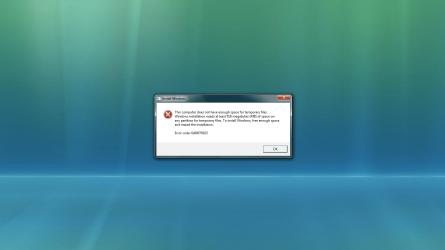
Heres my situation: I have Windows 7 already installed on my computer, but i want Windows Vista installed as a second OS. I thought it would be simple, make a primary partition and install it. But it wasnt even close to being that easy. I have a preset partition called "system" that was set by HP. This is set as the active partition. When I try to install windows vista i get an error:
this computer does not have enough space for temporary files.
Windows installation needs atleast 481 megabytes (MB) of space on
any partition for temporary files. To install Windows, free enough space
and restart the installation.

Error Code: 0x80070103

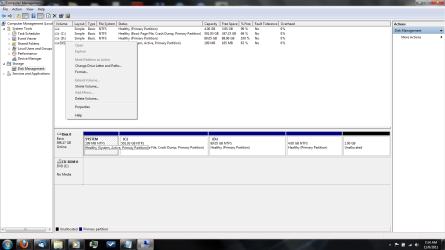
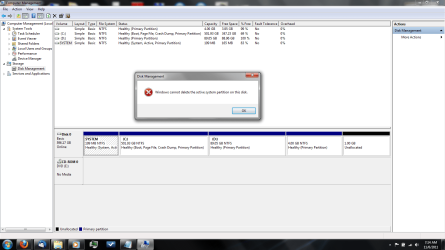
I found out that when i was trying to install vista that it was looking at the active partition to place temporary files. The system partition only has 199 MB. I tried to extend the system partition, but the option is browned out. I tried to extend it from the command line next using diskpart, but still i was not able to extend it. So i just made a new partition with enough space to install vista and set that as the active partition. When i did that, i could no longer boot windows 7. Its an either or thing, it just wont let me have both. I cannot delete the active system partition because it contains boot files for windows 7, which is why when i changed the active partition i was not able to boot windows 7. I do not want to rebuild my machine, i just want to force the system partition to extend to 5 GB. What can i do?
I also tried to backup the system partition so i could transfer the files to a larger partition, but i cant do that either. And whatever files are on this partition, i cannot view them from explorer, even if i change the file settings to view hidden files and folders.
 

My Computer My Computer

At a glance

Windows 7 Ultimate x644 GB
Computer Manufacturer/Model Number
HP Pavilion dv7
OS
Windows 7 Ultimate x64
Memory
4 GB

My Computer My Computer

At a glance

Windows 7 Ultimate x64Intel Core i7-2600K16 GB G Skill F3-10666 CL9D-4GBRLATI Radeon HD 6870
Computer Manufacturer/Model Number
Something I threw together
OS
Windows 7 Ultimate x64
CPU
Intel Core i7-2600K
Motherboard
Asus P8P67
Memory
16 GB G Skill F3-10666 CL9D-4GBRL
Graphics Card(s)
ATI Radeon HD 6870
Sound Card
ATI Radeon HDMI / Realtek ALC892
Monitor(s) Displays
2 x 22" standard monitors / LG32LC56v TV to watch films
Screen Resolution
1920 x1080
Hard Drives
2 x OCZ Vertex2 111.79GB
3 x Samsung103SJ
1 x Samsung103UJ
1 x WD3200BEVT
1 x Hitachi5K320-160
PSU
Thermaltake Toughpower Cable Management 750W
Case
Antec 300
Cooling
Noctua NH-U12P SE2 and 5 120mm Case fans
Keyboard
Microsoft Comfort Curve Keyboard 2000
Mouse
Hama M3110 / Logitech M305
Internet Speed
16000
Other Info
I have also used Fedora, Suse, Ubuntu Linux
And all other Windows from 95 to date except ME
You were almost there - when you created a new partition to install Vista into, that was all you needed.

Unfortunately, you then made it active which was your mistake. :) It doesn't need to be - Vista can live in a regular primary partition or even a logical one as long as the system partition (the one containing the boot files for both Windows 7 and, eventually, Vista) is the active one.
 

My Computer My Computer

At a glance

Windows 7 Professional SP1 32-bitIntel Core 2 Duo E6600 2.4GHz4GB DDR2-667 (4x1GB in dual-channel config)nVidia GeForce 9800 GT
Computer type
PC/Desktop
Computer Manufacturer/Model Number
Custom-built
OS
Windows 7 Professional SP1 32-bit
CPU
Intel Core 2 Duo E6600 2.4GHz
Motherboard
Asus PL5D2
Memory
4GB DDR2-667 (4x1GB in dual-channel config)
Graphics Card(s)
nVidia GeForce 9800 GT
Sound Card
Creative X-Fi XtremeMusic
Monitor(s) Displays
Acer P236H
Screen Resolution
1920x1200 (DVI)
Hard Drives
OCZ SSD Vertex Plus 60GB SATA (Firmware 3.55), 64MB cache
Hitachi HD321KJ SATA, 320GB, 7200rpm, 16MB cache
PSU
Antec TruePower 2.0
Case
Cooler Master Centurion
Cooling
Too many fans
Keyboard
Standard
Mouse
Microsoft wireless optical mouse
Internet Speed
AT&T U-verse (18mbit/sec)
Antivirus
Microsoft Security Essentials
Browser
Firefox
Other Info
Other devices:
Compaq CQ-60 laptop
Google Nexus 7 (2012) tablet
Nvidia SHIELD tablet (US/LTE)
Hardkernel ODROID-XU single-board computer (Samsung Exynos 5420)
But the system partition doesnt have enough space for vistas temporary files. And to have equilibrium between the two operating systsms, the system partition must be the active partition when vista is installed. I tested my theory by installing a second windows 7. And windows 7 installed, but vista gives me the space error. So the system partition must be extended, but my computer will not allow me to do it from disk management or the command line. I need a way to force it.
 

My Computer My Computer

At a glance

Windows 7 Ultimate x644 GB
Computer Manufacturer/Model Number
HP Pavilion dv7
OS
Windows 7 Ultimate x64
Memory
4 GB
computer management.png

cm2.png

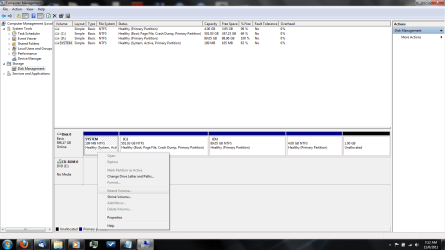
cm3.png
 

My Computer My Computer

At a glance

Windows 7 Ultimate x644 GB
Computer Manufacturer/Model Number
HP Pavilion dv7
OS
Windows 7 Ultimate x64
Memory
4 GB
Are you sure you are choosing partition 3 to install to?
 

My Computer My Computer

At a glance

ME/XP/Vista/Win7
OS
ME/XP/Vista/Win7
Vista wont let me get as far as to select a partition to install on, as soon as i start the set up i get the error about not having enough space.
vista error.png
I get this as soon as i click install.
 

My Computer My Computer

At a glance

Windows 7 Ultimate x644 GB
Computer Manufacturer/Model Number
HP Pavilion dv7
OS
Windows 7 Ultimate x64
Memory
4 GB
Now if i change active partitions i can select a partition to install on, but then inside vista, the partition i mark active to install becomes the permanent active partition, and then i cannot boot windows 7. If i change the active partition back, then i cannot boot windows vista.
 

My Computer My Computer

At a glance

Windows 7 Ultimate x644 GB
Computer Manufacturer/Model Number
HP Pavilion dv7
OS
Windows 7 Ultimate x64
Memory
4 GB
Did I understand your configuration right: you have win7 and vista installed now. Is that correct?
If so: Don't make vista partition active. Reboot and of course you only see win7 and bootmenu isn't even displayed because there's only one operating system available (win7). Only step to perform is "add vista to bootmenu"

Try "startup repair" from "recovery environment" does it find vista? If it doesn't fix your problem, startup in vista and post output of:
BCDEDIT /enum all
do this in an elevated command prompt
 

My Computer My Computer

At a glance

Microsoft Windows 7 Home Premium 64-bits 7601...Intel(R) Core(TM) i3 CPU M 370 @ 2.40GHz4,00 GBATI Mobility Radeon HD 5400 Series
Computer type
Laptop
Computer Manufacturer/Model Number
ACER ASPIRE 5742G
OS
Microsoft Windows 7 Home Premium 64-bits 7601 Multiprocessor Free Service Pack 1
CPU
Intel(R) Core(TM) i3 CPU M 370 @ 2.40GHz
Motherboard
Acer Aspire 5742G
Memory
4,00 GB
Graphics Card(s)
ATI Mobility Radeon HD 5400 Series
Sound Card
(1) AMD High Definition Audio Device (2) Realtek High Defi
Screen Resolution
1366 x 768 x 32 bits (4294967296 colors) @ 60 Hz
Hard Drives
WDC WD5000BEVT-22ZAT0
To Add Windows Vista Boot Option to Windows 7 Boot Menu
Open Command Prompt as an administrator or an elevated prompt and type
C:>bcdedit
This will list the current boot manager configuration. Note down the identifier key which is in the format
{e96c8447-8171-11de-9007-b10454ebd432} or something like it.
C:>bcdedit /copy {current} /d “Windows Vista”
This will copy the current bootloader into a new entry for Windows Vista. However selecting it will still boot into Windows 7.
C:>bcdedit /set {e96c8447-8171-11de-9007-b10454ebd432} device partition=D:
C:>bcdedit /set {e96c8447-8171-11de-9007-b10454ebd432} osdevice partition=D:
bcdedit /displayorder {e96c8447-8171-11de-9007-b10454ebd432} /addlast
These two commands will set the new boot entry to point to your Vista partition and load from it.
You can reboot and see the changes.
 

My Computer My Computer

At a glance

Microsoft Windows 7 Home Premium 64-bits 7601...Intel(R) Core(TM) i3 CPU M 370 @ 2.40GHz4,00 GBATI Mobility Radeon HD 5400 Series
Computer type
Laptop
Computer Manufacturer/Model Number
ACER ASPIRE 5742G
OS
Microsoft Windows 7 Home Premium 64-bits 7601 Multiprocessor Free Service Pack 1
CPU
Intel(R) Core(TM) i3 CPU M 370 @ 2.40GHz
Motherboard
Acer Aspire 5742G
Memory
4,00 GB
Graphics Card(s)
ATI Mobility Radeon HD 5400 Series
Sound Card
(1) AMD High Definition Audio Device (2) Realtek High Defi
Screen Resolution
1366 x 768 x 32 bits (4294967296 colors) @ 60 Hz
Hard Drives
WDC WD5000BEVT-22ZAT0
No, i do not currently have vista installed. When i did have it installed however, i did receive a bootmenu. Depending on the active partition, decided which OS i could boot. I has two listings in the bootmenu, but only one was an OS. The other item on the list was something i havent seen before, and when i tried to boot the item, i got a page that told me i needed to repair the OS. I tried to preform a repair of both windows 7 and vista, swapping the active partitions to boot the other OS, but both repairs failed.
 

My Computer My Computer

At a glance

Windows 7 Ultimate x644 GB
Computer Manufacturer/Model Number
HP Pavilion dv7
OS
Windows 7 Ultimate x64
Memory
4 GB
If i were to make the active partition the partition i want to install the OS to, would that fix the problem perhaps?
 

My Computer My Computer

At a glance

Windows 7 Ultimate x644 GB
Computer Manufacturer/Model Number
HP Pavilion dv7
OS
Windows 7 Ultimate x64
Memory
4 GB
Vista wont let me get as far as to select a partition to install on, as soon as i start the set up i get the error about not having enough space.
View attachment 182517
I get this as soon as i click install.

Are you using a Retail Vista DVD?
or
a OEM manufacturer Restore Disk? (HP/Compaq, Acer, Toshiba)
 
Last edited:

My Computer My Computer

At a glance

ME/XP/Vista/Win7
OS
ME/XP/Vista/Win7
This is all over the place. You have a few basic problems:

1. You have already 4 primary partitions and cannot create any additional partitions because you will end up with dynamics. First order of the day is to convert one of your current primaries into a logical partition. You do that with the bootable CD of Partition Wizard (last entry on the webpage). In PW, the controls are under the Partition tab > Modify. The best candidate for that is your current C: partition.

Alternatively you could delete that 4GB partition (does not seem to contain a lot of data) and combine it with the 1GB of free space. Then shrink some off the D: partition and define your Vista partition there.

2. Else shrink enough space for Vista from C: to obtain unallocated space. Into that you create a new, simple, logical partition (this is now possible because you have only 3 primaries).

3. Do not touch the small system partition. That contains your bootmgr and you should not mess it up.
 

My Computer My Computer

At a glance

Vista, Windows7, Mint Mate, Zorin, Windows 8from 1.6GHz Duo to i7
Computer Manufacturer/Model Number
HP, Dell, Gateway, Toshiba - 4 laptops and 2 desktops
OS
Vista, Windows7, Mint Mate, Zorin, Windows 8
CPU
from 1.6GHz Duo to i7
Monitor(s) Displays
2x HP w2207
Hard Drives
5x HDD, 7x SSD, 12x Externals
Keyboard
with trackball - no mices
Mouse
Trackball mice
Internet Speed
DSL 6000
If i were to make the active partition the partition i want to install the OS to, would that fix the problem perhaps?
Yes that fixes the diskspace problem!

When vista is installes try to boot in vista. works?
Set the other partition active so you can boot in windows7. Now add vista to the bootmenu using BCDEDIT as mentioned earlier
 

My Computer My Computer

At a glance

Microsoft Windows 7 Home Premium 64-bits 7601...Intel(R) Core(TM) i3 CPU M 370 @ 2.40GHz4,00 GBATI Mobility Radeon HD 5400 Series
Computer type
Laptop
Computer Manufacturer/Model Number
ACER ASPIRE 5742G
OS
Microsoft Windows 7 Home Premium 64-bits 7601 Multiprocessor Free Service Pack 1
CPU
Intel(R) Core(TM) i3 CPU M 370 @ 2.40GHz
Motherboard
Acer Aspire 5742G
Memory
4,00 GB
Graphics Card(s)
ATI Mobility Radeon HD 5400 Series
Sound Card
(1) AMD High Definition Audio Device (2) Realtek High Defi
Screen Resolution
1366 x 768 x 32 bits (4294967296 colors) @ 60 Hz
Hard Drives
WDC WD5000BEVT-22ZAT0

My Computer My Computer

At a glance

Microsoft Windows 7 Home Premium 64-bits 7601...Intel(R) Core(TM) i3 CPU M 370 @ 2.40GHz4,00 GBATI Mobility Radeon HD 5400 Series
Computer type
Laptop
Computer Manufacturer/Model Number
ACER ASPIRE 5742G
OS
Microsoft Windows 7 Home Premium 64-bits 7601 Multiprocessor Free Service Pack 1
CPU
Intel(R) Core(TM) i3 CPU M 370 @ 2.40GHz
Motherboard
Acer Aspire 5742G
Memory
4,00 GB
Graphics Card(s)
ATI Mobility Radeon HD 5400 Series
Sound Card
(1) AMD High Definition Audio Device (2) Realtek High Defi
Screen Resolution
1366 x 768 x 32 bits (4294967296 colors) @ 60 Hz
Hard Drives
WDC WD5000BEVT-22ZAT0
Partitions and available space isnt a problem. Im trying to install to D: . And i changed the drive letter of system so that it would become visible, but vista still says there isnt enough space, since theres only 199 MB and it wants 481 MB. Im trying to do this: To Add Windows Vista Boot Option to Windows 7 Boot Menu Open Command Prompt as an administrator or an elevated prompt and type C:>bcdedit This will list the current boot manager configuration. Note down the identifier key which is in the format {e96c8447-8171-11de-9007-b10454ebd432} or something like it. C:>bcdedit /copy {current} /d “Windows Vista” This will copy the current bootloader into a new entry for Windows Vista. However selecting it will still boot into Windows 7. C:>bcdedit /set {e96c8447-8171-11de-9007-b10454ebd432} device partition=D: C:>bcdedit /set {e96c8447-8171-11de-9007-b10454ebd432} osdevice partition=D: bcdedit /displayorder {e96c8447-8171-11de-9007-b10454ebd432} /addlast These two commands will set the new boot entry to point to your Vista partition and load from it. You can reboot and see the changes. But its not working. No changes in my ability to boot. It still depends on the active system partition.
 

My Computer My Computer

At a glance

Windows 7 Ultimate x644 GB
Computer Manufacturer/Model Number
HP Pavilion dv7
OS
Windows 7 Ultimate x64
Memory
4 GB
Very strange!! But do you realy need the small 199MB partition? Do you ever want to use bitlocker? If not:

1-save you bcd store. BCDEDIT /save c:\bcdsave. Post c:\bcdsave to this thread as attachment. Or post output of bcdedit /enum all
2-Set your C-drive as active instead of small partition. Can you reboot and see windows7? If not do startup repair (maybe 3 times)
3-check if your system is starting fine. Does "recovery environment" from disk work as well? press F8 when starting windows. All fine, then delete the "system reserved" partition
http://www.sevenforums.com/tutorials/71363-system-reserved-partition-delete.html (but you can do it in windows now as well)

later more
 

My Computer My Computer

At a glance

Microsoft Windows 7 Home Premium 64-bits 7601...Intel(R) Core(TM) i3 CPU M 370 @ 2.40GHz4,00 GBATI Mobility Radeon HD 5400 Series
Computer type
Laptop
Computer Manufacturer/Model Number
ACER ASPIRE 5742G
OS
Microsoft Windows 7 Home Premium 64-bits 7601 Multiprocessor Free Service Pack 1
CPU
Intel(R) Core(TM) i3 CPU M 370 @ 2.40GHz
Motherboard
Acer Aspire 5742G
Memory
4,00 GB
Graphics Card(s)
ATI Mobility Radeon HD 5400 Series
Sound Card
(1) AMD High Definition Audio Device (2) Realtek High Defi
Screen Resolution
1366 x 768 x 32 bits (4294967296 colors) @ 60 Hz
Hard Drives
WDC WD5000BEVT-22ZAT0

My Computer My Computer

At a glance

ME/XP/Vista/Win7
OS
ME/XP/Vista/Win7
Back
Top