
How do I move the System Reserved Partition (drive E:) to a new drive?

ednowak

New member
Local time
7:53 PM
Messages
6
My attempted upgrade from Windows 7 to Windows 10 stopped with the message that my System Reserved Partition was too small. Sure enough, my research indicated that Windows 10 requires a larger petition. I used MiniTool to extend the partition and discovered that my System Reserved Partition, which Windows has assigned drive letter E:, was on a different drive than I thought. Attached is a snip capture of my disk management screen.

Disk 2 has the OEM Windows installation, which is now in drive G:. I added a 500GB SSD as Disk 0 and cloned the original disk. I added Disk 1 and Disk 3 for additional storage. In the transition, somehow the Drive E: System Reserved Partition ended up on Disk 1. I used MiniTool to extend the Data partition on Disk 0 (from 100 MB to 408 MB) as well as the System Reserved Partition Drive E on Disk 1 (from 100 MB to 533 MB). There seem to be a few glitches from the resizing that I need to clean up. The worst seems to be related to an error messsage that C:\Windows\Prefetch is corrupt and unreadable. This is related to Adobe Creative Cloud and I haven't tried to fix it yet. I think that there are pointers to the G: drive rather than the C: drive.

After seeing that my disk management is a bit messed up, I decided to post here rather than proceed with the Windows 10 upgrade. I want to have the System Reserved Partition Drive E on Disk 0. (Do I need a Drive E:?) I think the Gateway C: drive on Disk 0 needs to made Active. And I think I need to tell Windows where to find boot data. I would appreciate a set of instructions to get this done correctly.
 

Attachments
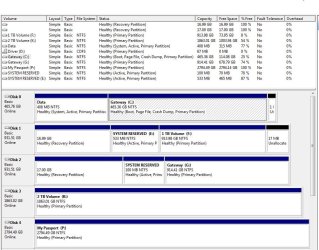
  • Disk Mgt Capture 20160110.JPG
    Disk Mgt Capture 20160110.JPG
    125.8 KB · Views: 1

My Computer My Computer

At a glance

Windows 7 Home Premium 64-bitAMD Phenom II X4 810 Processor 2.60 GHz6 GB
Computer type
PC/Desktop
Computer Manufacturer/Model Number
Gateway
OS
Windows 7 Home Premium 64-bit
CPU
AMD Phenom II X4 810 Processor 2.60 GHz
Motherboard
Microsoft
Memory
6 GB
Hard Drives
2 each: 1 TB drive
1 each: 2 TB deive
Antivirus
United States
Browser
Chrome
That`s quite a mess :eek:

Which Disk are you trying to update to 10 ?

You have 3 Active partitions, you should only have 1

Please tell us what you want to have when you`re done.
 

My Computer My Computer

At a glance

Windows 10 Pro x64Intel Core i7 6700KGSkill TridentZ RGB 16GB 3600 16-16-16-36EVGA GTX 980 Ti SC x2
Computer type
PC/Desktop
Computer Manufacturer/Model Number
Skylake Special #666
OS
Windows 10 Pro x64
CPU
Intel Core i7 6700K
Motherboard
Asus Sabertooth Z170 Mark 1
Memory
GSkill TridentZ RGB 16GB 3600 16-16-16-36
Graphics Card(s)
EVGA GTX 980 Ti SC x2
Sound Card
Realtek High Definition
Monitor(s) Displays
AOC G2460PG
Screen Resolution
1920 x 1080 144Hz
Hard Drives
Samsung 860 Pro 256GB, Seagate Barracuda 4TB x2
PSU
EVGA 1000 P2, EVGA White Custom Braided Cables
Case
Corsair Vengeance C70 Gunmetal Black
Cooling
Corsair H100i v2, Corsair ML120 x2, Thermal Grizzly Kryonaut
Keyboard
Logitech G910 Orion Spectrum
Mouse
Logitech G700s
Internet Speed
Verizon Fios Quantum Gateway 75/75
Antivirus
Windows Defender, Malwarebytes Free 3.8.3
Browser
Chrome
Other Info
Corsair SP120 x4, LG Blu-ray Drive, Durabrand HT-395 100 Watt Dolby Digital Amp, Corsair H2100 Wireless 7.1 Headset
Thanks for the reply, AddRAM. The Windows 7 installation I use is on Disk 0. This is the disk that I want to update to Windows 10. The other disks will be for storage only. For now, I don't want to change the data on Disk 2, which is where the original OEM installation of Windows 7 is located.
 

My Computer My Computer

At a glance

Windows 7 Home Premium 64-bitAMD Phenom II X4 810 Processor 2.60 GHz6 GB
Computer type
PC/Desktop
Computer Manufacturer/Model Number
Gateway
OS
Windows 7 Home Premium 64-bit
CPU
AMD Phenom II X4 810 Processor 2.60 GHz
Motherboard
Microsoft
Memory
6 GB
Hard Drives
2 each: 1 TB drive
1 each: 2 TB deive
Antivirus
United States
Browser
Chrome
Then I would unplug all the other drives, mark C Active, and run startup repair until the system files are on C. (Disk 0)

Right now that small 400 MB partition is Active and also contains the system files, whay is that partition marked Data ?

I have done quite a few upgrades to 10 from a single partition with 7, no need for a System Reserved partition on any of them.

Any time you do an install you should always unplug any other drives unless you want a dual boot.
 

My Computer My Computer

At a glance

Windows 10 Pro x64Intel Core i7 6700KGSkill TridentZ RGB 16GB 3600 16-16-16-36EVGA GTX 980 Ti SC x2
Computer type
PC/Desktop
Computer Manufacturer/Model Number
Skylake Special #666
OS
Windows 10 Pro x64
CPU
Intel Core i7 6700K
Motherboard
Asus Sabertooth Z170 Mark 1
Memory
GSkill TridentZ RGB 16GB 3600 16-16-16-36
Graphics Card(s)
EVGA GTX 980 Ti SC x2
Sound Card
Realtek High Definition
Monitor(s) Displays
AOC G2460PG
Screen Resolution
1920 x 1080 144Hz
Hard Drives
Samsung 860 Pro 256GB, Seagate Barracuda 4TB x2
PSU
EVGA 1000 P2, EVGA White Custom Braided Cables
Case
Corsair Vengeance C70 Gunmetal Black
Cooling
Corsair H100i v2, Corsair ML120 x2, Thermal Grizzly Kryonaut
Keyboard
Logitech G910 Orion Spectrum
Mouse
Logitech G700s
Internet Speed
Verizon Fios Quantum Gateway 75/75
Antivirus
Windows Defender, Malwarebytes Free 3.8.3
Browser
Chrome
Other Info
Corsair SP120 x4, LG Blu-ray Drive, Durabrand HT-395 100 Watt Dolby Digital Amp, Corsair H2100 Wireless 7.1 Headset
The 400 MB "Data" partition (originally 100 MB) on Disk 0 (the SSD) was created when I used Samsung's utility to move my existing installation from the original drive (now Disk 2 - Gateway G: ) to the SSD. I don't know how or why it was named "Data".

From the research I've done, this issue with a too-small System Reserved Partition on Windows 7 machines that are upgrading to Windows 10 is relatively common.

Your advice seems at odds with this advice from Bill2 on an older thread:
http://www.sevenforums.com/installa...rved-partition-wrong-drive-how-do-i-move.html

From what I can tell, the system files in the "Data" partition on Disk 0 are essentially the same as those in the System Reserved Drive E: petition on Disk 1. And they are also essentially the same as those in the 100 MB System Reserved petition on Disk 2. How can I tell which of these partitions Windows looks at when booting? Is this established by BIOS settings? Does it make any difference whether the System Reserved Partition is given a drive letter?
 

My Computer My Computer

At a glance

Windows 7 Home Premium 64-bitAMD Phenom II X4 810 Processor 2.60 GHz6 GB
Computer type
PC/Desktop
Computer Manufacturer/Model Number
Gateway
OS
Windows 7 Home Premium 64-bit
CPU
AMD Phenom II X4 810 Processor 2.60 GHz
Motherboard
Microsoft
Memory
6 GB
Hard Drives
2 each: 1 TB drive
1 each: 2 TB deive
Antivirus
United States
Browser
Chrome
From the looks of it, disk 0,1, and 2 should all boot on thier own.

I always create an install partition, so I never end up with a SR partition.
 

My Computer My Computer

At a glance

Windows 10 Pro x64Intel Core i7 6700KGSkill TridentZ RGB 16GB 3600 16-16-16-36EVGA GTX 980 Ti SC x2
Computer type
PC/Desktop
Computer Manufacturer/Model Number
Skylake Special #666
OS
Windows 10 Pro x64
CPU
Intel Core i7 6700K
Motherboard
Asus Sabertooth Z170 Mark 1
Memory
GSkill TridentZ RGB 16GB 3600 16-16-16-36
Graphics Card(s)
EVGA GTX 980 Ti SC x2
Sound Card
Realtek High Definition
Monitor(s) Displays
AOC G2460PG
Screen Resolution
1920 x 1080 144Hz
Hard Drives
Samsung 860 Pro 256GB, Seagate Barracuda 4TB x2
PSU
EVGA 1000 P2, EVGA White Custom Braided Cables
Case
Corsair Vengeance C70 Gunmetal Black
Cooling
Corsair H100i v2, Corsair ML120 x2, Thermal Grizzly Kryonaut
Keyboard
Logitech G910 Orion Spectrum
Mouse
Logitech G700s
Internet Speed
Verizon Fios Quantum Gateway 75/75
Antivirus
Windows Defender, Malwarebytes Free 3.8.3
Browser
Chrome
Other Info
Corsair SP120 x4, LG Blu-ray Drive, Durabrand HT-395 100 Watt Dolby Digital Amp, Corsair H2100 Wireless 7.1 Headset
Disk 0 is where I boot from now. Disk 2 can boot because that disk has the original Windows 7 installation. Disk 1 cannot boot, I don't think, because Windows is not installed on it, even though it has system boot files in its System Reserved Partition.

How can I tell which of these partitions Windows looks at when booting? I assume that only Disk 0 is read when booting. Is this established by BIOS settings? Does it make any difference whether the System Reserved Partition is given a drive letter?

Did you look at the older thread I referenced?
 

My Computer My Computer

At a glance

Windows 7 Home Premium 64-bitAMD Phenom II X4 810 Processor 2.60 GHz6 GB
Computer type
PC/Desktop
Computer Manufacturer/Model Number
Gateway
OS
Windows 7 Home Premium 64-bit
CPU
AMD Phenom II X4 810 Processor 2.60 GHz
Motherboard
Microsoft
Memory
6 GB
Hard Drives
2 each: 1 TB drive
1 each: 2 TB deive
Antivirus
United States
Browser
Chrome
windows always looks for the 1st active partition, and as long all the needed files are there, it will boot.

As long as disk 0 will boot on it`s own, I would think it will update to 10.

If not you could always clone disk 2 to disk 0 again, minus the recovery partition, then just extend the System Reserved partition to 400 MB, but this time unplug the power cable from the other drives 1st.
 

My Computer My Computer

At a glance

Windows 10 Pro x64Intel Core i7 6700KGSkill TridentZ RGB 16GB 3600 16-16-16-36EVGA GTX 980 Ti SC x2
Computer type
PC/Desktop
Computer Manufacturer/Model Number
Skylake Special #666
OS
Windows 10 Pro x64
CPU
Intel Core i7 6700K
Motherboard
Asus Sabertooth Z170 Mark 1
Memory
GSkill TridentZ RGB 16GB 3600 16-16-16-36
Graphics Card(s)
EVGA GTX 980 Ti SC x2
Sound Card
Realtek High Definition
Monitor(s) Displays
AOC G2460PG
Screen Resolution
1920 x 1080 144Hz
Hard Drives
Samsung 860 Pro 256GB, Seagate Barracuda 4TB x2
PSU
EVGA 1000 P2, EVGA White Custom Braided Cables
Case
Corsair Vengeance C70 Gunmetal Black
Cooling
Corsair H100i v2, Corsair ML120 x2, Thermal Grizzly Kryonaut
Keyboard
Logitech G910 Orion Spectrum
Mouse
Logitech G700s
Internet Speed
Verizon Fios Quantum Gateway 75/75
Antivirus
Windows Defender, Malwarebytes Free 3.8.3
Browser
Chrome
Other Info
Corsair SP120 x4, LG Blu-ray Drive, Durabrand HT-395 100 Watt Dolby Digital Amp, Corsair H2100 Wireless 7.1 Headset
Thanks again for your response. Should a drive letter (like E: ) be assigned to the System Reserved Partition, or doesn't it really matter?
 

My Computer My Computer

At a glance

Windows 7 Home Premium 64-bitAMD Phenom II X4 810 Processor 2.60 GHz6 GB
Computer type
PC/Desktop
Computer Manufacturer/Model Number
Gateway
OS
Windows 7 Home Premium 64-bit
CPU
AMD Phenom II X4 810 Processor 2.60 GHz
Motherboard
Microsoft
Memory
6 GB
Hard Drives
2 each: 1 TB drive
1 each: 2 TB deive
Antivirus
United States
Browser
Chrome
If I may add a little. A simple one, two, three.

*1 Unhook all drives except the drive you want to go from Windows 7 to W-10.

*2 Check to make sure it boots. If it boots, happy W-10 installation.

*3 When done just follow AddRAM's instructions on how to clean up the rest of the mess you have in Disk Management.

I'm back to watching.
 

My Computer My Computer

At a glance

Windows 10 Pro. 64/ version 1709 Windows 7 Pr...Intel i7-6800K @ 4.3Corsair Platinum 16 gig @2400EVGA GTX 1070 OC
Computer type
PC/Desktop
Computer Manufacturer/Model Number
Home made Desktop
OS
Windows 10 Pro. 64/ version 1709 Windows 7 Pro/64
CPU
Intel i7-6800K @ 4.3
Motherboard
ASUS X-99 Deluxe II
Memory
Corsair Platinum 16 gig @2400
Graphics Card(s)
EVGA GTX 1070 OC
Monitor(s) Displays
Asus 27" LED LCD/VE278Q
Screen Resolution
1920-1080 or 1280-720 HDMI
Hard Drives
INTEL SSD 730-240 Gb Sata 3.0/
PSU
EVGA Platium 1200W
Case
Phanteks Luxe Tempered Glass 8 fans/ one radiator
Cooling
XSPC/ Water Cooled CPU
Keyboard
Das 4 Professional
Mouse
Logitech M705/MX Anywhere 2-S
Internet Speed
100 mbits
Antivirus
Microsoft Security Essentials/ Malwarebytes Premium 3.0/ SAS
Browser
I.E. 11 default/Firefox/ ISP Time Warner Cable/Spectrum
Other Info
LG BluRay Burner/
Sound system-KLipsch-THX/
Icy Dock ssd Hot Swap bays.
Thanks again for your response. Should a drive letter (like E: ) be assigned to the System Reserved Partition, or doesn't it really matter?

No, a system reserve partition should never be lettered, that way nothing can be accidentally written to it.
 

My Computer My Computer

At a glance

Windows 10 Pro x64Intel Core i7 6700KGSkill TridentZ RGB 16GB 3600 16-16-16-36EVGA GTX 980 Ti SC x2
Computer type
PC/Desktop
Computer Manufacturer/Model Number
Skylake Special #666
OS
Windows 10 Pro x64
CPU
Intel Core i7 6700K
Motherboard
Asus Sabertooth Z170 Mark 1
Memory
GSkill TridentZ RGB 16GB 3600 16-16-16-36
Graphics Card(s)
EVGA GTX 980 Ti SC x2
Sound Card
Realtek High Definition
Monitor(s) Displays
AOC G2460PG
Screen Resolution
1920 x 1080 144Hz
Hard Drives
Samsung 860 Pro 256GB, Seagate Barracuda 4TB x2
PSU
EVGA 1000 P2, EVGA White Custom Braided Cables
Case
Corsair Vengeance C70 Gunmetal Black
Cooling
Corsair H100i v2, Corsair ML120 x2, Thermal Grizzly Kryonaut
Keyboard
Logitech G910 Orion Spectrum
Mouse
Logitech G700s
Internet Speed
Verizon Fios Quantum Gateway 75/75
Antivirus
Windows Defender, Malwarebytes Free 3.8.3
Browser
Chrome
Other Info
Corsair SP120 x4, LG Blu-ray Drive, Durabrand HT-395 100 Watt Dolby Digital Amp, Corsair H2100 Wireless 7.1 Headset
Thank you, AddRAM and Layback Bear, for helping me better understand how Windows partitions work. I'm confident I can get things squared away the way I want. I'll report back after I finish the Windows 10 Upgrade within the next week or so. I'll leave the thread open until then.
 

My Computer My Computer

At a glance

Windows 7 Home Premium 64-bitAMD Phenom II X4 810 Processor 2.60 GHz6 GB
Computer type
PC/Desktop
Computer Manufacturer/Model Number
Gateway
OS
Windows 7 Home Premium 64-bit
CPU
AMD Phenom II X4 810 Processor 2.60 GHz
Motherboard
Microsoft
Memory
6 GB
Hard Drives
2 each: 1 TB drive
1 each: 2 TB deive
Antivirus
United States
Browser
Chrome
Back
Top