FredeGail
It's full of stars
Hello guys.
I'm starting a new topic because the other one is not titled right and such.
So I upgraded my whole PC, except HDD.
I downloaded Steam, picked the games I want to install, and something didn't turn out quite right. Both games (Bastion, Terraria) lagged with like a second between, the same lag. Very distracting.
So I thought, what if I remove one of my monitors as I run dual-screening. It fixed it! But not for long. Bastion suddenly began to lag the same way. I was running full screen at that time. If I run Bastion in lower resolution it won't lag.
The same goes with Terraria, if it's too big sized it'll lag. The bonus about Terraria is that it has the Frame Skip feature, where you can force the game to show all frames. That'll do the trick, for Terraria.
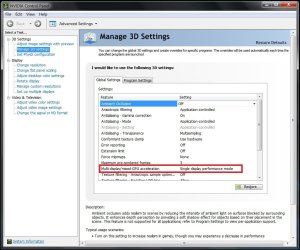
Also, now that I run one monitor, should it be Multi or Single-GPU in the Nvidia Control Panel?
It's kinda bugging me.
More you need to know:
When I installed my ASUS GTX 560 TI, I did not use the cables that it came with, I used the one in my PSU. The cables it came with, used Molex, and I didn't want to mess with my cabling at that time.
So I noticed the small differences with the PSU cables, and the cables that the Graphic Card came with:
Both have squares and those "triangles".
BUT, it one of the triangles it does not have a metal-thingy (lol).
I don't know if it means something.
I have all my Graphic Drivers up to date.
I'm also running the Realtek Audio HD Driver.
I'm starting a new topic because the other one is not titled right and such.
So I upgraded my whole PC, except HDD.
I downloaded Steam, picked the games I want to install, and something didn't turn out quite right. Both games (Bastion, Terraria) lagged with like a second between, the same lag. Very distracting.
So I thought, what if I remove one of my monitors as I run dual-screening. It fixed it! But not for long. Bastion suddenly began to lag the same way. I was running full screen at that time. If I run Bastion in lower resolution it won't lag.
The same goes with Terraria, if it's too big sized it'll lag. The bonus about Terraria is that it has the Frame Skip feature, where you can force the game to show all frames. That'll do the trick, for Terraria.
Also, now that I run one monitor, should it be Multi or Single-GPU in the Nvidia Control Panel?
It's kinda bugging me.
More you need to know:
When I installed my ASUS GTX 560 TI, I did not use the cables that it came with, I used the one in my PSU. The cables it came with, used Molex, and I didn't want to mess with my cabling at that time.
So I noticed the small differences with the PSU cables, and the cables that the Graphic Card came with:
Both have squares and those "triangles".
BUT, it one of the triangles it does not have a metal-thingy (lol).
I don't know if it means something.
I have all my Graphic Drivers up to date.
I'm also running the Realtek Audio HD Driver.
My Computer
- Computer Manufacturer/Model Number
- Brewed
- OS
- Microsoft Windows 7 Ultimate: x64 (SP1)
- CPU
- Intel® Core™ i5-2500K Processor
- Motherboard
- ASUS P8Z68-V PRO
- Memory
- Kingston DDR3 HyperX 1600MHz 8GB
- Graphics Card(s)
- ASUS GTX 560 TI DirectCU II 900MHz
- Sound Card
- Realtek® ALC892 8-Channel High Definition Audio CODEC
- Monitor(s) Displays
- ACER LCD P246HBD 1920x1080 (24") - Dell 1280x800
- Screen Resolution
- ACER LCD P246HBD ~ [1920X1080] - DELL ~ [1280x800]
- Hard Drives
- 500 GB WD Caviar SE116 7200rpm SATA2
- PSU
- Corsair 750W Power Supply
- Case
- Coolermaster CM Scout
- Cooling
- Zalman FS-C77 Fatal1ty CPU Cooler
- Keyboard
- Logitech G15
- Mouse
- Coolermaster Sentinel Advanced
- Internet Speed
- [↓ 10 MB/s DL] [↑ 1 MB/s UL]
- Other Info
- - ROCCAT™ Kave – Solid 5.1 Surround Sound Gaming Headset
- Not overclocking