
Solved Drawbacks, lags

FredeGail

It's full of stars
Guru
Local time
4:17 PM
Messages
2,360
Location
Denmark
Hello guys.

I'm starting a new topic because the other one is not titled right and such.

So I upgraded my whole PC, except HDD.
I downloaded Steam, picked the games I want to install, and something didn't turn out quite right. Both games (Bastion, Terraria) lagged with like a second between, the same lag. Very distracting.
So I thought, what if I remove one of my monitors as I run dual-screening. It fixed it! But not for long. Bastion suddenly began to lag the same way. I was running full screen at that time. If I run Bastion in lower resolution it won't lag.
The same goes with Terraria, if it's too big sized it'll lag. The bonus about Terraria is that it has the Frame Skip feature, where you can force the game to show all frames. That'll do the trick, for Terraria.

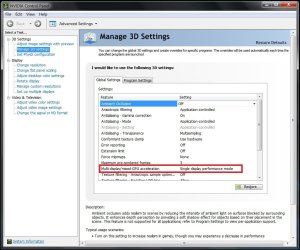
Also, now that I run one monitor, should it be Multi or Single-GPU in the Nvidia Control Panel?

It's kinda bugging me.

More you need to know:
When I installed my ASUS GTX 560 TI, I did not use the cables that it came with, I used the one in my PSU. The cables it came with, used Molex, and I didn't want to mess with my cabling at that time.
So I noticed the small differences with the PSU cables, and the cables that the Graphic Card came with:
Both have squares and those "triangles".
BUT, it one of the triangles it does not have a metal-thingy (lol).

I don't know if it means something.

I have all my Graphic Drivers up to date.

I'm also running the Realtek Audio HD Driver.
 

My Computer

Computer Manufacturer/Model Number
Brewed
OS
Microsoft Windows 7 Ultimate: x64 (SP1)
CPU
Intel® Core™ i5-2500K Processor
Motherboard
ASUS P8Z68-V PRO
Memory
Kingston DDR3 HyperX 1600MHz 8GB
Graphics Card(s)
ASUS GTX 560 TI DirectCU II 900MHz
Sound Card
Realtek® ALC892 8-Channel High Definition Audio CODEC
Monitor(s) Displays
ACER LCD P246HBD 1920x1080 (24") - Dell 1280x800
Screen Resolution
ACER LCD P246HBD ~ [1920X1080] - DELL ~ [1280x800]
Hard Drives
500 GB WD Caviar SE116 7200rpm SATA2
PSU
Corsair 750W Power Supply
Case
Coolermaster CM Scout
Cooling
Zalman FS-C77 Fatal1ty CPU Cooler
Keyboard
Logitech G15
Mouse
Coolermaster Sentinel Advanced
Internet Speed
[↓ 10 MB/s DL] [↑ 1 MB/s UL]
Other Info
- ROCCAT™ Kave – Solid 5.1 Surround Sound Gaming Headset
- Not overclocking
While I can't tell you why your issue is arising, I can ease your worry for the GPU power cables.

Not all of the dual 6 pin sockets are powered, hence the lack of connector inside them. Those extra slots tend to either be use if some cables then run off another plug in paralell and or if they have a second adaptor to make them 6+2 pin connectors. Normally found on corsair modular systems.

Sent from my BlackBerry 9900 using Tapatalk
 

My Computer

Computer type
PC/Desktop
Computer Manufacturer/Model Number
Built by badgers!!!
OS
Windows 7 Ultimate x64, & Mac OS X 10.9.2
CPU
Intel Core i5 2500k
Motherboard
Asus P8z68 LE
Memory
Corsair Vengence 8gb 1866mhz
Graphics Card(s)
Nvidia GTX 770 OC
Monitor(s) Displays
2x ASUS LED 22" IPS
Screen Resolution
3840x1080
Hard Drives
240GB Crucial M500 SSD
120gb Corsair Force 3 SSD
1TB Western Digital
PSU
Corsair HX650w Modular
Case
Corsair Air 540
Cooling
Corsair H60 Push/Pull
Keyboard
Corsair K70/ Logitech G27 wheel
Mouse
Saitek R.A.T 9
Internet Speed
Too slow!
Other Info
AMD fusion E350N Home server-Windows Home Server 2011 (also made by badgers!)
2011 Macbook 2.4ghz Core2Duo, 4gb ddr3, 120gb Ocz Vertex SSD
While I can't tell you why your issue is arising, I can ease your worry for the GPU power cables.

Not all of the dual 6 pin sockets are powered, hence the lack of connector inside them. Those extra slots tend to either be use if some cables then run off another plug in paralell and or if they have a second adaptor to make them 6+2 pin connectors. Normally found on corsair modular systems.

Sent from my BlackBerry 9900 using Tapatalk

So should I change it to those it came with? :)
 

My Computer

Computer Manufacturer/Model Number
Brewed
OS
Microsoft Windows 7 Ultimate: x64 (SP1)
CPU
Intel® Core™ i5-2500K Processor
Motherboard
ASUS P8Z68-V PRO
Memory
Kingston DDR3 HyperX 1600MHz 8GB
Graphics Card(s)
ASUS GTX 560 TI DirectCU II 900MHz
Sound Card
Realtek® ALC892 8-Channel High Definition Audio CODEC
Monitor(s) Displays
ACER LCD P246HBD 1920x1080 (24") - Dell 1280x800
Screen Resolution
ACER LCD P246HBD ~ [1920X1080] - DELL ~ [1280x800]
Hard Drives
500 GB WD Caviar SE116 7200rpm SATA2
PSU
Corsair 750W Power Supply
Case
Coolermaster CM Scout
Cooling
Zalman FS-C77 Fatal1ty CPU Cooler
Keyboard
Logitech G15
Mouse
Coolermaster Sentinel Advanced
Internet Speed
[↓ 10 MB/s DL] [↑ 1 MB/s UL]
Other Info
- ROCCAT™ Kave – Solid 5.1 Surround Sound Gaming Headset
- Not overclocking
Nah, its fine, an under powered or wrongly powered GPU will BSOD your rig.

Was another person with a similar issue (it might be you lol tapatalk doesn't show avatars lol) but nothing has been solved other than me saying get an SSD lol.

Apart from driver updates and the usual steam file defrag my little noodle is out of suggestions.
Could try running the games in compatibility mode, you'd have to find the .exe file within steams maze of files first though

Sent from my BlackBerry 9900 using Tapatalk
 

My Computer

Computer type
PC/Desktop
Computer Manufacturer/Model Number
Built by badgers!!!
OS
Windows 7 Ultimate x64, & Mac OS X 10.9.2
CPU
Intel Core i5 2500k
Motherboard
Asus P8z68 LE
Memory
Corsair Vengence 8gb 1866mhz
Graphics Card(s)
Nvidia GTX 770 OC
Monitor(s) Displays
2x ASUS LED 22" IPS
Screen Resolution
3840x1080
Hard Drives
240GB Crucial M500 SSD
120gb Corsair Force 3 SSD
1TB Western Digital
PSU
Corsair HX650w Modular
Case
Corsair Air 540
Cooling
Corsair H60 Push/Pull
Keyboard
Corsair K70/ Logitech G27 wheel
Mouse
Saitek R.A.T 9
Internet Speed
Too slow!
Other Info
AMD fusion E350N Home server-Windows Home Server 2011 (also made by badgers!)
2011 Macbook 2.4ghz Core2Duo, 4gb ddr3, 120gb Ocz Vertex SSD
Nah, its fine, an under powered or wrongly powered GPU will BSOD your rig.

Was another person with a similar issue (it might be you lol tapatalk doesn't show avatars lol) but nothing has been solved other than me saying get an SSD lol.

Apart from driver updates and the usual steam file defrag my little noodle is out of suggestions.
Could try running the games in compatibility mode, you'd have to find the .exe file within steams maze of files first though

Sent from my BlackBerry 9900 using Tapatalk

Talking about the Nvidia Control Panel, should I put the MultiGPU option on single-or multi display?

I believe this problem I have is just a stupid wrong seated-option, lol.

This photo is taken from the web, I do not have any of these settings simaliar to mine, well, probably some but never mind it, all you need to focus on the the red square.

Multi or single when running one monitor? I guess it'd be single but, who knows.

Nvidia Control Panel-Ambient Occlusion.jpg
 

My Computer

Computer Manufacturer/Model Number
Brewed
OS
Microsoft Windows 7 Ultimate: x64 (SP1)
CPU
Intel® Core™ i5-2500K Processor
Motherboard
ASUS P8Z68-V PRO
Memory
Kingston DDR3 HyperX 1600MHz 8GB
Graphics Card(s)
ASUS GTX 560 TI DirectCU II 900MHz
Sound Card
Realtek® ALC892 8-Channel High Definition Audio CODEC
Monitor(s) Displays
ACER LCD P246HBD 1920x1080 (24") - Dell 1280x800
Screen Resolution
ACER LCD P246HBD ~ [1920X1080] - DELL ~ [1280x800]
Hard Drives
500 GB WD Caviar SE116 7200rpm SATA2
PSU
Corsair 750W Power Supply
Case
Coolermaster CM Scout
Cooling
Zalman FS-C77 Fatal1ty CPU Cooler
Keyboard
Logitech G15
Mouse
Coolermaster Sentinel Advanced
Internet Speed
[↓ 10 MB/s DL] [↑ 1 MB/s UL]
Other Info
- ROCCAT™ Kave – Solid 5.1 Surround Sound Gaming Headset
- Not overclocking
If you only have a single GPU then choose single gpu.

Most modern cards can run up to 5 displays at once. Well I know ATI cards can.

Run fraps and see what frame rates your getting. If its below 30 then it could be the GPU can't handle gaming and dual display

Sent from my BlackBerry 9900 using Tapatalk
 

My Computer

Computer type
PC/Desktop
Computer Manufacturer/Model Number
Built by badgers!!!
OS
Windows 7 Ultimate x64, & Mac OS X 10.9.2
CPU
Intel Core i5 2500k
Motherboard
Asus P8z68 LE
Memory
Corsair Vengence 8gb 1866mhz
Graphics Card(s)
Nvidia GTX 770 OC
Monitor(s) Displays
2x ASUS LED 22" IPS
Screen Resolution
3840x1080
Hard Drives
240GB Crucial M500 SSD
120gb Corsair Force 3 SSD
1TB Western Digital
PSU
Corsair HX650w Modular
Case
Corsair Air 540
Cooling
Corsair H60 Push/Pull
Keyboard
Corsair K70/ Logitech G27 wheel
Mouse
Saitek R.A.T 9
Internet Speed
Too slow!
Other Info
AMD fusion E350N Home server-Windows Home Server 2011 (also made by badgers!)
2011 Macbook 2.4ghz Core2Duo, 4gb ddr3, 120gb Ocz Vertex SSD
If you only have a single GPU then choose single gpu.

Most modern cards can run up to 5 displays at once. Well I know ATI cards can.

Run fraps and see what frame rates your getting. If its below 30 then it could be the GPU can't handle gaming and dual display

Sent from my BlackBerry 9900 using Tapatalk

Well it is a GTX 560, should be able to handle a bunch. :D
 

My Computer

Computer Manufacturer/Model Number
Brewed
OS
Microsoft Windows 7 Ultimate: x64 (SP1)
CPU
Intel® Core™ i5-2500K Processor
Motherboard
ASUS P8Z68-V PRO
Memory
Kingston DDR3 HyperX 1600MHz 8GB
Graphics Card(s)
ASUS GTX 560 TI DirectCU II 900MHz
Sound Card
Realtek® ALC892 8-Channel High Definition Audio CODEC
Monitor(s) Displays
ACER LCD P246HBD 1920x1080 (24") - Dell 1280x800
Screen Resolution
ACER LCD P246HBD ~ [1920X1080] - DELL ~ [1280x800]
Hard Drives
500 GB WD Caviar SE116 7200rpm SATA2
PSU
Corsair 750W Power Supply
Case
Coolermaster CM Scout
Cooling
Zalman FS-C77 Fatal1ty CPU Cooler
Keyboard
Logitech G15
Mouse
Coolermaster Sentinel Advanced
Internet Speed
[↓ 10 MB/s DL] [↑ 1 MB/s UL]
Other Info
- ROCCAT™ Kave – Solid 5.1 Surround Sound Gaming Headset
- Not overclocking
None of you have any idea?
 

My Computer

Computer Manufacturer/Model Number
Brewed
OS
Microsoft Windows 7 Ultimate: x64 (SP1)
CPU
Intel® Core™ i5-2500K Processor
Motherboard
ASUS P8Z68-V PRO
Memory
Kingston DDR3 HyperX 1600MHz 8GB
Graphics Card(s)
ASUS GTX 560 TI DirectCU II 900MHz
Sound Card
Realtek® ALC892 8-Channel High Definition Audio CODEC
Monitor(s) Displays
ACER LCD P246HBD 1920x1080 (24") - Dell 1280x800
Screen Resolution
ACER LCD P246HBD ~ [1920X1080] - DELL ~ [1280x800]
Hard Drives
500 GB WD Caviar SE116 7200rpm SATA2
PSU
Corsair 750W Power Supply
Case
Coolermaster CM Scout
Cooling
Zalman FS-C77 Fatal1ty CPU Cooler
Keyboard
Logitech G15
Mouse
Coolermaster Sentinel Advanced
Internet Speed
[↓ 10 MB/s DL] [↑ 1 MB/s UL]
Other Info
- ROCCAT™ Kave – Solid 5.1 Surround Sound Gaming Headset
- Not overclocking
So guys, I have a somewhat fix to this lol.

I managed to install Farcry 2 and test it, and I could run it on Ultra Settings with the highest resolution with totally no lag. Even though the game is old, we can all agree that it's more demanding than Terraria right? :)

I don't really play Bastion and Terraria anymore, if I ever wanted to fix it, I just think I should reinstall everything including the games and Steam, but who wants to diagnose something you don't use, amright?

Anyway, thanks for all your support. Thread marked as solved.
 

My Computer

Computer Manufacturer/Model Number
Brewed
OS
Microsoft Windows 7 Ultimate: x64 (SP1)
CPU
Intel® Core™ i5-2500K Processor
Motherboard
ASUS P8Z68-V PRO
Memory
Kingston DDR3 HyperX 1600MHz 8GB
Graphics Card(s)
ASUS GTX 560 TI DirectCU II 900MHz
Sound Card
Realtek® ALC892 8-Channel High Definition Audio CODEC
Monitor(s) Displays
ACER LCD P246HBD 1920x1080 (24") - Dell 1280x800
Screen Resolution
ACER LCD P246HBD ~ [1920X1080] - DELL ~ [1280x800]
Hard Drives
500 GB WD Caviar SE116 7200rpm SATA2
PSU
Corsair 750W Power Supply
Case
Coolermaster CM Scout
Cooling
Zalman FS-C77 Fatal1ty CPU Cooler
Keyboard
Logitech G15
Mouse
Coolermaster Sentinel Advanced
Internet Speed
[↓ 10 MB/s DL] [↑ 1 MB/s UL]
Other Info
- ROCCAT™ Kave – Solid 5.1 Surround Sound Gaming Headset
- Not overclocking
Back
Top