Unable to connect to Ad-hoc connection

karangr81

New member
Local time
12:05 PM
Messages
4
Hello everyone,

I have 2 laptops both have windows 7 and use usb modem to connect to internet, and use Ad-hoc to share connection on 2nd laptop, usually i share connection from my personal laptop for my other laptop but since past few days i am getting error on my other laptop that window unable to connect to network, I tried making new ad-hoc connections with and without authentication but no luck.. but if i make ad-hoc connection on my other laptop and share it to my personal laptop it works and i am able to connect and browse internet without problem.. please help me solve this problem.

Thanks in advance
 

My Computer My Computer

At a glance

Windows 7
OS
Windows 7

My Computer My Computer

At a glance

Windows 7 Ultimate SP1 64-BitIntel Core i7 870 @ 2.93GHz8Gb Dual-Channel DDR3 @ 664MHznVidia GeForce GTX 460 1024MB dedicated RAM
Computer Manufacturer/Model Number
HP Pavilion Elite 495UK
OS
Windows 7 Ultimate SP1 64-Bit
CPU
Intel Core i7 870 @ 2.93GHz
Motherboard
MSI 2A9C (CPU1)
Memory
8Gb Dual-Channel DDR3 @ 664MHz
Graphics Card(s)
nVidia GeForce GTX 460 1024MB dedicated RAM
Sound Card
Realtek HD Audio
Monitor(s) Displays
HP2310i
Screen Resolution
1920 x 1080
Hard Drives
1x1954GB Hitachi HDS22020ALA 330 (RAID), 1x1954GB Hitachi External for backup and storage
PSU
460W
Case
HP Elite
Cooling
Air cooled
Keyboard
Logitech K750 solar-powered keyboard
Mouse
Logitech Wireless M180 mouse
Internet Speed
2Mb
Other Info
Pure Avanti Flow Internet Radio with iPod Dock, 64Gb iPod, HP USB Speakers, Sony MDR-V500 Headphones, Sony Vaio F-Series Laptop
I usually use USB Modem to connect to internet on my personal Laptop but to share connection for my other laptop i use ad-hoc network as i dont have wireless router, i am using win 7 built-in capability to double up as wifi router for this purpose.


Thanks I know how to setup ad-hoc Network, problem is i am unable to connect from personal pc to other pc but i am able to setup ad-hoc network on other pc and connect my personal pc through it, i hope you understand, its a bit confusing .
 

My Computer My Computer

At a glance

Windows 7
OS
Windows 7
Well, I've had no experience of using an ad-hoc network, so I'm hoping someone else will jump in, but I have to ask the question, would it not be easier to buy a wireless router and set up a permanent wireless network?
 

My Computer My Computer

At a glance

Windows 7 Ultimate SP1 64-BitIntel Core i7 870 @ 2.93GHz8Gb Dual-Channel DDR3 @ 664MHznVidia GeForce GTX 460 1024MB dedicated RAM
Computer Manufacturer/Model Number
HP Pavilion Elite 495UK
OS
Windows 7 Ultimate SP1 64-Bit
CPU
Intel Core i7 870 @ 2.93GHz
Motherboard
MSI 2A9C (CPU1)
Memory
8Gb Dual-Channel DDR3 @ 664MHz
Graphics Card(s)
nVidia GeForce GTX 460 1024MB dedicated RAM
Sound Card
Realtek HD Audio
Monitor(s) Displays
HP2310i
Screen Resolution
1920 x 1080
Hard Drives
1x1954GB Hitachi HDS22020ALA 330 (RAID), 1x1954GB Hitachi External for backup and storage
PSU
460W
Case
HP Elite
Cooling
Air cooled
Keyboard
Logitech K750 solar-powered keyboard
Mouse
Logitech Wireless M180 mouse
Internet Speed
2Mb
Other Info
Pure Avanti Flow Internet Radio with iPod Dock, 64Gb iPod, HP USB Speakers, Sony MDR-V500 Headphones, Sony Vaio F-Series Laptop
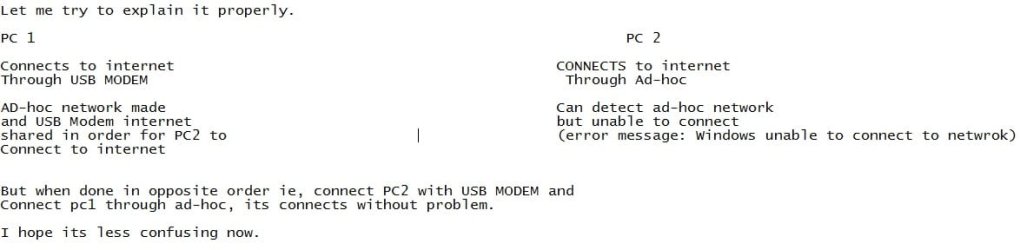
Attaching image i am unable to write here words getting mixed up, srry

explain.jpg
 
Last edited:

My Computer My Computer

At a glance

Windows 7
OS
Windows 7
Well, I've had no experience of using an ad-hoc network, so I'm hoping someone else will jump in, but I have to ask the question, would it not be easier to buy a wireless router and set up a permanent wireless network?


I dont want to waste money when i am able to get it done without need to buy wireless router and its kinda permanent too, just save ad-hoc network you make. you get option to save connection.
 

My Computer My Computer

At a glance

Windows 7
OS
Windows 7
Back
Top