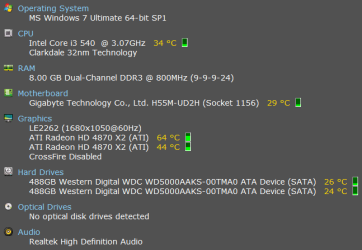
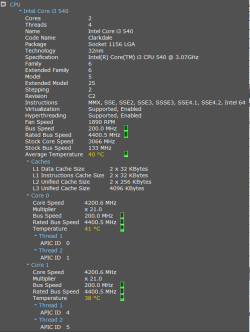
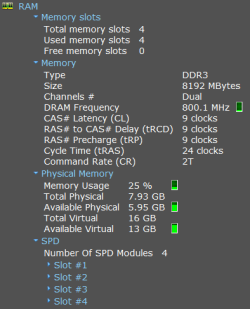
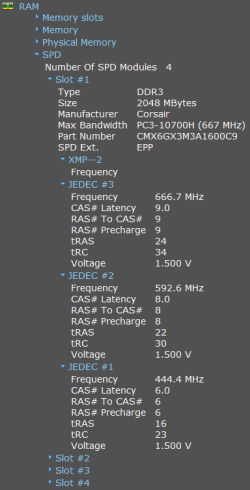
anyone mind taking a gander over my overclock settings?

MiddleIndex

New member
Local time
2:59 PM
Messages
3
Location
Ireland
Hey Guys what's the craic?

This is my 1st post so hope I'm in the right place. I got an overclocked bundle from overclockers.co.uk a good while ago and when I got it all setup I flashed the bios and of course I flashed the overclock settings with it. I tried getting on their forum to see about getting the settings off someone but that became a nightmare so at this point I thought sweet ill do myself. With this very helpful guide hxxp://www.overclockers.com/3-step-guide-overclock-core-i3-i5-i7/ I got the cpu to overclocked to 4.2 and learned a shitload about my pc and the bios for free!!! ok so in the mean time I managed to get overclockers to send me their settings so I could compare. The 1st time I seen the bios settings before I "lost" them there was loads of the voltage settings changed but when I got them the 2nd time less had been "overclocked" (basically the same overclock settings I ended up with doing it myself :)) what I have here is a mix of the 2 settings the best I understand them. Can anyone please give me their wisdom and any thoughts? thanx
 

My Computer My Computer

At a glance

Windows 7 Ultimate 64-bit SP1Intel Core i3 [email protected] Clarkdale 32nmCorsair 8.00 GB Dual-Channel DDR3 2x4GBATI Radeon HD 4870 X2 (ATI)
Computer Manufacturer/Model Number
Custom
OS
Windows 7 Ultimate 64-bit SP1
CPU
Intel Core i3 [email protected] Clarkdale 32nm
Motherboard
Gigabyte H55M-UD2H (Socket 1156)
Memory
Corsair 8.00 GB Dual-Channel DDR3 2x4GB
Graphics Card(s)
ATI Radeon HD 4870 X2 (ATI)
Sound Card
Realtek High Definition Audio
Monitor(s) Displays
Cibox LE2262
Screen Resolution
1680x1050@60Hz
Hard Drives
2 500GB Western Digital SATA Drives
PSU
Tagan 600W
Cooling
5 case fans and a Freezer 7 Pro Rev. 2 Cooler for the CPU
Keyboard
G15
Mouse
GM-3200
Internet Speed
30Mg Fiber optics
Summary.png

motherboard.png

cpu.png

ram1.png

ram2.png
 

My Computer My Computer

At a glance

Windows 7 Ultimate 64-bit SP1Intel Core i3 [email protected] Clarkdale 32nmCorsair 8.00 GB Dual-Channel DDR3 2x4GBATI Radeon HD 4870 X2 (ATI)
Computer Manufacturer/Model Number
Custom
OS
Windows 7 Ultimate 64-bit SP1
CPU
Intel Core i3 [email protected] Clarkdale 32nm
Motherboard
Gigabyte H55M-UD2H (Socket 1156)
Memory
Corsair 8.00 GB Dual-Channel DDR3 2x4GB
Graphics Card(s)
ATI Radeon HD 4870 X2 (ATI)
Sound Card
Realtek High Definition Audio
Monitor(s) Displays
Cibox LE2262
Screen Resolution
1680x1050@60Hz
Hard Drives
2 500GB Western Digital SATA Drives
PSU
Tagan 600W
Cooling
5 case fans and a Freezer 7 Pro Rev. 2 Cooler for the CPU
Keyboard
G15
Mouse
GM-3200
Internet Speed
30Mg Fiber optics
Hi,

Looks good. Have you stress-tested for stability? The overclock isn't much good unless it stays stable under load.

Some stress testing tips:

1. Download IntelBurnTest from download from Guru3D.com
- you use this to stress your CPU

2. Download HWINFO64 from HWiNFO64 Download
- you use this to monitor your temperatures (important!!!)

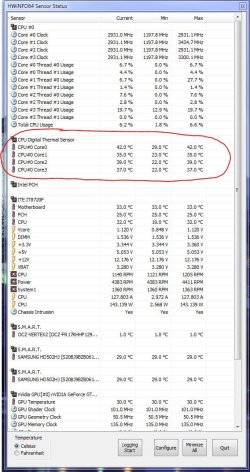
3. Install HWINFO64 and run the SENSOR-ONLY bit from the splash screen - you should see a panel displaying key temperatures:

Capture1.JPG

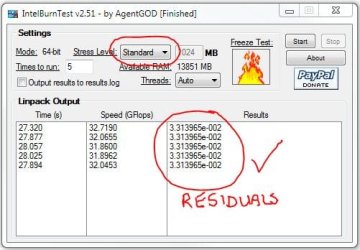
4. Run 3 IntelBurnTest stress tests using these settings:

- Standard
- High
- Very High

Capture2.JPG

IMPORTANT : you MUST monitor your temperatures during these test. You want to carefully observe the CPU Digital Thermal Sensor temperatures as shown above. Your CPU has a maximum TCase temperature of 72.6 degress C - please confirm that with link below. Usually we add 5 degrees to that. So, if your CPU starts approaching 77.6 degrees C, immediately stop the tests.

Intel® Core

If your CPU passes the stress tests, then all 5 residual values, as ringed in red above, will be the same:

Let us know how you get on. Remember that stress-testing stresses the system - you do so entirely at your own risk.

Regards,
Golden
 

My Computer My Computer

At a glance

Windows 10 Pro x64 ; Xubuntu x64Intel i7 860 @ 2.80 GHz O/C'ed to 4.0GHz16GB Corsair Vengance DDR3 @ 661 MHz Dual Cha...EVGA NVidia GTX 560 1024MB
Computer type
PC/Desktop
Computer Manufacturer/Model Number
Golden Mk. I.4
OS
Windows 10 Pro x64 ; Xubuntu x64
CPU
Intel i7 860 @ 2.80 GHz O/C'ed to 4.0GHz
Motherboard
Gigabyte P55A-UD3R Rev.1. Award BIOS F13
Memory
16GB Corsair Vengance DDR3 @ 661 MHz Dual Channel (9-9-9-24)
Graphics Card(s)
EVGA NVidia GTX 560 1024MB
Sound Card
Realtek Integrated
Monitor(s) Displays
Dual Samsung SyncMaster 2494HS
Screen Resolution
1920*1080 and 1920*1080
Hard Drives
1*Samsung 840 EVO 120GB SSD;
1*OCZ Vertex 2 60GB SSD;
2*Samsung F3 SpinPoint 1TB in RAID0;
1*Samsung F1 SpinPoint 1TB;
2*Western Digital 1TB External USB 3.0
1*Western Digital 500GB External USB 3.0
1*Seagate 500GB External USB 2.0
PSU
Thermaltake ToughPower QFan 750W
Case
Thermaltake Element S VK60001W2Z
Cooling
Corsair H60 Water Cooling, 2*230mm and 2*80mm case fans
Keyboard
Logitech G110
Mouse
Logitech MX518
Just looking at your memory. Check you bios to see if you have it running in profile XMP. It should be running at 1600 Mz. Very simple way to clock the memory. If it is then it is just the way it is being shown in the above program.

XMS3
 

My Computer My Computer

At a glance

Windows 7 Pro x64 -- PCLinuxOS KDE4 FullMonty...i7-875k @ Turbo - 7,6,5,5 - 3.6ghzCorsair CMD8GX3M4A1600C8 8gbAsus EAH5850 DirectCU/2DIS/1GD5
Computer Manufacturer/Model Number
Custom
OS
Windows 7 Pro x64 -- PCLinuxOS KDE4 FullMonty 2011
CPU
i7-875k @ Turbo - 7,6,5,5 - 3.6ghz
Motherboard
Asus P7P55D-E Deluxe
Memory
Corsair CMD8GX3M4A1600C8 8gb
Graphics Card(s)
Asus EAH5850 DirectCU/2DIS/1GD5
Sound Card
On Board
Monitor(s) Displays
Samsung SyncMaster T220 - Panasonic VT30a 50"
Screen Resolution
1680x1050 -
Hard Drives
Corsair Force 3 SSD 120GB x 2 ::
WD VelociRaptor 150GB WD1500HLFS x 2
PSU
Corsair HX-850 Power Supply
Case
Coolmaster HAF 932
Cooling
Corsair H50
Keyboard
Logitech Wireless MK700
Mouse
Logitech Wireless MX620
Internet Speed
Good enough for now
Other Info
Voip. Insanely cheap phone calls.
Just saw that the memory you have listed in your specs & the memory posted above are different so check that first.
 

My Computer My Computer

At a glance

Windows 7 Pro x64 -- PCLinuxOS KDE4 FullMonty...i7-875k @ Turbo - 7,6,5,5 - 3.6ghzCorsair CMD8GX3M4A1600C8 8gbAsus EAH5850 DirectCU/2DIS/1GD5
Computer Manufacturer/Model Number
Custom
OS
Windows 7 Pro x64 -- PCLinuxOS KDE4 FullMonty 2011
CPU
i7-875k @ Turbo - 7,6,5,5 - 3.6ghz
Motherboard
Asus P7P55D-E Deluxe
Memory
Corsair CMD8GX3M4A1600C8 8gb
Graphics Card(s)
Asus EAH5850 DirectCU/2DIS/1GD5
Sound Card
On Board
Monitor(s) Displays
Samsung SyncMaster T220 - Panasonic VT30a 50"
Screen Resolution
1680x1050 -
Hard Drives
Corsair Force 3 SSD 120GB x 2 ::
WD VelociRaptor 150GB WD1500HLFS x 2
PSU
Corsair HX-850 Power Supply
Case
Coolmaster HAF 932
Cooling
Corsair H50
Keyboard
Logitech Wireless MK700
Mouse
Logitech Wireless MX620
Internet Speed
Good enough for now
Other Info
Voip. Insanely cheap phone calls.
Hi,

Looks good. Have you stress-tested for stability? The overclock isn't much good unless it stays stable under load.

Some stress testing tips:

1. Download IntelBurnTest from download from Guru3D.com
- you use this to stress your CPU

2. Download HWINFO64 from HWiNFO64 Download
- you use this to monitor your temperatures (important!!!)

3. Install HWINFO64 and run the SENSOR-ONLY bit from the splash screen - you should see a panel displaying key temperatures:

View attachment 183073

4. Run 3 IntelBurnTest stress tests using these settings:

- Standard
- High
- Very High

View attachment 183074

IMPORTANT : you MUST monitor your temperatures during these test. You want to carefully observe the CPU Digital Thermal Sensor temperatures as shown above. Your CPU has a maximum TCase temperature of 72.6 degress C - please confirm that with link below. Usually we add 5 degrees to that. So, if your CPU starts approaching 77.6 degrees C, immediately stop the tests.

Intel® Core

If your CPU passes the stress tests, then all 5 residual values, as ringed in red above, will be the same:

Let us know how you get on. Remember that stress-testing stresses the system - you do so entirely at your own risk.

Regards,
Golden

thanx for the reply. ive been using realtemp and prime95 and as far as i can tell it seems fine. doesnt flicker or shutdown. only slows the computer down while the test runs. the memory is set in the bios 1600MHz and when the pc starts it says 1600MHz on the 1st screen. but ineverything else its says 800.0 MHz. not sure whats wrong there
 

My Computer My Computer

At a glance

Windows 7 Ultimate 64-bit SP1Intel Core i3 [email protected] Clarkdale 32nmCorsair 8.00 GB Dual-Channel DDR3 2x4GBATI Radeon HD 4870 X2 (ATI)
Computer Manufacturer/Model Number
Custom
OS
Windows 7 Ultimate 64-bit SP1
CPU
Intel Core i3 [email protected] Clarkdale 32nm
Motherboard
Gigabyte H55M-UD2H (Socket 1156)
Memory
Corsair 8.00 GB Dual-Channel DDR3 2x4GB
Graphics Card(s)
ATI Radeon HD 4870 X2 (ATI)
Sound Card
Realtek High Definition Audio
Monitor(s) Displays
Cibox LE2262
Screen Resolution
1680x1050@60Hz
Hard Drives
2 500GB Western Digital SATA Drives
PSU
Tagan 600W
Cooling
5 case fans and a Freezer 7 Pro Rev. 2 Cooler for the CPU
Keyboard
G15
Mouse
GM-3200
Internet Speed
30Mg Fiber optics
the memory is set in the bios 1600MHz and when the pc starts it says 1600MHz on the 1st screen. but ineverything else its says 800.0 MHz. not sure whats wrong there


DDR = Double Data Rate 800*2=1600mhz

It's being reported correctly. It's all good mate :)
 

My Computer My Computer

At a glance

8 Pro x64i7 3770K 4.6GHz16GB G.Skill Trident X 2666mhzx2 EVGA 780 Ti Superclocked SLI
Computer type
PC/Desktop
Computer Manufacturer/Model Number
Systems by SmartEyeball
OS
8 Pro x64
CPU
i7 3770K 4.6GHz
Motherboard
ASUS P8Z77 WS
Memory
16GB G.Skill Trident X 2666mhz
Graphics Card(s)
x2 EVGA 780 Ti Superclocked SLI
Sound Card
SB X-FI Surround 5.1 PRO USB / ATH-AD900 Headphones
Monitor(s) Displays
x3 Dell U2410 / 58" Samsung
Screen Resolution
5760*1200/ 1920*1200
Hard Drives
2x Intel 520 240GB (RAID 0) * 2x WD Caviar Blacks 2TB (RAID 0) * 2TB WD Caviar Black * Sony Optirac DVD
PSU
Silverstone Strider Evolution 1200W
Case
Thermaltake Level 10 GT Snow Edition
Cooling
Noctua NH-D14
Keyboard
Topre Realforce // Ducky Shine MX Black // Filco Ninja TKL
Mouse
Thermaltake Theron (Highly Recommended) + Razer Imperator
Antivirus
MSE
Browser
IE, FF, WaterFox
Other Info
GT Extreme V2 Sim Racing Cockpit + 40" LCD and K/B Mouse stand ▼
Fanatec CSR Elite Wheel + Clubsport V1 Pedals + CSR shifter/7G-H ▼Saitek X52 Pro ▼ TrackIR 5 Pro
Buttkicker v2 Seat Rumbler with Dedicated 5.1 and Sub Woofer attached to frame ▼
=
Bloody Big Grin
Back
Top