Solved Macrium Reflect- leaving junk?

The EaseUS free version is not a trial or limited. The paid version may have some additional features that you likely would not need.

I haven't read of any issues with a USB drive with either EaseUS or Macrium.

There is nothing wrong with using both in an alternating fashion--EaseUS this month and Macrium next month. That way, you are not out of luck if one of them gives you a problem.

The important thing is to confirm that your so-called recovery disk actually boots and will show all your partitions and your desired image file.
 

My Computer My Computer

At a glance

Windows 7 Home Premium SP1, 64-bitIntel Skylake i5-6600K, not overclocked8 GB HyperX DDR4-2666 (2 x 4 GB)none; graphics are integrated on CPU
Computer type
PC/Desktop
Computer Manufacturer/Model Number
Ignatz Special; 4 speed manual gearbox; factory air conditioning; one of one
OS
Windows 7 Home Premium SP1, 64-bit
CPU
Intel Skylake i5-6600K, not overclocked
Motherboard
AsRock Z170M Extreme 4, micro ATX
Memory
8 GB HyperX DDR4-2666 (2 x 4 GB)
Graphics Card(s)
none; graphics are integrated on CPU
Sound Card
onboard: Realtek ALC1150; external: USB Behringer UF0-202
Monitor(s) Displays
Dell S2340M 23 inch IPS
Screen Resolution
1600 x 900
Hard Drives
System: Crucial MX100 series SSD, 128 GB;
Data: Samsung Spinpoint 103SJ, 1 TB;
Backup: WD Caviar Green WD30EZRX-00D8PB0, 3 TB
PSU
Rosewill SilentNight 500 watt fanless, semi-modular
Case
Antec Solo II
Cooling
Noctua NH-U12S; Noctua F12 intake, Noctua S12A exhaust
Keyboard
Microsoft 200 6JH-00001 USB
Mouse
Dell or Microsoft optical wired; USB
Antivirus
Microsoft Security Essentials and Malwarebytes Premium
Browser
Pale Moon
Other Info
All fans PWM; speeds at idle: CPU circa 500 rpm; intake circa 600 rpm; exhaust circa 600 rpm; CPU temps 27 idle and 47 C load in a warm room (27 C/81 F) when running Intel Extreme Tuning Utility stress test.
I know there is nothing wrong with using both. I would use both if I were sure they were completely safe to use and not leave remnants after uninstall.

about confirmation - I am going to test it.
And thank you I will try both, maybe Macrium first.
 

My Computer My Computer

At a glance

Windows 7 Ultimate x64Intel(R) Core(TM) i3 CPU M370 2.40GHz2 GB RAMIntel(R) HD Grpahics (not worth the money)
Computer Manufacturer/Model Number
Lenovo G560(this is a laptop)
OS
Windows 7 Ultimate x64
CPU
Intel(R) Core(TM) i3 CPU M370 2.40GHz
Memory
2 GB RAM
Graphics Card(s)
Intel(R) HD Grpahics (not worth the money)
Screen Resolution
1360 x 768
You CAN restore from an internal disk. But you can't store the image on the same partition that you are imaging.

I have made images with Macrium and EaseUS. One is as easy as another. I have NOT restored an image with either, but I have not heard of many issues from either on these forums. The EaseUS product is newer and thus does not have as many users, so there is not as much feedback about it.

I have tried both and settled on Macrium. The only problem I had with Macrium was getting the Linux recovery disk to see my external drives. I have also done several restores of the OS with Macrium with no problems, the last only two weeks ago.

What problems did you have and how did you solve them?
I will probably use external drives too...

My only problem was with the Linux recovery disk sometimes not seeing my USB2 attached disks. I could get around this by making sure everything was done from a cold start (switched off). The real solution and one I have never had any problems with was to use a WinPE recovery disk. I think the latest free version (I have paid) has facilities for creating a PE disk but you need to download the WAIK (1GB+) to make it.
 

My Computer My Computer

At a glance

Microsoft Windows 7 Home Premium 64-bit Servi...Intel(R) Core(TM) i3 CPU M 330 @ 2.13GHz8 GB DDR3Intel(R) HD Graphics
Computer type
Laptop
Computer Manufacturer/Model Number
Hewlett-Packard/G62-107SA Notebook
OS
Microsoft Windows 7 Home Premium 64-bit Service Pack 1
CPU
Intel(R) Core(TM) i3 CPU M 330 @ 2.13GHz
Motherboard
Hewlett-Packard 1425
Memory
8 GB DDR3
Graphics Card(s)
Intel(R) HD Graphics
Sound Card
Realtek High Definition Audio
Monitor(s) Displays
Builtin
Screen Resolution
1366 x 768 x 32 bits (4294967296 colors) @ 60 Hz
Hard Drives
250 GB SATA Hard Disk Drive 7200 rpm
2TB Seagate GoFlex USB 2 Drive
1TB Iomega Prestige USB 2 Drive
1.5TB Iomega Prestige USB 2 Drive (Samsung)
2TB WD MyBook Live NAS.
Mouse
Logitech Anywhere MX
Internet Speed
152 Mbs download 10 Mbs upload
Antivirus
Norton 360
Browser
Chrome
It may be bad practice to image to a second partition on the same drive as the OS but the likelihood of your drive going bad compared to just restoring an image must be weighed up. The latter is generally more likely. It will also take longer to image to the same drive rather than the better solution of using a second drive but for laptops with a single drive then this might be one of the solutions. The Macrium boot CD can be removed once a restore is initiated so that images stored on DVD can be used but this usually involves spanning DVDs and is probably slower. ;)
 

My Computer My Computer

At a glance

Windows 7 x64 SP1Athlon II x2 2154.0 GBOnboard
Computer Manufacturer/Model Number
Compaq desktop
OS
Windows 7 x64 SP1
CPU
Athlon II x2 215
Memory
4.0 GB
Graphics Card(s)
Onboard
Sound Card
Creative SB X-Fi Titanium HD (nice)
Monitor(s) Displays
24" Dell LCD
Screen Resolution
1900 x 1200
Hard Drives
320 GB, 500 GB and 750 GB 7200 rpm
PSU
430w
Keyboard
USB
Mouse
USB
Internet Speed
approx 10 Mbps
I have tried both and settled on Macrium. The only problem I had with Macrium was getting the Linux recovery disk to see my external drives. I have also done several restores of the OS with Macrium with no problems, the last only two weeks ago.

What problems did you have and how did you solve them?
I will probably use external drives too...

My only problem was with the Linux recovery disk sometimes not seeing my USB2 attached disks. I could get around this by making sure everything was done from a cold start (switched off). The real solution and one I have never had any problems with was to use a WinPE recovery disk. I think the latest free version (I have paid) has facilities for creating a PE disk but you need to download the WAIK (1GB+) to make it.

The PE disk you are talking about is a boot-able recovery disk, right?
if so, I think a PE disk is a must, or a USB...

It may be bad practice to image to a second partition on the same drive as the OS but the likelihood of your drive going bad compared to just restoring an image must be weighed up. The latter is generally more likely. It will also take longer to image to the same drive rather than the better solution of using a second drive but for laptops with a single drive then this might be one of the solutions. The Macrium boot CD can be removed once a restore is initiated so that images stored on DVD can be used but this usually involves spanning DVDs and is probably slower. ;)

I have a laptop with 4 partitions, by the way, why when I go to disk management utility there are two unlabeled partitions(one named OEM and the other one something else probably not meaningful) which are not accessible.
I mean I am an administrator so I should have full access...?

The problem is that currently I do not have 70+ DVDs and 600GB HD.
But ofcourse when I get a HD, I will plug it in and use the Macirum PE to save the output on it.
 

My Computer My Computer

At a glance

Windows 7 Ultimate x64Intel(R) Core(TM) i3 CPU M370 2.40GHz2 GB RAMIntel(R) HD Grpahics (not worth the money)
Computer Manufacturer/Model Number
Lenovo G560(this is a laptop)
OS
Windows 7 Ultimate x64
CPU
Intel(R) Core(TM) i3 CPU M370 2.40GHz
Memory
2 GB RAM
Graphics Card(s)
Intel(R) HD Grpahics (not worth the money)
Screen Resolution
1360 x 768
Yes the bootable PE is best but try the Linux version first. It may be OK in your environment. I must admit that I haven't tried the latest version of the Linux disk. I believe it has changed with V5 for the better.
 

My Computer My Computer

At a glance

Microsoft Windows 7 Home Premium 64-bit Servi...Intel(R) Core(TM) i3 CPU M 330 @ 2.13GHz8 GB DDR3Intel(R) HD Graphics
Computer type
Laptop
Computer Manufacturer/Model Number
Hewlett-Packard/G62-107SA Notebook
OS
Microsoft Windows 7 Home Premium 64-bit Service Pack 1
CPU
Intel(R) Core(TM) i3 CPU M 330 @ 2.13GHz
Motherboard
Hewlett-Packard 1425
Memory
8 GB DDR3
Graphics Card(s)
Intel(R) HD Graphics
Sound Card
Realtek High Definition Audio
Monitor(s) Displays
Builtin
Screen Resolution
1366 x 768 x 32 bits (4294967296 colors) @ 60 Hz
Hard Drives
250 GB SATA Hard Disk Drive 7200 rpm
2TB Seagate GoFlex USB 2 Drive
1TB Iomega Prestige USB 2 Drive
1.5TB Iomega Prestige USB 2 Drive (Samsung)
2TB WD MyBook Live NAS.
Mouse
Logitech Anywhere MX
Internet Speed
152 Mbs download 10 Mbs upload
Antivirus
Norton 360
Browser
Chrome
The PE disk you are talking about is a boot-able recovery disk, right?
if so, I think a PE disk is a must, or a USB...

I have a laptop with 4 partitions, by the way, why when I go to disk management utility there are two unlabeled partitions(one named OEM and the other one something else probably not meaningful) which are not accessible.
I mean I am an administrator so I should have full access...?

The PE disk is a bootable recovery disk, but not a must. It's an alternative to the Linux recovery disk. You can use either. The PE disk may be more compatible (bootable) with your system. As I recall, you have to make some downloads and jump through a few hoops to build the PE disk.

Regarding your partitions. A very small (200 mb or less) should be the Windows "system reserved" partition that contains your boot files. Any other larger partitions are likely either for system recovery (to factory conditions) or may contain tools provided by the system manufacturer.
 

My Computer My Computer

At a glance

Windows 7 Home Premium SP1, 64-bitIntel Skylake i5-6600K, not overclocked8 GB HyperX DDR4-2666 (2 x 4 GB)none; graphics are integrated on CPU
Computer type
PC/Desktop
Computer Manufacturer/Model Number
Ignatz Special; 4 speed manual gearbox; factory air conditioning; one of one
OS
Windows 7 Home Premium SP1, 64-bit
CPU
Intel Skylake i5-6600K, not overclocked
Motherboard
AsRock Z170M Extreme 4, micro ATX
Memory
8 GB HyperX DDR4-2666 (2 x 4 GB)
Graphics Card(s)
none; graphics are integrated on CPU
Sound Card
onboard: Realtek ALC1150; external: USB Behringer UF0-202
Monitor(s) Displays
Dell S2340M 23 inch IPS
Screen Resolution
1600 x 900
Hard Drives
System: Crucial MX100 series SSD, 128 GB;
Data: Samsung Spinpoint 103SJ, 1 TB;
Backup: WD Caviar Green WD30EZRX-00D8PB0, 3 TB
PSU
Rosewill SilentNight 500 watt fanless, semi-modular
Case
Antec Solo II
Cooling
Noctua NH-U12S; Noctua F12 intake, Noctua S12A exhaust
Keyboard
Microsoft 200 6JH-00001 USB
Mouse
Dell or Microsoft optical wired; USB
Antivirus
Microsoft Security Essentials and Malwarebytes Premium
Browser
Pale Moon
Other Info
All fans PWM; speeds at idle: CPU circa 500 rpm; intake circa 600 rpm; exhaust circa 600 rpm; CPU temps 27 idle and 47 C load in a warm room (27 C/81 F) when running Intel Extreme Tuning Utility stress test.
What problems did you have and how did you solve them?
I will probably use external drives too...

My only problem was with the Linux recovery disk sometimes not seeing my USB2 attached disks. I could get around this by making sure everything was done from a cold start (switched off). The real solution and one I have never had any problems with was to use a WinPE recovery disk. I think the latest free version (I have paid) has facilities for creating a PE disk but you need to download the WAIK (1GB+) to make it.

The PE disk you are talking about is a boot-able recovery disk, right?
if so, I think a PE disk is a must, or a USB...

It may be bad practice to image to a second partition on the same drive as the OS but the likelihood of your drive going bad compared to just restoring an image must be weighed up. The latter is generally more likely. It will also take longer to image to the same drive rather than the better solution of using a second drive but for laptops with a single drive then this might be one of the solutions. The Macrium boot CD can be removed once a restore is initiated so that images stored on DVD can be used but this usually involves spanning DVDs and is probably slower. ;)

I have a laptop with 4 partitions, by the way, why when I go to disk management utility there are two unlabeled partitions(one named OEM and the other one something else probably not meaningful) which are not accessible.
I mean I am an administrator so I should have full access...?

The problem is that currently I do not have 70+ DVDs and 600GB HD.
But ofcourse when I get a HD, I will plug it in and use the Macirum PE to save the output on it.

Usually there is a boot partition of a hundred MB or more and a Recovery partition of 10 GB or so. These might not be visible. One of the things about imaging, in my view, is to get the OS partition down to the minimum necessary so that images will be smaller.

To do this on my system for example I try to keep all data from programs (Spotify, BBC Iplayer etc) elsewhere along with personal data (easier to back-up too). Also since mine is a desktop I don't use hibernation and have my swapfile on another partition - although many imaging programs don't include the swapfile anyway. With just the OS and programs on the system partition I find this can be kept down to 50 - 80 GB and space used might be around 30 - 40 GB. Hence images will be kept to a managable size and only take about 10 minutes or less. I find I image about every week or so, depending upon software installs or other updates.

Hope that helps. :) ;)
 

My Computer My Computer

At a glance

Windows 7 x64 SP1Athlon II x2 2154.0 GBOnboard
Computer Manufacturer/Model Number
Compaq desktop
OS
Windows 7 x64 SP1
CPU
Athlon II x2 215
Memory
4.0 GB
Graphics Card(s)
Onboard
Sound Card
Creative SB X-Fi Titanium HD (nice)
Monitor(s) Displays
24" Dell LCD
Screen Resolution
1900 x 1200
Hard Drives
320 GB, 500 GB and 750 GB 7200 rpm
PSU
430w
Keyboard
USB
Mouse
USB
Internet Speed
approx 10 Mbps
I totally agree about keeping the minimum amount of data on the OS partition. I have most of my data on separate disks and use other means to back that up.
 

My Computer My Computer

At a glance

Microsoft Windows 7 Home Premium 64-bit Servi...Intel(R) Core(TM) i3 CPU M 330 @ 2.13GHz8 GB DDR3Intel(R) HD Graphics
Computer type
Laptop
Computer Manufacturer/Model Number
Hewlett-Packard/G62-107SA Notebook
OS
Microsoft Windows 7 Home Premium 64-bit Service Pack 1
CPU
Intel(R) Core(TM) i3 CPU M 330 @ 2.13GHz
Motherboard
Hewlett-Packard 1425
Memory
8 GB DDR3
Graphics Card(s)
Intel(R) HD Graphics
Sound Card
Realtek High Definition Audio
Monitor(s) Displays
Builtin
Screen Resolution
1366 x 768 x 32 bits (4294967296 colors) @ 60 Hz
Hard Drives
250 GB SATA Hard Disk Drive 7200 rpm
2TB Seagate GoFlex USB 2 Drive
1TB Iomega Prestige USB 2 Drive
1.5TB Iomega Prestige USB 2 Drive (Samsung)
2TB WD MyBook Live NAS.
Mouse
Logitech Anywhere MX
Internet Speed
152 Mbs download 10 Mbs upload
Antivirus
Norton 360
Browser
Chrome
Yes the bootable PE is best but try the Linux version first. It may be OK in your environment. I must admit that I haven't tried the latest version of the Linux disk. I believe it has changed with V5 for the better.

would you please explain what the differences are?
What does it actually mean "Linux version" or "Linux" when you talk about programs which are not run inside Linux kernel based OSs?

The PE disk you are talking about is a boot-able recovery disk, right?
if so, I think a PE disk is a must, or a USB...

I have a laptop with 4 partitions, by the way, why when I go to disk management utility there are two unlabeled partitions(one named OEM and the other one something else probably not meaningful) which are not accessible.
I mean I am an administrator so I should have full access...?

The PE disk is a bootable recovery disk, but not a must. It's an alternative to the Linux recovery disk. You can use either. The PE disk may be more compatible (bootable) with your system. As I recall, you have to make some downloads and jump through a few hoops to build the PE disk.

Regarding your partitions. A very small (200 mb or less) should be the Windows "system reserved" partition that contains your boot files. Any other larger partitions are likely either for system recovery (to factory conditions) or may contain tools provided by the system manufacturer.


Okay I am a confused - on the Macrium tutorial you can see there is a button to burn such a recovery disk on a CD/DVD/USB storage. therefor eliminating downloads and hoops and jumps.

Yes there is a 200MB partition, probably for the MBR if I recall correctly and other required boot files.
besides the 200MB partition, the 500GB of the OS and user files, there two more partitions - one for the recovery solution and another one which I can not even see in process explorer and can also not even rename/delete. It is weird because I am an admin. I don't see any way the Manufacturer could block my access.

My only problem was with the Linux recovery disk sometimes not seeing my USB2 attached disks. I could get around this by making sure everything was done from a cold start (switched off). The real solution and one I have never had any problems with was to use a WinPE recovery disk. I think the latest free version (I have paid) has facilities for creating a PE disk but you need to download the WAIK (1GB+) to make it.

The PE disk you are talking about is a boot-able recovery disk, right?
if so, I think a PE disk is a must, or a USB...

It may be bad practice to image to a second partition on the same drive as the OS but the likelihood of your drive going bad compared to just restoring an image must be weighed up. The latter is generally more likely. It will also take longer to image to the same drive rather than the better solution of using a second drive but for laptops with a single drive then this might be one of the solutions. The Macrium boot CD can be removed once a restore is initiated so that images stored on DVD can be used but this usually involves spanning DVDs and is probably slower. ;)

I have a laptop with 4 partitions, by the way, why when I go to disk management utility there are two unlabeled partitions(one named OEM and the other one something else probably not meaningful) which are not accessible.
I mean I am an administrator so I should have full access...?

The problem is that currently I do not have 70+ DVDs and 600GB HD.
But ofcourse when I get a HD, I will plug it in and use the Macirum PE to save the output on it.

Usually there is a boot partition of a hundred MB or more and a Recovery partition of 10 GB or so. These might not be visible. One of the things about imaging, in my view, is to get the OS partition down to the minimum necessary so that images will be smaller.

To do this on my system for example I try to keep all data from programs (Spotify, BBC Iplayer etc) elsewhere along with personal data (easier to back-up too). Also since mine is a desktop I don't use hibernation and have my swapfile on another partition - although many imaging programs don't include the swapfile anyway. With just the OS and programs on the system partition I find this can be kept down to 50 - 80 GB and space used might be around 30 - 40 GB. Hence images will be kept to a managable size and only take about 10 minutes or less. I find I image about every week or so, depending upon software installs or other updates.

Hope that helps. :) ;)

I totally agree about keeping the minimum amount of data on the OS partition. I have most of my data on separate disks and use other means to back that up.

I know, I have those two partitions you mentioned.
But I also have another invisible partition which I can not even modify in any way. It has around the same space as the Recovery partition has.

Good idea but the problems emerge in case you choose/have to recover your system to get rid of viruses, or any malicious code.
It could stay in your Personal Data partition(which in most computers is at the same as the OS isn't it?) and then infect the OS partition after a restorations is completed. Now it is not such a good idea :)


Thank you all, you are very helpful :)
 

My Computer My Computer

At a glance

Windows 7 Ultimate x64Intel(R) Core(TM) i3 CPU M370 2.40GHz2 GB RAMIntel(R) HD Grpahics (not worth the money)
Computer Manufacturer/Model Number
Lenovo G560(this is a laptop)
OS
Windows 7 Ultimate x64
CPU
Intel(R) Core(TM) i3 CPU M370 2.40GHz
Memory
2 GB RAM
Graphics Card(s)
Intel(R) HD Grpahics (not worth the money)
Screen Resolution
1360 x 768
The Linux disk is a bootable mini version of Linux configured just to run the restore utility. They use it because it's free.
 

My Computer My Computer

At a glance

Microsoft Windows 7 Home Premium 64-bit Servi...Intel(R) Core(TM) i3 CPU M 330 @ 2.13GHz8 GB DDR3Intel(R) HD Graphics
Computer type
Laptop
Computer Manufacturer/Model Number
Hewlett-Packard/G62-107SA Notebook
OS
Microsoft Windows 7 Home Premium 64-bit Service Pack 1
CPU
Intel(R) Core(TM) i3 CPU M 330 @ 2.13GHz
Motherboard
Hewlett-Packard 1425
Memory
8 GB DDR3
Graphics Card(s)
Intel(R) HD Graphics
Sound Card
Realtek High Definition Audio
Monitor(s) Displays
Builtin
Screen Resolution
1366 x 768 x 32 bits (4294967296 colors) @ 60 Hz
Hard Drives
250 GB SATA Hard Disk Drive 7200 rpm
2TB Seagate GoFlex USB 2 Drive
1TB Iomega Prestige USB 2 Drive
1.5TB Iomega Prestige USB 2 Drive (Samsung)
2TB WD MyBook Live NAS.
Mouse
Logitech Anywhere MX
Internet Speed
152 Mbs download 10 Mbs upload
Antivirus
Norton 360
Browser
Chrome
Can I also browse the hard disk if Windows is installed?
 

My Computer My Computer

At a glance

Windows 7 Ultimate x64Intel(R) Core(TM) i3 CPU M370 2.40GHz2 GB RAMIntel(R) HD Grpahics (not worth the money)
Computer Manufacturer/Model Number
Lenovo G560(this is a laptop)
OS
Windows 7 Ultimate x64
CPU
Intel(R) Core(TM) i3 CPU M370 2.40GHz
Memory
2 GB RAM
Graphics Card(s)
Intel(R) HD Grpahics (not worth the money)
Screen Resolution
1360 x 768
I don't think so on the Linux disk. You can with the PE disk.
 

My Computer My Computer

At a glance

Microsoft Windows 7 Home Premium 64-bit Servi...Intel(R) Core(TM) i3 CPU M 330 @ 2.13GHz8 GB DDR3Intel(R) HD Graphics
Computer type
Laptop
Computer Manufacturer/Model Number
Hewlett-Packard/G62-107SA Notebook
OS
Microsoft Windows 7 Home Premium 64-bit Service Pack 1
CPU
Intel(R) Core(TM) i3 CPU M 330 @ 2.13GHz
Motherboard
Hewlett-Packard 1425
Memory
8 GB DDR3
Graphics Card(s)
Intel(R) HD Graphics
Sound Card
Realtek High Definition Audio
Monitor(s) Displays
Builtin
Screen Resolution
1366 x 768 x 32 bits (4294967296 colors) @ 60 Hz
Hard Drives
250 GB SATA Hard Disk Drive 7200 rpm
2TB Seagate GoFlex USB 2 Drive
1TB Iomega Prestige USB 2 Drive
1.5TB Iomega Prestige USB 2 Drive (Samsung)
2TB WD MyBook Live NAS.
Mouse
Logitech Anywhere MX
Internet Speed
152 Mbs download 10 Mbs upload
Antivirus
Norton 360
Browser
Chrome
Okay I am a confused - on the Macrium tutorial you can see there is a button to burn such a recovery disk on a CD/DVD/USB storage. therefor eliminating downloads and hoops and jumps.

Yes there is a 200MB partition, probably for the MBR if I recall correctly and other required boot files.
besides the 200MB partition, the 500GB of the OS and user files, there two more partitions - one for the recovery solution and another one which I can not even see in process explorer and can also not even rename/delete. It is weird because I am an admin. I don't see any way the Manufacturer could block my access.

I assume you are referring to Macrium 5.0?? It does include a choice to make the PE disk directly. I don't think earlier versions of Macrium had that feature.

Your unexplained partition is likely a Lenovo tools partition and is not required for Windows to work properly. I don't know how you access it---possibly through a menu or function key during boot or maybe through something listed in your installed programs list or Control Panel?
 

My Computer My Computer

At a glance

Windows 7 Home Premium SP1, 64-bitIntel Skylake i5-6600K, not overclocked8 GB HyperX DDR4-2666 (2 x 4 GB)none; graphics are integrated on CPU
Computer type
PC/Desktop
Computer Manufacturer/Model Number
Ignatz Special; 4 speed manual gearbox; factory air conditioning; one of one
OS
Windows 7 Home Premium SP1, 64-bit
CPU
Intel Skylake i5-6600K, not overclocked
Motherboard
AsRock Z170M Extreme 4, micro ATX
Memory
8 GB HyperX DDR4-2666 (2 x 4 GB)
Graphics Card(s)
none; graphics are integrated on CPU
Sound Card
onboard: Realtek ALC1150; external: USB Behringer UF0-202
Monitor(s) Displays
Dell S2340M 23 inch IPS
Screen Resolution
1600 x 900
Hard Drives
System: Crucial MX100 series SSD, 128 GB;
Data: Samsung Spinpoint 103SJ, 1 TB;
Backup: WD Caviar Green WD30EZRX-00D8PB0, 3 TB
PSU
Rosewill SilentNight 500 watt fanless, semi-modular
Case
Antec Solo II
Cooling
Noctua NH-U12S; Noctua F12 intake, Noctua S12A exhaust
Keyboard
Microsoft 200 6JH-00001 USB
Mouse
Dell or Microsoft optical wired; USB
Antivirus
Microsoft Security Essentials and Malwarebytes Premium
Browser
Pale Moon
Other Info
All fans PWM; speeds at idle: CPU circa 500 rpm; intake circa 600 rpm; exhaust circa 600 rpm; CPU temps 27 idle and 47 C load in a warm room (27 C/81 F) when running Intel Extreme Tuning Utility stress test.
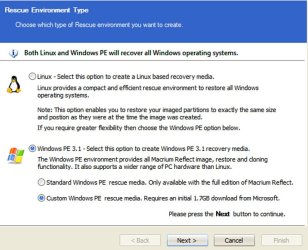
I don't think that button does anything on the free version. You need to select the radio button below it (custom PE) which also downloads the WAIK (1.7GB download) to create the PE disk from. It is all done with a wizard so you don't need to know about the WAIK. That is the way they get around licencing problems with Microsoft.
 

My Computer My Computer

At a glance

Microsoft Windows 7 Home Premium 64-bit Servi...Intel(R) Core(TM) i3 CPU M 330 @ 2.13GHz8 GB DDR3Intel(R) HD Graphics
Computer type
Laptop
Computer Manufacturer/Model Number
Hewlett-Packard/G62-107SA Notebook
OS
Microsoft Windows 7 Home Premium 64-bit Service Pack 1
CPU
Intel(R) Core(TM) i3 CPU M 330 @ 2.13GHz
Motherboard
Hewlett-Packard 1425
Memory
8 GB DDR3
Graphics Card(s)
Intel(R) HD Graphics
Sound Card
Realtek High Definition Audio
Monitor(s) Displays
Builtin
Screen Resolution
1366 x 768 x 32 bits (4294967296 colors) @ 60 Hz
Hard Drives
250 GB SATA Hard Disk Drive 7200 rpm
2TB Seagate GoFlex USB 2 Drive
1TB Iomega Prestige USB 2 Drive
1.5TB Iomega Prestige USB 2 Drive (Samsung)
2TB WD MyBook Live NAS.
Mouse
Logitech Anywhere MX
Internet Speed
152 Mbs download 10 Mbs upload
Antivirus
Norton 360
Browser
Chrome
I don't think so on the Linux disk. You can with the PE disk.

Okay I am a confused - on the Macrium tutorial you can see there is a button to burn such a recovery disk on a CD/DVD/USB storage. therefor eliminating downloads and hoops and jumps.

Yes there is a 200MB partition, probably for the MBR if I recall correctly and other required boot files.
besides the 200MB partition, the 500GB of the OS and user files, there two more partitions - one for the recovery solution and another one which I can not even see in process explorer and can also not even rename/delete. It is weird because I am an admin. I don't see any way the Manufacturer could block my access.

I assume you are referring to Macrium 5.0?? It does include a choice to make the PE disk directly. I don't think earlier versions of Macrium had that feature.

Your unexplained partition is likely a Lenovo tools partition and is not required for Windows to work properly. I don't know how you access it---possibly through a menu or function key during boot or maybe through something listed in your installed programs list or Control Panel?

Yes Macrium Reflect, it is back on and is free too.
They have that option as seen in a screenshot in sevenforums' tutorial.

So by burning it directly to optical disc I can access an external HD through USB and have it save the output on my ext HD.
Yes I am not sure why it is there, I guess I will ask in the respective forum.
 

My Computer My Computer

At a glance

Windows 7 Ultimate x64Intel(R) Core(TM) i3 CPU M370 2.40GHz2 GB RAMIntel(R) HD Grpahics (not worth the money)
Computer Manufacturer/Model Number
Lenovo G560(this is a laptop)
OS
Windows 7 Ultimate x64
CPU
Intel(R) Core(TM) i3 CPU M370 2.40GHz
Memory
2 GB RAM
Graphics Card(s)
Intel(R) HD Grpahics (not worth the money)
Screen Resolution
1360 x 768
I don't think that button does anything on the free version. You need to select the radio button below it (custom PE) which also downloads the WAIK (1.7GB download) to create the PE disk from. It is all done with a wizard so you don't need to know about the WAIK. That is the way they get around licencing problems with Microsoft.


Are you talking about Macrium Reflect?
Comparison
Free
Linux Rescue CD
yes.gif
yes.gif
yes.gif
yes.gif


It actually is available in the free version.
No way it is as huge, it should be simple so maybe you are confused with something
 

My Computer My Computer

At a glance

Windows 7 Ultimate x64Intel(R) Core(TM) i3 CPU M370 2.40GHz2 GB RAMIntel(R) HD Grpahics (not worth the money)
Computer Manufacturer/Model Number
Lenovo G560(this is a laptop)
OS
Windows 7 Ultimate x64
CPU
Intel(R) Core(TM) i3 CPU M370 2.40GHz
Memory
2 GB RAM
Graphics Card(s)
Intel(R) HD Grpahics (not worth the money)
Screen Resolution
1360 x 768
I think Kado is right, Here is a screen shot from the free version of Macrium 5.0. Looks like you have to download from Microsoft if you want the PE disk.

If you have the paid version, you can choose "Standard Windows PE". Otherwise, you are forced to "Custom".

The Linux disk is another story and is available in the free version.
 

Attachments

  • Untitled-1.jpg
    Untitled-1.jpg
    91.7 KB · Views: 7

My Computer My Computer

At a glance

Windows 7 Home Premium SP1, 64-bitIntel Skylake i5-6600K, not overclocked8 GB HyperX DDR4-2666 (2 x 4 GB)none; graphics are integrated on CPU
Computer type
PC/Desktop
Computer Manufacturer/Model Number
Ignatz Special; 4 speed manual gearbox; factory air conditioning; one of one
OS
Windows 7 Home Premium SP1, 64-bit
CPU
Intel Skylake i5-6600K, not overclocked
Motherboard
AsRock Z170M Extreme 4, micro ATX
Memory
8 GB HyperX DDR4-2666 (2 x 4 GB)
Graphics Card(s)
none; graphics are integrated on CPU
Sound Card
onboard: Realtek ALC1150; external: USB Behringer UF0-202
Monitor(s) Displays
Dell S2340M 23 inch IPS
Screen Resolution
1600 x 900
Hard Drives
System: Crucial MX100 series SSD, 128 GB;
Data: Samsung Spinpoint 103SJ, 1 TB;
Backup: WD Caviar Green WD30EZRX-00D8PB0, 3 TB
PSU
Rosewill SilentNight 500 watt fanless, semi-modular
Case
Antec Solo II
Cooling
Noctua NH-U12S; Noctua F12 intake, Noctua S12A exhaust
Keyboard
Microsoft 200 6JH-00001 USB
Mouse
Dell or Microsoft optical wired; USB
Antivirus
Microsoft Security Essentials and Malwarebytes Premium
Browser
Pale Moon
Other Info
All fans PWM; speeds at idle: CPU circa 500 rpm; intake circa 600 rpm; exhaust circa 600 rpm; CPU temps 27 idle and 47 C load in a warm room (27 C/81 F) when running Intel Extreme Tuning Utility stress test.
That's what I thought.
 

My Computer My Computer

At a glance

Microsoft Windows 7 Home Premium 64-bit Servi...Intel(R) Core(TM) i3 CPU M 330 @ 2.13GHz8 GB DDR3Intel(R) HD Graphics
Computer type
Laptop
Computer Manufacturer/Model Number
Hewlett-Packard/G62-107SA Notebook
OS
Microsoft Windows 7 Home Premium 64-bit Service Pack 1
CPU
Intel(R) Core(TM) i3 CPU M 330 @ 2.13GHz
Motherboard
Hewlett-Packard 1425
Memory
8 GB DDR3
Graphics Card(s)
Intel(R) HD Graphics
Sound Card
Realtek High Definition Audio
Monitor(s) Displays
Builtin
Screen Resolution
1366 x 768 x 32 bits (4294967296 colors) @ 60 Hz
Hard Drives
250 GB SATA Hard Disk Drive 7200 rpm
2TB Seagate GoFlex USB 2 Drive
1TB Iomega Prestige USB 2 Drive
1.5TB Iomega Prestige USB 2 Drive (Samsung)
2TB WD MyBook Live NAS.
Mouse
Logitech Anywhere MX
Internet Speed
152 Mbs download 10 Mbs upload
Antivirus
Norton 360
Browser
Chrome
Okay then, what are the differences between PE and Linux?
 

My Computer My Computer

At a glance

Windows 7 Ultimate x64Intel(R) Core(TM) i3 CPU M370 2.40GHz2 GB RAMIntel(R) HD Grpahics (not worth the money)
Computer Manufacturer/Model Number
Lenovo G560(this is a laptop)
OS
Windows 7 Ultimate x64
CPU
Intel(R) Core(TM) i3 CPU M370 2.40GHz
Memory
2 GB RAM
Graphics Card(s)
Intel(R) HD Grpahics (not worth the money)
Screen Resolution
1360 x 768
Back
Top