Snipping Tool via context menu in a browser - how to

Dude7

New member
Member
Local time
3:39 PM
Messages
41
I've successfully added Snipping Tool to the context menu using kintomaniac's ContextMenuTweaker. But, how do you make the Snipping Tool appear in the context menu when right-clicking in a browser?

Tried in IE and FF.

Windows 7 HP 64bit SP1
 

My Computer My Computer

At a glance

Windows 7 Home Premium 64bit
Computer type
Laptop
OS
Windows 7 Home Premium 64bit

My Computer My Computer

At a glance

Windows 7 Home Premium 64bitIntel(R)Core(TM)2 quad [email protected] 2.39GHz6GB DDR2 6400GeForce 8500/512MB
Computer Manufacturer/Model Number
HP M9077c
OS
Windows 7 Home Premium 64bit
CPU
Intel(R)Core(TM)2 quad [email protected] 2.39GHz
Motherboard
ASUSeK
Memory
6GB DDR2 6400
Graphics Card(s)
GeForce 8500/512MB
Sound Card
Realtek High Def Audio
Monitor(s) Displays
HP w2408 LCD 24" widescreen
Screen Resolution
1920x1200
Cooling
6 pack of Bud
Keyboard
MS wireless Inteli
Mouse
MS wireless Inteli
I've successfully added Snipping Tool to the context menu using kintomaniac's ContextMenuTweaker. But, how do you make the Snipping Tool appear in the context menu when right-clicking in a browser?

Tried in IE and FF.

Windows 7 HP 64bit SP1

I believe the Context Menu option is for Desktop not browser. I'm not sure if we can add custom menu for browsers.
 

My Computer My Computer

At a glance

Windows 7 Ultimate - 64-bit | Windows 8 Pro -...Intel® Core™ i7 Processor 3,610QM (2.30Hz, 6M...8 GBNVIDIA® GeForce® GT 650M 2GB Graphics, Optimu...
Computer Manufacturer/Model Number
Samsung NP550P5C-S02IN
OS
Windows 7 Ultimate - 64-bit | Windows 8 Pro - 64-bit
CPU
Intel® Core™ i7 Processor 3,610QM (2.30Hz, 6MB L3 Cach
Memory
8 GB
Graphics Card(s)
NVIDIA® GeForce® GT 650M 2GB Graphics, Optimus™ techno
Sound Card
SoundAlive™ JBL 3 Speakers (With sub-Woofer)
Monitor(s) Displays
39.62cm (15.6) SuperBright 300nit HD+ LED Display
Screen Resolution
1,600 x 900, Anti-Reflective
Hard Drives
1TB S-ATA II Hard Drive (5,400RPM)
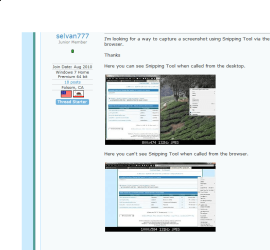
I'm looking for a way to capture a screenshot using Snipping Tool via the context menu of a browser.

Thanks

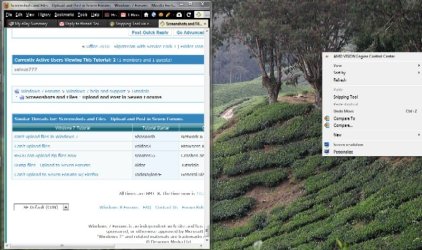
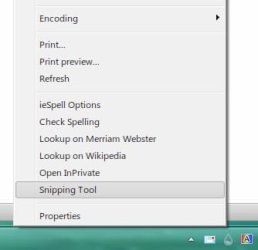
Here you can see Snipping Tool when called from the desktop.

untitled1.jpg

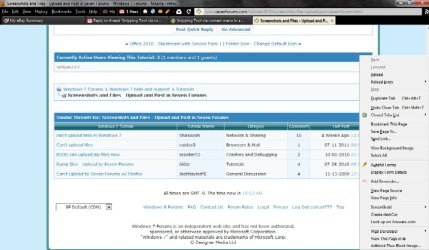
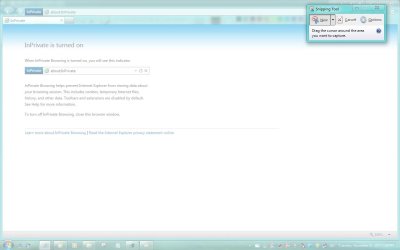
Here you can't see Snipping Tool when called from the browser.

untitled2.jpg
 

My Computer My Computer

At a glance

Windows 7 Home Premium 64bit
Computer type
Laptop
OS
Windows 7 Home Premium 64bit

My Computer My Computer

At a glance

Windows 7 Home Premium 64bit
Computer type
Laptop
OS
Windows 7 Home Premium 64bit
When I need snipping tool I go to start/accessories/snipping tool to activate it.
Here is a snip of your post #4
Capturesnipper.PNG

Is there something I am missing here?
 

My Computer My Computer

At a glance

Windows 7 Home Premium 64bitIntel(R)Core(TM)2 quad [email protected] 2.39GHz6GB DDR2 6400GeForce 8500/512MB
Computer Manufacturer/Model Number
HP M9077c
OS
Windows 7 Home Premium 64bit
CPU
Intel(R)Core(TM)2 quad [email protected] 2.39GHz
Motherboard
ASUSeK
Memory
6GB DDR2 6400
Graphics Card(s)
GeForce 8500/512MB
Sound Card
Realtek High Def Audio
Monitor(s) Displays
HP w2408 LCD 24" widescreen
Screen Resolution
1920x1200
Cooling
6 pack of Bud
Keyboard
MS wireless Inteli
Mouse
MS wireless Inteli
I'm not sure if we can add custom menu for browsers.

That's a shame, ought to be reported as a feature enhancement or bug.
I guess ScreenGrab remains than.

It's not a bug. Browser the interface is different each browser has it's own context menu. As for Firefox search for extensions https://addons.mozilla.org/en-US/fi...n+capture&cat=all&appver=9.0&platform=windows

When I need snipping tool I go to start/accessories/snipping tool to activate it.
Here is a snip of your post #4
View attachment 183798

Is there something I am missing here?

I think he is asking to add snipping tool to browser's context menu not to desktop context menu.
 

My Computer My Computer

At a glance

Windows 7 Ultimate - 64-bit | Windows 8 Pro -...Intel® Core™ i7 Processor 3,610QM (2.30Hz, 6M...8 GBNVIDIA® GeForce® GT 650M 2GB Graphics, Optimu...
Computer Manufacturer/Model Number
Samsung NP550P5C-S02IN
OS
Windows 7 Ultimate - 64-bit | Windows 8 Pro - 64-bit
CPU
Intel® Core™ i7 Processor 3,610QM (2.30Hz, 6MB L3 Cach
Memory
8 GB
Graphics Card(s)
NVIDIA® GeForce® GT 650M 2GB Graphics, Optimus™ techno
Sound Card
SoundAlive™ JBL 3 Speakers (With sub-Woofer)
Monitor(s) Displays
39.62cm (15.6) SuperBright 300nit HD+ LED Display
Screen Resolution
1,600 x 900, Anti-Reflective
Hard Drives
1TB S-ATA II Hard Drive (5,400RPM)
It's not a bug

None the less, I think it should have been written so it functions in at least IE.

Anyway, guess I'll look at Mozilla to see if it's possible since learning from you it's browser independent. Had a look at those FF extensions and see no mention of ScreenGrab, guess it is pretty old, but it is still working for me for now.
 

My Computer My Computer

At a glance

Windows 7 Home Premium 64bit
Computer type
Laptop
OS
Windows 7 Home Premium 64bit
I've successfully added Snipping Tool to the context menu using kintomaniac's ContextMenuTweaker. But, how do you make the Snipping Tool appear in the context menu when right-clicking in a browser?

Tried in IE and FF.

Windows 7 HP 64bit SP1
Warning: Maybe Shawn could check this out with approval or disapproval before anyone tries it. All I know is that it worked for me.

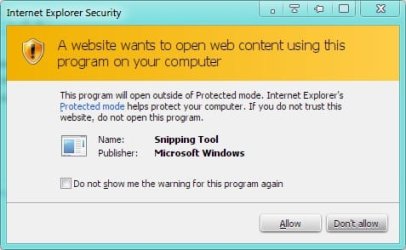
Just for kicks, I just did it so I know it's possible. I did get the security warning which can be checked to not show again.

Here's what I did, added entries to the Registry for the menuext.
Code:
Windows Registry Editor Version 5.00
[HKEY_CURRENT_USER\Software\Microsoft\Internet Explorer\MenuExt\Snipping Tool]
@="[URL]file://E:\\Program[/URL] Files\\Common Files\\Snip\\snip.htm"
"Contexts"=dword:00000001

You will have to change the path for where you place the snip.htm file. Note on my Win 7 partition, I'm E:

I placed the snip.htm code below into a created Snip folder in the path above. The code has to be copied and saved as snip.htm. Of course you can change the name of it but you would also have to change it in the registry code above.
snip.htm code
Code:
<SCRIPT LANGUAGE="JavaScript">
var shell = new ActiveXObject("WScript.Shell");
shell.run("SnippingTool.exe");
</SCRIPT>


Warning Dialog:
Untitled.jpg

Menu Item:
Untitled2.jpg

Snipping Tool
Untitled3.jpg
 

My Computer My Computer

At a glance

Windows 7 Professional 32-bit (6.1, Build 7600)Intel(R) Pentium(R) 4 3.00 GHz HT2.0 GBATI Mobility Radeon 9600 64MB
Computer Manufacturer/Model Number
Averatec 6130HS-20
OS
Windows 7 Professional 32-bit (6.1, Build 7600)
CPU
Intel(R) Pentium(R) 4 3.00 GHz HT
Memory
2.0 GB
Graphics Card(s)
ATI Mobility Radeon 9600 64MB
Sound Card
Realtek AC'97 Audio
Screen Resolution
1280 x 800
Hard Drives
Seagate 96023A 60GB 7200RPM -
Seagate FreeAgentDesktop 250GB
Cooling
20 Inch Box Fan
Mouse
Targus PAWM10 Wireless Optical Laptop Mouse
Cool, thanks, I got it in the context menu of IE v9 but clicking it does nothing although it works via run snippingtool.exe.

Thanks for bumping me to review the latest screen capture add-ons, this one, although slow, is great, ScreenGrab with online upload.
 

My Computer My Computer

At a glance

Windows 7 Home Premium 64bit
Computer type
Laptop
OS
Windows 7 Home Premium 64bit
Cool, thanks, I got it in the context menu of IE v9 but clicking it does nothing although it works via run snippingtool.exe.

Thanks for bumping me to review the latest screen capture add-ons, this one, although slow, is great, ScreenGrab with online upload.

Copy the Windows Registry Editor Version 5.00 code and save as snip.reg to your desktop. Right click the snip.reg and edit the code to match your path/setup. Right click the snip.reg file and Merge. Copy the snip.htm code and save as snip.htm and place it in the path/folder, matching what you edited in the Windows Registry Editor Version 5.00 snip.reg code. Restart IE

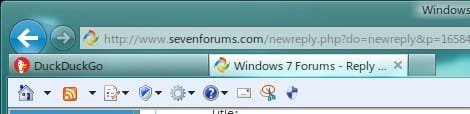
Although I don't use the command bar, you can also add it to that as well.
Untitled.jpg

If Brink approves, maybe he could make a tutorial on it. I'm lousy at explaining something.
 
Last edited:

My Computer My Computer

At a glance

Windows 7 Professional 32-bit (6.1, Build 7600)Intel(R) Pentium(R) 4 3.00 GHz HT2.0 GBATI Mobility Radeon 9600 64MB
Computer Manufacturer/Model Number
Averatec 6130HS-20
OS
Windows 7 Professional 32-bit (6.1, Build 7600)
CPU
Intel(R) Pentium(R) 4 3.00 GHz HT
Memory
2.0 GB
Graphics Card(s)
ATI Mobility Radeon 9600 64MB
Sound Card
Realtek AC'97 Audio
Screen Resolution
1280 x 800
Hard Drives
Seagate 96023A 60GB 7200RPM -
Seagate FreeAgentDesktop 250GB
Cooling
20 Inch Box Fan
Mouse
Targus PAWM10 Wireless Optical Laptop Mouse
Sorry! I can't believe I missed it!

Moved it from Program Files to Program Files\Common Files and it works like a champ. BTW, your tutorial was fine from the beginning.

You wouldn't happen to also know how to add it for Firefox 8, would you?
 

My Computer My Computer

At a glance

Windows 7 Home Premium 64bit
Computer type
Laptop
OS
Windows 7 Home Premium 64bit
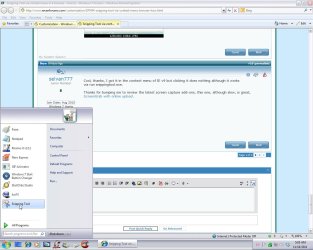
I pinned the Snipping Tool to the Start Menu.

Jim :geek:
 

Attachments

  • StartMenu-SnippingTool.jpg
    StartMenu-SnippingTool.jpg
    109.3 KB · Views: 8

My Computer My Computer

At a glance

Windows 7 Ultimate x86 w/SP13GB
Computer type
PC/Desktop
Computer Manufacturer/Model Number
Dell Dimension E521
OS
Windows 7 Ultimate x86 w/SP1
Memory
3GB
@ Hermitt not a fan of xp but can i know where you got that theme on win 7 from :geek:
 

My Computer My Computer

At a glance

Windows 10 Home 64BitIntel Core i5 10400 @ 2.90GHz8.00GB Single-Channel Unknown @ 1329MHz (16-2...
Computer type
PC/Desktop
Computer Manufacturer/Model Number
Self assembled
OS
Windows 10 Home 64Bit
CPU
Intel Core i5 10400 @ 2.90GHz
Motherboard
Intel Corporation DG41WV (PROCESSOR)
Memory
8.00GB Single-Channel Unknown @ 1329MHz (16-20-20-38)
Sound Card
Realtek High Definition Audio
Monitor(s) Displays
DELL E170S
Screen Resolution
1280x1024 pixels
Hard Drives
931GB TOSHIBA DT01ACA100 (SATA)
238GB TEAM TM8PS7256G (SATA SSD)
Case
Nothing Fancy
Cooling
Fans
Keyboard
A4 Tech Co LTD
Mouse
A4 Tech Co Ltd/Logitech
Internet Speed
25 Mbps
You wouldn't happen to also know how to add it for Firefox 8, would you?

Wow, it's been quite a few years since I worked with Firefox. I used to be big on customizing Firefox and hacked a few extensions together but it's been so long ago. On XP partition, I still have a very customized Firefox 1.5.0.12, lol. You could do just about anything with it back then. I even had clocks in the Titlebar, toolbar, statusbar and Tools menu, app buttons on toolbars etc. Not useful for anything but it was fun trying out different things just to see if they would work or not. I do remember that some/most required a combo of XUL, Js and CSS for styling as well as an install manifest. At one time there was an extension called UserChrome.js which could be used for changing alot of things. Another helpful extension was a customized Chrome Edit which contained tabs for XUL and UserChromeJs edits. All my old posts on MozForums were lost during the big server crash of '07. Have you tried the External Applications button extension?
 

My Computer My Computer

At a glance

Windows 7 Professional 32-bit (6.1, Build 7600)Intel(R) Pentium(R) 4 3.00 GHz HT2.0 GBATI Mobility Radeon 9600 64MB
Computer Manufacturer/Model Number
Averatec 6130HS-20
OS
Windows 7 Professional 32-bit (6.1, Build 7600)
CPU
Intel(R) Pentium(R) 4 3.00 GHz HT
Memory
2.0 GB
Graphics Card(s)
ATI Mobility Radeon 9600 64MB
Sound Card
Realtek AC'97 Audio
Screen Resolution
1280 x 800
Hard Drives
Seagate 96023A 60GB 7200RPM -
Seagate FreeAgentDesktop 250GB
Cooling
20 Inch Box Fan
Mouse
Targus PAWM10 Wireless Optical Laptop Mouse
thx :)
 

My Computer My Computer

At a glance

Windows 10 Home 64BitIntel Core i5 10400 @ 2.90GHz8.00GB Single-Channel Unknown @ 1329MHz (16-2...
Computer type
PC/Desktop
Computer Manufacturer/Model Number
Self assembled
OS
Windows 10 Home 64Bit
CPU
Intel Core i5 10400 @ 2.90GHz
Motherboard
Intel Corporation DG41WV (PROCESSOR)
Memory
8.00GB Single-Channel Unknown @ 1329MHz (16-20-20-38)
Sound Card
Realtek High Definition Audio
Monitor(s) Displays
DELL E170S
Screen Resolution
1280x1024 pixels
Hard Drives
931GB TOSHIBA DT01ACA100 (SATA)
238GB TEAM TM8PS7256G (SATA SSD)
Case
Nothing Fancy
Cooling
Fans
Keyboard
A4 Tech Co LTD
Mouse
A4 Tech Co Ltd/Logitech
Internet Speed
25 Mbps

My Computer My Computer

At a glance

Windows 7 Home Premium 64bit
Computer type
Laptop
OS
Windows 7 Home Premium 64bit
Back
Top