Windows 7 customize the Start Menu

snoopy64

New member
Hello,
i have to customize the start menu for one user. i have to remove everything except Shutdown button. i'm almost ready. the only icon that is still there, is the "computer" icon. how can i remove this icon from the start menu??? control panel etc are already gone.

i tried it already via the registry but i couldn't find out which user the right one is.
i removed the other icons by Group Policies (thanks for the great tutorials!!!).

can somebody tell me how i can remove the "computer"-icon from the start menu, please.

thx
chris
 

My Computer

OS
wind 7 32bit
it should be the first one in the list. under customize.
 

My Computer

Computer type
PC/Desktop
Computer Manufacturer/Model Number
Custom 2014 Upgrade.
OS
Windows 7 Ultimate x64 sp1
CPU
Intel i5 4590 Haswell refresh 3.30GHz(3.7GHz Turbo) Quad.
Motherboard
Gigabyte GA-H97-HD3 LGA 1150
Memory
G.Skill Ripjaws F3-12800CL9D-8GBRL 16GB (4x4GB) (1600MHz)
Graphics Card(s)
Gigabyte GeForce GT 740 4GB
Sound Card
Onboard. Realtek High Definition Audio
Monitor(s) Displays
Asus VW266H x 2
Screen Resolution
1920x1200 @ 60Hz
Hard Drives
Samsung 840 EVO 120GB SSD /
Samsung 850 Pro Series 1TB SSD x 2 /
Western Digital WD Black 1TB /
Western Digital VelociRaptor 150 GB.
PSU
Corsair 650 hx modular
Case
Cooler Master
Cooling
3x fans
Keyboard
Logitech Media Keyboard 600
Mouse
Logitech Performance Mouse MX
Internet Speed
Cable Broadband 100mbs/D, 2mbs/U
Antivirus
MSE, Malwarebytes, AdwCleaner, SUPERAntiSpyware
Browser
Mozilla Firefox, Google Chrome
Other Info
1GB DataRam
Hello snoopy

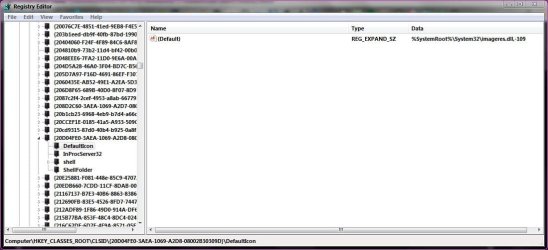
My computer icon in the start menu is controlled by the following key in the registry -
Code:
HKEY_CLASSES_ROOT\CLSID\{20D04FE0-3AEA-1069-A2D8-08002B30309D}

Expand this string, and find default icon and replace or remove.

Capture.JPG

Danny

Edit - Do you mean the icon at the top or the actual computer word link?
 

My Computer

Computer Manufacturer/Model Number
acer aspire 5935g
OS
Windows 7 Home Premium x64 SP1
CPU
intel(R)core(TM)2 duo CPU T6600 @ 2.20GHz
Motherboard
intel gm45/gm47 revision 07
Memory
3 gb ddr3
Graphics Card(s)
ati radeon hd4570/512mb
Monitor(s) Displays
lop156wh2-tle1 15.3 flat
Screen Resolution
1366x768
Hard Drives
OCZ-Agility3 60gig ssd
320gig external hdd
500gig external hdd
Mouse
Optical
Internet Speed
30Mbps Down/30Mbps Up
Hello danny,
thx for ur fast answer.
maybe my post was not enough detailed.
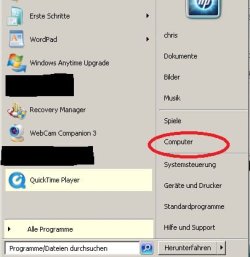
i made a screenshot form my laptop (but this is not the pc where i have to do it).
i have to remove the "red circle" ;-)
 

Attachments

  • start-menu.jpg
    start-menu.jpg
    42.6 KB · Views: 11

My Computer

OS
wind 7 32bit
here, right click properties on your task bar (as my computer is the first option) just select ' don't display this item '
& you're done. hope it helps :)
 
Last edited:

My Computer

Computer type
PC/Desktop
Computer Manufacturer/Model Number
Self assembled
OS
Windows 10 Home 64Bit
CPU
Intel Core i5 10400 @ 2.90GHz
Motherboard
Intel Corporation DG41WV (PROCESSOR)
Memory
8.00GB Single-Channel Unknown @ 1329MHz (16-20-20-38)
Sound Card
Realtek High Definition Audio
Monitor(s) Displays
DELL E170S
Screen Resolution
1280x1024 pixels
Hard Drives
931GB TOSHIBA DT01ACA100 (SATA)
238GB TEAM TM8PS7256G (SATA SSD)
Case
Nothing Fancy
Cooling
Fans
Keyboard
A4 Tech Co LTD
Mouse
A4 Tech Co Ltd/Logitech
Internet Speed
25 Mbps
thx for the answer.
is there a way in the group policies or in the registry where i can do it???
i'm the administrator and i have to customize the start menu for one user!
 

My Computer

OS
wind 7 32bit
well i'm not good at registries. ps. what i posted. did it work?
 

My Computer

Computer type
PC/Desktop
Computer Manufacturer/Model Number
Self assembled
OS
Windows 10 Home 64Bit
CPU
Intel Core i5 10400 @ 2.90GHz
Motherboard
Intel Corporation DG41WV (PROCESSOR)
Memory
8.00GB Single-Channel Unknown @ 1329MHz (16-20-20-38)
Sound Card
Realtek High Definition Audio
Monitor(s) Displays
DELL E170S
Screen Resolution
1280x1024 pixels
Hard Drives
931GB TOSHIBA DT01ACA100 (SATA)
238GB TEAM TM8PS7256G (SATA SSD)
Case
Nothing Fancy
Cooling
Fans
Keyboard
A4 Tech Co LTD
Mouse
A4 Tech Co Ltd/Logitech
Internet Speed
25 Mbps
i couldn't try it out. i'm on the other side of the world (thailand) it's 22.20.
the school is closed now. i have to try it tomorrow.
i would prefer the way via group policies or registry.
i prohibited already everything (right mouse, no taskbar, no nothing) and it's hard to disable your way without a right mouse and a taskbar.
in the worst case i have to undo all my changes and try it this way.

but i still hope, you or somebody else can tell me the way via group policies or registry.

i found a way in the tutorials, but this was just for the actual user (and i was the administrator) not for "normal" users or for a single user.
 

My Computer

OS
wind 7 32bit
okay, have you disabled search option in the start menu too?
 

My Computer

Computer type
PC/Desktop
Computer Manufacturer/Model Number
Self assembled
OS
Windows 10 Home 64Bit
CPU
Intel Core i5 10400 @ 2.90GHz
Motherboard
Intel Corporation DG41WV (PROCESSOR)
Memory
8.00GB Single-Channel Unknown @ 1329MHz (16-20-20-38)
Sound Card
Realtek High Definition Audio
Monitor(s) Displays
DELL E170S
Screen Resolution
1280x1024 pixels
Hard Drives
931GB TOSHIBA DT01ACA100 (SATA)
238GB TEAM TM8PS7256G (SATA SSD)
Case
Nothing Fancy
Cooling
Fans
Keyboard
A4 Tech Co LTD
Mouse
A4 Tech Co Ltd/Logitech
Internet Speed
25 Mbps
i disabled everything. the only thing what the user still has is the "computer"-icon and the shutdown/herunterfahren options.
 

My Computer

OS
wind 7 32bit
wow,alright :) do you have the option for 'right click - personalize' -the place where you get to change your themes? or have you disabled that too?
 

My Computer

Computer type
PC/Desktop
Computer Manufacturer/Model Number
Self assembled
OS
Windows 10 Home 64Bit
CPU
Intel Core i5 10400 @ 2.90GHz
Motherboard
Intel Corporation DG41WV (PROCESSOR)
Memory
8.00GB Single-Channel Unknown @ 1329MHz (16-20-20-38)
Sound Card
Realtek High Definition Audio
Monitor(s) Displays
DELL E170S
Screen Resolution
1280x1024 pixels
Hard Drives
931GB TOSHIBA DT01ACA100 (SATA)
238GB TEAM TM8PS7256G (SATA SSD)
Case
Nothing Fancy
Cooling
Fans
Keyboard
A4 Tech Co LTD
Mouse
A4 Tech Co Ltd/Logitech
Internet Speed
25 Mbps
as i said, there is no more right mouse :-)
that's the reason why i would prefer the registry or group policies. it would make the life much easier for me ;-)
 

My Computer

OS
wind 7 32bit
hmm :) well then we got to wait till someone else looks into the post cause like i said, im not good at registries :), so i'll have to learn.
 

My Computer

Computer type
PC/Desktop
Computer Manufacturer/Model Number
Self assembled
OS
Windows 10 Home 64Bit
CPU
Intel Core i5 10400 @ 2.90GHz
Motherboard
Intel Corporation DG41WV (PROCESSOR)
Memory
8.00GB Single-Channel Unknown @ 1329MHz (16-20-20-38)
Sound Card
Realtek High Definition Audio
Monitor(s) Displays
DELL E170S
Screen Resolution
1280x1024 pixels
Hard Drives
931GB TOSHIBA DT01ACA100 (SATA)
238GB TEAM TM8PS7256G (SATA SSD)
Case
Nothing Fancy
Cooling
Fans
Keyboard
A4 Tech Co LTD
Mouse
A4 Tech Co Ltd/Logitech
Internet Speed
25 Mbps
no worries, but thx for ur help!!

i found in the tutorials help. in this example they were talking about the current user not about a special user or the users (group)
 

My Computer

OS
wind 7 32bit
no worries, but thx for ur help!!

i found in the tutorials help. in this example they were talking about the current user not about a special user or the users (group)
 

My Computer

OS
wind 7 32bit
as i said, there is no more right mouse :-)
that's the reason why i would prefer the registry or group policies. it would make the life much easier for me ;-)

How about going through the control panel ,Taskbar and start menu
 

My Computer

Computer type
PC/Desktop
Computer Manufacturer/Model Number
Custom 2014 Upgrade.
OS
Windows 7 Ultimate x64 sp1
CPU
Intel i5 4590 Haswell refresh 3.30GHz(3.7GHz Turbo) Quad.
Motherboard
Gigabyte GA-H97-HD3 LGA 1150
Memory
G.Skill Ripjaws F3-12800CL9D-8GBRL 16GB (4x4GB) (1600MHz)
Graphics Card(s)
Gigabyte GeForce GT 740 4GB
Sound Card
Onboard. Realtek High Definition Audio
Monitor(s) Displays
Asus VW266H x 2
Screen Resolution
1920x1200 @ 60Hz
Hard Drives
Samsung 840 EVO 120GB SSD /
Samsung 850 Pro Series 1TB SSD x 2 /
Western Digital WD Black 1TB /
Western Digital VelociRaptor 150 GB.
PSU
Corsair 650 hx modular
Case
Cooler Master
Cooling
3x fans
Keyboard
Logitech Media Keyboard 600
Mouse
Logitech Performance Mouse MX
Internet Speed
Cable Broadband 100mbs/D, 2mbs/U
Antivirus
MSE, Malwarebytes, AdwCleaner, SUPERAntiSpyware
Browser
Mozilla Firefox, Google Chrome
Other Info
1GB DataRam
hi rustberger,
thx for the tip.
i'm not sure if i can really do this, but i think i have access from the computer to the control panel, from there i can access the the taskbar and there i can modify the start menu.

@koolkat77
if u meant the same, sorry that i didn't understand u.
i will tell u tomorrow my success.


@all
i still would prefer the way via registry or group policies.
if somebody knows a way, please let me know.

thx to all for ur help
 

My Computer

OS
wind 7 32bit
hi rustberger,
thx for the tip.
i'm not sure if i can really do this, but i think i have access from the computer to the control panel, from there i can access the the taskbar and there i can modify the start menu.

@koolkat77
if u meant the same, sorry that i didn't understand u.
i will tell u tomorrow my success.


@all
i still would prefer the way via registry or group policies.
if somebody knows a way, please let me know.

thx to all for ur help

well yes.. i meant the same thing :)
 

My Computer

Computer type
PC/Desktop
Computer Manufacturer/Model Number
Self assembled
OS
Windows 10 Home 64Bit
CPU
Intel Core i5 10400 @ 2.90GHz
Motherboard
Intel Corporation DG41WV (PROCESSOR)
Memory
8.00GB Single-Channel Unknown @ 1329MHz (16-20-20-38)
Sound Card
Realtek High Definition Audio
Monitor(s) Displays
DELL E170S
Screen Resolution
1280x1024 pixels
Hard Drives
931GB TOSHIBA DT01ACA100 (SATA)
238GB TEAM TM8PS7256G (SATA SSD)
Case
Nothing Fancy
Cooling
Fans
Keyboard
A4 Tech Co LTD
Mouse
A4 Tech Co Ltd/Logitech
Internet Speed
25 Mbps

My Computer

Computer type
PC/Desktop
Computer Manufacturer/Model Number
Self assembled
OS
Windows 10 Home 64Bit
CPU
Intel Core i5 10400 @ 2.90GHz
Motherboard
Intel Corporation DG41WV (PROCESSOR)
Memory
8.00GB Single-Channel Unknown @ 1329MHz (16-20-20-38)
Sound Card
Realtek High Definition Audio
Monitor(s) Displays
DELL E170S
Screen Resolution
1280x1024 pixels
Hard Drives
931GB TOSHIBA DT01ACA100 (SATA)
238GB TEAM TM8PS7256G (SATA SSD)
Case
Nothing Fancy
Cooling
Fans
Keyboard
A4 Tech Co LTD
Mouse
A4 Tech Co Ltd/Logitech
Internet Speed
25 Mbps
@koolkat77
i know this tutorial, but this goes into the HKEY_CURRENT_USER branch, but i don't want to remove the computer-icon for my administrator. i want to remove it for a special user or for the users group.
 

My Computer

OS
wind 7 32bit
Back
Top