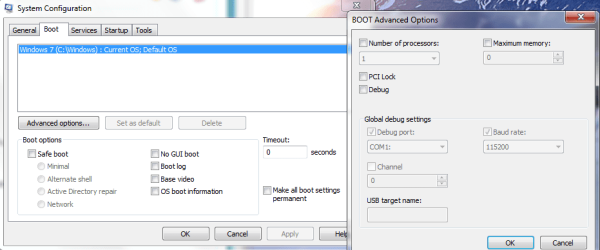
I have 4GB installed and only 2.93 usable.
I tried the solution given by rektalstab
1)Run
2)type "msconfig"
3)Go under the "boot" tab
4)click "advanced options" button
5)UNCHECK! "Maximum memory"
6)Reboot
This had no effect so i tried another "solution"
"open a cmd prompt (admin rights), type bcdedit.exe /SET PAE ForceEnable and reboot."
Still not fixed the problem.
I have enclosed two screenshots. If any more information is needed then please get in touch.
Thanks in advance for any help offered.
L Martin
I tried the solution given by rektalstab
1)Run
2)type "msconfig"
3)Go under the "boot" tab
4)click "advanced options" button
5)UNCHECK! "Maximum memory"
6)Reboot
This had no effect so i tried another "solution"
"open a cmd prompt (admin rights), type bcdedit.exe /SET PAE ForceEnable and reboot."
Still not fixed the problem.
I have enclosed two screenshots. If any more information is needed then please get in touch.
Thanks in advance for any help offered.
L Martin
Attachments


My Computer
At a glance
Windows 7 Home Premium 64Intel Core i3-2350M CPU @ 2.30GHz Sandy Bridge8.00 GB Dual-Channel DDR3 @ 665MHz1024MB GeForce GT 520M
- Computer Manufacturer/Model Number
- Lenovo Ideapad Z570
- OS
- Windows 7 Home Premium 64
- CPU
- Intel Core i3-2350M CPU @ 2.30GHz Sandy Bridge
- Motherboard
- LENOVO Emerald Lake
- Memory
- 8.00 GB Dual-Channel DDR3 @ 665MHz
- Graphics Card(s)
- 1024MB GeForce GT 520M
- Sound Card
- Realtek High Definition Audio Intel(R) Display Audio
- Monitor(s) Displays
- 15.6
- Screen Resolution
- 1366x768
- Hard Drives
- 500GB Seagate 2.5" SATA @5400 & a 600GB Lacie external HDD
- Mouse
- hp
- Internet Speed
- Never fast enough