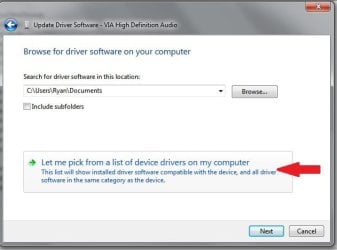
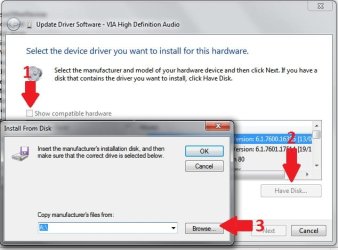
I have a USB 706 controller for PC. When I plug the controller into my USB Port windows has installed the windows driver for this controller. I do not wish to use this driver at all being I have the drivers disk to the controller. I have uninstalled the default windows driver in the device manager. Did the scan for hardware changes and it still uses the default windows driver. I would really like to use the driver that came with the controller and not the default windows driver.
The windows driver makes my controller read as a steering wheel in the latest Need for Speed The Run game. And its driving me crazy. Please let me know.
Thanks.
My Computer
At a glance
Windows 7 Ultimate x64AMD Athlon II X2 250 3.0GHz4096MB OCZ Gold 5-5-5-18 DDR2 800MHzECS Geforce GTS 250 512MB
Computer Manufacturer/Model Number
Custom Built
OS
Windows 7 Ultimate x64
CPU
AMD Athlon II X2 250 3.0GHz
Motherboard
Asus M3A76-CM AM2/AM2+/AM3
Memory
4096MB OCZ Gold 5-5-5-18 DDR2 800MHz
Graphics Card(s)
ECS Geforce GTS 250 512MB
Sound Card
Via High Def
Monitor(s) Displays
Acer X203H
Screen Resolution
1600x900 720p
Hard Drives
Western Digital Caviar 80GB 7200RPM
Seagate Barracuda 250GB 7200RPM
PSU
A-Power 680 Watt
Case
Power-Up Clear Sided
Cooling
120mm & 80mm System Fans, 140mm PSU Fan, Stock Fan
Keyboard
Microsoft Comfort Curve 2000
Mouse
OCZ Equalizer 7 button with Triple Threat button 2500 DPI
Internet Speed
12Mbps down 1.5Mbps up
Other Info
Plantronics Gamecom 777 USB 5.1 Surround Gaming Headset
How is the driver from the manufacturer packaged? There are 2 ways to install this driver (it should automatically replace the Microsoft driver)
1. By running the setup file on the manufacturers disk and restarting the computer.
2. By gong into the device manager and selecting the controller and updating its driver from there. You will not be able to do this with an .exe file the driver files will need to "unpacked".
Edit: When updating from the device manager I always browse for the driver manually to make sure the one I want is selected.
I dont even get a chance to install the driver on my own. Windows installs the driver automatically before i get a chance to install from the disk....But today I installed the driver from the disk before plugging in the controller and windows still installed the windows driver after i plugged in the controller....which makes no sense at all.
My Computer
At a glance
Windows 7 Ultimate x64AMD Athlon II X2 250 3.0GHz4096MB OCZ Gold 5-5-5-18 DDR2 800MHzECS Geforce GTS 250 512MB
Computer Manufacturer/Model Number
Custom Built
OS
Windows 7 Ultimate x64
CPU
AMD Athlon II X2 250 3.0GHz
Motherboard
Asus M3A76-CM AM2/AM2+/AM3
Memory
4096MB OCZ Gold 5-5-5-18 DDR2 800MHz
Graphics Card(s)
ECS Geforce GTS 250 512MB
Sound Card
Via High Def
Monitor(s) Displays
Acer X203H
Screen Resolution
1600x900 720p
Hard Drives
Western Digital Caviar 80GB 7200RPM
Seagate Barracuda 250GB 7200RPM
PSU
A-Power 680 Watt
Case
Power-Up Clear Sided
Cooling
120mm & 80mm System Fans, 140mm PSU Fan, Stock Fan
Keyboard
Microsoft Comfort Curve 2000
Mouse
OCZ Equalizer 7 button with Triple Threat button 2500 DPI
Internet Speed
12Mbps down 1.5Mbps up
Other Info
Plantronics Gamecom 777 USB 5.1 Surround Gaming Headset
If the manufacturers driver is unsigned, windows will always default to microsofts signed driver. You can install a new driver while the other driver still installed. It will be replaced.
Plug in the controller (please use the same USB port each time)
Let windows install the driver if it needs to, although it should already be there.
Open the device manager
Right click on your controller in the list and select properties
Click the "Driver" tab at the top of the properties screen
Click the update driver button
Browse for the driver manually and install it.
Have you gone to the device manager, chosen the device's properties menu, select uninstall. It should ask you if you want to uninstall the driver software. Choose yes then OK.
Samsung 850 Pro 256GB (OS), Samsung 2x 128GB 840 Pro SSD in RAID0, 3x WD Blue 6Gb/s 1TB RAID0, WD 2TB Black external USB 3.0, 2TB WD20EARS Green external USB 3.0, 2x 500GB Seagate and 1 750 GB external USB, 1x 350GB external USB3
Have you gone to the device manager, chosen the device's properties menu, select uninstall. It should ask you if you want to uninstall the driver software. Choose yes then OK.
Have you gone to the device manager, chosen the device's properties menu, select uninstall. It should ask you if you want to uninstall the driver software. Choose yes then OK.
I read your post accurately. My point was did you select to "delete the driver software for this device" when you did so?
If you still have problems, in the device manager, choose update driver, choose location, and point it to the disc or disk where you have the manufacturers driver and inf file.
Samsung 850 Pro 256GB (OS), Samsung 2x 128GB 840 Pro SSD in RAID0, 3x WD Blue 6Gb/s 1TB RAID0, WD 2TB Black external USB 3.0, 2TB WD20EARS Green external USB 3.0, 2x 500GB Seagate and 1 750 GB external USB, 1x 350GB external USB3
Samsung 850 Pro 256GB (OS), Samsung 2x 128GB 840 Pro SSD in RAID0, 3x WD Blue 6Gb/s 1TB RAID0, WD 2TB Black external USB 3.0, 2TB WD20EARS Green external USB 3.0, 2x 500GB Seagate and 1 750 GB external USB, 1x 350GB external USB3
If you are getting the message that "this driver is up to date" when clicking the update driver button, you are not searching for it manually but letting windows choose the driver to install.