How do I uninstall a windows driver permanantly?

majicninja

New member
Local time
5:17 PM
Messages
29
Location
Marion IN
I have a USB 706 controller for PC. When I plug the controller into my USB Port windows has installed the windows driver for this controller. I do not wish to use this driver at all being I have the drivers disk to the controller. I have uninstalled the default windows driver in the device manager. Did the scan for hardware changes and it still uses the default windows driver. I would really like to use the driver that came with the controller and not the default windows driver.

The windows driver makes my controller read as a steering wheel in the latest Need for Speed The Run game. And its driving me crazy. Please let me know.

Thanks.
 

My Computer My Computer

At a glance

Windows 7 Ultimate x64AMD Athlon II X2 250 3.0GHz4096MB OCZ Gold 5-5-5-18 DDR2 800MHzECS Geforce GTS 250 512MB
Computer Manufacturer/Model Number
Custom Built
OS
Windows 7 Ultimate x64
CPU
AMD Athlon II X2 250 3.0GHz
Motherboard
Asus M3A76-CM AM2/AM2+/AM3
Memory
4096MB OCZ Gold 5-5-5-18 DDR2 800MHz
Graphics Card(s)
ECS Geforce GTS 250 512MB
Sound Card
Via High Def
Monitor(s) Displays
Acer X203H
Screen Resolution
1600x900 720p
Hard Drives
Western Digital Caviar 80GB 7200RPM
Seagate Barracuda 250GB 7200RPM
PSU
A-Power 680 Watt
Case
Power-Up Clear Sided
Cooling
120mm & 80mm System Fans, 140mm PSU Fan, Stock Fan
Keyboard
Microsoft Comfort Curve 2000
Mouse
OCZ Equalizer 7 button with Triple Threat button 2500 DPI
Internet Speed
12Mbps down 1.5Mbps up
Other Info
Plantronics Gamecom 777 USB 5.1 Surround Gaming Headset
How is the driver from the manufacturer packaged? There are 2 ways to install this driver (it should automatically replace the Microsoft driver)

1. By running the setup file on the manufacturers disk and restarting the computer.
2. By gong into the device manager and selecting the controller and updating its driver from there. You will not be able to do this with an .exe file the driver files will need to "unpacked".

Edit: When updating from the device manager I always browse for the driver manually to make sure the one I want is selected.
 

My Computer My Computer

At a glance

Windows 7 Ultimate x64Intel Core2 Quad Q8300 2.5GhzKingston HyperX 4x1GB DDR2 1066MhzAsus/Nvidia 9500GT 1GB
Computer type
PC/Desktop
Computer Manufacturer/Model Number
Self Build
OS
Windows 7 Ultimate x64
CPU
Intel Core2 Quad Q8300 2.5Ghz
Motherboard
Asus P5QD Turbo
Memory
Kingston HyperX 4x1GB DDR2 1066Mhz
Graphics Card(s)
Asus/Nvidia 9500GT 1GB
Sound Card
On-Board HD
Monitor(s) Displays
22" Widescreen TFT
Screen Resolution
1920x1080
Hard Drives
2x 320Gb Seagate SATAII RAID 0
2x 80Gb Seagate SATAII RAID 0
1x 1tb hybrid (8gb ssd)
PSU
650w
Case
ATX
Cooling
140mm front, 120mm Rear, 80mm Chipset + stock CPU and GPU
Keyboard
Plastic one
Mouse
Plastic one
Internet Speed
4Mbps
Other Info
Laptop: HP Elitebook 2560p
i5 @2.7Ghz 4GB DDR3
I dont even get a chance to install the driver on my own. Windows installs the driver automatically before i get a chance to install from the disk....But today I installed the driver from the disk before plugging in the controller and windows still installed the windows driver after i plugged in the controller....which makes no sense at all.
 

My Computer My Computer

At a glance

Windows 7 Ultimate x64AMD Athlon II X2 250 3.0GHz4096MB OCZ Gold 5-5-5-18 DDR2 800MHzECS Geforce GTS 250 512MB
Computer Manufacturer/Model Number
Custom Built
OS
Windows 7 Ultimate x64
CPU
AMD Athlon II X2 250 3.0GHz
Motherboard
Asus M3A76-CM AM2/AM2+/AM3
Memory
4096MB OCZ Gold 5-5-5-18 DDR2 800MHz
Graphics Card(s)
ECS Geforce GTS 250 512MB
Sound Card
Via High Def
Monitor(s) Displays
Acer X203H
Screen Resolution
1600x900 720p
Hard Drives
Western Digital Caviar 80GB 7200RPM
Seagate Barracuda 250GB 7200RPM
PSU
A-Power 680 Watt
Case
Power-Up Clear Sided
Cooling
120mm & 80mm System Fans, 140mm PSU Fan, Stock Fan
Keyboard
Microsoft Comfort Curve 2000
Mouse
OCZ Equalizer 7 button with Triple Threat button 2500 DPI
Internet Speed
12Mbps down 1.5Mbps up
Other Info
Plantronics Gamecom 777 USB 5.1 Surround Gaming Headset
If the manufacturers driver is unsigned, windows will always default to microsofts signed driver. You can install a new driver while the other driver still installed. It will be replaced.

Plug in the controller (please use the same USB port each time)

Let windows install the driver if it needs to, although it should already be there.
Open the device manager
Right click on your controller in the list and select properties
Click the "Driver" tab at the top of the properties screen
Click the update driver button
Browse for the driver manually and install it.

Please report back any error messages.
 

My Computer My Computer

At a glance

Windows 7 Ultimate x64Intel Core2 Quad Q8300 2.5GhzKingston HyperX 4x1GB DDR2 1066MhzAsus/Nvidia 9500GT 1GB
Computer type
PC/Desktop
Computer Manufacturer/Model Number
Self Build
OS
Windows 7 Ultimate x64
CPU
Intel Core2 Quad Q8300 2.5Ghz
Motherboard
Asus P5QD Turbo
Memory
Kingston HyperX 4x1GB DDR2 1066Mhz
Graphics Card(s)
Asus/Nvidia 9500GT 1GB
Sound Card
On-Board HD
Monitor(s) Displays
22" Widescreen TFT
Screen Resolution
1920x1080
Hard Drives
2x 320Gb Seagate SATAII RAID 0
2x 80Gb Seagate SATAII RAID 0
1x 1tb hybrid (8gb ssd)
PSU
650w
Case
ATX
Cooling
140mm front, 120mm Rear, 80mm Chipset + stock CPU and GPU
Keyboard
Plastic one
Mouse
Plastic one
Internet Speed
4Mbps
Other Info
Laptop: HP Elitebook 2560p
i5 @2.7Ghz 4GB DDR3
I have done this and windows states the driver is currently up to date.
 

My Computer My Computer

At a glance

Windows 7 Ultimate x64AMD Athlon II X2 250 3.0GHz4096MB OCZ Gold 5-5-5-18 DDR2 800MHzECS Geforce GTS 250 512MB
Computer Manufacturer/Model Number
Custom Built
OS
Windows 7 Ultimate x64
CPU
AMD Athlon II X2 250 3.0GHz
Motherboard
Asus M3A76-CM AM2/AM2+/AM3
Memory
4096MB OCZ Gold 5-5-5-18 DDR2 800MHz
Graphics Card(s)
ECS Geforce GTS 250 512MB
Sound Card
Via High Def
Monitor(s) Displays
Acer X203H
Screen Resolution
1600x900 720p
Hard Drives
Western Digital Caviar 80GB 7200RPM
Seagate Barracuda 250GB 7200RPM
PSU
A-Power 680 Watt
Case
Power-Up Clear Sided
Cooling
120mm & 80mm System Fans, 140mm PSU Fan, Stock Fan
Keyboard
Microsoft Comfort Curve 2000
Mouse
OCZ Equalizer 7 button with Triple Threat button 2500 DPI
Internet Speed
12Mbps down 1.5Mbps up
Other Info
Plantronics Gamecom 777 USB 5.1 Surround Gaming Headset
I'd be inclined to just install the manufacturer's driver, choosing a custom install if it offers it.

Doing that you sometimes are given the option of uninstalling the old driver, and then carrying a clean install of the new one.
 

My Computer My Computer

At a glance

Windows 7 Ultimate SP1 64-BitIntel Core i7 870 @ 2.93GHz8Gb Dual-Channel DDR3 @ 664MHznVidia GeForce GTX 460 1024MB dedicated RAM
Computer Manufacturer/Model Number
HP Pavilion Elite 495UK
OS
Windows 7 Ultimate SP1 64-Bit
CPU
Intel Core i7 870 @ 2.93GHz
Motherboard
MSI 2A9C (CPU1)
Memory
8Gb Dual-Channel DDR3 @ 664MHz
Graphics Card(s)
nVidia GeForce GTX 460 1024MB dedicated RAM
Sound Card
Realtek HD Audio
Monitor(s) Displays
HP2310i
Screen Resolution
1920 x 1080
Hard Drives
1x1954GB Hitachi HDS22020ALA 330 (RAID), 1x1954GB Hitachi External for backup and storage
PSU
460W
Case
HP Elite
Cooling
Air cooled
Keyboard
Logitech K750 solar-powered keyboard
Mouse
Logitech Wireless M180 mouse
Internet Speed
2Mb
Other Info
Pure Avanti Flow Internet Radio with iPod Dock, 64Gb iPod, HP USB Speakers, Sony MDR-V500 Headphones, Sony Vaio F-Series Laptop
Have you gone to the device manager, chosen the device's properties menu, select uninstall. It should ask you if you want to uninstall the driver software. Choose yes then OK.
 

My Computer My Computer

At a glance

Windows 10 Pro. EFI boot partition, full EFI ...i7 4770k 4.4GHz (44-44-43-43 turbo) @ 1.248V16GB (8GBx2) @2200 MHz G.skill Sniper 10-11-1...MSI GTX 970 Gaming 4G
Computer type
PC/Desktop
Computer Manufacturer/Model Number
Home built (GeneO industries)/Model 4
OS
Windows 10 Pro. EFI boot partition, full EFI boot
CPU
i7 4770k 4.4GHz (44-44-43-43 turbo) @ 1.248V
Motherboard
ASUS Maximus VI Hero
Memory
16GB (8GBx2) @2200 MHz G.skill Sniper 10-11-10-30-1, 1.6V
Graphics Card(s)
MSI GTX 970 Gaming 4G
Sound Card
Onboard SupremeFX Audio
Monitor(s) Displays
NEC Spectraview 2490WUXi-SV
Screen Resolution
1920 x 1200
Hard Drives
Samsung 850 Pro 256GB (OS), Samsung 2x 128GB 840 Pro SSD in RAID0, 3x WD Blue 6Gb/s 1TB RAID0, WD 2TB Black external USB 3.0, 2TB WD20EARS Green external USB 3.0, 2x 500GB Seagate and 1 750 GB external USB, 1x 350GB external USB3
PSU
Seasonic X-850 (2012 KM3 model)
Case
Fractal Design Define R4
Cooling
NH-D14, NF-F12, NF-A15; NF-P14, NF-P12,NF-A14, S12A PWM
Keyboard
Cooler Master Storm Quickfire Rapid - Brown
Mouse
Logitech G602
Internet Speed
126.4 Mb/s down, 24.3 Mb/s up
Other Info
USB 3.0 x8 , SATA III x8, eSATA, USB 2.0 x6. Samsung DVD R/W drive.

WEI: CPU 7.8, Memory 7.9, Graphics 7.9, Disk 7.9
Have you gone to the device manager, chosen the device's properties menu, select uninstall. It should ask you if you want to uninstall the driver software. Choose yes then OK.

If you read the post accurately it states that i uninstalled it from device manager.
 

My Computer My Computer

At a glance

Windows 7 Ultimate x64AMD Athlon II X2 250 3.0GHz4096MB OCZ Gold 5-5-5-18 DDR2 800MHzECS Geforce GTS 250 512MB
Computer Manufacturer/Model Number
Custom Built
OS
Windows 7 Ultimate x64
CPU
AMD Athlon II X2 250 3.0GHz
Motherboard
Asus M3A76-CM AM2/AM2+/AM3
Memory
4096MB OCZ Gold 5-5-5-18 DDR2 800MHz
Graphics Card(s)
ECS Geforce GTS 250 512MB
Sound Card
Via High Def
Monitor(s) Displays
Acer X203H
Screen Resolution
1600x900 720p
Hard Drives
Western Digital Caviar 80GB 7200RPM
Seagate Barracuda 250GB 7200RPM
PSU
A-Power 680 Watt
Case
Power-Up Clear Sided
Cooling
120mm & 80mm System Fans, 140mm PSU Fan, Stock Fan
Keyboard
Microsoft Comfort Curve 2000
Mouse
OCZ Equalizer 7 button with Triple Threat button 2500 DPI
Internet Speed
12Mbps down 1.5Mbps up
Other Info
Plantronics Gamecom 777 USB 5.1 Surround Gaming Headset
Have you gone to the device manager, chosen the device's properties menu, select uninstall. It should ask you if you want to uninstall the driver software. Choose yes then OK.

If you read the post accurately it states that i uninstalled it from device manager.


I read your post accurately. My point was did you select to "delete the driver software for this device" when you did so?

If you still have problems, in the device manager, choose update driver, choose location, and point it to the disc or disk where you have the manufacturers driver and inf file.
 

My Computer My Computer

At a glance

Windows 10 Pro. EFI boot partition, full EFI ...i7 4770k 4.4GHz (44-44-43-43 turbo) @ 1.248V16GB (8GBx2) @2200 MHz G.skill Sniper 10-11-1...MSI GTX 970 Gaming 4G
Computer type
PC/Desktop
Computer Manufacturer/Model Number
Home built (GeneO industries)/Model 4
OS
Windows 10 Pro. EFI boot partition, full EFI boot
CPU
i7 4770k 4.4GHz (44-44-43-43 turbo) @ 1.248V
Motherboard
ASUS Maximus VI Hero
Memory
16GB (8GBx2) @2200 MHz G.skill Sniper 10-11-10-30-1, 1.6V
Graphics Card(s)
MSI GTX 970 Gaming 4G
Sound Card
Onboard SupremeFX Audio
Monitor(s) Displays
NEC Spectraview 2490WUXi-SV
Screen Resolution
1920 x 1200
Hard Drives
Samsung 850 Pro 256GB (OS), Samsung 2x 128GB 840 Pro SSD in RAID0, 3x WD Blue 6Gb/s 1TB RAID0, WD 2TB Black external USB 3.0, 2TB WD20EARS Green external USB 3.0, 2x 500GB Seagate and 1 750 GB external USB, 1x 350GB external USB3
PSU
Seasonic X-850 (2012 KM3 model)
Case
Fractal Design Define R4
Cooling
NH-D14, NF-F12, NF-A15; NF-P14, NF-P12,NF-A14, S12A PWM
Keyboard
Cooler Master Storm Quickfire Rapid - Brown
Mouse
Logitech G602
Internet Speed
126.4 Mb/s down, 24.3 Mb/s up
Other Info
USB 3.0 x8 , SATA III x8, eSATA, USB 2.0 x6. Samsung DVD R/W drive.

WEI: CPU 7.8, Memory 7.9, Graphics 7.9, Disk 7.9
yes i did...the post states that.
 

My Computer My Computer

At a glance

Windows 7 Ultimate x64AMD Athlon II X2 250 3.0GHz4096MB OCZ Gold 5-5-5-18 DDR2 800MHzECS Geforce GTS 250 512MB
Computer Manufacturer/Model Number
Custom Built
OS
Windows 7 Ultimate x64
CPU
AMD Athlon II X2 250 3.0GHz
Motherboard
Asus M3A76-CM AM2/AM2+/AM3
Memory
4096MB OCZ Gold 5-5-5-18 DDR2 800MHz
Graphics Card(s)
ECS Geforce GTS 250 512MB
Sound Card
Via High Def
Monitor(s) Displays
Acer X203H
Screen Resolution
1600x900 720p
Hard Drives
Western Digital Caviar 80GB 7200RPM
Seagate Barracuda 250GB 7200RPM
PSU
A-Power 680 Watt
Case
Power-Up Clear Sided
Cooling
120mm & 80mm System Fans, 140mm PSU Fan, Stock Fan
Keyboard
Microsoft Comfort Curve 2000
Mouse
OCZ Equalizer 7 button with Triple Threat button 2500 DPI
Internet Speed
12Mbps down 1.5Mbps up
Other Info
Plantronics Gamecom 777 USB 5.1 Surround Gaming Headset
yes i did...the post states that.

Your post did not state that you also choose to uninstall the driver software, only the device. Or at least you were not clear that is what you did.

Did you uninstall the device and software driver then try the manufacturers install before rebooting?
 

My Computer My Computer

At a glance

Windows 10 Pro. EFI boot partition, full EFI ...i7 4770k 4.4GHz (44-44-43-43 turbo) @ 1.248V16GB (8GBx2) @2200 MHz G.skill Sniper 10-11-1...MSI GTX 970 Gaming 4G
Computer type
PC/Desktop
Computer Manufacturer/Model Number
Home built (GeneO industries)/Model 4
OS
Windows 10 Pro. EFI boot partition, full EFI boot
CPU
i7 4770k 4.4GHz (44-44-43-43 turbo) @ 1.248V
Motherboard
ASUS Maximus VI Hero
Memory
16GB (8GBx2) @2200 MHz G.skill Sniper 10-11-10-30-1, 1.6V
Graphics Card(s)
MSI GTX 970 Gaming 4G
Sound Card
Onboard SupremeFX Audio
Monitor(s) Displays
NEC Spectraview 2490WUXi-SV
Screen Resolution
1920 x 1200
Hard Drives
Samsung 850 Pro 256GB (OS), Samsung 2x 128GB 840 Pro SSD in RAID0, 3x WD Blue 6Gb/s 1TB RAID0, WD 2TB Black external USB 3.0, 2TB WD20EARS Green external USB 3.0, 2x 500GB Seagate and 1 750 GB external USB, 1x 350GB external USB3
PSU
Seasonic X-850 (2012 KM3 model)
Case
Fractal Design Define R4
Cooling
NH-D14, NF-F12, NF-A15; NF-P14, NF-P12,NF-A14, S12A PWM
Keyboard
Cooler Master Storm Quickfire Rapid - Brown
Mouse
Logitech G602
Internet Speed
126.4 Mb/s down, 24.3 Mb/s up
Other Info
USB 3.0 x8 , SATA III x8, eSATA, USB 2.0 x6. Samsung DVD R/W drive.

WEI: CPU 7.8, Memory 7.9, Graphics 7.9, Disk 7.9
If you are getting the message that "this driver is up to date" when clicking the update driver button, you are not searching for it manually but letting windows choose the driver to install.

 

My Computer My Computer

At a glance

Windows 7 Ultimate x64Intel Core2 Quad Q8300 2.5GhzKingston HyperX 4x1GB DDR2 1066MhzAsus/Nvidia 9500GT 1GB
Computer type
PC/Desktop
Computer Manufacturer/Model Number
Self Build
OS
Windows 7 Ultimate x64
CPU
Intel Core2 Quad Q8300 2.5Ghz
Motherboard
Asus P5QD Turbo
Memory
Kingston HyperX 4x1GB DDR2 1066Mhz
Graphics Card(s)
Asus/Nvidia 9500GT 1GB
Sound Card
On-Board HD
Monitor(s) Displays
22" Widescreen TFT
Screen Resolution
1920x1080
Hard Drives
2x 320Gb Seagate SATAII RAID 0
2x 80Gb Seagate SATAII RAID 0
1x 1tb hybrid (8gb ssd)
PSU
650w
Case
ATX
Cooling
140mm front, 120mm Rear, 80mm Chipset + stock CPU and GPU
Keyboard
Plastic one
Mouse
Plastic one
Internet Speed
4Mbps
Other Info
Laptop: HP Elitebook 2560p
i5 @2.7Ghz 4GB DDR3
When i choose to do it automatically it says driver is up to date. When i select manually it says driver is up to date.
 

My Computer My Computer

At a glance

Windows 7 Ultimate x64AMD Athlon II X2 250 3.0GHz4096MB OCZ Gold 5-5-5-18 DDR2 800MHzECS Geforce GTS 250 512MB
Computer Manufacturer/Model Number
Custom Built
OS
Windows 7 Ultimate x64
CPU
AMD Athlon II X2 250 3.0GHz
Motherboard
Asus M3A76-CM AM2/AM2+/AM3
Memory
4096MB OCZ Gold 5-5-5-18 DDR2 800MHz
Graphics Card(s)
ECS Geforce GTS 250 512MB
Sound Card
Via High Def
Monitor(s) Displays
Acer X203H
Screen Resolution
1600x900 720p
Hard Drives
Western Digital Caviar 80GB 7200RPM
Seagate Barracuda 250GB 7200RPM
PSU
A-Power 680 Watt
Case
Power-Up Clear Sided
Cooling
120mm & 80mm System Fans, 140mm PSU Fan, Stock Fan
Keyboard
Microsoft Comfort Curve 2000
Mouse
OCZ Equalizer 7 button with Triple Threat button 2500 DPI
Internet Speed
12Mbps down 1.5Mbps up
Other Info
Plantronics Gamecom 777 USB 5.1 Surround Gaming Headset
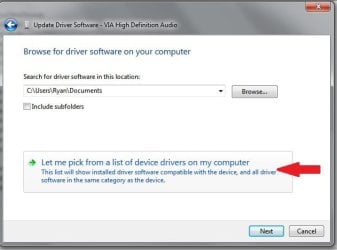
Are you browsing to the location of the .inf and associated files or just letting windows search the specified location?

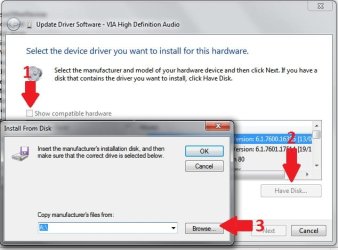
Try this:
Update Driver 1.jpg

Update Driver 2.jpg
1. Uncheck the compatible hardware box
2. Select Have Disk
3. browse to the folder with the correct .inf file
 

My Computer My Computer

At a glance

Windows 7 Ultimate x64Intel Core2 Quad Q8300 2.5GhzKingston HyperX 4x1GB DDR2 1066MhzAsus/Nvidia 9500GT 1GB
Computer type
PC/Desktop
Computer Manufacturer/Model Number
Self Build
OS
Windows 7 Ultimate x64
CPU
Intel Core2 Quad Q8300 2.5Ghz
Motherboard
Asus P5QD Turbo
Memory
Kingston HyperX 4x1GB DDR2 1066Mhz
Graphics Card(s)
Asus/Nvidia 9500GT 1GB
Sound Card
On-Board HD
Monitor(s) Displays
22" Widescreen TFT
Screen Resolution
1920x1080
Hard Drives
2x 320Gb Seagate SATAII RAID 0
2x 80Gb Seagate SATAII RAID 0
1x 1tb hybrid (8gb ssd)
PSU
650w
Case
ATX
Cooling
140mm front, 120mm Rear, 80mm Chipset + stock CPU and GPU
Keyboard
Plastic one
Mouse
Plastic one
Internet Speed
4Mbps
Other Info
Laptop: HP Elitebook 2560p
i5 @2.7Ghz 4GB DDR3
Back
Top