is overclocking safe for my pc

Most games 30. Some 60fps
 

My Computer

Computer type
PC/Desktop
Computer Manufacturer/Model Number
Built by badgers!!!
OS
Windows 7 Ultimate x64, & Mac OS X 10.9.2
CPU
Intel Core i5 2500k
Motherboard
Asus P8z68 LE
Memory
Corsair Vengence 8gb 1866mhz
Graphics Card(s)
Nvidia GTX 770 OC
Monitor(s) Displays
2x ASUS LED 22" IPS
Screen Resolution
3840x1080
Hard Drives
240GB Crucial M500 SSD
120gb Corsair Force 3 SSD
1TB Western Digital
PSU
Corsair HX650w Modular
Case
Corsair Air 540
Cooling
Corsair H60 Push/Pull
Keyboard
Corsair K70/ Logitech G27 wheel
Mouse
Saitek R.A.T 9
Internet Speed
Too slow!
Other Info
AMD fusion E350N Home server-Windows Home Server 2011 (also made by badgers!)
2011 Macbook 2.4ghz Core2Duo, 4gb ddr3, 120gb Ocz Vertex SSD
i know this like i said im planning on upgrading my video card and cpu but with that mobo would it be worth it

Would this rig be for sale on Craigs list perhaps?

Either way it's not really worth it. Good money after bad tbh. A 360 would probably end up being cheaper.


gpu is the video card correct?

Correct. Graphics Processing Unit.
 

My Computer

Computer type
PC/Desktop
Computer Manufacturer/Model Number
Systems by SmartEyeball
OS
8 Pro x64
CPU
i7 3770K 4.6GHz
Motherboard
ASUS P8Z77 WS
Memory
16GB G.Skill Trident X 2666mhz
Graphics Card(s)
x2 EVGA 780 Ti Superclocked SLI
Sound Card
SB X-FI Surround 5.1 PRO USB / ATH-AD900 Headphones
Monitor(s) Displays
x3 Dell U2410 / 58" Samsung
Screen Resolution
5760*1200/ 1920*1200
Hard Drives
2x Intel 520 240GB (RAID 0) * 2x WD Caviar Blacks 2TB (RAID 0) * 2TB WD Caviar Black * Sony Optirac DVD
PSU
Silverstone Strider Evolution 1200W
Case
Thermaltake Level 10 GT Snow Edition
Cooling
Noctua NH-D14
Keyboard
Topre Realforce // Ducky Shine MX Black // Filco Ninja TKL
Mouse
Thermaltake Theron (Highly Recommended) + Razer Imperator
Antivirus
MSE
Browser
IE, FF, WaterFox
Other Info
GT Extreme V2 Sim Racing Cockpit + 40" LCD and K/B Mouse stand ▼
Fanatec CSR Elite Wheel + Clubsport V1 Pedals + CSR shifter/7G-H ▼Saitek X52 Pro ▼ TrackIR 5 Pro
Buttkicker v2 Seat Rumbler with Dedicated 5.1 and Sub Woofer attached to frame ▼
=
Bloody Big Grin
no it aint for sale on Craigs list anymore but that is my pc you found probably he hasn't toke it down
i own a 360 which sux because red ring of death hopefully after i get it back from its reball it dont catch it for a very long time
limit my game play and use this pc and the 360 back and forth
so you say it isnt worth upgrading?
 

My Computer

OS
Microsoft Windows 7 Home Premium 32-bit
CPU
Intel(R) Pentium(R) D CPU 3.40GHz
Motherboard
Wolfdale 1333-D667 P1.40 w/ onboard sound and LAN, 4USB port
Memory
3.00 GB
Graphics Card(s)
mobo
Sound Card
High Definition Audio Device
Hard Drives
Western Digital 320GB-WDC WD3200AAKS-00VYA0 ATA Device

Seagate FA GoFlex Desk USB Device-External hard disk media-1.82 TB

(1) WDC WD3200AAKS-00VYA0 ATA Device (2) Seagate FA GoFlex Desk USB Device
Keyboard
emachines
Mouse
laser lol
Internet Speed
new speed http://www.speedtest.net/result/1778078629.png
It really would only be worth it if you managed to get a great deal on a used Q6660, Q8XX or a Q9XX 775 socket cpu.

Considering it's age, the BIOS may not actually be updated enough to accommodate the 'newer' CPU's. I couldn't get enough info about your board to be definite.

Second is the video card - there are plenty of cheap ones to be had - but - the PSU that's in the thing looks like a generic 500W.


'500W' aside, The 12v amperage capabilities required to run a lot of cards would outstrip that PSU's capability. Amps count more than overall wattage in some cases. Generic PSU's especially. There's a 50/50 chance that a new card would either not work from the outset, or it could easily blow up your PSU under load. This little trick can happen at any time :rolleyes:

Generic PSU's also have the nasty habit of taking other devices out with them. ie mobo, HDD's, card etc


If you can find a great deal on both a 'newer' CPU and used GPU and are willing to the risk that the mobo supports the chip and the GPU won't blow the PSU - whether or not it's worth it is up to you really.


Personally, I would (and have) called it a day on a machine with those specs. Doable, but still good money after bad tbh.
 

My Computer

Computer type
PC/Desktop
Computer Manufacturer/Model Number
Systems by SmartEyeball
OS
8 Pro x64
CPU
i7 3770K 4.6GHz
Motherboard
ASUS P8Z77 WS
Memory
16GB G.Skill Trident X 2666mhz
Graphics Card(s)
x2 EVGA 780 Ti Superclocked SLI
Sound Card
SB X-FI Surround 5.1 PRO USB / ATH-AD900 Headphones
Monitor(s) Displays
x3 Dell U2410 / 58" Samsung
Screen Resolution
5760*1200/ 1920*1200
Hard Drives
2x Intel 520 240GB (RAID 0) * 2x WD Caviar Blacks 2TB (RAID 0) * 2TB WD Caviar Black * Sony Optirac DVD
PSU
Silverstone Strider Evolution 1200W
Case
Thermaltake Level 10 GT Snow Edition
Cooling
Noctua NH-D14
Keyboard
Topre Realforce // Ducky Shine MX Black // Filco Ninja TKL
Mouse
Thermaltake Theron (Highly Recommended) + Razer Imperator
Antivirus
MSE
Browser
IE, FF, WaterFox
Other Info
GT Extreme V2 Sim Racing Cockpit + 40" LCD and K/B Mouse stand ▼
Fanatec CSR Elite Wheel + Clubsport V1 Pedals + CSR shifter/7G-H ▼Saitek X52 Pro ▼ TrackIR 5 Pro
Buttkicker v2 Seat Rumbler with Dedicated 5.1 and Sub Woofer attached to frame ▼
=
Bloody Big Grin
so upgrade my psu aswell
Considering it's age, the BIOS may not actually be updated enough to accommodate the 'newer' CPU's. I couldn't get enough info about your board to be definite.
how do i find this one out
this is what asrock.com says about my mobo
- LGA 775 for Intel® Dual Core Core™ 2 Extreme / Core™ 2 Duo / Pentium® Dual Core / Celeron®, supporting Dual Core Wolfdale processors
- Compatible with all FSB1333*/1066/800/533 MHz CPUs except Quad Core
- Supports Hyper-Threading Technology
- Supports Untied Overclocking Technology
- Supports EM64T CPU
*In overclocking mode. Under this situation, PCIE frequency will also be overclocked to 115MHz.
this is my mobos CPU Support List
http://www.asrock.com/mb/cpu.asp?Model=Wolfdale1333-D667
 
Last edited:

My Computer

OS
Microsoft Windows 7 Home Premium 32-bit
CPU
Intel(R) Pentium(R) D CPU 3.40GHz
Motherboard
Wolfdale 1333-D667 P1.40 w/ onboard sound and LAN, 4USB port
Memory
3.00 GB
Graphics Card(s)
mobo
Sound Card
High Definition Audio Device
Hard Drives
Western Digital 320GB-WDC WD3200AAKS-00VYA0 ATA Device

Seagate FA GoFlex Desk USB Device-External hard disk media-1.82 TB

(1) WDC WD3200AAKS-00VYA0 ATA Device (2) Seagate FA GoFlex Desk USB Device
Keyboard
emachines
Mouse
laser lol
Internet Speed
new speed http://www.speedtest.net/result/1778078629.png
Cheers. I thought it *might* have been the asrock, but I didn't want say 'yeah, go ahead' and give you the wrong advice. I'm glad I held off.

The CPU support lists Core 2 Duo's - but unfortunately no quad chips. So that eliminates any Q6xx, Q8xx,Q9xx chips.

On this wiki page here , the majority of these chips should be compatible. But the lowest I'd even consider as an upgrade would be the E6300. Forget the E4xxx

(some benchmarks to give an idea of the difference between a Pentium D and core 2 Duo )

On the plus side, these Core 2 Duos are everywhere.

If you could find an E8400 for cheap, that would be better. Legendary (and worthwhile) overclockers. Finding one of these for cheap might be hard though. The really cheap ones have probably had the nuts overclocked them. The others seem to hover near the $100 mark :rolleyes:


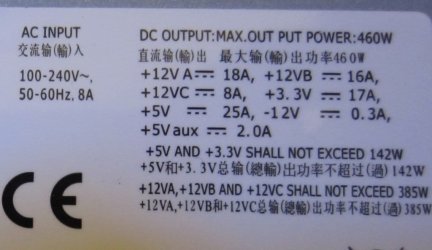
As for the PSU, have a look at it's specs. It should look similar to something like this:

PSU Specificationsa.jpg

If you don't have a camera, could you list the 12V Amps? ie 12V 16A

Depending on that, you might luck out and could probably and hopefully get away with only a new video card to boost your frame rate enough to keep you happy. A lot cheaper too.

Ideally, I'm trying to save you as much money for maximum return, without risking your shit - or wasting your time.


* What's your monitors resolution btw?
 

My Computer

Computer type
PC/Desktop
Computer Manufacturer/Model Number
Systems by SmartEyeball
OS
8 Pro x64
CPU
i7 3770K 4.6GHz
Motherboard
ASUS P8Z77 WS
Memory
16GB G.Skill Trident X 2666mhz
Graphics Card(s)
x2 EVGA 780 Ti Superclocked SLI
Sound Card
SB X-FI Surround 5.1 PRO USB / ATH-AD900 Headphones
Monitor(s) Displays
x3 Dell U2410 / 58" Samsung
Screen Resolution
5760*1200/ 1920*1200
Hard Drives
2x Intel 520 240GB (RAID 0) * 2x WD Caviar Blacks 2TB (RAID 0) * 2TB WD Caviar Black * Sony Optirac DVD
PSU
Silverstone Strider Evolution 1200W
Case
Thermaltake Level 10 GT Snow Edition
Cooling
Noctua NH-D14
Keyboard
Topre Realforce // Ducky Shine MX Black // Filco Ninja TKL
Mouse
Thermaltake Theron (Highly Recommended) + Razer Imperator
Antivirus
MSE
Browser
IE, FF, WaterFox
Other Info
GT Extreme V2 Sim Racing Cockpit + 40" LCD and K/B Mouse stand ▼
Fanatec CSR Elite Wheel + Clubsport V1 Pedals + CSR shifter/7G-H ▼Saitek X52 Pro ▼ TrackIR 5 Pro
Buttkicker v2 Seat Rumbler with Dedicated 5.1 and Sub Woofer attached to frame ▼
=
Bloody Big Grin
yes as soon as i open it up again ill give you that info im waiting to do so
i installed my 80gb hdd and it makes a squeaking sound when i access it sometimes
i ran error check with win7 and no error im thinking i put the screw in to tight im hoping thats it
and it dont go died ill let you know that info in a few days
ill have to write them down which is np


* What's your monitors resolution btw?
by that you mean
Control Panel\Appearance and Personalization\Display\Screen Resolution
display:VGA
res:1024 x 168 (recommended)
orientation:landscape

it may be my fan im thinking now that makes a squeaking sound every was in a while
if it is you think it would be fine ?
im going to take the hdd out and see if i hear it then


Depending on that, you might luck out and could probably and hopefully get away with only a new video card to boost your frame rate enough to keep you happy. A lot cheaper too.
sounds good
 
Last edited:

My Computer

OS
Microsoft Windows 7 Home Premium 32-bit
CPU
Intel(R) Pentium(R) D CPU 3.40GHz
Motherboard
Wolfdale 1333-D667 P1.40 w/ onboard sound and LAN, 4USB port
Memory
3.00 GB
Graphics Card(s)
mobo
Sound Card
High Definition Audio Device
Hard Drives
Western Digital 320GB-WDC WD3200AAKS-00VYA0 ATA Device

Seagate FA GoFlex Desk USB Device-External hard disk media-1.82 TB

(1) WDC WD3200AAKS-00VYA0 ATA Device (2) Seagate FA GoFlex Desk USB Device
Keyboard
emachines
Mouse
laser lol
Internet Speed
new speed http://www.speedtest.net/result/1778078629.png
Yeah, it's never a good idea to over tighten anything inside a PC. Always wait till the first 'bite' and tension accordingly. Always stop when it starts really resisting.

Whenever you're ready mate.
 

My Computer

Computer type
PC/Desktop
Computer Manufacturer/Model Number
Systems by SmartEyeball
OS
8 Pro x64
CPU
i7 3770K 4.6GHz
Motherboard
ASUS P8Z77 WS
Memory
16GB G.Skill Trident X 2666mhz
Graphics Card(s)
x2 EVGA 780 Ti Superclocked SLI
Sound Card
SB X-FI Surround 5.1 PRO USB / ATH-AD900 Headphones
Monitor(s) Displays
x3 Dell U2410 / 58" Samsung
Screen Resolution
5760*1200/ 1920*1200
Hard Drives
2x Intel 520 240GB (RAID 0) * 2x WD Caviar Blacks 2TB (RAID 0) * 2TB WD Caviar Black * Sony Optirac DVD
PSU
Silverstone Strider Evolution 1200W
Case
Thermaltake Level 10 GT Snow Edition
Cooling
Noctua NH-D14
Keyboard
Topre Realforce // Ducky Shine MX Black // Filco Ninja TKL
Mouse
Thermaltake Theron (Highly Recommended) + Razer Imperator
Antivirus
MSE
Browser
IE, FF, WaterFox
Other Info
GT Extreme V2 Sim Racing Cockpit + 40" LCD and K/B Mouse stand ▼
Fanatec CSR Elite Wheel + Clubsport V1 Pedals + CSR shifter/7G-H ▼Saitek X52 Pro ▼ TrackIR 5 Pro
Buttkicker v2 Seat Rumbler with Dedicated 5.1 and Sub Woofer attached to frame ▼
=
Bloody Big Grin
ok i opened it up today and mine looked nothing like that pic but i wrote down all the numbers so here they are
delta power switching power supply

ac input ac115/230v,50/6hz
5/2.5a 6/3a 8/4a
dc output +5v +12v -5v-12v +3.3 5vsb +5&+3.3v total
max-400atx 30a 15a 0.5a 0.8a 20a 2a 200w 400w
.max-500atx 35a 18a 0.5a 0.8a 24a 2a 250w 450w
max-550atx 40a 24a 0.5a 0.8a 26a 2a 285w 500w
 

My Computer

OS
Microsoft Windows 7 Home Premium 32-bit
CPU
Intel(R) Pentium(R) D CPU 3.40GHz
Motherboard
Wolfdale 1333-D667 P1.40 w/ onboard sound and LAN, 4USB port
Memory
3.00 GB
Graphics Card(s)
mobo
Sound Card
High Definition Audio Device
Hard Drives
Western Digital 320GB-WDC WD3200AAKS-00VYA0 ATA Device

Seagate FA GoFlex Desk USB Device-External hard disk media-1.82 TB

(1) WDC WD3200AAKS-00VYA0 ATA Device (2) Seagate FA GoFlex Desk USB Device
Keyboard
emachines
Mouse
laser lol
Internet Speed
new speed http://www.speedtest.net/result/1778078629.png
i know this like i said im planning on upgrading my video card and cpu but with that mobo would it be worth it
gpu is the video card correct?

You will be better off with a new motherboard....IF your old board can take a dual core, you will have to buy a used one, that's been through who knows what.....
 

My Computer

Computer type
PC/Desktop
Computer Manufacturer/Model Number
Custom
OS
windows 10 pro 64 bit
CPU
i5 4690K@4500 COOLER MASTER Seidon 120M water cooler
Motherboard
ASUS SABERTOOTH Z87 LGA 1150 Intel
Memory
16gb Kingston HyperX DDR3 1600
Graphics Card(s)
EVGA GTX 1070 sc
Monitor(s) Displays
BenQ GL2760H Black 27" 2ms HDMI Widescreen LED 1920X1080
Screen Resolution
DSR 2103X1183
Hard Drives
ADATA 256 gig SSD + 4 junk
PSU
EVGA supernova 750
Case
coolermaster
Cooling
many...
Keyboard
z merc
Mouse
Logitech wireless G602
Internet Speed
2.5mbs cable

My Computer

OS
Microsoft Windows 7 Home Premium 32-bit
CPU
Intel(R) Pentium(R) D CPU 3.40GHz
Motherboard
Wolfdale 1333-D667 P1.40 w/ onboard sound and LAN, 4USB port
Memory
3.00 GB
Graphics Card(s)
mobo
Sound Card
High Definition Audio Device
Hard Drives
Western Digital 320GB-WDC WD3200AAKS-00VYA0 ATA Device

Seagate FA GoFlex Desk USB Device-External hard disk media-1.82 TB

(1) WDC WD3200AAKS-00VYA0 ATA Device (2) Seagate FA GoFlex Desk USB Device
Keyboard
emachines
Mouse
laser lol
Internet Speed
new speed http://www.speedtest.net/result/1778078629.png
delta power switching power supply

ac input ac115/230v,50/6hz
5/2.5a 6/3a 8/4a
dc output +5v +12v -5v-12v +3.3 5vsb +5&+3.3v total
max-400atx 30a 15a 0.5a 0.8a 20a 2a 200w 400w
.max-500atx 35a 18a 0.5a 0.8a 24a 2a 250w 450w
max-550atx 40a 24a 0.5a 0.8a 26a 2a 285w 500w

It's an OEM/generic PSU all right. Looks like the same label goes on three different units.

If it's the 500W model, it should be this:
max-550atx 40a 24a 0.5a 0.8a 26a 2a 285w 500w

That gives you 24Amps on the 12v rail. Not a whole lot of wiggle room.

Something like the ATI 5770 or nvidia GTS 250 should run comfortably on that PSU. Neither require that much Amps or wattage.

If it was a newer, non-generic PSU I'd say you could get away with a gtx 460, but given it's age - it could be dicey.

The 5770/250 aren't powerhouses by any stretch of the imagination, but both are an improvement over your current card. I've seen them go from anywhere between $40-100+

Again, once you start adding a CPU, GPU or even PSU, even with deals; it can start adding up. It's also money that could be better spent elsewhere.


Start with finding a card like the 5770 or GTS 250
 

My Computer

Computer type
PC/Desktop
Computer Manufacturer/Model Number
Systems by SmartEyeball
OS
8 Pro x64
CPU
i7 3770K 4.6GHz
Motherboard
ASUS P8Z77 WS
Memory
16GB G.Skill Trident X 2666mhz
Graphics Card(s)
x2 EVGA 780 Ti Superclocked SLI
Sound Card
SB X-FI Surround 5.1 PRO USB / ATH-AD900 Headphones
Monitor(s) Displays
x3 Dell U2410 / 58" Samsung
Screen Resolution
5760*1200/ 1920*1200
Hard Drives
2x Intel 520 240GB (RAID 0) * 2x WD Caviar Blacks 2TB (RAID 0) * 2TB WD Caviar Black * Sony Optirac DVD
PSU
Silverstone Strider Evolution 1200W
Case
Thermaltake Level 10 GT Snow Edition
Cooling
Noctua NH-D14
Keyboard
Topre Realforce // Ducky Shine MX Black // Filco Ninja TKL
Mouse
Thermaltake Theron (Highly Recommended) + Razer Imperator
Antivirus
MSE
Browser
IE, FF, WaterFox
Other Info
GT Extreme V2 Sim Racing Cockpit + 40" LCD and K/B Mouse stand ▼
Fanatec CSR Elite Wheel + Clubsport V1 Pedals + CSR shifter/7G-H ▼Saitek X52 Pro ▼ TrackIR 5 Pro
Buttkicker v2 Seat Rumbler with Dedicated 5.1 and Sub Woofer attached to frame ▼
=
Bloody Big Grin
you will have to buy a used one
why would i have to

Well surprise surprise surprise....Intel is so famous for dumping sockets I figured all the chips would be out of production.....I found this on the egg Newegg.com - Intel Pentium E6800 Wolfdale 3.33GHz LGA 775 65W Dual-Core Desktop Processor BX80571E6800 $99 firesale prices for Intel....It's a 6800 and that's not listed, might have to do a bios update....seems to overclock well too....
 

My Computer

Computer type
PC/Desktop
Computer Manufacturer/Model Number
Custom
OS
windows 10 pro 64 bit
CPU
i5 4690K@4500 COOLER MASTER Seidon 120M water cooler
Motherboard
ASUS SABERTOOTH Z87 LGA 1150 Intel
Memory
16gb Kingston HyperX DDR3 1600
Graphics Card(s)
EVGA GTX 1070 sc
Monitor(s) Displays
BenQ GL2760H Black 27" 2ms HDMI Widescreen LED 1920X1080
Screen Resolution
DSR 2103X1183
Hard Drives
ADATA 256 gig SSD + 4 junk
PSU
EVGA supernova 750
Case
coolermaster
Cooling
many...
Keyboard
z merc
Mouse
Logitech wireless G602
Internet Speed
2.5mbs cable
i unistalled the hdd and no sounds so it aint the fan ty god dont got to get a new one
it was for sure the hdd now i relocated the hdd within the case as well spotted the 2nd ide hookup 1st time in i was blind and didnt see it so i rigged it to work
It's also money that could be better spent elsewhere.
so you think i should just build my own i found a great tut on it
Recommended Gaming Desktop Computer Builds
but i wont be able to start for some time im talking like mid summer even later maybe
i would be building Budget Gaming PC Build the 1st one on that page
buying one thing at a time tell i have it all then start the building
so should i just go with that or upgrade
are the specs on that build good
 
Last edited:

My Computer

OS
Microsoft Windows 7 Home Premium 32-bit
CPU
Intel(R) Pentium(R) D CPU 3.40GHz
Motherboard
Wolfdale 1333-D667 P1.40 w/ onboard sound and LAN, 4USB port
Memory
3.00 GB
Graphics Card(s)
mobo
Sound Card
High Definition Audio Device
Hard Drives
Western Digital 320GB-WDC WD3200AAKS-00VYA0 ATA Device

Seagate FA GoFlex Desk USB Device-External hard disk media-1.82 TB

(1) WDC WD3200AAKS-00VYA0 ATA Device (2) Seagate FA GoFlex Desk USB Device
Keyboard
emachines
Mouse
laser lol
Internet Speed
new speed http://www.speedtest.net/result/1778078629.png
so you think i should just build my own

That's a personal choice. I would (and do) - but that does not mean I'd expect everyone else to.

Realistically, building a PC today is quite easy and there plenty of tutorials out there. But there is still plenty of risk involved if you 'get something wrong'. Read, read and then read some more.

If you're comfortable with the idea. go for it. If not...


Recommended Gaming Desktop Computer Builds
but i wont be able to start for some time im talking like mid summer even later maybe
Which kind of leaves you without anything to really play on in the meantime, thus defeating the purpose :(


i would be building Budget Gaming PC Build the 1st one on that page
buying one thing at a time tell i have it all then start the building
so should i just go with that or upgrade
Again, entirely your choice. You could try your luck with a second hand card in your current machine and build the rest at your leisure.

Or if you could absorb the cost of both a new PSU + GPU at the same time, you could use those components with your current machine and transplant them over when the time is right.

So far I've pointed out what you could upgrade, but unless you plan to recycle/transplant parts - I'd leave it to a cheap 2nd hand card with your current machine.

(PSU's, GPU's, Hard drives can go from one build to another, so they're not a waste of money if used in your current machine)


are the specs on that build good
They're decent-ish for the most part. The mobo seems okay, and the 955BE is a decent chip, with some nice OCing potential.

The GPU - depends on the size (resolution) of your screen. If it's anything highr than 1680x1050, then it might struggle a bit. It's not an "Ultra/maxxed" capable card, but should handle a fair bit of High here and there.

The Hard drive is middle of the road. Not bad, not great.

Unfortunately hard drive prices are ridiculously high at the moment. No-one knows for sure when the prices are going to start coming down.

The PSU is fine. The case is a personal choice. There's a few options around that price point.


Overall, It's still far better than your current (and the 360's) capabilities.


The way I see it, the bottom line is:

Improve game performance NOW, buy a better 2nd hand card and be done with it. No other upgrades.

If you can afford both card+PSU, buy both now, enjoy improvement now. Recyle into new build.

Want better performance, but can wait: Start with the heart - a new PSU. Then add a new card.

If the performance is still not enough with your current machine, progress to a new mobo/CPU/RAM/Case etc
 

My Computer

Computer type
PC/Desktop
Computer Manufacturer/Model Number
Systems by SmartEyeball
OS
8 Pro x64
CPU
i7 3770K 4.6GHz
Motherboard
ASUS P8Z77 WS
Memory
16GB G.Skill Trident X 2666mhz
Graphics Card(s)
x2 EVGA 780 Ti Superclocked SLI
Sound Card
SB X-FI Surround 5.1 PRO USB / ATH-AD900 Headphones
Monitor(s) Displays
x3 Dell U2410 / 58" Samsung
Screen Resolution
5760*1200/ 1920*1200
Hard Drives
2x Intel 520 240GB (RAID 0) * 2x WD Caviar Blacks 2TB (RAID 0) * 2TB WD Caviar Black * Sony Optirac DVD
PSU
Silverstone Strider Evolution 1200W
Case
Thermaltake Level 10 GT Snow Edition
Cooling
Noctua NH-D14
Keyboard
Topre Realforce // Ducky Shine MX Black // Filco Ninja TKL
Mouse
Thermaltake Theron (Highly Recommended) + Razer Imperator
Antivirus
MSE
Browser
IE, FF, WaterFox
Other Info
GT Extreme V2 Sim Racing Cockpit + 40" LCD and K/B Mouse stand ▼
Fanatec CSR Elite Wheel + Clubsport V1 Pedals + CSR shifter/7G-H ▼Saitek X52 Pro ▼ TrackIR 5 Pro
Buttkicker v2 Seat Rumbler with Dedicated 5.1 and Sub Woofer attached to frame ▼
=
Bloody Big Grin
that sounds great i think ill upgrade to a new PSU + GPU at the same time
thanks for all your help
 

My Computer

OS
Microsoft Windows 7 Home Premium 32-bit
CPU
Intel(R) Pentium(R) D CPU 3.40GHz
Motherboard
Wolfdale 1333-D667 P1.40 w/ onboard sound and LAN, 4USB port
Memory
3.00 GB
Graphics Card(s)
mobo
Sound Card
High Definition Audio Device
Hard Drives
Western Digital 320GB-WDC WD3200AAKS-00VYA0 ATA Device

Seagate FA GoFlex Desk USB Device-External hard disk media-1.82 TB

(1) WDC WD3200AAKS-00VYA0 ATA Device (2) Seagate FA GoFlex Desk USB Device
Keyboard
emachines
Mouse
laser lol
Internet Speed
new speed http://www.speedtest.net/result/1778078629.png
Good luck. We're here if you need help putting it together.
 

My Computer

Computer type
PC/Desktop
Computer Manufacturer/Model Number
Systems by SmartEyeball
OS
8 Pro x64
CPU
i7 3770K 4.6GHz
Motherboard
ASUS P8Z77 WS
Memory
16GB G.Skill Trident X 2666mhz
Graphics Card(s)
x2 EVGA 780 Ti Superclocked SLI
Sound Card
SB X-FI Surround 5.1 PRO USB / ATH-AD900 Headphones
Monitor(s) Displays
x3 Dell U2410 / 58" Samsung
Screen Resolution
5760*1200/ 1920*1200
Hard Drives
2x Intel 520 240GB (RAID 0) * 2x WD Caviar Blacks 2TB (RAID 0) * 2TB WD Caviar Black * Sony Optirac DVD
PSU
Silverstone Strider Evolution 1200W
Case
Thermaltake Level 10 GT Snow Edition
Cooling
Noctua NH-D14
Keyboard
Topre Realforce // Ducky Shine MX Black // Filco Ninja TKL
Mouse
Thermaltake Theron (Highly Recommended) + Razer Imperator
Antivirus
MSE
Browser
IE, FF, WaterFox
Other Info
GT Extreme V2 Sim Racing Cockpit + 40" LCD and K/B Mouse stand ▼
Fanatec CSR Elite Wheel + Clubsport V1 Pedals + CSR shifter/7G-H ▼Saitek X52 Pro ▼ TrackIR 5 Pro
Buttkicker v2 Seat Rumbler with Dedicated 5.1 and Sub Woofer attached to frame ▼
=
Bloody Big Grin
Which kind of leaves you without anything to really play on in the meantime, thus defeating the purpose
its going to be a minute anyways
before any upgrades get done but recycle/transplant parts is what ill do
i play cod waw for the pc and a handful of other pc games that will hold me over till i upgrade the psu & gpu
but
you will have to buy a used one
why would i have to

Well surprise surprise surprise....Intel is so famous for dumping sockets I figured all the chips would be out of production.....I found this on the egg Newegg.com - Intel Pentium E6800 Wolfdale 3.33GHz LGA 775 65W Dual-Core Desktop Processor BX80571E6800 $99 firesale prices for Intel....It's a 6800 and that's not listed, might have to do a bios update....seems to overclock well too....
Ivan the SoSo and a few others tell me that im going to need to update the cpu as well is this true i dont mind doing so
Start with the heart - a new PSU
what kind of psu would i need to get
how many watts do you think i need ect.
Good luck
thanks thats needed because this is really the 1st time on upgrading parts such as these if you knew what my older desktop specs was you would be asking how in gods name could you deal with it lol the ram on it was im thinking 120mb lol
 

My Computer

OS
Microsoft Windows 7 Home Premium 32-bit
CPU
Intel(R) Pentium(R) D CPU 3.40GHz
Motherboard
Wolfdale 1333-D667 P1.40 w/ onboard sound and LAN, 4USB port
Memory
3.00 GB
Graphics Card(s)
mobo
Sound Card
High Definition Audio Device
Hard Drives
Western Digital 320GB-WDC WD3200AAKS-00VYA0 ATA Device

Seagate FA GoFlex Desk USB Device-External hard disk media-1.82 TB

(1) WDC WD3200AAKS-00VYA0 ATA Device (2) Seagate FA GoFlex Desk USB Device
Keyboard
emachines
Mouse
laser lol
Internet Speed
new speed http://www.speedtest.net/result/1778078629.png
If your going to keep the motherboard, the cpu mentioned is the best available....if the board can support it....as mentioned earlier, I wouldn't expect it to be available much longer.....However if your W7 isn't a OEM I would look for a different board....

This sticky by Punkster gives the wattage's used by each card....and equally important what brands of power supply to avoid http://www.sevenforums.com/graphic-cards/135087-planning-upgrade-your-graphics-card-read-first.html Don't believe what the manufacturer put on the box Here is a diablotech giving up the magic smoke at about HALF it's rated capacity Diablotek RPM-1050 1050W Review That is a very good site to check about PSU's....
 

My Computer

Computer type
PC/Desktop
Computer Manufacturer/Model Number
Custom
OS
windows 10 pro 64 bit
CPU
i5 4690K@4500 COOLER MASTER Seidon 120M water cooler
Motherboard
ASUS SABERTOOTH Z87 LGA 1150 Intel
Memory
16gb Kingston HyperX DDR3 1600
Graphics Card(s)
EVGA GTX 1070 sc
Monitor(s) Displays
BenQ GL2760H Black 27" 2ms HDMI Widescreen LED 1920X1080
Screen Resolution
DSR 2103X1183
Hard Drives
ADATA 256 gig SSD + 4 junk
PSU
EVGA supernova 750
Case
coolermaster
Cooling
many...
Keyboard
z merc
Mouse
Logitech wireless G602
Internet Speed
2.5mbs cable
right now i cant just get a new cpu i dont got the money to do so
plus it could wait due to me being ok with what i got
i am able to play some R most games just fine search the web and download
and if my pc wont play it my 360 should
but i am thinking of starting a project this summer on building a pc
like i said i dont have the money to just get the cpu right now and upgrade times R hard
if i did i would have built my pc myself
smarteyeball says i could just upgrade the the psu & gpu on this pc and be fine
but you say as well as some others on different forums that i should upgrade my cpu as well
and i do believe if i upgrade that as well my pc would run the pcsx2 100x times better
+more
but all that will be a minute before i do it
the Budget Gaming PC Build on this page
Recommended Gaming Desktop Computer Builds
But just because it's cheap doesn't mean it lacks quality or high performance, and you will find it to be capable of playing all of the latest games now and into the near future. The amount of bang for your buck you get with this particular build is quite astounding, it could easily outperform many full-built computers that are twice the price
is that true
 

My Computer

OS
Microsoft Windows 7 Home Premium 32-bit
CPU
Intel(R) Pentium(R) D CPU 3.40GHz
Motherboard
Wolfdale 1333-D667 P1.40 w/ onboard sound and LAN, 4USB port
Memory
3.00 GB
Graphics Card(s)
mobo
Sound Card
High Definition Audio Device
Hard Drives
Western Digital 320GB-WDC WD3200AAKS-00VYA0 ATA Device

Seagate FA GoFlex Desk USB Device-External hard disk media-1.82 TB

(1) WDC WD3200AAKS-00VYA0 ATA Device (2) Seagate FA GoFlex Desk USB Device
Keyboard
emachines
Mouse
laser lol
Internet Speed
new speed http://www.speedtest.net/result/1778078629.png
Back
Top