Solved Formating WHOLE 8GB SD CARD?? how?

zapp22

New member
Power User
VIP
Local time
5:34 AM
Messages
730
Location
Tejas, northern Mexico
gang this should be easy as cake but none of the links I've found and Utils I've tried work. Simple good 8GB Kingston SD card [fullsize]. long past was formatted FAT32 half the space, yielding one good 3.something GB partition, the other 4gb is orphaned.
Cannot delete the partition, merge freespace, reformat to take maximum.

how??
 

My Computer My Computer

Computer Manufacturer/Model Number
HP DC7600, HP DC7600[2], HP DC7100, Samsung NC10
OS
Windows XP Pro SP3, Windows 7 Pro 32-bit, Windows 7 Ultimate 64bit, Windows XP Home SP3
CPU
Pentium 4 3.2GHz, Pentium 4 3.4GHz 64bit, Atom,
Motherboard
Dunno
Memory
4GB matched, 1GB, 2.5GB, 4.0 GB
Graphics Card(s)
Geforce 8400 GS and others
Sound Card
RealteK ALC260 and others
Monitor(s) Displays
Asus HD
Screen Resolution
1920x1080
Hard Drives
WD Caviar 640gb SATA
Cooling
We Be Cool
Click Start Menu, right click on My Computer, and select Manage.

Under Storage, click Disk Management and it should be there.

Then Right Click on your Device and select Format
 

My Computer My Computer

Computer Manufacturer/Model Number
iRush Pro
OS
Windows 7 Ultimate x64
CPU
Intel Core i5 2500K Processor
Motherboard
Intel H67 Chipset Motherboard (Micro ATX)
Memory
2x4GB DDR3 1333Mhz Memory
Graphics Card(s)
Novatech Radeon 6770 1GB Graphics Card
Hard Drives
1TB
PSU
Novatech 500W
Case
Novatech ATX Gaming Case
Cooling
-
Keyboard
Novatech Wired Keyboard
Mouse
Novatech Wired Mouse
Internet Speed
VirginMedia 10MB/s
nope.
disc management only gives me either/or options regarding the existing 4gb partition OR the free 4gb unpartitioned. It does NOT provide an option for exterminating the existing partition, and does not provide an option to delete partition.

Click Start Menu, right click on My Computer, and select Manage.

Under Storage, click Disk Management and it should be there.

Then Right Click on your Device and select Format
 

My Computer My Computer

Computer Manufacturer/Model Number
HP DC7600, HP DC7600[2], HP DC7100, Samsung NC10
OS
Windows XP Pro SP3, Windows 7 Pro 32-bit, Windows 7 Ultimate 64bit, Windows XP Home SP3
CPU
Pentium 4 3.2GHz, Pentium 4 3.4GHz 64bit, Atom,
Motherboard
Dunno
Memory
4GB matched, 1GB, 2.5GB, 4.0 GB
Graphics Card(s)
Geforce 8400 GS and others
Sound Card
RealteK ALC260 and others
Monitor(s) Displays
Asus HD
Screen Resolution
1920x1080
Hard Drives
WD Caviar 640gb SATA
Cooling
We Be Cool
Have you tried using diskpart?
 

My Computer My Computer

Computer Manufacturer/Model Number
Dell XPS 15 L502x
OS
Windows 7 Ultimate x64 SP1
CPU
Core i7-2670QM
Memory
8GB DDR3 PC3-10600
Graphics Card(s)
Intel HD Graphics 3000 + GeForce GT 540M
Screen Resolution
1920x1080
Hard Drives
1TB 5400RPM Seagate
Try HP USB Disk Storage Format Tool. Download from here .

Report if successful.:)
 

My Computer My Computer

OS
Windows 7 Home Premium 32 bit
gang this should be easy as cake but none of the links I've found and Utils I've tried work. Simple good 8GB Kingston SD card [fullsize]. long past was formatted FAT32 half the space, yielding one good 3.something GB partition, the other 4gb is orphaned.
Cannot delete the partition, merge freespace, reformat to take maximum.

how??
What you need is right here....SD Formatter 2.0 | Download | SD Memory Card | Digital AV | Consumer Products | Support | Panasonic Global
It's much more effective on SD and microsd cards than the Windows built-in formatter.:geek:
 

My Computer My Computer

Computer type
PC/Desktop
Computer Manufacturer/Model Number
Gigabyte Technology Co., Ltd.
OS
Win 7 Ultimate 64-bit SP1 (desktop)
CPU
Intel Core 2 Duo E8400
Motherboard
Gigabyte GA-EP35-DS3R
Memory
2x 2GB OCZ DDR II SDRAM PC2-6400
Graphics Card(s)
NVIDIA GeForce 9400GT
Monitor(s) Displays
HP 2009m(primary), Acer P191W
Screen Resolution
1600x900, 1440x900
Hard Drives
Internal:WD Caviar Black 640GB 32MB cache 7200RPM
External:Samsung Story Station 1TB HDD desktop drive
500GB Toshiba portable drive
PSU
Antec Earthwatts EA500D
Case
Antec Sonata III
Cooling
4 fans
Keyboard
Logitech Wave
Mouse
Logitech M-SBF90
Internet Speed
Slow due to home Wireless-G router
Antivirus
MSE, Hitman Pro, Malwarebytes
Browser
Chrome and Palemoon
Other Info
Laptop....Acer 5750Z-4835
15.6" HD Widescreen CineCrystal™ LED-backlit LCD Display: (1366x768 resolution, 16:9 aspect ratio)
Intel® Pentium® Processor B940 (2.0GHz, 2MB L3 cache)
Windows® 7 Home Premium,500GB Hard Drive,4GB DDR3 RAM, Intel® HD Graphics,8X DVD-Super Multi Double-Layer Drive
Multi-in-1 Digital Media Card Reader,802.11b/g/n Wi-Fi
Chrome and Palemoon, MSE, Hitman Pro
the sd formatter fails. same as disk management it only assumes dealing with an existing partition to redo the existing.
Easeus worked. so I know have a clean 8GB partition.

jumangi I'm there - thought of that this a.m. but doesn't it default a <4gb Fat 32? how do I get the win7 iso on there with it such that it boots, executes?? anyway I'll give it a shot now and report back
 

My Computer My Computer

Computer Manufacturer/Model Number
HP DC7600, HP DC7600[2], HP DC7100, Samsung NC10
OS
Windows XP Pro SP3, Windows 7 Pro 32-bit, Windows 7 Ultimate 64bit, Windows XP Home SP3
CPU
Pentium 4 3.2GHz, Pentium 4 3.4GHz 64bit, Atom,
Motherboard
Dunno
Memory
4GB matched, 1GB, 2.5GB, 4.0 GB
Graphics Card(s)
Geforce 8400 GS and others
Sound Card
RealteK ALC260 and others
Monitor(s) Displays
Asus HD
Screen Resolution
1920x1080
Hard Drives
WD Caviar 640gb SATA
Cooling
We Be Cool
Have you used diskpart? It's not disk management, it's a command line utility.
 

My Computer My Computer

Computer Manufacturer/Model Number
Dell XPS 15 L502x
OS
Windows 7 Ultimate x64 SP1
CPU
Core i7-2670QM
Memory
8GB DDR3 PC3-10600
Graphics Card(s)
Intel HD Graphics 3000 + GeForce GT 540M
Screen Resolution
1920x1080
Hard Drives
1TB 5400RPM Seagate
Done! now what?
the HP formatter did the trick, all 79@### bytes...

so... do I just simply copy the iso on there and give it a shot? guess so -
 

My Computer My Computer

Computer Manufacturer/Model Number
HP DC7600, HP DC7600[2], HP DC7100, Samsung NC10
OS
Windows XP Pro SP3, Windows 7 Pro 32-bit, Windows 7 Ultimate 64bit, Windows XP Home SP3
CPU
Pentium 4 3.2GHz, Pentium 4 3.4GHz 64bit, Atom,
Motherboard
Dunno
Memory
4GB matched, 1GB, 2.5GB, 4.0 GB
Graphics Card(s)
Geforce 8400 GS and others
Sound Card
RealteK ALC260 and others
Monitor(s) Displays
Asus HD
Screen Resolution
1920x1080
Hard Drives
WD Caviar 640gb SATA
Cooling
We Be Cool

My Computer My Computer

Computer Manufacturer/Model Number
Dell XPS 15 L502x
OS
Windows 7 Ultimate x64 SP1
CPU
Core i7-2670QM
Memory
8GB DDR3 PC3-10600
Graphics Card(s)
Intel HD Graphics 3000 + GeForce GT 540M
Screen Resolution
1920x1080
Hard Drives
1TB 5400RPM Seagate
Done! now what?
the HP formatter did the trick, all 79@### bytes...

so... do I just simply copy the iso on there and give it a shot? guess so -

I simulated your conditions on my 8GB pendrive - one 4 GB NTFS and the rest orphaned :) - and tried HP formatter and it formatted the whole 8GB. So I knew that it should work with the SD card too. Thanks for confirming. ( I was just getting my stuff ready to do it on a 8GB SD card and by that time you confirmed.)

Regarding putting the Win7 ISO, well, I have not tried it on an SD card. I had actually used the Microsoft tool and the pendrive and not sure whether it will recognise the SD card and write it on to it. You have to try.

I know that one can also use the Universal Installer http://www.pendrivelinux.com/universal-usb-installer-easy-as-1-2-3/ can write the ISO to a pendrive but on an SD, well, again you have to try.

But I presume that it should do it on the SD card too.(Past midnight here. hitting the sack.)

 

My Computer My Computer

OS
Windows 7 Home Premium 32 bit
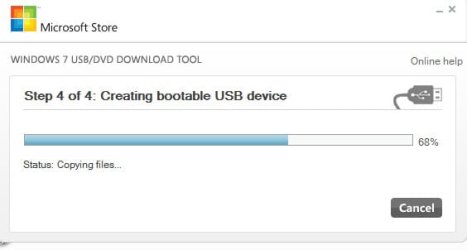
The first thing in the morning, I tried writing the Windows 7 Installation ISO on to the 8GB SD card using Windows 7 USB DVD download tool Microsoft Store Online and it was successful. I also booted into it.

27-11-2011 07-57-49.jpg

27-11-2011 08-09-25.jpg

You may mark this thread as solved unless you have further queries. :)
 

My Computer My Computer

OS
Windows 7 Home Premium 32 bit
excellent and instructive!
so, the end of it was thusly:
- ran the HP util and it did as you say, reformatting the whole 8gb SD card [which was sitting in a Targus USB mount]
- copied the .iso to the drive
- attempted to force the x120e to boot frm that device
- failed. it tried gamely, but failed, returning to the "gimme a valid bootable" menu
- after previous fails, I thought... maybe the hp thingy did some good in other ways, and tried one last shot at the Microsoft utility for making things bootable/installable for Win7. This time: SUCCESS! - took a really long time but redid everything with the .iso file to make the drive do its job
- reboot, pointed to the device, and successful install.

Activated and now doing 4 million win7 updates.... sheeesh.

for the record, to help future searchers: a friend tells me that there IS a way to boot from the included SD slot on the thinkpad x120e - I tried and failed, punted to USB instead, but he succeeded. My guess is that a later BIOS flash enabled that to work properly.

not a bad little notebook, by the way. I bought 6 months old, still under warranty, for 300 bucks and in good condition otherwise.
Done! now what?
the HP formatter did the trick, all 79@### bytes...

so... do I just simply copy the iso on there and give it a shot? guess so -

I simulated your conditions on my 8GB pendrive - one 4 GB NTFS and the rest orphaned :) - and tried HP formatter and it formatted the whole 8GB. So I knew that it should work with the SD card too. Thanks for confirming. ( I was just getting my stuff ready to do it on a 8GB SD card and by that time you confirmed.)

Regarding putting the Win7 ISO, well, I have not tried it on an SD card. I had actually used the Microsoft tool and the pendrive and not sure whether it will recognise the SD card and write it on to it. You have to try.

I know that one can also use the Universal Installer Universal USB Installer – Easy as 1 2 3 | USB Pen Drive Linux can write the ISO to a pendrive but on an SD, well, again you have to try.

But I presume that it should do it on the SD card too.(Past midnight here. hitting the sack.)
 

My Computer My Computer

Computer Manufacturer/Model Number
HP DC7600, HP DC7600[2], HP DC7100, Samsung NC10
OS
Windows XP Pro SP3, Windows 7 Pro 32-bit, Windows 7 Ultimate 64bit, Windows XP Home SP3
CPU
Pentium 4 3.2GHz, Pentium 4 3.4GHz 64bit, Atom,
Motherboard
Dunno
Memory
4GB matched, 1GB, 2.5GB, 4.0 GB
Graphics Card(s)
Geforce 8400 GS and others
Sound Card
RealteK ALC260 and others
Monitor(s) Displays
Asus HD
Screen Resolution
1920x1080
Hard Drives
WD Caviar 640gb SATA
Cooling
We Be Cool
Zapp22 you can't just copy an ISO to media and make it work. It needs to be from a tool like the Windows 7 USB DVD download tool or Magic iso, etc. there is a boot file written and the iso is unpacked, it's like a compressed, zip, file. Glad to see it can be done with an SD card.
 

My Computer My Computer

Computer type
PC/Desktop
Computer Manufacturer/Model Number
Home Built Desktop By DataTech
OS
Windows 7 Ultimate X64 SP1
CPU
Intel i5-2550K, Differing ~4.4-4.8GHz No built in GPU
Motherboard
ASUS P8Z68-V PRO/GEN3
Memory
16GB G.Skill Sniper 1866MHz @ 2133MHz 2x8GB
Graphics Card(s)
ASUS GTX650TIB-DC2OC-2GD5, (650TI Boost)
Sound Card
Onboard Realtek 5-1
Monitor(s) Displays
Samsung P2570HD
Screen Resolution
1920x1080
Hard Drives
Samsung 840 Pro 256GB SSD for OS, 500GB Seagate Constellation (Enterprise drive) for Data
PSU
Corsair HX650W
Case
Inwin Dragon Rider
Cooling
Hyper 212 EVO w/two Noctua fans, push-pull, @1300 RPM
Keyboard
E-Z Eyes, bright yellow keys with large characters
Mouse
steelseries SENSEI Laser Pro Gaming
Internet Speed
48-51Mbs Mbs down, 11 Mbs up Xfinity Cable
Antivirus
Norton Internet Security 2013
Browser
IE 10, Opera, Pale Moon if needed
Other Info
4 case fans, LG BluRay-RE, ASUS DVD-RW, Mr. Fusion power supply, 1.21 gigawatts.
One reason why I am loathe to see the end of my XP system is having Partition Magic on it which can cope with most of the partitioning I ever required and on the system itself - never had it fail on me personally. Often still use it when W7 will not do what is required and I do have EASUS Partition Master free edition on the W7 system. :confused: :) :D
 

My Computer My Computer

Computer Manufacturer/Model Number
Compaq desktop
OS
Windows 7 x64 SP1
CPU
Athlon II x2 215
Memory
4.0 GB
Graphics Card(s)
Onboard
Sound Card
Creative SB X-Fi Titanium HD (nice)
Monitor(s) Displays
24" Dell LCD
Screen Resolution
1900 x 1200
Hard Drives
320 GB, 500 GB and 750 GB 7200 rpm
PSU
430w
Keyboard
USB
Mouse
USB
Internet Speed
approx 10 Mbps
EASEUS Partition Master is a great product, very similar to Partition Wizard actually. As for Partition Magic that's outdated and doesn't support Windows 7 properly, I believe...might want to think about just getting rid of it. Besides, I can't imagine PMagic doing anything that PWizard can't...
 

My Computer My Computer

Computer type
PC/Desktop
Computer Manufacturer/Model Number
Custom-built
OS
Windows 7 Professional SP1 32-bit
CPU
Intel Core 2 Duo E6600 2.4GHz
Motherboard
Asus PL5D2
Memory
4GB DDR2-667 (4x1GB in dual-channel config)
Graphics Card(s)
nVidia GeForce 9800 GT
Sound Card
Creative X-Fi XtremeMusic
Monitor(s) Displays
Acer P236H
Screen Resolution
1920x1200 (DVI)
Hard Drives
OCZ SSD Vertex Plus 60GB SATA (Firmware 3.55), 64MB cache
Hitachi HD321KJ SATA, 320GB, 7200rpm, 16MB cache
PSU
Antec TruePower 2.0
Case
Cooler Master Centurion
Cooling
Too many fans
Keyboard
Standard
Mouse
Microsoft wireless optical mouse
Internet Speed
AT&T U-verse (18mbit/sec)
Antivirus
Microsoft Security Essentials
Browser
Firefox
Other Info
Other devices:
Compaq CQ-60 laptop
Google Nexus 7 (2012) tablet
Nvidia SHIELD tablet (US/LTE)
Hardkernel ODROID-XU single-board computer (Samsung Exynos 5420)
EASEUS Partition Master is a great product, very similar to Partition Wizard actually. As for Partition Magic that's outdated and doesn't support Windows 7 properly, I believe...might want to think about just getting rid of it. Besides, I can't imagine PMagic doing anything that PWizard can't...

Partition Magic is on my XP system and I've never tried to install it on this system. Since I paid for it I can't see getting rid of it will soothe my slight annoyance - not the only program I have had to rethink for solutions since moving to W7. :( :cry: :D
 

My Computer My Computer

Computer Manufacturer/Model Number
Compaq desktop
OS
Windows 7 x64 SP1
CPU
Athlon II x2 215
Memory
4.0 GB
Graphics Card(s)
Onboard
Sound Card
Creative SB X-Fi Titanium HD (nice)
Monitor(s) Displays
24" Dell LCD
Screen Resolution
1900 x 1200
Hard Drives
320 GB, 500 GB and 750 GB 7200 rpm
PSU
430w
Keyboard
USB
Mouse
USB
Internet Speed
approx 10 Mbps
Be careful with that HP formatter for USB drives. Once I burned my fingers by accidently formatting a 200GB USB harddrive full of data which was also connected to the system, thinking that I was formatting a 2 GB flash drive :shock:!!!! Since then I have stopped using that utility. Use it with caution!!!
 

My Computer My Computer

Computer Manufacturer/Model Number
Toshiba Satellite P775-S7232
OS
MS Windows 7 Ultimate 64-bit SP1
CPU
i5-2410M 2.3GHz (2.9GHz Turbo-Boost) Sandy Bridge 32nm
Motherboard
Toshiba PHRAA ver. PSBY1U-00F003
Memory
4GB+4GB Samsung DDR3 PC3-10700 (1333 MHz)
Graphics Card(s)
Video Intel(R) HD Graphics Family, 1696MB available memory
Sound Card
Realtek High Definition Audio version=6.0.1.6323
Monitor(s) Displays
17.3 " Trubrite TFT LCD, LED Backlit
Screen Resolution
1600x900 32 bit, Native support for 720P content
Hard Drives
TOSHIBA MK6476GSXN
580.614 [GB] partitioned C: 80GB and D: 500GB with hidden recovery partitons.

Spare bay for 2nd HDD but no SATA connector :-(
PSU
Toshiba AC/DC Adapter
Case
Notebook
Cooling
Built-in Fan
Keyboard
Premium Raised Tile keyboard
Mouse
Logitech M215 wireless mouse
Internet Speed
Not fast enough
Other Info
Built-in Harman Kardon speakers with Dolby Advanced Audio, Waves MaxxAudio® 3. HDMI, 1xUSB3+3xUSB2 ports, WebCam, Battery life 4hrs 11mins, 4GB Readyboost SDHC card, WD My Book Essential Ext HDDs 2 TB, 2x1TB, My Passport SE 1TB and WDTV 1st Gen for Multimedia playing on a Sony Wega 32" LCD.
Recent addition to my toys are Asus Transformer Pad TF300T with 32GB onboard sd card + 32GB microsd card.
as it turned out, I used Easeus to get rid of the old partition and make one big 8gb one. tried the HP tool [didn't kill my drive :)] but system wouldn't boot it ...dunno why.
but, oddly enough, once I had used the HP flash utility, then the MS Windows 7 flash boot utility worked like a charm. stuck it in the slot in the thinkpad and 'voila''! win7 home premium freshly installed
 

My Computer My Computer

Computer Manufacturer/Model Number
HP DC7600, HP DC7600[2], HP DC7100, Samsung NC10
OS
Windows XP Pro SP3, Windows 7 Pro 32-bit, Windows 7 Ultimate 64bit, Windows XP Home SP3
CPU
Pentium 4 3.2GHz, Pentium 4 3.4GHz 64bit, Atom,
Motherboard
Dunno
Memory
4GB matched, 1GB, 2.5GB, 4.0 GB
Graphics Card(s)
Geforce 8400 GS and others
Sound Card
RealteK ALC260 and others
Monitor(s) Displays
Asus HD
Screen Resolution
1920x1080
Hard Drives
WD Caviar 640gb SATA
Cooling
We Be Cool
In the case of the HP tool, there is a misconception that it can be used only for pendrives.

Any formatting tool, has to be used with caution. One has to check and double check that he is formatting the right drive/partition, lest he ends up in misery.

And an elementary rule when one formats an external drive is to make sure that no other external drive is connected. Not very difficult, I presume :)
 

My Computer My Computer

OS
Windows 7 Home Premium 32 bit
Back
Top