Used diskpart-clean command on sd card? Help

Jennied123

New member
Local time
3:40 PM
Messages
21
Hello all! Im in desperate need of some help!!

Long story short, my micro SD card was in an adapter on my PC, working fine, and suddenly i got an error message, saying it needed to be reformatted. I STUPIDLY trusted a youtube video that brought me to command prompt-diskpart.
From there i ended up using clean command and created a primary partition. I check the SD card and all of my photos are GONE. I just had a baby and all of his hospital photos are on it, etc.

These links below are actually exactly what i did to my SD card (drive E: )

http://www.sevenforums.com/tutorials/52129-disk-clean-clean-all-diskpart-command.html

http://www.sevenforums.com/tutorials/2674-partition-volume-create-new.html

What im trying to figure out is if I permanently deleted everything or if its recoverable.

I tried almost all recovery software i could find, and nothing.

If anyone knows how to fix this, PLEASE HELP!!
 

My Computer

Computer type
Laptop
OS
windows 7 home premium 32 bit
If you did a Clean All, the files are overwritten with zeros and chances to retrieve them are quasi zero. You can try Recuva, but your chances are slim. Sorry. -- Always backup precious data.

https://www.piriform.com/recuva
 

My Computer

Computer Manufacturer/Model Number
HP, Dell, Gateway, Toshiba - 4 laptops and 2 desktops
OS
Vista, Windows7, Mint Mate, Zorin, Windows 8
CPU
from 1.6GHz Duo to i7
Monitor(s) Displays
2x HP w2207
Hard Drives
5x HDD, 7x SSD, 12x Externals
Keyboard
with trackball - no mices
Mouse
Trackball mice
Internet Speed
DSL 6000
Yes, tell us whether you ran diskpart clean or clean all?

Clean command writes zeros only to the first 2048 sectors and like last sectors. Your chances of recovery is good.

Clean all writes zeros to all sectors. Your chances of recovery next to nil.

What is the capacity of the card?
 

My Computer

OS
Windows 7 Home Premium 32 bit
I only did a clean, NOT clean all. The micro SD card is 1gb
Like i said, i stupidly followed a youtube video, so i dont really know what sectors are, or partitions for that matter. ):
 

My Computer

Computer type
Laptop
OS
windows 7 home premium 32 bit
Well, as Jumanji said, your chances are better. Did you try Recuva.
 

My Computer

Computer Manufacturer/Model Number
HP, Dell, Gateway, Toshiba - 4 laptops and 2 desktops
OS
Vista, Windows7, Mint Mate, Zorin, Windows 8
CPU
from 1.6GHz Duo to i7
Monitor(s) Displays
2x HP w2207
Hard Drives
5x HDD, 7x SSD, 12x Externals
Keyboard
with trackball - no mices
Mouse
Trackball mice
Internet Speed
DSL 6000
Yes, tell us whether you ran diskpart clean or clean all?

Clean command writes zeros only to the first 2048 sectors and like last sectors. Your chances of recovery is good.

Clean all writes zeros to all sectors. Your chances of recovery next to nil.

What is the capacity of the card?

Also, i tried using recuva, testdisk, easeUS, basically any software i could find. It was only able to see the new partition i created, making me think its unrecoverable.
*side note* This just happened yesterday, and i didnt save anything else/write new files on the card.
 

My Computer

Computer type
Laptop
OS
windows 7 home premium 32 bit
Yes i tried recuva, testdisk, easeUS... everything i could find. It was only able to view the new partition i created. I tried a partition recovery software as well and nothing there.
 

My Computer

Computer type
Laptop
OS
windows 7 home premium 32 bit
Hmm, does not look too good. Recuva is one of the few programs where I have seen people recover files from SD cards.
 

My Computer

Computer Manufacturer/Model Number
HP, Dell, Gateway, Toshiba - 4 laptops and 2 desktops
OS
Vista, Windows7, Mint Mate, Zorin, Windows 8
CPU
from 1.6GHz Duo to i7
Monitor(s) Displays
2x HP w2207
Hard Drives
5x HDD, 7x SSD, 12x Externals
Keyboard
with trackball - no mices
Mouse
Trackball mice
Internet Speed
DSL 6000
Try PhotoRec. PhotoRec - Digital Picture and File Recovery

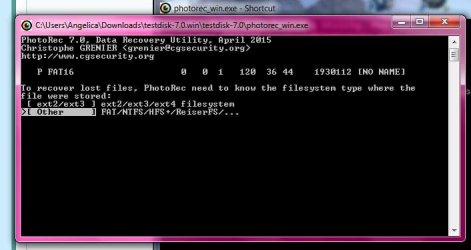
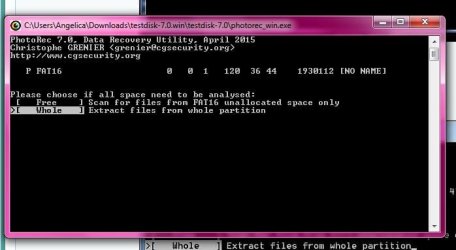
My Guide here http://www.sevenforums.com/software/193467-guide-using-photorec-recovery-software.html Go to the Topic under Recovery in that thread and follow the procedure.

I would advise you to connect an empty pendrive before you run PhotoRec and show it as the destination to which you want to copy.

During selection of file formats to copy select only the formats you want to recover. ( You may select all also and since your SDcard is only 1GB, it may not take a longtime)

Run only PhotoRec.exe and not testdisk.exe

Good luck.
 

My Computer

OS
Windows 7 Home Premium 32 bit
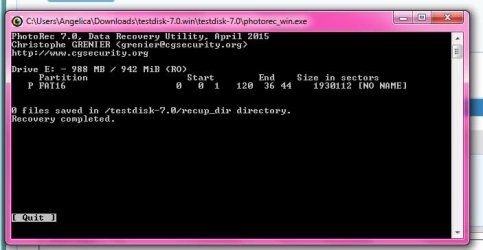
Unfortunately, PhotoRec did not work. :cry:
But thank you for your help!
 

My Computer

Computer type
Laptop
OS
windows 7 home premium 32 bit
Can you post the screenshots in the same sequence as shown in my guide? Let me assess it. Do it slowly - may be tomorrow since its already bedtime. May look like a postmortem but it can perhaps reveal what has actually happened.

( As you must have seen in that guide, even after formatting, the photos could be recovered.Did running various other data Recovery software ruin your SD Card beyond recovery?????)
 

My Computer

OS
Windows 7 Home Premium 32 bit
Can you post the screenshots in the same sequence as shown in my guide? Let me assess it. Do it slowly - may be tomorrow since its already bedtime. May look like a postmortem but it can perhaps reveal what has actually happened.

( As you must have seen in that guide, even after formatting, the photos could be recovered.Did running various other data Recovery software ruin your SD Card beyond recovery?????)

I will definitely start doing that now!
 

My Computer

Computer type
Laptop
OS
windows 7 home premium 32 bit
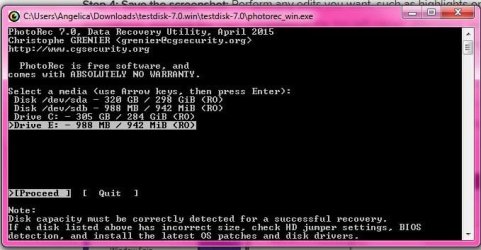
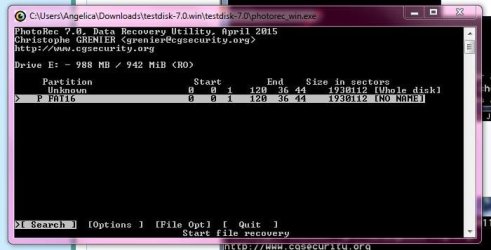
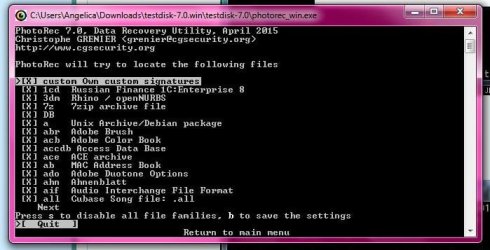
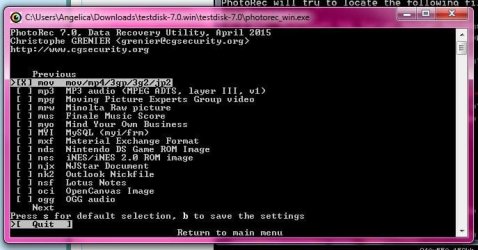
Okay, so i have all the screen shots, and followed tutorial step by step. It says 0 files recovered, but again, nothing was over written on the card. So i'm confused, and wondering if its even worth sending to a professional? (i tried getting attachments in correct order)
 

Attachments

  • screen 1.JPG
    screen 1.JPG
    46.2 KB · Views: 18
  • screen 2.JPG
    screen 2.JPG
    37.1 KB · Views: 18
  • screen 3.JPG
    screen 3.JPG
    48.6 KB · Views: 18
  • screen 4.JPG
    screen 4.JPG
    48.7 KB · Views: 18
  • screen 5.JPG
    screen 5.JPG
    29.3 KB · Views: 2
  • screen 6.JPG
    screen 6.JPG
    35.3 KB · Views: 18
  • screen 7.JPG
    screen 7.JPG
    34.9 KB · Views: 2
  • screen 8.JPG
    screen 8.JPG
    35.1 KB · Views: 18
  • screen 9.JPG
    screen 9.JPG
    75.7 KB · Views: 2
  • screen11.JPG
    screen11.JPG
    34 KB · Views: 2

My Computer

Computer type
Laptop
OS
windows 7 home premium 32 bit
I think you are missing many things.

If your SD card contains photos you should select .jpg file format to recover the photos.

Your screenshot shows you had selected only .mov files which are video files.

Run PhotoRec again and select only.jpg format.

Don't be afraid of. You can run PhotoRec a thousand times and it can in no way affect your data. as it does not write anything to the SD card.

In the meanwhile, I shall install PhotoRec on my lappy, refresh myself ( I don't rather can't keep anything in my failing memory :D) and come back with screenshots with detailed instructions. It may take sometime, I am rather a slow couch but we shall do it. Perhaps you have to be led by hand.
 

My Computer

OS
Windows 7 Home Premium 32 bit
Sorry I didn't show I had this one selected as well as the other. & still no files recovered. Is it possible i deleted a partition and created a new one and over wrote it instead of just formatting?
 

Attachments

  • Capture.JPG
    Capture.JPG
    50 KB · Views: 2

My Computer

Computer type
Laptop
OS
windows 7 home premium 32 bit
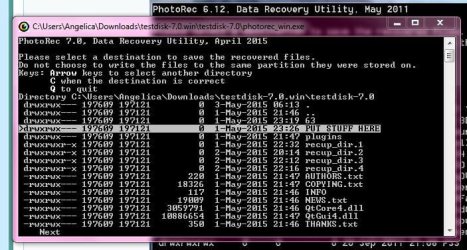
Where did you create the Put Stuff here folder?

Do you have another empty pen drive? Even if it is not empty it is sufficient if you have 1 GB free space in it to copy. But I would prefer an empty pendrive

Then plug it in, see what drive letter it has, then run PhotoRec and show your pen drive as destination to copy.

By using the arrow keys you should be able to select the destination drive. When the correct destination is shown press Shift+c (capital C)
 

My Computer

OS
Windows 7 Home Premium 32 bit
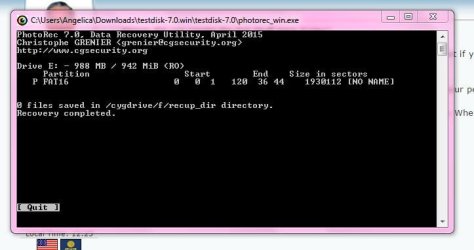
Okay, I did that, and got this..
 

Attachments

  • Capture.JPG
    Capture.JPG
    35.5 KB · Views: 2

My Computer

Computer type
Laptop
OS
windows 7 home premium 32 bit
That is very bad indeed.
I see you have reached the correct destination f drive which must be your pendrive.
One last time try this.
In PhotoRec leave the default all file formats marked X , save settings with b and proceed. Let us see if it copies anything to your destination.
 

My Computer

OS
Windows 7 Home Premium 32 bit
Still nothing doing it that way. ):
Do you think a professional company would be able to recover it if i sent it out? Or did i completely ruin it?
 

My Computer

Computer type
Laptop
OS
windows 7 home premium 32 bit
Back
Top