How to apply FW patch to HDD with Win7 OS from DOS

mackado

New member
Local time
4:12 AM
Messages
50
Dell Xps 435t (01-2010 built)
Corsair 650W PSU,(installed a year ago)
Windows 7 SP1 Home premium
i7 920 @ 2.7Ghz CPU,
6 Gig DDR3,
Radeon 5770 Video (installed a year ago)
M-Audio- Audiophile 2496 Audio.
Samsung 750 GB SATA2 HDD
Hitachi 1TB SATA2 HDD
Wacom Intuos Tablet


How to apply FW patch to HDD with Win7 OS from DOS


In my efforts to find whats causing “BSOD Kernel 41 error” while in sleep (or at wake) mode as described in this other thread here, I ran a SFC /scannow as indicated in this forum and the util found “some errors that could not be fixed”, I tried to do a second scan (following instructions here)from the root Dir to see if I get better results, but my 'recovery' disc generated an error before loading the 'Recovery options' window, (I will try this again later after creating a second fresh recovery disc).


But over at the Dell upgrade area for my system, I found a Patch (6-16-11) for my Samsung HDD marked “urgent” that states..

“Resolves an issue that cause intermittent boot problems”


and may just be the reason this Sys intermittently crashes when coming out of sleep mode, but I can't figure out how to apply this patch to the OS HDD. This are the instructions Dells offers..


Custom Instructions for F3_Patch.zip:
This firmware download utility runs in DOS.
1. Unzip the file F3_Patch.zip to your bootable USB key
2. Run the F3_Patch.exe file form your bootable key
3. You will notice that the current FW is 1AJ10001, after flash it will become 1AJ10002 (but this can only be done after reboot and re-run step 2)
4. Reboot the system after flashed
5. Please take note the PC will halted sometimes as the BIOS is trying to detect the HDD, force reboot again if you see this situation
6. Once reboot successful, you will be able to go into Windows, Windows will detect your new HDD again
7. Last reboot from the Windows after detection completed, restart and FW is now 002 version


Can someone here help me with how to load this patch to a bootable USB Key/Thumb drive?


Also here is the CBS.Log generated by the HDD scan, in case someone can make sense of this info.


Thanks


View attachment 186327
 

My Computer My Computer

At a glance

Windows 7 Home Premium Edition SP1 64 bitIntel i7-920 2.66 GHZ6 Gig DDR3 @ 1066 MHZATi Radeon HD 5770 - 1GB GDDR5
Computer type
PC/Desktop
Computer Manufacturer/Model Number
Dell Studio XPS 9000
OS
Windows 7 Home Premium Edition SP1 64 bit
CPU
Intel i7-920 2.66 GHZ
Motherboard
Intel
Memory
6 Gig DDR3 @ 1066 MHZ
Graphics Card(s)
ATi Radeon HD 5770 - 1GB GDDR5
Sound Card
M-Audio AudioPhile 24/96
Monitor(s) Displays
Dell_ST2310_Digital
Screen Resolution
1920 x 1080(p) (60.000Hz)
Hard Drives
Samsung 250 Gb SDD 850 EVO,
Hitachi 1TB 7200/RPM, External Seagate 1TB 7200 RPM
PSU
Corsair 650 Watt
Mouse
Logitech Wireless MX Revolution
Antivirus
Windows Defender
Browser
Firefox
Try this:

Download the HP format utility : https://rs635tl2.rapidshare.com/#!d...p|2002|R~86EFBA95CD36833E3AA42B4ECB350D24|0|0

That should also contain the files needed to make the usb a bootable dos disk... Run the hp format utility on the usb, direct it to the dos files when selecting "Make bootable dos"...

Unzip the file you need for firmware directly to the usb root, make note of the name of the file.

Boot to the disk and run the file...
 

My Computer My Computer

At a glance

Windows 7 Ultimate SP1 x64i7 950 4ghz6GB G.Skill pc12800EVGA GTX 580 SC
Computer Manufacturer/Model Number
Custom build
OS
Windows 7 Ultimate SP1 x64
CPU
i7 950 4ghz
Motherboard
EVGA x58 FTW3
Memory
6GB G.Skill pc12800
Graphics Card(s)
EVGA GTX 580 SC
Sound Card
Xfi Titanium
Monitor(s) Displays
Samsung 24"
Screen Resolution
1920x1200
Hard Drives
Vertex 3 SSD 120Gb x2 RAID 0
4 x 1TB WD Black RAID 0
PSU
Thermaltake 850
Case
Mountain Mods U2-UFO Horizon
Cooling
Custom watercooling
Internet Speed
100 down 5 up
Sedril, is not working for me, the hpusbdiskstorage...exe is the only .exe here and never asks for Dos files location, this looks like a diff util.
 

My Computer My Computer

At a glance

Windows 7 Home Premium Edition SP1 64 bitIntel i7-920 2.66 GHZ6 Gig DDR3 @ 1066 MHZATi Radeon HD 5770 - 1GB GDDR5
Computer type
PC/Desktop
Computer Manufacturer/Model Number
Dell Studio XPS 9000
OS
Windows 7 Home Premium Edition SP1 64 bit
CPU
Intel i7-920 2.66 GHZ
Motherboard
Intel
Memory
6 Gig DDR3 @ 1066 MHZ
Graphics Card(s)
ATi Radeon HD 5770 - 1GB GDDR5
Sound Card
M-Audio AudioPhile 24/96
Monitor(s) Displays
Dell_ST2310_Digital
Screen Resolution
1920 x 1080(p) (60.000Hz)
Hard Drives
Samsung 250 Gb SDD 850 EVO,
Hitachi 1TB 7200/RPM, External Seagate 1TB 7200 RPM
PSU
Corsair 650 Watt
Mouse
Logitech Wireless MX Revolution
Antivirus
Windows Defender
Browser
Firefox

My Computer My Computer

At a glance

Windows 7 Home Premium 32 bit
OS
Windows 7 Home Premium 32 bit
Jumanji, I was able to create the USB boot flash drive with your links, and ran the DOS Samsung drive patch successfully as far as I can tell. My Dos was/is so rusty I had to look up a very old DOS 4.0 book I still have around here. LOL:D

The only thing is I can't find within W7 where the firmware version is displayed to be sure of the FW update, I can't find it on 'Device manager' ..

Any suggestions?

Thanks
 

My Computer My Computer

At a glance

Windows 7 Home Premium Edition SP1 64 bitIntel i7-920 2.66 GHZ6 Gig DDR3 @ 1066 MHZATi Radeon HD 5770 - 1GB GDDR5
Computer type
PC/Desktop
Computer Manufacturer/Model Number
Dell Studio XPS 9000
OS
Windows 7 Home Premium Edition SP1 64 bit
CPU
Intel i7-920 2.66 GHZ
Motherboard
Intel
Memory
6 Gig DDR3 @ 1066 MHZ
Graphics Card(s)
ATi Radeon HD 5770 - 1GB GDDR5
Sound Card
M-Audio AudioPhile 24/96
Monitor(s) Displays
Dell_ST2310_Digital
Screen Resolution
1920 x 1080(p) (60.000Hz)
Hard Drives
Samsung 250 Gb SDD 850 EVO,
Hitachi 1TB 7200/RPM, External Seagate 1TB 7200 RPM
PSU
Corsair 650 Watt
Mouse
Logitech Wireless MX Revolution
Antivirus
Windows Defender
Browser
Firefox
use crystaldiskinfo utility, you can even download the portable edition so you don't have to install anything.. That will give you the FW version number...

Sorry my link didn't work for you, that's the way I do it all the time so not sure what's wrong there...
 

My Computer My Computer

At a glance

Windows 7 Ultimate SP1 x64i7 950 4ghz6GB G.Skill pc12800EVGA GTX 580 SC
Computer Manufacturer/Model Number
Custom build
OS
Windows 7 Ultimate SP1 x64
CPU
i7 950 4ghz
Motherboard
EVGA x58 FTW3
Memory
6GB G.Skill pc12800
Graphics Card(s)
EVGA GTX 580 SC
Sound Card
Xfi Titanium
Monitor(s) Displays
Samsung 24"
Screen Resolution
1920x1200
Hard Drives
Vertex 3 SSD 120Gb x2 RAID 0
4 x 1TB WD Black RAID 0
PSU
Thermaltake 850
Case
Mountain Mods U2-UFO Horizon
Cooling
Custom watercooling
Internet Speed
100 down 5 up
I just double checked my link I gave you and, it is exactly what it should be, has the utility and the dos files...
 

My Computer My Computer

At a glance

Windows 7 Ultimate SP1 x64i7 950 4ghz6GB G.Skill pc12800EVGA GTX 580 SC
Computer Manufacturer/Model Number
Custom build
OS
Windows 7 Ultimate SP1 x64
CPU
i7 950 4ghz
Motherboard
EVGA x58 FTW3
Memory
6GB G.Skill pc12800
Graphics Card(s)
EVGA GTX 580 SC
Sound Card
Xfi Titanium
Monitor(s) Displays
Samsung 24"
Screen Resolution
1920x1200
Hard Drives
Vertex 3 SSD 120Gb x2 RAID 0
4 x 1TB WD Black RAID 0
PSU
Thermaltake 850
Case
Mountain Mods U2-UFO Horizon
Cooling
Custom watercooling
Internet Speed
100 down 5 up
I just double checked my link I gave you and, it is exactly what it should be, has the utility and the dos files...

Sedril, your link and util is probably fine, it was late when i tried it and my head was out of it, but when I tried the other link by Jumanji today and noticed it was almost the same as your, I realized I was missing something, I didn't realized the HP util was installing in my HDD as an App and I was supposed to launch it, I thought it was just running in memory....I know it was dumb:sleepy:

I thank you very much for your effort, and Jumanji's, I'm going to try your FW version detector now, before It gets to late and my brain turns to mulch..:shock:

I've been searching the user forums over at Dell for 'how to read the current FW' for an hour, but that forum is always too difficult to find anything..
 

My Computer My Computer

At a glance

Windows 7 Home Premium Edition SP1 64 bitIntel i7-920 2.66 GHZ6 Gig DDR3 @ 1066 MHZATi Radeon HD 5770 - 1GB GDDR5
Computer type
PC/Desktop
Computer Manufacturer/Model Number
Dell Studio XPS 9000
OS
Windows 7 Home Premium Edition SP1 64 bit
CPU
Intel i7-920 2.66 GHZ
Motherboard
Intel
Memory
6 Gig DDR3 @ 1066 MHZ
Graphics Card(s)
ATi Radeon HD 5770 - 1GB GDDR5
Sound Card
M-Audio AudioPhile 24/96
Monitor(s) Displays
Dell_ST2310_Digital
Screen Resolution
1920 x 1080(p) (60.000Hz)
Hard Drives
Samsung 250 Gb SDD 850 EVO,
Hitachi 1TB 7200/RPM, External Seagate 1TB 7200 RPM
PSU
Corsair 650 Watt
Mouse
Logitech Wireless MX Revolution
Antivirus
Windows Defender
Browser
Firefox
well, turns out I had already installed a util that reads the SMART HDD data and reports FW id, Speed Fan v4.45.

The bad news is that the FW version reported for the Sammy drive is the same as the one before the patch, (CC45) and it doesn't resemble at all what Dell's instructions above says it should be.

This same FW id can be found on W7-> Device manager->discDrives->details-> hardware ids, which I though was something else..:huh:

So now I'm stuck, I did everything Dell says, and double checked the Patch compatibility etc, Dos Patch found the HD drive and did 'something" but apparently it didn't work? :confused:

I think I'll give it a rest, I may have to call Dell after all, I was trying to avoid that..

Can somebody make sense of the #3 instruction above by Dell, Am I suppose to run the patch twice ?
 

My Computer My Computer

At a glance

Windows 7 Home Premium Edition SP1 64 bitIntel i7-920 2.66 GHZ6 Gig DDR3 @ 1066 MHZATi Radeon HD 5770 - 1GB GDDR5
Computer type
PC/Desktop
Computer Manufacturer/Model Number
Dell Studio XPS 9000
OS
Windows 7 Home Premium Edition SP1 64 bit
CPU
Intel i7-920 2.66 GHZ
Motherboard
Intel
Memory
6 Gig DDR3 @ 1066 MHZ
Graphics Card(s)
ATi Radeon HD 5770 - 1GB GDDR5
Sound Card
M-Audio AudioPhile 24/96
Monitor(s) Displays
Dell_ST2310_Digital
Screen Resolution
1920 x 1080(p) (60.000Hz)
Hard Drives
Samsung 250 Gb SDD 850 EVO,
Hitachi 1TB 7200/RPM, External Seagate 1TB 7200 RPM
PSU
Corsair 650 Watt
Mouse
Logitech Wireless MX Revolution
Antivirus
Windows Defender
Browser
Firefox
Yes, better to drill the DELL Tech Support (chat, preferably) and ask them to walk you through. ( There I believe it is 24X7)

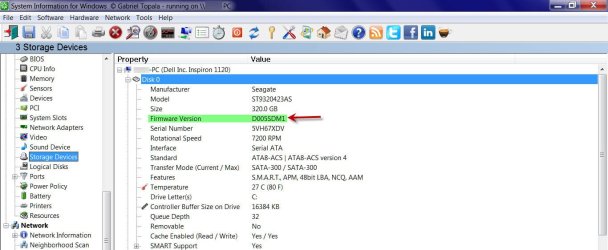
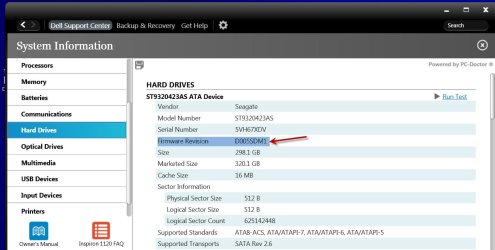
Yes. the FW version can be found in Device Manager for the specific disk.

Properties > Details > Hardware IDs.

While it is the simplest way, there are many other tools. In some cases, you may already have these.

1.SIW 2011 (Freeware) - Buy SIW Pro or Download SIW Freeware

SWFW1.jpg

2. Dell Support Center
Dell Support Center | Dell (only for DELL PCs I presume) - It is a customized, skinned down OEM version of PC Doctor for Windows.

dscfw2.jpg

Regarding DOS: I also had the book DOS for Dummies :). Haven't seen it for more than a decade now.
 

My Computer My Computer

At a glance

Windows 7 Home Premium 32 bit
OS
Windows 7 Home Premium 32 bit
Can somebody make sense of the #3 instruction above by Dell, Am I suppose to run the patch twice ?

Are those instructions a direct copy and paste from somewhere on Dell.com??

If so, I am surprised. The instructions have numerous grammatical and spelling errors that I would not expect to see at Dell. I was just wondering if maybe you got them from some other, possibly second-hand, source.

Like you, I cannot parse the #3 instruction. It reads like it was composed by a non-native English speaker. Which is all too common of US college graduates or other victims of US public education, post-1980.
 

My Computer My Computer

At a glance

Windows 7 Home Premium SP1, 64-bitIntel Skylake i5-6600K, not overclocked8 GB HyperX DDR4-2666 (2 x 4 GB)none; graphics are integrated on CPU
Computer type
PC/Desktop
Computer Manufacturer/Model Number
Ignatz Special; 4 speed manual gearbox; factory air conditioning; one of one
OS
Windows 7 Home Premium SP1, 64-bit
CPU
Intel Skylake i5-6600K, not overclocked
Motherboard
AsRock Z170M Extreme 4, micro ATX
Memory
8 GB HyperX DDR4-2666 (2 x 4 GB)
Graphics Card(s)
none; graphics are integrated on CPU
Sound Card
onboard: Realtek ALC1150; external: USB Behringer UF0-202
Monitor(s) Displays
Dell S2340M 23 inch IPS
Screen Resolution
1600 x 900
Hard Drives
System: Crucial MX100 series SSD, 128 GB;
Data: Samsung Spinpoint 103SJ, 1 TB;
Backup: WD Caviar Green WD30EZRX-00D8PB0, 3 TB
PSU
Rosewill SilentNight 500 watt fanless, semi-modular
Case
Antec Solo II
Cooling
Noctua NH-U12S; Noctua F12 intake, Noctua S12A exhaust
Keyboard
Microsoft 200 6JH-00001 USB
Mouse
Dell or Microsoft optical wired; USB
Antivirus
Microsoft Security Essentials and Malwarebytes Premium
Browser
Pale Moon
Other Info
All fans PWM; speeds at idle: CPU circa 500 rpm; intake circa 600 rpm; exhaust circa 600 rpm; CPU temps 27 idle and 47 C load in a warm room (27 C/81 F) when running Intel Extreme Tuning Utility stress test.
Alec, double check the model of your HDD and make sure the Dell patch is the right one for your installed HDD, after contacting Dell for my issue, it turned out the Dell patch I was trying to install was not for the HDD model in my PC.

All my 'Kernel 41" errors and BSOD went away by themselves, and for many months now the 'sleep' mode has been working as it is supposed to without any hang-ups, which tells me that there was nothing wrong with my HDD or memory chips to begin with.

I believe the problem is with Microsoft W7 and patches that automatically install just about every other nite at shutdown, my errors began after a bunch of these patches were installed, I think MS discovers that a certain patch is affecting certain users- many weeks later- and then they issue a new patch that addresses that issue they created.

I would suggest you download all MS W7 patches from the "Update" console that W7 recommends, before doing more troubleshooting, maybe your issue was already fixed, if not contact Dell to make sure their HDD Patch is the right one for you, as Dells' patch area is very confusing.....
 

My Computer My Computer

At a glance

Windows 7 Home Premium Edition SP1 64 bitIntel i7-920 2.66 GHZ6 Gig DDR3 @ 1066 MHZATi Radeon HD 5770 - 1GB GDDR5
Computer type
PC/Desktop
Computer Manufacturer/Model Number
Dell Studio XPS 9000
OS
Windows 7 Home Premium Edition SP1 64 bit
CPU
Intel i7-920 2.66 GHZ
Motherboard
Intel
Memory
6 Gig DDR3 @ 1066 MHZ
Graphics Card(s)
ATi Radeon HD 5770 - 1GB GDDR5
Sound Card
M-Audio AudioPhile 24/96
Monitor(s) Displays
Dell_ST2310_Digital
Screen Resolution
1920 x 1080(p) (60.000Hz)
Hard Drives
Samsung 250 Gb SDD 850 EVO,
Hitachi 1TB 7200/RPM, External Seagate 1TB 7200 RPM
PSU
Corsair 650 Watt
Mouse
Logitech Wireless MX Revolution
Antivirus
Windows Defender
Browser
Firefox
Thank You for the fast reply!
I double checked and the patch is really for my type of HDD...
As I said before I managed to flash the FW succesfully and since yesterday I havn't received any BSOD... But anyway... They appeared randomly lets say 1 in 5 times... So I still have to wait a little bit...
I don't have original windows 7... Is it possible to download and install the updates.. A friend told me that I shouldn't leave windows to access the internet as it could detect that its not valid and stop working....
And I also heard that there are some programs on the dell page which can filter the windows updated just to the dell certified ones.. Is it true? I agree with you, mackado that the dell page is very confusing...:(
 

My Computer My Computer

At a glance

Windows 7 Ultimate x64
OS
Windows 7 Ultimate x64
Back
Top