Solved Skyrim Audio Issue: Incredibly quiet game.

Dudes. You probably have one of these problems:

a) you have your 2.1 speakers set up as 5.1 or 7.1
b) you have your 5.1 speakers configured correctly but have a physical "matrix" button on your speakers pressed

The game is meant to be enjoyed on 5.1 audio or greater. It was all produced in surround sound channel format. Therefore you must change windows options on your computer to your correct speaker-set up value.

On win7 if you go to Sound in the control panel, choose your default speakers and press the configure button. From there set your speakers appropriately.
 

My Computer My Computer

OS
win7 64 bit
No, I don't have them setup incorrectly.

The company should have made an option in the game to set it up with either 2.1 or 5.1 sound. Baaaad planning.
 

My Computer My Computer

Computer Manufacturer/Model Number
Custom
OS
Windows 7 Ultimate 32-Bit
CPU
Intel(R) Core(TM) i7 CPU 920 @ 2.67GHz
Motherboard
Gigabyte Technology Co., Ltd. EX58-UD3R
Memory
Corsair DDR3 4Gb
Graphics Card(s)
Nvidia Ge-Force GTS250
Sound Card
High Definition Audio Device
Monitor(s) Displays
Envision 19 inch
Screen Resolution
1280x1024
Hard Drives
2 physical hard drives (4 letter drives) that equal up to 626.3 gigs of space all together. I think both are Maxtors, but primary is a SATA drive, secondary is a SATA, too.
Case
"Elite" style case
Cooling
"Cooler Master"
Mouse
Microsoft Optical USB Mouse.
Internet Speed
Verizon DSL Internet
5.1 Surround will cause voices to seem distant...

I've played Skyrim on both 5.1 and 2.1 speakers, and never run into this issue. I tested this last night, the only way i was able to reproduce it, was by having a 5.1 sound setting, and using 2.1 speakers. Speech seems to only come through the front middle. When I disconnected this speaker, I could still hear speech, in the FL,FR,RL,RR speakers but it was barely audible.

I'm thinking this would have to be either a driver, or setting issue somewhere. If you've gone through all the usual settings, one quick fix might be to just enable subtitles. You might not be able to hear them, but at least you can get an idea of what's being said.

~V
 

My Computer My Computer

Computer Manufacturer/Model Number
Custom Rig
OS
Windows 7 Ultimate 64-Bit SP1
CPU
Intel Core i7-2600k OC'd @ 5.0Ghz
Motherboard
ASUS Maximus IV Extreme-Z
Memory
16 GB Corsair Vengeance PC3-12800 (4x4GB)
Graphics Card(s)
XFX 695X DD (x2) in Crossfire
Sound Card
Realtek ALC889 (Integrated)
Monitor(s) Displays
XFX Triple Monitor Display w/ 3 ASUS 23.6" LCD
Screen Resolution
5760x1080 (AMD Eyefinity)
Hard Drives
OCZ Vertex 3 SATA III (120GB)
WD Caviar Black 1.5 TB x2
PSU
XFX ProSeries Black Edition 1000w 80+ Platinum Certified
Case
Cooler Master HAF X Blue Edition
Cooling
Corsair H100 w/ Noctua NF-S12B FLX (x4) Push/Pull
Keyboard
Razer Lycosa
Mouse
Razer Naga & Razer Nostromo
Other Info
ASUS ROG G74SX
-240GB OCZ Vertex II x2 (Raid 0)
I've played Skyrim on both 5.1 and 2.1 speakers, and never run into this issue. I tested this last night, the only way i was able to reproduce it, was by having a 5.1 sound setting, and using 2.1 speakers. Speech seems to only come through the front middle. When I disconnected this speaker, I could still hear speech, in the FL,FR,RL,RR speakers but it was barely audible.

I'm thinking this would have to be either a driver, or setting issue somewhere. If you've gone through all the usual settings, one quick fix might be to just enable subtitles. You might not be able to hear them, but at least you can get an idea of what's being said.

~V

I'd rather have proper audio for my games. If the company can't even get that right, then the company obviously isn't worth my money. The average person has 2.1 speakers, and they obviously went for 5.1.
 

My Computer My Computer

Computer Manufacturer/Model Number
Custom
OS
Windows 7 Ultimate 32-Bit
CPU
Intel(R) Core(TM) i7 CPU 920 @ 2.67GHz
Motherboard
Gigabyte Technology Co., Ltd. EX58-UD3R
Memory
Corsair DDR3 4Gb
Graphics Card(s)
Nvidia Ge-Force GTS250
Sound Card
High Definition Audio Device
Monitor(s) Displays
Envision 19 inch
Screen Resolution
1280x1024
Hard Drives
2 physical hard drives (4 letter drives) that equal up to 626.3 gigs of space all together. I think both are Maxtors, but primary is a SATA drive, secondary is a SATA, too.
Case
"Elite" style case
Cooling
"Cooler Master"
Mouse
Microsoft Optical USB Mouse.
Internet Speed
Verizon DSL Internet
The game was designed to support 2.1, 5.1, and 7.1 sound. I don't think it has anything to do with Bethesda. It is certainly unfair to blame the company when this issue does not seem to be wide spread. I will do some checking around later this afternoon and see if I can come up with anything that might help. Hopefully we can come up with something that will allow you to experience the game as it should be!

~V

Edit: After reading, it seems this issue is happening exclusively with systems using the Realtek Integrated HD Audio.

I found this on the Bethesda forums: The user (Pyide) cites unknown sources.

"I forgot where I saw this (credit to you, unknown source!) but if you have Realtek onboard sound and are using stereo speakers or headphones, switch the speaker configuration to 5.1 and uncheck the center channel / sub / rear speaker options like so: http://img507.images...0/lowvolume.png

The game's audio will be extremely loud now (you've been warned!), and you'll still hear everything behind you and such. I couldn't say if the separation is better or worse but I can at least hear people talk and the music now.
Not sure if it'll work the same for other sound and system setups, I use headphones and it definitely helped my low volume problem"

Give this a shot and let me know how this works please!

~V
 

My Computer My Computer

Computer Manufacturer/Model Number
Custom Rig
OS
Windows 7 Ultimate 64-Bit SP1
CPU
Intel Core i7-2600k OC'd @ 5.0Ghz
Motherboard
ASUS Maximus IV Extreme-Z
Memory
16 GB Corsair Vengeance PC3-12800 (4x4GB)
Graphics Card(s)
XFX 695X DD (x2) in Crossfire
Sound Card
Realtek ALC889 (Integrated)
Monitor(s) Displays
XFX Triple Monitor Display w/ 3 ASUS 23.6" LCD
Screen Resolution
5760x1080 (AMD Eyefinity)
Hard Drives
OCZ Vertex 3 SATA III (120GB)
WD Caviar Black 1.5 TB x2
PSU
XFX ProSeries Black Edition 1000w 80+ Platinum Certified
Case
Cooler Master HAF X Blue Edition
Cooling
Corsair H100 w/ Noctua NF-S12B FLX (x4) Push/Pull
Keyboard
Razer Lycosa
Mouse
Razer Naga & Razer Nostromo
Other Info
ASUS ROG G74SX
-240GB OCZ Vertex II x2 (Raid 0)
If you are experiencing the problem in this way:

You have stereo 2.1 speakers, and you can only hear a person talk when not facing them (camera wise) and everything is echo-like, your speakers must be set up wrong. This is the case because I have to change my speaker settings from 5.1 to stereo if I want to use my headphones.

The game itself is fine although it could definitely use better audio options. Its your speaker set up. PERIOD! If however you are just complaining about low voice audio, go to your audio options, lower everything except for master and voice. Voila.
 

My Computer My Computer

OS
win7 64 bit
If you are experiencing the problem in this way:

You have stereo 2.1 speakers, and you can only hear a person talk when not facing them (camera wise) and everything is echo-like, your speakers must be set up wrong. This is the case because I have to change my speaker settings from 5.1 to stereo if I want to use my headphones.

The game itself is fine although it could definitely use better audio options. Its your speaker set up. PERIOD! If however you are just complaining about low voice audio, go to your audio options, lower everything except for master and voice. Voila.

This is not the case for quite a few people experiencing the issue, go have a look on the Bethesda forums. There is a thread 10-15 pages long. There seems to be a conflict between Skyrim and Realtek's audio drivers that cause this issue.
 

My Computer My Computer

Computer Manufacturer/Model Number
Custom Rig
OS
Windows 7 Ultimate 64-Bit SP1
CPU
Intel Core i7-2600k OC'd @ 5.0Ghz
Motherboard
ASUS Maximus IV Extreme-Z
Memory
16 GB Corsair Vengeance PC3-12800 (4x4GB)
Graphics Card(s)
XFX 695X DD (x2) in Crossfire
Sound Card
Realtek ALC889 (Integrated)
Monitor(s) Displays
XFX Triple Monitor Display w/ 3 ASUS 23.6" LCD
Screen Resolution
5760x1080 (AMD Eyefinity)
Hard Drives
OCZ Vertex 3 SATA III (120GB)
WD Caviar Black 1.5 TB x2
PSU
XFX ProSeries Black Edition 1000w 80+ Platinum Certified
Case
Cooler Master HAF X Blue Edition
Cooling
Corsair H100 w/ Noctua NF-S12B FLX (x4) Push/Pull
Keyboard
Razer Lycosa
Mouse
Razer Naga & Razer Nostromo
Other Info
ASUS ROG G74SX
-240GB OCZ Vertex II x2 (Raid 0)
  • Like
Reactions: JMH
If you are experiencing the problem in this way:

You have stereo 2.1 speakers, and you can only hear a person talk when not facing them (camera wise) and everything is echo-like, your speakers must be set up wrong. This is the case because I have to change my speaker settings from 5.1 to stereo if I want to use my headphones.

The game itself is fine although it could definitely use better audio options. Its your speaker set up. PERIOD! If however you are just complaining about low voice audio, go to your audio options, lower everything except for master and voice. Voila.

This is not the case for quite a few people experiencing the issue, go have a look on the Bethesda forums. There is a thread 10-15 pages long. There seems to be a conflict between Skyrim and Realtek's audio drivers that cause this issue.

He's correct. My speakers aren't setup wrong. Every other game I play does NOT have this stupid issue. I really hope they fix this in a later patch or something. It's annoying.
 

My Computer My Computer

Computer Manufacturer/Model Number
Custom
OS
Windows 7 Ultimate 32-Bit
CPU
Intel(R) Core(TM) i7 CPU 920 @ 2.67GHz
Motherboard
Gigabyte Technology Co., Ltd. EX58-UD3R
Memory
Corsair DDR3 4Gb
Graphics Card(s)
Nvidia Ge-Force GTS250
Sound Card
High Definition Audio Device
Monitor(s) Displays
Envision 19 inch
Screen Resolution
1280x1024
Hard Drives
2 physical hard drives (4 letter drives) that equal up to 626.3 gigs of space all together. I think both are Maxtors, but primary is a SATA drive, secondary is a SATA, too.
Case
"Elite" style case
Cooling
"Cooler Master"
Mouse
Microsoft Optical USB Mouse.
Internet Speed
Verizon DSL Internet
The game was designed to support 2.1, 5.1, and 7.1 sound. I don't think it has anything to do with Bethesda. It is certainly unfair to blame the company when this issue does not seem to be wide spread. I will do some checking around later this afternoon and see if I can come up with anything that might help. Hopefully we can come up with something that will allow you to experience the game as it should be!

~V

Edit: After reading, it seems this issue is happening exclusively with systems using the Realtek Integrated HD Audio.

I found this on the Bethesda forums: The user (Pyide) cites unknown sources.

"I forgot where I saw this (credit to you, unknown source!) but if you have Realtek onboard sound and are using stereo speakers or headphones, switch the speaker configuration to 5.1 and uncheck the center channel / sub / rear speaker options like so: http://img507.images...0/lowvolume.png

The game's audio will be extremely loud now (you've been warned!), and you'll still hear everything behind you and such. I couldn't say if the separation is better or worse but I can at least hear people talk and the music now.
Not sure if it'll work the same for other sound and system setups, I use headphones and it definitely helped my low volume problem"

Give this a shot and let me know how this works please!

~V

This fixed my problem! The sound is much louder and more audible now. Thanks a bunch mate! :cool:
 

My Computer My Computer

OS
Windows 7 Ultimatex64
CPU
AMD Phenom 2 x4 965 processor 3.40 GHz
Motherboard
ASUS M4A88TD-V EVO
Memory
4 GB
Graphics Card(s)
AMD Radeon HD 6870
Monitor(s) Displays
24" LG full HD
Thank you a million times thank you! Fixed
The game was designed to support 2.1, 5.1, and 7.1 sound. I don't think it has anything to do with Bethesda. It is certainly unfair to blame the company when this issue does not seem to be wide spread. I will do some checking around later this afternoon and see if I can come up with anything that might help. Hopefully we can come up with something that will allow you to experience the game as it should be!

~V

Edit: After reading, it seems this issue is happening exclusively with systems using the Realtek Integrated HD Audio.

I found this on the Bethesda forums: The user (Pyide) cites unknown sources.

"I forgot where I saw this (credit to you, unknown source!) but if you have Realtek onboard sound and are using stereo speakers or headphones, switch the speaker configuration to 5.1 and uncheck the center channel / sub / rear speaker options like so: http://img507.images...0/lowvolume.png

The game's audio will be extremely loud now (you've been warned!), and you'll still hear everything behind you and such. I couldn't say if the separation is better or worse but I can at least hear people talk and the music now.
Not sure if it'll work the same for other sound and system setups, I use headphones and it definitely helped my low volume problem"

Give this a shot and let me know how this works please!

~V
 

My Computer My Computer

OS
Windows 7 Pro 64 bit
CPU
AMD Phenom II X4 925
Motherboard
Gigabyte GA-870A-UD3
Memory
2 x 4gb DDR3 1333
Graphics Card(s)
Radeon 6950 2gb
Sound Card
Onboard
Monitor(s) Displays
Samsung BX2431 (x2)
Screen Resolution
1920-1080 (x2)
Hard Drives
120GB OCZ Vertex 2 &
750GB & 250gb Seagate &
1TB Samsung
PSU
Corsair 750TX
Case
Antec 900
Cooling
Cooler Master 212
Keyboard
Logitech Illuminated Keyboard
Mouse
Razer Deathadder
Internet Speed
12 Mb
  • Like
Reactions: JMH
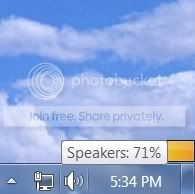
I fixed this problem for me - maybe it will help others. First I loaded my game, then I alt tabbed to desktop. I right clicked on the speaker icon on the taskbar.
speakericonontaskbar.jpg

Choose "Open Volume Mixer".
rightclickresultsm.jpg

Skyrim should be one of the Icons. Adjust the sound here.
clickonspeakerbuttonsm.jpg

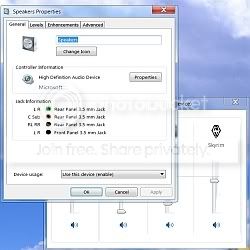
If this does not work. Try clicking the speaker button, the speaker properties window should appear.
speakerpagesm.jpg

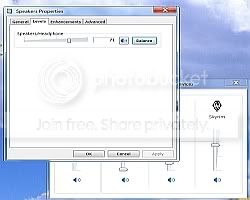
Click on Levels tab
levelssm.jpg

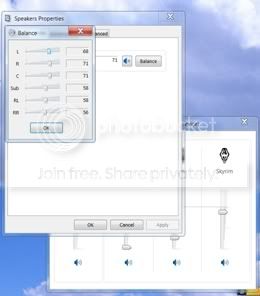
and then balance.
balancesm.jpg


Increase the level of where your speaker or headphones plug in. A little experimenting here should make the speech and other noises in Skyrim so much louder. It was such a difference I was blown away :p Hope this helps.
 

My Computer My Computer

OS
64 windows 7
Depends if you have the right hardware or not. But I think I tried it on XP for a bit, before I quit playing it not too long afterwords. And it worked fine.
 

My Computer My Computer

Computer Manufacturer/Model Number
Custom
OS
Windows 7 Ultimate 32-Bit
CPU
Intel(R) Core(TM) i7 CPU 920 @ 2.67GHz
Motherboard
Gigabyte Technology Co., Ltd. EX58-UD3R
Memory
Corsair DDR3 4Gb
Graphics Card(s)
Nvidia Ge-Force GTS250
Sound Card
High Definition Audio Device
Monitor(s) Displays
Envision 19 inch
Screen Resolution
1280x1024
Hard Drives
2 physical hard drives (4 letter drives) that equal up to 626.3 gigs of space all together. I think both are Maxtors, but primary is a SATA drive, secondary is a SATA, too.
Case
"Elite" style case
Cooling
"Cooler Master"
Mouse
Microsoft Optical USB Mouse.
Internet Speed
Verizon DSL Internet
Back
Top