

poppa bear
Banned
Solved: After installing Intel RAID Rapid Storage drivers on both my computers, which have SATA hard drives and burners, then Nero 7, 8, 10 and 11 all ran flawlessly on Vista and Windows 7.
RAID Rapid Storage provides improved performanace and reliability for systems equipped with SATA discs for desktop, mobile and server platforms.
I have recently installed Nero Burning ROM 11 on my Windows 7 Ultimate 64bit OS, and have noticed an inconsistency which I hope someone may be able to shed some light on.
1. If I try to burn a data, multi-session disc, in ISO (joliet) format, using write only -R DVD disks, the burn fails and the disk becomes un-useable. This happens whether Windows 7 burning software is turned on or off.
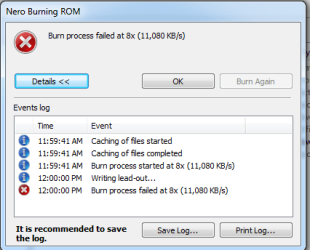
Nero displays the following error message:
2. However, if I burn exactly the same data multi-session disc using a rewriteable +RW DVD disk, it successfully burns every time!
3. At first glance it would seem to indicate that the write only disks are incompatible, but not so. Once a session has been successfully burnt, using the rewriteable +RW discs, then any further sessions where the write only –R disks are used burn perfectly every time!
4. However, if the PC is turned off completely, and rebooted, any burns done with the write only –R disks will fail, unless a preliminary burn is first done using rewriteable +RW disks.
This seems to indicate that some memory item has been saved; or a program has not shut down properly.
6. Now consider the scenario where:
But like before, this will only work if the latter session is run using a +RW rewriteable DVD. If a –R write only disk is used before the session is run with the +RW rewriteable disk, the -R write only disc will be ruined.
I’d be very grateful for any help anyone can offer on this issue.
RAID Rapid Storage provides improved performanace and reliability for systems equipped with SATA discs for desktop, mobile and server platforms.
I have recently installed Nero Burning ROM 11 on my Windows 7 Ultimate 64bit OS, and have noticed an inconsistency which I hope someone may be able to shed some light on.
1. If I try to burn a data, multi-session disc, in ISO (joliet) format, using write only -R DVD disks, the burn fails and the disk becomes un-useable. This happens whether Windows 7 burning software is turned on or off.
Nero displays the following error message:
2. However, if I burn exactly the same data multi-session disc using a rewriteable +RW DVD disk, it successfully burns every time!
3. At first glance it would seem to indicate that the write only disks are incompatible, but not so. Once a session has been successfully burnt, using the rewriteable +RW discs, then any further sessions where the write only –R disks are used burn perfectly every time!
4. However, if the PC is turned off completely, and rebooted, any burns done with the write only –R disks will fail, unless a preliminary burn is first done using rewriteable +RW disks.
- This means it is a necessary prerequisite to burn a data session using a rewriteable DVD before a successful session can be burnt on a write only disk.
- First a rewriteable +RW DVD disk is formatted in UDF using Windows 7 burning software; so it acts like a flash drive.
- After burning data to the disc the PC is logged off and then back on.
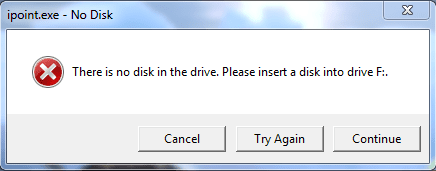
- When the computer logs on, the following error message comes up, as shown below:
This seems to indicate that some memory item has been saved; or a program has not shut down properly.
6. Now consider the scenario where:
- A UDF disk has been formatted and data burnt onto it, but the PC has not been logged off and on again.
- Now a second session is run using Nero to successfully burn a multi-session data disk using a rewriteable +RW DVD disc in ISO (Joliet) format.
- When the PC is now logged off and back on again, the error message does not appear.
But like before, this will only work if the latter session is run using a +RW rewriteable DVD. If a –R write only disk is used before the session is run with the +RW rewriteable disk, the -R write only disc will be ruined.
I’d be very grateful for any help anyone can offer on this issue.
My Computer
At a glance
Win7 Ultimate 64bit RetailIntel i7 960 quad core12 GB Kingston DDR 3 1300PCI Express Gigabyte GTX 550 Ti
- Computer Manufacturer/Model Number
- Self-assembled
- OS
- Win7 Ultimate 64bit Retail
- CPU
- Intel i7 960 quad core
- Motherboard
- Intel DX58SO2 Extreme
- Memory
- 12 GB Kingston DDR 3 1300
- Graphics Card(s)
- PCI Express Gigabyte GTX 550 Ti
- Sound Card
- Gigabyte GTX 550 Ti Graphics/5 Sound card
- Monitor(s) Displays
- Samsung WS Syncmaster S23A350H
- Screen Resolution
- 1920 x 1080
- Hard Drives
- OS on 128 GB Corsair SSD SATA 3 + Storage on 1 TB Western Digital Black SATA 2
- Case
- Cooler Master CM690 II Advanced Mid Tower
- Cooling
- CPU, top, front and rear extractor fans
- Keyboard
- Microsoft Intellitype Wireless Multimedia
- Mouse
- Microsoft Intellipoint2 Wireless
- Internet Speed
- 100 MB/sec Theoretical max. Actual average 0.5MB/sec
- Other Info
- Back-up PC with Vista Ultimate OEM 32bit. Intel i5 2400 Quad Core CPU, DH67CL mobo, 8 GB Kingston DDR3 1300 RAM,


 Also when I had burnt a DVD to be used like a flash drive, in USD format using Windows 7 burning software, every time I would eject it, an error messge came up, saying it had not finished writing the disc so it could be used on other PCs. I would have to try and eject it 2 or 3 times before it finished writing. This problem has also disappeared. Finally, when attempting to open an existing DVD, it was very slow and often took 2 or 3 attempts. Ditto for this problem being fixed.


