
Upgrading Windows 7 Home Premium to Windows 7 Professional

cover

New member
Member
Local time
6:22 AM
Messages
40
I'm purchasing a Windows 7 Home Premium 64 machine that I want to upgrade to Pro to be able to use the virtual & XP mode features on. I have quite a bit of 16 bit installer programs that appear to run okay on Windows 7 32 bit but not Windows 7 64 bit. Has anyone done an upgrade from 64 bit to 32 bit? I can purchase the upgrade directly from MS and am thinking about it.

Interesting read here on similar stuff from 2 yrs ago.

Is Windows 7 able to run 16 bit installers under XP mode? - Microsoft Answers

TIA
 

My Computer My Computer

At a glance

Win 7 Pro 64
Computer Manufacturer/Model Number
Dell
OS
Win 7 Pro 64
I'm purchasing a Windows 7 Home Premium 64 machine that I want to upgrade to Pro to be able to use the virtual & XP mode features on. I have quite a bit of 16 bit installer programs that appear to run okay on Windows 7 32 bit but not Windows 7 64 bit. Has anyone done an upgrade from 64 bit to 32 bit? I can purchase the upgrade directly from MS and am thinking about it.

Interesting read here on similar stuff from 2 yrs ago.

Is Windows 7 able to run 16 bit installers under XP mode? - Microsoft Answers

TIA
Use virtual pc: since you have Home Premium you can't use the new one but the old one works fine:Download: Virtual PC 2007 - Microsoft Download Center - Download Details

Install XP in this VPC and enjoy ;p your programs will run fine
 
Last edited:

My Computer My Computer

At a glance

Windows 7 Home Premium x64Core i7 2600K4GB DDR3 Kingston HyperXGigabyte GTX 670
Computer Manufacturer/Model Number
Homebuilt
OS
Windows 7 Home Premium x64
CPU
Core i7 2600K
Motherboard
Asus P8Z77-V LX
Memory
4GB DDR3 Kingston HyperX
Graphics Card(s)
Gigabyte GTX 670
Sound Card
Realtek HD Audio
Monitor(s) Displays
Delium Monitor
Screen Resolution
1360 x 768
Hard Drives
C: (500GB)
PSU
Corsair 620W
Case
Antec
Cooling
Cooling Master
Keyboard
Logitech
Mouse
Logitech wireless mouse M 505
Internet Speed
60MBPS
Sure Windows 7 supports VPC 2007 ? Didn't see listed in System requirements.
 

My Computer My Computer

At a glance

Win 7 Pro 64
Computer Manufacturer/Model Number
Dell
OS
Win 7 Pro 64
Sure Windows 7 supports VPC 2007 ? Didn't see listed in System requirements.

But it works !, Just download the x64 version and if you try to install it and you got an error ('Not supported OS!) just click OK, and it will install so just ignore it. It works fine trust me :) and if the installation is complete you will get this message (attached (1)) (just click don't show this message again) and it works !
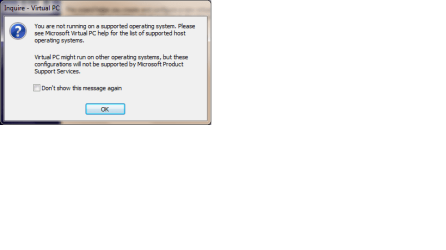

PS:than you just have to install a 32-bit XP iso in this virtual machine
 

Attachments

  • Naamloos.png
    Naamloos.png
    9.8 KB · Views: 13
  • works.png
    works.png
    9.3 KB · Views: 11
Last edited:

My Computer My Computer

At a glance

Windows 7 Home Premium x64Core i7 2600K4GB DDR3 Kingston HyperXGigabyte GTX 670
Computer Manufacturer/Model Number
Homebuilt
OS
Windows 7 Home Premium x64
CPU
Core i7 2600K
Motherboard
Asus P8Z77-V LX
Memory
4GB DDR3 Kingston HyperX
Graphics Card(s)
Gigabyte GTX 670
Sound Card
Realtek HD Audio
Monitor(s) Displays
Delium Monitor
Screen Resolution
1360 x 768
Hard Drives
C: (500GB)
PSU
Corsair 620W
Case
Antec
Cooling
Cooling Master
Keyboard
Logitech
Mouse
Logitech wireless mouse M 505
Internet Speed
60MBPS
Technically you can't upgrade from 64 bit to 32 bit, or 32 bit to 64 bit. You have to do a custom/clean install. Just so you know, that would mean recovering your stuff from the Windows.old folder if you don't back it up, and re-installing all your apps.
 

My Computer My Computer

At a glance

Windows 10 Education 64 bitAMD Phenom II X4 980 Black Edition Deneb 3.7GHz8GB 4GBx2 Kingston PC10600 DDR3 1333 MemoryZotac NVIDIA Geforce GT640 2 Gig DDR3 PCIe
Computer type
PC/Desktop
Computer Manufacturer/Model Number
Home Built
OS
Windows 10 Education 64 bit
CPU
AMD Phenom II X4 980 Black Edition Deneb 3.7GHz
Motherboard
Asus M4N68T-M V2 µATX Motherboard
Memory
8GB 4GBx2 Kingston PC10600 DDR3 1333 Memory
Graphics Card(s)
Zotac NVIDIA Geforce GT640 2 Gig DDR3 PCIe
Sound Card
VIA VT1708s High Definition Audio 8-channel Onboard
Monitor(s) Displays
22" LG E2242 1080p and 2 19" I-INC AG191D
Screen Resolution
1280x1024 - 1920x1080 - 1280x1024
Hard Drives
Crucial M100 256 GB SSD and 500 GB WD Blue SATA
PSU
Thermaltake TR 620
Case
Power Up Black ATX Mid-Tower Case
Cooling
Stock heatsink and fan
Keyboard
Logitech Wireless K350 Wave
Mouse
Logitech Wireless M570 Trackman Wheel
Internet Speed
80 Mbps Down 30 Mbps Up
Antivirus
Windows Defender
Browser
Internet Explorer 11
Other Info
HP DVD1040e Lightscribe - External USB2
Technically you can't upgrade from 64 bit to 32 bit, or 32 bit to 64 bit. You have to do a custom/clean install. Just so you know, that would mean recovering your stuff from the Windows.old folder if you don't back it up, and re-installing all your apps.

But downgrading from 64-bit to 32-bit isn't recommend use virtual pc with the instructions I posted in my previous post
 

My Computer My Computer

At a glance

Windows 7 Home Premium x64Core i7 2600K4GB DDR3 Kingston HyperXGigabyte GTX 670
Computer Manufacturer/Model Number
Homebuilt
OS
Windows 7 Home Premium x64
CPU
Core i7 2600K
Motherboard
Asus P8Z77-V LX
Memory
4GB DDR3 Kingston HyperX
Graphics Card(s)
Gigabyte GTX 670
Sound Card
Realtek HD Audio
Monitor(s) Displays
Delium Monitor
Screen Resolution
1360 x 768
Hard Drives
C: (500GB)
PSU
Corsair 620W
Case
Antec
Cooling
Cooling Master
Keyboard
Logitech
Mouse
Logitech wireless mouse M 505
Internet Speed
60MBPS

My Computer My Computer

At a glance

Windows 7 Ultimate SP1 64-BitIntel Core i7 870 @ 2.93GHz8Gb Dual-Channel DDR3 @ 664MHznVidia GeForce GTX 460 1024MB dedicated RAM
Computer Manufacturer/Model Number
HP Pavilion Elite 495UK
OS
Windows 7 Ultimate SP1 64-Bit
CPU
Intel Core i7 870 @ 2.93GHz
Motherboard
MSI 2A9C (CPU1)
Memory
8Gb Dual-Channel DDR3 @ 664MHz
Graphics Card(s)
nVidia GeForce GTX 460 1024MB dedicated RAM
Sound Card
Realtek HD Audio
Monitor(s) Displays
HP2310i
Screen Resolution
1920 x 1080
Hard Drives
1x1954GB Hitachi HDS22020ALA 330 (RAID), 1x1954GB Hitachi External for backup and storage
PSU
460W
Case
HP Elite
Cooling
Air cooled
Keyboard
Logitech K750 solar-powered keyboard
Mouse
Logitech Wireless M180 mouse
Internet Speed
2Mb
Other Info
Pure Avanti Flow Internet Radio with iPod Dock, 64Gb iPod, HP USB Speakers, Sony MDR-V500 Headphones, Sony Vaio F-Series Laptop

My Computer My Computer

At a glance

Windows 7 Home Premium x64Core i7 2600K4GB DDR3 Kingston HyperXGigabyte GTX 670
Computer Manufacturer/Model Number
Homebuilt
OS
Windows 7 Home Premium x64
CPU
Core i7 2600K
Motherboard
Asus P8Z77-V LX
Memory
4GB DDR3 Kingston HyperX
Graphics Card(s)
Gigabyte GTX 670
Sound Card
Realtek HD Audio
Monitor(s) Displays
Delium Monitor
Screen Resolution
1360 x 768
Hard Drives
C: (500GB)
PSU
Corsair 620W
Case
Antec
Cooling
Cooling Master
Keyboard
Logitech
Mouse
Logitech wireless mouse M 505
Internet Speed
60MBPS
Isn't XP mode 32 bit anyway, even on 64 bit Windows 7? So there would be no need to go 32 bit, just upgrade to Pro 64 bit. I'm not saying do it, I'm just asking if the 16 bit apps would work in XP mode on a 64 bit system? If the answer is yes then you could just use anytime upgrade to unlock Pro and install XP Mode and not worry about going 32 bit at all.
 

My Computer My Computer

At a glance

Windows 10 Education 64 bitAMD Phenom II X4 980 Black Edition Deneb 3.7GHz8GB 4GBx2 Kingston PC10600 DDR3 1333 MemoryZotac NVIDIA Geforce GT640 2 Gig DDR3 PCIe
Computer type
PC/Desktop
Computer Manufacturer/Model Number
Home Built
OS
Windows 10 Education 64 bit
CPU
AMD Phenom II X4 980 Black Edition Deneb 3.7GHz
Motherboard
Asus M4N68T-M V2 µATX Motherboard
Memory
8GB 4GBx2 Kingston PC10600 DDR3 1333 Memory
Graphics Card(s)
Zotac NVIDIA Geforce GT640 2 Gig DDR3 PCIe
Sound Card
VIA VT1708s High Definition Audio 8-channel Onboard
Monitor(s) Displays
22" LG E2242 1080p and 2 19" I-INC AG191D
Screen Resolution
1280x1024 - 1920x1080 - 1280x1024
Hard Drives
Crucial M100 256 GB SSD and 500 GB WD Blue SATA
PSU
Thermaltake TR 620
Case
Power Up Black ATX Mid-Tower Case
Cooling
Stock heatsink and fan
Keyboard
Logitech Wireless K350 Wave
Mouse
Logitech Wireless M570 Trackman Wheel
Internet Speed
80 Mbps Down 30 Mbps Up
Antivirus
Windows Defender
Browser
Internet Explorer 11
Other Info
HP DVD1040e Lightscribe - External USB2
Isn't XP mode 32 bit anyway, even on 64 bit Windows 7? So there would be no need to go 32 bit, just upgrade to Pro 64 bit. I'm not saying do it, I'm just asking if the 16 bit apps would work in XP mode on a 64 bit system? If the answer is yes then you could just use anytime upgrade to unlock Pro and install XP Mode and not worry about going 32 bit at all.

Yes 16-bits apps will work in XP mode even if the host pc is 64-bit
 

My Computer My Computer

At a glance

Windows 7 Home Premium x64Core i7 2600K4GB DDR3 Kingston HyperXGigabyte GTX 670
Computer Manufacturer/Model Number
Homebuilt
OS
Windows 7 Home Premium x64
CPU
Core i7 2600K
Motherboard
Asus P8Z77-V LX
Memory
4GB DDR3 Kingston HyperX
Graphics Card(s)
Gigabyte GTX 670
Sound Card
Realtek HD Audio
Monitor(s) Displays
Delium Monitor
Screen Resolution
1360 x 768
Hard Drives
C: (500GB)
PSU
Corsair 620W
Case
Antec
Cooling
Cooling Master
Keyboard
Logitech
Mouse
Logitech wireless mouse M 505
Internet Speed
60MBPS
I'm purchasing a Windows 7 Home Premium 64 machine that I want to upgrade to Pro to be able to use the virtual & XP mode features on. I have quite a bit of 16 bit installer programs that appear to run okay on Windows 7 32 bit but not Windows 7 64 bit. Has anyone done an upgrade from 64 bit to 32 bit? I can purchase the upgrade directly from MS and am thinking about it.

Interesting read here on similar stuff from 2 yrs ago.

Is Windows 7 able to run 16 bit installers under XP mode? - Microsoft Answers

TIA
Use virtual pc: since you have Home Premium you can't use the new one but the old one works fine:Download: Virtual PC 2007 - Microsoft Download Center - Download Details

Install XP in this VPC and enjoy ;p your programs will run fine

I've just clicked the Virtual PC 2007 link you've posted and it's only for Virtual PC 2007 SP1 i.e. it's just the service pack for Virtual PC 2007, not the full program.
 

My Computer My Computer

At a glance

Windows 7 Ultimate SP1 64-BitIntel Core i7 870 @ 2.93GHz8Gb Dual-Channel DDR3 @ 664MHznVidia GeForce GTX 460 1024MB dedicated RAM
Computer Manufacturer/Model Number
HP Pavilion Elite 495UK
OS
Windows 7 Ultimate SP1 64-Bit
CPU
Intel Core i7 870 @ 2.93GHz
Motherboard
MSI 2A9C (CPU1)
Memory
8Gb Dual-Channel DDR3 @ 664MHz
Graphics Card(s)
nVidia GeForce GTX 460 1024MB dedicated RAM
Sound Card
Realtek HD Audio
Monitor(s) Displays
HP2310i
Screen Resolution
1920 x 1080
Hard Drives
1x1954GB Hitachi HDS22020ALA 330 (RAID), 1x1954GB Hitachi External for backup and storage
PSU
460W
Case
HP Elite
Cooling
Air cooled
Keyboard
Logitech K750 solar-powered keyboard
Mouse
Logitech Wireless M180 mouse
Internet Speed
2Mb
Other Info
Pure Avanti Flow Internet Radio with iPod Dock, 64Gb iPod, HP USB Speakers, Sony MDR-V500 Headphones, Sony Vaio F-Series Laptop
I'm purchasing a Windows 7 Home Premium 64 machine that I want to upgrade to Pro to be able to use the virtual & XP mode features on. I have quite a bit of 16 bit installer programs that appear to run okay on Windows 7 32 bit but not Windows 7 64 bit. Has anyone done an upgrade from 64 bit to 32 bit? I can purchase the upgrade directly from MS and am thinking about it.

Interesting read here on similar stuff from 2 yrs ago.

Is Windows 7 able to run 16 bit installers under XP mode? - Microsoft Answers

TIA
Use virtual pc: since you have Home Premium you can't use the new one but the old one works fine:Download: Virtual PC 2007 - Microsoft Download Center - Download Details

Install XP in this VPC and enjoy ;p your programs will run fine

I've just clicked the Virtual PC 2007 link you've posted and it's only for Virtual PC 2007 SP1 i.e. it's just the service pack for Virtual PC 2007, not the full program.
It is the full program look at my pics it works -.-. And if you don't believe me try it !
 

My Computer My Computer

At a glance

Windows 7 Home Premium x64Core i7 2600K4GB DDR3 Kingston HyperXGigabyte GTX 670
Computer Manufacturer/Model Number
Homebuilt
OS
Windows 7 Home Premium x64
CPU
Core i7 2600K
Motherboard
Asus P8Z77-V LX
Memory
4GB DDR3 Kingston HyperX
Graphics Card(s)
Gigabyte GTX 670
Sound Card
Realtek HD Audio
Monitor(s) Displays
Delium Monitor
Screen Resolution
1360 x 768
Hard Drives
C: (500GB)
PSU
Corsair 620W
Case
Antec
Cooling
Cooling Master
Keyboard
Logitech
Mouse
Logitech wireless mouse M 505
Internet Speed
60MBPS
Isn't XP mode 32 bit anyway, even on 64 bit Windows 7? So there would be no need to go 32 bit, just upgrade to Pro 64 bit. I'm not saying do it, I'm just asking if the 16 bit apps would work in XP mode on a 64 bit system? If the answer is yes then you could just use anytime upgrade to unlock Pro and install XP Mode and not worry about going 32 bit at all.

What you are saying is entirely correct.
 

My Computer My Computer

At a glance

Windows 7 Ultimate SP1 64-BitIntel Core i7 870 @ 2.93GHz8Gb Dual-Channel DDR3 @ 664MHznVidia GeForce GTX 460 1024MB dedicated RAM
Computer Manufacturer/Model Number
HP Pavilion Elite 495UK
OS
Windows 7 Ultimate SP1 64-Bit
CPU
Intel Core i7 870 @ 2.93GHz
Motherboard
MSI 2A9C (CPU1)
Memory
8Gb Dual-Channel DDR3 @ 664MHz
Graphics Card(s)
nVidia GeForce GTX 460 1024MB dedicated RAM
Sound Card
Realtek HD Audio
Monitor(s) Displays
HP2310i
Screen Resolution
1920 x 1080
Hard Drives
1x1954GB Hitachi HDS22020ALA 330 (RAID), 1x1954GB Hitachi External for backup and storage
PSU
460W
Case
HP Elite
Cooling
Air cooled
Keyboard
Logitech K750 solar-powered keyboard
Mouse
Logitech Wireless M180 mouse
Internet Speed
2Mb
Other Info
Pure Avanti Flow Internet Radio with iPod Dock, 64Gb iPod, HP USB Speakers, Sony MDR-V500 Headphones, Sony Vaio F-Series Laptop
Use virtual pc: since you have Home Premium you can't use the new one but the old one works fine:Download: Virtual PC 2007 - Microsoft Download Center - Download Details

Install XP in this VPC and enjoy ;p your programs will run fine

I've just clicked the Virtual PC 2007 link you've posted and it's only for Virtual PC 2007 SP1 i.e. it's just the service pack for Virtual PC 2007, not the full program.
It is the full program look at my pics it works -.-. And if you don't believe me try it !

I don't need to as I've already installed XP mode.

I don't try and break the terms of Microsoft license, nor do I encourage others to do so. :)
 

My Computer My Computer

At a glance

Windows 7 Ultimate SP1 64-BitIntel Core i7 870 @ 2.93GHz8Gb Dual-Channel DDR3 @ 664MHznVidia GeForce GTX 460 1024MB dedicated RAM
Computer Manufacturer/Model Number
HP Pavilion Elite 495UK
OS
Windows 7 Ultimate SP1 64-Bit
CPU
Intel Core i7 870 @ 2.93GHz
Motherboard
MSI 2A9C (CPU1)
Memory
8Gb Dual-Channel DDR3 @ 664MHz
Graphics Card(s)
nVidia GeForce GTX 460 1024MB dedicated RAM
Sound Card
Realtek HD Audio
Monitor(s) Displays
HP2310i
Screen Resolution
1920 x 1080
Hard Drives
1x1954GB Hitachi HDS22020ALA 330 (RAID), 1x1954GB Hitachi External for backup and storage
PSU
460W
Case
HP Elite
Cooling
Air cooled
Keyboard
Logitech K750 solar-powered keyboard
Mouse
Logitech Wireless M180 mouse
Internet Speed
2Mb
Other Info
Pure Avanti Flow Internet Radio with iPod Dock, 64Gb iPod, HP USB Speakers, Sony MDR-V500 Headphones, Sony Vaio F-Series Laptop
I've just clicked the Virtual PC 2007 link you've posted and it's only for Virtual PC 2007 SP1 i.e. it's just the service pack for Virtual PC 2007, not the full program.
It is the full program look at my pics it works -.-. And if you don't believe me try it !

I don't need to as I've already installed XP mode.

I don't try and break the terms of Microsoft license, nor do I encourage others to do so. :)
If it works that's all you need (and you use vpc 2010 because you have ultimate than that's ok)
 

My Computer My Computer

At a glance

Windows 7 Home Premium x64Core i7 2600K4GB DDR3 Kingston HyperXGigabyte GTX 670
Computer Manufacturer/Model Number
Homebuilt
OS
Windows 7 Home Premium x64
CPU
Core i7 2600K
Motherboard
Asus P8Z77-V LX
Memory
4GB DDR3 Kingston HyperX
Graphics Card(s)
Gigabyte GTX 670
Sound Card
Realtek HD Audio
Monitor(s) Displays
Delium Monitor
Screen Resolution
1360 x 768
Hard Drives
C: (500GB)
PSU
Corsair 620W
Case
Antec
Cooling
Cooling Master
Keyboard
Logitech
Mouse
Logitech wireless mouse M 505
Internet Speed
60MBPS
Sure Windows 7 supports VPC 2007 ? Didn't see listed in System requirements.

But it works !, Just download the x64 version and if you try to install it and you got an error ('Not supported OS!) just click OK, and it will install so just ignore it. It works fine trust me and if the installation is complete you will get this message (attached (1)) (just click don't show this message again) and it works !

PS:than you just have to install a 32-bit XP iso in this virtual machine


Cool - I'll check it out... Thank you. :D
 

My Computer My Computer

At a glance

Win 7 Pro 64
Computer Manufacturer/Model Number
Dell
OS
Win 7 Pro 64
Great discussion - thank you everyone...

So GianniDPC, two remaining questions that you can probably help with. 1) once the drive is set up, a person should pretty much treat it as another drive? ( i.e. my computer would now show an additional drive - perhaps, C [hard drive], D [DVD/CD drive], E [Newly created Virtual Drive]). 2) I'm assuming that so much of my 1ter HDD needs to be committed to this new virtual drive when set up and that the virtual drive size cannot be adjusted on the fly. Should I leave room for the virtual drive to have it's own Windows 'swap file'? I was thinking perhaps somewhere around 1GB for the virtual. Your thoughts?
 

My Computer My Computer

At a glance

Win 7 Pro 64
Computer Manufacturer/Model Number
Dell
OS
Win 7 Pro 64
Great discussion - thank you everyone...

So GianniDPC, two remaining questions that you can probably help with. 1) once the drive is set up, a person should pretty much treat it as another drive? ( i.e. my computer would now show an additional drive - perhaps, C [hard drive], D [DVD/CD drive], E [Newly created Virtual Drive]). 2) I'm assuming that so much of my 1ter HDD needs to be committed to this new virtual drive when set up and that the virtual drive size cannot be adjusted on the fly. Should I leave room for the virtual drive to have it's own Windows 'swap file'? I was thinking perhaps somewhere around 1GB for the virtual. Your thoughts?

No, so if you create a virtual machine and install it with an XP iso/disk you will have a .vhd file so this will not show up under 'Computer' Also if you make your virtual machine you will need to choose the VHD space and it's location. It isn't that hard just follow the steps on the screen in VPC :)
 

My Computer My Computer

At a glance

Windows 7 Home Premium x64Core i7 2600K4GB DDR3 Kingston HyperXGigabyte GTX 670
Computer Manufacturer/Model Number
Homebuilt
OS
Windows 7 Home Premium x64
CPU
Core i7 2600K
Motherboard
Asus P8Z77-V LX
Memory
4GB DDR3 Kingston HyperX
Graphics Card(s)
Gigabyte GTX 670
Sound Card
Realtek HD Audio
Monitor(s) Displays
Delium Monitor
Screen Resolution
1360 x 768
Hard Drives
C: (500GB)
PSU
Corsair 620W
Case
Antec
Cooling
Cooling Master
Keyboard
Logitech
Mouse
Logitech wireless mouse M 505
Internet Speed
60MBPS
Last edited:

My Computer My Computer

At a glance

Windows 7 Home Premium x64Core i7 2600K4GB DDR3 Kingston HyperXGigabyte GTX 670
Computer Manufacturer/Model Number
Homebuilt
OS
Windows 7 Home Premium x64
CPU
Core i7 2600K
Motherboard
Asus P8Z77-V LX
Memory
4GB DDR3 Kingston HyperX
Graphics Card(s)
Gigabyte GTX 670
Sound Card
Realtek HD Audio
Monitor(s) Displays
Delium Monitor
Screen Resolution
1360 x 768
Hard Drives
C: (500GB)
PSU
Corsair 620W
Case
Antec
Cooling
Cooling Master
Keyboard
Logitech
Mouse
Logitech wireless mouse M 505
Internet Speed
60MBPS
Back
Top