Solved Failed HDD: Can this drive be reclaimed??

aarrghh. on deep query: "Read error at 391/224/26 [lba=62995552]
 

My Computer My Computer

At a glance

Windows XP Pro SP3, Windows 7 Pro 32-bit, Win...Pentium 4 3.2GHz, Pentium 4 3.4GHz 64bit, Atom,4GB matched, 1GB, 2.5GB, 4.0 GBGeforce 8400 GS and others
Computer Manufacturer/Model Number
HP DC7600, HP DC7600[2], HP DC7100, Samsung NC10
OS
Windows XP Pro SP3, Windows 7 Pro 32-bit, Windows 7 Ultimate 64bit, Windows XP Home SP3
CPU
Pentium 4 3.2GHz, Pentium 4 3.4GHz 64bit, Atom,
Motherboard
Dunno
Memory
4GB matched, 1GB, 2.5GB, 4.0 GB
Graphics Card(s)
Geforce 8400 GS and others
Sound Card
RealteK ALC260 and others
Monitor(s) Displays
Asus HD
Screen Resolution
1920x1080
Hard Drives
WD Caviar 640gb SATA
Cooling
We Be Cool
i should have made note. I think the last one I saw was trying the backup command - or copy - it was something that had promise of writing out a copy of the partition/contents. it basically went non-linear and kept repeating the error msg over and over ad infinitum so I had to kill the process.
I'm doing the deep search now and at least it is able to interrogate the cylinders. but I would be very surprised if there is another partition. its the files I'm after...

is there a way to write a new table or something to the zero track so that it might be recognizable under windows?

If it was once recognized under windows, that partition may show up in TestDisk and you can recover it to be viewed in Windows. If not, you will have to use the Photorec program to recover your files, then you can reformat the drive to use it again. I'm afraid to try to fix the file system in any way as it may result in you losing data.
 

My Computer My Computer

At a glance

Windows 7 Home Premium 64 BitIntel(R) Core(TM)2 Quad CPU Q9550 @ 2.83GHz6.00 GB Hundai HMT125U6BFR8C-H9ATI Radeon HD 4850
Computer Manufacturer/Model Number
HP Pavilion e9110t
OS
Windows 7 Home Premium 64 Bit
CPU
Intel(R) Core(TM)2 Quad CPU Q9550 @ 2.83GHz
Motherboard
Pegatron IPIEL-LA3
Memory
6.00 GB Hundai HMT125U6BFR8C-H9
Graphics Card(s)
ATI Radeon HD 4850
Sound Card
Realtek High Definition Audio/ATI High Definition Audio
Monitor(s) Displays
Acer AL2216W
Screen Resolution
1680x1050
Hard Drives
Hitachi HDP725050GLA360 ATA Device 500 GB
PSU
Unknown/installed by HP
Case
HP generic case
Cooling
Intel Stock Cooling
Keyboard
HP Keyboard
Mouse
HP Mouse
Internet Speed
Download: 19.15 Mbps Upload: 1.67 Mbps
Other Info
Network Adapter Realtek RTL8168D/8111D Family PCI-E Gigabit Ethernet NIC (NDIS 6.20)
Network Adapter 802.11n Wireless PCI Express Card LAN Adapter
just one more quicky... this really surprised me - threw in a windows xp pro install disc, and it found the drive, ready to install... i don't want to go there though - but it gives hope. an install wouldn't necessarily delete [really] the files but would damage a lot of them in all likelihood

Zapp,

One other thing to try, but not sure if it will work.

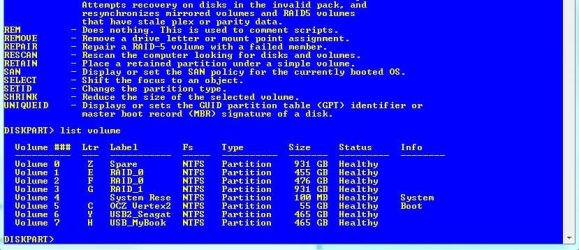
Boot from a Windows 7 installation disk as if you were doing a fresh installation. At the screen that prompt for Language, Keyboard Layout etc., hold SHIFT and then hit F10. The CMD window will open at the following prompt X:\Sources.

Now follow these steps:

1. Type diskpart
2. Type list volume
3. If the drive shows up with a letter as per example below, type exit
4. Now change to the drive letter, then type chkdsk /R

Let us know if this works.

Regards,
Golden
 

Attachments

  • Capture.JPG
    Capture.JPG
    81.3 KB · Views: 13

My Computer My Computer

At a glance

Windows 10 Pro x64 ; Xubuntu x64Intel i7 860 @ 2.80 GHz O/C'ed to 4.0GHz16GB Corsair Vengance DDR3 @ 661 MHz Dual Cha...EVGA NVidia GTX 560 1024MB
Computer type
PC/Desktop
Computer Manufacturer/Model Number
Golden Mk. I.4
OS
Windows 10 Pro x64 ; Xubuntu x64
CPU
Intel i7 860 @ 2.80 GHz O/C'ed to 4.0GHz
Motherboard
Gigabyte P55A-UD3R Rev.1. Award BIOS F13
Memory
16GB Corsair Vengance DDR3 @ 661 MHz Dual Channel (9-9-9-24)
Graphics Card(s)
EVGA NVidia GTX 560 1024MB
Sound Card
Realtek Integrated
Monitor(s) Displays
Dual Samsung SyncMaster 2494HS
Screen Resolution
1920*1080 and 1920*1080
Hard Drives
1*Samsung 840 EVO 120GB SSD;
1*OCZ Vertex 2 60GB SSD;
2*Samsung F3 SpinPoint 1TB in RAID0;
1*Samsung F1 SpinPoint 1TB;
2*Western Digital 1TB External USB 3.0
1*Western Digital 500GB External USB 3.0
1*Seagate 500GB External USB 2.0
PSU
Thermaltake ToughPower QFan 750W
Case
Thermaltake Element S VK60001W2Z
Cooling
Corsair H60 Water Cooling, 2*230mm and 2*80mm case fans
Keyboard
Logitech G110
Mouse
Logitech MX518
I'll give it a shot Golden.

one more piece of info f/u on what I did not record properly earlier.
using the linux utils, I see that there IS a 2nd partition, a debug/recover 100mb partition and it is working. It has PC Doctor loaded along with the bootup files/dos. everything in perfect working order.
However when Linux is asked to Mount the other partition - the 100gb one, which it only labels "Hard Drive" [generic], it fails as follows:
"Error mounting: mount exited with exit code 13:
ntfs_attr_pread_i:ntfs_preread failed. input/output error. Failed to read vcn 0x1; NTFS is either inconsistent, or there is a hardware fault..... run chkdsk /f"
 

My Computer My Computer

At a glance

Windows XP Pro SP3, Windows 7 Pro 32-bit, Win...Pentium 4 3.2GHz, Pentium 4 3.4GHz 64bit, Atom,4GB matched, 1GB, 2.5GB, 4.0 GBGeforce 8400 GS and others
Computer Manufacturer/Model Number
HP DC7600, HP DC7600[2], HP DC7100, Samsung NC10
OS
Windows XP Pro SP3, Windows 7 Pro 32-bit, Windows 7 Ultimate 64bit, Windows XP Home SP3
CPU
Pentium 4 3.2GHz, Pentium 4 3.4GHz 64bit, Atom,
Motherboard
Dunno
Memory
4GB matched, 1GB, 2.5GB, 4.0 GB
Graphics Card(s)
Geforce 8400 GS and others
Sound Card
RealteK ALC260 and others
Monitor(s) Displays
Asus HD
Screen Resolution
1920x1080
Hard Drives
WD Caviar 640gb SATA
Cooling
We Be Cool
writh, photorec apparently has a bigtime achille's heel in that it does not recognize USB attached devices. thus, there is no place to "destination" recovered files to, in this case, except a very sparse amount of ram.

i should have made note. I think the last one I saw was trying the backup command - or copy - it was something that had promise of writing out a copy of the partition/contents. it basically went non-linear and kept repeating the error msg over and over ad infinitum so I had to kill the process.
I'm doing the deep search now and at least it is able to interrogate the cylinders. but I would be very surprised if there is another partition. its the files I'm after...

is there a way to write a new table or something to the zero track so that it might be recognizable under windows?

If it was once recognized under windows, that partition may show up in TestDisk and you can recover it to be viewed in Windows. If not, you will have to use the Photorec program to recover your files, then you can reformat the drive to use it again. I'm afraid to try to fix the file system in any way as it may result in you losing data.
 

My Computer My Computer

At a glance

Windows XP Pro SP3, Windows 7 Pro 32-bit, Win...Pentium 4 3.2GHz, Pentium 4 3.4GHz 64bit, Atom,4GB matched, 1GB, 2.5GB, 4.0 GBGeforce 8400 GS and others
Computer Manufacturer/Model Number
HP DC7600, HP DC7600[2], HP DC7100, Samsung NC10
OS
Windows XP Pro SP3, Windows 7 Pro 32-bit, Windows 7 Ultimate 64bit, Windows XP Home SP3
CPU
Pentium 4 3.2GHz, Pentium 4 3.4GHz 64bit, Atom,
Motherboard
Dunno
Memory
4GB matched, 1GB, 2.5GB, 4.0 GB
Graphics Card(s)
Geforce 8400 GS and others
Sound Card
RealteK ALC260 and others
Monitor(s) Displays
Asus HD
Screen Resolution
1920x1080
Hard Drives
WD Caviar 640gb SATA
Cooling
We Be Cool
writh, photorec apparently has a bigtime achille's heel in that it does not recognize USB attached devices. thus, there is no place to "destination" recovered files to, in this case, except a very sparse amount of ram.

That's no good. Sorry to hear that. What happened with Diskpart? Any luck on that front?
 

My Computer My Computer

At a glance

Windows 7 Home Premium 64 BitIntel(R) Core(TM)2 Quad CPU Q9550 @ 2.83GHz6.00 GB Hundai HMT125U6BFR8C-H9ATI Radeon HD 4850
Computer Manufacturer/Model Number
HP Pavilion e9110t
OS
Windows 7 Home Premium 64 Bit
CPU
Intel(R) Core(TM)2 Quad CPU Q9550 @ 2.83GHz
Motherboard
Pegatron IPIEL-LA3
Memory
6.00 GB Hundai HMT125U6BFR8C-H9
Graphics Card(s)
ATI Radeon HD 4850
Sound Card
Realtek High Definition Audio/ATI High Definition Audio
Monitor(s) Displays
Acer AL2216W
Screen Resolution
1680x1050
Hard Drives
Hitachi HDP725050GLA360 ATA Device 500 GB
PSU
Unknown/installed by HP
Case
HP generic case
Cooling
Intel Stock Cooling
Keyboard
HP Keyboard
Mouse
HP Mouse
Internet Speed
Download: 19.15 Mbps Upload: 1.67 Mbps
Other Info
Network Adapter Realtek RTL8168D/8111D Family PCI-E Gigabit Ethernet NIC (NDIS 6.20)
Network Adapter 802.11n Wireless PCI Express Card LAN Adapter
haven't tried Diskpart - but help me think through this: I have a good recovery partition on that drive. If I can make it bootable, and add to it the utils to fix NTFS, I have a chance of recovering the files, right? How to do??
 

My Computer My Computer

At a glance

Windows XP Pro SP3, Windows 7 Pro 32-bit, Win...Pentium 4 3.2GHz, Pentium 4 3.4GHz 64bit, Atom,4GB matched, 1GB, 2.5GB, 4.0 GBGeforce 8400 GS and others
Computer Manufacturer/Model Number
HP DC7600, HP DC7600[2], HP DC7100, Samsung NC10
OS
Windows XP Pro SP3, Windows 7 Pro 32-bit, Windows 7 Ultimate 64bit, Windows XP Home SP3
CPU
Pentium 4 3.2GHz, Pentium 4 3.4GHz 64bit, Atom,
Motherboard
Dunno
Memory
4GB matched, 1GB, 2.5GB, 4.0 GB
Graphics Card(s)
Geforce 8400 GS and others
Sound Card
RealteK ALC260 and others
Monitor(s) Displays
Asus HD
Screen Resolution
1920x1080
Hard Drives
WD Caviar 640gb SATA
Cooling
We Be Cool
haven't tried Diskpart - but help me think through this: I have a good recovery partition on that drive. If I can make it bootable, and add to it the utils to fix NTFS, I have a chance of recovering the files, right? How to do??

It may be as simple as what Golden suggested. If you can list your volumes, even if the volume you are looking for does not have a drive letter but shows up in Diskpart, you have a good start. You can assign a drive letter once you find the drive, and then you can run chkdsk /r on that drive letter.
 

My Computer My Computer

At a glance

Windows 7 Home Premium 64 BitIntel(R) Core(TM)2 Quad CPU Q9550 @ 2.83GHz6.00 GB Hundai HMT125U6BFR8C-H9ATI Radeon HD 4850
Computer Manufacturer/Model Number
HP Pavilion e9110t
OS
Windows 7 Home Premium 64 Bit
CPU
Intel(R) Core(TM)2 Quad CPU Q9550 @ 2.83GHz
Motherboard
Pegatron IPIEL-LA3
Memory
6.00 GB Hundai HMT125U6BFR8C-H9
Graphics Card(s)
ATI Radeon HD 4850
Sound Card
Realtek High Definition Audio/ATI High Definition Audio
Monitor(s) Displays
Acer AL2216W
Screen Resolution
1680x1050
Hard Drives
Hitachi HDP725050GLA360 ATA Device 500 GB
PSU
Unknown/installed by HP
Case
HP generic case
Cooling
Intel Stock Cooling
Keyboard
HP Keyboard
Mouse
HP Mouse
Internet Speed
Download: 19.15 Mbps Upload: 1.67 Mbps
Other Info
Network Adapter Realtek RTL8168D/8111D Family PCI-E Gigabit Ethernet NIC (NDIS 6.20)
Network Adapter 802.11n Wireless PCI Express Card LAN Adapter
ok, got on this this a.m. while my brain is working.
very interesting: running the diskpart [actually from a repair disc since that was what was handy] it did a better job of deciphering the fog than did Testdisk. took a long time but finally yielded:
volume 1 ltr C no label, fs: RAW [thats a miss], Partition, 93gb, status: Healthy [another miss]
volume 2 I expected: FAT32 repair partition
volume 3 missed by all previous attempts is a hidden partition of 200mb. ???

at any rate it is now munching away on chkdsk c: /r and we'll see. I imagine it will take a long time. its printing a lot of "unreadable" right now.

thanks G! :geek:

just one more quicky... this really surprised me - threw in a windows xp pro install disc, and it found the drive, ready to install... i don't want to go there though - but it gives hope. an install wouldn't necessarily delete [really] the files but would damage a lot of them in all likelihood

Zapp,

One other thing to try, but not sure if it will work.

Boot from a Windows 7 installation disk as if you were doing a fresh installation. At the screen that prompt for Language, Keyboard Layout etc., hold SHIFT and then hit F10. The CMD window will open at the following prompt X:\Sources.

Now follow these steps:

1. Type diskpart
2. Type list volume
3. If the drive shows up with a letter as per example below, type exit
4. Now change to the drive letter, then type chkdsk /R

Let us know if this works.

Regards,
Golden
 

My Computer My Computer

At a glance

Windows XP Pro SP3, Windows 7 Pro 32-bit, Win...Pentium 4 3.2GHz, Pentium 4 3.4GHz 64bit, Atom,4GB matched, 1GB, 2.5GB, 4.0 GBGeforce 8400 GS and others
Computer Manufacturer/Model Number
HP DC7600, HP DC7600[2], HP DC7100, Samsung NC10
OS
Windows XP Pro SP3, Windows 7 Pro 32-bit, Windows 7 Ultimate 64bit, Windows XP Home SP3
CPU
Pentium 4 3.2GHz, Pentium 4 3.4GHz 64bit, Atom,
Motherboard
Dunno
Memory
4GB matched, 1GB, 2.5GB, 4.0 GB
Graphics Card(s)
Geforce 8400 GS and others
Sound Card
RealteK ALC260 and others
Monitor(s) Displays
Asus HD
Screen Resolution
1920x1080
Hard Drives
WD Caviar 640gb SATA
Cooling
We Be Cool
ah.. one more question gents: when this is all done, how do I then make something on that drive actually bootable? assuming the best, chkdsk will render the drive at least readable, then I hope to recover/save files & fragments
 

My Computer My Computer

At a glance

Windows XP Pro SP3, Windows 7 Pro 32-bit, Win...Pentium 4 3.2GHz, Pentium 4 3.4GHz 64bit, Atom,4GB matched, 1GB, 2.5GB, 4.0 GBGeforce 8400 GS and others
Computer Manufacturer/Model Number
HP DC7600, HP DC7600[2], HP DC7100, Samsung NC10
OS
Windows XP Pro SP3, Windows 7 Pro 32-bit, Windows 7 Ultimate 64bit, Windows XP Home SP3
CPU
Pentium 4 3.2GHz, Pentium 4 3.4GHz 64bit, Atom,
Motherboard
Dunno
Memory
4GB matched, 1GB, 2.5GB, 4.0 GB
Graphics Card(s)
Geforce 8400 GS and others
Sound Card
RealteK ALC260 and others
Monitor(s) Displays
Asus HD
Screen Resolution
1920x1080
Hard Drives
WD Caviar 640gb SATA
Cooling
We Be Cool
ah.. one more question gents: when this is all done, how do I then make something on that drive actually bootable? assuming the best, chkdsk will render the drive at least readable, then I hope to recover/save files & fragments

If chkdsk completes and is successful (you may have to run it more than once for this to happen), then it should fix the drive so it can boot.

Edit: Some info on the /r option... "When /R is used, CHKDSK attempts to read every sector on the volume to confirm that the sector is usable. Sectors associated with metadata are read during the natural course of running CHKDSK even when /R is not used. Sectors associated with user data are read during earlier phases of CHKDSK provided /R is specified. When an unreadable sector is located, NTFS will add the cluster containing that sector to its list of bad clusters and, if the cluster was in use, allocate a new cluster to do the job of the old. If a fault tolerant disk driver is being used, data is recovered and written to the newly allocated cluster. Otherwise, the new cluster is filled with a pattern of 0xFF bytes" (Microsoft, 2007).
 

My Computer My Computer

At a glance

Windows 7 Home Premium 64 BitIntel(R) Core(TM)2 Quad CPU Q9550 @ 2.83GHz6.00 GB Hundai HMT125U6BFR8C-H9ATI Radeon HD 4850
Computer Manufacturer/Model Number
HP Pavilion e9110t
OS
Windows 7 Home Premium 64 Bit
CPU
Intel(R) Core(TM)2 Quad CPU Q9550 @ 2.83GHz
Motherboard
Pegatron IPIEL-LA3
Memory
6.00 GB Hundai HMT125U6BFR8C-H9
Graphics Card(s)
ATI Radeon HD 4850
Sound Card
Realtek High Definition Audio/ATI High Definition Audio
Monitor(s) Displays
Acer AL2216W
Screen Resolution
1680x1050
Hard Drives
Hitachi HDP725050GLA360 ATA Device 500 GB
PSU
Unknown/installed by HP
Case
HP generic case
Cooling
Intel Stock Cooling
Keyboard
HP Keyboard
Mouse
HP Mouse
Internet Speed
Download: 19.15 Mbps Upload: 1.67 Mbps
Other Info
Network Adapter Realtek RTL8168D/8111D Family PCI-E Gigabit Ethernet NIC (NDIS 6.20)
Network Adapter 802.11n Wireless PCI Express Card LAN Adapter
just to OCD - is there a distinction between /R and /r ? looking at the command list on technet I don't see a /R - just want to make sure I learn what I can.... thx

also, as to boot: wouldn't that presume upon chkdsk the power of marking the 'fixed' partition as the 0 and primary, and further implies that whatever file damage has been done did not damage the MBR, or that it has been replaced with a good one? i would be knocked out if the thing booted after this much damage

terminology question: is what chkdsk refers to as a "file record segment" the same as what the more cryptic tools refer to as a "cylinder" ?

ah.. one more question gents: when this is all done, how do I then make something on that drive actually bootable? assuming the best, chkdsk will render the drive at least readable, then I hope to recover/save files & fragments

If chkdsk completes and is successful (you may have to run it more than once for this to happen), then it should fix the drive so it can boot.

Edit: Some info on the /r option... "When /R is used, CHKDSK attempts to read every sector on the volume to confirm that the sector is usable. Sectors associated with metadata are read during the natural course of running CHKDSK even when /R is not used. Sectors associated with user data are read during earlier phases of CHKDSK provided /R is specified. When an unreadable sector is located, NTFS will add the cluster containing that sector to its list of bad clusters and, if the cluster was in use, allocate a new cluster to do the job of the old. If a fault tolerant disk driver is being used, data is recovered and written to the newly allocated cluster. Otherwise, the new cluster is filled with a pattern of 0xFF bytes" (Microsoft, 2007).
 

My Computer My Computer

At a glance

Windows XP Pro SP3, Windows 7 Pro 32-bit, Win...Pentium 4 3.2GHz, Pentium 4 3.4GHz 64bit, Atom,4GB matched, 1GB, 2.5GB, 4.0 GBGeforce 8400 GS and others
Computer Manufacturer/Model Number
HP DC7600, HP DC7600[2], HP DC7100, Samsung NC10
OS
Windows XP Pro SP3, Windows 7 Pro 32-bit, Windows 7 Ultimate 64bit, Windows XP Home SP3
CPU
Pentium 4 3.2GHz, Pentium 4 3.4GHz 64bit, Atom,
Motherboard
Dunno
Memory
4GB matched, 1GB, 2.5GB, 4.0 GB
Graphics Card(s)
Geforce 8400 GS and others
Sound Card
RealteK ALC260 and others
Monitor(s) Displays
Asus HD
Screen Resolution
1920x1080
Hard Drives
WD Caviar 640gb SATA
Cooling
We Be Cool
just to OCD - is there a distinction between /R and /r ? looking at the command list on technet I don't see a /R - just want to make sure I learn what I can.... thx

also, as to boot: wouldn't that presume upon chkdsk the power of marking the 'fixed' partition as the 0 and primary, and further implies that whatever file damage has been done did not damage the MBR, or that it has been replaced with a good one? i would be knocked out if the thing booted after this much damage

terminology question: is what chkdsk refers to as a "file record segment" the same as what the more cryptic tools refer to as a "cylinder" ?

There is no difference between /r and /R in terms of how it runs, only in terms of upper and lower case in our alphabet. ;)

As to the MBR, it depends on whether chkdsk is able to salvage enough data to put back into good sectors from the bad sectors. In my experience, it usually does a pretty remarkable job of doing so.

As to your "cylinder" versus "file record segment" I am not familiar with either terminology, so I cannot answer that question without hazarding a guess, and I don't like creating hazards. I will look into it. In the meantime, maybe someone else understands the terminology better and can answer the question?
 

My Computer My Computer

At a glance

Windows 7 Home Premium 64 BitIntel(R) Core(TM)2 Quad CPU Q9550 @ 2.83GHz6.00 GB Hundai HMT125U6BFR8C-H9ATI Radeon HD 4850
Computer Manufacturer/Model Number
HP Pavilion e9110t
OS
Windows 7 Home Premium 64 Bit
CPU
Intel(R) Core(TM)2 Quad CPU Q9550 @ 2.83GHz
Motherboard
Pegatron IPIEL-LA3
Memory
6.00 GB Hundai HMT125U6BFR8C-H9
Graphics Card(s)
ATI Radeon HD 4850
Sound Card
Realtek High Definition Audio/ATI High Definition Audio
Monitor(s) Displays
Acer AL2216W
Screen Resolution
1680x1050
Hard Drives
Hitachi HDP725050GLA360 ATA Device 500 GB
PSU
Unknown/installed by HP
Case
HP generic case
Cooling
Intel Stock Cooling
Keyboard
HP Keyboard
Mouse
HP Mouse
Internet Speed
Download: 19.15 Mbps Upload: 1.67 Mbps
Other Info
Network Adapter Realtek RTL8168D/8111D Family PCI-E Gigabit Ethernet NIC (NDIS 6.20)
Network Adapter 802.11n Wireless PCI Express Card LAN Adapter
File Record segment: "A specific file record segment... uniquely identifies every file and directory on an NTFS volume" (Microsoft TechNet, 2005).
Cylinder: I believe this used to refer to the physical portion of the hard drive that data was written to. Today's hard drives have moved away from the Cylinder/Head/Sector model and now just use a translation factor to make the hardware appear continuous when used by a computer. The cylinder term is still relevant, but I do not think it is truly hardware related anymore other than to go from one section of the disk to another using the translation factor. You can read about how the hard drive is laid out in hard disk basics (NTFS)

Basically, the file record segment refers to how your files are laid out, whereas the cylinder is more of a matter of how the physical hard drive is managed.
 

My Computer My Computer

At a glance

Windows 7 Home Premium 64 BitIntel(R) Core(TM)2 Quad CPU Q9550 @ 2.83GHz6.00 GB Hundai HMT125U6BFR8C-H9ATI Radeon HD 4850
Computer Manufacturer/Model Number
HP Pavilion e9110t
OS
Windows 7 Home Premium 64 Bit
CPU
Intel(R) Core(TM)2 Quad CPU Q9550 @ 2.83GHz
Motherboard
Pegatron IPIEL-LA3
Memory
6.00 GB Hundai HMT125U6BFR8C-H9
Graphics Card(s)
ATI Radeon HD 4850
Sound Card
Realtek High Definition Audio/ATI High Definition Audio
Monitor(s) Displays
Acer AL2216W
Screen Resolution
1680x1050
Hard Drives
Hitachi HDP725050GLA360 ATA Device 500 GB
PSU
Unknown/installed by HP
Case
HP generic case
Cooling
Intel Stock Cooling
Keyboard
HP Keyboard
Mouse
HP Mouse
Internet Speed
Download: 19.15 Mbps Upload: 1.67 Mbps
Other Info
Network Adapter Realtek RTL8168D/8111D Family PCI-E Gigabit Ethernet NIC (NDIS 6.20)
Network Adapter 802.11n Wireless PCI Express Card LAN Adapter
thanks again writh. It appears it may be tomorrow before I know the verdict. its about 30% through the process at this point. it was a good use of a machine, however :) ... an old dell optiplex that nobody wants. impossible to sell desktops in this collapsing market! it will end up going to recycler..
 

My Computer My Computer

At a glance

Windows XP Pro SP3, Windows 7 Pro 32-bit, Win...Pentium 4 3.2GHz, Pentium 4 3.4GHz 64bit, Atom,4GB matched, 1GB, 2.5GB, 4.0 GBGeforce 8400 GS and others
Computer Manufacturer/Model Number
HP DC7600, HP DC7600[2], HP DC7100, Samsung NC10
OS
Windows XP Pro SP3, Windows 7 Pro 32-bit, Windows 7 Ultimate 64bit, Windows XP Home SP3
CPU
Pentium 4 3.2GHz, Pentium 4 3.4GHz 64bit, Atom,
Motherboard
Dunno
Memory
4GB matched, 1GB, 2.5GB, 4.0 GB
Graphics Card(s)
Geforce 8400 GS and others
Sound Card
RealteK ALC260 and others
Monitor(s) Displays
Asus HD
Screen Resolution
1920x1080
Hard Drives
WD Caviar 640gb SATA
Cooling
We Be Cool
thanks again writh. It appears it may be tomorrow before I know the verdict. its about 30% through the process at this point. it was a good use of a machine, however :) ... an old dell optiplex that nobody wants. impossible to sell desktops in this collapsing market! it will end up going to recycler..

Alright, keep us updated. Hope all goes well. :)
 

My Computer My Computer

At a glance

Windows 7 Home Premium 64 BitIntel(R) Core(TM)2 Quad CPU Q9550 @ 2.83GHz6.00 GB Hundai HMT125U6BFR8C-H9ATI Radeon HD 4850
Computer Manufacturer/Model Number
HP Pavilion e9110t
OS
Windows 7 Home Premium 64 Bit
CPU
Intel(R) Core(TM)2 Quad CPU Q9550 @ 2.83GHz
Motherboard
Pegatron IPIEL-LA3
Memory
6.00 GB Hundai HMT125U6BFR8C-H9
Graphics Card(s)
ATI Radeon HD 4850
Sound Card
Realtek High Definition Audio/ATI High Definition Audio
Monitor(s) Displays
Acer AL2216W
Screen Resolution
1680x1050
Hard Drives
Hitachi HDP725050GLA360 ATA Device 500 GB
PSU
Unknown/installed by HP
Case
HP generic case
Cooling
Intel Stock Cooling
Keyboard
HP Keyboard
Mouse
HP Mouse
Internet Speed
Download: 19.15 Mbps Upload: 1.67 Mbps
Other Info
Network Adapter Realtek RTL8168D/8111D Family PCI-E Gigabit Ethernet NIC (NDIS 6.20)
Network Adapter 802.11n Wireless PCI Express Card LAN Adapter
at any rate it is now munching away on chkdsk c: /r and we'll see. I imagine it will take a long time. its printing a lot of "unreadable" right now.

thanks G! :geek:

No worries. Let us know the outcome when its done.
 

My Computer My Computer

At a glance

Windows 10 Pro x64 ; Xubuntu x64Intel i7 860 @ 2.80 GHz O/C'ed to 4.0GHz16GB Corsair Vengance DDR3 @ 661 MHz Dual Cha...EVGA NVidia GTX 560 1024MB
Computer type
PC/Desktop
Computer Manufacturer/Model Number
Golden Mk. I.4
OS
Windows 10 Pro x64 ; Xubuntu x64
CPU
Intel i7 860 @ 2.80 GHz O/C'ed to 4.0GHz
Motherboard
Gigabyte P55A-UD3R Rev.1. Award BIOS F13
Memory
16GB Corsair Vengance DDR3 @ 661 MHz Dual Channel (9-9-9-24)
Graphics Card(s)
EVGA NVidia GTX 560 1024MB
Sound Card
Realtek Integrated
Monitor(s) Displays
Dual Samsung SyncMaster 2494HS
Screen Resolution
1920*1080 and 1920*1080
Hard Drives
1*Samsung 840 EVO 120GB SSD;
1*OCZ Vertex 2 60GB SSD;
2*Samsung F3 SpinPoint 1TB in RAID0;
1*Samsung F1 SpinPoint 1TB;
2*Western Digital 1TB External USB 3.0
1*Western Digital 500GB External USB 3.0
1*Seagate 500GB External USB 2.0
PSU
Thermaltake ToughPower QFan 750W
Case
Thermaltake Element S VK60001W2Z
Cooling
Corsair H60 Water Cooling, 2*230mm and 2*80mm case fans
Keyboard
Logitech G110
Mouse
Logitech MX518
ok, so about 38 hours into the process, chkdsk forced to bail:
"16% complete ... [file info]
An unspecified error occurred <696e647863686b2e 4a8>
Failed to transfer logged messages to the event log with status 50.
"

I am guessing I need to reboot and give it another shot?
 

My Computer My Computer

At a glance

Windows XP Pro SP3, Windows 7 Pro 32-bit, Win...Pentium 4 3.2GHz, Pentium 4 3.4GHz 64bit, Atom,4GB matched, 1GB, 2.5GB, 4.0 GBGeforce 8400 GS and others
Computer Manufacturer/Model Number
HP DC7600, HP DC7600[2], HP DC7100, Samsung NC10
OS
Windows XP Pro SP3, Windows 7 Pro 32-bit, Windows 7 Ultimate 64bit, Windows XP Home SP3
CPU
Pentium 4 3.2GHz, Pentium 4 3.4GHz 64bit, Atom,
Motherboard
Dunno
Memory
4GB matched, 1GB, 2.5GB, 4.0 GB
Graphics Card(s)
Geforce 8400 GS and others
Sound Card
RealteK ALC260 and others
Monitor(s) Displays
Asus HD
Screen Resolution
1920x1080
Hard Drives
WD Caviar 640gb SATA
Cooling
We Be Cool
ok, so about 38 hours into the process, chkdsk forced to bail:
"16% complete ... [file info]
An unspecified error occurred <696e647863686b2e 4a8>
Failed to transfer logged messages to the event log with status 50.
"

I am guessing I need to reboot and give it another shot?

Give it another chance. If you continue to have issues, let us know and we will try to come up with other solutions.
 

My Computer My Computer

At a glance

Windows 7 Home Premium 64 BitIntel(R) Core(TM)2 Quad CPU Q9550 @ 2.83GHz6.00 GB Hundai HMT125U6BFR8C-H9ATI Radeon HD 4850
Computer Manufacturer/Model Number
HP Pavilion e9110t
OS
Windows 7 Home Premium 64 Bit
CPU
Intel(R) Core(TM)2 Quad CPU Q9550 @ 2.83GHz
Motherboard
Pegatron IPIEL-LA3
Memory
6.00 GB Hundai HMT125U6BFR8C-H9
Graphics Card(s)
ATI Radeon HD 4850
Sound Card
Realtek High Definition Audio/ATI High Definition Audio
Monitor(s) Displays
Acer AL2216W
Screen Resolution
1680x1050
Hard Drives
Hitachi HDP725050GLA360 ATA Device 500 GB
PSU
Unknown/installed by HP
Case
HP generic case
Cooling
Intel Stock Cooling
Keyboard
HP Keyboard
Mouse
HP Mouse
Internet Speed
Download: 19.15 Mbps Upload: 1.67 Mbps
Other Info
Network Adapter Realtek RTL8168D/8111D Family PCI-E Gigabit Ethernet NIC (NDIS 6.20)
Network Adapter 802.11n Wireless PCI Express Card LAN Adapter
otay
 

My Computer My Computer

At a glance

Windows XP Pro SP3, Windows 7 Pro 32-bit, Win...Pentium 4 3.2GHz, Pentium 4 3.4GHz 64bit, Atom,4GB matched, 1GB, 2.5GB, 4.0 GBGeforce 8400 GS and others
Computer Manufacturer/Model Number
HP DC7600, HP DC7600[2], HP DC7100, Samsung NC10
OS
Windows XP Pro SP3, Windows 7 Pro 32-bit, Windows 7 Ultimate 64bit, Windows XP Home SP3
CPU
Pentium 4 3.2GHz, Pentium 4 3.4GHz 64bit, Atom,
Motherboard
Dunno
Memory
4GB matched, 1GB, 2.5GB, 4.0 GB
Graphics Card(s)
Geforce 8400 GS and others
Sound Card
RealteK ALC260 and others
Monitor(s) Displays
Asus HD
Screen Resolution
1920x1080
Hard Drives
WD Caviar 640gb SATA
Cooling
We Be Cool
Back
Top