What's this unallocated space in my C: drive?

@Anak lol! That's funny, you can probably find what song that's from, those are the lyrics from some of it. Anyway I still haven't tried it yet, I've been doing other things.
 

My Computer My Computer

At a glance

Windows 10 Home 64-bit
OS
Windows 10 Home 64-bit
Here ya' go..........


But....Lets not get off topic, this is just for break time! :geek:
 

My Computer My Computer

At a glance

Originally Win 7 Hm Prem x64 Ver 6.1.7600 Bui...Intel i3 530 2.93GHz, 2933MHz 2 Cores 4 Logic...6GB of 1,333MHz DDR3 SDRAM32MB Intel Graphics Media Accelerator HD IGChip
Computer type
PC/Desktop
Computer Manufacturer/Model Number
Gateway DX4831-01e (Mid-Tower Desktop)
OS
Originally Win 7 Hm Prem x64 Ver 6.1.7600 Build 7601-SP1 | Upgraded to Windows 10 December 14, 2019
CPU
Intel i3 530 2.93GHz, 2933MHz 2 Cores 4 Logical Processors
Motherboard
Gateway H57M01 133 megahertz
Memory
6GB of 1,333MHz DDR3 SDRAM
Graphics Card(s)
32MB Intel Graphics Media Accelerator HD IGChip
Sound Card
Realtek High Definition Audio
Monitor(s) Displays
Gateway HX2000 20inch TFT active matrix TN
Screen Resolution
1600 x 900 x 59 hertz
Hard Drives
WDC WD10EADS-00M2B0 [HDD] (1000.20 GB) -- drive 0,
HL-DT-ST DVDRAM GH41N [CD-ROM dr]
Four card readers, and Four USB 2.0
PSU
300watts.
Case
Mid-Tower Desktop
Cooling
Stock from Gateway
Keyboard
Natural Ergonomic Keyboard 4000, see Other Info
Mouse
Orig. Gateway wore out now using Insignia USB wired optical
Internet Speed
Vz FIOS 10ms png 57.64Mbps down 65.53Mbps up Speedtest.org
Antivirus
Zamana Anti-logger with Anti-malware, MSE, Windows Firewall,
Browser
IE11.0.9600.19399-Upd ver11.0.135, Firefox 68.0.1 x64
Other Info
System Specs by Belarc.

BIOS: American Megatrends Inc. P01-A0 11/17/2009

Replaced the MS 'Natural' Standard PS/2 Enhanced 101-102 Keyboard with a new Natural Ergonomic Keyboard 4000 on August 1st 2014.

Canon Pixma MG3222 Printer.

Updated to IE11 on 12102015 | Fios Quantum Router g1100

Additional AV: SpywareBlaster, manual Mbam, SAS
@Anak Yeah, that's the one! Anyway, I still haven't tried the reset thing yet, I still don't want anyone to hear the beep... Can I disable the pc speaker? Or at least turn it down?
 

My Computer My Computer

At a glance

Windows 10 Home 64-bit
OS
Windows 10 Home 64-bit
Oh look! I used a partition recovery tool and it found it! the unallocated 10.67gb partition! I'm going to see if I can recover it to how it was.
View attachment 189700
 
Last edited:

My Computer My Computer

At a glance

Windows 10 Home 64-bit
OS
Windows 10 Home 64-bit
What partition was in that space? Does it have a label? Are you using Partition Wizard bootable CD Partition Recovery Wizard?
 
@gregrocker I used another one. I'll reboot and see if anything is different. It was the active@ partition recovery.
 

My Computer My Computer

At a glance

Windows 10 Home 64-bit
OS
Windows 10 Home 64-bit
Can you cue up Recovery by using the hotkey?

What partitioning has been done since you got the PC?
 
@gregrocker I don't think I'm going to mess around with this anymore... I was using the program and then Windows said it encountered a critical error. It then asked me to save my work and then shut down... It restarted, and I got rid of the program. My computer is running fine though.
 

My Computer My Computer

At a glance

Windows 10 Home 64-bit
OS
Windows 10 Home 64-bit
OK. in the future use free Partition Wizard bootable CD which causes no problems and can handle all partition operations Disk Mgmt can't, including scanning for lost partitions.

Do you think you deleted a partition?

How is performance overall?
 
@gregrocker well, basically I tried to recover it with that program I was using, and it came up in the prog as disk 2, which was the unallocated partition. I tried to see what was inside by just clicking on it and that's when I got the error. I haven't lost it, as It's still connect to my primary drive. I'm not really sure what to do now. The unallocated partition looks like it's ALLOCATED now, what going on with that? I know, I'll try the partition wizard you suggested. Overall the performance in normal.
 

My Computer My Computer

At a glance

Windows 10 Home 64-bit
OS
Windows 10 Home 64-bit
If it still says Unalloc partition then there's still nothing there. Use PW CD to get a correct scan for lost partitions, if you're pretty sure you've lost one.
 
@gregrocker I used the bootable cd you suggested and it didn't find anything. It wouldn't let me choose the 'unallocated' option either. I'm lost :/
 

My Computer My Computer

At a glance

Windows 10 Home 64-bit
OS
Windows 10 Home 64-bit
I tried doing the system recovery and it's not working. I've literally screwed up everything on this. Half the things that are supposed to work don't, :( :( :(
 

My Computer My Computer

At a glance

Windows 10 Home 64-bit
OS
Windows 10 Home 64-bit
You can't explore Unallocated Space as it's empty.

What is it you wuold like to do? We can help you if you will reply to our questions. I've asked you repeatedly if you think you deleted a partition there.
 
@gregrocker I know I didn't delete it, this all started when I extended the unallocated partition to my main one, I didn't delete it. I just want the unallocated partition to show up on its own like it was in the first screenshot, but I can't because i have already added it to the C:. That was what I was trying to explain. It now looks like the second screenshot.
 

My Computer My Computer

At a glance

Windows 10 Home 64-bit
OS
Windows 10 Home 64-bit
This maybe a little too late at this point, but here you are gln.

Can I disable the pc speaker? Or at least turn it down?
Disabling the internal speaker through Software, the Motherboard jumper or Motherboard cable.

With Software

You can disable the Internal speaker or PC speaker by following these steps.
Hopefully this will work, the other two ways require you to disassemble the Laptop.

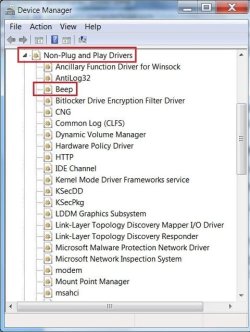
Open Device Manager

In Device Manager click View and click "Show hidden devices"
This should make "Non-Plug and Play Drivers" visible in Device Manager.
DB1.jpg

Expand Non-Plug and Play Drivers by clicking the arrow and double-click Beep.
DB2.jpg

Within the "Beep properties" window click the Driver tab.
Under the driver tab if you wish to temporarily disable this device click the Stop button.
If you wish to permanently disable this device under the Startup Type, select Disabled.
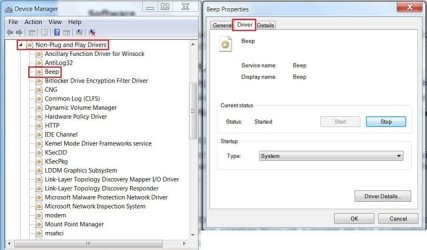
DB3.jpg

These are more difficult:

With the Motherboard jumper


If following the above steps does not disable the Internal speaker you can also almost always disable the Internal speaker through jumpers on the motherboard. Many motherboard manufacturers have jumpers that when jumped or not jumped will enable the on-board speaker. Unfortunately all motherboards are different, therefore you will need to refer to the motherboard documentation in order to determine if your motherboard has such a jumper and what to set it to.

With a Motherboard cable

Some motherboards do not have an onboard speaker and instead use a computer case speaker that can be removed to disable the speaker. Unfortunately again you will need to refer to the motherboard or computers documentation to determine if your computer is setup this way.

Whatever way works for you, remember! To reverse the changes you made when you are done.

 

My Computer My Computer

At a glance

Originally Win 7 Hm Prem x64 Ver 6.1.7600 Bui...Intel i3 530 2.93GHz, 2933MHz 2 Cores 4 Logic...6GB of 1,333MHz DDR3 SDRAM32MB Intel Graphics Media Accelerator HD IGChip
Computer type
PC/Desktop
Computer Manufacturer/Model Number
Gateway DX4831-01e (Mid-Tower Desktop)
OS
Originally Win 7 Hm Prem x64 Ver 6.1.7600 Build 7601-SP1 | Upgraded to Windows 10 December 14, 2019
CPU
Intel i3 530 2.93GHz, 2933MHz 2 Cores 4 Logical Processors
Motherboard
Gateway H57M01 133 megahertz
Memory
6GB of 1,333MHz DDR3 SDRAM
Graphics Card(s)
32MB Intel Graphics Media Accelerator HD IGChip
Sound Card
Realtek High Definition Audio
Monitor(s) Displays
Gateway HX2000 20inch TFT active matrix TN
Screen Resolution
1600 x 900 x 59 hertz
Hard Drives
WDC WD10EADS-00M2B0 [HDD] (1000.20 GB) -- drive 0,
HL-DT-ST DVDRAM GH41N [CD-ROM dr]
Four card readers, and Four USB 2.0
PSU
300watts.
Case
Mid-Tower Desktop
Cooling
Stock from Gateway
Keyboard
Natural Ergonomic Keyboard 4000, see Other Info
Mouse
Orig. Gateway wore out now using Insignia USB wired optical
Internet Speed
Vz FIOS 10ms png 57.64Mbps down 65.53Mbps up Speedtest.org
Antivirus
Zamana Anti-logger with Anti-malware, MSE, Windows Firewall,
Browser
IE11.0.9600.19399-Upd ver11.0.135, Firefox 68.0.1 x64
Other Info
System Specs by Belarc.

BIOS: American Megatrends Inc. P01-A0 11/17/2009

Replaced the MS 'Natural' Standard PS/2 Enhanced 101-102 Keyboard with a new Natural Ergonomic Keyboard 4000 on August 1st 2014.

Canon Pixma MG3222 Printer.

Updated to IE11 on 12102015 | Fios Quantum Router g1100

Additional AV: SpywareBlaster, manual Mbam, SAS
@Anak I've disabled the speaker, but the restore to factory settings doesn't work, probably since I messed up the unallocated partition, so I don't know if it has disabled it.
 

My Computer My Computer

At a glance

Windows 10 Home 64-bit
OS
Windows 10 Home 64-bit
I don't think you guys should worry about this anymore, there's nothing I can do, I tried everything and it hasn't worked. I just give up, because you can't fix the partition.
 

My Computer My Computer

At a glance

Windows 10 Home 64-bit
OS
Windows 10 Home 64-bit
Hello everyone, I was recently looking in disc management today for something and recently discovered this in the C: drive section:View attachment 189593
What is this '10.67 GB unallocated space' for? Is it the recovery partition? I heard that system recovery contains the whole OS and programs and stuff, which is about 10gb. What could this be for? I'm hoping it's the recovery partition, as I'm missing quite a few Toshiba programs that only come installed on the original system. Any help is appreciated! Oh yes, I should say, Merry Christmas :D!

i know im coming in a lil late on this, but i cant help but wonder why you are so worried about this "Unallocated Space" if it says "Unallocated Space" then there is nothing in that space, it hasnt even been partitioned properly, so there for nothing can be stored there. You extending your "C:" drive to encompass that unallocated space just granted you 10 more gigs of useable hard drive space.

In lamens terms, the space is unallocated, your "recovery" is NOT there, IF you had one at all then it is somewhere else, could have been in you C: drive to begin with, IDK, i too have a Toshiba PC (laptop) and dont run any recovery partion of any kind, and have no problems, if you need software of some sort (drivers, and other things to run hardware that is factory installed) then you can just go to the Toshiba tech support site and download it...not too difficult, PLEASE CORRECT ME IF I'M WRONG, but i believe that you are freaking out over NOTHING
 

My Computer My Computer

At a glance

Windows 7 Ultimate x64AMD Athlon II X2 220 Regor 45nm Technology4.00 GB Dual-Channel DDR3 @ 669MHz (9-9-9-24)Generic Non-PnP Monitor (1024x768@60Hz) ATI R...
Computer type
PC/Desktop
Computer Manufacturer/Model Number
Asus Essentio Desktop PC CM1630
OS
Windows 7 Ultimate x64
CPU
AMD Athlon II X2 220 Regor 45nm Technology
Motherboard
ASUSTeK Computer INC. CM1630 (AM3)
Memory
4.00 GB Dual-Channel DDR3 @ 669MHz (9-9-9-24)
Graphics Card(s)
Generic Non-PnP Monitor (1024x768@60Hz) ATI Radeon 3000 Grap
Hard Drives
977GB Seagate ST31000528AS ATA Device (SATA)
Case
Asus
Cooling
Asus
Keyboard
Asus (came w/tower)
Mouse
Asus (came w/tower)
Other Info
Also have a Toshiba Satellite laptop running W7 Ult x64
@Murd3rd I think you just answered my question. And yes, I realize I was kind of freaking out too much, because I see what you mean. 'Unallocated' is just empty space, sort of locked up? The reason I freak out is because of my parents, because they bought it for me as a gift. You're right anyway, I was freaking out over nothing.
redface.gif
 

My Computer My Computer

At a glance

Windows 10 Home 64-bit
OS
Windows 10 Home 64-bit
Back
Top