
Solved How do I add unallocated space to my C: drive?

Taurine5

New member
Local time
10:29 PM
Messages
6
Location
United Kingdom
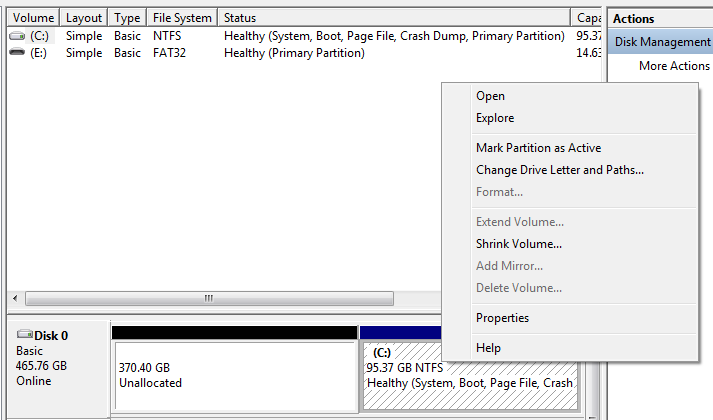
I'm in Disk Management and I want to add some unallocated space back to my C: drive after uninstalling Arch Linux, but I'm not sure how I do this. Any suggestions?

EDIT: I was hoping that 'Extend volume' would do this, but it's grayed out.
fl5vDgs.png
 

My Computer My Computer

At a glance

Windows 7 Ultimate x64AMD Athlon II X2 250 (Dual core 3.00 GHz)4 GBAMD Radeon HD 6570
Computer type
PC/Desktop
Computer Manufacturer/Model Number
Custom Build
OS
Windows 7 Ultimate x64
CPU
AMD Athlon II X2 250 (Dual core 3.00 GHz)
Motherboard
Gigabyte M68MT-S2
Memory
4 GB
Graphics Card(s)
AMD Radeon HD 6570
Monitor(s) Displays
Generic PnP Monitor (18.5" HD)
Screen Resolution
16:9 1366x768
Hard Drives
500GB HDD
PSU
Generic 750w PSU
Case
Cooler Master
Thanks dude.
 

My Computer My Computer

At a glance

Windows 7 Ultimate x64AMD Athlon II X2 250 (Dual core 3.00 GHz)4 GBAMD Radeon HD 6570
Computer type
PC/Desktop
Computer Manufacturer/Model Number
Custom Build
OS
Windows 7 Ultimate x64
CPU
AMD Athlon II X2 250 (Dual core 3.00 GHz)
Motherboard
Gigabyte M68MT-S2
Memory
4 GB
Graphics Card(s)
AMD Radeon HD 6570
Monitor(s) Displays
Generic PnP Monitor (18.5" HD)
Screen Resolution
16:9 1366x768
Hard Drives
500GB HDD
PSU
Generic 750w PSU
Case
Cooler Master
You can only extend a partition into unallocated space that is at the end (to the right) of the partition. That is not the case here. You would need to move the partition to the beginning of the drive. Windows Disk Manager cannot do this but it can be done with third party tools. But be aware that there are risks in doing this. If anything goes wrong the disk could be left in an undefined and unusable state. Be very sure you have the ability to restore the OS and a backup of all important files.
 

My Computer My Computer

At a glance

Windows 7 Pro 64 bitXeon W35208 GBNvidia Geforce 210
Computer type
PC/Desktop
Computer Manufacturer/Model Number
HP
OS
Windows 7 Pro 64 bit
CPU
Xeon W3520
Memory
8 GB
Graphics Card(s)
Nvidia Geforce 210
You can use Method Two of the tutorial.

NOTE: If the partition that you want to extend is to the right of the unallocated space, then you will need to use METHOD TWO below to extend it instead.

Your welcome :)
 

My Computer My Computer

Computer type
Laptop
Back
Top