
What's this unallocated space in my C: drive?

vStone1K

New member
Member
VIP
Local time
1:18 AM
Messages
234
Location
Australia
Hello everyone, I was recently looking in disc management today for something and recently discovered this in the C: drive section:View attachment 189593
What is this '10.67 GB unallocated space' for? Is it the recovery partition? I heard that system recovery contains the whole OS and programs and stuff, which is about 10gb. What could this be for? I'm hoping it's the recovery partition, as I'm missing quite a few Toshiba programs that only come installed on the original system. Any help is appreciated! Oh yes, I should say, Merry Christmas :D!
 
Last edited:

My Computer My Computer

At a glance

Windows 10 Home 64-bit
OS
Windows 10 Home 64-bit
Hello everyone, I was recently looking in disc management today for something and recently discovered this in the C: drive section:View attachment 189593
What is this '10.67 GB unallocated space' for? Is it the recovery partition? I heard that system recovery contains the whole OS and programs and stuff, which is about 10gb. What could this be for? I'm hoping it's the recovery partition, as I'm missing quite a few Toshiba programs that only come installed on the original system. Any help is appreciated! Oh yes, I should say, Merry Christmas :D!

Nothing :D just select the C: drive and (right click) increase volume (or something like that my windows is in dutch) then it should be allocated to your C: drive

EDIT
 

My Computer My Computer

At a glance

Windows 7 Home Premium x64Core i7 2600K4GB DDR3 Kingston HyperXGigabyte GTX 670
Computer Manufacturer/Model Number
Homebuilt
OS
Windows 7 Home Premium x64
CPU
Core i7 2600K
Motherboard
Asus P8Z77-V LX
Memory
4GB DDR3 Kingston HyperX
Graphics Card(s)
Gigabyte GTX 670
Sound Card
Realtek HD Audio
Monitor(s) Displays
Delium Monitor
Screen Resolution
1360 x 768
Hard Drives
C: (500GB)
PSU
Corsair 620W
Case
Antec
Cooling
Cooling Master
Keyboard
Logitech
Mouse
Logitech wireless mouse M 505
Internet Speed
60MBPS
Hello everyone, I was recently looking in disc management today for something and recently discovered this in the C: drive section:View attachment 189593
What is this '10.67 GB unallocated space' for? Is it the recovery partition? I heard that system recovery contains the whole OS and programs and stuff, which is about 10gb. What could this be for? I'm hoping it's the recovery partition, as I'm missing quite a few Toshiba programs that only come installed on the original system. Any help is appreciated! Oh yes, I should say, Merry Christmas :D!

Nothing :D just select the C: drive and (right click) increase volume (or something like that my windows is in dutch) then it should be allocated to your C: drive

EDIT
You mean extend volume?
 

My Computer My Computer

At a glance

Windows 10 Home 64-bit
OS
Windows 10 Home 64-bit
Hello everyone, I was recently looking in disc management today for something and recently discovered this in the C: drive section:View attachment 189593
What is this '10.67 GB unallocated space' for? Is it the recovery partition? I heard that system recovery contains the whole OS and programs and stuff, which is about 10gb. What could this be for? I'm hoping it's the recovery partition, as I'm missing quite a few Toshiba programs that only come installed on the original system. Any help is appreciated! Oh yes, I should say, Merry Christmas :D!

Nothing :D just select the C: drive and (right click) increase volume (or something like that my windows is in dutch) then it should be allocated to your C: drive

EDIT
You mean extend volume?
yes
 

My Computer My Computer

At a glance

Windows 7 Home Premium x64Core i7 2600K4GB DDR3 Kingston HyperXGigabyte GTX 670
Computer Manufacturer/Model Number
Homebuilt
OS
Windows 7 Home Premium x64
CPU
Core i7 2600K
Motherboard
Asus P8Z77-V LX
Memory
4GB DDR3 Kingston HyperX
Graphics Card(s)
Gigabyte GTX 670
Sound Card
Realtek HD Audio
Monitor(s) Displays
Delium Monitor
Screen Resolution
1360 x 768
Hard Drives
C: (500GB)
PSU
Corsair 620W
Case
Antec
Cooling
Cooling Master
Keyboard
Logitech
Mouse
Logitech wireless mouse M 505
Internet Speed
60MBPS
For whatever reason that space was never given a useful purpose.

GianniDPC is correct in that you can either add it to your existing C:\ drive or you can create additional drives within that space.
 

My Computer My Computer

At a glance

Originally Win 7 Hm Prem x64 Ver 6.1.7600 Bui...Intel i3 530 2.93GHz, 2933MHz 2 Cores 4 Logic...6GB of 1,333MHz DDR3 SDRAM32MB Intel Graphics Media Accelerator HD IGChip
Computer type
PC/Desktop
Computer Manufacturer/Model Number
Gateway DX4831-01e (Mid-Tower Desktop)
OS
Originally Win 7 Hm Prem x64 Ver 6.1.7600 Build 7601-SP1 | Upgraded to Windows 10 December 14, 2019
CPU
Intel i3 530 2.93GHz, 2933MHz 2 Cores 4 Logical Processors
Motherboard
Gateway H57M01 133 megahertz
Memory
6GB of 1,333MHz DDR3 SDRAM
Graphics Card(s)
32MB Intel Graphics Media Accelerator HD IGChip
Sound Card
Realtek High Definition Audio
Monitor(s) Displays
Gateway HX2000 20inch TFT active matrix TN
Screen Resolution
1600 x 900 x 59 hertz
Hard Drives
WDC WD10EADS-00M2B0 [HDD] (1000.20 GB) -- drive 0,
HL-DT-ST DVDRAM GH41N [CD-ROM dr]
Four card readers, and Four USB 2.0
PSU
300watts.
Case
Mid-Tower Desktop
Cooling
Stock from Gateway
Keyboard
Natural Ergonomic Keyboard 4000, see Other Info
Mouse
Orig. Gateway wore out now using Insignia USB wired optical
Internet Speed
Vz FIOS 10ms png 57.64Mbps down 65.53Mbps up Speedtest.org
Antivirus
Zamana Anti-logger with Anti-malware, MSE, Windows Firewall,
Browser
IE11.0.9600.19399-Upd ver11.0.135, Firefox 68.0.1 x64
Other Info
System Specs by Belarc.

BIOS: American Megatrends Inc. P01-A0 11/17/2009

Replaced the MS 'Natural' Standard PS/2 Enhanced 101-102 Keyboard with a new Natural Ergonomic Keyboard 4000 on August 1st 2014.

Canon Pixma MG3222 Printer.

Updated to IE11 on 12102015 | Fios Quantum Router g1100

Additional AV: SpywareBlaster, manual Mbam, SAS
OK, so I extended my drive, and It's added the unallocated space to my main drive. I was actually trying to see if I could find the recovery folder in there.
 

My Computer My Computer

At a glance

Windows 10 Home 64-bit
OS
Windows 10 Home 64-bit
I would leave it alone. That is more likely to be the recovery partition.
 

My Computer My Computer

At a glance

Windows 8.1 Pro RTM x64Intel Core-i5-3570K 4-core @ 3.4GHz (Ivy Brid...4 x 4GB DDR3-1600 Corsair Vengeance CMZ8GX3M2...MSI GeForce GTX770 Gaming OC 2GB
Computer type
PC/Desktop
Computer Manufacturer/Model Number
Dwarf Dwf/11/2012 r09/2013
OS
Windows 8.1 Pro RTM x64
CPU
Intel Core-i5-3570K 4-core @ 3.4GHz (Ivy Bridge) (OC 4.4GHz)
Motherboard
ASRock Z77 Extreme4-M
Memory
4 x 4GB DDR3-1600 Corsair Vengeance CMZ8GX3M2A1600C9B (16GB)
Graphics Card(s)
MSI GeForce GTX770 Gaming OC 2GB
Sound Card
Realtek High Definition on board solution (ALC 898)
Monitor(s) Displays
ViewSonic VA1912w Widescreen (VGA)
Screen Resolution
1440x900
Hard Drives
OCZ Agility 3 SSD 120GB SATA III x2 (RAID 0)
Samsung HD501LJ 500GB SATA II x2
Hitachi HDS721010CLA332 1TB SATA II
Iomega 1.5TB Ext USB 2.0
WD 2.0TB Ext USB 3.0
PSU
XFX Pro Series 850W Semi-Modular
Case
Gigabyte IF233
Cooling
1 x 120mm Front Inlet 1 x 120mm Rear Exhaust
Keyboard
Microsoft Comfort Curve Keyboard 3000 (USB)
Mouse
Microsoft Comfort Mouse 3000 for Business (USB)
Internet Speed
NetGear DG834Gv3 ADSL Modem/Router (Ethernet) ~4.0 Mb/s (O2)
Antivirus
Avast! 8.0.1497
Browser
IE 11
Other Info
Optical Drive: HL-DT-ST BD-RE BH10LS30 SATA Bluray
Lexmark S305 Printer/Scanner/Copier (USB)
WEI Score: 8.1/8.1/8.5/8.5/8.25
Asus Eee PC 1011PX Netbook (Windows 7 x86 Starter)
I would leave it alone. That is more likely to be the recovery partition.

:confused: when it was a recovery partition it would say that (it does on my laptop)
 

Attachments

  • ls.png
    ls.png
    26.5 KB · Views: 65

My Computer My Computer

At a glance

Windows 7 Home Premium x64Core i7 2600K4GB DDR3 Kingston HyperXGigabyte GTX 670
Computer Manufacturer/Model Number
Homebuilt
OS
Windows 7 Home Premium x64
CPU
Core i7 2600K
Motherboard
Asus P8Z77-V LX
Memory
4GB DDR3 Kingston HyperX
Graphics Card(s)
Gigabyte GTX 670
Sound Card
Realtek HD Audio
Monitor(s) Displays
Delium Monitor
Screen Resolution
1360 x 768
Hard Drives
C: (500GB)
PSU
Corsair 620W
Case
Antec
Cooling
Cooling Master
Keyboard
Logitech
Mouse
Logitech wireless mouse M 505
Internet Speed
60MBPS
@Dwarf I jut wanted to see if I still had the recovery partition thing in there, as I remember readding that in some laptop there's a folder called RECOVERY or something, but I'm just going to check.
 

My Computer My Computer

At a glance

Windows 10 Home 64-bit
OS
Windows 10 Home 64-bit
The 1.46GB in gln2d3's screenshot is the recovery partition. From my experience it is well to leave that alone.
 

My Computer My Computer

At a glance

Originally Win 7 Hm Prem x64 Ver 6.1.7600 Bui...Intel i3 530 2.93GHz, 2933MHz 2 Cores 4 Logic...6GB of 1,333MHz DDR3 SDRAM32MB Intel Graphics Media Accelerator HD IGChip
Computer type
PC/Desktop
Computer Manufacturer/Model Number
Gateway DX4831-01e (Mid-Tower Desktop)
OS
Originally Win 7 Hm Prem x64 Ver 6.1.7600 Build 7601-SP1 | Upgraded to Windows 10 December 14, 2019
CPU
Intel i3 530 2.93GHz, 2933MHz 2 Cores 4 Logical Processors
Motherboard
Gateway H57M01 133 megahertz
Memory
6GB of 1,333MHz DDR3 SDRAM
Graphics Card(s)
32MB Intel Graphics Media Accelerator HD IGChip
Sound Card
Realtek High Definition Audio
Monitor(s) Displays
Gateway HX2000 20inch TFT active matrix TN
Screen Resolution
1600 x 900 x 59 hertz
Hard Drives
WDC WD10EADS-00M2B0 [HDD] (1000.20 GB) -- drive 0,
HL-DT-ST DVDRAM GH41N [CD-ROM dr]
Four card readers, and Four USB 2.0
PSU
300watts.
Case
Mid-Tower Desktop
Cooling
Stock from Gateway
Keyboard
Natural Ergonomic Keyboard 4000, see Other Info
Mouse
Orig. Gateway wore out now using Insignia USB wired optical
Internet Speed
Vz FIOS 10ms png 57.64Mbps down 65.53Mbps up Speedtest.org
Antivirus
Zamana Anti-logger with Anti-malware, MSE, Windows Firewall,
Browser
IE11.0.9600.19399-Upd ver11.0.135, Firefox 68.0.1 x64
Other Info
System Specs by Belarc.

BIOS: American Megatrends Inc. P01-A0 11/17/2009

Replaced the MS 'Natural' Standard PS/2 Enhanced 101-102 Keyboard with a new Natural Ergonomic Keyboard 4000 on August 1st 2014.

Canon Pixma MG3222 Printer.

Updated to IE11 on 12102015 | Fios Quantum Router g1100

Additional AV: SpywareBlaster, manual Mbam, SAS
@Anak I just need to access it, like on Toshiba laptops there's usually the 0 key thing, where it asks you if you want to reset your computer to out-of-box-state. I tried that ages ago and it beeped for 10 seconds (which is a good thing) and didn't do anything else. It just booted up normally. I just need to find out if I still have the recovery partition. Should I try again?
 

My Computer My Computer

At a glance

Windows 10 Home 64-bit
OS
Windows 10 Home 64-bit
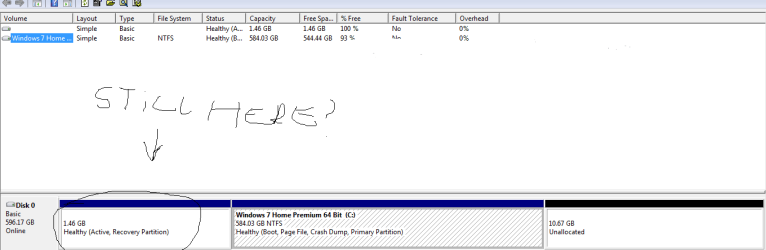
Although on the small side (mine is 13GB) yours says it is a healthy, (Active, Recovery Partition)
I do not understand the urgency?
 

My Computer My Computer

At a glance

Originally Win 7 Hm Prem x64 Ver 6.1.7600 Bui...Intel i3 530 2.93GHz, 2933MHz 2 Cores 4 Logic...6GB of 1,333MHz DDR3 SDRAM32MB Intel Graphics Media Accelerator HD IGChip
Computer type
PC/Desktop
Computer Manufacturer/Model Number
Gateway DX4831-01e (Mid-Tower Desktop)
OS
Originally Win 7 Hm Prem x64 Ver 6.1.7600 Build 7601-SP1 | Upgraded to Windows 10 December 14, 2019
CPU
Intel i3 530 2.93GHz, 2933MHz 2 Cores 4 Logical Processors
Motherboard
Gateway H57M01 133 megahertz
Memory
6GB of 1,333MHz DDR3 SDRAM
Graphics Card(s)
32MB Intel Graphics Media Accelerator HD IGChip
Sound Card
Realtek High Definition Audio
Monitor(s) Displays
Gateway HX2000 20inch TFT active matrix TN
Screen Resolution
1600 x 900 x 59 hertz
Hard Drives
WDC WD10EADS-00M2B0 [HDD] (1000.20 GB) -- drive 0,
HL-DT-ST DVDRAM GH41N [CD-ROM dr]
Four card readers, and Four USB 2.0
PSU
300watts.
Case
Mid-Tower Desktop
Cooling
Stock from Gateway
Keyboard
Natural Ergonomic Keyboard 4000, see Other Info
Mouse
Orig. Gateway wore out now using Insignia USB wired optical
Internet Speed
Vz FIOS 10ms png 57.64Mbps down 65.53Mbps up Speedtest.org
Antivirus
Zamana Anti-logger with Anti-malware, MSE, Windows Firewall,
Browser
IE11.0.9600.19399-Upd ver11.0.135, Firefox 68.0.1 x64
Other Info
System Specs by Belarc.

BIOS: American Megatrends Inc. P01-A0 11/17/2009

Replaced the MS 'Natural' Standard PS/2 Enhanced 101-102 Keyboard with a new Natural Ergonomic Keyboard 4000 on August 1st 2014.

Canon Pixma MG3222 Printer.

Updated to IE11 on 12102015 | Fios Quantum Router g1100

Additional AV: SpywareBlaster, manual Mbam, SAS
Uh oh, guys - that unallocated space - I merged it with my main C: drive!! That is not good, is it? I realized the beeping was supposed to happen! Well, I guess it's too late, I've already merged it. View attachment 189605
Is there any way I can make the unallocated space go back to where it was? Also, instead of 584gb, it now says 594gb! So it has added the unallocated space to my drive.
 
Last edited:

My Computer My Computer

At a glance

Windows 10 Home 64-bit
OS
Windows 10 Home 64-bit
Uh oh, guys - that unallocated space - I merged it with my main C: drive!! That is not good, is it? I realized the beeping was supposed to happen! Well, I guess it's too late, I've already merged it. View attachment 189605
Is there any way I can make the unallocated space go back to where it was? Also, instead of 584gb, it now says 594gb! So it has added the unallocated space to my drive.

Well.. Everything should be fine then if your recovery partition is still there
 

My Computer My Computer

At a glance

Windows 7 Home Premium x64Core i7 2600K4GB DDR3 Kingston HyperXGigabyte GTX 670
Computer Manufacturer/Model Number
Homebuilt
OS
Windows 7 Home Premium x64
CPU
Core i7 2600K
Motherboard
Asus P8Z77-V LX
Memory
4GB DDR3 Kingston HyperX
Graphics Card(s)
Gigabyte GTX 670
Sound Card
Realtek HD Audio
Monitor(s) Displays
Delium Monitor
Screen Resolution
1360 x 768
Hard Drives
C: (500GB)
PSU
Corsair 620W
Case
Antec
Cooling
Cooling Master
Keyboard
Logitech
Mouse
Logitech wireless mouse M 505
Internet Speed
60MBPS
Uh oh, guys - that unallocated space - I merged it with my main C: drive!! That is not good, is it? I realized the beeping was supposed to happen! Well, I guess it's too late, I've already merged it. View attachment 189605
Is there any way I can make the unallocated space go back to where it was? Also, instead of 584gb, it now says 594gb! So it has added the unallocated space to my drive.

Well.. Everything should be fine then if your recovery partition is still there
Oh, that's good to hear :) I was just thinking if I want to reset my lappy to factory settings will it know the recovery partition has been moved?
 

My Computer My Computer

At a glance

Windows 10 Home 64-bit
OS
Windows 10 Home 64-bit
Uh oh, guys - that unallocated space - I merged it with my main C: drive!! That is not good, is it? I realized the beeping was supposed to happen! Well, I guess it's too late, I've already merged it. View attachment 189605
Is there any way I can make the unallocated space go back to where it was? Also, instead of 584gb, it now says 594gb! So it has added the unallocated space to my drive.

Well.. Everything should be fine then if your recovery partition is still there
Oh, that's good to hear :) I was just thinking if I want to reset my lappy to factory settings will it know the recovery partition has been moved?
Is this still there ? than you should be ok. But :s it's small 1gb mine is 9gb
well can you test it if the recovery starts if you try it ? (ofcourse don't do a recovery but just look if it works or not)
 

Attachments

  • diskmgmt.png
    diskmgmt.png
    10.6 KB · Views: 14

My Computer My Computer

At a glance

Windows 7 Home Premium x64Core i7 2600K4GB DDR3 Kingston HyperXGigabyte GTX 670
Computer Manufacturer/Model Number
Homebuilt
OS
Windows 7 Home Premium x64
CPU
Core i7 2600K
Motherboard
Asus P8Z77-V LX
Memory
4GB DDR3 Kingston HyperX
Graphics Card(s)
Gigabyte GTX 670
Sound Card
Realtek HD Audio
Monitor(s) Displays
Delium Monitor
Screen Resolution
1360 x 768
Hard Drives
C: (500GB)
PSU
Corsair 620W
Case
Antec
Cooling
Cooling Master
Keyboard
Logitech
Mouse
Logitech wireless mouse M 505
Internet Speed
60MBPS
The first partition may say Recovery but it's too small to contain an OS. So it either links to install.wim files on C or they were in the partition which is now unallocated and got deleted.

You can test this by running Factory Recovery from boot: Toshiba HDD Recovery Utility. See if it cues up and what choices it gives you, or if you're ready run full factory recovery after backing up your files.
 
@gregrocker I'm going to try the Toshiba recovery again, there seems to be another way of doing it. I saw in a video you must hold down the 0 key until your computer starts beeping very loudly, and then keep on pressing the key until it says 'loading files'. I didn't do that, I just stopped holding the 0 key because I didn't know what the beeping was. But I know now :) Oh yes and it beeps for something like 10 seconds... So I hope it works. I just don't want anyone to hear the beep..
 

My Computer My Computer

At a glance

Windows 10 Home 64-bit
OS
Windows 10 Home 64-bit
Start holding the 0 key before you turn on the computer and keep holding it until Recovery appears.
 
If you "don't want anyone to hear the beep".....get your records on, and turn the music up......:p

gln, hang in there with Greg he has more experience in his little finger, than I have in my whole body! ;)
 

My Computer My Computer

At a glance

Originally Win 7 Hm Prem x64 Ver 6.1.7600 Bui...Intel i3 530 2.93GHz, 2933MHz 2 Cores 4 Logic...6GB of 1,333MHz DDR3 SDRAM32MB Intel Graphics Media Accelerator HD IGChip
Computer type
PC/Desktop
Computer Manufacturer/Model Number
Gateway DX4831-01e (Mid-Tower Desktop)
OS
Originally Win 7 Hm Prem x64 Ver 6.1.7600 Build 7601-SP1 | Upgraded to Windows 10 December 14, 2019
CPU
Intel i3 530 2.93GHz, 2933MHz 2 Cores 4 Logical Processors
Motherboard
Gateway H57M01 133 megahertz
Memory
6GB of 1,333MHz DDR3 SDRAM
Graphics Card(s)
32MB Intel Graphics Media Accelerator HD IGChip
Sound Card
Realtek High Definition Audio
Monitor(s) Displays
Gateway HX2000 20inch TFT active matrix TN
Screen Resolution
1600 x 900 x 59 hertz
Hard Drives
WDC WD10EADS-00M2B0 [HDD] (1000.20 GB) -- drive 0,
HL-DT-ST DVDRAM GH41N [CD-ROM dr]
Four card readers, and Four USB 2.0
PSU
300watts.
Case
Mid-Tower Desktop
Cooling
Stock from Gateway
Keyboard
Natural Ergonomic Keyboard 4000, see Other Info
Mouse
Orig. Gateway wore out now using Insignia USB wired optical
Internet Speed
Vz FIOS 10ms png 57.64Mbps down 65.53Mbps up Speedtest.org
Antivirus
Zamana Anti-logger with Anti-malware, MSE, Windows Firewall,
Browser
IE11.0.9600.19399-Upd ver11.0.135, Firefox 68.0.1 x64
Other Info
System Specs by Belarc.

BIOS: American Megatrends Inc. P01-A0 11/17/2009

Replaced the MS 'Natural' Standard PS/2 Enhanced 101-102 Keyboard with a new Natural Ergonomic Keyboard 4000 on August 1st 2014.

Canon Pixma MG3222 Printer.

Updated to IE11 on 12102015 | Fios Quantum Router g1100

Additional AV: SpywareBlaster, manual Mbam, SAS
Back
Top