
Help with playing iso image files on WMC7 on my HTPC!

Dad2David

New member
Local time
8:47 AM
Messages
11
Hi All,

I have Win 7 Home Premium (64-Bit) both on my Intel Core i5 desktop and my AMD A6 HTPC, the problem is this:

I can play my iso image files fine in WMC on my desktop using Slysoft Virtual Clone Drive and Mikinhos Mount Image to automatically mount the images! (I downloaded the x64 file on Mikinhos, is that the right file)!

When I did the same on my HTPC it did work fine for the first time, but every time I restart it the image does not mount and the file does not play, it does not give me an error, but when I click on play in My Movies, WMC just asks me whether I want to burn a CD or DVD and when I click close on that or just wait, it does not play the movie the blue activity indicator circle (instead of the hourglass) just disappears and I am back to the My Movies screen!

In WMC Movies (not using My Movies, here) it gives me an error asking me to check the path specified, looks like WMC is not recognizing the virtual drive created by the software!

How do you play your image files? What mounting software do you use? I tried uninstalling both the applications and re installing but same thing, it does play when I do it, but after rebooting the same issue again, have no idea how to fix it.

I tried DVD fab virtual drive & daemon lite instead of Virtual clone, and WMC keeps telling that it could not find an appropriate software to mount the image for both, why is this?

Any help is appreciated? Most of movies are in ISO image files, so I would love for them to auto mount and play in WMC! I know this works (on my desktop) but don't know why it wouldn't on the HTPC!

Thanks in advance! I'll post some screen shots to this post as soon as I get home today, might make it more clear!
 

My Computer My Computer

At a glance

Win 7 Home Premium 64 BitIntel Core i5-2500 K16 GB Corsair VengeanceXFX Radeon HD 6870 (900 MHz)
Computer Manufacturer/Model Number
Self Built Desktop for Gaming & Work
OS
Win 7 Home Premium 64 Bit
CPU
Intel Core i5-2500 K
Motherboard
Asus P8Z68 V
Memory
16 GB Corsair Vengeance
Graphics Card(s)
XFX Radeon HD 6870 (900 MHz)
Sound Card
On Board
Monitor(s) Displays
Haans-G 28" LCD Monitor
Screen Resolution
1920 x 1080
Hard Drives
Crucial M4 - 64GB (SSD Caching / Intel SRT)
Samsung Spinpoint F3 7200 RPM - 1 TB
PSU
Seasonic X Series 650W 80 Plus Gold ATX
Case
NZXT Phantom Black
Cooling
CM Hyper 212 Plus
Keyboard
Logitech K 800 - Wireless & Illuminated
Mouse
Logitech Performance MX
Internet Speed
Comcast Cable - 28 Mbps DL
Other Info
Go Groove 2.1 Sound Blaster Speakers
Logitech C910 HD Webcam
Anyone here who can help?

I'm happy to provide more info if you need! I've used Kari's guide on this forum to move my users and program data folders to my HDD and only have the Windows Program files on my SSD, during installation!

Would that be causing any issues?
 

My Computer My Computer

At a glance

Win 7 Home Premium 64 BitIntel Core i5-2500 K16 GB Corsair VengeanceXFX Radeon HD 6870 (900 MHz)
Computer Manufacturer/Model Number
Self Built Desktop for Gaming & Work
OS
Win 7 Home Premium 64 Bit
CPU
Intel Core i5-2500 K
Motherboard
Asus P8Z68 V
Memory
16 GB Corsair Vengeance
Graphics Card(s)
XFX Radeon HD 6870 (900 MHz)
Sound Card
On Board
Monitor(s) Displays
Haans-G 28" LCD Monitor
Screen Resolution
1920 x 1080
Hard Drives
Crucial M4 - 64GB (SSD Caching / Intel SRT)
Samsung Spinpoint F3 7200 RPM - 1 TB
PSU
Seasonic X Series 650W 80 Plus Gold ATX
Case
NZXT Phantom Black
Cooling
CM Hyper 212 Plus
Keyboard
Logitech K 800 - Wireless & Illuminated
Mouse
Logitech Performance MX
Internet Speed
Comcast Cable - 28 Mbps DL
Other Info
Go Groove 2.1 Sound Blaster Speakers
Logitech C910 HD Webcam
WMC just asks me whether I want to burn a CD or DVD

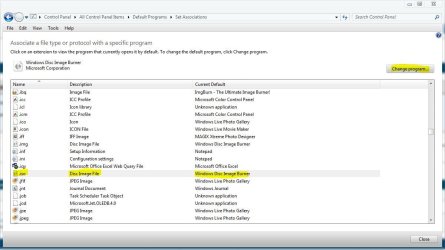
That part right there sounds like the .iso file extension is still set to the default association with Windows disc image burner.

See if changing it manually on your HTPC to the program that you want fixes it,

http://www.sevenforums.com/tutorials/9154-default-programs-associate-file-type-protocol.html

Capture.JPG

Is this the guide you used for Slysoft Virtual Clone Drive and Mikinhos Mount Image?

Automatically Mount and View ISO files in Windows 7 Media Center - How-To Geek
 

My Computer My Computer

At a glance

Win 10 Pro x64Intel I5-2500K @3.3GHz16GB G.Skill Ripjaws X (4x4GB)EVGA GeForce 750 Ti SC 2GB
Computer type
PC/Desktop
Computer Manufacturer/Model Number
Self Built
OS
Win 10 Pro x64
CPU
Intel I5-2500K @3.3GHz
Motherboard
Asrock P67 Extreme4
Memory
16GB G.Skill Ripjaws X (4x4GB)
Graphics Card(s)
EVGA GeForce 750 Ti SC 2GB
Sound Card
ASUS Xonar DG 5.1 Channels 24-bit 96KHz PCI Interface Sound
Monitor(s) Displays
auria eq2367
Screen Resolution
1920 x 1080
Hard Drives
250GB Samsung 850 EVO SSD
1TB WD Blue
1TB Hitachi
PSU
SeaSonic X 650W 80 Plus Gold
Case
Corsair Obsidian 750D
Cooling
Corsair H60, Three 140mm case fans
Keyboard
Logitech Wireless Keyboard K520
Mouse
Logitech Wireless Mouse M310
Internet Speed
Wave Broadband ~ 100 dn 5 up
Antivirus
Windows Defender, Malwarebytes Premium
Browser
Edge, IE11, Chrome
Other Info
Laptop specs: HP g7-1365dx /
CPU: AMD A6-3420M APU with Radeon(tm) HD Graphics /
RAM: Crucial 8Gb (2x4Gb) /
SSD: Crucial M4-CT128M4SSD2 ATA Device/ FW 000F /
GFX: AMD Radeon HD 6520G /
OS: Windows 10 Pro x64
WMC just asks me whether I want to burn a CD or DVD

That part right there sounds like the .iso file extension is still set to the default association with Windows disc image burner.

See if changing it manually on your HTPC to the program that you want fixes it,

http://www.sevenforums.com/tutorials/9154-default-programs-associate-file-type-protocol.html

View attachment 189982

Is this the guide you used for Slysoft Virtual Clone Drive and Mikinhos Mount Image?

Automatically Mount and View ISO files in Windows 7 Media Center - How-To Geek

Thank you for the reply, appreciate it!

I did try earlier and check the file associations and it is set to virtual clone drive for iso in Win 7, is there an option within My Movies or Virtual Clone Drive to set how to play a disc when detected?

I'm thinking that WMC is not seeing the image in the drive but just the drive and hence is asking to load blank media to burn on - could this be the case?

Looks like the image is not getting properly mounted on VCD, I say this because:

1) On Virtual clone drive on the task bar, it says the media is mounted and it shows me the path!

2) In Win Explorer, it shows my virtual drive (F: in my case) but when I double click on it to try and expand or open the file, it asks me to insert media into the drive.

3) When I use XBMC instead of Win Media Center the image plays without any problems, so there is nothing corrupted with the image file either, is that correct?

I love WMC and would prefer to use that for all my media over XBMC, but I have integrated XBMC to WMC just to play ISO files for now!

How could this be playing in one and not the other, what virtual drive software does XBMC use? Any ideas?

Is this the guide you used for Slysoft Virtual Clone Drive and Mikinhos Mount Image?

Automatically Mount and View ISO files in Windows 7 Media Center - How-To Geek
- Yes that is the one I used!

That is for the default Movies library in WMC (not the My Movies Movie Library), when I try it in the default movies location, it gives me an error says the path specified is not correct! WMC is not seeing the mounted disk image for some reason!
 

My Computer My Computer

At a glance

Win 7 Home Premium 64 BitIntel Core i5-2500 K16 GB Corsair VengeanceXFX Radeon HD 6870 (900 MHz)
Computer Manufacturer/Model Number
Self Built Desktop for Gaming & Work
OS
Win 7 Home Premium 64 Bit
CPU
Intel Core i5-2500 K
Motherboard
Asus P8Z68 V
Memory
16 GB Corsair Vengeance
Graphics Card(s)
XFX Radeon HD 6870 (900 MHz)
Sound Card
On Board
Monitor(s) Displays
Haans-G 28" LCD Monitor
Screen Resolution
1920 x 1080
Hard Drives
Crucial M4 - 64GB (SSD Caching / Intel SRT)
Samsung Spinpoint F3 7200 RPM - 1 TB
PSU
Seasonic X Series 650W 80 Plus Gold ATX
Case
NZXT Phantom Black
Cooling
CM Hyper 212 Plus
Keyboard
Logitech K 800 - Wireless & Illuminated
Mouse
Logitech Performance MX
Internet Speed
Comcast Cable - 28 Mbps DL
Other Info
Go Groove 2.1 Sound Blaster Speakers
Logitech C910 HD Webcam
You're welcome.

Sorry I'm just getting back to you, let me set mine up like yours real quick and see if I can give you some better help.

OK, I'm setup and playing a movie. Lets see if we can figure this out.

1) On Virtual clone drive on the task bar, it says the media is mounted and it shows me the path!

All I see is the icon in the system tray, so I'm not sure about this part.

2) In Win Explorer, it shows my virtual drive (F: in my case) but when I double click on it to try and expand or open the file, it asks me to insert media into the drive.

Yeah, I get that too if the disc is unmounted.

3) When I use XBMC instead of Win Media Center the image plays without any problems, so there is nothing corrupted with the image file either, is that correct?

I don't have XBMC installed but it sounds like it's good, is it just a certain iso or any of them?

I don't know what XBMC uses to mount iso's, maybe someone else does.

That is for the default Movies library in WMC (not the My Movies Movie Library), when I try it in the default movies location, it gives me an error says the path specified is not correct! WMC is not seeing the mounted disk image for some reason!

I'm curious about this, what is the "My Movies Library" , I only have the one in WMC that I set what locations to look for movies. Do both of those have the same locations for you?

I'll make a couple more iso's and see if I can replicate what you're getting.
 
Last edited:

My Computer My Computer

At a glance

Win 10 Pro x64Intel I5-2500K @3.3GHz16GB G.Skill Ripjaws X (4x4GB)EVGA GeForce 750 Ti SC 2GB
Computer type
PC/Desktop
Computer Manufacturer/Model Number
Self Built
OS
Win 10 Pro x64
CPU
Intel I5-2500K @3.3GHz
Motherboard
Asrock P67 Extreme4
Memory
16GB G.Skill Ripjaws X (4x4GB)
Graphics Card(s)
EVGA GeForce 750 Ti SC 2GB
Sound Card
ASUS Xonar DG 5.1 Channels 24-bit 96KHz PCI Interface Sound
Monitor(s) Displays
auria eq2367
Screen Resolution
1920 x 1080
Hard Drives
250GB Samsung 850 EVO SSD
1TB WD Blue
1TB Hitachi
PSU
SeaSonic X 650W 80 Plus Gold
Case
Corsair Obsidian 750D
Cooling
Corsair H60, Three 140mm case fans
Keyboard
Logitech Wireless Keyboard K520
Mouse
Logitech Wireless Mouse M310
Internet Speed
Wave Broadband ~ 100 dn 5 up
Antivirus
Windows Defender, Malwarebytes Premium
Browser
Edge, IE11, Chrome
Other Info
Laptop specs: HP g7-1365dx /
CPU: AMD A6-3420M APU with Radeon(tm) HD Graphics /
RAM: Crucial 8Gb (2x4Gb) /
SSD: Crucial M4-CT128M4SSD2 ATA Device/ FW 000F /
GFX: AMD Radeon HD 6520G /
OS: Windows 10 Pro x64
Thank you - appreciate all your efforts, sorry it took me some time to get back to this:

You're welcome.

Sorry I'm just getting back to you, let me set mine up like yours real quick and see if I can give you some better help.

OK, I'm setup and playing a movie. Lets see if we can figure this out.

1) On Virtual clone drive on the task bar, it says the media is mounted and it shows me the path!

All I see is the icon in the system tray, so I'm not sure about this part.

If you right click on that icon and check the drives/sheep you have it should show the disc on one of those!

2) In Win Explorer, it shows my virtual drive (F: in my case) but when I double click on it to try and expand or open the file, it asks me to insert media into the drive.

Yeah, I get that too if the disc is unmounted.

I get that even when the disc is mounted. The virtual drive icon on the taskbar shows that the disk is mounted, but the virtual drive on Win Explorer shows that the drive is empty!

Normally if the disc is correctly mounted then double clicking on the drive icon should open the folder and show me the Video_TS and Audio_TS folders right, but in my case it asks me to please insert a disc into the drive when I double click on it!

3) When I use XBMC instead of Win Media Center the image plays without any problems, so there is nothing corrupted with the image file either, is that correct?

I don't have XBMC installed but it sounds like it's good, is it just a certain iso or any of them?

I don't know what XBMC uses to mount iso's, maybe someone else does.

It is for all iso files, I've quite a few on the system, and I have tried at least 5-8 different files and the same result on all!

That is for the default Movies library in WMC (not the My Movies Movie Library), when I try it in the default movies location, it gives me an error says the path specified is not correct! WMC is not seeing the mounted disk image for some reason!

I'm curious about this, what is the "My Movies Library" , I only have the one in WMC that I set what locations to look for movies. Do both of those have the same locations for you?

I'll make a couple more iso's and see if I can replicate what you're getting.

My Movies is basically another application similar to the WMC Movies Library but much better and more versatile! It is a collections management and metadata gathering software add on for WMC, there are other ones out there as well, like Media Browser.

The biggest advantage of this is the metadata gathering, every time I add titles to my HDD; my movies automatically adds the meta data and cover art to the folder from its database and it shows up much better on the WMC screen! So if you haven't downloaded and installed this then you would not have that showing up in your WMC!

Yes the file locations for the ISO are the same on both the libraries!

Let me ask you this: have you used Kari's guide in here to relocate your Program Data and Users folder to another location other than your boot drive?
 

My Computer My Computer

At a glance

Win 7 Home Premium 64 BitIntel Core i5-2500 K16 GB Corsair VengeanceXFX Radeon HD 6870 (900 MHz)
Computer Manufacturer/Model Number
Self Built Desktop for Gaming & Work
OS
Win 7 Home Premium 64 Bit
CPU
Intel Core i5-2500 K
Motherboard
Asus P8Z68 V
Memory
16 GB Corsair Vengeance
Graphics Card(s)
XFX Radeon HD 6870 (900 MHz)
Sound Card
On Board
Monitor(s) Displays
Haans-G 28" LCD Monitor
Screen Resolution
1920 x 1080
Hard Drives
Crucial M4 - 64GB (SSD Caching / Intel SRT)
Samsung Spinpoint F3 7200 RPM - 1 TB
PSU
Seasonic X Series 650W 80 Plus Gold ATX
Case
NZXT Phantom Black
Cooling
CM Hyper 212 Plus
Keyboard
Logitech K 800 - Wireless & Illuminated
Mouse
Logitech Performance MX
Internet Speed
Comcast Cable - 28 Mbps DL
Other Info
Go Groove 2.1 Sound Blaster Speakers
Logitech C910 HD Webcam
That's OK, we're always here. :)

If you right click on that icon and check the drives/sheep you have it should show the disc on one of those!

Correct! My bad.

I get that even when the disc is mounted. The virtual drive icon on the taskbar shows that the disk is mounted, but the virtual drive on Win Explorer shows that the drive is empty!

Normally if the disc is correctly mounted then double clicking on the drive icon should open the folder and show me the Video_TS and Audio_TS folders right, but in my case it asks me to please insert a disc into the drive when I double click on it!

I get nothing like that, if I double click on the drive when it's mounted it just brings WMC to the front. The only Video_TS and Audio_TS folders I have are for the ripped movies I have, not the converted iso's.

OK, I tried out that My Movies a while ago, I guess I forgot the name. I started using Mikinho | Yammm , sadly there hasn't been any updates for a while. It's from Mikinho also.

No I haven't used Kari's guide, are you thinking this could be related to your post http://www.sevenforums.com/1624307-post134.html ? I could ask him to have a look here if you want.

Sorry I'm not much help after all, I'll keep playing with it and I'll try to help as much as I can. Hopefully someone will log in and be able to enlighten us.
 

My Computer My Computer

At a glance

Win 10 Pro x64Intel I5-2500K @3.3GHz16GB G.Skill Ripjaws X (4x4GB)EVGA GeForce 750 Ti SC 2GB
Computer type
PC/Desktop
Computer Manufacturer/Model Number
Self Built
OS
Win 10 Pro x64
CPU
Intel I5-2500K @3.3GHz
Motherboard
Asrock P67 Extreme4
Memory
16GB G.Skill Ripjaws X (4x4GB)
Graphics Card(s)
EVGA GeForce 750 Ti SC 2GB
Sound Card
ASUS Xonar DG 5.1 Channels 24-bit 96KHz PCI Interface Sound
Monitor(s) Displays
auria eq2367
Screen Resolution
1920 x 1080
Hard Drives
250GB Samsung 850 EVO SSD
1TB WD Blue
1TB Hitachi
PSU
SeaSonic X 650W 80 Plus Gold
Case
Corsair Obsidian 750D
Cooling
Corsair H60, Three 140mm case fans
Keyboard
Logitech Wireless Keyboard K520
Mouse
Logitech Wireless Mouse M310
Internet Speed
Wave Broadband ~ 100 dn 5 up
Antivirus
Windows Defender, Malwarebytes Premium
Browser
Edge, IE11, Chrome
Other Info
Laptop specs: HP g7-1365dx /
CPU: AMD A6-3420M APU with Radeon(tm) HD Graphics /
RAM: Crucial 8Gb (2x4Gb) /
SSD: Crucial M4-CT128M4SSD2 ATA Device/ FW 000F /
GFX: AMD Radeon HD 6520G /
OS: Windows 10 Pro x64
No need to apologize, you have helped me try to narrow it down now!

I get that even when the disc is mounted. The virtual drive icon on the taskbar shows that the disk is mounted, but the virtual drive on Win Explorer shows that the drive is empty!

Normally if the disc is correctly mounted then double clicking on the drive icon should open the folder and show me the Video_TS and Audio_TS folders right, but in my case it asks me to please insert a disc into the drive when I double click on it!

I get nothing like that, if I double click on the drive when it's mounted it just brings WMC to the front. The only Video_TS and Audio_TS folders I have are for the ripped movies I have, not the converted iso's.

That is weird - on my desktop where I have have the VCD installed and it works very well with WMC. When a disk it mounted on the Virtual Drive, if I go to Windows Explorer (My Computer) and then click or expand the Virtual drive folder it shows me the Audio and Video_TS folders as I have inserted a DVD in the DVD drive! Are you not able to expand the virtual drive letter and see this when a disc is mounted?

No I haven't used Kari's guide, are you thinking this could be related to your post http://www.sevenforums.com/1624307-post134.html ? I could ask him to have a look here if you want.

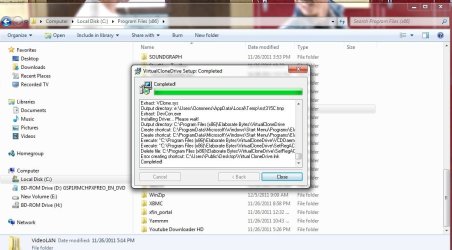
Yes I'm thinking it is because I did relocate the folders to my HDD instead of the boot drive which is the SSD, why I say that is because where I installed the VCD is in the the default location on the SSD- Program Files (x86) folder!

And the installation did give me an error for not being able to post the VCD shortcut on my desktop! I'm at work now, once I get home I can look at this again and post some screen shots!
 

My Computer My Computer

At a glance

Win 7 Home Premium 64 BitIntel Core i5-2500 K16 GB Corsair VengeanceXFX Radeon HD 6870 (900 MHz)
Computer Manufacturer/Model Number
Self Built Desktop for Gaming & Work
OS
Win 7 Home Premium 64 Bit
CPU
Intel Core i5-2500 K
Motherboard
Asus P8Z68 V
Memory
16 GB Corsair Vengeance
Graphics Card(s)
XFX Radeon HD 6870 (900 MHz)
Sound Card
On Board
Monitor(s) Displays
Haans-G 28" LCD Monitor
Screen Resolution
1920 x 1080
Hard Drives
Crucial M4 - 64GB (SSD Caching / Intel SRT)
Samsung Spinpoint F3 7200 RPM - 1 TB
PSU
Seasonic X Series 650W 80 Plus Gold ATX
Case
NZXT Phantom Black
Cooling
CM Hyper 212 Plus
Keyboard
Logitech K 800 - Wireless & Illuminated
Mouse
Logitech Performance MX
Internet Speed
Comcast Cable - 28 Mbps DL
Other Info
Go Groove 2.1 Sound Blaster Speakers
Logitech C910 HD Webcam
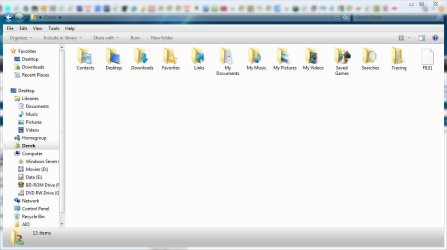
Are you not able to expand the virtual drive letter and see this when a disc is mounted?

You are correct again, I wasn't looking at the leftside.

Capture.JPG

Yeah, I have to step out too, we can get back at this later and see if moving those files might be related.

Thank you for the rep as well. :)
 

My Computer My Computer

At a glance

Win 10 Pro x64Intel I5-2500K @3.3GHz16GB G.Skill Ripjaws X (4x4GB)EVGA GeForce 750 Ti SC 2GB
Computer type
PC/Desktop
Computer Manufacturer/Model Number
Self Built
OS
Win 10 Pro x64
CPU
Intel I5-2500K @3.3GHz
Motherboard
Asrock P67 Extreme4
Memory
16GB G.Skill Ripjaws X (4x4GB)
Graphics Card(s)
EVGA GeForce 750 Ti SC 2GB
Sound Card
ASUS Xonar DG 5.1 Channels 24-bit 96KHz PCI Interface Sound
Monitor(s) Displays
auria eq2367
Screen Resolution
1920 x 1080
Hard Drives
250GB Samsung 850 EVO SSD
1TB WD Blue
1TB Hitachi
PSU
SeaSonic X 650W 80 Plus Gold
Case
Corsair Obsidian 750D
Cooling
Corsair H60, Three 140mm case fans
Keyboard
Logitech Wireless Keyboard K520
Mouse
Logitech Wireless Mouse M310
Internet Speed
Wave Broadband ~ 100 dn 5 up
Antivirus
Windows Defender, Malwarebytes Premium
Browser
Edge, IE11, Chrome
Other Info
Laptop specs: HP g7-1365dx /
CPU: AMD A6-3420M APU with Radeon(tm) HD Graphics /
RAM: Crucial 8Gb (2x4Gb) /
SSD: Crucial M4-CT128M4SSD2 ATA Device/ FW 000F /
GFX: AMD Radeon HD 6520G /
OS: Windows 10 Pro x64
Okay, I tried changing the default folder that VCD was being installed in to another folder location, but with no luck!

This is the same error I keep getting when I install VCD:
vcd.jpg
 

My Computer My Computer

At a glance

Win 7 Home Premium 64 BitIntel Core i5-2500 K16 GB Corsair VengeanceXFX Radeon HD 6870 (900 MHz)
Computer Manufacturer/Model Number
Self Built Desktop for Gaming & Work
OS
Win 7 Home Premium 64 Bit
CPU
Intel Core i5-2500 K
Motherboard
Asus P8Z68 V
Memory
16 GB Corsair Vengeance
Graphics Card(s)
XFX Radeon HD 6870 (900 MHz)
Sound Card
On Board
Monitor(s) Displays
Haans-G 28" LCD Monitor
Screen Resolution
1920 x 1080
Hard Drives
Crucial M4 - 64GB (SSD Caching / Intel SRT)
Samsung Spinpoint F3 7200 RPM - 1 TB
PSU
Seasonic X Series 650W 80 Plus Gold ATX
Case
NZXT Phantom Black
Cooling
CM Hyper 212 Plus
Keyboard
Logitech K 800 - Wireless & Illuminated
Mouse
Logitech Performance MX
Internet Speed
Comcast Cable - 28 Mbps DL
Other Info
Go Groove 2.1 Sound Blaster Speakers
Logitech C910 HD Webcam
Okay, I tried changing the default folder that VCD was being installed in to another folder location, but with no luck!

This is the same error I keep getting when I install VCD:
View attachment 190475

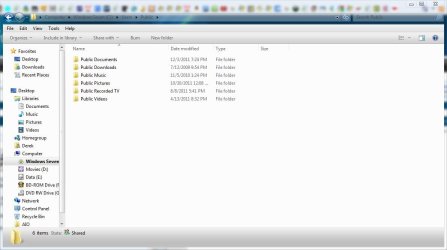
Are you talking about the C/Users/Public/Desktop error?

My Desktop folder is under my name, I don't even have a public desktop.
 

Attachments

  • Derek.JPG
    Derek.JPG
    61 KB · Views: 4
  • public.JPG
    public.JPG
    61.7 KB · Views: 2

My Computer My Computer

At a glance

Win 10 Pro x64Intel I5-2500K @3.3GHz16GB G.Skill Ripjaws X (4x4GB)EVGA GeForce 750 Ti SC 2GB
Computer type
PC/Desktop
Computer Manufacturer/Model Number
Self Built
OS
Win 10 Pro x64
CPU
Intel I5-2500K @3.3GHz
Motherboard
Asrock P67 Extreme4
Memory
16GB G.Skill Ripjaws X (4x4GB)
Graphics Card(s)
EVGA GeForce 750 Ti SC 2GB
Sound Card
ASUS Xonar DG 5.1 Channels 24-bit 96KHz PCI Interface Sound
Monitor(s) Displays
auria eq2367
Screen Resolution
1920 x 1080
Hard Drives
250GB Samsung 850 EVO SSD
1TB WD Blue
1TB Hitachi
PSU
SeaSonic X 650W 80 Plus Gold
Case
Corsair Obsidian 750D
Cooling
Corsair H60, Three 140mm case fans
Keyboard
Logitech Wireless Keyboard K520
Mouse
Logitech Wireless Mouse M310
Internet Speed
Wave Broadband ~ 100 dn 5 up
Antivirus
Windows Defender, Malwarebytes Premium
Browser
Edge, IE11, Chrome
Other Info
Laptop specs: HP g7-1365dx /
CPU: AMD A6-3420M APU with Radeon(tm) HD Graphics /
RAM: Crucial 8Gb (2x4Gb) /
SSD: Crucial M4-CT128M4SSD2 ATA Device/ FW 000F /
GFX: AMD Radeon HD 6520G /
OS: Windows 10 Pro x64
That is what I thought, neither do I have a Public Desktop. Mine is also under my user login!

I was more worried about the Reg Set file being deleted is that normal too?
 

My Computer My Computer

At a glance

Win 7 Home Premium 64 BitIntel Core i5-2500 K16 GB Corsair VengeanceXFX Radeon HD 6870 (900 MHz)
Computer Manufacturer/Model Number
Self Built Desktop for Gaming & Work
OS
Win 7 Home Premium 64 Bit
CPU
Intel Core i5-2500 K
Motherboard
Asus P8Z68 V
Memory
16 GB Corsair Vengeance
Graphics Card(s)
XFX Radeon HD 6870 (900 MHz)
Sound Card
On Board
Monitor(s) Displays
Haans-G 28" LCD Monitor
Screen Resolution
1920 x 1080
Hard Drives
Crucial M4 - 64GB (SSD Caching / Intel SRT)
Samsung Spinpoint F3 7200 RPM - 1 TB
PSU
Seasonic X Series 650W 80 Plus Gold ATX
Case
NZXT Phantom Black
Cooling
CM Hyper 212 Plus
Keyboard
Logitech K 800 - Wireless & Illuminated
Mouse
Logitech Performance MX
Internet Speed
Comcast Cable - 28 Mbps DL
Other Info
Go Groove 2.1 Sound Blaster Speakers
Logitech C910 HD Webcam
That is what I thought, neither do I have a Public Desktop. Mine is also under my user login!

I was more worried about the Reg Set file being deleted is that normal too?

I honestly don't know.

You said you were trying to change the location it installs to but it looks like it is in program files x86.

Why are you trying to change that?

I can understand wanting to move the user folders, but changing where programs install can be troublesome if it wants to be in the root directory.
 

My Computer My Computer

At a glance

Win 10 Pro x64Intel I5-2500K @3.3GHz16GB G.Skill Ripjaws X (4x4GB)EVGA GeForce 750 Ti SC 2GB
Computer type
PC/Desktop
Computer Manufacturer/Model Number
Self Built
OS
Win 10 Pro x64
CPU
Intel I5-2500K @3.3GHz
Motherboard
Asrock P67 Extreme4
Memory
16GB G.Skill Ripjaws X (4x4GB)
Graphics Card(s)
EVGA GeForce 750 Ti SC 2GB
Sound Card
ASUS Xonar DG 5.1 Channels 24-bit 96KHz PCI Interface Sound
Monitor(s) Displays
auria eq2367
Screen Resolution
1920 x 1080
Hard Drives
250GB Samsung 850 EVO SSD
1TB WD Blue
1TB Hitachi
PSU
SeaSonic X 650W 80 Plus Gold
Case
Corsair Obsidian 750D
Cooling
Corsair H60, Three 140mm case fans
Keyboard
Logitech Wireless Keyboard K520
Mouse
Logitech Wireless Mouse M310
Internet Speed
Wave Broadband ~ 100 dn 5 up
Antivirus
Windows Defender, Malwarebytes Premium
Browser
Edge, IE11, Chrome
Other Info
Laptop specs: HP g7-1365dx /
CPU: AMD A6-3420M APU with Radeon(tm) HD Graphics /
RAM: Crucial 8Gb (2x4Gb) /
SSD: Crucial M4-CT128M4SSD2 ATA Device/ FW 000F /
GFX: AMD Radeon HD 6520G /
OS: Windows 10 Pro x64
Okay, I tried changing the default folder that VCD was being installed in to another folder location, but with no luck!

This is the same error I keep getting when I install VCD:
View attachment 190475

I just noticed that C:\Users\Public\Desktop is actually a hidden folder, I'm not sure why. Here's what mine looks like, VCD does have a shortcut there.

Capture.JPG

Can you try installing in it's default location and see if you don't get the error.

I'm sure you know how to hide/unhide folders, this is a handy little context menu addition that makes it a lot quicker if you want.

http://www.sevenforums.com/tutorials/156518-show-hide-hidden-files-add-context-menu.html
 

My Computer My Computer

At a glance

Win 10 Pro x64Intel I5-2500K @3.3GHz16GB G.Skill Ripjaws X (4x4GB)EVGA GeForce 750 Ti SC 2GB
Computer type
PC/Desktop
Computer Manufacturer/Model Number
Self Built
OS
Win 10 Pro x64
CPU
Intel I5-2500K @3.3GHz
Motherboard
Asrock P67 Extreme4
Memory
16GB G.Skill Ripjaws X (4x4GB)
Graphics Card(s)
EVGA GeForce 750 Ti SC 2GB
Sound Card
ASUS Xonar DG 5.1 Channels 24-bit 96KHz PCI Interface Sound
Monitor(s) Displays
auria eq2367
Screen Resolution
1920 x 1080
Hard Drives
250GB Samsung 850 EVO SSD
1TB WD Blue
1TB Hitachi
PSU
SeaSonic X 650W 80 Plus Gold
Case
Corsair Obsidian 750D
Cooling
Corsair H60, Three 140mm case fans
Keyboard
Logitech Wireless Keyboard K520
Mouse
Logitech Wireless Mouse M310
Internet Speed
Wave Broadband ~ 100 dn 5 up
Antivirus
Windows Defender, Malwarebytes Premium
Browser
Edge, IE11, Chrome
Other Info
Laptop specs: HP g7-1365dx /
CPU: AMD A6-3420M APU with Radeon(tm) HD Graphics /
RAM: Crucial 8Gb (2x4Gb) /
SSD: Crucial M4-CT128M4SSD2 ATA Device/ FW 000F /
GFX: AMD Radeon HD 6520G /
OS: Windows 10 Pro x64
I only tried installin it in the non default location once to try and see whether the problems I had was because of the User and Program Data folders were in another drive! But that did not solve it!

All the other times (including that screenshot), I've installed and uninstalled multiple times, it was done in the default location picked by VCD! all the problems are still there!

I might do a fresh install of windows and see if that helps, seems like that is the only option!

I use Revo Uninstaller for uninstalling stuff, would that cause issues, to me this whole problem seems like an issue with the registry values or for some reason the installtion being corrupted, I have the same version of VCD on my desktop which loads and plays movies just fine, and it does that even in WMC with the same same to programs installed, VCD and Mikhino's!
 

My Computer My Computer

At a glance

Win 7 Home Premium 64 BitIntel Core i5-2500 K16 GB Corsair VengeanceXFX Radeon HD 6870 (900 MHz)
Computer Manufacturer/Model Number
Self Built Desktop for Gaming & Work
OS
Win 7 Home Premium 64 Bit
CPU
Intel Core i5-2500 K
Motherboard
Asus P8Z68 V
Memory
16 GB Corsair Vengeance
Graphics Card(s)
XFX Radeon HD 6870 (900 MHz)
Sound Card
On Board
Monitor(s) Displays
Haans-G 28" LCD Monitor
Screen Resolution
1920 x 1080
Hard Drives
Crucial M4 - 64GB (SSD Caching / Intel SRT)
Samsung Spinpoint F3 7200 RPM - 1 TB
PSU
Seasonic X Series 650W 80 Plus Gold ATX
Case
NZXT Phantom Black
Cooling
CM Hyper 212 Plus
Keyboard
Logitech K 800 - Wireless & Illuminated
Mouse
Logitech Performance MX
Internet Speed
Comcast Cable - 28 Mbps DL
Other Info
Go Groove 2.1 Sound Blaster Speakers
Logitech C910 HD Webcam
I only tried installin it in the non default location once to try and see whether the problems I had was because of the User and Program Data folders were in another drive! But that did not solve it!

All the other times (including that screenshot), I've installed and uninstalled multiple times, it was done in the default location picked by VCD! all the problems are still there!

I might do a fresh install of windows and see if that helps, seems like that is the only option!

I use Revo Uninstaller for uninstalling stuff, would that cause issues, to me this whole problem seems like an issue with the registry values or for some reason the installtion being corrupted, I have the same version of VCD on my desktop which loads and plays movies just fine, and it does that even in WMC with the same same to programs installed, VCD and Mikhino's!

OK, I thought you were just trying to save space on your SSD.

To be honest, I would try the fresh install myself too, just in case.

I don't think Revo would cause problems, it is widely used for uninstalling.

Do you have problems uninstalling stuff from Control Panel\All Control Panel Items\Programs and Features?

I can't seem to replicate your errors, and it seems the only difference in your two systems is that you've changed the location of the user folders on your HTPC, is that correct?
 

My Computer My Computer

At a glance

Win 10 Pro x64Intel I5-2500K @3.3GHz16GB G.Skill Ripjaws X (4x4GB)EVGA GeForce 750 Ti SC 2GB
Computer type
PC/Desktop
Computer Manufacturer/Model Number
Self Built
OS
Win 10 Pro x64
CPU
Intel I5-2500K @3.3GHz
Motherboard
Asrock P67 Extreme4
Memory
16GB G.Skill Ripjaws X (4x4GB)
Graphics Card(s)
EVGA GeForce 750 Ti SC 2GB
Sound Card
ASUS Xonar DG 5.1 Channels 24-bit 96KHz PCI Interface Sound
Monitor(s) Displays
auria eq2367
Screen Resolution
1920 x 1080
Hard Drives
250GB Samsung 850 EVO SSD
1TB WD Blue
1TB Hitachi
PSU
SeaSonic X 650W 80 Plus Gold
Case
Corsair Obsidian 750D
Cooling
Corsair H60, Three 140mm case fans
Keyboard
Logitech Wireless Keyboard K520
Mouse
Logitech Wireless Mouse M310
Internet Speed
Wave Broadband ~ 100 dn 5 up
Antivirus
Windows Defender, Malwarebytes Premium
Browser
Edge, IE11, Chrome
Other Info
Laptop specs: HP g7-1365dx /
CPU: AMD A6-3420M APU with Radeon(tm) HD Graphics /
RAM: Crucial 8Gb (2x4Gb) /
SSD: Crucial M4-CT128M4SSD2 ATA Device/ FW 000F /
GFX: AMD Radeon HD 6520G /
OS: Windows 10 Pro x64
Yup the fresh install fixed it! No problems whatsoever now...! All the ISO's plays like it is supposed to!

It took me the whole weekend to get the system back to where I wanted but now all that I have works as it is supposed to!

I am still curious about what caused the issue, though?

Thanks for all the help Derekimo!
 

My Computer My Computer

At a glance

Win 7 Home Premium 64 BitIntel Core i5-2500 K16 GB Corsair VengeanceXFX Radeon HD 6870 (900 MHz)
Computer Manufacturer/Model Number
Self Built Desktop for Gaming & Work
OS
Win 7 Home Premium 64 Bit
CPU
Intel Core i5-2500 K
Motherboard
Asus P8Z68 V
Memory
16 GB Corsair Vengeance
Graphics Card(s)
XFX Radeon HD 6870 (900 MHz)
Sound Card
On Board
Monitor(s) Displays
Haans-G 28" LCD Monitor
Screen Resolution
1920 x 1080
Hard Drives
Crucial M4 - 64GB (SSD Caching / Intel SRT)
Samsung Spinpoint F3 7200 RPM - 1 TB
PSU
Seasonic X Series 650W 80 Plus Gold ATX
Case
NZXT Phantom Black
Cooling
CM Hyper 212 Plus
Keyboard
Logitech K 800 - Wireless & Illuminated
Mouse
Logitech Performance MX
Internet Speed
Comcast Cable - 28 Mbps DL
Other Info
Go Groove 2.1 Sound Blaster Speakers
Logitech C910 HD Webcam
Yup the fresh install fixed it! No problems whatsoever now...! All the ISO's plays like it is supposed to!

It took me the whole weekend to get the system back to where I wanted but now all that I have works as it is supposed to!

I am still curious about what caused the issue, though?

Thanks for all the help Derekimo!

You're welcome, glad to hear all is working now.

A nice start for the new year, Thanks for posting back.
 

My Computer My Computer

At a glance

Win 10 Pro x64Intel I5-2500K @3.3GHz16GB G.Skill Ripjaws X (4x4GB)EVGA GeForce 750 Ti SC 2GB
Computer type
PC/Desktop
Computer Manufacturer/Model Number
Self Built
OS
Win 10 Pro x64
CPU
Intel I5-2500K @3.3GHz
Motherboard
Asrock P67 Extreme4
Memory
16GB G.Skill Ripjaws X (4x4GB)
Graphics Card(s)
EVGA GeForce 750 Ti SC 2GB
Sound Card
ASUS Xonar DG 5.1 Channels 24-bit 96KHz PCI Interface Sound
Monitor(s) Displays
auria eq2367
Screen Resolution
1920 x 1080
Hard Drives
250GB Samsung 850 EVO SSD
1TB WD Blue
1TB Hitachi
PSU
SeaSonic X 650W 80 Plus Gold
Case
Corsair Obsidian 750D
Cooling
Corsair H60, Three 140mm case fans
Keyboard
Logitech Wireless Keyboard K520
Mouse
Logitech Wireless Mouse M310
Internet Speed
Wave Broadband ~ 100 dn 5 up
Antivirus
Windows Defender, Malwarebytes Premium
Browser
Edge, IE11, Chrome
Other Info
Laptop specs: HP g7-1365dx /
CPU: AMD A6-3420M APU with Radeon(tm) HD Graphics /
RAM: Crucial 8Gb (2x4Gb) /
SSD: Crucial M4-CT128M4SSD2 ATA Device/ FW 000F /
GFX: AMD Radeon HD 6520G /
OS: Windows 10 Pro x64
Back
Top