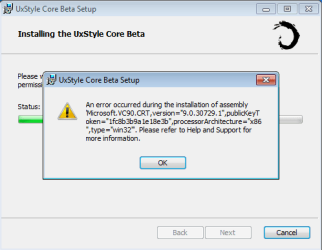
G gregtanwy New member Local time 4:01 AM Messages 1 Jan 1, 2012 #1 I use an ASUS Eee PC running Windows 7 starter 32bit. I recently tried installing UxStyle but an error occurs every time. Attachments help.png 9.2 KB · Views: 18 My Computer My Computer OSWindows 7 starter 32bit
I use an ASUS Eee PC running Windows 7 starter 32bit. I recently tried installing UxStyle but an error occurs every time.
zigzag3143 New member Local time 5:01 AM Messages 27,140 Jan 1, 2012 #2 gregtanwy said: I use an ASUS Eee PC running Windows 7 starter 32bit. I recently tried installing UxStyle but an error occurs every time. Click to expand... How to Install & Use Custom 3rd Party Themes in Windows XP, Vista & 7 using Universal Theme Patcher, VistaGlazz and UxStyle - Tweaking with Vishal My Computer My Computer Computer Manufacturer/Model NumberHP Pavillion dv-7 1005 TxOSWin 8 Release candidate 8400CPU[email protected]Memory4 gigsGraphics Card(s)Nvidia 9600MSound CardHD built-inMonitor(s) Displays17" WxgaScreen Resolution1440x900CoolingnoneInternet Speed45Mb down 5Mb up
gregtanwy said: I use an ASUS Eee PC running Windows 7 starter 32bit. I recently tried installing UxStyle but an error occurs every time. Click to expand... How to Install & Use Custom 3rd Party Themes in Windows XP, Vista & 7 using Universal Theme Patcher, VistaGlazz and UxStyle - Tweaking with Vishal
Bongo Jerry ☮ 1956-2019 R.I.P. VIP SF Team Local time 4:01 AM Messages 10,864 Location Iowa Jan 1, 2012 #3 Welcome to the Seven Forums Look at this tutorial http://www.sevenforums.com/tutorials/34579-enabling-custom-themes-windows-7-a.html You need to turn UAC down all the way, restart, then install UxStyle Jerry My Computer My Computer Computer typeLaptopComputer Manufacturer/Model NumberSager NP9170OSWin 7 Pro x64 / Win 10 ProCPUIntel(R) Core(TM) i7-3630QM CPU @ 2.40GHzMotherboardCLEVO P170EMMemory12 GBGraphics Card(s)(1) Intel(R) HD Graphics 4000 (2) NVIDIA GeForce GTX 675MSound Card(1) Realtek High Definition Audio (2) Intel(R) Display AudMonitor(s) Displays17.3Screen Resolution1920x1080Hard Drives(1) Samsung 860 EVO 500GB(OS) (1) Samsung 860 EVO 500GB(Data)KeyboardBackliteAntivirusMSE, Malwarebytes ProBrowserFirefoxOther InfoDESKTOP: Custom-built. OS: Win 10 Pro x64. CASE: Rosewill R5. CPU: Intel I5 4670K CPU @ 3.40GHz. CPU COOLER: Cool Master Hyper 212 EVO. MOTHERBOARD: Asus Z87-A. MEMORY: Kingston HyperX 2x4 GB. GPU: Nvidia Geforce 650 TI. PSU: Corsair TX750. DRIVES: (1) Samsung 840 120 GB SSD (2) Western Digital blue 500 GB 7200 RPM.
Welcome to the Seven Forums Look at this tutorial http://www.sevenforums.com/tutorials/34579-enabling-custom-themes-windows-7-a.html You need to turn UAC down all the way, restart, then install UxStyle Jerry
D derekimo New member SF Team Local time 2:01 AM Messages 16,779 Location Shasta County Jan 1, 2012 #4 gregtanwy said: I use an ASUS Eee PC running Windows 7 starter 32bit. I recently tried installing UxStyle but an error occurs every time. Click to expand... That's not going help with win 7 starter anyway. Option two of this tutorial, http://www.sevenforums.com/tutorials/47294-desktop-background-change-windows-7-starter.html Is as close as you will get to customizing starter. My Computer My Computer Computer typePC/DesktopComputer Manufacturer/Model NumberSelf BuiltOSWin 10 Pro x64CPUIntel I5-2500K @3.3GHzMotherboardAsrock P67 Extreme4Memory16GB G.Skill Ripjaws X (4x4GB)Graphics Card(s)EVGA GeForce 750 Ti SC 2GBSound CardASUS Xonar DG 5.1 Channels 24-bit 96KHz PCI Interface SoundMonitor(s) Displaysauria eq2367Screen Resolution1920 x 1080Hard Drives250GB Samsung 850 EVO SSD 1TB WD Blue 1TB HitachiPSUSeaSonic X 650W 80 Plus GoldCaseCorsair Obsidian 750DCoolingCorsair H60, Three 140mm case fansKeyboardLogitech Wireless Keyboard K520MouseLogitech Wireless Mouse M310Internet SpeedWave Broadband ~ 100 dn 5 upAntivirusWindows Defender, Malwarebytes PremiumBrowserEdge, IE11, ChromeOther InfoLaptop specs: HP g7-1365dx / CPU: AMD A6-3420M APU with Radeon(tm) HD Graphics / RAM: Crucial 8Gb (2x4Gb) / SSD: Crucial M4-CT128M4SSD2 ATA Device/ FW 000F / GFX: AMD Radeon HD 6520G / OS: Windows 10 Pro x64
gregtanwy said: I use an ASUS Eee PC running Windows 7 starter 32bit. I recently tried installing UxStyle but an error occurs every time. Click to expand... That's not going help with win 7 starter anyway. Option two of this tutorial, http://www.sevenforums.com/tutorials/47294-desktop-background-change-windows-7-starter.html Is as close as you will get to customizing starter.
Bongo Jerry ☮ 1956-2019 R.I.P. VIP SF Team Local time 4:01 AM Messages 10,864 Location Iowa Jan 1, 2012 #5 derekimo said: gregtanwy said: I use an ASUS Eee PC running Windows 7 starter 32bit. I recently tried installing UxStyle but an error occurs every time. Click to expand... That's not going help with win 7 starter anyway. Option two of this tutorial, http://www.sevenforums.com/tutorials/47294-desktop-background-change-windows-7-starter.html Is as close as you will get to customizing starter. Click to expand... Good catch My Computer My Computer Computer typeLaptopComputer Manufacturer/Model NumberSager NP9170OSWin 7 Pro x64 / Win 10 ProCPUIntel(R) Core(TM) i7-3630QM CPU @ 2.40GHzMotherboardCLEVO P170EMMemory12 GBGraphics Card(s)(1) Intel(R) HD Graphics 4000 (2) NVIDIA GeForce GTX 675MSound Card(1) Realtek High Definition Audio (2) Intel(R) Display AudMonitor(s) Displays17.3Screen Resolution1920x1080Hard Drives(1) Samsung 860 EVO 500GB(OS) (1) Samsung 860 EVO 500GB(Data)KeyboardBackliteAntivirusMSE, Malwarebytes ProBrowserFirefoxOther InfoDESKTOP: Custom-built. OS: Win 10 Pro x64. CASE: Rosewill R5. CPU: Intel I5 4670K CPU @ 3.40GHz. CPU COOLER: Cool Master Hyper 212 EVO. MOTHERBOARD: Asus Z87-A. MEMORY: Kingston HyperX 2x4 GB. GPU: Nvidia Geforce 650 TI. PSU: Corsair TX750. DRIVES: (1) Samsung 840 120 GB SSD (2) Western Digital blue 500 GB 7200 RPM.
derekimo said: gregtanwy said: I use an ASUS Eee PC running Windows 7 starter 32bit. I recently tried installing UxStyle but an error occurs every time. Click to expand... That's not going help with win 7 starter anyway. Option two of this tutorial, http://www.sevenforums.com/tutorials/47294-desktop-background-change-windows-7-starter.html Is as close as you will get to customizing starter. Click to expand... Good catch
D derekimo New member SF Team Local time 2:01 AM Messages 16,779 Location Shasta County Jan 1, 2012 #6 Bongo said: derekimo said: gregtanwy said: I use an ASUS Eee PC running Windows 7 starter 32bit. I recently tried installing UxStyle but an error occurs every time. Click to expand... That's not going help with win 7 starter anyway. Option two of this tutorial, http://www.sevenforums.com/tutorials/47294-desktop-background-change-windows-7-starter.html Is as close as you will get to customizing starter. Click to expand... Good catch Click to expand... Thanks Jerry. My Computer My Computer Computer typePC/DesktopComputer Manufacturer/Model NumberSelf BuiltOSWin 10 Pro x64CPUIntel I5-2500K @3.3GHzMotherboardAsrock P67 Extreme4Memory16GB G.Skill Ripjaws X (4x4GB)Graphics Card(s)EVGA GeForce 750 Ti SC 2GBSound CardASUS Xonar DG 5.1 Channels 24-bit 96KHz PCI Interface SoundMonitor(s) Displaysauria eq2367Screen Resolution1920 x 1080Hard Drives250GB Samsung 850 EVO SSD 1TB WD Blue 1TB HitachiPSUSeaSonic X 650W 80 Plus GoldCaseCorsair Obsidian 750DCoolingCorsair H60, Three 140mm case fansKeyboardLogitech Wireless Keyboard K520MouseLogitech Wireless Mouse M310Internet SpeedWave Broadband ~ 100 dn 5 upAntivirusWindows Defender, Malwarebytes PremiumBrowserEdge, IE11, ChromeOther InfoLaptop specs: HP g7-1365dx / CPU: AMD A6-3420M APU with Radeon(tm) HD Graphics / RAM: Crucial 8Gb (2x4Gb) / SSD: Crucial M4-CT128M4SSD2 ATA Device/ FW 000F / GFX: AMD Radeon HD 6520G / OS: Windows 10 Pro x64
Bongo said: derekimo said: gregtanwy said: I use an ASUS Eee PC running Windows 7 starter 32bit. I recently tried installing UxStyle but an error occurs every time. Click to expand... That's not going help with win 7 starter anyway. Option two of this tutorial, http://www.sevenforums.com/tutorials/47294-desktop-background-change-windows-7-starter.html Is as close as you will get to customizing starter. Click to expand... Good catch Click to expand... Thanks Jerry.