
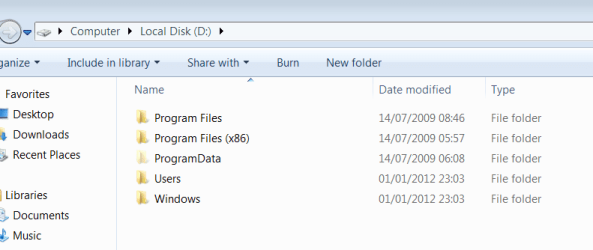
Restored from earlier image now D has folders in it

templar

New member
Member
Local time
10:23 PM
Messages
50
Hi folks, I have a partitioned hard drive. All my Windows files etc. are on C: and I leave D: empty. I just recovered my Windows to an earlier Windows image and D: is now filled with folders. I have included an image. Can I delete these? They shouldn't be there.
 

Attachments
  • Capture.PNG
    Capture.PNG
    11.4 KB · Views: 18

My Computer My Computer

At a glance

Windows 7 x64 SP1
OS
Windows 7 x64 SP1
Did you intentionally restore the image to the D drive?

Post a picture of Windows Disk Management.
 

My Computer My Computer

At a glance

Windows 7 Home Premium SP1, 64-bitIntel Skylake i5-6600K, not overclocked8 GB HyperX DDR4-2666 (2 x 4 GB)none; graphics are integrated on CPU
Computer type
PC/Desktop
Computer Manufacturer/Model Number
Ignatz Special; 4 speed manual gearbox; factory air conditioning; one of one
OS
Windows 7 Home Premium SP1, 64-bit
CPU
Intel Skylake i5-6600K, not overclocked
Motherboard
AsRock Z170M Extreme 4, micro ATX
Memory
8 GB HyperX DDR4-2666 (2 x 4 GB)
Graphics Card(s)
none; graphics are integrated on CPU
Sound Card
onboard: Realtek ALC1150; external: USB Behringer UF0-202
Monitor(s) Displays
Dell S2340M 23 inch IPS
Screen Resolution
1600 x 900
Hard Drives
System: Crucial MX100 series SSD, 128 GB;
Data: Samsung Spinpoint 103SJ, 1 TB;
Backup: WD Caviar Green WD30EZRX-00D8PB0, 3 TB
PSU
Rosewill SilentNight 500 watt fanless, semi-modular
Case
Antec Solo II
Cooling
Noctua NH-U12S; Noctua F12 intake, Noctua S12A exhaust
Keyboard
Microsoft 200 6JH-00001 USB
Mouse
Dell or Microsoft optical wired; USB
Antivirus
Microsoft Security Essentials and Malwarebytes Premium
Browser
Pale Moon
Other Info
All fans PWM; speeds at idle: CPU circa 500 rpm; intake circa 600 rpm; exhaust circa 600 rpm; CPU temps 27 idle and 47 C load in a warm room (27 C/81 F) when running Intel Extreme Tuning Utility stress test.
Did you intentionally restore the image to the D drive?

Post a picture of Windows Disk Management.

I don't think so. All it seemed to do is just find my back up file and I just proceeded the recovery process from there. It didn't ask me what partition it wanted to be put. Here is the screenshot.

I am no expert but I have noticed both are primary. Is that something to do with my problem?
 

Attachments

  • Capture.PNG
    Capture.PNG
    17 KB · Views: 20

My Computer My Computer

At a glance

Windows 7 x64 SP1
OS
Windows 7 x64 SP1
Have you made any partition changes between the time you took the system image and the time when you restored said system image? System Image will save the partition info in the MBR for the physical disk that the image is for.
 

My Computer My Computer

At a glance

Windows 7AMD Phenom II X2 (dual-core)4Gintegrated ATI HD 4200
Computer type
PC/Desktop
Computer Manufacturer/Model Number
Custom
OS
Windows 7
CPU
AMD Phenom II X2 (dual-core)
Motherboard
GA-MA785GM-US2H
Memory
4G
Graphics Card(s)
integrated ATI HD 4200
Sound Card
integrated
Monitor(s) Displays
Samsung 24"
Screen Resolution
1920x1080
Hard Drives
1 SSD - Samsung 840 - 500 GB - OS and DATA partitions
1 SSD - Intel 320 - 120 GB (used for backups) - Misc/BACKUP
1 SATA HD - WD, 500 GB - BACKUP
PSU
Ultra X4 500W
Case
Ultra X-blaster
Keyboard
Microsoft Digital Media Pro
Mouse
Logitech WIRED!
Internet Speed
15 Mbps FIOS
Have you made any partition changes between the time you took the system image and the time when you restored said system image? System Image will save the partition info in the MBR for the physical disk that the image is for.

Basically I was going to create a new system image from scratch, so I decided to reformat, put the Windows 7 disk in and reinstalled. I formated both the C: and D: to get rid of anything on there beforehand. However, after Windows 7 had installed every time I booted I got a prompt asking me which version of Windows I wanted to run. Both were Windows 7 so somehow I ended up installing Windows 7 twice. I didn't have a clue how to delete one of them so I decided to use the Windows Image on an external hard drive. After I recovered the dual-boot prompt was gone but there were copies of the C: folders in the D: as well.
 

My Computer My Computer

At a glance

Windows 7 x64 SP1
OS
Windows 7 x64 SP1
Windows will want to install to C: (your 3rd partition here).
You appear to want to start from a clean install?... then I suggest format and partition with all primary NTFS
1) First partition 200MB (better than the default 100MB). NB: Mark it ACTIVE.
2) Second partition C: around the 80GB as you have is good for the OS/installed programs. Do not mark it active.
3) Third partition D: remainder of space (not active).

Run an install and all should be well.

All future Windows images will include and then restore system reserved and C: correctly. If you don't change the partition structure you should never need a reformat with a reimage and the data partition D: will remain intact.
 

My Computer My Computer

At a glance

Windows 7x64 Home Premium SP1Intel i7 2600kG.Skill Ripjaws (DDR3-1600) 2x4GBNvidia GeForce GTS 450; Intel HD Graphics 300...
Computer type
PC/Desktop
Computer Manufacturer/Model Number
Own build
OS
Windows 7x64 Home Premium SP1
CPU
Intel i7 2600k
Motherboard
ASUS P8Z68 Deluxe
Memory
G.Skill Ripjaws (DDR3-1600) 2x4GB
Graphics Card(s)
Nvidia GeForce GTS 450; Intel HD Graphics 3000(GT2+)
Monitor(s) Displays
Dell Ultrasharp IPS panel U2311H, Samsung SyncMaster P2350
Screen Resolution
1920x1080
Hard Drives
Samsung 850 Pro SSD 256GB, Samsung SSD 840 120GB, Seagates 1TB Barracuda ST31000528AS x2
PSU
Seasonic M12II 520W
Case
Lian Li Lancool PC-K60
Cooling
Case: 1x120mm, 3x140mm CPU: Hyper 212+
Keyboard
Logitech MK520 (wireless)
Mouse
Logitech MK520
Internet Speed
6-7 Mbps
Antivirus
Norton Security Premium, Malwarebytes on 2 (MSE on 3rd PC)
Browser
FireFox
Other Info
Audio: Logitech Z523 2.1
Windows will want to install to C: (your 3rd partition here).
You appear to want to start from a clean install?... then I suggest format and partition with all primary NTFS
1) First partition 200MB (better than the default 100MB). NB: Mark it ACTIVE.
2) Second partition C: around the 80GB as you have is good for the OS/installed programs. Do not mark it active.
3) Third partition D: remainder of space (not active).

Run an install and all should be well.

All future Windows images will include and then restore system reserved and C: correctly. If you don't change the partition structure you should never need a reformat with a reimage and the data partition D: will remain intact.

Okay, I will try it out. Thanks!
 

My Computer My Computer

At a glance

Windows 7 x64 SP1
OS
Windows 7 x64 SP1
Back
Top