Help me removing incomplete installation of win 7

zed7007

New member
Local time
12:33 PM
Messages
22
I had a small startup problem so I used my win 7 installation DVD to fix it. The problem was solved but now every time windows loads it shows a menu whether to load windows 7 or windows seven setup. So how do I solve this problem?
 

My Computer My Computer

At a glance

windows 7 ultimate 32bit
OS
windows 7 ultimate 32bit

My Computer My Computer

At a glance

Microsoft Windows 10 Pro Insider Preview 64-bitIntel(R) Core(TM) i3-4130 CPU @ 3.40GHzCorsair Vengence 4GB x2 (8.00GB Dual-Channel ...2047MB GeForce GTS 450 (ZOTAC International)
Computer type
PC/Desktop
Computer Manufacturer/Model Number
Self Assembled
OS
Microsoft Windows 10 Pro Insider Preview 64-bit
CPU
Intel(R) Core(TM) i3-4130 CPU @ 3.40GHz
Motherboard
Gigabyte Technology Co., Ltd. B85M-D3H
Memory
Corsair Vengence 4GB x2 (8.00GB Dual-Channel DDR3 @ 798MHz)
Graphics Card(s)
2047MB GeForce GTS 450 (ZOTAC International)
Sound Card
Onboard (Realtek High Definition Audio)
Monitor(s) Displays
LG Flatron E2040T
Screen Resolution
1600x900
Hard Drives
Western Digital 1 TB
Seagate 500 GB
PSU
Corsair VS550
Case
Cooler Master K380
Cooling
Cooler Master Seidon 120V Plus
Keyboard
Logitech MK260r
Mouse
Logitech MK260r
Internet Speed
PMPL Broadband
Antivirus
Windows Defender + MBAM
Browser
Firefox
Other Info
Dell Studio 15" Laptop
It didnt help. I tried EasyBDC, but win 7 setup is not on the boot list.
 

My Computer My Computer

At a glance

windows 7 ultimate 32bit
OS
windows 7 ultimate 32bit

My Computer My Computer

At a glance

win 7 X64 Ultimate SP1I3770KG Skill F3-14900CL9-4GBXL x 4NVIDIA GeForce GTX670 + Intel 4000
Computer Manufacturer/Model Number
BGC (Bob's Garage Crew)
OS
win 7 X64 Ultimate SP1
CPU
I3770K
Motherboard
Asus P8Z77-V Deluxe
Memory
G Skill F3-14900CL9-4GBXL x 4
Graphics Card(s)
NVIDIA GeForce GTX670 + Intel 4000
Sound Card
Realtek HD 5.1 (MOB)
Monitor(s) Displays
Asus VW224T (1)
Screen Resolution
1920 x 1080
Hard Drives
SATA Corsair Force GT 2.5" 180GB (System) Sata 3
OCZ Vertex3 120GB
OCZ Vertex 2 120GB 2.5" SATA II
ST31000524AS 1000.2GB
WD15EARS (External)
PSU
CoolerMaster 1000 Watt
Case
CoolerMaster HAF X
Cooling
CPU -- CoolerMaster 520N
Keyboard
MS Wireless 3000 V2
Mouse
MS Wireless 3000 V2
Internet Speed
Cable
Antivirus
Norton Internet Security
Browser
IE9
Other Info
AMI Bios 1805
OC'd 3%
What exactly did you perform with your Win7 installation DVD? Did you click Install at all?

You should have run Startup Repair . Try running it a few times again.
 
What exactly did you perform with your Win7 installation DVD? Did you click Install at all?

You should have run Startup Repair . Try running it a few times again.
I inserted win 7 dvd and after windows loaded the setup files I clicked repair windows and ran startup repair. Thats all.
 

My Computer My Computer

At a glance

windows 7 ultimate 32bit
OS
windows 7 ultimate 32bit
What happens after running Startup Repair a few more times with reboots?

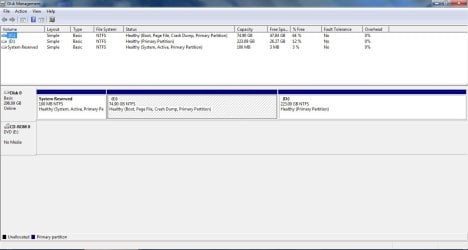
Please post back a screenshot of your maximized Disk Management drive map and listings, using Snipping Tool in Start Menu. Type Disk management in Start Search box to begin.
 
What happens after running Startup Repair a few more times with reboots?

Please post back a screenshot of your maximized Disk Management drive map and listings, using Snipping Tool in Start Menu. Type Disk management in Start Search box to begin.

I tried Startup repair few more times but it didnt solve the problem.

Here is the screenshot of diskmgmt window

diskmgmt.jpg
 

My Computer My Computer

At a glance

windows 7 ultimate 32bit
OS
windows 7 ultimate 32bit
Looks good.

I'd save a Win7 backup image and then reboot to try running the Setup choice then cancel it if it runs. Backup Complete Computer - Create an Image Backup

If it stalls and Startup Repair cannot set you right then boot the DVD or Repair CD to reimage your HD back to where it is now. System Image Recovery

You may choose to leave it the way it is or research it more. I'm only saying what I would do since I never fear to fall back on an image and would not leave a Dual Boot choice hanging without resolving it. EasyBCD would also be my first stop.

It's unusual that Windows Setup would appear if no attempt was made to install but only Repair from DVD. Is it possible someone else may have aborted a reinstall attempt?
 
I deal with all the software problems of the laptop myself so there is no chance that anyone else might have aborted a reinstall of windows.

I could have solved this problem by setting the duration of displaying the dual boot screen to zero. But I want to remove the windows setup option from the boot screen, so it would load the default OS automatically.
 

My Computer My Computer

At a glance

windows 7 ultimate 32bit
OS
windows 7 ultimate 32bit
Yup. I did. It displayed only the default OS. There wasn't a windows setup option on the list
 

My Computer My Computer

At a glance

windows 7 ultimate 32bit
OS
windows 7 ultimate 32bit
It gives a message saying that windows failed to load due to a recent hardware or software changes. Then it gives the procedure to run startup repair.
After that there is something like this:

File: \$LDR$

status: 0x000000f

info: The selected entry could not be loaded because the application is missing or corrupt.
 

My Computer My Computer

At a glance

windows 7 ultimate 32bit
OS
windows 7 ultimate 32bit
There was no XP in my computer.

The startup problem that I mentioned earlier happened because I tried make a bootable usb of win xp using WinSetupfromUSB. I ran RMprepUSB to make the usb ready for copying windows files but the program said the pen drive was not ready. I got bored and shutdown the laptop. Next day when I started the system it gave me a message saying "NTLDR is missing, press ctrl+alt+del" to restart. So I did a startup repair.
 
Last edited:

My Computer My Computer

At a glance

windows 7 ultimate 32bit
OS
windows 7 ultimate 32bit
That error only pertains to XP, which is why I asked if you'd had it on the machine. It's possible you applied XP bootsect code to Win7 in an attempt to create a bootable flash stick.

In the future use Universal USB Installer to write the Win7 ISO (extracted with ImgBurn) to flash stick with Win7 in dropdown menu.

The XP bootsect may still be on the HD so I'd run Startup Repair a few more times to see if it can get rid of it.
 
Yeah I will try running startup repair. Thanx for the help dude.
 

My Computer My Computer

At a glance

windows 7 ultimate 32bit
OS
windows 7 ultimate 32bit
Back
Top