

- Local time
- 2:27 PM
- Messages
- 74
Hi
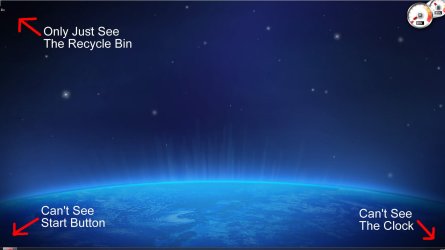
I got a new 37" panasonic 1080p LCD TV I use a hdmi cable for my pc to tv I only have the top half of my taskbar as you can see in the screenshot below I don't know how to change it so that I can see it all i have tried changing Resolution that didn't not work I've got the Resolution on its recommended settings witch are 1920 X 1080 and i have a Nvidia GeForce 310 with the lastest update
Thanks
I got a new 37" panasonic 1080p LCD TV I use a hdmi cable for my pc to tv I only have the top half of my taskbar as you can see in the screenshot below I don't know how to change it so that I can see it all i have tried changing Resolution that didn't not work I've got the Resolution on its recommended settings witch are 1920 X 1080 and i have a Nvidia GeForce 310 with the lastest update
Thanks
Attachments
My Computer
At a glance
Windows 7 Ultimate 64-bit SP1Intel i7-3930K 3.20GHz 6-Core ProcessorG Skill Ripjaws Z 32GB DDR3 1866MHzEVGA Nvidia GeForce GTX 980 4GB
- Computer type
- PC/Desktop
- Computer Manufacturer/Model Number
- Custom Build
- OS
- Windows 7 Ultimate 64-bit SP1
- CPU
- Intel i7-3930K 3.20GHz 6-Core Processor
- Motherboard
- Asus Sabertooth X79
- Memory
- G Skill Ripjaws Z 32GB DDR3 1866MHz
- Graphics Card(s)
- EVGA Nvidia GeForce GTX 980 4GB
- Monitor(s) Displays
- 29" LG Curved Ultrawide IPS Monitor
- Screen Resolution
- 2560 x 1080
- Hard Drives
- Samsung 850 Pro 128GB
- PSU
- Corsair AX760
- Case
- Aerocool DS200
- Cooling
- Cooler Master Nepton 240M
- Keyboard
- Wireless Keyboard
- Mouse
- Wireless Mouse
- Internet Speed
- 32MB
- Antivirus
- Bitdefender
- Browser
- Google Chrome
- Other Info
- TP-LINK Archer T9E Network adapter


