update your bios

Cost of new computer £400 0r $600 at least.
New media player, cost.... probably $0 or £0 - whichever.
 
Last edited:

My Computer My Computer

At a glance

Win 7Intel core 2 duo4 gig
Computer Manufacturer/Model Number
Mesh PC
OS
Win 7
CPU
Intel core 2 duo
Memory
4 gig
Hard Drives
1 x250 gig
1 x 500 gig
Mouse
MS lasermouse 5000 -'cos it scrolls smoothly, no wheel click
Internet Speed
10mb - cable
Other Info
The mouse took most research. I hate that click on the wheel, this one has the old fashioned smooth wheel. There aren't many about.
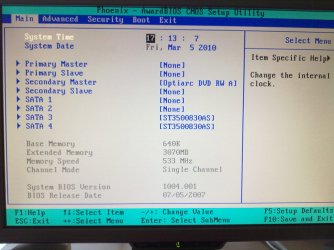
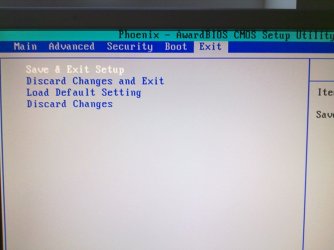
here is my bios screen since i can't change hardly any settings would that make it
safe
 

Attachments

  • 05032010059.jpg
    05032010059.jpg
    264.4 KB · Views: 43
  • 05032010060.jpg
    05032010060.jpg
    186.4 KB · Views: 21

My Computer My Computer

At a glance

windows 74 CPU by Intel Core 2 Quad Q66003 gb ramNVIDIA GeForce 8800
Computer Manufacturer/Model Number
PACKARD bell
OS
windows 7
CPU
4 CPU by Intel Core 2 Quad Q6600
Motherboard
Vegas 2 Motherboard Full ATX motherboard
Memory
3 gb ram
Graphics Card(s)
NVIDIA GeForce 8800
Hard Drives
500GB C D =500GB
Seagate Barracuda 7200.10 500 GB Hard Disk by 2
Other Info
8 in 1 Gigabyte GO-C81LA CardReader/Writer
Let me be totally honest with you.


For the reason you want to do this, it is not worth the risk, not to mention that everyone has told you it won't solve the issue.


If you've decided to do this I hope you've done your homework as you're on your own with this.
 

My Computer My Computer

At a glance

W 7 64-bit UltimateIntel Q9550 Yorkfield8GB Dominator 8500C5DATI : XFX 5870
Computer Manufacturer/Model Number
* BFK Customs *
OS
W 7 64-bit Ultimate
CPU
Intel Q9550 Yorkfield
Motherboard
ASUS P5Q Pro
Memory
8GB Dominator 8500C5D
Graphics Card(s)
ATI : XFX 5870
Sound Card
Realtek HD Audio 7-1
Monitor(s) Displays
1x 47" LCD HDMI & 3x 26" LCD HDMI
Screen Resolution
1920x1080P & 1920x1200
Hard Drives
1x 80GB Intel X25-M G2 SSD : 1x 500GB & 1x 640GB WD Caviar Black(s)
PSU
Corsair 620HX
Case
Cooler Master RC-690
Cooling
Tuniq Tower 120, 2x 140mm and 3x 120mm case fans
Keyboard
Microsoft 500
Mouse
Razer Diamondback 3G
Internet Speed
14 Mb/s
Other Info
1x Koutech 3Gb/s SATA HDD Hot Swap Rack
my motherboard is a packard bell ipower motherboard name is asus p5n-e
i cant update as packard bell removed all bioses i have phoned packard bell
they want me to pay for a reapair as all it needs is the bios reflashing thanks hope someone can help me take care
 
Last edited:

My Computer My Computer

At a glance

windows 72.80ghz8gb256mb
Computer Manufacturer/Model Number
packard bell i power 8610
OS
windows 7
CPU
2.80ghz
Motherboard
p5n-e
Memory
8gb
Graphics Card(s)
256mb
Sound Card
on board
Monitor(s) Displays
lg 20''
Hard Drives
2x 2tb
PSU
570w
Case
gameing case
Cooling
fans
The last BIOS for your motherboard is August 2007 .... get it -=> here Hope this helps.. ;)
 

My Computer My Computer

At a glance

64-bit Windows 8.1 ProCore(TM) i5 CPU 4330 Haswell @ 3.20GHz12.00 GBIntel(R) HD Graphics
Computer type
PC/Desktop
Computer Manufacturer/Model Number
LENOVO K450 @3.0GHZ
OS
64-bit Windows 8.1 Pro
CPU
Core(TM) i5 CPU 4330 Haswell @ 3.20GHz
Motherboard
LENOVO
Memory
12.00 GB
Graphics Card(s)
Intel(R) HD Graphics
Sound Card
Intel HD integtrated
Monitor(s) Displays
HP 25' ISP Monitor
Screen Resolution
1900/1020
Hard Drives
(1) ST1000DM003-1CH162 (2) Generic STORAGE DEVICE USB Device (3) Generic STORAGE DEVICE USB Device
Internet Speed
100mb down/10mb up
tryed to download it but it does not download hope you can find other site thanks for this mate the packard bell tower cost me £899 would be good if i can fix it take care
 

My Computer My Computer

At a glance

windows 72.80ghz8gb256mb
Computer Manufacturer/Model Number
packard bell i power 8610
OS
windows 7
CPU
2.80ghz
Motherboard
p5n-e
Memory
8gb
Graphics Card(s)
256mb
Sound Card
on board
Monitor(s) Displays
lg 20''
Hard Drives
2x 2tb
PSU
570w
Case
gameing case
Cooling
fans
It works!

Packard Bell PB-Vegas2 IS identical to Asus P5N-E SLI and bios updates from asus work perfectly. Can't believe nobody has tried doing this in all this time. But you may want to reset the bios before flashing or after that you may not be able to enter setup, and will have to reset it anyway. At first when this bug happened i thought the flashing had failed and the pc dead but no... bios reset made it ok. Soooo many more settings that the crappy Packard Bell bios. But can someone tell me what my LDT must be? It is default at 5X multiplier and FSB is 200 (as should be). So is the LDT correct?
 

My Computer My Computer

At a glance

Windows 7 Ultimate 64bitCore2Quad Q66008GB DDR 2 Kingmax2x GT520 1GB/64bit
Computer type
PC/Desktop
Computer Manufacturer/Model Number
Home brewed
OS
Windows 7 Ultimate 64bit
CPU
Core2Quad Q6600
Motherboard
Asus P5N-E sli
Memory
8GB DDR 2 Kingmax
Graphics Card(s)
2x GT520 1GB/64bit
Sound Card
Realtek ALC883 :P
Monitor(s) Displays
LG Flatron W245
Screen Resolution
1920x1200
Hard Drives
2x STM3250820AS; 2x SP2014N; ST310005AS; WD3200BEVT; WD10EARS; WD1600AAJB; 6Y200M0; ST9160310AS;
PSU
Chieftec 650W
Case
Antec Twelve Hundred
Keyboard
Microsoft Wireless 800
Mouse
Microsoft Wireless 1000
R4dul how did you go about this?

As i have recently purchased a Sapphire 6870 and didnt realise this issue. Previously when i have gone to update to the asus bios it has always failed I didn;t even get to the thinking the pc was dead option.
 

My Computer My Computer

At a glance

Windows 7 64bit
OS
Windows 7 64bit
R4dul how did you go about this?

As i have recently purchased a Sapphire 6870 and didnt realise this issue. Previously when i have gone to update to the asus bios it has always failed I didn;t even get to the thinking the pc was dead option.

I used the latest bios version from asus, in my case was 1406.bin file. Also used the DOS flasher program, since i could not use the asus update program to flash the bios (because board was recognized as packard bell). I copied the bios file to main HDD, on the drive root for ease of access and also the awdflash.exe file. Then i booted from a CD (i used hiren's boot cd) and loaded NTFS4DOS to have access to my HDD. Then i simply ran awdflash.exe program. Downside for me was, i was unable to backup the current bios to a file since awdflash program can't write to the HDD through the NTFS4DOS environment, or maybe packard bell did some copy protecting on their bios. It made sense that the board work with the asus bios since they're practically identical... except the packard bell has fewer connectors :( It was a huge risk though...
 

My Computer My Computer

At a glance

Windows 7 Ultimate 64bitCore2Quad Q66008GB DDR 2 Kingmax2x GT520 1GB/64bit
Computer type
PC/Desktop
Computer Manufacturer/Model Number
Home brewed
OS
Windows 7 Ultimate 64bit
CPU
Core2Quad Q6600
Motherboard
Asus P5N-E sli
Memory
8GB DDR 2 Kingmax
Graphics Card(s)
2x GT520 1GB/64bit
Sound Card
Realtek ALC883 :P
Monitor(s) Displays
LG Flatron W245
Screen Resolution
1920x1200
Hard Drives
2x STM3250820AS; 2x SP2014N; ST310005AS; WD3200BEVT; WD10EARS; WD1600AAJB; 6Y200M0; ST9160310AS;
PSU
Chieftec 650W
Case
Antec Twelve Hundred
Keyboard
Microsoft Wireless 800
Mouse
Microsoft Wireless 1000
R4dul how did you go about this?

As i have recently purchased a Sapphire 6870 and didnt realise this issue. Previously when i have gone to update to the asus bios it has always failed I didn;t even get to the thinking the pc was dead option.

I used the latest bios version from asus, in my case was 1406.bin file. Also used the DOS flasher program, since i could not use the asus update program to flash the bios (because board was recognized as packard bell). I copied the bios file to main HDD, on the drive root for ease of access and also the awdflash.exe file. Then i booted from a CD (i used hiren's boot cd) and loaded NTFS4DOS to have access to my HDD. Then i simply ran awdflash.exe program. Downside for me was, i was unable to backup the current bios to a file since awdflash program can't write to the HDD through the NTFS4DOS environment, or maybe packard bell did some copy protecting on their bios. It made sense that the board work with the asus bios since they're practically identical... except the packard bell has fewer connectors :( It was a huge risk though...

I think i just about get the idea

1.) copy bios and awdflsh.exe to C:
2.) set bios to boot from CD
3.) Run hirens disc and use NTFS4DOS
4.) go to C: in dos
5.) in DOS type "awdflash.exe newbios.bin
6.) sit back and cross fingers?

Is that it or is there more to it? A simple tutorial would be really nice. As i have a sapphire ATI 6870 sat next to me that i can't use in my pc :cry:.

Thanks for your help in advance.
 

My Computer My Computer

At a glance

Windows 7 64bit
OS
Windows 7 64bit
Yes that pretty much covers it :) Of course yu can just run the awdflash then it will automatically ask you what's the file name. After you select it you'll notice it will display the name of your BIOS chip, for me it was Winbond. You can try making a backup of the current BIOS but at least for me that did not work, it could not read it. I also noticed, when writing the new BIOS that there were 2 blocks that could not be written, but since it works flawlessly ever since i suppose those are ROM blocks and it's normal that they stay that way. The upside of this new BIOS is that (except the occasional and well known "cannot enter setup" bug) it's far more stable than the packard bell version.
Anyway, good luck! And hope it works out for you. But i'm curious why you would want to use ATI graphics on Nvidia motherboard. There are many rumours of stability problems when doing that. As you can see yourself it doesn't even work at all with your current BIOS.
 

My Computer My Computer

At a glance

Windows 7 Ultimate 64bitCore2Quad Q66008GB DDR 2 Kingmax2x GT520 1GB/64bit
Computer type
PC/Desktop
Computer Manufacturer/Model Number
Home brewed
OS
Windows 7 Ultimate 64bit
CPU
Core2Quad Q6600
Motherboard
Asus P5N-E sli
Memory
8GB DDR 2 Kingmax
Graphics Card(s)
2x GT520 1GB/64bit
Sound Card
Realtek ALC883 :P
Monitor(s) Displays
LG Flatron W245
Screen Resolution
1920x1200
Hard Drives
2x STM3250820AS; 2x SP2014N; ST310005AS; WD3200BEVT; WD10EARS; WD1600AAJB; 6Y200M0; ST9160310AS;
PSU
Chieftec 650W
Case
Antec Twelve Hundred
Keyboard
Microsoft Wireless 800
Mouse
Microsoft Wireless 1000
Yes that pretty much covers it :) Of course yu can just run the awdflash then it will automatically ask you what's the file name. After you select it you'll notice it will display the name of your BIOS chip, for me it was Winbond. You can try making a backup of the current BIOS but at least for me that did not work, it could not read it. I also noticed, when writing the new BIOS that there were 2 blocks that could not be written, but since it works flawlessly ever since i suppose those are ROM blocks and it's normal that they stay that way. The upside of this new BIOS is that (except the occasional and well known "cannot enter setup" bug) it's far more stable than the packard bell version.
Anyway, good luck! And hope it works out for you. But i'm curious why you would want to use ATI graphics on Nvidia motherboard. There are many rumours of stability problems when doing that. As you can see yourself it doesn't even work at all with your current BIOS.

Cost is the biggest issue for choosing the 6870 ati card, when the equivalent Nvidia card is aproximately £40 more expensive. Something that at present i cannot afford. I will get the chance this weekend to flash the bios so fingers crossed it all works out well. Thanks for your help. The only problem i have found is on hirens website is finding the actual download link to his boot cd. Any help would be gratefully received.
 

My Computer My Computer

At a glance

Windows 7 64bit
OS
Windows 7 64bit

My Computer My Computer

At a glance

Windows 7 Ultimate 64bitCore2Quad Q66008GB DDR 2 Kingmax2x GT520 1GB/64bit
Computer type
PC/Desktop
Computer Manufacturer/Model Number
Home brewed
OS
Windows 7 Ultimate 64bit
CPU
Core2Quad Q6600
Motherboard
Asus P5N-E sli
Memory
8GB DDR 2 Kingmax
Graphics Card(s)
2x GT520 1GB/64bit
Sound Card
Realtek ALC883 :P
Monitor(s) Displays
LG Flatron W245
Screen Resolution
1920x1200
Hard Drives
2x STM3250820AS; 2x SP2014N; ST310005AS; WD3200BEVT; WD10EARS; WD1600AAJB; 6Y200M0; ST9160310AS;
PSU
Chieftec 650W
Case
Antec Twelve Hundred
Keyboard
Microsoft Wireless 800
Mouse
Microsoft Wireless 1000
One last question for you did you do just awdflash.exe newbios.bin or did you have anything after it like /sn /cc /cd /wb??

Cheers
 

My Computer My Computer

At a glance

Windows 7 64bit
OS
Windows 7 64bit
No, i just ran the awdflash and then typed the file name in the prompt box it displayed.

Cheers and good luck
 

My Computer My Computer

At a glance

Windows 7 Ultimate 64bitCore2Quad Q66008GB DDR 2 Kingmax2x GT520 1GB/64bit
Computer type
PC/Desktop
Computer Manufacturer/Model Number
Home brewed
OS
Windows 7 Ultimate 64bit
CPU
Core2Quad Q6600
Motherboard
Asus P5N-E sli
Memory
8GB DDR 2 Kingmax
Graphics Card(s)
2x GT520 1GB/64bit
Sound Card
Realtek ALC883 :P
Monitor(s) Displays
LG Flatron W245
Screen Resolution
1920x1200
Hard Drives
2x STM3250820AS; 2x SP2014N; ST310005AS; WD3200BEVT; WD10EARS; WD1600AAJB; 6Y200M0; ST9160310AS;
PSU
Chieftec 650W
Case
Antec Twelve Hundred
Keyboard
Microsoft Wireless 800
Mouse
Microsoft Wireless 1000
Well i just tried it and i got Invalid Windows Licence.

Any ideas?
 

My Computer My Computer

At a glance

Windows 7 64bit
OS
Windows 7 64bit
what? wait a minute i don't get it, what does the awdflash dos program got to do with windows?
 

My Computer My Computer

At a glance

Windows 7 Ultimate 64bitCore2Quad Q66008GB DDR 2 Kingmax2x GT520 1GB/64bit
Computer type
PC/Desktop
Computer Manufacturer/Model Number
Home brewed
OS
Windows 7 Ultimate 64bit
CPU
Core2Quad Q6600
Motherboard
Asus P5N-E sli
Memory
8GB DDR 2 Kingmax
Graphics Card(s)
2x GT520 1GB/64bit
Sound Card
Realtek ALC883 :P
Monitor(s) Displays
LG Flatron W245
Screen Resolution
1920x1200
Hard Drives
2x STM3250820AS; 2x SP2014N; ST310005AS; WD3200BEVT; WD10EARS; WD1600AAJB; 6Y200M0; ST9160310AS;
PSU
Chieftec 650W
Case
Antec Twelve Hundred
Keyboard
Microsoft Wireless 800
Mouse
Microsoft Wireless 1000
found version 1403 over at my digital life forums and that worked. now to test the ati card in that version.....

Still get the same error when trying to flash 1406 over 1403.
 

My Computer My Computer

At a glance

Windows 7 64bit
OS
Windows 7 64bit
So just to understand better... is there a windows flasher that can be used? If so please tell me, it wold be much simpler (but less safe) than the DOS version :D
 

My Computer My Computer

At a glance

Windows 7 Ultimate 64bitCore2Quad Q66008GB DDR 2 Kingmax2x GT520 1GB/64bit
Computer type
PC/Desktop
Computer Manufacturer/Model Number
Home brewed
OS
Windows 7 Ultimate 64bit
CPU
Core2Quad Q6600
Motherboard
Asus P5N-E sli
Memory
8GB DDR 2 Kingmax
Graphics Card(s)
2x GT520 1GB/64bit
Sound Card
Realtek ALC883 :P
Monitor(s) Displays
LG Flatron W245
Screen Resolution
1920x1200
Hard Drives
2x STM3250820AS; 2x SP2014N; ST310005AS; WD3200BEVT; WD10EARS; WD1600AAJB; 6Y200M0; ST9160310AS;
PSU
Chieftec 650W
Case
Antec Twelve Hundred
Keyboard
Microsoft Wireless 800
Mouse
Microsoft Wireless 1000
Back
Top