Solved AMD Radeon 6670 / SpeedFan indicates 0 RPMs

Anesthetic

New member
Member
VIP
Local time
1:24 AM
Messages
110
Location
U.S.A
I have an eerie situation. When I turn my computer on, with chassis case off, I can clearly see the GPU's fan spinning happily. However, according to SpeedFan, the GPU's RPM is 0.

All drivers have been correctly installed. Also, this GPU is completely powered through PCIex16 motherboard slot. No extra power cables are required. Does this maybe have something to do with it?

Thanks guys!
 

My Computer My Computer

At a glance

Windows 10 HomeIntel Core i5-4690 3.5GHz16gb DDR3 1600 MHzMSI GTX 970 4gb DDR3
Computer type
PC/Desktop
Computer Manufacturer/Model Number
Custom Build
OS
Windows 10 Home
CPU
Intel Core i5-4690 3.5GHz
Motherboard
ASUS Z97-Deluxe 3.1
Memory
16gb DDR3 1600 MHz
Graphics Card(s)
MSI GTX 970 4gb DDR3
Sound Card
Creative Sound Blaster Z
Monitor(s) Displays
Ben-Q XL2420G G-SYNC 1080P Gaming Monitor
Screen Resolution
1080p
Hard Drives
ADATA 256GB SSD, Western Digital 1TB Black 7200RPM x 3, Seagate Baracuda 7200RPM + 2 external WD Black 1TB.
PSU
Modular Corsair Enthusiast Series RM850
Case
Obsidian Series 750D
Cooling
ZALMAN CNPS10X OPTIMA 120mm FSB
Keyboard
Logitech K320
Mouse
Corsair Gaming M65 RGB
Internet Speed
100+ Mbps
Antivirus
Webroot Secure Anywhere
Browser
Mozilla Firefox
Other Info
This computer was built by Xidax.

My Computer My Computer

At a glance

Systems 1 and 2: Windows 7 Enterprise x64, Wi...System 1: i7 [email protected], System 2: AMD FX-41...System 1: 8GB System 2: 8GBSystem 1: ATI FirePro V4800 System 2: Radeon ...
Computer Manufacturer/Model Number
Dell and Custom
OS
Systems 1 and 2: Windows 7 Enterprise x64, Win 8 Developer
CPU
System 1: i7 [email protected], System 2: AMD FX-4100 Zambezi 3.6G
Motherboard
System 1:Dell 06NWYK System 2: ASUS M5A97 AM3+
Memory
System 1: 8GB System 2: 8GB
Graphics Card(s)
System 1: ATI FirePro V4800 System 2: Radeon HD 6850
Sound Card
System 1: onboard System 2: onboard
Monitor(s) Displays
System1: Viewsonic HDMI 24"
Screen Resolution
System 1: 1920x1080 System 2: 1920x1080
Hard Drives
System 1: Mirrored .5B drives System 2: Seagate Barracuda ST1000DM003 1TB 7200 RPM 64MB Cache SATA 6.0Gb/s
Case
System 1: Dell System 2: Cooler Master
Internet Speed
10 MBPS

My Computer My Computer

At a glance

Win 7 64bit Desktop/Win 7 32bit LaptopIntel i7 3770k @ 4.2ghz4x4Gb 1600Mhz Excelram/3GB ddr2 667MSI GTX970 Gaming 4GB/Intel GMA950
Computer Manufacturer/Model Number
Homebrew/DELL Inspiron e1505/6400
OS
Win 7 64bit Desktop/Win 7 32bit Laptop
CPU
Intel i7 3770k @ 4.2ghz
Motherboard
Asus P8Z77 V/Intel GMi945gm
Memory
4x4Gb 1600Mhz Excelram/3GB ddr2 667
Graphics Card(s)
MSI GTX970 Gaming 4GB/Intel GMA950
Sound Card
Asus Xonar DGX/Sigmatel 9200
Monitor(s) Displays
Samsung 245B 24"/15.4"
Screen Resolution
1920x1200/1280x800
Hard Drives
256Gb Crucial M4 SSD
2x1TB Samsung F3
1x1TB Hitachi External
Laptop 64GB Kingston SSD
PSU
Cosair HX750
Case
Cooler Master Stacker STC-T01
Cooling
Watercooled cpu 360 rad
Keyboard
Logitech G19
Mouse
Razer DeathAdder
Internet Speed
16 meg ish :(
Antivirus
Panda Cloud
I have an eerie situation. When I turn my computer on, with chassis case off, I can clearly see the GPU's fan spinning happily. However, according to SpeedFan, the GPU's RPM is 0.

All drivers have been correctly installed. Also, this GPU is completely powered through PCIex16 motherboard slot. No extra power cables are required. Does this maybe have something to do with it?

Thanks guys!

The GPU reading is fairly new in Speedfan, so the "0" RPM is not an indication that something is broken. Speedfan is always being refined, so the problem may not get fixed until the next version. Try GPU-Z. If GPU-Z doesn't show anything, then there's a problem.
 

My Computer My Computer

At a glance

Windows 7 Home Premium 64 bitIntel Core i7-4790G.SKILL 8GB (2 x 4GB) DDR3 F3-10666CL9D-8GBNTAMD Radeon R7 250
Computer type
PC/Desktop
Computer Manufacturer/Model Number
Custom Build
OS
Windows 7 Home Premium 64 bit
CPU
Intel Core i7-4790
Motherboard
GA-Z87X-D3H
Memory
G.SKILL 8GB (2 x 4GB) DDR3 F3-10666CL9D-8GBNT
Graphics Card(s)
AMD Radeon R7 250
Sound Card
Realtek ALC892
Monitor(s) Displays
Samsung UN32EH5000, Dell 1703FPT
Screen Resolution
1920 x 1080, 1280 x 1024
Hard Drives
WD5003AZEX
WD10EZEX
Samsung HD103SJ
Samsung 128 GB 840 PRO
PSU
SeaSonic M12II SS-500GM
Case
Fractal Design Define R4
Cooling
Zalman CNPS9900ALED
Keyboard
Logitech K800
Mouse
Logitech M705
Internet Speed
16 Mbps
Antivirus
Avast
Browser
Firefox
Other Info
Bose Companion 2 Multimedia Speakers
Thanks all! GPU-Z worked! It's spinning.
 

My Computer My Computer

At a glance

Windows 10 HomeIntel Core i5-4690 3.5GHz16gb DDR3 1600 MHzMSI GTX 970 4gb DDR3
Computer type
PC/Desktop
Computer Manufacturer/Model Number
Custom Build
OS
Windows 10 Home
CPU
Intel Core i5-4690 3.5GHz
Motherboard
ASUS Z97-Deluxe 3.1
Memory
16gb DDR3 1600 MHz
Graphics Card(s)
MSI GTX 970 4gb DDR3
Sound Card
Creative Sound Blaster Z
Monitor(s) Displays
Ben-Q XL2420G G-SYNC 1080P Gaming Monitor
Screen Resolution
1080p
Hard Drives
ADATA 256GB SSD, Western Digital 1TB Black 7200RPM x 3, Seagate Baracuda 7200RPM + 2 external WD Black 1TB.
PSU
Modular Corsair Enthusiast Series RM850
Case
Obsidian Series 750D
Cooling
ZALMAN CNPS10X OPTIMA 120mm FSB
Keyboard
Logitech K320
Mouse
Corsair Gaming M65 RGB
Internet Speed
100+ Mbps
Antivirus
Webroot Secure Anywhere
Browser
Mozilla Firefox
Other Info
This computer was built by Xidax.
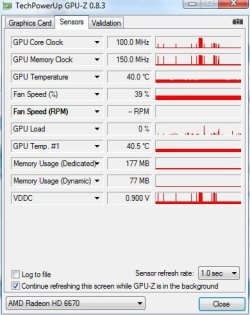
I am having a similar problem. Someone please help. Over the past few days I am getting 0 RPM on my AMD Radeon 6670 HD :'( What should I do ? Updated my drivers , later removed it and did a fresh install. Nothing seem to work
 

Attachments

  • 1.jpg
    1.jpg
    34 KB · Views: 6

My Computer My Computer

At a glance

Win 7 ultimate x64
Computer type
PC/Desktop
OS
Win 7 ultimate x64
Back
Top