
Laptop Make Weird "Click" Sound

hicarl92

New member
Local time
4:55 AM
Messages
20
hi guys,

i had a problem here. the problem is my laptop/notebook always making the "click" sound (the sound that like you open a folder in windows) although i'm not doing anything.when i turn off my laptop today, then i opened my laptop for the next day it making the same problem.i don't know how it's happened.

hope you guys can help me to solve my problem.

p/s : i am using windows 7.*sorry for bad english
 

My Computer My Computer

Computer Manufacturer/Model Number
Dell Inspiron N4010
OS
Windows 7 Home Premium 64bit (main), Windows XP Professional 32bit

My Computer My Computer

Computer type
PC/Desktop
Computer Manufacturer/Model Number
Gateway DX4831-01e (Mid-Tower Desktop)
OS
Originally Win 7 Hm Prem x64 Ver 6.1.7600 Build 7601-SP1 | Upgraded to Windows 10 December 14, 2019
CPU
Intel i3 530 2.93GHz, 2933MHz 2 Cores 4 Logical Processors
Motherboard
Gateway H57M01 133 megahertz
Memory
6GB of 1,333MHz DDR3 SDRAM
Graphics Card(s)
32MB Intel Graphics Media Accelerator HD IGChip
Sound Card
Realtek High Definition Audio
Monitor(s) Displays
Gateway HX2000 20inch TFT active matrix TN
Screen Resolution
1600 x 900 x 59 hertz
Hard Drives
WDC WD10EADS-00M2B0 [HDD] (1000.20 GB) -- drive 0,
HL-DT-ST DVDRAM GH41N [CD-ROM dr]
Four card readers, and Four USB 2.0
PSU
300watts.
Case
Mid-Tower Desktop
Cooling
Stock from Gateway
Keyboard
Natural Ergonomic Keyboard 4000, see Other Info
Mouse
Orig. Gateway wore out now using Insignia USB wired optical
Internet Speed
Vz FIOS 10ms png 57.64Mbps down 65.53Mbps up Speedtest.org
Antivirus
Zamana Anti-logger with Anti-malware, MSE, Windows Firewall,
Browser
IE11.0.9600.19399-Upd ver11.0.135, Firefox 68.0.1 x64
Other Info
System Specs by Belarc.

BIOS: American Megatrends Inc. P01-A0 11/17/2009

Replaced the MS 'Natural' Standard PS/2 Enhanced 101-102 Keyboard with a new Natural Ergonomic Keyboard 4000 on August 1st 2014.

Canon Pixma MG3222 Printer.

Updated to IE11 on 12102015 | Fios Quantum Router g1100

Additional AV: SpywareBlaster, manual Mbam, SAS
hicarl92,
Have you identified for sure that this sound is coming from the speakers, please use headphones and double check that it is in fact in the system sounds area? If not then flip the laptop over and identify where the hard drive is located then listen very closely.....is the sound coming from the computer it's self and more directly it's hard drive. When hard drives begin to go bad they make a clicking sound. If it turns out to be the hard drive making noise then back up all files and important data immediately...without haste !
 

My Computer My Computer

Computer type
PC/Desktop
Computer Manufacturer/Model Number
A blend of brains, brawn and dumb luck.
OS
Windows 7 Ultimate 64
CPU
i7 3770k OC'd 4.6 @ 1.17v, also FX 8120 & i5 miniITX
Motherboard
MSI P67A-GD80 b3
Memory
32 gb G.Skill Sniper DDR3 10-12-12-31 @ 2133
Graphics Card(s)
XFX Radeon 7870 2GB DDR5
Sound Card
Sound Blaster Z Series Card
Monitor(s) Displays
(2) LG LED 23" 1920 x 1080 2ms Monitors via mini d-port
Screen Resolution
1680 X 1050 p
Hard Drives
Samsung 256 gb 830 SSD sata III
(1) 1 tb WD Black
(2) 1 tb Hitachi deskmates/sata II
(2) 1 tb WD green/sata II
(2) 3 tb Seagate Barracuda
(1) 120 gb OCZ Vertex SS
(1) Drobo 5N w/5 Seagate 3tb
PSU
EVGA modular 1000G2 80% gold rating & APC 1200 RS
Case
CoolerMaster Storm Styker
Cooling
7 case fans 140mm & 120mm, NZXT Kraken X60
Keyboard
(2) Logitech Illuminated Keyboards (1) usb (1) wireless
Mouse
Logitech G700 & T-BC21 - nano nx for the laptop
Internet Speed
Basic 120mbps down
Antivirus
Trend Micro Titanium Max Security & Malwarebytes Premium
Browser
Chrome and IE 10
Other Info
5 Noctua case fans + 3 Noctua in p/p on NZXT cooler
Integrated hot swap drive bays for 2.5" Drives
(2) Lite-on dvd/cd/Blu Ray optical 22X
Integrated fan controller and led on/off
HP Officejet Pro 8630 all-n-one
Hot-swappable 3.5" hard drive bay
Netgear Nighthawk router
Asus USB 3 & sata 6 PCIe card
Vantec IDE to sata adptr./Ultra sata adptr
Lenovo L420 i5 lappy with m sata
Drobo 5N advanced NAS
hicarl92,
Have you identified for sure that this sound is coming from the speakers, please use headphones and double check that it is in fact in the system sounds area? If not then flip the laptop over and identify where the hard drive is located then listen very closely.....is the sound coming from the computer it's self and more directly it's hard drive. When hard drives begin to go bad they make a clicking sound. If it turns out to be the hard drive making noise then back up all files and important data immediately...without haste !
Nice catch!

I do not endorse this site, but I did find it unusual that a repair shop would specifically Pick out the n4010: Dell Inspiron N4010 Laptop Hard Drive Repair - Dell Inspiron N4010 Laptop Harddisk Replacement - HDD Upgrade
 

My Computer My Computer

Computer type
PC/Desktop
Computer Manufacturer/Model Number
Gateway DX4831-01e (Mid-Tower Desktop)
OS
Originally Win 7 Hm Prem x64 Ver 6.1.7600 Build 7601-SP1 | Upgraded to Windows 10 December 14, 2019
CPU
Intel i3 530 2.93GHz, 2933MHz 2 Cores 4 Logical Processors
Motherboard
Gateway H57M01 133 megahertz
Memory
6GB of 1,333MHz DDR3 SDRAM
Graphics Card(s)
32MB Intel Graphics Media Accelerator HD IGChip
Sound Card
Realtek High Definition Audio
Monitor(s) Displays
Gateway HX2000 20inch TFT active matrix TN
Screen Resolution
1600 x 900 x 59 hertz
Hard Drives
WDC WD10EADS-00M2B0 [HDD] (1000.20 GB) -- drive 0,
HL-DT-ST DVDRAM GH41N [CD-ROM dr]
Four card readers, and Four USB 2.0
PSU
300watts.
Case
Mid-Tower Desktop
Cooling
Stock from Gateway
Keyboard
Natural Ergonomic Keyboard 4000, see Other Info
Mouse
Orig. Gateway wore out now using Insignia USB wired optical
Internet Speed
Vz FIOS 10ms png 57.64Mbps down 65.53Mbps up Speedtest.org
Antivirus
Zamana Anti-logger with Anti-malware, MSE, Windows Firewall,
Browser
IE11.0.9600.19399-Upd ver11.0.135, Firefox 68.0.1 x64
Other Info
System Specs by Belarc.

BIOS: American Megatrends Inc. P01-A0 11/17/2009

Replaced the MS 'Natural' Standard PS/2 Enhanced 101-102 Keyboard with a new Natural Ergonomic Keyboard 4000 on August 1st 2014.

Canon Pixma MG3222 Printer.

Updated to IE11 on 12102015 | Fios Quantum Router g1100

Additional AV: SpywareBlaster, manual Mbam, SAS
Are you on wireless? It is possible you are picking up:
Broadband interference usually comes from incidental radio frequency emitters. These include electric power transmission lines, electric motors, thermostats, bug zappers, etc. Anywhere electrical power is being turned off and on rapidly is a potential source

Source: https://en.wikipedia.org/wiki/Electromagnetic_interference


yep..i am using a wireless buy not the broadband.i don't think that's the source of the problem.besides,i am far enough from other electrical appliances.
 

My Computer My Computer

Computer Manufacturer/Model Number
Dell Inspiron N4010
OS
Windows 7 Home Premium 64bit (main), Windows XP Professional 32bit
hicarl92,
Have you identified for sure that this sound is coming from the speakers, please use headphones and double check that it is in fact in the system sounds area? If not then flip the laptop over and identify where the hard drive is located then listen very closely.....is the sound coming from the computer it's self and more directly it's hard drive. When hard drives begin to go bad they make a clicking sound. If it turns out to be the hard drive making noise then back up all files and important data immediately...without haste !


i'm sure this sound coming from the speaker.because i tried to increase and decrease the volume of the speaker and it the sound coming from the speaker.
 

My Computer My Computer

Computer Manufacturer/Model Number
Dell Inspiron N4010
OS
Windows 7 Home Premium 64bit (main), Windows XP Professional 32bit
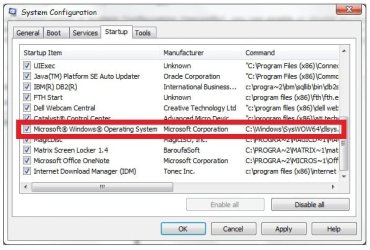
did anyone know about dlsys.exe in the process list?would you mind to give some intro about this process. i had end the process of this dlsys.exe after i booting up my laptop and that sound was dissappear.but when i shut down/restart my laptop and switch on back that dlsys.exe process still appear on startup
 

My Computer My Computer

Computer Manufacturer/Model Number
Dell Inspiron N4010
OS
Windows 7 Home Premium 64bit (main), Windows XP Professional 32bit
Prevx and Glarysoft flag it as malware. I also seen it as a File from a GPS website, and it seems to be associated with Shooter games.

Best, just to run your security programs to see what comes up.

As to it returning when you restart, you have to do more than kill the process, you have to find the program it is associated with, and stop that program from starting up.

See: http://www.sevenforums.com/tutorials/1401-startup-programs-change.html - Method Three, to see if dlsys.exe is listed in the Startup Tab.
If it is you can uncheck it, Apply, OK your way out.
Then restart, go back to the Startup tab to double check that it has been stopped from starting.

If it is not listed you have to type/copy/paste dlsys.exe into the Start/Search box.
If it shows there, then right click on it, then click on Open File Location.
Try, and match anything in that file against what you see on the Startup tab.
As it says in the tutorial, you may have to try Method Four, and check the Registry.

But, don't forget, If you do stop it, and it is needed by a legitimate program, that program will not work properly again.
 

My Computer My Computer

Computer type
PC/Desktop
Computer Manufacturer/Model Number
Gateway DX4831-01e (Mid-Tower Desktop)
OS
Originally Win 7 Hm Prem x64 Ver 6.1.7600 Build 7601-SP1 | Upgraded to Windows 10 December 14, 2019
CPU
Intel i3 530 2.93GHz, 2933MHz 2 Cores 4 Logical Processors
Motherboard
Gateway H57M01 133 megahertz
Memory
6GB of 1,333MHz DDR3 SDRAM
Graphics Card(s)
32MB Intel Graphics Media Accelerator HD IGChip
Sound Card
Realtek High Definition Audio
Monitor(s) Displays
Gateway HX2000 20inch TFT active matrix TN
Screen Resolution
1600 x 900 x 59 hertz
Hard Drives
WDC WD10EADS-00M2B0 [HDD] (1000.20 GB) -- drive 0,
HL-DT-ST DVDRAM GH41N [CD-ROM dr]
Four card readers, and Four USB 2.0
PSU
300watts.
Case
Mid-Tower Desktop
Cooling
Stock from Gateway
Keyboard
Natural Ergonomic Keyboard 4000, see Other Info
Mouse
Orig. Gateway wore out now using Insignia USB wired optical
Internet Speed
Vz FIOS 10ms png 57.64Mbps down 65.53Mbps up Speedtest.org
Antivirus
Zamana Anti-logger with Anti-malware, MSE, Windows Firewall,
Browser
IE11.0.9600.19399-Upd ver11.0.135, Firefox 68.0.1 x64
Other Info
System Specs by Belarc.

BIOS: American Megatrends Inc. P01-A0 11/17/2009

Replaced the MS 'Natural' Standard PS/2 Enhanced 101-102 Keyboard with a new Natural Ergonomic Keyboard 4000 on August 1st 2014.

Canon Pixma MG3222 Printer.

Updated to IE11 on 12102015 | Fios Quantum Router g1100

Additional AV: SpywareBlaster, manual Mbam, SAS
Prevx and Glarysoft flag it as malware. I also seen it as a File from a GPS website, and it seems to be associated with Shooter games.

Best, just to run your security programs to see what comes up.

As to it returning when you restart, you have to do more than kill the process, you have to find the program it is associated with, and stop that program from starting up.

See: http://www.sevenforums.com/tutorials/1401-startup-programs-change.html - Method Three, to see if dlsys.exe is listed in the Startup Tab.
If it is you can uncheck it, Apply, OK your way out.
Then restart, go back to the Startup tab to double check that it has been stopped from starting.

If it is not listed you have to type/copy/paste dlsys.exe into the Start/Search box.
If it shows there, then right click on it, then click on Open File Location.
Try, and match anything in that file against what you see on the Startup tab.
As it says in the tutorial, you may have to try Method Four, and check the Registry.

But, don't forget, If you do stop it, and it is needed by a legitimate program, that program will not work properly again.


here the screenshot shown that i found dlsys.exe process

dlsys process.jpg

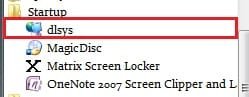
and here the screenshot of dlsys.exe program at startup folder in start menu program

dlsys program.jpg


what should i do?
whether just disable on startup or permenantly delete the program?

p/s : this program located in C:\Windows\SysWOW64\dlsys.exe
 

My Computer My Computer

Computer Manufacturer/Model Number
Dell Inspiron N4010
OS
Windows 7 Home Premium 64bit (main), Windows XP Professional 32bit
There is a simple solution

Hi Guyz,

I had the similar issue with my laptop on windows vista OS. I noticed i was coming from my speaker (I tried reducing volume and the noise reduced) then I noticed it is due to the soft touch buttons I have on my HP. THanks to HP Quick Touch feature sometimes it starts to increase the volume automatically (and decrease at times) at both the time it makes a sound on changing each sound level. this explained the noise to me. I somehow got that stable (that the volume slider was not going up/ down automatically) and the noise vanished.

Try this.
 

My Computer My Computer

Computer type
PC/Desktop
OS
Windows Vista
Back
Top