20Mbps is slugish

cookiemonster

New member
Local time
1:16 PM
Messages
14
I have Mediacom Cable Internet here in Arizona and my advertised speed is 20Mbps Download and 2Mbps Upload. When I go to Speedtest.net and you the closest server in AZ I will get any ware from 10 to 15Mbps download, then I try LA and I will get from 22 to 30Mbps download and my upload is always 1.45 to 1.67Mbps no matter what server I use. I do understand different servers will get different speeds. My main problem is even when I’m getting 20+ Mbps on my tests the internet just feels sluggish. Web pages do not load really fast. When downloading a file I have never got over 1.5 Mbps/Sec no matter what server I download from. My upload is always around .2Mbps no matter how i upload. So why does the internet seem slow even when I get good speeds?

Sorry for the long post.
 

My Computer My Computer

At a glance

Vista Ultimate 64
OS
Vista Ultimate 64
I have Mediacom Cable Internet here in Arizona and my advertised speed is 20Mbps Download and 2Mbps Upload. When I go to Speedtest.net and you the closest server in AZ I will get any ware from 10 to 15Mbps download, then I try LA and I will get from 22 to 30Mbps download and my upload is always 1.45 to 1.67Mbps no matter what server I use. I do understand different servers will get different speeds. My main problem is even when I’m getting 20+ Mbps on my tests the internet just feels sluggish. Web pages do not load really fast. When downloading a file I have never got over 1.5 Mbps/Sec no matter what server I download from. My upload is always around .2Mbps no matter how i upload. So why does the internet seem slow even when I get good speeds?

Sorry for the long post.


When does it happen? (only when DL'ing a file)

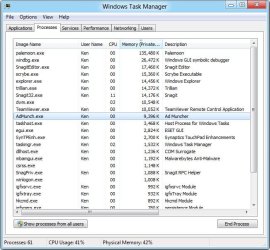
please make a snip of the performance tab of task manager sorted by memory. I suspect the is something internal like indexing, or malware scan running)
 

My Computer My Computer

At a glance

Win 8 Release candidate 8400[email protected]4 gigsNvidia 9600M
Computer Manufacturer/Model Number
HP Pavillion dv-7 1005 Tx
OS
Win 8 Release candidate 8400
CPU
[email protected]
Memory
4 gigs
Graphics Card(s)
Nvidia 9600M
Sound Card
HD built-in
Monitor(s) Displays
17" Wxga
Screen Resolution
1440x900
Cooling
none
Internet Speed
45Mb down 5Mb up
Its all the time. How do i sort the performance tab by memory? Or did you mean processes tab? Its not that bad but when i lived in a different state years ago and had a much slower computer and my advertised speed was 5Mbps it felt much faster. I was able to run a game server on 1 computer, download music or what ever on another computer and using my thired computer it just felt faster. With this ISP if my wift is on her pc downloading something i can feel the internet on my pc get slower.
 

My Computer My Computer

At a glance

Vista Ultimate 64
OS
Vista Ultimate 64
Network connections are advertised in Megabits/s (8 Megabits (Mb) = 1 Megabyte (MB))
Downloading is usually shown in Kilobytes which I assume you're converting to megabytes.
So at 20Mb/s you should be getting ~2.5MB/s download.


Most likely causes are:
a) You're using wireless and your router is not capable of transmitting/receiving such high speeds, and thus, reducing performance.
Solution: New wireless router.
b) Malware.
Solution: Run an anti-malware scan.
 

My Computer My Computer

At a glance

Windows 7 Professional 32bit
OS
Windows 7 Professional 32bit
Its all the time. How do i sort the performance tab by memory? Or did you mean processes tab? Its not that bad but when i lived in a different state years ago and had a much slower computer and my advertised speed was 5Mbps it felt much faster. I was able to run a game server on 1 computer, download music or what ever on another computer and using my thired computer it just felt faster. With this ISP if my wift is on her pc downloading something i can feel the internet on my pc get slower.

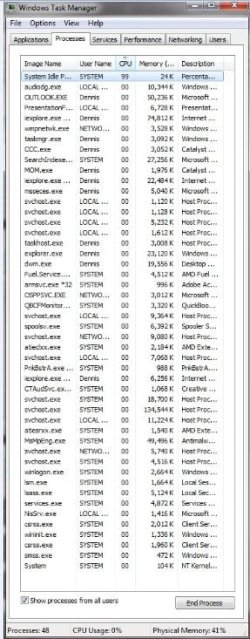
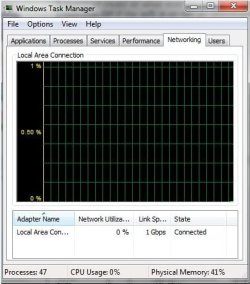
cpu
View attachment 196254

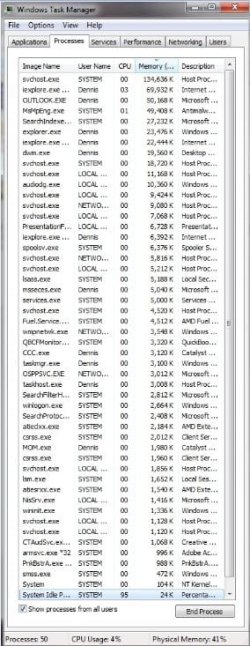
Mem
memory.jpg

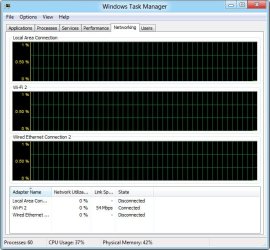
Network
network.jpg


Thanks Jan
 
Last edited:

My Computer My Computer

At a glance

Win 8 Release candidate 8400[email protected]4 gigsNvidia 9600M
Computer Manufacturer/Model Number
HP Pavillion dv-7 1005 Tx
OS
Win 8 Release candidate 8400
CPU
[email protected]
Memory
4 gigs
Graphics Card(s)
Nvidia 9600M
Sound Card
HD built-in
Monitor(s) Displays
17" Wxga
Screen Resolution
1440x900
Cooling
none
Internet Speed
45Mb down 5Mb up
Network connections are advertised in Megabits/s (8 Megabits (Mb) = 1 Megabyte (MB))
Downloading is usually shown in Kilobytes which I assume you're converting to megabytes.
So at 20Mb/s you should be getting ~2.5MB/s download.


Most likely causes are:
a) You're using wireless and your router is not capable of transmitting/receiving such high speeds, and thus, reducing performance.
Solution: New wireless router.
b) Malware.
Solution: Run an anti-malware scan.
Whan i said what speed download i get when downloading a file or uploading a file i ment MB, My bad. Not using wireless and no Malware

please make a snip of the performance tab of task manager sorted by memory. I suspect the is something internal like indexing, or malware scan running)
Thanks Jan
 

Attachments

  • CPU.jpg
    CPU.jpg
    61 KB · Views: 7
  • Memory.jpg
    Memory.jpg
    61.8 KB · Views: 8
  • Network.jpg
    Network.jpg
    40 KB · Views: 8

My Computer My Computer

At a glance

Vista Ultimate 64
OS
Vista Ultimate 64
Hi there
Other things to look at. :

1) Some ISP's cap downloads after an "undefinable" download limit has been reached. Sometimes contracts include a really vague "Fair Use" policy which is never actually spelt out to the customer what this limit actually is.

Since even a modest amount of HD quality streaming will use a LOT of bandwidth you could be "capped" even after watching just 20 mins of a TV show. -- These companies are really quick to advertise really fast download speeds but fail to tell you that in general they will limit bandwidth or severely cap users -- so whereas before it would take maybe 3 weeks to reach the "cap limit" now you can do it in 30 mins or so.!!!

2) Contention -- if the number of users in the area is high then the 20 or 50 mbs advertised speed will fall very rapidly due to capacity shortage.

Always make sure what you are paying for, question the meaning of "Fair usage policies" and resist paying for any service that caps - especially these days in the area of HD quality video streaming / downloads.

If you get a note back saying "It's company policy" -- ensuure you get the name of the actual person who signed this stuff out.

Same with I.T systems -- as far as I know no I.T stuff is released into production without SOME MANAGER signing it off -- so SOMEONE IS ULTIMATELY RESPONSIBLE whether it's "Company standing orders" or whatever.

Always go for the juggular on these issues and make sure people are accountable and can't hide behind "Our I.T systems are designed to work like that" etc etc.

Cheers
jimbo
 

My Computer My Computer

At a glance

Linux CENTOS 7 / various Windows OS'es and se...Intel i7 Intel i58GB, 16GBOn Motherboard
Computer type
PC/Desktop
Computer Manufacturer/Model Number
Custom built, several laptops HP/ASUS
OS
Linux CENTOS 7 / various Windows OS'es and servers
CPU
Intel i7 Intel i5
Memory
8GB, 16GB
Graphics Card(s)
On Motherboard
Sound Card
Realtek HD audio
Monitor(s) Displays
Apple Cinema display, Samsung LCD
Screen Resolution
1920 X 1080
Hard Drives
4 X 1TB SATA
Mouse
Toshiba wireless laser
Internet Speed
> 20MB up
Back
Top