Solved "Include a system image of drives" what difference does it make?

LEITZ5008

New member
Local time
1:23 PM
Messages
20
"Include a system image of drives" what difference does it make?

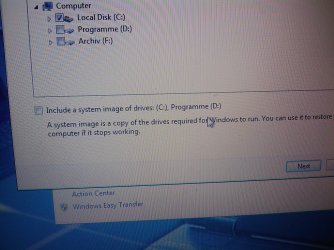
i'm about to create my very 1st backup for windows on c:\ and, if possible, also a recovery option for Programme on d:\

please explain me someone what will happen/not happen to my backup files if the last chekbox is checked when i start to backup? i'm asking for a good advise as well. should i go for an image or not?
 

Attachments
  • IMAGE_368.jpg
    IMAGE_368.jpg
    577.2 KB · Views: 21

My Computer My Computer

At a glance

win 7 x64i7 920@3,83x2GB OCZ3P1333LVA6GKGTX 470 SOC
OS
win 7 x64
CPU
i7 920@3,8
Motherboard
GA-X58A-UD5
Memory
3x2GB OCZ3P1333LVA6GK
Graphics Card(s)
GTX 470 SOC
Sound Card
onboard
Monitor(s) Displays
iiyama ProLite E2403WS
Screen Resolution
1920x1200
Hard Drives
1 SSD
2x2TB HDD
PSU
MODU 87+ (620W)
Case
none
Cooling
all on air..
Keyboard
eVolution Barracuda XT 745
Mouse
Diamondback
Internet Speed
100MBit down
Hello Leitz,

If you do not check it, then it will just not include a system image backup (a complete backup of Windows HDD) along with whatever files you are backing up. The links below can help tell you more on the differences between just a backup (selected files and folders) and a system image (Windows HDD and any other selected HDD). :)

http://www.sevenforums.com/tutorials/663-backup-complete-computer-create-image-backup.html

http://www.sevenforums.com/tutorials/615-backup-user-system-files.html

Hope this helps,
Shawn
 
Last edited:

My Computer My Computer

At a glance

64-bit Windows 11 Pro for WorkstationsIntel i7-8700K OC'd to 5 GHz64 GB (4x16GB) G.SKILL TridentZ RGB DDR4 3600...ASUS ROG-STRIX-GTX1080TI-O11G-GAMING
Computer type
PC/Desktop
Computer Manufacturer/Model Number
Self built custom
OS
64-bit Windows 11 Pro for Workstations
CPU
Intel i7-8700K OC'd to 5 GHz
Motherboard
ASUS ROG Maximus XI Formula Z390
Memory
64 GB (4x16GB) G.SKILL TridentZ RGB DDR4 3600 MHz
Graphics Card(s)
ASUS ROG-STRIX-GTX1080TI-O11G-GAMING
Sound Card
Integrated
Monitor(s) Displays
2 x Samsung Odyssey G7 27"
Screen Resolution
2560x1440
Hard Drives
1TB Samsung 990 PRO M.2,
4TB Samsung 990 PRO PRO M.2,
TerraMaster F8 SSD Plus NAS
PSU
Seasonic Prime Titanium 850W
Case
Thermaltake Core P3
Cooling
Corsair Hydro H115i
Keyboard
Logitech wireless K800
Mouse
Logitech MX Master 4
Internet Speed
2 Gb/s Download and 100 Mb/s Upload
Antivirus
Malwarebyte Anti-Malware Premium
Browser
Google Chrome
Other Info
Logitech Z625 speaker system,
Logitech BRIO 4K Pro webcam,
HP Color LaserJet Pro MFP M477fdn,
APC SMART-UPS RT 1000 XL - SURT1000XLI,
Galaxy S23 Plus phone
thank you! i'll read it tomorrow. maybe than i will understand why you could want a fully checked c:\ AND an image. the clone will be exactly the same size as my c:\ partition (which has 50 gb at the moment)?
 

My Computer My Computer

At a glance

win 7 x64i7 920@3,83x2GB OCZ3P1333LVA6GKGTX 470 SOC
OS
win 7 x64
CPU
i7 920@3,8
Motherboard
GA-X58A-UD5
Memory
3x2GB OCZ3P1333LVA6GK
Graphics Card(s)
GTX 470 SOC
Sound Card
onboard
Monitor(s) Displays
iiyama ProLite E2403WS
Screen Resolution
1920x1200
Hard Drives
1 SSD
2x2TB HDD
PSU
MODU 87+ (620W)
Case
none
Cooling
all on air..
Keyboard
eVolution Barracuda XT 745
Mouse
Diamondback
Internet Speed
100MBit down
maybe than i will understand why you could want a fully checked c:\ AND an image. the clone will be exactly the same size as my c:\ partition (which has 50 gb at the moment)?

If you DON'T check it, you will not get an image and you will not be backing up Windows. So, check it if you want to back up your Windows installation. You can't back up your Windows installation without an image.

The image file will probably be smaller than C, due to compression.
 

My Computer My Computer

At a glance

Windows 7 Home Premium SP1, 64-bitIntel Skylake i5-6600K, not overclocked8 GB HyperX DDR4-2666 (2 x 4 GB)none; graphics are integrated on CPU
Computer type
PC/Desktop
Computer Manufacturer/Model Number
Ignatz Special; 4 speed manual gearbox; factory air conditioning; one of one
OS
Windows 7 Home Premium SP1, 64-bit
CPU
Intel Skylake i5-6600K, not overclocked
Motherboard
AsRock Z170M Extreme 4, micro ATX
Memory
8 GB HyperX DDR4-2666 (2 x 4 GB)
Graphics Card(s)
none; graphics are integrated on CPU
Sound Card
onboard: Realtek ALC1150; external: USB Behringer UF0-202
Monitor(s) Displays
Dell S2340M 23 inch IPS
Screen Resolution
1600 x 900
Hard Drives
System: Crucial MX100 series SSD, 128 GB;
Data: Samsung Spinpoint 103SJ, 1 TB;
Backup: WD Caviar Green WD30EZRX-00D8PB0, 3 TB
PSU
Rosewill SilentNight 500 watt fanless, semi-modular
Case
Antec Solo II
Cooling
Noctua NH-U12S; Noctua F12 intake, Noctua S12A exhaust
Keyboard
Microsoft 200 6JH-00001 USB
Mouse
Dell or Microsoft optical wired; USB
Antivirus
Microsoft Security Essentials and Malwarebytes Premium
Browser
Pale Moon
Other Info
All fans PWM; speeds at idle: CPU circa 500 rpm; intake circa 600 rpm; exhaust circa 600 rpm; CPU temps 27 idle and 47 C load in a warm room (27 C/81 F) when running Intel Extreme Tuning Utility stress test.
Creating an image is used for backup and recovery purposes and enables you to recover your computer to the configuration it was in when you created the image.

Cloning a drive enables you to copy all the files from one drive to another.
 

My Computer My Computer

At a glance

Windows 7 Ultimate SP1 64-BitIntel Core i7 870 @ 2.93GHz8Gb Dual-Channel DDR3 @ 664MHznVidia GeForce GTX 460 1024MB dedicated RAM
Computer Manufacturer/Model Number
HP Pavilion Elite 495UK
OS
Windows 7 Ultimate SP1 64-Bit
CPU
Intel Core i7 870 @ 2.93GHz
Motherboard
MSI 2A9C (CPU1)
Memory
8Gb Dual-Channel DDR3 @ 664MHz
Graphics Card(s)
nVidia GeForce GTX 460 1024MB dedicated RAM
Sound Card
Realtek HD Audio
Monitor(s) Displays
HP2310i
Screen Resolution
1920 x 1080
Hard Drives
1x1954GB Hitachi HDS22020ALA 330 (RAID), 1x1954GB Hitachi External for backup and storage
PSU
460W
Case
HP Elite
Cooling
Air cooled
Keyboard
Logitech K750 solar-powered keyboard
Mouse
Logitech Wireless M180 mouse
Internet Speed
2Mb
Other Info
Pure Avanti Flow Internet Radio with iPod Dock, 64Gb iPod, HP USB Speakers, Sony MDR-V500 Headphones, Sony Vaio F-Series Laptop
No compression. It simply images only USED blocks (re: cluster size).
 

My Computer My Computer

At a glance

Windows 7AMD Phenom II X2 (dual-core)4Gintegrated ATI HD 4200
Computer type
PC/Desktop
Computer Manufacturer/Model Number
Custom
OS
Windows 7
CPU
AMD Phenom II X2 (dual-core)
Motherboard
GA-MA785GM-US2H
Memory
4G
Graphics Card(s)
integrated ATI HD 4200
Sound Card
integrated
Monitor(s) Displays
Samsung 24"
Screen Resolution
1920x1080
Hard Drives
1 SSD - Samsung 840 - 500 GB - OS and DATA partitions
1 SSD - Intel 320 - 120 GB (used for backups) - Misc/BACKUP
1 SATA HD - WD, 500 GB - BACKUP
PSU
Ultra X4 500W
Case
Ultra X-blaster
Keyboard
Microsoft Digital Media Pro
Mouse
Logitech WIRED!
Internet Speed
15 Mbps FIOS
I strongly recommend you do not check that box in your backup schedule. If you do every "backup" operation will include a system image as well as a file/folder backup. These are totally different things lumped together in the backup options.

There are a number of reasons why not to do this. It far better to take full control of the imaging process quite separately from the file/folder backup process. For Windows images (which I use) select the "Create a System Image" option in the Backup & Restore Screen. Make one image only. To make make more delete, rename or move the last one (see the tutorial).
 

My Computer My Computer

At a glance

Windows 7x64 Home Premium SP1Intel i7 2600kG.Skill Ripjaws (DDR3-1600) 2x4GBNvidia GeForce GTS 450; Intel HD Graphics 300...
Computer type
PC/Desktop
Computer Manufacturer/Model Number
Own build
OS
Windows 7x64 Home Premium SP1
CPU
Intel i7 2600k
Motherboard
ASUS P8Z68 Deluxe
Memory
G.Skill Ripjaws (DDR3-1600) 2x4GB
Graphics Card(s)
Nvidia GeForce GTS 450; Intel HD Graphics 3000(GT2+)
Monitor(s) Displays
Dell Ultrasharp IPS panel U2311H, Samsung SyncMaster P2350
Screen Resolution
1920x1080
Hard Drives
Samsung 850 Pro SSD 256GB, Samsung SSD 840 120GB, Seagates 1TB Barracuda ST31000528AS x2
PSU
Seasonic M12II 520W
Case
Lian Li Lancool PC-K60
Cooling
Case: 1x120mm, 3x140mm CPU: Hyper 212+
Keyboard
Logitech MK520 (wireless)
Mouse
Logitech MK520
Internet Speed
6-7 Mbps
Antivirus
Norton Security Premium, Malwarebytes on 2 (MSE on 3rd PC)
Browser
FireFox
Other Info
Audio: Logitech Z523 2.1
If you DON'T check it, you will not get an image and you will not be backing up Windows. So, check it if you want to back up your Windows installation. You can't back up your Windows installation without an image.

The image file will probably be smaller than C, due to compression.
thank you, that was quiete clear)

No compression. It simply images only USED blocks (re: cluster size).
can you please share any good source for this information?

I strongly recommend you do not check that box in your backup schedule. If you do every "backup" operation will include a system image as well as a file/folder backup. These are totally different things lumped together in the backup options.
thank you, mjf
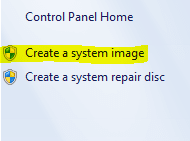
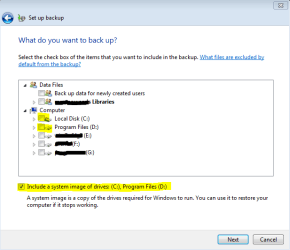
let me conclude what you recommended: i should create one or more (different) images directly with "Create a system image" or Backup - "Change Settings" with no checked boxes but "Include a system image of drives".[please see the picture below. i guess you get the same result with those different ways.] THAN set up a scheduled backup for files and folders by selecting them, NOT checking "Include a system image of drives".
so you have two backups (one for system image - not scheduled and one for selected files and folders - scheduled). so you need something additional to make your way of backing up scheduled, right?
 

Attachments

  • create image.PNG
    create image.PNG
    4.6 KB · Views: 357
  • set up backup.PNG
    set up backup.PNG
    11.4 KB · Views: 14
Last edited:

My Computer My Computer

At a glance

win 7 x64i7 920@3,83x2GB OCZ3P1333LVA6GKGTX 470 SOC
OS
win 7 x64
CPU
i7 920@3,8
Motherboard
GA-X58A-UD5
Memory
3x2GB OCZ3P1333LVA6GK
Graphics Card(s)
GTX 470 SOC
Sound Card
onboard
Monitor(s) Displays
iiyama ProLite E2403WS
Screen Resolution
1920x1200
Hard Drives
1 SSD
2x2TB HDD
PSU
MODU 87+ (620W)
Case
none
Cooling
all on air..
Keyboard
eVolution Barracuda XT 745
Mouse
Diamondback
Internet Speed
100MBit down
My advice is that you do not check the "Include a system image" box in the backup schedule. I suggested you always make them manually using the "Create a System Image" as shown in your screenshot.

I personally don't like installed programs located on a separate partition to the OS.
I think an OS and most installed programs could be accommodated even on a smallish 64 GB SSD.
 

My Computer My Computer

At a glance

Windows 7x64 Home Premium SP1Intel i7 2600kG.Skill Ripjaws (DDR3-1600) 2x4GBNvidia GeForce GTS 450; Intel HD Graphics 300...
Computer type
PC/Desktop
Computer Manufacturer/Model Number
Own build
OS
Windows 7x64 Home Premium SP1
CPU
Intel i7 2600k
Motherboard
ASUS P8Z68 Deluxe
Memory
G.Skill Ripjaws (DDR3-1600) 2x4GB
Graphics Card(s)
Nvidia GeForce GTS 450; Intel HD Graphics 3000(GT2+)
Monitor(s) Displays
Dell Ultrasharp IPS panel U2311H, Samsung SyncMaster P2350
Screen Resolution
1920x1080
Hard Drives
Samsung 850 Pro SSD 256GB, Samsung SSD 840 120GB, Seagates 1TB Barracuda ST31000528AS x2
PSU
Seasonic M12II 520W
Case
Lian Li Lancool PC-K60
Cooling
Case: 1x120mm, 3x140mm CPU: Hyper 212+
Keyboard
Logitech MK520 (wireless)
Mouse
Logitech MK520
Internet Speed
6-7 Mbps
Antivirus
Norton Security Premium, Malwarebytes on 2 (MSE on 3rd PC)
Browser
FireFox
Other Info
Audio: Logitech Z523 2.1
I personally don't like installed programs located on a separate partition to the OS.
why? whats so bad about it? (my d:\ for programs is 100gb now and growing. all games and big applications are there.)
 

My Computer My Computer

At a glance

win 7 x64i7 920@3,83x2GB OCZ3P1333LVA6GKGTX 470 SOC
OS
win 7 x64
CPU
i7 920@3,8
Motherboard
GA-X58A-UD5
Memory
3x2GB OCZ3P1333LVA6GK
Graphics Card(s)
GTX 470 SOC
Sound Card
onboard
Monitor(s) Displays
iiyama ProLite E2403WS
Screen Resolution
1920x1200
Hard Drives
1 SSD
2x2TB HDD
PSU
MODU 87+ (620W)
Case
none
Cooling
all on air..
Keyboard
eVolution Barracuda XT 745
Mouse
Diamondback
Internet Speed
100MBit down
I personally don't like installed programs located on a separate partition to the OS.
why? whats so bad about it? (my d:\ for programs is 100gb now and growing. all games and big applications are there.)
Installed programs use the registry which is stored in the binary "hive" in
C:\windows\system32\config
So Windows will want to image both C: and D: . Even if a third party imaging program gives you the option you should image both C: and D: because they are logically linked. It's better to have only one partition to image and keep the image reasonably small. This excludes the little system reserved partition if you have one.

Edit: I notice your programs are 100GB! That's large but I'm not a gamer. If they are all installed (not standalone) then maybe you can't avoid large images anyway. You may want to consider a well regarded third imaging program with better compression like (free) Macrium Reflect.

Gamers may have other strategies for you.
 
Last edited:

My Computer My Computer

At a glance

Windows 7x64 Home Premium SP1Intel i7 2600kG.Skill Ripjaws (DDR3-1600) 2x4GBNvidia GeForce GTS 450; Intel HD Graphics 300...
Computer type
PC/Desktop
Computer Manufacturer/Model Number
Own build
OS
Windows 7x64 Home Premium SP1
CPU
Intel i7 2600k
Motherboard
ASUS P8Z68 Deluxe
Memory
G.Skill Ripjaws (DDR3-1600) 2x4GB
Graphics Card(s)
Nvidia GeForce GTS 450; Intel HD Graphics 3000(GT2+)
Monitor(s) Displays
Dell Ultrasharp IPS panel U2311H, Samsung SyncMaster P2350
Screen Resolution
1920x1080
Hard Drives
Samsung 850 Pro SSD 256GB, Samsung SSD 840 120GB, Seagates 1TB Barracuda ST31000528AS x2
PSU
Seasonic M12II 520W
Case
Lian Li Lancool PC-K60
Cooling
Case: 1x120mm, 3x140mm CPU: Hyper 212+
Keyboard
Logitech MK520 (wireless)
Mouse
Logitech MK520
Internet Speed
6-7 Mbps
Antivirus
Norton Security Premium, Malwarebytes on 2 (MSE on 3rd PC)
Browser
FireFox
Other Info
Audio: Logitech Z523 2.1
Back
Top