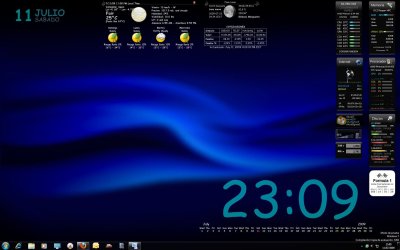
how to get clock and date on wallpaper ??

My Computer My Computer

Computer Manufacturer/Model Number
Built
OS
Windows 7 RC build 7100x64 // 7260x32
CPU
Quad core 2.33GHz
Motherboard
Asus P5Q SE
Memory
4 gig DRR2
Graphics Card(s)
8400 GS gigabyte
Sound Card
built in with motherboard
Monitor(s) Displays
LG Flaton l1739s
Screen Resolution
1440x900 x2
Hard Drives
500 gig HDD // and a 500 gig out
PSU
500Watt
Case
ATX black case
Cooling
Cpu fan \ case fan
Keyboard
logitech
Mouse
logitech
Internet Speed
1500

My Computer My Computer

Computer Manufacturer/Model Number
Built
OS
Windows 7 RC build 7100x64 // 7260x32
CPU
Quad core 2.33GHz
Motherboard
Asus P5Q SE
Memory
4 gig DRR2
Graphics Card(s)
8400 GS gigabyte
Sound Card
built in with motherboard
Monitor(s) Displays
LG Flaton l1739s
Screen Resolution
1440x900 x2
Hard Drives
500 gig HDD // and a 500 gig out
PSU
500Watt
Case
ATX black case
Cooling
Cpu fan \ case fan
Keyboard
logitech
Mouse
logitech
Internet Speed
1500
To add a gadget to the desktop right click the rainmeter icon in the system tray, and then click configs and then select the folder of the skin.
 
i think you have a conception that rainmeter is meant to show the date/time on your desktop, when in fact it is meant to display whatever system monitors you configure it to display. but it's got a very steep learning curve, so unless you spend some time with it, you won't be able to set it up yourself.

so yes, just download some skins for it, drop them in the skins folder, and you should be good to go.

another option is samurize, which i actually prefer because it does a much better job of drawing text on the desktop. but it's similarly hard to skin, so you'll have to look around to find something you like that's already been built, and run that.
 

My Computer My Computer

OS
7600 x86
CPU
Core 2 Duo e7200, 2.53 ghz
Motherboard
Micro-Star MS-7529
Memory
2x DDR2 PC5300 1gb, 667 mhz
Graphics Card(s)
GeForce 9500gt, 512mb
Monitor(s) Displays
22" LG Flatron w2234s
Screen Resolution
1680x1050
Hard Drives
Excelstor SATA-II 250gb 7200rpm, 8mb cache
PSU
CoolerMaster M520
Internet Speed
30/20 mbits
This skin is something like you were looking at

Link to skin
 

My Computer My Computer

Computer Manufacturer/Model Number
Built
OS
Windows 7 RC build 7100x64 // 7260x32
CPU
Quad core 2.33GHz
Motherboard
Asus P5Q SE
Memory
4 gig DRR2
Graphics Card(s)
8400 GS gigabyte
Sound Card
built in with motherboard
Monitor(s) Displays
LG Flaton l1739s
Screen Resolution
1440x900 x2
Hard Drives
500 gig HDD // and a 500 gig out
PSU
500Watt
Case
ATX black case
Cooling
Cpu fan \ case fan
Keyboard
logitech
Mouse
logitech
Internet Speed
1500
how to install the theme ? please explain if you can :)
Go to program files then find the Rainmeter folder double click it, and put the theme folder in the skins folder (remember this doesnt work with Zip files, first unpack them and then do this ;))
 
Go to program files then find the Rainmeter folder double click it, and put the theme folder in the skins folder (remember this doesnt work with Zip files, first unpack them and then do this ;))

Also remember to close and open rainmeter program again to reset it =)
 

My Computer My Computer

Computer Manufacturer/Model Number
Built
OS
Windows 7 RC build 7100x64 // 7260x32
CPU
Quad core 2.33GHz
Motherboard
Asus P5Q SE
Memory
4 gig DRR2
Graphics Card(s)
8400 GS gigabyte
Sound Card
built in with motherboard
Monitor(s) Displays
LG Flaton l1739s
Screen Resolution
1440x900 x2
Hard Drives
500 gig HDD // and a 500 gig out
PSU
500Watt
Case
ATX black case
Cooling
Cpu fan \ case fan
Keyboard
logitech
Mouse
logitech
Internet Speed
1500
here is skin you are looking for - 10-Foot HUD

link for a lot of skins - my dropbox rainmeter zip file

ok when you start rainmeter rightclick and go to config and click on the white or black clock - thats it. the weather is set for US.


[Variables] - change inside the 1st paragragh inside the ini file
below is set for US or Farenheit - just change zip for US

URL=http://xml.weather.com/weather/local/34997?cc=*&dayf=6

YBoris-Time is set up a little different - try it and good luck
___________________________________________________________

this one is for UK for Celcius

;Find your weather code at Weather.com (like UKXX0296 below) and replace the one in this URL.
;To have the temperature display in Farenheit, delete "&unit=m" from the URL.
URL=http://xml.weather.com/weather/local/UKXX0296?cc=*&unit=m&dayf=6
 

Attachments

My Computer My Computer

Computer Manufacturer/Model Number
dell optiplex - 2003
OS
windows7 7600 x86
CPU
itel pentium 4
Memory
3.00 GB
Graphics Card(s)
diamond radion x1050
Sound Card
SoundMax
Monitor(s) Displays
dell 2408wfp dell e172fp
Screen Resolution
1920 x 1200 1280 x 1024
Hard Drives
2 - 80 GB internals WD
1 - 01 TB ext
2 - 750 GB ext
1- 500 GB ext
all running on system no problems
Keyboard
old logitech cordless
Mouse
logitech wireless
Internet Speed
16 / 4
Other Info
networked into my sbs2003 server running sp1 still
it's a wonder I could even get windows 7 to connect to it
And inside the .ini file you can customize everything: the size, the font, the color, the position, etc.
Look at my desktop. I change the font to Comic Sans MS, the color to blue, the position of the date, the size, the language, etc. to suit my preferences.
Play with it a little and you can do anything.
Greetings
 

Attachments

  • Desktop3.jpg
    Desktop3.jpg
    145.7 KB · Views: 3,094

My Computer My Computer

OS
Windows 7 Ultimate x64
CPU
AMD Phenom II X4 955BE@3,423 Ghz
Motherboard
Gigabyte GA-MA790X-UD4
Memory
OCZ DDR2 PC2-9200 1150 Reaper HPC 4GB Edition
Graphics Card(s)
Sapphire ATI Radeon HD 4850
Sound Card
Realtek High Definition Audio ALC889A
Monitor(s) Displays
HP w2448hc ; LG Flatron L203WT
Screen Resolution
1900*1200 ; 1680*1050
Hard Drives
Western Digital Caviar Blue 500 GB
Samsung HD502HJ
Seagate Barracuda 500 GB
Maxtor 250 GB
PSU
Corsair Modular HX620W
Case
Cooler Master HAF 932
Cooling
Xigmatek HDT-S1283
Keyboard
Logitech LX710
Mouse
Logitech LX710
Internet Speed
12M/1M
Back
Top