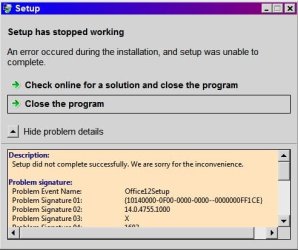
My system is Win7-64 with Office 2010 64-bit version installed and running OK. I installed Office 2010 using the standard Setup routine and opted to install only Word, Excel, PowerPoint, Access, and Outlook. After completing the installation I deleted the huge MSOCache folder the installation left behind on my boot drive because my C: is a 64GB SSD and I need all the free space on it I can get.
Now I need to install InfoPath but cannot do it. I have the original Office 2010 CD but all of the Setup programs on it fail - including the one in the InfoPath folder. I downloaded the "trial" Office2010 Setup routine (15.7 MB) but that fails also. I tried "Change" from the Control Panel INstalled Programs list but that does nothing.
Is there any way to get InfoPath installed without having to completely de-install Office 2010 and re-install it?
Now I need to install InfoPath but cannot do it. I have the original Office 2010 CD but all of the Setup programs on it fail - including the one in the InfoPath folder. I downloaded the "trial" Office2010 Setup routine (15.7 MB) but that fails also. I tried "Change" from the Control Panel INstalled Programs list but that does nothing.
Is there any way to get InfoPath installed without having to completely de-install Office 2010 and re-install it?
My Computer
- Computer type
- PC/Desktop
- Computer Manufacturer/Model Number
- Custom built
- OS
- Win7-64
- CPU
- Intel i7-3770S
- Motherboard
- ASUS P8Z77-M
- Memory
- 16GB
- Graphics Card(s)
- nVidia GT630
- Sound Card
- onboard
- Monitor(s) Displays
- dual
- Screen Resolution
- 1920x1200 (primary) 1050x1680 (secondary)
- Hard Drives
- 128GB SSD (boot)
64GB SSD (Temp/My Documents)
500GB (photos/videos)
1TB (rendered video, backups)
- PSU
- 650W
- Case
- Thermaltake A30
- Cooling
- Thermaltake
- Keyboard
- Logitech Lighted
- Mouse
- Kensington Expert Mouse (trackball)
- Internet Speed
- FIOS 35/35
- Antivirus
- MS Security Essentials
- Browser
- Chrome (beta)