Generic Install Disc

Aardvarkly

New member
Power User
VIP
Local time
4:04 PM
Messages
222
Location
Northern France
Does such a thing exist?
Although I have successfully built two desktops over the last couple of decades and installed W7 I really don't have very much knowledge of what I am doing. Although I have had very little trouble over the years I do worry about how much I/we depend on a PC to live in today's world. Every time I boot up successfully I breathe a sigh of relief that it still works. I have had to do a full installation twice to get out from under some problem and each time it is more difficult and complicated. Once it was a motherboard failure (I got lucky and found an identical one S/H on ebay) and the other time it was something like a power spike or outage during a storm that necessitated a hard drive replacement. I took the opportunity to upgrade from a spinner to an SSD.

I was wondering if there is a source of a ready assembled Install disc that can just be inserted into the DVD tray to do a full installation much like one that comes with a store-bought PC. Ideally it would have drivers for wifi, USB3, and useful stuff like the Dotnet framework in it. I would happily pay to have one of these in the drawer ready to go in the event of the next catastrophic failure. I know there are plenty of helpful posts here on how to perform a new installation but I'm 79 this year and it doesn't get any easier. I have tried countless times to set up a good backup setup to help out but after trying many different products and reading much good advice here I haven't yet managed it. Too much jargon and screenshots of what I should be seeing during the setup never seem to match what I am looking at.
 

My Computer

Computer type
PC/Desktop
Computer Manufacturer/Model Number
Home built Asus
OS
Windows 7 Pro 64bit
CPU
Intel® Core™ i3 Processor 3.7ghz
Motherboard
Asus Intel Prime H270-Pro LGA 1151 ATX
Memory
Crucial (2x8GB) DDR4-2400
Graphics Card(s)
on board
Monitor(s) Displays
BENQ GL2450HE (24 inch)
Screen Resolution
1980 x 1080
Hard Drives
C drive is SSD Crucial 500gb mostly for the OS
PSU
Corsair CX750
Case
A big black one
Cooling
Cooler Master Hyper TX3i on the processor
Keyboard
Logitech k2700 wireless
Mouse
Logitech M575 wireless trackball
Internet Speed
Just under about 7mb/s on a good day
Antivirus
Avira Free
Browser
Opera, Firefox, Chrome, and Supermium
There won't be a premade installation media with the drivers etc specific for your machine.

There are a couple of things you could do

1. Capture a wim backup of your running system named install.wim which could then be used to replace the standard install.wim
in installation media sources folder

the wim can be easily captured using dism++
https://github.com/Chuyu-Team/Dism-.../download/v10.1.1002.2/Dism++10.1.1002.1B.zip


2. Use one of the popular free imaging programs to make a backup of your system. Save it on a separate disk.
Important to make the boot media because you will need it to do a restore

popular at the moment is hasleo backup Hasleo provides Windows Backup & Clone, Data Recovery, Windows To Go Creator, and more.
 

My Computers

System One System Two

  • Computer type
    PC/Desktop
    OS
    7 X64
    CPU
    i5 8400
    Motherboard
    gigabyte b365m ds3h
    Memory
    2x8gb 3200mhz
    Hard Drives
    various
    PSU
    pure power 11 400w cm
    Case
    Coolermaster
    Cooling
    cryorig m9i
  • Computer type
    PC/Desktop
    OS
    7x64
    CPU
    g5400
    Motherboard
    ga b365m ds3h
    Memory
    8gb ddr4 2400
    PSU
    xfx pro 450w
I suppose it makes sense that a disc would have to be tailored to the hardware installed so finding an off the peg Installation disc would not be possible. I have tried a couple of backup methods including Hasleo but could not understand them, inspite of detailed instructions from forum members. I always have trouble with choosing between image, clone, backup, etc. and various questions regarding partitions. I think I am expecting a simple method that requires very little tech knowledge.
Thankyou for your response to my question.
 

My Computer

Computer type
PC/Desktop
Computer Manufacturer/Model Number
Home built Asus
OS
Windows 7 Pro 64bit
CPU
Intel® Core™ i3 Processor 3.7ghz
Motherboard
Asus Intel Prime H270-Pro LGA 1151 ATX
Memory
Crucial (2x8GB) DDR4-2400
Graphics Card(s)
on board
Monitor(s) Displays
BENQ GL2450HE (24 inch)
Screen Resolution
1980 x 1080
Hard Drives
C drive is SSD Crucial 500gb mostly for the OS
PSU
Corsair CX750
Case
A big black one
Cooling
Cooler Master Hyper TX3i on the processor
Keyboard
Logitech k2700 wireless
Mouse
Logitech M575 wireless trackball
Internet Speed
Just under about 7mb/s on a good day
Antivirus
Avira Free
Browser
Opera, Firefox, Chrome, and Supermium
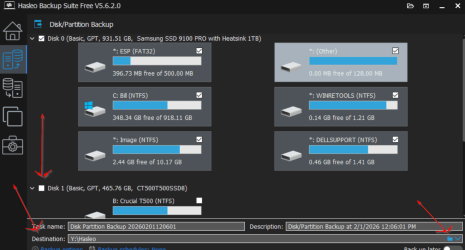
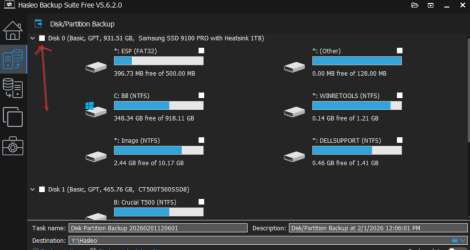
Usng Hasloe is really fairly simple. In the below screenshot click the second button on the left.
Then choose Disk/Partition Backup. In the second screenshot, select disk 0. It will select all partitions on the main drive.
Make sure no other disks are checked. All partitios on drive 0 are checked.
In the bottom screenshot, No other disk is checked, go to destination, click the little blue folder at the right arrow and select a location to save the image. It can't be on the drive your imaging, it must be on a separate drive large enough to hold the image. Some of mine are up to 300 GBs.
Then click "Proceed".
 

Attachments

  • 01 Hasleo Backup Suite.png
    01 Hasleo Backup Suite.png
    71.7 KB · Views: 0
  • 02 Hasleo Backup Suite.png
    02 Hasleo Backup Suite.png
    164.3 KB · Views: 0
  • 03 Hasleo Backup Suite.png
    03 Hasleo Backup Suite.png
    179.7 KB · Views: 0

My Computer

Computer type
Laptop
Computer Manufacturer/Model Number
Dell Precision 15 7550 Workstation
OS
Windows 10 22H2 Pro
CPU
Intel(R) Xeon W-10885M
Motherboard
Dell
Memory
2x 32 GB DDR4 ECC memory (128 GB max)
Graphics Card(s)
Intel onboard GPU 1080p - Quadro RTX 5000 Max-Q GPU 4K
Hard Drives
500 GB Corsair T500 main M2 SSD
1 TB Intel storage M2 SSD (6 TB max)
Mouse
Logitech MX-25 Bluetooth
Internet Speed
slow
Antivirus
MS
Browser
Pale Moon 33.3.x x64 AVX2 build
Aardvarkley

I think I am expecting a simple method that requires very little tech knowledge.

The easiest thing for you is windows system image


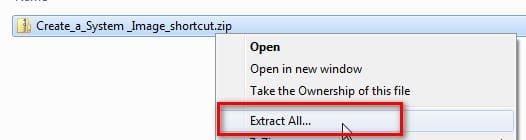
download this zip file :ar: View attachment Create_a_System_Image_shortcut.zip

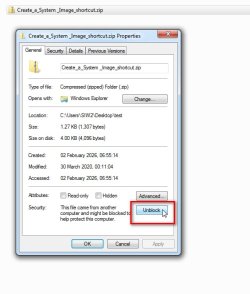
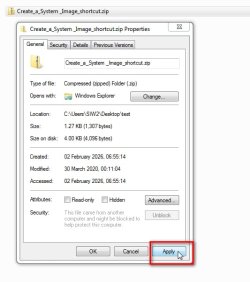
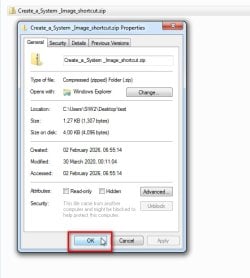
rt click it >properties>Unblock >Apply >OK

create-system-image1.jpg

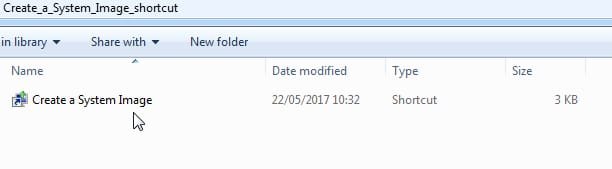
create-system-image2.jpg

create-system-image3.jpg

create-system-image4.jpg

create-system-image5.jpg

you can put the shortcut e.g. on your desktop

create-system-image6.jpg

- - - Updated - - -

Make sure you have another disk attached. It will not save the backup image to the same disk

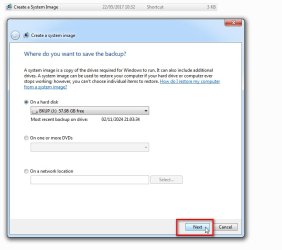
click the shortcut and it will automatically show the backup disk

Click Next

create-system-image7.jpg

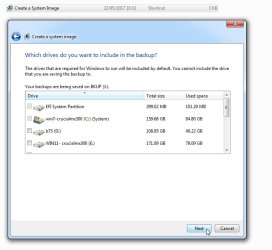
It will automaticaly select the partitions windows needs.

Just click Next

create-system-image8.jpg


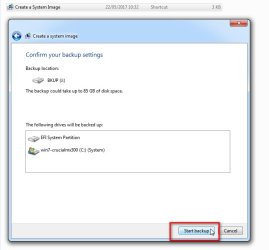
It confirms which partitions it is backing up

Just click Start Backup

create-system-image9.jpg
 
Last edited:

My Computers

System One System Two

  • Computer type
    PC/Desktop
    OS
    7 X64
    CPU
    i5 8400
    Motherboard
    gigabyte b365m ds3h
    Memory
    2x8gb 3200mhz
    Hard Drives
    various
    PSU
    pure power 11 400w cm
    Case
    Coolermaster
    Cooling
    cryorig m9i
  • Computer type
    PC/Desktop
    OS
    7x64
    CPU
    g5400
    Motherboard
    ga b365m ds3h
    Memory
    8gb ddr4 2400
    PSU
    xfx pro 450w
SIW2 Very detailed instructions and clear enough for me to try it. First I will plug in a new SSD of correct size into a spare bay. Do I need to prepare the new SSD or format it before starting the backup?
 

My Computer

Computer type
PC/Desktop
Computer Manufacturer/Model Number
Home built Asus
OS
Windows 7 Pro 64bit
CPU
Intel® Core™ i3 Processor 3.7ghz
Motherboard
Asus Intel Prime H270-Pro LGA 1151 ATX
Memory
Crucial (2x8GB) DDR4-2400
Graphics Card(s)
on board
Monitor(s) Displays
BENQ GL2450HE (24 inch)
Screen Resolution
1980 x 1080
Hard Drives
C drive is SSD Crucial 500gb mostly for the OS
PSU
Corsair CX750
Case
A big black one
Cooling
Cooler Master Hyper TX3i on the processor
Keyboard
Logitech k2700 wireless
Mouse
Logitech M575 wireless trackball
Internet Speed
Just under about 7mb/s on a good day
Antivirus
Avira Free
Browser
Opera, Firefox, Chrome, and Supermium
Yes. Initialize the new disk. Create an ntfs partition and give it a letter. You can give it a sensible label such as backup disk if you like

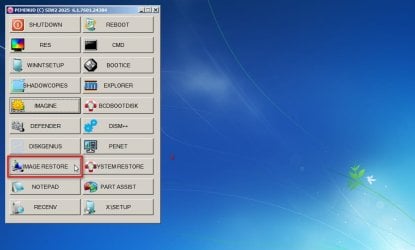
you can borrow this to do restores :ar: RECDISC7B.iso

Captured_000.jpg

Captured_001.jpg
 
Last edited:

My Computers

System One System Two

  • Computer type
    PC/Desktop
    OS
    7 X64
    CPU
    i5 8400
    Motherboard
    gigabyte b365m ds3h
    Memory
    2x8gb 3200mhz
    Hard Drives
    various
    PSU
    pure power 11 400w cm
    Case
    Coolermaster
    Cooling
    cryorig m9i
  • Computer type
    PC/Desktop
    OS
    7x64
    CPU
    g5400
    Motherboard
    ga b365m ds3h
    Memory
    8gb ddr4 2400
    PSU
    xfx pro 450w
Back
Top