Is it beneficial to use multiple ReadyBoost flash drives?

Influx

New member
Local time
2:50 AM
Messages
467
Location
Pearl of the Orient Seas
Having 4gb of physical ram and an 8gb flash drive (4gb used) for ReadyBoost. Would it be beneficial to use more flash drives for ready boost?
 

My Computer My Computer

At a glance

Win7 Ultimate x64 SP1 / WCP x64 / Ubuntu 11 x64
OS
Win7 Ultimate x64 SP1 / WCP x64 / Ubuntu 11 x64
No, ReadyBoost is only effective on systems with around 1GB of RAM or less, don't use it as a replacement for RAM.
 

My Computer My Computer

At a glance

Windows 10 Pro x64, Arch LinuxIntel Core 2 Quad Q8200 OC'd 3.08GHz8GB DDR2 900MhzMSI GT730 2GB GDDR5 (Kepler)
Computer type
PC/Desktop
Computer Manufacturer/Model Number
Custom Build
OS
Windows 10 Pro x64, Arch Linux
CPU
Intel Core 2 Quad Q8200 OC'd 3.08GHz
Motherboard
Asus Rampage formula LGA775
Memory
8GB DDR2 900Mhz
Graphics Card(s)
MSI GT730 2GB GDDR5 (Kepler)
Sound Card
Supreme FX2
Monitor(s) Displays
Samsung LS22F350 LED
Screen Resolution
1080P
Hard Drives
Kingston SSDNow UV400 120GB, 500GB Hitachi, 2TB Samsung, 500GB Seagate FreeAgent, 640GB Samsung, 160GB Toshiba (Arch)
PSU
AeroCool 500W Bronze
Cooling
Cooler Master V6 + 3X fans
Keyboard
Prolink keyboard
Mouse
Logitech M705
Internet Speed
1MiB/s
Browser
Chrome Beta
No, ReadyBoost is only effective on systems with around 1GB of RAM or less, don't use it as a replacement for RAM.

Ah, good to know. I wondered what the cut-off was for any benefits.

Seems that most computers made today (desktops) have a minimum of 4gb of ram which would make Ready Boost pointless.
 

My Computer My Computer

At a glance

7 Ultimate 64bitCore i72600K OC'd to 4.3GHzCorsair Vengeance 16GGTS250
Computer Manufacturer/Model Number
Custom Build
OS
7 Ultimate 64bit
CPU
Core i72600K OC'd to 4.3GHz
Motherboard
Asus Maximus Gene-Z
Memory
Corsair Vengeance 16G
Graphics Card(s)
GTS250
Hard Drives
Corsair Force GT 120GB SSD
Seagate 1TB HDD
PSU
Corsair TX750M
Case
Corsair 500R
Cooling
Corsair H100

My Computer My Computer

At a glance

Windows 7 Ultimate SP1 - 64 BitIntel Core i5 2500k2x4GB DDR3 1333HzAti Radeon 6770
Computer type
PC/Desktop
Computer Manufacturer/Model Number
Novatech iRush Pro
OS
Windows 7 Ultimate SP1 - 64 Bit
CPU
Intel Core i5 2500k
Motherboard
Foxconn H67M-S/H67M-V/H67
Memory
2x4GB DDR3 1333Hz
Graphics Card(s)
Ati Radeon 6770
Sound Card
None
Monitor(s) Displays
Samsung S22B150
Screen Resolution
1920x1080
Hard Drives
2x500GB
PSU
500W
Cooling
Fan
Keyboard
HP KU0316
Mouse
Wireless Logitech M185
Internet Speed
20MB/s
Antivirus
Avast Free
Browser
Google Chrome
Other Info
Logitech M185 Mouse
KU-M316 Keyboard
Readyboost isn't really about RAM (although if you have less than 2GB of RAM, it will indeed help as an additional Superfetch cache), it is more about the type, speed, and usage of the hard disk (it's not just for extending the superfetch cache, it can be used to supplement hard disk cache). If you have 8+GB of RAM, obviously you aren't very likely to need additional Superfetch cache - however, if you have slower hard disks (5400-7200RPM) with low amounts of cache (16MB or less), you might actually benefit from a Readyboost key or two. On Windows 7 you can use up to 32GB of a USB key for cache (and since it's 2:1 compressed, that ends up being more like 60-64MB of Readyboost cache), so a fast, big key is somewhat preferable to multiple small keys. However, if you don't do a lot of random I/O (other than during boot) as a normal usage pattern, do not have slow disks with small amounts of disk cache, or have 2GB of RAM or less in your system (especially an x64 install), you won't see much benefit from Readyboost. Also, since Readyboost is running off of a USB key, it's not as fast as main RAM, so adding more RAM (if possible) will be far more beneficial than adding USB keys for Readyboost.
 

My Computer My Computer

At a glance

Windows 10 Pro x64Intel Core i7 4790K @ 4.5GHz32GB DDR3Nvidia GeForce GTX970
Computer type
PC/Desktop
Computer Manufacturer/Model Number
Custom
OS
Windows 10 Pro x64
CPU
Intel Core i7 4790K @ 4.5GHz
Motherboard
Asus Maximus Hero VII
Memory
32GB DDR3
Graphics Card(s)
Nvidia GeForce GTX970
Sound Card
Realtek HD Audio
Screen Resolution
1920x1200
Hard Drives
1x Samsung 250GB SSD
4x WD RE 2TB (RAIDZ)
PSU
Corsair AX760i
Case
Fractal Design Define R4
Cooling
Noctua NH-D15
Having 4gb of physical ram and an 8gb flash drive (4gb used) for ReadyBoost. Would it be beneficial to use more flash drives for ready boost?
With 4GB, forget it. In fact it will probably slow your system down because of the extra write operations. Use the stick for something else.
 

My Computer My Computer

At a glance

Vista, Windows7, Mint Mate, Zorin, Windows 8from 1.6GHz Duo to i7
Computer Manufacturer/Model Number
HP, Dell, Gateway, Toshiba - 4 laptops and 2 desktops
OS
Vista, Windows7, Mint Mate, Zorin, Windows 8
CPU
from 1.6GHz Duo to i7
Monitor(s) Displays
2x HP w2207
Hard Drives
5x HDD, 7x SSD, 12x Externals
Keyboard
with trackball - no mices
Mouse
Trackball mice
Internet Speed
DSL 6000
No, ReadyBoost is only effective on systems with around 1GB of RAM or less, don't use it as a replacement for RAM.

Thanks, I don't use it as a replacement for RAM, it can never be.
 

My Computer My Computer

At a glance

Win7 Ultimate x64 SP1 / WCP x64 / Ubuntu 11 x64
OS
Win7 Ultimate x64 SP1 / WCP x64 / Ubuntu 11 x64
For Ready Boost Skeptics...

Recently, I've been doing a lot of research on Ready Boost, SSDs, & Ramdisks.

Many people believe that Ready Boost serves as added ram for users with small amounts of ram. This appears to be untrue, based on a test I ran. (I'm probably not the first to try this.) My system has 8GB of ram & I have NEVER maxed out my ram usage, soooo.....

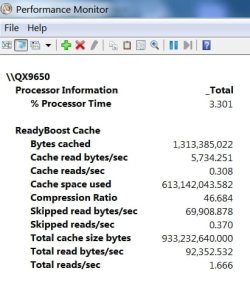
I experimented with Ready Boost by creating a 1GB Ramdisk & dedicated it to Ready Boost. I then set up logging for Ready Boost & ran it for about 7 minutes while I was doing other things on my PC. Please note again that I still never even came close to maxing out my ram. I'm attaching the report from the log file.

As you can see, Ready Boost is performing caching functions. Win 7 is definitely making use of Ready Boost, regardless of the amount of available/unused ram. I believe their is some slight benefit. I'm thinking the new Rapid Storage Technology on the Z68 chipped motherboards may be a variation/refinement of Ready Boost.

Improvements from using Ready Boost will vary, based on the media used. Some flash memory is faster than others. Also, there is the speed difference between USB 2 & USB 3. A Ramdisk is much faster than the average flash drive, & should be the best option for Ready Boost.

Any corrections or comments are welcome, as - by my avatar/logo implies - I'm no expert. I just find this subject interesting.

Also - please note that Ready Boost will only be useful when your OS is on a mechanical HD.
 

Attachments

  • ReadyBoostLog.JPG
    ReadyBoostLog.JPG
    33.1 KB · Views: 50
Last edited:

My Computer My Computer

At a glance

Windows 7 Professional 64 Bit SP1Intel i7-3770K. Mild Overclock to 4.2 GhzCrucial Ballistix Sport 32GB DDR3-1600 (PC3-1...Intel 4000 - On CPU
Computer type
PC/Desktop
Computer Manufacturer/Model Number
Custom Build
OS
Windows 7 Professional 64 Bit SP1
CPU
Intel i7-3770K. Mild Overclock to 4.2 Ghz
Motherboard
ASUS Sabertooth Z77
Memory
Crucial Ballistix Sport 32GB DDR3-1600 (PC3-12800)
Graphics Card(s)
Intel 4000 - On CPU
Sound Card
On Board
Monitor(s) Displays
HP w2408h
Screen Resolution
1920 x 1200
Hard Drives
Samsung 840 Pro 256Gb SSD, --
Two - WDC WD1001FALS-00J7B0 SATA
PSU
Antec EarthWatts Green Series 650 Watt ATX
Case
Fractal Design Core 3000 ATX
Cooling
Corsair H80i Water Cooled
Keyboard
Logitech Illuminated
Mouse
Logitech Wireless Trackball M570 + Touchpad T650
Internet Speed
9.5 Mbps down - 25.4 Mbps upload
Antivirus
MSE
Browser
IE 10, Chrome
Interesting - how do you generate that report? I got into the resource monitor, but I am lost after that...
 

My Computer My Computer

At a glance

7 Ultimate 64bitCore i72600K OC'd to 4.3GHzCorsair Vengeance 16GGTS250
Computer Manufacturer/Model Number
Custom Build
OS
7 Ultimate 64bit
CPU
Core i72600K OC'd to 4.3GHz
Motherboard
Asus Maximus Gene-Z
Memory
Corsair Vengeance 16G
Graphics Card(s)
GTS250
Hard Drives
Corsair Force GT 120GB SSD
Seagate 1TB HDD
PSU
Corsair TX750M
Case
Corsair 500R
Cooling
Corsair H100
Yeah, but a RAM disk is something completely different than a slow stick. And you only have to look into Resource Monitor > Memory tab > the graph on the bottom right to see that there are very few hard page faults (with 3GB of RAM or more). But yes, some programs generate faults even if there is plenty of available RAM. But for those rare occasions it is not necessary to install Ready Boost - especially not with a stick. It will only produce additional overhead.
 

My Computer My Computer

At a glance

Vista, Windows7, Mint Mate, Zorin, Windows 8from 1.6GHz Duo to i7
Computer Manufacturer/Model Number
HP, Dell, Gateway, Toshiba - 4 laptops and 2 desktops
OS
Vista, Windows7, Mint Mate, Zorin, Windows 8
CPU
from 1.6GHz Duo to i7
Monitor(s) Displays
2x HP w2207
Hard Drives
5x HDD, 7x SSD, 12x Externals
Keyboard
with trackball - no mices
Mouse
Trackball mice
Internet Speed
DSL 6000
Interesting - how do you generate that report? I got into the resource monitor, but I am lost after that...

You must open the Performance Monitor via Administrative Tools. Click on the green "+" at the top. The "Add Counters" window will open. Click on "Ready Boost Cache" & hit the "add" button.

Click on Action>New>Data Collector Set, name it, select where you want to save the data. It will now appear in the tree on the right under Data Collector Sets>User Defined. Right click on the DCS you just created & click "start".

BTW - You can change the way the data is displayed from the drop down menu from the "change graph" icon at the top.

 

My Computer My Computer

At a glance

Windows 7 Professional 64 Bit SP1Intel i7-3770K. Mild Overclock to 4.2 GhzCrucial Ballistix Sport 32GB DDR3-1600 (PC3-1...Intel 4000 - On CPU
Computer type
PC/Desktop
Computer Manufacturer/Model Number
Custom Build
OS
Windows 7 Professional 64 Bit SP1
CPU
Intel i7-3770K. Mild Overclock to 4.2 Ghz
Motherboard
ASUS Sabertooth Z77
Memory
Crucial Ballistix Sport 32GB DDR3-1600 (PC3-12800)
Graphics Card(s)
Intel 4000 - On CPU
Sound Card
On Board
Monitor(s) Displays
HP w2408h
Screen Resolution
1920 x 1200
Hard Drives
Samsung 840 Pro 256Gb SSD, --
Two - WDC WD1001FALS-00J7B0 SATA
PSU
Antec EarthWatts Green Series 650 Watt ATX
Case
Fractal Design Core 3000 ATX
Cooling
Corsair H80i Water Cooled
Keyboard
Logitech Illuminated
Mouse
Logitech Wireless Trackball M570 + Touchpad T650
Internet Speed
9.5 Mbps down - 25.4 Mbps upload
Antivirus
MSE
Browser
IE 10, Chrome
  • Like
Reactions: whs
Yeah, but a RAM disk is something completely different than a slow stick. And you only have to look into Resource Monitor > Memory tab > the graph on the bottom right to see that there are very few hard page faults (with 3GB of RAM or more). But yes, some programs generate faults even if there is plenty of available RAM. But for those rare occasions it is not necessary to install Ready Boost - especially not with a stick. It will only produce additional overhead.

Good point - some flash memory is slow.

While reading more about how Win 7 caches memory, my first post may not be entirely accurate.

The real question is - Is the ram that Win 7 caches used for the same purpose as the Ready Boost cache? - Or is Ready Boost created for other specific caching functions?

Does anyone have a solid answer? Brink.....?

If there is no distinction between the way the Win7 cache & RB cache are used, then using a Ramdisk for Ready Boost truly is redundant!

All I know is that RB is being used, despite the fact that I have 4.2GB of my memory cached.
 

My Computer My Computer

At a glance

Windows 7 Professional 64 Bit SP1Intel i7-3770K. Mild Overclock to 4.2 GhzCrucial Ballistix Sport 32GB DDR3-1600 (PC3-1...Intel 4000 - On CPU
Computer type
PC/Desktop
Computer Manufacturer/Model Number
Custom Build
OS
Windows 7 Professional 64 Bit SP1
CPU
Intel i7-3770K. Mild Overclock to 4.2 Ghz
Motherboard
ASUS Sabertooth Z77
Memory
Crucial Ballistix Sport 32GB DDR3-1600 (PC3-12800)
Graphics Card(s)
Intel 4000 - On CPU
Sound Card
On Board
Monitor(s) Displays
HP w2408h
Screen Resolution
1920 x 1200
Hard Drives
Samsung 840 Pro 256Gb SSD, --
Two - WDC WD1001FALS-00J7B0 SATA
PSU
Antec EarthWatts Green Series 650 Watt ATX
Case
Fractal Design Core 3000 ATX
Cooling
Corsair H80i Water Cooled
Keyboard
Logitech Illuminated
Mouse
Logitech Wireless Trackball M570 + Touchpad T650
Internet Speed
9.5 Mbps down - 25.4 Mbps upload
Antivirus
MSE
Browser
IE 10, Chrome
Interesting - how do you generate that report? I got into the resource monitor, but I am lost after that...

You must open the Performance Monitor via Administrative Tools. Click on the green "+" at the top. The "Add Counters" window will open. Click on "Ready Boost Cache" & hit the "add" button.

Click on Action>New>Data Collector Set, name it, select where you want to save the data. It will now appear in the tree on the right under Data Collector Sets>User Defined. Right click on the DCS you just created & click "start".

BTW - You can change the way the data is displayed from the drop down menu from the "change graph" icon at the top.

Great - thanks. Never fooled with that function before.
 

My Computer My Computer

At a glance

7 Ultimate 64bitCore i72600K OC'd to 4.3GHzCorsair Vengeance 16GGTS250
Computer Manufacturer/Model Number
Custom Build
OS
7 Ultimate 64bit
CPU
Core i72600K OC'd to 4.3GHz
Motherboard
Asus Maximus Gene-Z
Memory
Corsair Vengeance 16G
Graphics Card(s)
GTS250
Hard Drives
Corsair Force GT 120GB SSD
Seagate 1TB HDD
PSU
Corsair TX750M
Case
Corsair 500R
Cooling
Corsair H100
The real question is - Is the ram that Win 7 caches used for the same purpose as the Ready Boost cache? - Or is Ready Boost created for other specific caching functions?
ReadyBoost is used to extend the SuperFetch cache (almost all of what you see as the "cached" memory number that you see in Windows 7 task manager or resmon), and also helps increase disk cache. So, using a RAMdisk for SuperFetch or ReadyBoost cache is indeed redundant, as Windows will also use RAM as a disk cache if the system's disk cache(es) get backed up enough to need it.
 

My Computer My Computer

At a glance

Windows 10 Pro x64Intel Core i7 4790K @ 4.5GHz32GB DDR3Nvidia GeForce GTX970
Computer type
PC/Desktop
Computer Manufacturer/Model Number
Custom
OS
Windows 10 Pro x64
CPU
Intel Core i7 4790K @ 4.5GHz
Motherboard
Asus Maximus Hero VII
Memory
32GB DDR3
Graphics Card(s)
Nvidia GeForce GTX970
Sound Card
Realtek HD Audio
Screen Resolution
1920x1200
Hard Drives
1x Samsung 250GB SSD
4x WD RE 2TB (RAIDZ)
PSU
Corsair AX760i
Case
Fractal Design Define R4
Cooling
Noctua NH-D15
Thanks, cluberti. I guess I'll conclude my experiment & eliminate my ramdisk!

I will soon have 16GB of ram & am still thinking of uses for a Ramdisk sized to suit whatever will benefit performance.

From what I've learned so far, a Ramdisk could be beneficial used as a scratch disc for Photoshop & other programs that provide options for designating a location to place certain files tha the program utilizes as swap or some form of cache.

I also realize that - when using a ramdisk for such programs - that the ramdisk image must be saved & reloaded on shutdown & startup. I have good battery backup, so data loss from a sudden power loss would not be an issue.

Any other ideas for Ramdisk use?
 

My Computer My Computer

At a glance

Windows 7 Professional 64 Bit SP1Intel i7-3770K. Mild Overclock to 4.2 GhzCrucial Ballistix Sport 32GB DDR3-1600 (PC3-1...Intel 4000 - On CPU
Computer type
PC/Desktop
Computer Manufacturer/Model Number
Custom Build
OS
Windows 7 Professional 64 Bit SP1
CPU
Intel i7-3770K. Mild Overclock to 4.2 Ghz
Motherboard
ASUS Sabertooth Z77
Memory
Crucial Ballistix Sport 32GB DDR3-1600 (PC3-12800)
Graphics Card(s)
Intel 4000 - On CPU
Sound Card
On Board
Monitor(s) Displays
HP w2408h
Screen Resolution
1920 x 1200
Hard Drives
Samsung 840 Pro 256Gb SSD, --
Two - WDC WD1001FALS-00J7B0 SATA
PSU
Antec EarthWatts Green Series 650 Watt ATX
Case
Fractal Design Core 3000 ATX
Cooling
Corsair H80i Water Cooled
Keyboard
Logitech Illuminated
Mouse
Logitech Wireless Trackball M570 + Touchpad T650
Internet Speed
9.5 Mbps down - 25.4 Mbps upload
Antivirus
MSE
Browser
IE 10, Chrome
No, ReadyBoost is only effective on systems with around 1GB of RAM or less, don't use it as a replacement for RAM.

This thread may be old, but it has some VERY invalid information

I have a Windows 8.1 x64 system with 16GB ram... I get GREAT speed boosts from Readyboost USB 3.0 thumb drives... The KEY is USB 3.0 USB 2.0 RB drives were simply too slow to provide benefits

1) All my drives are HD or HDDSD, but no SDDs.. a USB 3.0 RB unit 32GB in size (formatted NTFS to go around the 4GB limit), GREATLY helps because data can be read/written FASTER to it vs my HDDs - EVEN my RAID 0 and Raid 5 arrays

2) Everyone assumes if you have 4,8,16,32GB of ram, you have TONS of ram just sitting around caching data... true for many people... NOT true for me. I have 16GB and I often have 12-14GB in use... so YES.. having 2 32GB usb3 RB drives hold 64GB of cached data with GREATLY boosts my performance

3) Even if I never used more than 8GB and had 8GB left over for cache.. that's still ONLY 8GB cached... I now can have 64GB ADDITIONAL cached. It's not as fast as RAM.... but faster than the HD.

So no matter how you slice it, unless you are running pure SSDs, RB drives WILL help you, no matter what configuration as long as they are USB 3
 

My Computer My Computer

At a glance

Windows 8.1 x64i7-2600K OCed to 5GHZ16GB2 Nvidia Titan Z in 4way SLI
Computer type
PC/Desktop
Computer Manufacturer/Model Number
Alienware
OS
Windows 8.1 x64
CPU
i7-2600K OCed to 5GHZ
Motherboard
Unknown
Memory
16GB
Graphics Card(s)
2 Nvidia Titan Z in 4way SLI
Hard Drives
Many.. totaling in 40TB total space which included usb 3.0 20TB raid backup unit....
Antivirus
Lavasoft
Browser
FireFox
While that's true, you also have to remember that Windows 7 was released in 2009, and USB3 as a standard didn't exist until 2008 (and finding machines with USB3 ports as standard is only really the last year or two). Also, for the most part, you aren't normal if you're constantly using 90+% of your RAM.

Your points are valid, but be careful when posting in old threads and be cognizant of the time frame things were being discussed. Also, getting SSDs as standard in a lot of mobile devices is starting to become the norm, and even desktops are starting to head that way. In not very long, ReadyBoost will definitely become even more of a niche use case.
 

My Computer My Computer

At a glance

Windows 10 Pro x64Intel Core i7 4790K @ 4.5GHz32GB DDR3Nvidia GeForce GTX970
Computer type
PC/Desktop
Computer Manufacturer/Model Number
Custom
OS
Windows 10 Pro x64
CPU
Intel Core i7 4790K @ 4.5GHz
Motherboard
Asus Maximus Hero VII
Memory
32GB DDR3
Graphics Card(s)
Nvidia GeForce GTX970
Sound Card
Realtek HD Audio
Screen Resolution
1920x1200
Hard Drives
1x Samsung 250GB SSD
4x WD RE 2TB (RAIDZ)
PSU
Corsair AX760i
Case
Fractal Design Define R4
Cooling
Noctua NH-D15
dduttonnc I'm glad you took care of the (VERY invalid information).

Valid information is if you are using 90% of your ram you need more ram.
If your hard drives are to slow for the way you use your PC you need SSD's. No usb 2.0 or 3.0 is faster than ram and a SSD, I don't care what you plug into it. ReadBoost went out with buckle shoes.

Have a nice day.
 

My Computer My Computer

At a glance

Windows 10 Pro. 64/ version 1709 Windows 7 Pr...Intel i7-6800K @ 4.3Corsair Platinum 16 gig @2400EVGA GTX 1070 OC
Computer type
PC/Desktop
Computer Manufacturer/Model Number
Home made Desktop
OS
Windows 10 Pro. 64/ version 1709 Windows 7 Pro/64
CPU
Intel i7-6800K @ 4.3
Motherboard
ASUS X-99 Deluxe II
Memory
Corsair Platinum 16 gig @2400
Graphics Card(s)
EVGA GTX 1070 OC
Monitor(s) Displays
Asus 27" LED LCD/VE278Q
Screen Resolution
1920-1080 or 1280-720 HDMI
Hard Drives
INTEL SSD 730-240 Gb Sata 3.0/
PSU
EVGA Platium 1200W
Case
Phanteks Luxe Tempered Glass 8 fans/ one radiator
Cooling
XSPC/ Water Cooled CPU
Keyboard
Das 4 Professional
Mouse
Logitech M705/MX Anywhere 2-S
Internet Speed
100 mbits
Antivirus
Microsoft Security Essentials/ Malwarebytes Premium 3.0/ SAS
Browser
I.E. 11 default/Firefox/ ISP Time Warner Cable/Spectrum
Other Info
LG BluRay Burner/
Sound system-KLipsch-THX/
Icy Dock ssd Hot Swap bays.
well I don't have a ssd on my computer. However I used readyboost after removing the cache from my main harddrive because I was trying to reduce crashes I was getting running fallout 4 on integrated graphics. with my gpu drivers and whatever fallout 4 did plus readyboost. Readyboost did improve my fps and google chrome was now usable which it hadn't been after turning off the disk cache. I guess I'm just saying it can be useful. Here is my question. Assuming you have enough ram and have an ssd, Are you saying if I had
an ssd instead of a harddrive and I turned off the cache. Readyboost wouldn't help. I realize that readyboost wouldn't actually be enabled by default but there is a way around that you just set devicestatus and only devicestatus to 2 in the registry. I only know that because I also tested readyboost with a fast harddrive and it works okay if I set the partition size as the size of the readyboostcache. Otherwise fallout4 runs better with a program called eboostr where I could set the cache to the size of the mb transfer rate which was around 100mb. Anyway, the usb drive works fine and it did give me performance improvement. It's just I was only able to put the drive in high performance mode and not use the setting enable write caching on the drive. If it wasn't for that I would have stuck with the drive with the lower seek times for searching through the cache.
sorry I'll sum it up
would an ssd without a cache be helped by readyboost even though readyboost is not supported on such systems
when readyboost is not supported, negligible benefits are seen.
It is possible to use readyboost alternatives for those situations. However, I tried to purchase eboostr and it wouldn't process my credit card. Plus windows works great with the flash drives it supports so there is no need to reinvent the wheel.
there may never be a reason to disable your ssd drives cache. However I was desperate to stop whatever crashes I could in fallout4. my graphics card shares memory with the gpu so I thought it would help. anyway all the fixes I'm probably seeing are due to updates by the developer.

as far as the original question
I used an unsupported usb 3.1 harddrive in a 2.0 port and usb 3.0 flash drive in a 3.0 port. Both transfer speeds for both drives were around 60 megabytes and I noticed a performance decrease doing this compared to using either by themselves. I am curious as to why this isn't true though because with ram dual channel or quad channel ram is always better at least with integrated graphics it is. Also I watched a video where usb sticks were put in a raid 0 configuration on a mac and read speed increased after two drives so I wonder wouldn't two identical drives with identical readyboost caches be good with readyboost
 
Last edited:

My Computer My Computer

At a glance

Windows 8.1 64 biti5 5200u8gb 1600 lddr3hd graphics 5500
Computer type
PC/Desktop
OS
Windows 8.1 64 bit
CPU
i5 5200u
Memory
8gb 1600 lddr3
Graphics Card(s)
hd graphics 5500
Browser
chrome
Back
Top