Solved Is it possible to install windows 7 from a FAT32 formatted usb drive?

norsul

New member
Local time
7:04 AM
Messages
7
I'm currently trying to install windows 7 from a usb on my laptop, however I seem to have a strange issue - when I go to set the boot priority in my BIOS, it does not list any NTFS formatted usb drives as boot options. I've tried this with multiple usb drives formatting them to both NTFS and FAT32: whenever a usb drive is formatted as FAT32, the BIOS acknowledges it as a boot option, if it's formatted as NTFS, the BIOS refuses to accept the drive's existence and doesn't show it as an option.

So my question is: can I just use a FAT32 formatted usb drive, boot from it and and install windows 7 that way? After all, there aren't any files larger than 4GB in windows 7's installation files, so it shouldn't be an issue, or are there other concerns? I am asking because all of the tutorials about installing windows 7 from a usb always tell you to format it to NTFS, but I don't know if they do that just because NTFS is the newer format or because there are actually some kind of issues wiht using FAT32.

I guess I should also point out these things, because they might be relevant:
- I used this guide to create a bootable usb: Install Windows 7 From USB

- I tried using the bootable usb created using the guide above with my desktop pc and everything worked just fine, i.e. I managed to boot from it and reach the installation screen

- I am running windows 8 and ubuntu dual booted on a single hard drive. I should note that I did install ubuntu from a usb drive on this laptop, so booting from a usb should be supported at least in some way on this machine.

- I tried to find out about my BIOS a bit more, but all I could find is that the BIOS version is P03RAN and it also says Aptio setup utility on the bottom.
 

My Computer My Computer

At a glance

Windows 7 Ultimate 64bit
Computer type
PC/Desktop
OS
Windows 7 Ultimate 64bit

My Computer My Computer

At a glance

64-bit Windows 11 Pro for WorkstationsIntel i7-8700K OC'd to 5 GHz64 GB (4x16GB) G.SKILL TridentZ RGB DDR4 3600...ASUS ROG-STRIX-GTX1080TI-O11G-GAMING
Computer type
PC/Desktop
Computer Manufacturer/Model Number
Self built custom
OS
64-bit Windows 11 Pro for Workstations
CPU
Intel i7-8700K OC'd to 5 GHz
Motherboard
ASUS ROG Maximus XI Formula Z390
Memory
64 GB (4x16GB) G.SKILL TridentZ RGB DDR4 3600 MHz
Graphics Card(s)
ASUS ROG-STRIX-GTX1080TI-O11G-GAMING
Sound Card
Integrated
Monitor(s) Displays
2 x Samsung Odyssey G7 27"
Screen Resolution
2560x1440
Hard Drives
1TB Samsung 990 PRO M.2,
4TB Samsung 990 PRO PRO M.2,
TerraMaster F8 SSD Plus NAS
PSU
Seasonic Prime Titanium 850W
Case
Thermaltake Core P3
Cooling
Corsair Hydro H115i
Keyboard
Logitech wireless K800
Mouse
Logitech MX Master 4
Internet Speed
2 Gb/s Download and 100 Mb/s Upload
Antivirus
Malwarebyte Anti-Malware Premium
Browser
Google Chrome
Other Info
Logitech Z625 speaker system,
Logitech BRIO 4K Pro webcam,
HP Color LaserJet Pro MFP M477fdn,
APC SMART-UPS RT 1000 XL - SURT1000XLI,
Galaxy S23 Plus phone
Hello Norsul, and welcome to Seven Forums.
Yes, the USB flash drive can be formatted with either NTFS or FAT32. :)

First of all, thank you for the answer. So what I did was create a bootable usb using my guide (I did this before I saw your answer) and try to install windows 7 from that. This time the BIOS recognized that there is a usb device connected and listed it as a boot option, but unfortunately it refuses to boot from it (i.e. either chooses the next thing in the priority list or, if I disable the other options, just throws me back into the BIOS after I save the changes and leave). I'll check your guide to see if there's something I did wrong with creating a bootable usb, but I think the issue lies elsewhere.

Sometimes with NTFS you may have to select to temporarily boot from the USB flash drive from the motherboard's boot menu.

I am not exactly sure what you're talking about here, isn't this exactly the thing that I was trying to do and failed? My point is that I CANNOT select the usb drive from the motherboard's boot menu if it is formatted as NTFS, because it doesn't list it as an option.
 

My Computer My Computer

At a glance

Windows 7 Ultimate 64bit
Computer type
PC/Desktop
OS
Windows 7 Ultimate 64bit
I would just use FAT32. Using OPTION ONE in the tutorial I posted above would make it even easier to create the USB if you have an ISO file.

I wasn't clear if you had used the boot menu (not boot order in BIOS) or not, so just mentioned it.
 

My Computer My Computer

At a glance

64-bit Windows 11 Pro for WorkstationsIntel i7-8700K OC'd to 5 GHz64 GB (4x16GB) G.SKILL TridentZ RGB DDR4 3600...ASUS ROG-STRIX-GTX1080TI-O11G-GAMING
Computer type
PC/Desktop
Computer Manufacturer/Model Number
Self built custom
OS
64-bit Windows 11 Pro for Workstations
CPU
Intel i7-8700K OC'd to 5 GHz
Motherboard
ASUS ROG Maximus XI Formula Z390
Memory
64 GB (4x16GB) G.SKILL TridentZ RGB DDR4 3600 MHz
Graphics Card(s)
ASUS ROG-STRIX-GTX1080TI-O11G-GAMING
Sound Card
Integrated
Monitor(s) Displays
2 x Samsung Odyssey G7 27"
Screen Resolution
2560x1440
Hard Drives
1TB Samsung 990 PRO M.2,
4TB Samsung 990 PRO PRO M.2,
TerraMaster F8 SSD Plus NAS
PSU
Seasonic Prime Titanium 850W
Case
Thermaltake Core P3
Cooling
Corsair Hydro H115i
Keyboard
Logitech wireless K800
Mouse
Logitech MX Master 4
Internet Speed
2 Gb/s Download and 100 Mb/s Upload
Antivirus
Malwarebyte Anti-Malware Premium
Browser
Google Chrome
Other Info
Logitech Z625 speaker system,
Logitech BRIO 4K Pro webcam,
HP Color LaserJet Pro MFP M477fdn,
APC SMART-UPS RT 1000 XL - SURT1000XLI,
Galaxy S23 Plus phone
I would just use FAT32. Using OPTION ONE in the tutorial I posted above would make it even easier to create the USB if you have an ISO file.

Turns out your guide was more complete and I've finally reached success! The problem was that I had to disable secure boot and set it to use CSM OS instead of UEFI OS, which is something that the other guides did not mention. Also I didn't know that there was a distinction between BIOS and UEFI, I just assumed that everything that you get into by mashing a function key during startup is a BIOS :).

I wasn't clear if you had used the boot menu (not boot order in BIOS) or not, so just mentioned it.

Ok now I'm getting confused again, are you saying that the boot menu and boot order in BIOS are different things? If so, then which one am I accessing when I mash that function key (F2 for my samsung laptop) during startup? This isn't all that relevant since the problem is solved already, but I'm still curious.
 

My Computer My Computer

At a glance

Windows 7 Ultimate 64bit
Computer type
PC/Desktop
OS
Windows 7 Ultimate 64bit
Glad the tutorial was able to help you get it sorted.

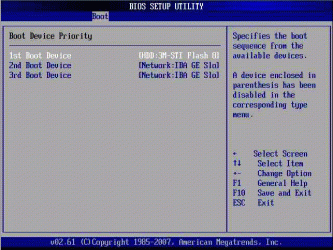
The BIOS boot priority order is what is always used, and is changed in your BIOS settings. Normally you would have say the DVD drive listed 1st and the Windows drive second.
BIOS_Boot_DevicePriority.gif
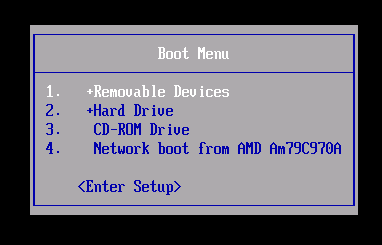
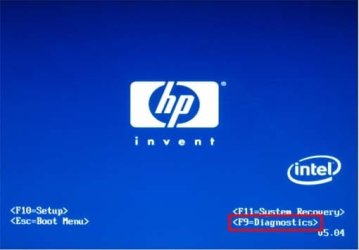
The boot menu is just where you select to temporarily boot from a list of drive for just that one time. Usually, you should briefly see what key (ex: F11) to press for "Boot Menu" next to the same what key to press to enter "Setup" or "BIOS" at boot.
Boot_Menu.png
Boot_screen-1.jpg

bios-boot-menu-message.png
 

My Computer My Computer

At a glance

64-bit Windows 11 Pro for WorkstationsIntel i7-8700K OC'd to 5 GHz64 GB (4x16GB) G.SKILL TridentZ RGB DDR4 3600...ASUS ROG-STRIX-GTX1080TI-O11G-GAMING
Computer type
PC/Desktop
Computer Manufacturer/Model Number
Self built custom
OS
64-bit Windows 11 Pro for Workstations
CPU
Intel i7-8700K OC'd to 5 GHz
Motherboard
ASUS ROG Maximus XI Formula Z390
Memory
64 GB (4x16GB) G.SKILL TridentZ RGB DDR4 3600 MHz
Graphics Card(s)
ASUS ROG-STRIX-GTX1080TI-O11G-GAMING
Sound Card
Integrated
Monitor(s) Displays
2 x Samsung Odyssey G7 27"
Screen Resolution
2560x1440
Hard Drives
1TB Samsung 990 PRO M.2,
4TB Samsung 990 PRO PRO M.2,
TerraMaster F8 SSD Plus NAS
PSU
Seasonic Prime Titanium 850W
Case
Thermaltake Core P3
Cooling
Corsair Hydro H115i
Keyboard
Logitech wireless K800
Mouse
Logitech MX Master 4
Internet Speed
2 Gb/s Download and 100 Mb/s Upload
Antivirus
Malwarebyte Anti-Malware Premium
Browser
Google Chrome
Other Info
Logitech Z625 speaker system,
Logitech BRIO 4K Pro webcam,
HP Color LaserJet Pro MFP M477fdn,
APC SMART-UPS RT 1000 XL - SURT1000XLI,
Galaxy S23 Plus phone
Well, looks like I ran into a wall again... So I am trying to install windows 7 on the partition where windows 8 was (due to a complicated set of events I ended up formatting it, which I regret deeply, but that is not important any more), and it doesn't allow me to because apparently my HDD is set into this GPT style and windows 7 doesn't want to be installed on a GPT style partition for whatever reason (although according to what I've researched, it should be able to use GPT just fine). The only solution as far as I see (according to my research) is to make my HDD an MBR disk, but that would require me to wipe my ubuntu partition (which is the only working thing right now so I am afraid to do that). Also another problem with MBR is that as far as I understand I have EFI instead of BIOS, and apparently EFI is supposed to only work with GPT disks and might have issues with MBR disks, which is another reason why I'm afraid to convert my disk into MBR without further research.

I think I should also mention one more thing. In order for me to boot from that aforementioned usb drive that has the windows 7 installation on it, I need to disable secure boot AND set it to use CSM OS instead of UEFI OS. So maybe the windows 7 installer thinks that I am using BIOS because I have set it to use CSM OS which makes it think that installing windows 7 on a GPT style partition will not work because BIOS does not support GPT? I'm sorry if this is kind of confusing because most of this stuff is kind of new to me and I might be using the terminology and concepts in the wrong way, and this whole situation kind of annoys me because I've installed windows 7 like five times before now and never ran into issues.
 

My Computer My Computer

At a glance

Windows 7 Ultimate 64bit
Computer type
PC/Desktop
OS
Windows 7 Ultimate 64bit
You would only be able to install Windows 7 to a GPT HDD if you have UEFI enabled instead of CSM in you UEFI firmware, and are using UEFI Windows 7 64-bit installation media.

UEFI Bootable USB Flash Drive - Create in Windows


Since you are using a USB, you would still need to keep secure boot disabled until finished installing Windows to be able to boot from the USB.
 

My Computer My Computer

At a glance

64-bit Windows 11 Pro for WorkstationsIntel i7-8700K OC'd to 5 GHz64 GB (4x16GB) G.SKILL TridentZ RGB DDR4 3600...ASUS ROG-STRIX-GTX1080TI-O11G-GAMING
Computer type
PC/Desktop
Computer Manufacturer/Model Number
Self built custom
OS
64-bit Windows 11 Pro for Workstations
CPU
Intel i7-8700K OC'd to 5 GHz
Motherboard
ASUS ROG Maximus XI Formula Z390
Memory
64 GB (4x16GB) G.SKILL TridentZ RGB DDR4 3600 MHz
Graphics Card(s)
ASUS ROG-STRIX-GTX1080TI-O11G-GAMING
Sound Card
Integrated
Monitor(s) Displays
2 x Samsung Odyssey G7 27"
Screen Resolution
2560x1440
Hard Drives
1TB Samsung 990 PRO M.2,
4TB Samsung 990 PRO PRO M.2,
TerraMaster F8 SSD Plus NAS
PSU
Seasonic Prime Titanium 850W
Case
Thermaltake Core P3
Cooling
Corsair Hydro H115i
Keyboard
Logitech wireless K800
Mouse
Logitech MX Master 4
Internet Speed
2 Gb/s Download and 100 Mb/s Upload
Antivirus
Malwarebyte Anti-Malware Premium
Browser
Google Chrome
Other Info
Logitech Z625 speaker system,
Logitech BRIO 4K Pro webcam,
HP Color LaserJet Pro MFP M477fdn,
APC SMART-UPS RT 1000 XL - SURT1000XLI,
Galaxy S23 Plus phone
I did follow that tutorial (most importantly step 11, something that I have not seen anywhere else and something that seems to be crucial to my endeavor) and I did manage to get it to boot from the USB in UEFI OS mode, so yay for that. But (as should be expected by now :) ), I ran into another problem - when it boots up, it just gets stuck on the "Starting Windows" screen. It's possible that I've just messed up something while making the bootable USB, so I'll try it a couple times again, but any help is appreciated if this is a known issue. I guess I should also note that this USB is also bootable in CSM, and in that mode it does not get stuck on the "Starting Windows" screen (but refuses to install windows 7 on a GPT partition, as metioned before, and yes I am using a 64-bit version of windows 7).

There is however the possibility (that seems to become more likely as time goes by) that all of this will not work and the only option that I will have is to just wipe my HDD and convert it to an MBR disk. I'm just afraid to do this because I'm still concerned whether an MBR disk would work with my UEFI firmware, but theoretically and according to the stuff I've read, if you disable secure boot and turn on CSM, the firmware will basically act exactly as an old BIOS would (it even says "To boot windows 7, switch to CSM OS" when I'm in the firmware settings at the "OS mode selection" option). What's your opinion on this?
 

My Computer My Computer

At a glance

Windows 7 Ultimate 64bit
Computer type
PC/Desktop
OS
Windows 7 Ultimate 64bit
Could also be something with Ubuntu causing an issue with the installation, but I have no experience with using it.

A MBR disk will work just fine with your UEFI firmware. After Windows has finished installing, you can also enable secure boot again if you are using UEFI instead of CSM.

Correct, if you use CSM, it'll be like the older BIOS instead of UEFI.
 

My Computer My Computer

At a glance

64-bit Windows 11 Pro for WorkstationsIntel i7-8700K OC'd to 5 GHz64 GB (4x16GB) G.SKILL TridentZ RGB DDR4 3600...ASUS ROG-STRIX-GTX1080TI-O11G-GAMING
Computer type
PC/Desktop
Computer Manufacturer/Model Number
Self built custom
OS
64-bit Windows 11 Pro for Workstations
CPU
Intel i7-8700K OC'd to 5 GHz
Motherboard
ASUS ROG Maximus XI Formula Z390
Memory
64 GB (4x16GB) G.SKILL TridentZ RGB DDR4 3600 MHz
Graphics Card(s)
ASUS ROG-STRIX-GTX1080TI-O11G-GAMING
Sound Card
Integrated
Monitor(s) Displays
2 x Samsung Odyssey G7 27"
Screen Resolution
2560x1440
Hard Drives
1TB Samsung 990 PRO M.2,
4TB Samsung 990 PRO PRO M.2,
TerraMaster F8 SSD Plus NAS
PSU
Seasonic Prime Titanium 850W
Case
Thermaltake Core P3
Cooling
Corsair Hydro H115i
Keyboard
Logitech wireless K800
Mouse
Logitech MX Master 4
Internet Speed
2 Gb/s Download and 100 Mb/s Upload
Antivirus
Malwarebyte Anti-Malware Premium
Browser
Google Chrome
Other Info
Logitech Z625 speaker system,
Logitech BRIO 4K Pro webcam,
HP Color LaserJet Pro MFP M477fdn,
APC SMART-UPS RT 1000 XL - SURT1000XLI,
Galaxy S23 Plus phone
Well I finally mustered up my courage, wiped my HDD and converted it to an MBR disk. This did solve the previous issue I was having, but now it gives me a new error: "Windows cannot be installed to this disk. This computer's hardware may not support booting to this disk. Ensure the disk's controller is enabled in the computer's BIOS menu." I should note that I did run the "create partition primary" and "active" commands in diskpart after converting the disk to MBR and formatting it as NTFS.

Naturally I googled the error, but none of the solutions I could find helped me. Some said things along the lines of "If you have an IDE drive you should set the controller to IDE instead of SATA", but I couldn't find any options like this. Others said that I should set the HDD as number 1 in the boot priority and use the boot menu to temporarily boot from the USB, but this did not solve issue either - if I had my "OS mode selection" option set to "UEFI and CSM OS" it seemed to ignore the USB and boot from the empty HDD, since it simply said something like "BOOTMGR missing, please press ctr+alt+del to leave"; if I had it set to "CSM OS" it booted from the USB but the error did not go away.

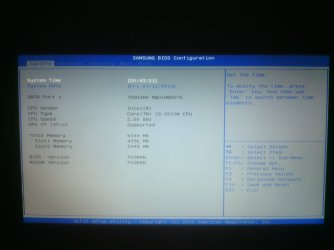
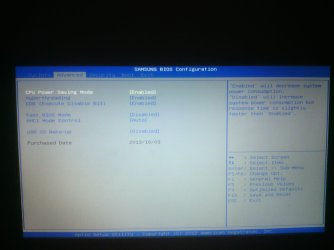
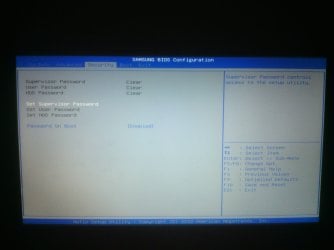
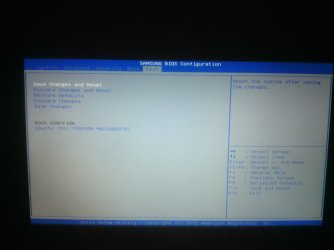
Now I was scared that I managed to break my HDD irreversibly and tried installing ubuntu on it and it turned out just fine, so at least the HDD seems functional. So, any ideas on fixing this problem? I thought that if I took snapshots of my firmware setup it would give you a better idea of what options are available to me (These are just the main tabs, I can take more snapshots of specific areas if necessary). The picture quality is not great and the angle is kind of weird, but you can make out the text just fine.

P.S. I am starting to lean towards installing windows 8 back again, but I also know for a fact that it will also be difficult because I would have to fish the key out of the firmware instead of just looking at the back of my laptop and probably a thousand other issues I could have never thought of. But if I do decide to do this, do I think I should the convert the HDD back into a GPT disk or is it better to leave it as MBR?

firmware01.jpg

firmware02.jpg

firmware03.jpg

firmware04.jpg

firmware05.jpg
 

My Computer My Computer

At a glance

Windows 7 Ultimate 64bit
Computer type
PC/Desktop
OS
Windows 7 Ultimate 64bit
See if this may help: :)

1) Temporarily set "Password on Boot" in BIOS to disable. You can enable it after Windows 7 has finished installing.

2) Set "OS mode selection" to only CSM.

3) Boot from your installation media to open a command prompt at boot, run a "Clean" (not "clean all) command to wipe the hard drive completely like in the tutorial below. Afterwards, create a new primary partition using MBR.

http://www.sevenforums.com/tutorials/52129-disk-clean-clean-all-diskpart-command.html

4) Next, see if you are now able to do a clean install.

http://www.sevenforums.com/tutorials/1649-clean-install-windows-7-a.html
 

My Computer My Computer

At a glance

64-bit Windows 11 Pro for WorkstationsIntel i7-8700K OC'd to 5 GHz64 GB (4x16GB) G.SKILL TridentZ RGB DDR4 3600...ASUS ROG-STRIX-GTX1080TI-O11G-GAMING
Computer type
PC/Desktop
Computer Manufacturer/Model Number
Self built custom
OS
64-bit Windows 11 Pro for Workstations
CPU
Intel i7-8700K OC'd to 5 GHz
Motherboard
ASUS ROG Maximus XI Formula Z390
Memory
64 GB (4x16GB) G.SKILL TridentZ RGB DDR4 3600 MHz
Graphics Card(s)
ASUS ROG-STRIX-GTX1080TI-O11G-GAMING
Sound Card
Integrated
Monitor(s) Displays
2 x Samsung Odyssey G7 27"
Screen Resolution
2560x1440
Hard Drives
1TB Samsung 990 PRO M.2,
4TB Samsung 990 PRO PRO M.2,
TerraMaster F8 SSD Plus NAS
PSU
Seasonic Prime Titanium 850W
Case
Thermaltake Core P3
Cooling
Corsair Hydro H115i
Keyboard
Logitech wireless K800
Mouse
Logitech MX Master 4
Internet Speed
2 Gb/s Download and 100 Mb/s Upload
Antivirus
Malwarebyte Anti-Malware Premium
Browser
Google Chrome
Other Info
Logitech Z625 speaker system,
Logitech BRIO 4K Pro webcam,
HP Color LaserJet Pro MFP M477fdn,
APC SMART-UPS RT 1000 XL - SURT1000XLI,
Galaxy S23 Plus phone
AAAAAHH YEEEEAAA!! It actually worked! Got windows 7 installed, got all of the drivers installed and even setup the ubuntu dual boot. Thanks for all the help Brink!
 

My Computer My Computer

At a glance

Windows 7 Ultimate 64bit
Computer type
PC/Desktop
OS
Windows 7 Ultimate 64bit
You're most welcome. :)
 

My Computer My Computer

At a glance

64-bit Windows 11 Pro for WorkstationsIntel i7-8700K OC'd to 5 GHz64 GB (4x16GB) G.SKILL TridentZ RGB DDR4 3600...ASUS ROG-STRIX-GTX1080TI-O11G-GAMING
Computer type
PC/Desktop
Computer Manufacturer/Model Number
Self built custom
OS
64-bit Windows 11 Pro for Workstations
CPU
Intel i7-8700K OC'd to 5 GHz
Motherboard
ASUS ROG Maximus XI Formula Z390
Memory
64 GB (4x16GB) G.SKILL TridentZ RGB DDR4 3600 MHz
Graphics Card(s)
ASUS ROG-STRIX-GTX1080TI-O11G-GAMING
Sound Card
Integrated
Monitor(s) Displays
2 x Samsung Odyssey G7 27"
Screen Resolution
2560x1440
Hard Drives
1TB Samsung 990 PRO M.2,
4TB Samsung 990 PRO PRO M.2,
TerraMaster F8 SSD Plus NAS
PSU
Seasonic Prime Titanium 850W
Case
Thermaltake Core P3
Cooling
Corsair Hydro H115i
Keyboard
Logitech wireless K800
Mouse
Logitech MX Master 4
Internet Speed
2 Gb/s Download and 100 Mb/s Upload
Antivirus
Malwarebyte Anti-Malware Premium
Browser
Google Chrome
Other Info
Logitech Z625 speaker system,
Logitech BRIO 4K Pro webcam,
HP Color LaserJet Pro MFP M477fdn,
APC SMART-UPS RT 1000 XL - SURT1000XLI,
Galaxy S23 Plus phone
Back
Top