Can anyone explain this speed loss?

gregrocker

New member
Guru
Local time
8:27 AM
Messages
50,634
I recently had to relocate my router to have a wired connection in the house, then returned it to where it was after the project was finished.

My laptop lost a lot of connection speed that didn't affect the other computers on our network. I had been getting "same IP address being used" errors on it during the project I was doing so I thought it was responsible.

When the problem persisted even after everything was set back as before I rolled it back to its last image but the speed remained less than half usual.

It seemed like the only cause could be a failing wireless adapter since the other computers on the network remained at the same speed.

As a last resort I clean reinstalled and now the laptop has regained all of its original speed. Does anyone have an idea what could have caused this since the problem persisted even after reimaging but corrected after clean reinstall?
 
I used to have this error on two netbooks at the same time:
same IP address being used

Can't remember what I did to fix it.

I think I tried resetting the computer and router and removing it from Manage Wireless Networks.
 

My Computer My Computer

Computer type
PC/Desktop
Computer Manufacturer/Model Number
Novatech iRush Pro
OS
Windows 7 Ultimate SP1 - 64 Bit
CPU
Intel Core i5 2500k
Motherboard
Foxconn H67M-S/H67M-V/H67
Memory
2x4GB DDR3 1333Hz
Graphics Card(s)
Ati Radeon 6770
Sound Card
None
Monitor(s) Displays
Samsung S22B150
Screen Resolution
1920x1080
Hard Drives
2x500GB
PSU
500W
Cooling
Fan
Keyboard
HP KU0316
Mouse
Wireless Logitech M185
Internet Speed
20MB/s
Antivirus
Avast Free
Browser
Google Chrome
Other Info
Logitech M185 Mouse
KU-M316 Keyboard
Error would go away when I'd restart it. My roommate had a new Ipad plugged in so it could have been that, or the PC I had here that I was working on.
 
A week later and the problem has returned to the clean reinstall. Start up for the day and speeds are slow, while other computers on network are still fast.

Does anything about this suggest wireless adapter failure? Flash Player problems? At one point on a player the flash crashed is the reason I ask. Is there a way to test these or other suspects?

I have a wand across the country which I'll bring back with me to test that way. Other ideas?

The PC which was apparently generating the IP address conflict has left the house.

Thanks for sharing any expertise on this! :geek:
 
Hi Greg,

What's your signed up bandwidth? Would you happen to know how many devices are all sharing in your network?
Also, anything that would hog the bandwidth is a big concern - HD video streaming, downloading and heavy gaming, all of these 'might' contribute to your issue.

Do you know if there's any QoS setup in your router? Who control's the router setting?
Can you modify if needed? What type of a Wi-Fi adapter to you have? B/G, N? Is the router also an N or just B/G? Is it a Dual Band and a regular router? These are some things that you might also look into and adusting the settings might help.

Sorry, too many questions that I asked. One of those might be causing an issue, if not we can blame the Wi-Fi adapter. :D

We'll await for your respond.
 
Last edited:

My Computer My Computer

Computer Manufacturer/Model Number
Lenovo Desktop/Samsung Laptop
OS
Win7 & Win8 64bit
CPU
Intel i5
Internet Speed
Charter-20 Mbps
Antivirus
Avast
Browser
FF, IE9 and Chrome
We have a Linksys 300N router here, which I have access into. I reset it a few days after the problem arose and nothing changed. Wired connection for all computers tests at 30 mbps, while wireless on all other computers holds around 20 mbps, except for mine now which is right now testing around 5 mbps.

This is an old HP 510 business laptop which refuses to die and runs Win7 fast, with Intel Pro Wireless 2200BG adapter which has held up fine until now. I wonder if there's a way I can test it other than taking it back to Calif on Thurs and trying our network there, then if necessary plug in a USB wand to take to MVP Summit and back to Florida.

I'm certainly open to all suggestions, and thanks. ;)
 
You may do some tests, like changing the Mode of the Linksys router. If it's on Mixed Mode try N/G, G or B/G but inform others in your place about the tests that you will be conducting. I have an Intel Wi-Fi adapter similar to yours that died. The Samsung netbook that I'm using has Atheros B/G and it gets pretty decent signal and the wireless connection is fast too.

Other than that, it's hard to find out what others might be doing since you're all sharing the bandwidth.

Check the QoS also, see if it's enabled and what type setup it has. Try disabling it.

MVP Summit, I've heard of it? :D
 
Last edited:

My Computer My Computer

Computer Manufacturer/Model Number
Lenovo Desktop/Samsung Laptop
OS
Win7 & Win8 64bit
CPU
Intel i5
Internet Speed
Charter-20 Mbps
Antivirus
Avast
Browser
FF, IE9 and Chrome
Does it do this whether connected physically or wireless?
Any new apps/programs that might come to mind?
Does it make any difference at various distances?
Have you tried using a usb wireless if you have one? Or borrow one?
Like others have said it could a whole bunch of things. Hardware failure, signal interference, too many pc's on same wifi channel.
 

My Computer My Computer

Computer type
PC/Desktop
Computer Manufacturer/Model Number
Custom Build
OS
Windows 7 Pro 64bit build 7601 SP1
CPU
Intel Core I5 3570K 3.4Ghz w/ Zalman CNPS9900NT RT
Motherboard
MSI Z77A-G45 Gaming
Memory
G.Skill F3-12800CL9D-8GbXL ; 4Gx2
Graphics Card(s)
EVGA Geforce GTX 770 Superclocked
Sound Card
Creative Sound Blaster Z
Monitor(s) Displays
Dual ViewSonic VX2770Smh-LED Black 27"IPS-Panel
Screen Resolution
1920x1080
Hard Drives
Kingston Hyper X 240GB SSD Win8 Pro 64bit 6GB/s Sata III
Intel 335 Series SSD 240GB Win8 Storage 6GB/s Sata III
Intel 320 Series SSD 600GB Storage 3GB/s Sata II
Western Digital Scorpio Black 1TB - Docked via Esata
PSU
Coolermaster GX 750W
Case
Corsair Vengence C70
Cooling
Coolermaster 120mm and Enermax 140mm
Keyboard
Corsair Vengence K70
Mouse
Logitech G500
Internet Speed
22mbps+
Browser
Firefox, Chrome, IE
Other Info
Swan M50W 2.1 speakers
APC UPS
Thermaltake BlacX HDD Dock
Samsung BD Optical Drive
Netgear WNDR4500
My housemate has an iPod and every time she syncs the daggone thing it throws the entire wireless side of my network into an uproar. Conflicts, sluggishness, weeping and wailing and gnashing of digital teeth.

Be a shame if something happened to it... :cool:
 

My Computer My Computer

Computer Manufacturer/Model Number
Self
OS
Main - Windows 7 Pro SP1 64-Bit; 2nd - Windows Server 2008 R2
CPU
Main - Core i7 2600K; 2nd - Core i7 920
Motherboard
Main - Asus P8Z68-V Pro/Gen3; 2nd - Gigabyte GA-EX58-UDR3
Memory
Main - 16GB Corsair Vengeance; 2nd - 12GB Corsair Vengeance
Graphics Card(s)
Main - XFX Radeon 6870 1GB; 2nd - XFX Radeon 4870 1GB
Sound Card
Both: Onboard Realtek Azalia
Monitor(s) Displays
Main - Hann 25" + I-INC 25" + Acer 23"; 2nd - Upgrading Soon
Screen Resolution
Main - 1920x1080 (All Three Monitors); 2nd - Upgrading Soon
Hard Drives
Main - (1) Crucial M4 128GB (Boot)
Main - (1) Seagate 2TB 64MB Cache (Data)
Main - (1) Seagate 2TB 64MB Cache (Data Backup)
2nd - (1) Intel X25-M SSD 80GB (Boot)
2nd - (3) Seagate 1TB 32MB Cache (Data Backup)
2nd - (1) Seagate 320GB (Because)
PSU
Main - OCZ 600W Modular; 2nd - OCZ 600W
Case
Main - Thermaltake Element G; 2nd - NZXT something or other
Cooling
Main - Corsair H80; 2nd - Prolimatech Megahalems
Keyboard
Main - Razer Reclusa; 2nd - Old MS Keyboard
Mouse
Main - Logitech MX Revolution; 2nd - Old MS Mouse
Internet Speed
20Mbps Time-Warner Cable
You can set a fixed IP address for your computer.
 

My Computer My Computer

OS
Windows XP 32bit
Thanks, all. I'm ready to abandon this house for a new one! (Thurs)

If it's on Mixed Mode try N/G, G or B/G but inform others in your place about the tests that you will be conducting.

Check the QoS also, see if it's enabled and what type setup it has. Try disabling it.
Same in mixed or N/G modes. Where do I find QoS on WRT300N router?

Does it do this whether connected physically or wireless?
Any new apps/programs that might come to mind?
Does it make any difference at various distances?
Have you tried using a usb wireless if you have one? Or borrow one?
Like others have said it could a whole bunch of things. Hardware failure, signal interference, too many pc's on same wifi channel.

The wired connection gets the full 30 mbps speed.

Strange, if I move it using wireless to next to the router, the Speedtest pegs up to 20mbps for just a second then drops back to abysmal 700kbps-5mbps.

I'll have a wireless wand later this week and a new network at my place in Calif to test this.

My housemate has an iPod and every time she syncs the daggone thing it throws the entire wireless side of my network into an uproar. Conflicts, sluggishness, weeping and wailing and gnashing of digital teeth.

There is a new Maxi Ipad in the house which is left on and chirps a lot obnoxiously.

You can set a fixed IP address for your computer.

Just tried it and there is no difference. Then it lost connection and troubleshooter wanted to turn on DHCP.
 
If you turn the Ipad off does it help?
Can I assume you got the latest driver when you reinstalled the OS?
Also have you used a program like Inssider or similar to see other wifi networks and what channels they are on to see if it's crowded?
Oh sorry about asking about physical connection. You said that in the couple posts just before mine.
 

My Computer My Computer

Computer type
PC/Desktop
Computer Manufacturer/Model Number
Custom Build
OS
Windows 7 Pro 64bit build 7601 SP1
CPU
Intel Core I5 3570K 3.4Ghz w/ Zalman CNPS9900NT RT
Motherboard
MSI Z77A-G45 Gaming
Memory
G.Skill F3-12800CL9D-8GbXL ; 4Gx2
Graphics Card(s)
EVGA Geforce GTX 770 Superclocked
Sound Card
Creative Sound Blaster Z
Monitor(s) Displays
Dual ViewSonic VX2770Smh-LED Black 27"IPS-Panel
Screen Resolution
1920x1080
Hard Drives
Kingston Hyper X 240GB SSD Win8 Pro 64bit 6GB/s Sata III
Intel 335 Series SSD 240GB Win8 Storage 6GB/s Sata III
Intel 320 Series SSD 600GB Storage 3GB/s Sata II
Western Digital Scorpio Black 1TB - Docked via Esata
PSU
Coolermaster GX 750W
Case
Corsair Vengence C70
Cooling
Coolermaster 120mm and Enermax 140mm
Keyboard
Corsair Vengence K70
Mouse
Logitech G500
Internet Speed
22mbps+
Browser
Firefox, Chrome, IE
Other Info
Swan M50W 2.1 speakers
APC UPS
Thermaltake BlacX HDD Dock
Samsung BD Optical Drive
Netgear WNDR4500
Hopefully you won't have any issues connecting to the new home and wireless network. If the issue persist, then a new Wi-Fi adapter might work.
Thanks, all. I'm ready to abandon this house for a new one!
 

My Computer My Computer

Computer Manufacturer/Model Number
Lenovo Desktop/Samsung Laptop
OS
Win7 & Win8 64bit
CPU
Intel i5
Internet Speed
Charter-20 Mbps
Antivirus
Avast
Browser
FF, IE9 and Chrome
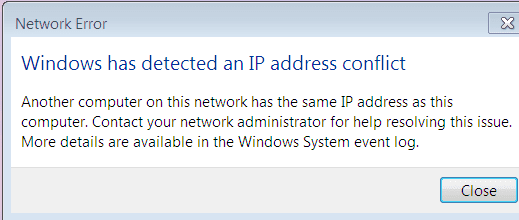
Just started up to this error message:

Capture.PNG

ran ipconfig/ release
and ipconfig/ renew

Have five bars now but it tends to degrade in hours.

If I knew how to check IP address for the Ipad it would help.

If no other PC's are connected now and I get this startup message wouldn't it almost have to be the Ipad?
 

My Computer My Computer

Computer type
PC/Desktop
Computer Manufacturer/Model Number
Novatech iRush Pro
OS
Windows 7 Ultimate SP1 - 64 Bit
CPU
Intel Core i5 2500k
Motherboard
Foxconn H67M-S/H67M-V/H67
Memory
2x4GB DDR3 1333Hz
Graphics Card(s)
Ati Radeon 6770
Sound Card
None
Monitor(s) Displays
Samsung S22B150
Screen Resolution
1920x1080
Hard Drives
2x500GB
PSU
500W
Cooling
Fan
Keyboard
HP KU0316
Mouse
Wireless Logitech M185
Internet Speed
20MB/s
Antivirus
Avast Free
Browser
Google Chrome
Other Info
Logitech M185 Mouse
KU-M316 Keyboard
You must have been typing as I went back and edited it in. Yes I found that thread when I googled the error text. Maybe others will find this one if google can read the screenshot.

I still have five bars as I did when the error appeared at startup.

The error message is never consistent and I haven't seen it in at least a week since I had a PC here I was working on requiring moving the router and modem - so it was the prime suspect then.

Now I smell a rotten apple. :huh:
 
Newer wireless routers have the ability to auto detect the IP and Mac Addresses of the network devices, it shows on one of the router's setting page. My DLink DIR 655 has this feature. Also, I use AdvancedIPScanner to find out Host Name, IP and Mac Addresses.
If I knew how to check IP address for the Ipad it would help.
The IP conflict might also be coming from another device (Smart phones, wireless/network printer, network storage device, gaming console etc.) and not necessarily a computer. I'd suggest for you to install and run AdvancedIPScanner.

Pleave give us another update.
 
Last edited:

My Computer My Computer

Computer Manufacturer/Model Number
Lenovo Desktop/Samsung Laptop
OS
Win7 & Win8 64bit
CPU
Intel i5
Internet Speed
Charter-20 Mbps
Antivirus
Avast
Browser
FF, IE9 and Chrome
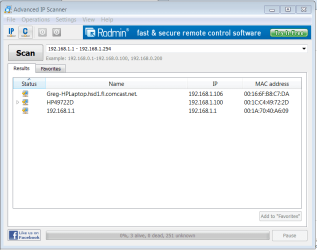
Thanks for the cool tool. Here's what it found:

Capture.PNG

I think the HP device is our wireless printer which is plugged into the router now. Just turned it's wireless radio off but the listings remain the same after Scan.

Doesn't look like the conflict continues. But I also don't see the Ipad around today. May need to run it again when it shows up again.
 
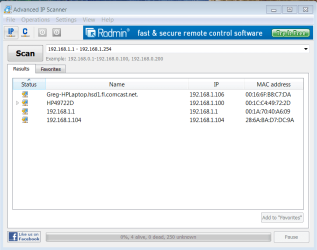
The Ipad returns. There is also an IPhone so the new fourth listing might be either.

I think the 3rd listing is the router?

Capture2.PNG
 
IP leases expires and gets renewed also. If the next IP conflict happens again, try running the AdvancedIPScanner. I use this for home and work, it comes handy. Although my Dlink router also displays a similar information which is kind of cool too.
 

My Computer My Computer

Computer Manufacturer/Model Number
Lenovo Desktop/Samsung Laptop
OS
Win7 & Win8 64bit
CPU
Intel i5
Internet Speed
Charter-20 Mbps
Antivirus
Avast
Browser
FF, IE9 and Chrome
Back
Top