Have mercy on the Less experienced!

The responses in these forums mostly seem to promote workarounds, and some people (Not all, or even the majority) blast those that promote a less steep learning curve, or a more user friendly UI. The ability to customize your own UI would be nice.

Reading some of the things in these forums has made me realize, that a lot more has disappeared than I thought. I too liked the thumbnail view, and some of the customization features that seem to have been deleted by Microsoft. I also looked for a way to hide that stupid flag. I'm glad I'm not the only one. Some of the changes feel like Microsoft has put shackles on the OS. The OS has been "Childproofed" to the point adults can't play.

And the nags! You can turn a lot of them off, but you have to be an either dedicated, or very knowledgeable to do it. Microsoft is also quick to point out all the horrible things that can happen if you do turn them off. Are today’s Virus Protections, or Ad/Spyware blockers so inadequate?

Thumbs.DB is designated a system file. Why? Has anyone found out a way to stop windows from asking you if you really want to move or delete it? Why NOT delete it? If there is anything left in the folder the system is just going to make another copy. What if I don't want a thumbs.db in that folder?
Folder.jpg is a system file too? Do I want to copy it? Yes! I just made it! Delete it? I guess so... Isn't that part of the batch of files I just said I wanted to delete? Windows Media player is one of the very few things that makes a folder.jpg file (Or used to be). Not that it matters anymore. Microsoft has taken away the thumbnail view I liked so much. Why?....

I'm not advocating living in the stone age; but when the developers make changes, do the REALY care what the end user thinks, likes, or what the learning curve is going to be like? What ever happened to KISS?

Is the new OS all bad? No, I don't really think so. Not even close. There are a lot of very GOOD changes. I just wish some more thought went into the decision to move (Hide) or delete options.

(There is no longer a reason to have Icons on your desktop you don't want. Even the dreaded trash can may be hidden. System tray icons though..... Does anyone know how to hide that flag?)
 

My Computer My Computer

At a glance

XP Media Edition / Vista /Win 7 Home PremiumWin 7 Machine: Intel Core 2 Duo T5850 @ 2.16G...4GB Dual Channel DDR2 @ 333MHz 5-5-5-15Nvidia Defaul 1920X1200 256MB GeForce 9300M
Computer Manufacturer/Model Number
HP Touchsmart
OS
XP Media Edition / Vista /Win 7 Home Premium
CPU
Win 7 Machine: Intel Core 2 Duo T5850 @ 2.16GHz Merom 65nm
Motherboard
Pegatron Corp. EVE Model
Memory
4GB Dual Channel DDR2 @ 333MHz 5-5-5-15
Graphics Card(s)
Nvidia Defaul 1920X1200 256MB GeForce 9300M
Sound Card
SoundMAX Integrated Digital HD Audio
Monitor(s) Displays
HP 25" Flat Panel Touch Screen
Screen Resolution
1900X1200
Hard Drives
500 GB Seagate ST3500620as (Sata) 1.5 TB Seagate External
Keyboard
HP Model RK713A
Internet Speed
3.0Gb
I am in XP right no and cannot switch to 7 for a while, so I will do this blind.

The ability to customize your own UI would be nice.
Hands down the easiest Windows OS to customize. Too many options to address them here. I will re-visit this and PM you with a forum link when I have a comprehensive set.

And the nags!
Control Panel, User Accounts, Change User Account Controls - drag the slider all the way down. I would recommend that you leave it one step up from the bottom, but this is your choice.

Thumbs.DB...
In Explore, from the menu bar, choose Tools, Options, View select/check Do Not Cache Thumbnails
(You may have to press ALT to see the menu - this is one of the many examples of UI customization - more on this later)

Folder.jpg is a system file too?
This also customizable but I dont remember how - since I have it completely turned off anyway.

thumbnail view
It is still there. View, Small Icons, Medium Icons, Large Icons, Very Large icons. These are thumbnails in various sizes. You can turn this off completely and show icons, or you can show thumbnails.

hide that flag?
Click the FLAG and drag it off to the right - it will stay hidden in the SysTray - I think you can even disable the Action Center - will check when I am back in Win7 as to how.

With few exceptions, you have not mentioned anything new. All of this was available in XP, it just was not as easy to adjust or customize. I think you are looking to closely or perhaps too hard. When it all comes into focus, I think you will have an AHA! moment and will then begin to explore the robustness of this advance in Windows.

You see, I do not really see this as a new version of Windows, or even Vista2. Each advance/digression has been a variation on a theme and a consistent progression in the development of a concept. Windowed desktop computing.
 
thumbnail view
It is still there. View, Small Icons, Medium Icons, Large Icons, Very Large icons. These are thumbnails in various sizes. You can turn this off completely and show icons, or you can show thumbnails.
But .. Thumbnails are not Icons ?? .. By anyone else’s definition other that M$
e.g… Since when is a Thumbnail of the contents of a pdf file .. an Icon ???
How can you tell if it’s a pdf or an Image file on your Desktop ??
Vista (with or without the W7 service pack) will not let me use my customized Irfanview icons..
And I can’t see what I have on my desktop .. unless I disable ALL thumbnail viewing.

W98 could view the thumbnail a Photoshop psd file .. and this was removed in XP.
So far .. It looks like the hack to put this back in W7 doesn’t work.
So what good it is to view the Thumbnails of some .. but not all image files ???

Also .. Mail will not let you use a wab file remotely (outside or OE) like one could in OE ..
And it will not let you backup/restore your contacts .. If you have your contacts organized in folders.
If/When I have to set up Mail .. It will be a huge Manual chore to get my contacts organized as I like them.

W7’s Mail looks like a webmail service .. I can’t figure it out.
It’s leaving all my mail on my server .. and I have no control ??
I sure feel sorry for my Aunt Fred or Uncle Sue .. If they get a new computer and have to set up mail.

Cbleman’s question was regarding the less experienced … How bout the more experienced.
Personally, I think I’ve been spoiled by XP .. (not that I consider myself an expert) ..
And will only move to another system when forced to.
Not too sure my blood pressure can stand the newer M$ Systems
 

My Computer My Computer

At a glance

XP MCE .... XP Pro 64 .... W7 U x64E6750, 2.67GHz C2D4GB, PC2 6400GeForce 9400GT
Computer Manufacturer/Model Number
HP d4996t (upgraded)
OS
XP MCE .... XP Pro 64 .... W7 U x64
CPU
E6750, 2.67GHz C2D
Memory
4GB, PC2 6400
Graphics Card(s)
GeForce 9400GT
Monitor(s) Displays
Twin Samsung 2443BWT
Screen Resolution
1920x1200
Hard Drives
Many .. 3 Installed
PSU
460W
Internet Speed
Cable
Thank you Antman: I'll look forward to your PM. You have answered most of my questions. As for Small, Medium, and large icons. I am presented with a picture of open folders, with several pages in it when I view my directory.
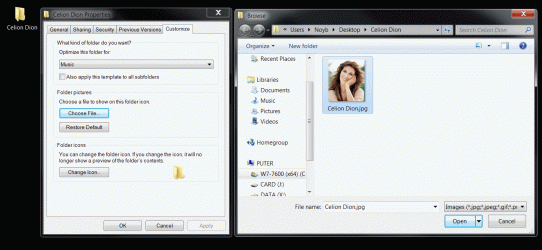
I have backed up my music CDs onto my hard drive, including the cover art. All I want to see on each folder is the cover art. The folder Icon occludes the cover art and anything else is a destraction to me. The many pages is a neat display for some folders, but not in this case. Is there any way to only see the cover art without an open folder in the way? I would like to see the whole thumb and nothing else (Like in XP).
 

My Computer My Computer

At a glance

XP Media Edition / Vista /Win 7 Home PremiumWin 7 Machine: Intel Core 2 Duo T5850 @ 2.16G...4GB Dual Channel DDR2 @ 333MHz 5-5-5-15Nvidia Defaul 1920X1200 256MB GeForce 9300M
Computer Manufacturer/Model Number
HP Touchsmart
OS
XP Media Edition / Vista /Win 7 Home Premium
CPU
Win 7 Machine: Intel Core 2 Duo T5850 @ 2.16GHz Merom 65nm
Motherboard
Pegatron Corp. EVE Model
Memory
4GB Dual Channel DDR2 @ 333MHz 5-5-5-15
Graphics Card(s)
Nvidia Defaul 1920X1200 256MB GeForce 9300M
Sound Card
SoundMAX Integrated Digital HD Audio
Monitor(s) Displays
HP 25" Flat Panel Touch Screen
Screen Resolution
1900X1200
Hard Drives
500 GB Seagate ST3500620as (Sata) 1.5 TB Seagate External
Keyboard
HP Model RK713A
Internet Speed
3.0Gb
...I am presented with a picture of open folders, with several pages in it when I view my directory. ...Is there any way to only see the cover art without an open folder in the way...
I better understand this morning, now that I am back in 7 (at exactly 0700). I see now. To answer the cover art question, I am certain - Yes. Just don't know how, yet.

There will be a tradeoff I imagine. If the folder contains more than item, which I twm will it show?

It will be some time before I get back to this study. I am working on three other issues and I expect to be on task for a couple of weeks.
 
Hmmm .. I can't get the obvious approach to work ???
 

Attachments

  • Clipboard.gif
    Clipboard.gif
    110.7 KB · Views: 24

My Computer My Computer

At a glance

XP MCE .... XP Pro 64 .... W7 U x64E6750, 2.67GHz C2D4GB, PC2 6400GeForce 9400GT
Computer Manufacturer/Model Number
HP d4996t (upgraded)
OS
XP MCE .... XP Pro 64 .... W7 U x64
CPU
E6750, 2.67GHz C2D
Memory
4GB, PC2 6400
Graphics Card(s)
GeForce 9400GT
Monitor(s) Displays
Twin Samsung 2443BWT
Screen Resolution
1920x1200
Hard Drives
Many .. 3 Installed
PSU
460W
Internet Speed
Cable
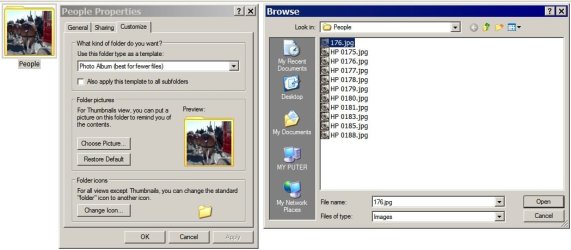
That was a picture of the procedure I would have used in XP to customize the view of a folder with a cover photo.

At this time, I am unable to get it to work the same way in my version Windows 7.
 

Attachments

  • Clipboard.jpg
    Clipboard.jpg
    60 KB · Views: 14

My Computer My Computer

At a glance

XP MCE .... XP Pro 64 .... W7 U x64E6750, 2.67GHz C2D4GB, PC2 6400GeForce 9400GT
Computer Manufacturer/Model Number
HP d4996t (upgraded)
OS
XP MCE .... XP Pro 64 .... W7 U x64
CPU
E6750, 2.67GHz C2D
Memory
4GB, PC2 6400
Graphics Card(s)
GeForce 9400GT
Monitor(s) Displays
Twin Samsung 2443BWT
Screen Resolution
1920x1200
Hard Drives
Many .. 3 Installed
PSU
460W
Internet Speed
Cable

My Computer My Computer

At a glance

7600 x86Core 2 Duo e7200, 2.53 ghz2x DDR2 PC5300 1gb, 667 mhzGeForce 9500gt, 512mb
OS
7600 x86
CPU
Core 2 Duo e7200, 2.53 ghz
Motherboard
Micro-Star MS-7529
Memory
2x DDR2 PC5300 1gb, 667 mhz
Graphics Card(s)
GeForce 9500gt, 512mb
Monitor(s) Displays
22" LG Flatron w2234s
Screen Resolution
1680x1050
Hard Drives
Excelstor SATA-II 250gb 7200rpm, 8mb cache
PSU
CoolerMaster M520
Internet Speed
30/20 mbits
Nice! I apreciate the Link. It looks great, but I was hoping to avoid 3rd party apps to do something that XP already does. I hope I can do the same thing in 7.

Some features and options might be another "casualty of progress". I hope not.
I don't think the object of these OS "upgrades" is to open the door for third party software, to reestablish well used features or options that disappear with revisions.

Sigh... I hope Microsoft listens. I talk with people all the time about these things. Unfortunatly a majority the people who will be affected the most, (Regular people who use these features) will not voice their opinion. They will not evaluate Win 7, or join these forums. Most I talk with think this is above their heads. They care; but not enough to get online and say something. Nothing I can say or do will change their minds.To bad. One voice is probably NOT going to make much difference.... but I have to give it a shot. Things I learn here, I can pass on. Thanks to everyone (like you) that help. Who knows? Perhaps Microsoft WILL listen. Always a bright spot somewhere.

(Apathy is not a virtue.)
 

My Computer My Computer

At a glance

XP Media Edition / Vista /Win 7 Home PremiumWin 7 Machine: Intel Core 2 Duo T5850 @ 2.16G...4GB Dual Channel DDR2 @ 333MHz 5-5-5-15Nvidia Defaul 1920X1200 256MB GeForce 9300M
Computer Manufacturer/Model Number
HP Touchsmart
OS
XP Media Edition / Vista /Win 7 Home Premium
CPU
Win 7 Machine: Intel Core 2 Duo T5850 @ 2.16GHz Merom 65nm
Motherboard
Pegatron Corp. EVE Model
Memory
4GB Dual Channel DDR2 @ 333MHz 5-5-5-15
Graphics Card(s)
Nvidia Defaul 1920X1200 256MB GeForce 9300M
Sound Card
SoundMAX Integrated Digital HD Audio
Monitor(s) Displays
HP 25" Flat Panel Touch Screen
Screen Resolution
1900X1200
Hard Drives
500 GB Seagate ST3500620as (Sata) 1.5 TB Seagate External
Keyboard
HP Model RK713A
Internet Speed
3.0Gb
...I was hoping to avoid 3rd party apps to do something that XP already does...
I understand, I really do. BUTT, this what is wrong with MS OS products, not what is right. It is the core of the hate. It is the basis of all the lawsuits. It is why you don't have the choice to do it the way you want to.

Apathy is not a virtue.
 
I have said all along that the whole OS is not NDG. While it is true, people tend to focus on the negative, perhaps some of the comments/suggestions have merit. It IS quite overboard to file suit because Microsoft renamed a folder, or you cannot view icons the way you want.

Renaming/Hiding/removing even small things do have a tremendous impact on a huge user base. What I’m asking is that MS keep this in mind when they revise/revamp the OS. If it's not an improvement or an upgrade, why mess with it. Yes, the chaff has to go, and a redesigned UI may not support the same options in the same place. how else would we move forward. User input (Like this forum) however, is important. one mans chaff is another’s treasure. Who decides. I would hope that user input matters, and if a large enough group clamors for an option/tool back, that it might eventually find its way back into the fold. If not, we are all whistling in the dark, and a small group will simply make unilateral decisions for the majority.

Let me revise my last post a little. Judging from the people who have participated in this thread, I realize I am not just one voice. If a more massive group joined the discussion however, who all would like or use... Well you get the picture
 
Last edited:

My Computer My Computer

At a glance

XP Media Edition / Vista /Win 7 Home PremiumWin 7 Machine: Intel Core 2 Duo T5850 @ 2.16G...4GB Dual Channel DDR2 @ 333MHz 5-5-5-15Nvidia Defaul 1920X1200 256MB GeForce 9300M
Computer Manufacturer/Model Number
HP Touchsmart
OS
XP Media Edition / Vista /Win 7 Home Premium
CPU
Win 7 Machine: Intel Core 2 Duo T5850 @ 2.16GHz Merom 65nm
Motherboard
Pegatron Corp. EVE Model
Memory
4GB Dual Channel DDR2 @ 333MHz 5-5-5-15
Graphics Card(s)
Nvidia Defaul 1920X1200 256MB GeForce 9300M
Sound Card
SoundMAX Integrated Digital HD Audio
Monitor(s) Displays
HP 25" Flat Panel Touch Screen
Screen Resolution
1900X1200
Hard Drives
500 GB Seagate ST3500620as (Sata) 1.5 TB Seagate External
Keyboard
HP Model RK713A
Internet Speed
3.0Gb
microsoft can't please all people all the time. if windows explorer looked like total commander, it would scare away 95% of all users :geek:

there will be things here and there that certain groups of users are not content with. i don't know any "power users" that don't run a 3rd party file manager. but this isn't a bad thing. it doesn't mean that the windows model is flawed. it just means some users desire a bit more control over how they use their machine.
 

My Computer My Computer

At a glance

7600 x86Core 2 Duo e7200, 2.53 ghz2x DDR2 PC5300 1gb, 667 mhzGeForce 9500gt, 512mb
OS
7600 x86
CPU
Core 2 Duo e7200, 2.53 ghz
Motherboard
Micro-Star MS-7529
Memory
2x DDR2 PC5300 1gb, 667 mhz
Graphics Card(s)
GeForce 9500gt, 512mb
Monitor(s) Displays
22" LG Flatron w2234s
Screen Resolution
1680x1050
Hard Drives
Excelstor SATA-II 250gb 7200rpm, 8mb cache
PSU
CoolerMaster M520
Internet Speed
30/20 mbits
you are 100% right. Even I use third party apps to help me out. I was sending a plea not to change some particular aspects of the UI that were already there.

Total commander looks good. It might even be something I would consider.
 

My Computer My Computer

At a glance

XP Media Edition / Vista /Win 7 Home PremiumWin 7 Machine: Intel Core 2 Duo T5850 @ 2.16G...4GB Dual Channel DDR2 @ 333MHz 5-5-5-15Nvidia Defaul 1920X1200 256MB GeForce 9300M
Computer Manufacturer/Model Number
HP Touchsmart
OS
XP Media Edition / Vista /Win 7 Home Premium
CPU
Win 7 Machine: Intel Core 2 Duo T5850 @ 2.16GHz Merom 65nm
Motherboard
Pegatron Corp. EVE Model
Memory
4GB Dual Channel DDR2 @ 333MHz 5-5-5-15
Graphics Card(s)
Nvidia Defaul 1920X1200 256MB GeForce 9300M
Sound Card
SoundMAX Integrated Digital HD Audio
Monitor(s) Displays
HP 25" Flat Panel Touch Screen
Screen Resolution
1900X1200
Hard Drives
500 GB Seagate ST3500620as (Sata) 1.5 TB Seagate External
Keyboard
HP Model RK713A
Internet Speed
3.0Gb
TC is a good choice, especially since it's free. it's got a lot of features, it's extremely flexible, and its keyboard support is fantastic.

another nice free one is Xplorer2, which i used for about a year. there's a pro version to with a little more power.

but now, obviously, i use Directory Opus, which is quite far from being free. but i'm a customization freak, so DOpus is the only one for me. you can change everything - toolbars, menus, status bar... it's absolutely amazing.

here's my current setup. most of the top toolbar buttons have three functions - right click, middle click, and left click. the bar on the right launches current directories or selected files in various apps, and it can be toggled on/off.

http://i31.tinypic.com/2h72yw2.png
 

My Computer My Computer

At a glance

7600 x86Core 2 Duo e7200, 2.53 ghz2x DDR2 PC5300 1gb, 667 mhzGeForce 9500gt, 512mb
OS
7600 x86
CPU
Core 2 Duo e7200, 2.53 ghz
Motherboard
Micro-Star MS-7529
Memory
2x DDR2 PC5300 1gb, 667 mhz
Graphics Card(s)
GeForce 9500gt, 512mb
Monitor(s) Displays
22" LG Flatron w2234s
Screen Resolution
1680x1050
Hard Drives
Excelstor SATA-II 250gb 7200rpm, 8mb cache
PSU
CoolerMaster M520
Internet Speed
30/20 mbits
Followed your link. Looks good!
 

My Computer My Computer

At a glance

XP Media Edition / Vista /Win 7 Home PremiumWin 7 Machine: Intel Core 2 Duo T5850 @ 2.16G...4GB Dual Channel DDR2 @ 333MHz 5-5-5-15Nvidia Defaul 1920X1200 256MB GeForce 9300M
Computer Manufacturer/Model Number
HP Touchsmart
OS
XP Media Edition / Vista /Win 7 Home Premium
CPU
Win 7 Machine: Intel Core 2 Duo T5850 @ 2.16GHz Merom 65nm
Motherboard
Pegatron Corp. EVE Model
Memory
4GB Dual Channel DDR2 @ 333MHz 5-5-5-15
Graphics Card(s)
Nvidia Defaul 1920X1200 256MB GeForce 9300M
Sound Card
SoundMAX Integrated Digital HD Audio
Monitor(s) Displays
HP 25" Flat Panel Touch Screen
Screen Resolution
1900X1200
Hard Drives
500 GB Seagate ST3500620as (Sata) 1.5 TB Seagate External
Keyboard
HP Model RK713A
Internet Speed
3.0Gb
microsoft can't please all people all the time. if windows explorer looked like total commander, it would scare away 95% of all users :geek:

there will be things here and there that certain groups of users are not content with. i don't know any "power users" that don't run a 3rd party file manager. but this isn't a bad thing. it doesn't mean that the windows model is flawed. it just means some users desire a bit more control over how they use their machine.

not buying the $%#@ about all power users third party file apps.
 

My Computer My Computer

At a glance

Windows 7 RC Build 7100 x86 / Windows Vista SP2Intel Core2Duo E84003 Gigs DDR2 6400Asus NVIDIA GeForce 9500 GT 512MB
Computer Manufacturer/Model Number
Internet-Junkie
OS
Windows 7 RC Build 7100 x86 / Windows Vista SP2
CPU
Intel Core2Duo E8400
Motherboard
Asus Rampage Formula
Memory
3 Gigs DDR2 6400
Graphics Card(s)
Asus NVIDIA GeForce 9500 GT 512MB
Sound Card
Sound Blaster FX Extreme Audio PCI-E
Monitor(s) Displays
Sceptre X22WG Gamer 22" 1080p Widescreen LCD
Screen Resolution
1680 x 1050 32bit
Hard Drives
OCZ 64gig SSD Western Digital 300gig VelociRaptor 10,000RPM
Two Seagate Barracuda 320gig 7200RPM
PSU
700 Watt
Case
U2-UFO Black Powder Coat - Solid Top www.mountainmods.com
Cooling
Ultra ChillTech Thermo Electric Cooler/7 120mm 2500RMP Fans
Keyboard
Logitech diNOVO Edge
Mouse
Logitech LX 8 Cordless Laser Mouse
Internet Speed
7 MBPS Down / 784KBPS Up
Other Info
Hauppauge WinTV HVR-1800 Dual Tuner
not buying the $%#@ about all power users third party file apps.
True dat. I have tried quite a few and always come back to Explorer. Mind you, I have highly customized context menus with a few self-developed commands. I have not tried DOpus simply because I have lost interest in file managers.
 
TC is a good choice, especially since it's free.

Its not free! Its Shareware, one month trial, thereafter $US38 or EUR26.
 

My Computer My Computer

At a glance

Windows 7 Ultimate, UbuntuDDR 2Gb (!)6600GT
Computer Manufacturer/Model Number
AMD Athlon 64 3200+, Lenovo G560 i3
OS
Windows 7 Ultimate, Ubuntu
Motherboard
Gigabyte K8T8000
Memory
DDR 2Gb (!)
Graphics Card(s)
6600GT
Monitor(s) Displays
MultiMonitor (2) LCD
Hard Drives
Old Seagate 75
Big Western Digital
Samsung 500Gb pulled out of an external drive and installed
Ext: Maxtor (Firewire), 1Gb Lacie (Samsung)
Mouse
Logitech MX620 Cordless
Mostly I rely on my directory structure, and the ability to format the view in a window when it comes up. I like the thumbs view for my pictures and music. A single picture without an open folder. If someone knows how I can get it back I would apreciate the info. I've been playing with it. ...so far to no avail. Under properties-customize-choose file, I just get the standard view. Changing optimize this folder for: dosn't seem to have any effect on the view. Creating a folder.jpg file didn't work either.
 
Last edited:

My Computer My Computer

At a glance

XP Media Edition / Vista /Win 7 Home PremiumWin 7 Machine: Intel Core 2 Duo T5850 @ 2.16G...4GB Dual Channel DDR2 @ 333MHz 5-5-5-15Nvidia Defaul 1920X1200 256MB GeForce 9300M
Computer Manufacturer/Model Number
HP Touchsmart
OS
XP Media Edition / Vista /Win 7 Home Premium
CPU
Win 7 Machine: Intel Core 2 Duo T5850 @ 2.16GHz Merom 65nm
Motherboard
Pegatron Corp. EVE Model
Memory
4GB Dual Channel DDR2 @ 333MHz 5-5-5-15
Graphics Card(s)
Nvidia Defaul 1920X1200 256MB GeForce 9300M
Sound Card
SoundMAX Integrated Digital HD Audio
Monitor(s) Displays
HP 25" Flat Panel Touch Screen
Screen Resolution
1900X1200
Hard Drives
500 GB Seagate ST3500620as (Sata) 1.5 TB Seagate External
Keyboard
HP Model RK713A
Internet Speed
3.0Gb
Back
Top