Have mercy on the Less experienced!

to each his own, i suppose.

personally, i like being able to:
- navigate across my entire drive structure via my keyboard using custom folder aliases and user-defined hotkeys.
- create custom context menus for every filetype, or for user-defined filetype groups. especially helpful for command-line operations, letting me right-click PNGs and turn them into icons, or perform lossless image rotations on JPGs with just two clicks (or a hotkey).
- convert images, register DLLs, take ownership of files, get MD5 checksums, and a whole lot more - all with custom buttons, hotkeys, or context menu items.
- customize tooltips to show thumbnails, file info (such as video duration, audio bitrate, or EXIF data for my photos).
- create my own menus. i made a "rename" menu filled with various regex rename scripts for adding prefixes/suffixes, adding file counts, renaming images based on EXIF data, even cleaning up messy file names and doing case conversions - all with two clicks of my mouse.
- invert selection, select similar, show filter, hide filter. i hit a hotkey to bring the filter into focus, then type .rar to immediately hide all but .rar files in the current pane. the pane is also a find-as-you-type field. or, i can select a .dll, then hit a hotkey to also select all other .dll files in the folder.
- flat view! flatten an entire directory and all sub directories into one viewer pane, sorted hierarchically or mixed. very powerful.
- move the contents of the current folder into sub folders inside the target folder based on file extension - with a single hotkey.
- integrate any app that supports command line input. select some files, hit a hotkey, send them to ImgBurn. select an .msi, hotkey, extract with UniExtract. select .exe, hotkey, run in Sandboxie. etc.

i could go on all day! but i guess you get the idea. there's very little that DOpus can't do. but if you find explorer to be adequate, then by all means, keep using it :D
 

My Computer My Computer

At a glance

7600 x86Core 2 Duo e7200, 2.53 ghz2x DDR2 PC5300 1gb, 667 mhzGeForce 9500gt, 512mb
OS
7600 x86
CPU
Core 2 Duo e7200, 2.53 ghz
Motherboard
Micro-Star MS-7529
Memory
2x DDR2 PC5300 1gb, 667 mhz
Graphics Card(s)
GeForce 9500gt, 512mb
Monitor(s) Displays
22" LG Flatron w2234s
Screen Resolution
1680x1050
Hard Drives
Excelstor SATA-II 250gb 7200rpm, 8mb cache
PSU
CoolerMaster M520
Internet Speed
30/20 mbits
For most users Windows Explorer works just fine. The main problem is the fact that in each new so called OS Microsoft removes feature that we have all ready paid for. Or they add in unneeded features. In 7 just like Vista you have to unhide the Menu bar. When you do unhide it it is the one thing in the entire OS you cannot reskin. You are stuck with that flat baby blue color. The bar they gave us with organize on it is really worthless, it would be great if you could customize with features you will really use instead of what Microsoft thinks you will use. Everything on the organize menu belongs under items under the menu bar buttons. Like I said about the ability to open a folder without the navigation was taken away, if you now disable the navigation pane in one folder Windows makes it the default in all folders. We lost the ability to restore previous folders at logon in 7. Besides saving time because when I logoff or restart I do not have to drill down to the folder I was in it also saves time if someone is picking up where I left off editing files if I happen to forget to inform them where I was. As for the Icon spacing this is probably my personal biggest pet pev. I have gone to personalize, window colors, advance settings icon spacing (horizontal) / (vertical) and set each to 23. I have tried logoff / logon afterwards, I have tried restart and the Icon spacing does not change. I bought the monitor so I could have more workspace. Now Microsoft decides more or less that we do not need that extra workspace. I have one folder that I create on the desktop after installing all my programs, and before hiding my desktop icons called desktop shortcuts. I place shortcuts for all of my most used programs in it then hide the desktop icons to have a clean desktop. The view for this is normally small icons and no navigation pane. I make the folder as small as I can without getting navigation bars(I also normally setup Control Panel this way as well). Now I am stuck with the navigation pane in it, and icons way furthered apart than I like. This makes the whole folder just about twice as wide and at least a third taller than it is normally. We are screaming at Microsoft not because of a higher learning curve, but rather removing features that we do use and that we all ready paid for. As I stated above regardless of the EULA I own the copy of Windows I paid for not Microsoft, therefore I will tweak, hack, crack, and customize it the way I want it regardless of what Microsoft tells me. Especially since they believe they can continue to remove features I do use, and all ready paid for.

Up Button
Animated Wallpaper
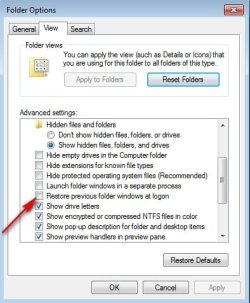
Restore Previous Folders At Logon
Icon Spacing
Properly remembering a folders individual view settings without affecting other folders.
etc...
 

My Computer My Computer

At a glance

Windows 7 RC Build 7100 x86 / Windows Vista SP2Intel Core2Duo E84003 Gigs DDR2 6400Asus NVIDIA GeForce 9500 GT 512MB
Computer Manufacturer/Model Number
Internet-Junkie
OS
Windows 7 RC Build 7100 x86 / Windows Vista SP2
CPU
Intel Core2Duo E8400
Motherboard
Asus Rampage Formula
Memory
3 Gigs DDR2 6400
Graphics Card(s)
Asus NVIDIA GeForce 9500 GT 512MB
Sound Card
Sound Blaster FX Extreme Audio PCI-E
Monitor(s) Displays
Sceptre X22WG Gamer 22" 1080p Widescreen LCD
Screen Resolution
1680 x 1050 32bit
Hard Drives
OCZ 64gig SSD Western Digital 300gig VelociRaptor 10,000RPM
Two Seagate Barracuda 320gig 7200RPM
PSU
700 Watt
Case
U2-UFO Black Powder Coat - Solid Top www.mountainmods.com
Cooling
Ultra ChillTech Thermo Electric Cooler/7 120mm 2500RMP Fans
Keyboard
Logitech diNOVO Edge
Mouse
Logitech LX 8 Cordless Laser Mouse
Internet Speed
7 MBPS Down / 784KBPS Up
Other Info
Hauppauge WinTV HVR-1800 Dual Tuner
I have one folder that I create on the desktop after installing all my programs, and before hiding my desktop icons called desktop shortcuts.
Me too.
And, since you cannot turn off folder sorting ..
You can't manually arrange your shortcuts in this folder.

You can arrange the shorts in a new task bar ..
But W7 will not let you make a new task bar and park it on any edge of your screen(s).
You can only make a new taskbar .. In the taskbar.
Now that can get crowded.

But, you don't have to press the shift key to open a file in a new taskbar shortcut ..
unlike the Windows task bar pinned app.

More new exciting features in W7
 

My Computer My Computer

At a glance

XP MCE .... XP Pro 64 .... W7 U x64E6750, 2.67GHz C2D4GB, PC2 6400GeForce 9400GT
Computer Manufacturer/Model Number
HP d4996t (upgraded)
OS
XP MCE .... XP Pro 64 .... W7 U x64
CPU
E6750, 2.67GHz C2D
Memory
4GB, PC2 6400
Graphics Card(s)
GeForce 9400GT
Monitor(s) Displays
Twin Samsung 2443BWT
Screen Resolution
1920x1200
Hard Drives
Many .. 3 Installed
PSU
460W
Internet Speed
Cable
In short most of the items removed from the OS have to do with Windows Explorer and simple navigation. By Win 8 if the only things you do on your computer are browse the Internet or check email you will be fine, the rest of us will be running either a different OS or tons of third party apps just to be able to do anything else than check email and browse the net.
 
Last edited:

My Computer My Computer

At a glance

Windows 7 RC Build 7100 x86 / Windows Vista SP2Intel Core2Duo E84003 Gigs DDR2 6400Asus NVIDIA GeForce 9500 GT 512MB
Computer Manufacturer/Model Number
Internet-Junkie
OS
Windows 7 RC Build 7100 x86 / Windows Vista SP2
CPU
Intel Core2Duo E8400
Motherboard
Asus Rampage Formula
Memory
3 Gigs DDR2 6400
Graphics Card(s)
Asus NVIDIA GeForce 9500 GT 512MB
Sound Card
Sound Blaster FX Extreme Audio PCI-E
Monitor(s) Displays
Sceptre X22WG Gamer 22" 1080p Widescreen LCD
Screen Resolution
1680 x 1050 32bit
Hard Drives
OCZ 64gig SSD Western Digital 300gig VelociRaptor 10,000RPM
Two Seagate Barracuda 320gig 7200RPM
PSU
700 Watt
Case
U2-UFO Black Powder Coat - Solid Top www.mountainmods.com
Cooling
Ultra ChillTech Thermo Electric Cooler/7 120mm 2500RMP Fans
Keyboard
Logitech diNOVO Edge
Mouse
Logitech LX 8 Cordless Laser Mouse
Internet Speed
7 MBPS Down / 784KBPS Up
Other Info
Hauppauge WinTV HVR-1800 Dual Tuner
Enough 3rd party apps make's one's eyes go crazy
 

Attachments

  • grimace2.gif
    grimace2.gif
    8.2 KB · Views: 83

My Computer My Computer

At a glance

XP MCE .... XP Pro 64 .... W7 U x64E6750, 2.67GHz C2D4GB, PC2 6400GeForce 9400GT
Computer Manufacturer/Model Number
HP d4996t (upgraded)
OS
XP MCE .... XP Pro 64 .... W7 U x64
CPU
E6750, 2.67GHz C2D
Memory
4GB, PC2 6400
Graphics Card(s)
GeForce 9400GT
Monitor(s) Displays
Twin Samsung 2443BWT
Screen Resolution
1920x1200
Hard Drives
Many .. 3 Installed
PSU
460W
Internet Speed
Cable

My Computer My Computer

At a glance

Windows 7 RC Build 7100 x86 / Windows Vista SP2Intel Core2Duo E84003 Gigs DDR2 6400Asus NVIDIA GeForce 9500 GT 512MB
Computer Manufacturer/Model Number
Internet-Junkie
OS
Windows 7 RC Build 7100 x86 / Windows Vista SP2
CPU
Intel Core2Duo E8400
Motherboard
Asus Rampage Formula
Memory
3 Gigs DDR2 6400
Graphics Card(s)
Asus NVIDIA GeForce 9500 GT 512MB
Sound Card
Sound Blaster FX Extreme Audio PCI-E
Monitor(s) Displays
Sceptre X22WG Gamer 22" 1080p Widescreen LCD
Screen Resolution
1680 x 1050 32bit
Hard Drives
OCZ 64gig SSD Western Digital 300gig VelociRaptor 10,000RPM
Two Seagate Barracuda 320gig 7200RPM
PSU
700 Watt
Case
U2-UFO Black Powder Coat - Solid Top www.mountainmods.com
Cooling
Ultra ChillTech Thermo Electric Cooler/7 120mm 2500RMP Fans
Keyboard
Logitech diNOVO Edge
Mouse
Logitech LX 8 Cordless Laser Mouse
Internet Speed
7 MBPS Down / 784KBPS Up
Other Info
Hauppauge WinTV HVR-1800 Dual Tuner
Don't know bout you ..
But a nice OS that didn't need a bunch of 3rd party apps or registry hacks ...
could make my mouth water
 

Attachments

  • grimace3.gif
    grimace3.gif
    46.3 KB · Views: 73

My Computer My Computer

At a glance

XP MCE .... XP Pro 64 .... W7 U x64E6750, 2.67GHz C2D4GB, PC2 6400GeForce 9400GT
Computer Manufacturer/Model Number
HP d4996t (upgraded)
OS
XP MCE .... XP Pro 64 .... W7 U x64
CPU
E6750, 2.67GHz C2D
Memory
4GB, PC2 6400
Graphics Card(s)
GeForce 9400GT
Monitor(s) Displays
Twin Samsung 2443BWT
Screen Resolution
1920x1200
Hard Drives
Many .. 3 Installed
PSU
460W
Internet Speed
Cable
In short most of the items removed from the OS have to do with Windows Explorer and simple navigation. By Win 8 if the only things you do on your computer are browser the Internet or check email you will be fine, the rest of us will be running either a different OS or tons of third party apps just to be able to do anything else than check email and browse the net.
the restore previous folders at login is still there you know...and besides the up button just hit backspace...
 

My Computer My Computer

At a glance

Windows 7 Home Premium x64 - Mac OS X 10.6.4 x64Intel Core 2 Duo T9300 2.5 GHz4GB Kingston DDR2-800NVIDIA Geforce 8600M GT (512MB Model)
Computer Manufacturer/Model Number
Compal JFT02 (Custom Build Laptop)
OS
Windows 7 Home Premium x64 - Mac OS X 10.6.4 x64
CPU
Intel Core 2 Duo T9300 2.5 GHz
Motherboard
JFT02
Memory
4GB Kingston DDR2-800
Graphics Card(s)
NVIDIA Geforce 8600M GT (512MB Model)
Sound Card
Realtek HD Audio
Monitor(s) Displays
WUXGA Standard Laptop Display
Screen Resolution
1680*1050
Hard Drives
Toshiba 320GB 5400RPM Laptop HD
PSU
Standard Laptop Power Supply
Case
Standard Laptop Case
Cooling
Standard Laptop Cooling
Keyboard
Standard Laptop 105 Key-Keyboard
Mouse
Synaptics Touchpad
Internet Speed
Verizion Online DSL 3360/864 kbs (dl/up)
the restore previous folders at login is still there you know...and besides the up button just hit backspace...

restore previous folders at logon is gone. i have been running rc 7100 since it came out and can tell you in xp and vista it is one of first things i enable along with the rest of my folder options. backspace is fine for going to the previous folder you were in, the up button is for going to the parent folder of the folder you are looking at. if i am looking at my vids then in the navigation pane click on general utilities then click the back button i end up back in my vids, however if while viewing general utilities i press the up button i am now viewing my downloads which is the parent folder of general utilities. plus we still have all the other items taken out by microsoft that we have all ready paid for.
 

My Computer My Computer

At a glance

Windows 7 RC Build 7100 x86 / Windows Vista SP2Intel Core2Duo E84003 Gigs DDR2 6400Asus NVIDIA GeForce 9500 GT 512MB
Computer Manufacturer/Model Number
Internet-Junkie
OS
Windows 7 RC Build 7100 x86 / Windows Vista SP2
CPU
Intel Core2Duo E8400
Motherboard
Asus Rampage Formula
Memory
3 Gigs DDR2 6400
Graphics Card(s)
Asus NVIDIA GeForce 9500 GT 512MB
Sound Card
Sound Blaster FX Extreme Audio PCI-E
Monitor(s) Displays
Sceptre X22WG Gamer 22" 1080p Widescreen LCD
Screen Resolution
1680 x 1050 32bit
Hard Drives
OCZ 64gig SSD Western Digital 300gig VelociRaptor 10,000RPM
Two Seagate Barracuda 320gig 7200RPM
PSU
700 Watt
Case
U2-UFO Black Powder Coat - Solid Top www.mountainmods.com
Cooling
Ultra ChillTech Thermo Electric Cooler/7 120mm 2500RMP Fans
Keyboard
Logitech diNOVO Edge
Mouse
Logitech LX 8 Cordless Laser Mouse
Internet Speed
7 MBPS Down / 784KBPS Up
Other Info
Hauppauge WinTV HVR-1800 Dual Tuner
You paid for them in that OS, not in 7. Just cause it is Windows, doesn't mean it's a continuation of the same old same old. Things change, some for better, some for not, some are not even missed.

Breadcrumbs are actually a lot better than all the buttons we had before to navigate.

Breadcrumbs are far more powerful and precise. You can pretty much get to any parent folder you want once you start drilling down to sub-folders you want. You need to use the little arrows between names. You will find that once you start using it and get used to it, that XP's way seems rudimentary.

I would hope that user input matters, and if a large enough group clamors for an option/tool back, that it might eventually find its way back into the fold. If not, we are all whistling in the dark, and a small group will simply make unilateral decisions for the majority.

That is one of the main reasons for the really bad copy/move problems when Vista first came out. People complained about how XP's time calcs were off, luckily they fixed the issue and it is more like XP again, just copy the damn file, I don't care about the meg's to minutes thing, (but some group out there did). Also, they did remove a lot of useful info from the move/copy window, Not really a big deal, but it can be. Which is why I use other tools for elaborate copy/move operations.

My point is, just cause a number of people thinks it might be a good idea, doesn't make it a good idea.

Just cause a lot of people believe something is right, doesn't make it right, it's still as wrong as ever.

Restore previous folders at login IS still there... see attachment
 

Attachments

  • 2009-07-18_204034.jpeg
    2009-07-18_204034.jpeg
    33.3 KB · Views: 12
Last edited:

My Computer My Computer

At a glance

Win 7 Ultimate 32bitC2D E6600 2.4Ghz4G Kingston KHX5400D2EVGA GTX 570 HD SC (012-P3-1573-KR)
Computer Manufacturer/Model Number
Self Built
OS
Win 7 Ultimate 32bit
CPU
C2D E6600 2.4Ghz
Motherboard
Intel D965WH
Memory
4G Kingston KHX5400D2
Graphics Card(s)
EVGA GTX 570 HD SC (012-P3-1573-KR)
Sound Card
On-Board
Monitor(s) Displays
Samsung 226BW
Screen Resolution
1680 x 1050
Hard Drives
2 x 250 Seagate Barracuda
2 x 500 Seagate Barracuda (Raid1)
PSU
Corsair TX750W
Case
In-Win C589
Cooling
Stock Intel Cooling
You will find that once you start using it and get used to it, that XP's way seems rudimentary...
I did not like breadcrumbs when I first "tasted" it. I just wanted my arrow back. Now, I cannot imagine not having it. My mouse mileage has dropped significantly.

There was a time when I hated Windows. What the hell did I need a mouse for? Freakin' MS.
 
You paid for them in that OS, not in 7. Just cause it is Windows, doesn't mean it's a continuation of the same old same old. Things change, some for better, some for not, some are not even missed.

Breadcrumbs are actually a lot better than all the buttons we had before to navigate.

Breadcrumbs are far more powerful and precise. You can pretty much get to any parent folder you want once you start drilling down to sub-folders you want. You need to use the little arrows between names. You will find that once you start using it and get used to it, that XP's way seems rudimentary.

i will give that sometime after build 7100 microsoft added back in restore previous folders at logon, and the bread crumbs do nicely in replacing the up button, however as stated above we are still missing items we paid for.

Restore previous folders at login IS still there... see attachment

if you would bother to read the entire thread you would see that there is more missing than these two items. you are the second person that seems to only want to focus in onto these two items only.
 

My Computer My Computer

At a glance

Windows 7 RC Build 7100 x86 / Windows Vista SP2Intel Core2Duo E84003 Gigs DDR2 6400Asus NVIDIA GeForce 9500 GT 512MB
Computer Manufacturer/Model Number
Internet-Junkie
OS
Windows 7 RC Build 7100 x86 / Windows Vista SP2
CPU
Intel Core2Duo E8400
Motherboard
Asus Rampage Formula
Memory
3 Gigs DDR2 6400
Graphics Card(s)
Asus NVIDIA GeForce 9500 GT 512MB
Sound Card
Sound Blaster FX Extreme Audio PCI-E
Monitor(s) Displays
Sceptre X22WG Gamer 22" 1080p Widescreen LCD
Screen Resolution
1680 x 1050 32bit
Hard Drives
OCZ 64gig SSD Western Digital 300gig VelociRaptor 10,000RPM
Two Seagate Barracuda 320gig 7200RPM
PSU
700 Watt
Case
U2-UFO Black Powder Coat - Solid Top www.mountainmods.com
Cooling
Ultra ChillTech Thermo Electric Cooler/7 120mm 2500RMP Fans
Keyboard
Logitech diNOVO Edge
Mouse
Logitech LX 8 Cordless Laser Mouse
Internet Speed
7 MBPS Down / 784KBPS Up
Other Info
Hauppauge WinTV HVR-1800 Dual Tuner
Honestly, I am at work and using 7 in a Portable Vbox on an XP machine.
A lot of the work I must do, I do in XP, but more of my time is spent in 7.
I can float between the 2 with great ease and not be lost.
But I prefer 7. Infact, I am trying (at times) to do all my work in the VM, but certain things just don't allow for it unfortunately.

I will not miss XP when it is gone.

So, whatever is missing, apparently, I am not missing it in 7.

And no, I did not go all the way back and read the rest of the thread and I am not going to focus on every little pithy thing that gets mentioned or complained about.


******************
or maybe I will
 

My Computer My Computer

At a glance

Win 7 Ultimate 32bitC2D E6600 2.4Ghz4G Kingston KHX5400D2EVGA GTX 570 HD SC (012-P3-1573-KR)
Computer Manufacturer/Model Number
Self Built
OS
Win 7 Ultimate 32bit
CPU
C2D E6600 2.4Ghz
Motherboard
Intel D965WH
Memory
4G Kingston KHX5400D2
Graphics Card(s)
EVGA GTX 570 HD SC (012-P3-1573-KR)
Sound Card
On-Board
Monitor(s) Displays
Samsung 226BW
Screen Resolution
1680 x 1050
Hard Drives
2 x 250 Seagate Barracuda
2 x 500 Seagate Barracuda (Raid1)
PSU
Corsair TX750W
Case
In-Win C589
Cooling
Stock Intel Cooling
if you would bother to read the entire thread you would see that there is more missing than these two items. you are the second person that seems to only want to focus in onto these two items only.
He is not the only person ignoring some of the ill-informed and inane comments you have made. Personally, I am having mercy on the less experienced. In your last burst of rudeness you referenced three concerns and only counted two. I count five ideas in Tepid's referenced comment - and I am only vaguely interested.

Perhaps you should read things more thoroughly. No one is committed to addressing each and every point in a comment. This is not a linear discussion limited to participants incapable of abstraction. Likewise, Windows development is not a linear process. Rather, it is an abstraction of historical development.

This thread is contained in the Customization section of SevenForums. There is a Tutorials section also. In time, you will become more familiar with the Windows 7 operating system. In due course, you will be better suited to choose an operating system that meets the majority of your usage requirements. In the meantime, make the most of what you have.
 
try again. what people complained about xp was not its stability, rather that it had a extremely high learning curve versus 98 and the fact that the ui looked more like something a child through together. vista pre sp1 was a nightmare. post sp1 it ran great.

Yes, that is also what people complained about, which I did not mention. But,...

"extremely high learning curve versus 98 and the fact that the ui looked more like something a child through together"

Is this also what people are yapping about with Vista/7?

cannot hide the action flag, cannot hide the speaker icon

Yes you can, and if you can't figure it out, then you need to stop talking.

in 7 if you hide the navigation pane in one folder 7 makes it universal across all folders.

Just like in XP. Setting to Windows Classic mode does the exact same thing in XP.
Please, you need to stop talking. You do not know what you are talkign about, AT ALL. Or are you just a troll?
 

My Computer My Computer

At a glance

Win 7 Ultimate 32bitC2D E6600 2.4Ghz4G Kingston KHX5400D2EVGA GTX 570 HD SC (012-P3-1573-KR)
Computer Manufacturer/Model Number
Self Built
OS
Win 7 Ultimate 32bit
CPU
C2D E6600 2.4Ghz
Motherboard
Intel D965WH
Memory
4G Kingston KHX5400D2
Graphics Card(s)
EVGA GTX 570 HD SC (012-P3-1573-KR)
Sound Card
On-Board
Monitor(s) Displays
Samsung 226BW
Screen Resolution
1680 x 1050
Hard Drives
2 x 250 Seagate Barracuda
2 x 500 Seagate Barracuda (Raid1)
PSU
Corsair TX750W
Case
In-Win C589
Cooling
Stock Intel Cooling
Yes, that is also what people complained about, which I did not mention. But,...

"extremely high learning curve versus 98 and the fact that the ui looked more like something a child through together"

Is this also what people are yapping about with Vista/7?


Yes you can, and if you can't figure it out, then you need to stop talking.


Just like in XP. Setting to Windows Classic mode does the exact same thing in XP.
Please, you need to stop talking. You do not know what you are talkign about, AT ALL. Or are you just a troll?

the only way to get some of the system tray icons to show is to set the new syystray to show all icons and notifications. dragging the flag all the way to the right or the left does not hide it. as for the speaker icon i just rechecked the sounds properties again and it cannot be removed from the systray.

i quite well know what i am talking about. you need to keep you personal comments out of the conversation or stay out of it.
 

My Computer My Computer

At a glance

Windows 7 RC Build 7100 x86 / Windows Vista SP2Intel Core2Duo E84003 Gigs DDR2 6400Asus NVIDIA GeForce 9500 GT 512MB
Computer Manufacturer/Model Number
Internet-Junkie
OS
Windows 7 RC Build 7100 x86 / Windows Vista SP2
CPU
Intel Core2Duo E8400
Motherboard
Asus Rampage Formula
Memory
3 Gigs DDR2 6400
Graphics Card(s)
Asus NVIDIA GeForce 9500 GT 512MB
Sound Card
Sound Blaster FX Extreme Audio PCI-E
Monitor(s) Displays
Sceptre X22WG Gamer 22" 1080p Widescreen LCD
Screen Resolution
1680 x 1050 32bit
Hard Drives
OCZ 64gig SSD Western Digital 300gig VelociRaptor 10,000RPM
Two Seagate Barracuda 320gig 7200RPM
PSU
700 Watt
Case
U2-UFO Black Powder Coat - Solid Top www.mountainmods.com
Cooling
Ultra ChillTech Thermo Electric Cooler/7 120mm 2500RMP Fans
Keyboard
Logitech diNOVO Edge
Mouse
Logitech LX 8 Cordless Laser Mouse
Internet Speed
7 MBPS Down / 784KBPS Up
Other Info
Hauppauge WinTV HVR-1800 Dual Tuner
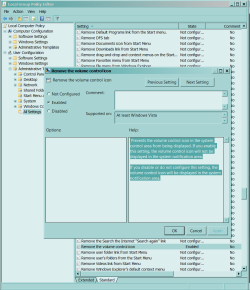
I am using my HTPC right now, so I cannot boot to see if the Volume icon disappears from the SysTray/Notification Area as the Group Policy Editor states that it will.
 

Attachments

  • Capture.PNG
    Capture.PNG
    37.7 KB · Views: 5
Whose bright idea was it to hide that menu bar by default anyway. It didn't take long to find and unhide it, but for some I feel, it would be difficult to find.
Without tools, you cannot configure anything. If you don't have the experience to find something, good luck. it might as well be gone.

allow me to disagree about a wide user base using an option not being right. There are sometimes several ways to do things in Windows. I do what’s comfortable to me. Someone else might do it another way. That doesn’t make their way wrong, or my way better. If a wide user base is doing something a certain way; who am I to take that option away because I feel there is a better (or more correct) way. Are these really upgrades??... or just forcing user patterns. Comfort is good. You shouldn’t have to use an OS that gets more alien every three years. Yes… I agree there is a limit; I don’t want everyone to go back to the command prompt, but “Power to the people!" (By the way…. What ever did happen to debug. Does anyone know?)

I also agree, that MS deletes or hides some very good things with each revision, going all the way back to DOS. As things hide, or go away, my list of third party software gets bigger. I too would like an OS that relied on less 3rd party apps. I’m not suggesting throw in the kitchen sink, but having back some of the wonderful tools MS took away would be nice.

(I think I can get used to bread crumbs.... I know some people don't like it, but the more I play with it, the more I like it. it just took getting used to. Yes Virginia, sometimes there is a better way.
It looks like my user pattern is being forced! AAAAAAA!!! hehehe)
 
Last edited:

My Computer My Computer

At a glance

XP Media Edition / Vista /Win 7 Home PremiumWin 7 Machine: Intel Core 2 Duo T5850 @ 2.16G...4GB Dual Channel DDR2 @ 333MHz 5-5-5-15Nvidia Defaul 1920X1200 256MB GeForce 9300M
Computer Manufacturer/Model Number
HP Touchsmart
OS
XP Media Edition / Vista /Win 7 Home Premium
CPU
Win 7 Machine: Intel Core 2 Duo T5850 @ 2.16GHz Merom 65nm
Motherboard
Pegatron Corp. EVE Model
Memory
4GB Dual Channel DDR2 @ 333MHz 5-5-5-15
Graphics Card(s)
Nvidia Defaul 1920X1200 256MB GeForce 9300M
Sound Card
SoundMAX Integrated Digital HD Audio
Monitor(s) Displays
HP 25" Flat Panel Touch Screen
Screen Resolution
1900X1200
Hard Drives
500 GB Seagate ST3500620as (Sata) 1.5 TB Seagate External
Keyboard
HP Model RK713A
Internet Speed
3.0Gb
...What ever did happen to debug. Does anyone know?...
Debug.exe is a 16-bit app. There are better modern debuggers.

I am playing with the menu bar and discovered right click the bread crumbs. Something I do all the time just got a lot easier. And I do not have to SHIFT+Right Click to Copy Path.

Keep bitchin' - it is helping me to learn numerous advances in productivity and usability.

Argue for your limitations and you get to keep them.
 
Mostly I rely on my directory structure, and the ability to format the view in a window when it comes up. I like the thumbs view for my pictures and music. A single picture without an open folder. If someone knows how I can get it back I would apreciate the info. I've been playing with it. ...so far to no avail. Under properties-customize-choose file, I just get the standard view. Changing optimize this folder for: dosn't seem to have any effect on the view. Creating a folder.jpg file didn't work either.

If you are talking about image file thumbnails and you are not seeing them while in icon or tile views, then open explorer and go to tools, folder options and uncheck "show icons never thumbnails".
 

My Computer My Computer

At a glance

Windows 7 x64 Ultimatei7 96012 Gig Corsair DominatorNvidia 480
Computer Manufacturer/Model Number
Scratch built
OS
Windows 7 x64 Ultimate
CPU
i7 960
Motherboard
Asus P6X58D
Memory
12 Gig Corsair Dominator
Graphics Card(s)
Nvidia 480
Sound Card
Maudio Delta 44 + breakout box
Monitor(s) Displays
Dell UltraSharp U2410 24in and Samsung 21 dual monitors
Screen Resolution
1920x1200 and 1280x1024
Hard Drives
Primary: Intel X-25M G2 160G SSD
Secondary: Segate baracuda 1.0 TB
HDs in AHCI mode.
PSU
Corasair TX850
Case
Cooler Master HAF
Cooling
Corsair H50
Keyboard
Logitech G15 + N52 game pad
Mouse
Logitech MX518
Internet Speed
15kbs down 4.5kbps up
Other Info
WEI 7.6
CPU & RAM 7.6
Graphics 7.9
Hard disk 7.7
Back
Top