Solved - active and inactive windows too similar in Aero

Saber

New member
Local time
4:35 PM
Messages
2
Hi all

This has taken a lot of research, effort and trial and error, but here it is.

This aero.msstyles file (attached) retains all the transparency and style of original aero, except it is more obvious which window / taskbar button is active.

I like the aero theme, but I was always checking twice to see which window is active. The contrast between active and inactive windows and taskbar buttons was just too small.

To solve this I applied the following:

  • Active taskbar button appears indented like in classic themes and slightly darker (blue tint).
  • Active window is slightly darker (blue tint) and has a red notch on the top-left, similar to the red close button on the top-right.
  • On the window preview pane (when you hover your mouse over a taskbar button) the active window in the group appears indented, and slightly darker (blue tint).
The blue tint works well with all the standard aero theme colours. The notch is really growing on me, as it is a nice target for click-drag resizing, and it serves to demarcate the top-left corner of the top-left, clickable icon-region.

The changes are minimal, but make all the difference to your intuitions when you glance at your windows.

The attached files are just for the 64bit editions of Windows 7. I don't know if they are different for 32 bit or for vista, but if someone wants to send me an original file to patch, that's fine.

Hope this helps someone!


Attachments

My Computer My Computer

At a glance

Windows 7 64bit
OS
Windows 7 64bit
Hi all. I know this is very old but it is exactly what I am looking for.

I have changed ownership of files and directly replaced the aero.msstyles file with this one. However, it just reverts my taskbar to classic theme. Can anyone verify that this file does work, and if so, what am I doing wrong?

Thanks in advance
 

My Computer My Computer

At a glance

Windows 7 Ultimate x64Intel Core i7-2760QM8GB 1600MHzDual Radeon HD 6990M
Computer Manufacturer/Model Number
Clevo P180HM
OS
Windows 7 Ultimate x64
CPU
Intel Core i7-2760QM
Memory
8GB 1600MHz
Graphics Card(s)
Dual Radeon HD 6990M
Screen Resolution
1920x1080
Hard Drives
OCZ Vertex 3 60gb SSD
7200rpm 500GB HDD
Hi all. I know this is very old but it is exactly what I am looking for.

I have changed ownership of files and directly replaced the aero.msstyles file with this one. However, it just reverts my taskbar to classic theme. Can anyone verify that this file does work, and if so, what am I doing wrong?

Thanks in advance
Yes they work but you have to rename (Delete some text).
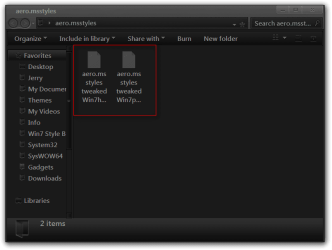
If this is what they look like in large or medium icon view, like two pieces of paper.
aero.msstyles.png

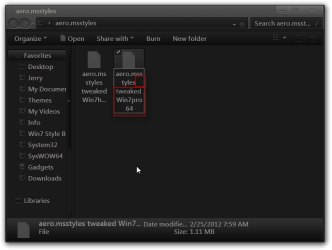
You need to right-click on one then click on Rename and removes the text until all you have is aero.msstyles
aero.msstyles2.png

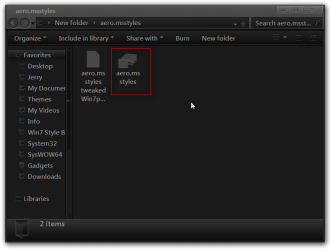
Then the image should change and look like this.
aero.msstyles3.png

Then make sure you switch to Windows Classic theme then log off and log on and then change the aero.msstyles and then it should work for you, be sure to keep a copy of the original aero.msstyles in case you ever want to go back.
If this does not work let me know you may have to do something else.
Jerry
 

My Computer My Computer

At a glance

Win 7 Pro x64 / Win 10 ProIntel(R) Core(TM) i7-3630QM CPU @ 2.40GHz12 GB(1) Intel(R) HD Graphics 4000 (2) NVIDIA GeFo...
Computer type
Laptop
Computer Manufacturer/Model Number
Sager NP9170
OS
Win 7 Pro x64 / Win 10 Pro
CPU
Intel(R) Core(TM) i7-3630QM CPU @ 2.40GHz
Motherboard
CLEVO P170EM
Memory
12 GB
Graphics Card(s)
(1) Intel(R) HD Graphics 4000 (2) NVIDIA GeForce GTX 675M
Sound Card
(1) Realtek High Definition Audio (2) Intel(R) Display Aud
Monitor(s) Displays
17.3
Screen Resolution
1920x1080
Hard Drives
(1) Samsung 860 EVO 500GB(OS) (1) Samsung 860 EVO 500GB(Data)
Keyboard
Backlite
Antivirus
MSE, Malwarebytes Pro
Browser
Firefox
Other Info
DESKTOP: Custom-built.
OS: Win 10 Pro x64.
CASE: Rosewill R5.
CPU: Intel I5 4670K CPU @ 3.40GHz.
CPU COOLER: Cool Master Hyper 212 EVO.
MOTHERBOARD: Asus Z87-A.
MEMORY: Kingston HyperX 2x4 GB.
GPU: Nvidia Geforce 650 TI.
PSU: Corsair TX750.
DRIVES: (1) Samsung 840 120 GB SSD (2) Western Digital blue 500 GB 7200 RPM.
Thanks a bunch Bongo. I was doing everything except restarting.

So it ends up working, but the active window color is stuck on blue. I can't get it to change to the colors I want. All I wanted this theme for was to get the more noticable active icon on the taskbar. I like it being indented and darkened instead of highlighted.

Is there a better way to go about doing that?
 

My Computer My Computer

At a glance

Windows 7 Ultimate x64Intel Core i7-2760QM8GB 1600MHzDual Radeon HD 6990M
Computer Manufacturer/Model Number
Clevo P180HM
OS
Windows 7 Ultimate x64
CPU
Intel Core i7-2760QM
Memory
8GB 1600MHz
Graphics Card(s)
Dual Radeon HD 6990M
Screen Resolution
1920x1080
Hard Drives
OCZ Vertex 3 60gb SSD
7200rpm 500GB HDD
Let me look at it a little more and I will get back to you in a little bit.
Jerry
 

My Computer My Computer

At a glance

Win 7 Pro x64 / Win 10 ProIntel(R) Core(TM) i7-3630QM CPU @ 2.40GHz12 GB(1) Intel(R) HD Graphics 4000 (2) NVIDIA GeFo...
Computer type
Laptop
Computer Manufacturer/Model Number
Sager NP9170
OS
Win 7 Pro x64 / Win 10 Pro
CPU
Intel(R) Core(TM) i7-3630QM CPU @ 2.40GHz
Motherboard
CLEVO P170EM
Memory
12 GB
Graphics Card(s)
(1) Intel(R) HD Graphics 4000 (2) NVIDIA GeForce GTX 675M
Sound Card
(1) Realtek High Definition Audio (2) Intel(R) Display Aud
Monitor(s) Displays
17.3
Screen Resolution
1920x1080
Hard Drives
(1) Samsung 860 EVO 500GB(OS) (1) Samsung 860 EVO 500GB(Data)
Keyboard
Backlite
Antivirus
MSE, Malwarebytes Pro
Browser
Firefox
Other Info
DESKTOP: Custom-built.
OS: Win 10 Pro x64.
CASE: Rosewill R5.
CPU: Intel I5 4670K CPU @ 3.40GHz.
CPU COOLER: Cool Master Hyper 212 EVO.
MOTHERBOARD: Asus Z87-A.
MEMORY: Kingston HyperX 2x4 GB.
GPU: Nvidia Geforce 650 TI.
PSU: Corsair TX750.
DRIVES: (1) Samsung 840 120 GB SSD (2) Western Digital blue 500 GB 7200 RPM.
Thanks!
 

My Computer My Computer

At a glance

Windows 7 Ultimate x64Intel Core i7-2760QM8GB 1600MHzDual Radeon HD 6990M
Computer Manufacturer/Model Number
Clevo P180HM
OS
Windows 7 Ultimate x64
CPU
Intel Core i7-2760QM
Memory
8GB 1600MHz
Graphics Card(s)
Dual Radeon HD 6990M
Screen Resolution
1920x1080
Hard Drives
OCZ Vertex 3 60gb SSD
7200rpm 500GB HDD
After looking at it again I have found that the maker of this colored that active and inactive top frame that is why you cannot change that color. I also looked at what they did to the taskbar buttons.
I cannot change this person's work it would not be fair to them but I could start with a fresh copy of the aero.msstyles make the changes for you, using Windows Style Builder and post it here in a zip folder.
&
This will be a custom theme and you will need to do 1 of these 2 ways of Enabling custom themes for it to work.
http://www.sevenforums.com/tutorials/34579-enabling-custom-themes-windows-7-a.html
Or
http://www.sevenforums.com/tutorials/28377-theme-how-apply-custom-themes.html?filter
I can flatten the buttons and leave everything else as the default Aero theme and then you can change the colors of the frame as you normally would. If this is something you would like done all I need is a name to call the theme.
Let me know.
Jerry
 

My Computer My Computer

At a glance

Win 7 Pro x64 / Win 10 ProIntel(R) Core(TM) i7-3630QM CPU @ 2.40GHz12 GB(1) Intel(R) HD Graphics 4000 (2) NVIDIA GeFo...
Computer type
Laptop
Computer Manufacturer/Model Number
Sager NP9170
OS
Win 7 Pro x64 / Win 10 Pro
CPU
Intel(R) Core(TM) i7-3630QM CPU @ 2.40GHz
Motherboard
CLEVO P170EM
Memory
12 GB
Graphics Card(s)
(1) Intel(R) HD Graphics 4000 (2) NVIDIA GeForce GTX 675M
Sound Card
(1) Realtek High Definition Audio (2) Intel(R) Display Aud
Monitor(s) Displays
17.3
Screen Resolution
1920x1080
Hard Drives
(1) Samsung 860 EVO 500GB(OS) (1) Samsung 860 EVO 500GB(Data)
Keyboard
Backlite
Antivirus
MSE, Malwarebytes Pro
Browser
Firefox
Other Info
DESKTOP: Custom-built.
OS: Win 10 Pro x64.
CASE: Rosewill R5.
CPU: Intel I5 4670K CPU @ 3.40GHz.
CPU COOLER: Cool Master Hyper 212 EVO.
MOTHERBOARD: Asus Z87-A.
MEMORY: Kingston HyperX 2x4 GB.
GPU: Nvidia Geforce 650 TI.
PSU: Corsair TX750.
DRIVES: (1) Samsung 840 120 GB SSD (2) Western Digital blue 500 GB 7200 RPM.
Thank you so much for going out of your way for me.

All I want changed is to be able to identify the active window easier. I would like it to act in the manner that Vista did.

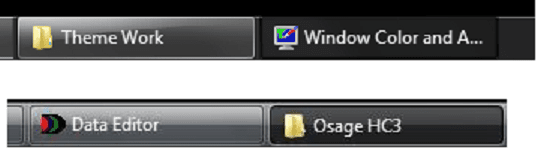
The first picture is how it looks now, and the second picture is one of a Vista taskbar.I would like it to look indented and much darker than the rest of the windows showing in the taskbar, similar to Vista. Is this possible?
 

Attachments

  • 7.png
    7.png
    3.4 KB · Views: 456
  • Vista.png
    Vista.png
    7 KB · Views: 462

My Computer My Computer

At a glance

Windows 7 Ultimate x64Intel Core i7-2760QM8GB 1600MHzDual Radeon HD 6990M
Computer Manufacturer/Model Number
Clevo P180HM
OS
Windows 7 Ultimate x64
CPU
Intel Core i7-2760QM
Memory
8GB 1600MHz
Graphics Card(s)
Dual Radeon HD 6990M
Screen Resolution
1920x1080
Hard Drives
OCZ Vertex 3 60gb SSD
7200rpm 500GB HDD
I have some company coming over in just a little bit but give me a couple hours and I'm pretty sure I can come pretty close to that, even though I am not an artist :p.
While I am doing that try to think of a name for it or I will just call it Glutton. and follow one of those two tutorials while you are waiting to.
Let me know
Jerry
 

My Computer My Computer

At a glance

Win 7 Pro x64 / Win 10 ProIntel(R) Core(TM) i7-3630QM CPU @ 2.40GHz12 GB(1) Intel(R) HD Graphics 4000 (2) NVIDIA GeFo...
Computer type
Laptop
Computer Manufacturer/Model Number
Sager NP9170
OS
Win 7 Pro x64 / Win 10 Pro
CPU
Intel(R) Core(TM) i7-3630QM CPU @ 2.40GHz
Motherboard
CLEVO P170EM
Memory
12 GB
Graphics Card(s)
(1) Intel(R) HD Graphics 4000 (2) NVIDIA GeForce GTX 675M
Sound Card
(1) Realtek High Definition Audio (2) Intel(R) Display Aud
Monitor(s) Displays
17.3
Screen Resolution
1920x1080
Hard Drives
(1) Samsung 860 EVO 500GB(OS) (1) Samsung 860 EVO 500GB(Data)
Keyboard
Backlite
Antivirus
MSE, Malwarebytes Pro
Browser
Firefox
Other Info
DESKTOP: Custom-built.
OS: Win 10 Pro x64.
CASE: Rosewill R5.
CPU: Intel I5 4670K CPU @ 3.40GHz.
CPU COOLER: Cool Master Hyper 212 EVO.
MOTHERBOARD: Asus Z87-A.
MEMORY: Kingston HyperX 2x4 GB.
GPU: Nvidia Geforce 650 TI.
PSU: Corsair TX750.
DRIVES: (1) Samsung 840 120 GB SSD (2) Western Digital blue 500 GB 7200 RPM.
I ran the patcher and should be ready for the custom theme. The name glutton will do just fine.

Thanks again
 

My Computer My Computer

At a glance

Windows 7 Ultimate x64Intel Core i7-2760QM8GB 1600MHzDual Radeon HD 6990M
Computer Manufacturer/Model Number
Clevo P180HM
OS
Windows 7 Ultimate x64
CPU
Intel Core i7-2760QM
Memory
8GB 1600MHz
Graphics Card(s)
Dual Radeon HD 6990M
Screen Resolution
1920x1080
Hard Drives
OCZ Vertex 3 60gb SSD
7200rpm 500GB HDD
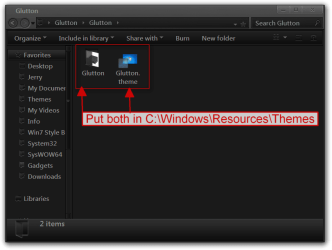
Here you go download the zip and extract it to your desktop and open the folder untell you see (screenshot) then put both 1 Glutton folder and 1 Glutton.theme file in C:\Windows\Resources\Themes
Glutton.png

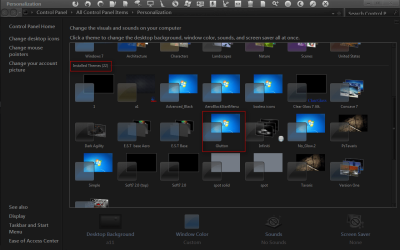
It will show up in Installed Themes as Glutton
Personalization.png

If the buttons are not right let me know.
Jerry
 

Attachments

My Computer My Computer

At a glance

Win 7 Pro x64 / Win 10 ProIntel(R) Core(TM) i7-3630QM CPU @ 2.40GHz12 GB(1) Intel(R) HD Graphics 4000 (2) NVIDIA GeFo...
Computer type
Laptop
Computer Manufacturer/Model Number
Sager NP9170
OS
Win 7 Pro x64 / Win 10 Pro
CPU
Intel(R) Core(TM) i7-3630QM CPU @ 2.40GHz
Motherboard
CLEVO P170EM
Memory
12 GB
Graphics Card(s)
(1) Intel(R) HD Graphics 4000 (2) NVIDIA GeForce GTX 675M
Sound Card
(1) Realtek High Definition Audio (2) Intel(R) Display Aud
Monitor(s) Displays
17.3
Screen Resolution
1920x1080
Hard Drives
(1) Samsung 860 EVO 500GB(OS) (1) Samsung 860 EVO 500GB(Data)
Keyboard
Backlite
Antivirus
MSE, Malwarebytes Pro
Browser
Firefox
Other Info
DESKTOP: Custom-built.
OS: Win 10 Pro x64.
CASE: Rosewill R5.
CPU: Intel I5 4670K CPU @ 3.40GHz.
CPU COOLER: Cool Master Hyper 212 EVO.
MOTHERBOARD: Asus Z87-A.
MEMORY: Kingston HyperX 2x4 GB.
GPU: Nvidia Geforce 650 TI.
PSU: Corsair TX750.
DRIVES: (1) Samsung 840 120 GB SSD (2) Western Digital blue 500 GB 7200 RPM.
Jeez, I've been refreshing page one looking for this. Whoops! Let me give it a go and I'll get back to ya
 

My Computer My Computer

At a glance

Windows 7 Ultimate x64Intel Core i7-2760QM8GB 1600MHzDual Radeon HD 6990M
Computer Manufacturer/Model Number
Clevo P180HM
OS
Windows 7 Ultimate x64
CPU
Intel Core i7-2760QM
Memory
8GB 1600MHz
Graphics Card(s)
Dual Radeon HD 6990M
Screen Resolution
1920x1080
Hard Drives
OCZ Vertex 3 60gb SSD
7200rpm 500GB HDD
Thank you! That helps a ton. It is now much easier to identify which window is active.

There is a small amount if tweaking I would do to it though. I would like it to have a thin, lighter color border when clicked on such as in vista. Is it possible to do this?

Here is a pic of how it looks now, compared to the one in vista.
 

Attachments

  • comparison.png
    comparison.png
    14.2 KB · Views: 144

My Computer My Computer

At a glance

Windows 7 Ultimate x64Intel Core i7-2760QM8GB 1600MHzDual Radeon HD 6990M
Computer Manufacturer/Model Number
Clevo P180HM
OS
Windows 7 Ultimate x64
CPU
Intel Core i7-2760QM
Memory
8GB 1600MHz
Graphics Card(s)
Dual Radeon HD 6990M
Screen Resolution
1920x1080
Hard Drives
OCZ Vertex 3 60gb SSD
7200rpm 500GB HDD
Like I said I am not an artist, here are the 2 images that need edited you can try and I will use them
Jerry
TaskBand2_TaskItemButton_NormalSelectedImage.pngTaskBand2Vertical__Taskband2_TaskItemButton_NormalSelectedImage.png
 

My Computer My Computer

At a glance

Win 7 Pro x64 / Win 10 ProIntel(R) Core(TM) i7-3630QM CPU @ 2.40GHz12 GB(1) Intel(R) HD Graphics 4000 (2) NVIDIA GeFo...
Computer type
Laptop
Computer Manufacturer/Model Number
Sager NP9170
OS
Win 7 Pro x64 / Win 10 Pro
CPU
Intel(R) Core(TM) i7-3630QM CPU @ 2.40GHz
Motherboard
CLEVO P170EM
Memory
12 GB
Graphics Card(s)
(1) Intel(R) HD Graphics 4000 (2) NVIDIA GeForce GTX 675M
Sound Card
(1) Realtek High Definition Audio (2) Intel(R) Display Aud
Monitor(s) Displays
17.3
Screen Resolution
1920x1080
Hard Drives
(1) Samsung 860 EVO 500GB(OS) (1) Samsung 860 EVO 500GB(Data)
Keyboard
Backlite
Antivirus
MSE, Malwarebytes Pro
Browser
Firefox
Other Info
DESKTOP: Custom-built.
OS: Win 10 Pro x64.
CASE: Rosewill R5.
CPU: Intel I5 4670K CPU @ 3.40GHz.
CPU COOLER: Cool Master Hyper 212 EVO.
MOTHERBOARD: Asus Z87-A.
MEMORY: Kingston HyperX 2x4 GB.
GPU: Nvidia Geforce 650 TI.
PSU: Corsair TX750.
DRIVES: (1) Samsung 840 120 GB SSD (2) Western Digital blue 500 GB 7200 RPM.
Perfect, thank you very much. I will fiddle with them and get back to you.
 

My Computer My Computer

At a glance

Windows 7 Ultimate x64Intel Core i7-2760QM8GB 1600MHzDual Radeon HD 6990M
Computer Manufacturer/Model Number
Clevo P180HM
OS
Windows 7 Ultimate x64
CPU
Intel Core i7-2760QM
Memory
8GB 1600MHz
Graphics Card(s)
Dual Radeon HD 6990M
Screen Resolution
1920x1080
Hard Drives
OCZ Vertex 3 60gb SSD
7200rpm 500GB HDD
Not sure I know what I'm doing here, but can we try these? :D
 

Attachments

  • TaskBand2_TaskItemButton_NormalSelectedImage.png
    TaskBand2_TaskItemButton_NormalSelectedImage.png
    261 bytes · Views: 363
  • TaskBand2Vertical__Taskband2_TaskItemButton_NormalSelectedImage.png
    TaskBand2Vertical__Taskband2_TaskItemButton_NormalSelectedImage.png
    254 bytes · Views: 373

My Computer My Computer

At a glance

Windows 7 Ultimate x64Intel Core i7-2760QM8GB 1600MHzDual Radeon HD 6990M
Computer Manufacturer/Model Number
Clevo P180HM
OS
Windows 7 Ultimate x64
CPU
Intel Core i7-2760QM
Memory
8GB 1600MHz
Graphics Card(s)
Dual Radeon HD 6990M
Screen Resolution
1920x1080
Hard Drives
OCZ Vertex 3 60gb SSD
7200rpm 500GB HDD
Also, is it possible to simply take the image files from the vista buttons and use them? It would be great if I could use that for both selected and non-selected items.
 

My Computer My Computer

At a glance

Windows 7 Ultimate x64Intel Core i7-2760QM8GB 1600MHzDual Radeon HD 6990M
Computer Manufacturer/Model Number
Clevo P180HM
OS
Windows 7 Ultimate x64
CPU
Intel Core i7-2760QM
Memory
8GB 1600MHz
Graphics Card(s)
Dual Radeon HD 6990M
Screen Resolution
1920x1080
Hard Drives
OCZ Vertex 3 60gb SSD
7200rpm 500GB HDD
The mod you made for me is actually really great. Once I lightened up my color scheme a bit, it's pretty much exactly what I wanted. Thank you once again
 

My Computer My Computer

At a glance

Windows 7 Ultimate x64Intel Core i7-2760QM8GB 1600MHzDual Radeon HD 6990M
Computer Manufacturer/Model Number
Clevo P180HM
OS
Windows 7 Ultimate x64
CPU
Intel Core i7-2760QM
Memory
8GB 1600MHz
Graphics Card(s)
Dual Radeon HD 6990M
Screen Resolution
1920x1080
Hard Drives
OCZ Vertex 3 60gb SSD
7200rpm 500GB HDD
Also, is it possible to simply take the image files from the vista buttons and use them? It would be great if I could use that for both selected and non-selected items.
If you have a vista aero.msstyles I could try it.


The mod you made for me is actually really great. Once I lightened up my color scheme a bit, it's pretty much exactly what I wanted. Thank you once again
Cool, You're Welcome, I played around with them and they are touchy.
 

My Computer My Computer

At a glance

Win 7 Pro x64 / Win 10 ProIntel(R) Core(TM) i7-3630QM CPU @ 2.40GHz12 GB(1) Intel(R) HD Graphics 4000 (2) NVIDIA GeFo...
Computer type
Laptop
Computer Manufacturer/Model Number
Sager NP9170
OS
Win 7 Pro x64 / Win 10 Pro
CPU
Intel(R) Core(TM) i7-3630QM CPU @ 2.40GHz
Motherboard
CLEVO P170EM
Memory
12 GB
Graphics Card(s)
(1) Intel(R) HD Graphics 4000 (2) NVIDIA GeForce GTX 675M
Sound Card
(1) Realtek High Definition Audio (2) Intel(R) Display Aud
Monitor(s) Displays
17.3
Screen Resolution
1920x1080
Hard Drives
(1) Samsung 860 EVO 500GB(OS) (1) Samsung 860 EVO 500GB(Data)
Keyboard
Backlite
Antivirus
MSE, Malwarebytes Pro
Browser
Firefox
Other Info
DESKTOP: Custom-built.
OS: Win 10 Pro x64.
CASE: Rosewill R5.
CPU: Intel I5 4670K CPU @ 3.40GHz.
CPU COOLER: Cool Master Hyper 212 EVO.
MOTHERBOARD: Asus Z87-A.
MEMORY: Kingston HyperX 2x4 GB.
GPU: Nvidia Geforce 650 TI.
PSU: Corsair TX750.
DRIVES: (1) Samsung 840 120 GB SSD (2) Western Digital blue 500 GB 7200 RPM.
Here is the aero.msstyles file from vista. Thanks much
 

Attachments

My Computer My Computer

At a glance

Windows 7 Ultimate x64Intel Core i7-2760QM8GB 1600MHzDual Radeon HD 6990M
Computer Manufacturer/Model Number
Clevo P180HM
OS
Windows 7 Ultimate x64
CPU
Intel Core i7-2760QM
Memory
8GB 1600MHz
Graphics Card(s)
Dual Radeon HD 6990M
Screen Resolution
1920x1080
Hard Drives
OCZ Vertex 3 60gb SSD
7200rpm 500GB HDD
Back
Top