Accidentally installed windows 7 on my Recovery Partition D:\

Khraum

New member
Local time
5:38 PM
Messages
16
Hi

Can someone please help me?

I have a Dell Studio laptop, and recently tried to reformat it by reinstalling Windows 7 Home Premium 64 bit. However, I made a mistake and reinstalled Windows 7 on the Recovery Partition. Because of this, when I started up my computer I got two Windows 7 boot options, one in C: and another in the Recovery Partition, which normally should not be visible but is now labelled D:.

I reformatted the hard drive again by reinstalling Windows 7 on C:, but still got the 2 boot options when I started up. I used msconfig to delete the boot option on the Recovery Partition after this. However, each time I start up my computer Windows 7 loads very slowly, and I even got 2 crashes. I think the Windows 7 installed on the Recovery Partition might still be causing problems. Is there a way that I can remove this installation completely, both from the Recovery Partition and from the boot configuration on my computer?

Thanks
 

My Computer My Computer

At a glance

windows 7 64 bit
OS
windows 7 64 bit
Yes. If you manage to get it installed on C: you could format D: from disk management. Or better yet just delete it when you install windows.
 

My Computer My Computer

At a glance

Windows 10 Pro x64Intel Core i7 6700KGSkill TridentZ RGB 16GB 3600 16-16-16-36EVGA GTX 980 Ti SC x2
Computer type
PC/Desktop
Computer Manufacturer/Model Number
Skylake Special #666
OS
Windows 10 Pro x64
CPU
Intel Core i7 6700K
Motherboard
Asus Sabertooth Z170 Mark 1
Memory
GSkill TridentZ RGB 16GB 3600 16-16-16-36
Graphics Card(s)
EVGA GTX 980 Ti SC x2
Sound Card
Realtek High Definition
Monitor(s) Displays
AOC G2460PG
Screen Resolution
1920 x 1080 144Hz
Hard Drives
Samsung 860 Pro 256GB, Seagate Barracuda 4TB x2
PSU
EVGA 1000 P2, EVGA White Custom Braided Cables
Case
Corsair Vengeance C70 Gunmetal Black
Cooling
Corsair H100i v2, Corsair ML120 x2, Thermal Grizzly Kryonaut
Keyboard
Logitech G910 Orion Spectrum
Mouse
Logitech G700s
Internet Speed
Verizon Fios Quantum Gateway 75/75
Antivirus
Windows Defender, Malwarebytes Free 3.8.3
Browser
Chrome
Other Info
Corsair SP120 x4, LG Blu-ray Drive, Durabrand HT-395 100 Watt Dolby Digital Amp, Corsair H2100 Wireless 7.1 Headset
Yes. If you manage to get it installed on C: you could format D: from disk management. Or better yet just delete it when you install windows.

Thanks. I not sure about deleting D: yet, because Dell, my laptop's manufacturer has some files on restoring the computer to the original factory configuration on it. I only read somewhere that I can access this option by pressing F8 when I start my computer. Before I reformatted my computer I tried this, and it didn't work. After I reformatted my computer I tried this, and it didn't work either. But I wonder if installing windows 7 on D has corrupted this function, and I would still like to retain it.

As well, is there some other critical files that would be lost if I delete or reformat D:?

Can someone with a Dell computer help me on this?
 

My Computer My Computer

At a glance

windows 7 64 bit
OS
windows 7 64 bit
Dell partition may be the active one.

You would need to pick out carefully the bits you installed to it by mistake.

Easy to make an error there.

Perhaps post a screenie of the contenst of your "D" partition.

Screenie of disk mgmt window would help, too.
 

My Computers My Computers

  • At a glance

    7 X64i5 84002x8gb 3200mhz
    Computer type
    PC/Desktop
    OS
    7 X64
    CPU
    i5 8400
    Motherboard
    gigabyte b365m ds3h
    Memory
    2x8gb 3200mhz
    Hard Drives
    various
    PSU
    pure power 11 400w cm
    Case
    Coolermaster
    Cooling
    cryorig m9i
  • At a glance

    7x64g54008gb ddr4 2400
    Computer type
    PC/Desktop
    OS
    7x64
    CPU
    g5400
    Motherboard
    ga b365m ds3h
    Memory
    8gb ddr4 2400
    PSU
    xfx pro 450w
Dell partition may be the active one.

You would need to pick out carefully the bits you installed to it by mistake.

Easy to make an error there.

Perhaps post a screenie of the contenst of your "D" partition.

Screenie of disk mgmt window would help, too.

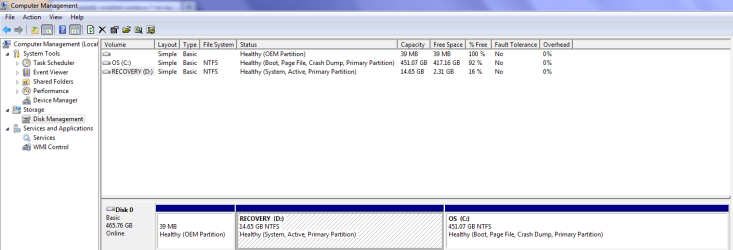
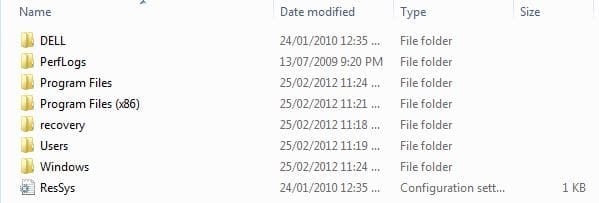
Thanks, here are the images of my D partition contents and disk Mgmt
 

Attachments

  • Partition.PNG
    Partition.PNG
    25.5 KB · Views: 122
  • Capture2.JPG
    Capture2.JPG
    20.5 KB · Views: 57

My Computer My Computer

At a glance

windows 7 64 bit
OS
windows 7 64 bit
Dell partition is system.

That is fine.

TO access Dell recovery options you need to add the dell bootable wim to boot menu.

It maybe called winpe.wim or similar.

It will be on D somewhere - look in the folder named Dell - and all it's sub folders and post screenie.
 

My Computers My Computers

  • At a glance

    7 X64i5 84002x8gb 3200mhz
    Computer type
    PC/Desktop
    OS
    7 X64
    CPU
    i5 8400
    Motherboard
    gigabyte b365m ds3h
    Memory
    2x8gb 3200mhz
    Hard Drives
    various
    PSU
    pure power 11 400w cm
    Case
    Coolermaster
    Cooling
    cryorig m9i
  • At a glance

    7x64g54008gb ddr4 2400
    Computer type
    PC/Desktop
    OS
    7x64
    CPU
    g5400
    Motherboard
    ga b365m ds3h
    Memory
    8gb ddr4 2400
    PSU
    xfx pro 450w
Dell partition is system.

That is fine.

TO access Dell recovery options you need to add the dell bootable wim to boot menu.

It maybe called winpe.wim or similar.

It will be on D somewhere - look in the folder named Dell - and all it's sub folders and post screenie.

Just did this. The only 2 files in the Dell folder are:

catalog.ini (It is a configuration setting file)

and Factory.wim (Is this the file you are talking about, and how do you use it to access the recovery options?).
 

My Computer My Computer

At a glance

windows 7 64 bit
OS
windows 7 64 bit
If factory.wim is large - 3gb or so - then that is the installation wim.

You are looking for the preinstallation wim - it is probably under 200mb.

It is possible you may have overwritten it - look in the folder recovery\{longnumber} as well.
 

My Computers My Computers

  • At a glance

    7 X64i5 84002x8gb 3200mhz
    Computer type
    PC/Desktop
    OS
    7 X64
    CPU
    i5 8400
    Motherboard
    gigabyte b365m ds3h
    Memory
    2x8gb 3200mhz
    Hard Drives
    various
    PSU
    pure power 11 400w cm
    Case
    Coolermaster
    Cooling
    cryorig m9i
  • At a glance

    7x64g54008gb ddr4 2400
    Computer type
    PC/Desktop
    OS
    7x64
    CPU
    g5400
    Motherboard
    ga b365m ds3h
    Memory
    8gb ddr4 2400
    PSU
    xfx pro 450w

My Computer My Computer

At a glance

Vista, Windows7, Mint Mate, Zorin, Windows 8from 1.6GHz Duo to i7
Computer Manufacturer/Model Number
HP, Dell, Gateway, Toshiba - 4 laptops and 2 desktops
OS
Vista, Windows7, Mint Mate, Zorin, Windows 8
CPU
from 1.6GHz Duo to i7
Monitor(s) Displays
2x HP w2207
Hard Drives
5x HDD, 7x SSD, 12x Externals
Keyboard
with trackball - no mices
Mouse
Trackball mice
Internet Speed
DSL 6000
Hi whs,

Dell is system .

He wants to retain dell recovery options.

Your tut - excellent tho it is - not appropriate here.
 

My Computers My Computers

  • At a glance

    7 X64i5 84002x8gb 3200mhz
    Computer type
    PC/Desktop
    OS
    7 X64
    CPU
    i5 8400
    Motherboard
    gigabyte b365m ds3h
    Memory
    2x8gb 3200mhz
    Hard Drives
    various
    PSU
    pure power 11 400w cm
    Case
    Coolermaster
    Cooling
    cryorig m9i
  • At a glance

    7x64g54008gb ddr4 2400
    Computer type
    PC/Desktop
    OS
    7x64
    CPU
    g5400
    Motherboard
    ga b365m ds3h
    Memory
    8gb ddr4 2400
    PSU
    xfx pro 450w
Hi whs,

Dell is system .

He wants to retain dell recovery options.

Your tut - excellent tho it is - not appropriate here.
Hmm, looks like I missed something. Thanks for pointing that out.
 

My Computer My Computer

At a glance

Vista, Windows7, Mint Mate, Zorin, Windows 8from 1.6GHz Duo to i7
Computer Manufacturer/Model Number
HP, Dell, Gateway, Toshiba - 4 laptops and 2 desktops
OS
Vista, Windows7, Mint Mate, Zorin, Windows 8
CPU
from 1.6GHz Duo to i7
Monitor(s) Displays
2x HP w2207
Hard Drives
5x HDD, 7x SSD, 12x Externals
Keyboard
with trackball - no mices
Mouse
Trackball mice
Internet Speed
DSL 6000
If factory.wim is large - 3gb or so - then that is the installation wim.

You are looking for the preinstallation wim - it is probably under 200mb.

It is possible you may have overwritten it - look in the folder recovery\{longnumber} as well.

I can't find it, it must be gone. I guess if it is gone then I would be willing to get rid of D:. Would getting rid of it damage my system? Would I have to reformat the system again? As well would simply formatting or deleting D: get rid of all the residues of the windows 7 I installed on it, including from boot files?
 

My Computer My Computer

At a glance

windows 7 64 bit
OS
windows 7 64 bit
LOL.

Dell used to put the recovery.wim or windowsre.wim in the recovery folder.

You don't need it to restore - it just provides an easy gui.

You can apply the factory.wim to the partition with imagex or any number of similar apps.

We can have a quick look for it by running this - then post up the text file it produces:

unzip it - then rt click and run as admin on findwims.cmd

View attachment findwims-V2.zip
 

My Computers My Computers

  • At a glance

    7 X64i5 84002x8gb 3200mhz
    Computer type
    PC/Desktop
    OS
    7 X64
    CPU
    i5 8400
    Motherboard
    gigabyte b365m ds3h
    Memory
    2x8gb 3200mhz
    Hard Drives
    various
    PSU
    pure power 11 400w cm
    Case
    Coolermaster
    Cooling
    cryorig m9i
  • At a glance

    7x64g54008gb ddr4 2400
    Computer type
    PC/Desktop
    OS
    7x64
    CPU
    g5400
    Motherboard
    ga b365m ds3h
    Memory
    8gb ddr4 2400
    PSU
    xfx pro 450w
LOL.

Dell used to put the recovery.wim or windowsre.wim in the recovery folder.

You don't need it to restore - it just provides an easy gui.

You can apply the factory.wim to the partition with imagex or any number of similar apps.

Can you be more specific about what steps I should take? As well, even if I completely restored the factory configuration, would traces of the Windows 7 on D: still be in the partition or my boot files?
 

My Computer My Computer

At a glance

windows 7 64 bit
OS
windows 7 64 bit
If you run the .cmd file I posted above -it will find any wims on C or D drive.

If you have the del bootable wim we can add it to the boot menu .

If you don't have it - then you can still apply the image from the factory.wim to back to your drive - but you will need to use a different app. to do the applying.

findwims-V2.zip

After we have organised your restore method - then we can delete anything you don't need from D partition
 

My Computers My Computers

  • At a glance

    7 X64i5 84002x8gb 3200mhz
    Computer type
    PC/Desktop
    OS
    7 X64
    CPU
    i5 8400
    Motherboard
    gigabyte b365m ds3h
    Memory
    2x8gb 3200mhz
    Hard Drives
    various
    PSU
    pure power 11 400w cm
    Case
    Coolermaster
    Cooling
    cryorig m9i
  • At a glance

    7x64g54008gb ddr4 2400
    Computer type
    PC/Desktop
    OS
    7x64
    CPU
    g5400
    Motherboard
    ga b365m ds3h
    Memory
    8gb ddr4 2400
    PSU
    xfx pro 450w
LOL.

Dell used to put the recovery.wim or windowsre.wim in the recovery folder.

You don't need it to restore - it just provides an easy gui.

You can apply the factory.wim to the partition with imagex or any number of similar apps.

We can have a quick look for it by running this - then post up the text file it produces:

unzip it - then rt click and run as admin on findwims.cmd

View attachment 200477

Hi, don't quite understand what you mean. It doesn't show any wim files. Should I put the program in a certain folder?
 

My Computer My Computer

At a glance

windows 7 64 bit
OS
windows 7 64 bit
What doesn't show any wim files?

Rt click and run as admin on findwims.cmd.

That will produce a text file called foundwims.txt.

If you have a wim on drive C or drive D - it will be listed in the foudwims.txt file.
 

My Computers My Computers

  • At a glance

    7 X64i5 84002x8gb 3200mhz
    Computer type
    PC/Desktop
    OS
    7 X64
    CPU
    i5 8400
    Motherboard
    gigabyte b365m ds3h
    Memory
    2x8gb 3200mhz
    Hard Drives
    various
    PSU
    pure power 11 400w cm
    Case
    Coolermaster
    Cooling
    cryorig m9i
  • At a glance

    7x64g54008gb ddr4 2400
    Computer type
    PC/Desktop
    OS
    7x64
    CPU
    g5400
    Motherboard
    ga b365m ds3h
    Memory
    8gb ddr4 2400
    PSU
    xfx pro 450w
What doesn't show any wim files?

Rt click and run as admin on findwims.cmd.

That will produce a text file called foundwims.txt.

If you have a wim on drive C or drive D - it will be listed in the foudwims.txt file.

Do you mean opening up the findwims zip file and highlighting and right clicking findwims.cmd? I tried to do this, but it never gave me the option to run as admin. The only options it gave me are open, cut, copy, delete, properties.

Maybe there are no files other than factory.wim?
 

My Computer My Computer

At a glance

windows 7 64 bit
OS
windows 7 64 bit
You will only find out by looking - that .cmd file will do the job.

Strange you don't get the option to run as admin .

You are the administrator on that machine ?

Actually - you shouldn't need to run it as admin - just dble click the .cmd file, or rt click it and select open - works fine for me.
 

My Computers My Computers

  • At a glance

    7 X64i5 84002x8gb 3200mhz
    Computer type
    PC/Desktop
    OS
    7 X64
    CPU
    i5 8400
    Motherboard
    gigabyte b365m ds3h
    Memory
    2x8gb 3200mhz
    Hard Drives
    various
    PSU
    pure power 11 400w cm
    Case
    Coolermaster
    Cooling
    cryorig m9i
  • At a glance

    7x64g54008gb ddr4 2400
    Computer type
    PC/Desktop
    OS
    7x64
    CPU
    g5400
    Motherboard
    ga b365m ds3h
    Memory
    8gb ddr4 2400
    PSU
    xfx pro 450w
It may be easier if you ever decide to restore to factory condition to simply order the Recovery Disks from Dell.

Since you used the Dell Win7 Reinstallation DVD to clean reinstall, it seems you want the cleaner installation without the preinstalled bloatware anyway. If this is the case, here's how to recover both the System boot files and the HD disk space from D into C

Boot free Partition Wizard bootable CD, right click C, select Modify>Set to Active, click OK.

Next click on the Disk # to highlight it, from Disk tab select Rebuild MBR, Apply both steps, reboot.

If Win7 doesn't start boot into the Win7 DVD Repair console to run Startup Repair up to 3 Separate Times with reboots to write the System boot files to the Active partition.

Once Win7 starts and holds the System Active Boot flags, boot PW CD, rightclick on D, select Delete, OK.

Next rightclick on C, select Resize, slide the left border to the left to take up the space deleted on D, OK, Apply both steps.

If you'd prefer to reinstall reclaiming both C and D, follow these steps to Clean Reinstall Windows 7 Factory OEM
 
Back
Top