Any reason to use Readyboost on Windows 7 X64 with 8GB?

Dorfdad

New member
Member
Power User
VIP
Local time
12:21 AM
Messages
204
Location
Philadelphia, PA
Ive been reading about how windows 7 is supposed to improve and remove the restrictions of the readyboost that was in windows.

My question is if its even worth it on an X64 system with 8GB DDR3 RAM?

Would it improve the system speed even more having stuff cached right on the usb?

I have a 4GB sitting around here I would need to clean off but wanted to know what your thoughts were?
 

My Computer My Computer

At a glance

Windows 7 7264AMD Phenon X4955 Black Edition 3.2 Quad Core8GB CORSAIR XMS3 DHX 4GB 240-Pin DDR3 SDRAM D...SAPPHIRE Radeon HD 4890 1GB 256-bit GDDR5 PCI...
OS
Windows 7 7264
CPU
AMD Phenon X4955 Black Edition 3.2 Quad Core
Motherboard
ASUS M4A79T Deluxe AM3 DDR3 AMD 790FX ATX AMD Motherboard
Memory
8GB CORSAIR XMS3 DHX 4GB 240-Pin DDR3 SDRAM DDR3 1600
Graphics Card(s)
SAPPHIRE Radeon HD 4890 1GB 256-bit GDDR5 PCI Exp 2.0 16x
Sound Card
Onboard Asus
Monitor(s) Displays
Hanns G 28" Widscreen Baby!
Screen Resolution
1900x1200
Hard Drives
Western Digital Caviar Black WD1001FALS 1TB 7200 RPM 32MB Cache SATA 3.0Gb

Western Digital 320gb 7200 RPM 16MB Cache
PSU
CORSAIR CMPSU-750TX 750W ATX12V / EPS12V
Case
Custom Made ATX
Cooling
Air
Keyboard
Microsoft Wired for gaming
Mouse
Wired for gaming 2200
Internet Speed
Comcast 24GB
readyboost

Ive been reading about how windows 7 is supposed to improve and remove the restrictions of the readyboost that was in windows.

My question is if its even worth it on an X64 system with 8GB DDR3 RAM?

Would it improve the system speed even more having stuff cached right on the usb?

I have a 4GB sitting around here I would need to clean off but wanted to know what your thoughts were?

Hey dorfdad

Readyboost is designed for systems with little ram. If I had 8 gigs readyboost would be off and so would the page file.

hope this helps a bit

Ken
 

My Computer My Computer

At a glance

Win 8 Release candidate 8400[email protected]4 gigsNvidia 9600M
Computer Manufacturer/Model Number
HP Pavillion dv-7 1005 Tx
OS
Win 8 Release candidate 8400
CPU
[email protected]
Memory
4 gigs
Graphics Card(s)
Nvidia 9600M
Sound Card
HD built-in
Monitor(s) Displays
17" Wxga
Screen Resolution
1440x900
Cooling
none
Internet Speed
45Mb down 5Mb up
Hey dorfdad

Readyboost is designed for systems with little ram. If I had 8 gigs readyboost would be off and so would the page file.

hope this helps a bit

Ken
I would set the PF to 64 MB (1/8) just so if an app complains about not finding the PF than it would see one
 

My Computer My Computer

At a glance

Windows 7 Home Premium x64 - Mac OS X 10.6.4 x64Intel Core 2 Duo T9300 2.5 GHz4GB Kingston DDR2-800NVIDIA Geforce 8600M GT (512MB Model)
Computer Manufacturer/Model Number
Compal JFT02 (Custom Build Laptop)
OS
Windows 7 Home Premium x64 - Mac OS X 10.6.4 x64
CPU
Intel Core 2 Duo T9300 2.5 GHz
Motherboard
JFT02
Memory
4GB Kingston DDR2-800
Graphics Card(s)
NVIDIA Geforce 8600M GT (512MB Model)
Sound Card
Realtek HD Audio
Monitor(s) Displays
WUXGA Standard Laptop Display
Screen Resolution
1680*1050
Hard Drives
Toshiba 320GB 5400RPM Laptop HD
PSU
Standard Laptop Power Supply
Case
Standard Laptop Case
Cooling
Standard Laptop Cooling
Keyboard
Standard Laptop 105 Key-Keyboard
Mouse
Synaptics Touchpad
Internet Speed
Verizion Online DSL 3360/864 kbs (dl/up)
Yep I was thinking that, but being new to 7 and the new changes... Ok thanks installing RTM now :)
 

My Computer My Computer

At a glance

Windows 7 7264AMD Phenon X4955 Black Edition 3.2 Quad Core8GB CORSAIR XMS3 DHX 4GB 240-Pin DDR3 SDRAM D...SAPPHIRE Radeon HD 4890 1GB 256-bit GDDR5 PCI...
OS
Windows 7 7264
CPU
AMD Phenon X4955 Black Edition 3.2 Quad Core
Motherboard
ASUS M4A79T Deluxe AM3 DDR3 AMD 790FX ATX AMD Motherboard
Memory
8GB CORSAIR XMS3 DHX 4GB 240-Pin DDR3 SDRAM DDR3 1600
Graphics Card(s)
SAPPHIRE Radeon HD 4890 1GB 256-bit GDDR5 PCI Exp 2.0 16x
Sound Card
Onboard Asus
Monitor(s) Displays
Hanns G 28" Widscreen Baby!
Screen Resolution
1900x1200
Hard Drives
Western Digital Caviar Black WD1001FALS 1TB 7200 RPM 32MB Cache SATA 3.0Gb

Western Digital 320gb 7200 RPM 16MB Cache
PSU
CORSAIR CMPSU-750TX 750W ATX12V / EPS12V
Case
Custom Made ATX
Cooling
Air
Keyboard
Microsoft Wired for gaming
Mouse
Wired for gaming 2200
Internet Speed
Comcast 24GB
how do you even use all 8GB ram. I have 8GB and have not found a way to use it all. Even with virtual machine and gaming.
 

My Computer My Computer

At a glance

Windows 7 UltimateIntel e6750 2.66GhZ8GB Patriot DDR2 800MhZ Memory320MB eVGA 8800 GTS
Computer Manufacturer/Model Number
Custom
OS
Windows 7 Ultimate
CPU
Intel e6750 2.66GhZ
Motherboard
Gigabyte P35 DS3R
Memory
8GB Patriot DDR2 800MhZ Memory
Graphics Card(s)
320MB eVGA 8800 GTS
Sound Card
Bult-in
Monitor(s) Displays
Samsung Syncmaster 931C 19"
Screen Resolution
1280*1024
Hard Drives
Samsung HD642JJ - 640GB
PSU
Corsair 500W
Case
Antec 900
Cooling
Stock
ReadyBoost does more than emulate RAM or Page. It complements SuperFetch. It caches certain disk I/O. I admit that I have not read any white papers on changes in Windows 7 implementation of ReadyBoost, but I doubt that MS made it dumber. It is my leap of faith that MS tweaked the algorithms that determine where small random data accesses are better served via flash versus HDD (page).

I have a self-modified USB splice inside my case, intercepting the lead to a flash reader. I soldered it to the back plane of the reader assembly. Here, I attach a 4GB thumb drive. It is internal and out of the way. If 7 ever needs it, it is there. I also keep a page file on a secondary controller RAID0 volume.

Let me define "Systems" as meaning hardware + Software. Some systems will never need the page file. Some systems will never need ReadyBoost. Some systems will experience a performance degradation using either or both. Some systems will benefit from either or both.

Many of the existing processes for analysis of page file efficiency will determine degradation vs. beneficence. Only direct examination of a particular system under a range of operational modalities will reveal the answer to the OP's question.

I think you youngsters call it YMMV.
 
I have 8 GB and in Vista I had disabled pagefile once. Then Matlab would not work and I deisntalled it and tried all kind of things untill I realized that it needs a pagefile. Just leave it at default, if W7 doesn't need it, it won't hurt. If needed, it will use it. Unless your HDD really is small, leave it at the size W7 determines.

Unlike vista, W7 doesn't really fill up my RAM either. I haven't been using heavy software yet, though. I suppose once I do, superfetch will do more caching. In vista going from 4 GB to 8 GB sped up visrusscan, defragmentation and file transfer significantly.

I still have my 4 GB USB stick for readyboost. Not sure if it does anything. It sure doesn't hurt. If you have one, use it. If you don't have one... don't waste money buying one. I think W7 now can use much more than the vista-4GB for readyboost. That makes me think it is useful somehow.
My board has 4 RAM slots. 2 GB modules are inexpensive. 4GB modules are very expensive. So I figured readyboost would be the only feasible way to get more RAM (or fake RAM :-). no matter what you see how much RAM is free, you never have enough RAM! Especially not at $ 100 for 8 GB :-)
 

My Computer My Computer

At a glance

W7 Pro 64Intel i3 3220 @ 3.3 GHz2x8GB DDR 3 1600 Kingstononboard
Computer Manufacturer/Model Number
homemade
OS
W7 Pro 64
CPU
Intel i3 3220 @ 3.3 GHz
Motherboard
ASRock H77M
Memory
2x8GB DDR 3 1600 Kingston
Graphics Card(s)
onboard
Sound Card
onboard
Monitor(s) Displays
two 21" LCD
Hard Drives
128 GB Samsung 830
PSU
OCZ400MXSP
Cooling
Stock
Internet Speed
DSL
In my experience, the disk cache is usually faster that the USB, even if the USB is 2.0. Forcing windows to use the readyboost on a USB drive when you have enough ram may even hinder your performance, unless the drive is an old 5400 super slow read/write drive

Also disabling the pagefile is not the best idea, setting it static is the best. Some apps require one.

If you disable the pagefile and Windows needs somewhere to page the data, it will page it it to kernel, which is not the best idea. If you have it too low, windows will dynamically make it bigger, hindering performance as well.

I have 6GB of RAM, I still set my pagefile to 6GB static, with out any readyboost drives, my drive's cache is faster than querying the USB drive over USB.

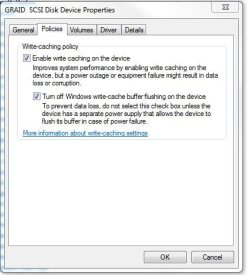
I recommend turning off the Windows write-cache buffer if you want more performance from your drives, but be sure that you have a power backup in case of loss of power. Not buffering the write cache could lead to loss of data if you lose power in midst of a write.

Computer Management> Device Manager>Disk Drives>[Select one]>Properties>Policies>Enable write cache>Turn Off write-cache buffer

Depending on your drive type, you may have even more performance options.
 

Attachments

  • wrie-cache-buffer.JPG
    wrie-cache-buffer.JPG
    33.6 KB · Views: 295
Last edited:

My Computer My Computer

At a glance

Windows 7 7600.16384 x64Intel Core i7 OC'd to 3.20 GHz6GB GSkillz Triple Channel DDR3 OC'd to 1600 MHzNvidia GTX 280
Computer Manufacturer/Model Number
Built Myself
OS
Windows 7 7600.16384 x64
CPU
Intel Core i7 OC'd to 3.20 GHz
Motherboard
Gigabyte
Memory
6GB GSkillz Triple Channel DDR3 OC'd to 1600 MHz
Graphics Card(s)
Nvidia GTX 280
Sound Card
X-Fi Platinum
Monitor(s) Displays
Dual 2001FWP
Screen Resolution
1680x1050 x 2
Hard Drives
System - Dual 150GB Raptors Raid0
Doc Storage - 1TB SATA 32MB cache Samsung
TV Recordings - 1TB SATA 32MB cache Samsung
PSU
Gigawatt Antec
Case
Antec 900
Keyboard
Saitek
Mouse
logitech MX 10000
Internet Speed
30 mb/s
I asked nicely

7im? If the page file is a fixed size or range, and the Windows systems requires more memory than is available, the system will generate an out of memory error. It will NOT expand the page file.

Windows is designed to use a page file. The design aspect deals with memory allocation, not just memory usage.

I simply cannot wrap my head around "page it to kernel."

You are coming to a valid conclusion under some circumstances, but your roadmap is severely wrinkled.
 
Sure the HDD cache is faster than the USB stick. But it is only 32 MB compared to 4 GB or so. Most HDD only have 16 MB or even 8 MB cache.
wouldn't W7 be smart enough to fully use the HDD cache and only use readyboost if the HDD cache is full already?

Maybe my readyboost doesn't help much, but do you think with good HDDs it would slow me down?
 

My Computer My Computer

At a glance

W7 Pro 64Intel i3 3220 @ 3.3 GHz2x8GB DDR 3 1600 Kingstononboard
Computer Manufacturer/Model Number
homemade
OS
W7 Pro 64
CPU
Intel i3 3220 @ 3.3 GHz
Motherboard
ASRock H77M
Memory
2x8GB DDR 3 1600 Kingston
Graphics Card(s)
onboard
Sound Card
onboard
Monitor(s) Displays
two 21" LCD
Hard Drives
128 GB Samsung 830
PSU
OCZ400MXSP
Cooling
Stock
Internet Speed
DSL
I recommend turning off the Windows write-cache buffer if you want more performance from your drives, but be sure that you have a power backup in case of loss of power. Not buffering the write cache could lead to loss of data if you lose power in midst of a write.

Computer Management> Device Manager>Disk Drives>[Select one]>Properties>Policies>Enable write cache>Turn Off write-cache buffer

Depending on your drive type, you may have even more performance options.

Can anyone else verify this? Would this be a good idea to do on a laptop? Will disabling it really improve performance?

Regarding Paging, disabling it altogether is a bad idea. What about setting it to a low setting, such as 512 MB?
 

My Computer My Computer

At a glance

Windows 7 64-bit (7127) & Mac OS X 10.5.72.53 GHz Intel Core2Duo (6MB L2 Cache)4GB DDR2 6678600M GT 512MB
Computer Manufacturer/Model Number
Apple MacBook Pro
OS
Windows 7 64-bit (7127) & Mac OS X 10.5.7
CPU
2.53 GHz Intel Core2Duo (6MB L2 Cache)
Memory
4GB DDR2 667
Graphics Card(s)
8600M GT 512MB
Monitor(s) Displays
15.4 LED backlit LCD
Screen Resolution
1440x900
Hard Drives
Hitachi 250GB 5400 RPM (soon to be replaced)
Mouse
Logitech
I tried ready-boost on a system with only 1 gig and 2 gig ready-boost and didn't see much difference. Since that system wasn't being stretched i.e. using over 750mb the ready-boost didn't do much. It's basically just a disk cache for small bits of data. Reading from disk is far quicker for bigger sequential reads.
 

My Computer My Computer

At a glance

Windows 7 x64Intel Core 2 Quad Q6700 @ 3.2 GHz4 GigATI Radeon HD 4870
Computer Manufacturer/Model Number
Home Built
OS
Windows 7 x64
CPU
Intel Core 2 Quad Q6700 @ 3.2 GHz
Motherboard
Gigabyte GA-965P-DQ6
Memory
4 Gig
Graphics Card(s)
ATI Radeon HD 4870
Sound Card
Creative X-Fi XtremeMusic
Monitor(s) Displays
Samsung SyncMaster 226BW
Screen Resolution
1680 x 1050
PSU
Antec TruePower TP-550
Case
Antec P180
Cooling
Zalman CNPS9700, 3 Antec TriCool 120mm
Keyboard
Logitech G15
I played around with ReadyBoost under Vista and I didn't see 1 bit of difference with it enabled. With anything more than 2GB of RAM, I wouldn't even consider it. And since RAM is really cheap...might as well just put more RAM in it if you need to. And since the OP already has 8GB...there really isn't any more need.

As far as page files go, i usually recommend hard setting the size so that Windows doesn't adjust the size on the fly and possible fragment stuff. With regards to size...since hard drives are so incredibly cheap these days, why not make a 1x or 1.5x RAM pagefile and just be done with it. Even if you don't use it....it's unlikely that it will really take up that much of your hard drive...you can always shrink it later if you really need the hard drive space back.
 

My Computer My Computer

At a glance

Windows 7 Ultimate x64Intel Q9550 2.83Ghz OC'd to 3.40Ghz8GB G.Skill PI DDR2-800, 4-4-4-12 timingsEVGA 1280MB Nvidia GeForce GTX570
Computer Manufacturer/Model Number
Self-Built in July 2009
OS
Windows 7 Ultimate x64
CPU
Intel Q9550 2.83Ghz OC'd to 3.40Ghz
Motherboard
Gigabyte GA-EP45-UD3R rev. 1.1, F12 BIOS
Memory
8GB G.Skill PI DDR2-800, 4-4-4-12 timings
Graphics Card(s)
EVGA 1280MB Nvidia GeForce GTX570
Sound Card
Realtek ALC899A 8 channel onboard audio
Monitor(s) Displays
23" Acer x233H
Screen Resolution
1920x1080
Hard Drives
Intel X25-M 80GB Gen 2 SSD
Western Digital 1TB Caviar Black, 32MB cache. WD1001FALS
PSU
Corsair 620HX modular
Case
Antec P182
Cooling
stock
Keyboard
ABS M1 Mechanical
Mouse
Logitech G9 Laser Mouse
Internet Speed
15/2 cable modem
Other Info
Windows and Linux enthusiast. Logitech G35 Headset.
Whether you use a USB stick, SD card, etc, or not before you go disabling the Readyboost service you might want to read up on Readyboot.
 

My Computer My Computer

At a glance

Win 7 Ultimate x64FX-8350 @ 4.6 GHz so farADATA XPG V1 Series Black 8GB DDR3 1600Sapphire R9 270x Dual-X
Computer type
PC/Desktop
Computer Manufacturer/Model Number
Me
OS
Win 7 Ultimate x64
CPU
FX-8350 @ 4.6 GHz so far
Motherboard
Asus M5A97 EVO
Memory
ADATA XPG V1 Series Black 8GB DDR3 1600
Graphics Card(s)
Sapphire R9 270x Dual-X
Sound Card
Xonar DGX w/ Corsair Vengence 1300
Monitor(s) Displays
Acer S232HL Abid
Screen Resolution
1920x1080
Hard Drives
120 GB OCZ Vertex 3
500 GB Seagate 7200.12
PSU
Antec Earthwatts 650W Green
Case
Antec Three Hundred
Cooling
Cooler Master 212 EVO
Keyboard
Logitech G510
Mouse
Logitech G500s
Internet Speed
35000/3000
I have been outside playing volleyball, me on one side and all of the kids on the other side. I am sore and tired. Tomorrow, I will post a number of references to address some of the archaic, mythic and just wrong information posted here. I will include source documentation links and will not include any anecdotal content. In the meantime, I am hoping that that some of you will do a little bit of homework and research the subject matter. HINT: You should not look at tweak guides.

Quoting myself is poor form. -1 on me.

ReadyBoost does more than emulate RAM or Page. It complements SuperFetch. It caches certain disk I/O....

Let me define "Systems" as meaning hardware + Software. Some systems will never need the page file. Some systems will never need ReadyBoost. Some systems will experience a performance degradation using either or both. Some systems will benefit from either or both.

Many of the existing processes for analysis of page file efficiency will determine degradation vs. beneficence. Only direct examination of a particular system under a range of operational modalities will reveal the answer....
 
...since hard drives are so incredibly cheap these days, why not make a 1x or 1.5x RAM pagefile and just be done with it. Even if you don't use it....
I seem to have great difficulties reading various posts on this board...

RAM pagefile?
If you have a pagefile in RAM, you're just subtracting that much that could be used as system memory.

Perhaps I should read more...

(C'mon Antman, start typing !!!) :thumbsup:
 

My Computer My Computer

At a glance

XP_Pro, W7_7201, W7RC.vhd, SciLinux5.3, Fedor...AMD 64x21 gigDunno
Computer Manufacturer/Model Number
Gateway GT5056
OS
XP_Pro, W7_7201, W7RC.vhd, SciLinux5.3, Fedora12, Fedora9_2x, OpenSolaris_09-06
CPU
AMD 64x2
Motherboard
Yes
Memory
1 gig
Graphics Card(s)
Dunno
Sound Card
Realtek something
Monitor(s) Displays
Samsung SyncMaster 940MW w/TV
Screen Resolution
1280x1024
Hard Drives
250 GB WD, USB Seagate Freedesk 1.5 T
Internet Speed
Cable modem
Other Info
1 + 1 = 10b,
7 + 7 = 16o,
a + b = 15h.
RAM pagefile? If you have a pagefile in RAM, you're just subtracting that much that could be used as system memory...
(C'mon Antman, start typing !!!)
He typed: why not make a 1x or 1.5x RAM pagefile and just be done with it.
It is not unreasonable to interpret this as: Just use the archaic formula, Page File Size = Physical memory times 1 or 1.5

I really am tired.
 
Yes, I mean to set your pagefile = RAM x 1.0 or RAM x 1.5. For example, I have 8GB of RAM, and Windows suggested a 12GB page file. So, since I have 1TB of disk space and well over 850GB of free space, I figured why not.

Again, do I need a 12GB page file with 8GB RAM? Not likely.
Can I get the disk space back later if I need it? Yes.
 

My Computer My Computer

At a glance

Windows 7 Ultimate x64Intel Q9550 2.83Ghz OC'd to 3.40Ghz8GB G.Skill PI DDR2-800, 4-4-4-12 timingsEVGA 1280MB Nvidia GeForce GTX570
Computer Manufacturer/Model Number
Self-Built in July 2009
OS
Windows 7 Ultimate x64
CPU
Intel Q9550 2.83Ghz OC'd to 3.40Ghz
Motherboard
Gigabyte GA-EP45-UD3R rev. 1.1, F12 BIOS
Memory
8GB G.Skill PI DDR2-800, 4-4-4-12 timings
Graphics Card(s)
EVGA 1280MB Nvidia GeForce GTX570
Sound Card
Realtek ALC899A 8 channel onboard audio
Monitor(s) Displays
23" Acer x233H
Screen Resolution
1920x1080
Hard Drives
Intel X25-M 80GB Gen 2 SSD
Western Digital 1TB Caviar Black, 32MB cache. WD1001FALS
PSU
Corsair 620HX modular
Case
Antec P182
Cooling
stock
Keyboard
ABS M1 Mechanical
Mouse
Logitech G9 Laser Mouse
Internet Speed
15/2 cable modem
Other Info
Windows and Linux enthusiast. Logitech G35 Headset.
Yes, I mean to set your pagefile = RAM x 1.0 or RAM x 1.5. For example, I have 8GB of RAM, and Windows suggested a 12GB page file. So, since I have 1TB of disk space and well over 850GB of free space, I figured why not.

Again, do I need a 12GB page file with 8GB RAM? Not likely.
Can I get the disk space back later if I need it? Yes.

That all depends on what applications you plan on running, I could kill that amount in a couple of mouse clicks.

I do beleive that.. this formula is one of the myth's Antman is on about. The reason being is if someone has a minimum amout of ram (say 500mb for arguments sake) and sets it to x1.5 (750mb), their still gonna run out of memory pretty sharpish depending on what they run.

Try running 3d Max and creating a sphere, then add a 'TurboSmooth' modifier to it and put the 'Iterations' up by 30 if you can.. it'll soon kill your memory and your CPU will have a head-ache for awhile.
(THIS IS NOT RECOMMENDED, DO @ OWN RISK!!) :p


..& Yes, before anyone states the obvious.. I only have 2gb on an x64 system, but it runs perectly fine for what I need and I do beleive the virtual memory has something to do with this.


My Computer My Computer

At a glance

XP Pro SP3 x86/Vista SP2 x64/Win7 x64 Triple-...AMD64 X2 AM2 5000+Corsair TWX 2Gb (2x1Gb) DDR2 800MhzPCI-X 2.0 Inno3D (NVidia) 9500GT 1Gb DDR2
Computer Manufacturer/Model Number
Self Built
OS
XP Pro SP3 x86/Vista SP2 x64/Win7 x64 Triple-boot
CPU
AMD64 X2 AM2 5000+
Motherboard
Asus MSN-X Plus
Memory
Corsair TWX 2Gb (2x1Gb) DDR2 800Mhz
Graphics Card(s)
PCI-X 2.0 Inno3D (NVidia) 9500GT 1Gb DDR2
Sound Card
Onboard Realtec ALC662-GR
Monitor(s) Displays
Relisys 17' CRT (model unknown)
Screen Resolution
1024x768
Hard Drives
750Gb Samsung 7200-3Gb/s 32Mb Cache SATA
PSU
500W
Cooling
Standard AMD CPU Fan, One side, front and rear case fan.
Keyboard
Microsoft Multimedia Keyboard
Mouse
Samsung Optical
Internet Speed
10M
Back
Top