Solved Secondary drive left plugged in during install

copy folder boot from E to C
it's a hidden folder. Just for memtest so no that important
 

My Computer My Computer

At a glance

Microsoft Windows 7 Home Premium 64-bits 7601...Intel(R) Core(TM) i3 CPU M 370 @ 2.40GHz4,00 GBATI Mobility Radeon HD 5400 Series
Computer type
Laptop
Computer Manufacturer/Model Number
ACER ASPIRE 5742G
OS
Microsoft Windows 7 Home Premium 64-bits 7601 Multiprocessor Free Service Pack 1
CPU
Intel(R) Core(TM) i3 CPU M 370 @ 2.40GHz
Motherboard
Acer Aspire 5742G
Memory
4,00 GB
Graphics Card(s)
ATI Mobility Radeon HD 5400 Series
Sound Card
(1) AMD High Definition Audio Device (2) Realtek High Defi
Screen Resolution
1366 x 768 x 32 bits (4294967296 colors) @ 60 Hz
Hard Drives
WDC WD5000BEVT-22ZAT0
C:\Windows\system32>bcdedit/enum all
Windows Boot Manager
--------------------
identifier {bootmgr}
device partition=E:
description Windows Boot Manager
locale en-US
inherit {globalsettings}
default {current}
resumeobject {214fcf45-51fd-11e1-984e-fd8647f7836a}
displayorder {current}
toolsdisplayorder {memdiag}
timeout 30
Windows Boot Loader
-------------------
identifier {current}
device partition=C:
path \Windows\system32\winload.exe
description Windows 7
locale en-US
inherit {bootloadersettings}
recoverysequence {214fcf47-51fd-11e1-984e-fd8647f7836a}
recoveryenabled Yes
osdevice partition=C:
systemroot \Windows
resumeobject {214fcf45-51fd-11e1-984e-fd8647f7836a}
nx OptIn
Windows Boot Loader
-------------------
identifier {214fcf47-51fd-11e1-984e-fd8647f7836a}
device ramdisk=[C:]\Recovery\214fcf47-51fd-11e1-984e-fd8647f783
6a\Winre.wim,{214fcf48-51fd-11e1-984e-fd8647f7836a}
path \windows\system32\winload.exe
description Windows Recovery Environment
inherit {bootloadersettings}
osdevice ramdisk=[C:]\Recovery\214fcf47-51fd-11e1-984e-fd8647f783
6a\Winre.wim,{214fcf48-51fd-11e1-984e-fd8647f7836a}
systemroot \windows
nx OptIn
winpe Yes
Resume from Hibernate
---------------------
identifier {214fcf45-51fd-11e1-984e-fd8647f7836a}
device partition=C:
path \Windows\system32\winresume.exe
description Windows Resume Application
locale en-US
inherit {resumeloadersettings}
filedevice partition=C:
filepath \hiberfil.sys
debugoptionenabled No
Windows Memory Tester
---------------------
identifier {memdiag}
device partition=E:
path \boot\memtest.exe
description Windows Memory Diagnostic
locale en-US
inherit {globalsettings}
badmemoryaccess Yes
EMS Settings
------------
identifier {emssettings}
bootems Yes
Debugger Settings
-----------------
identifier {dbgsettings}
debugtype Serial
debugport 1
baudrate 115200
RAM Defects
-----------
identifier {badmemory}
Global Settings
---------------
identifier {globalsettings}
inherit {dbgsettings}
{emssettings}
{badmemory}
Boot Loader Settings
--------------------
identifier {bootloadersettings}
inherit {globalsettings}
{hypervisorsettings}
Hypervisor Settings
-------------------
identifier {hypervisorsettings}
hypervisordebugtype Serial
hypervisordebugport 1
hypervisorbaudrate 115200
Resume Loader Settings
----------------------
identifier {resumeloadersettings}
inherit {globalsettings}
Device options
--------------
identifier {214fcf44-51fd-11e1-984e-fd8647f7836a}
description Ramdisk Options
ramdisksdidevice unknown
ramdisksdipath \Recovery\214fcf43-51fd-11e1-984e-fd8647f7836a\boot.sdi
Device options
--------------
identifier {214fcf48-51fd-11e1-984e-fd8647f7836a}
description Ramdisk Options
ramdisksdidevice partition=C:
ramdisksdipath \Recovery\214fcf47-51fd-11e1-984e-fd8647f7836a\boot.sdi
C:\Windows\system32>

 

My Computer My Computer

At a glance

Windows 7 Professional 64-bitIntel i5 2500k 3.30gHz8gb G.Skill Ripjaw dual-channel 1600AMD Radeon HD 6870
OS
Windows 7 Professional 64-bit
CPU
Intel i5 2500k 3.30gHz
Motherboard
Asus AsRock P67 Extreme4 Gen3
Memory
8gb G.Skill Ripjaw dual-channel 1600
Graphics Card(s)
AMD Radeon HD 6870
Sound Card
On-Board
Hard Drives
OCZ Vertex Sata II 120gb
WD Caviar Black 1tb
WD Scorpio Blue 320gb
PSU
Corsair 650
bcdedit/delete {214fcf44-51fd-11e1-984e-fd8647f7836a}

has to be deleted as well. Not realy important but it's anused entry to old ssd
 

My Computer My Computer

At a glance

Microsoft Windows 7 Home Premium 64-bits 7601...Intel(R) Core(TM) i3 CPU M 370 @ 2.40GHz4,00 GBATI Mobility Radeon HD 5400 Series
Computer type
Laptop
Computer Manufacturer/Model Number
ACER ASPIRE 5742G
OS
Microsoft Windows 7 Home Premium 64-bits 7601 Multiprocessor Free Service Pack 1
CPU
Intel(R) Core(TM) i3 CPU M 370 @ 2.40GHz
Motherboard
Acer Aspire 5742G
Memory
4,00 GB
Graphics Card(s)
ATI Mobility Radeon HD 5400 Series
Sound Card
(1) AMD High Definition Audio Device (2) Realtek High Defi
Screen Resolution
1366 x 768 x 32 bits (4294967296 colors) @ 60 Hz
Hard Drives
WDC WD5000BEVT-22ZAT0
bootmgr points to E what we gonna fix

but also
identifier {memdiag}
device partition=E:
path \boot\memtest.exe
description Windows Memory Diagnostic
locale en-US
inherit {globalsettings}
badmemoryaccess Yes
EMS Settings

gonna fix that later. have you already copied boot folder?
Al fine so far. try to reboot it should work with only 1 boot option. most likely it just continues automatically.
 

My Computer My Computer

At a glance

Microsoft Windows 7 Home Premium 64-bits 7601...Intel(R) Core(TM) i3 CPU M 370 @ 2.40GHz4,00 GBATI Mobility Radeon HD 5400 Series
Computer type
Laptop
Computer Manufacturer/Model Number
ACER ASPIRE 5742G
OS
Microsoft Windows 7 Home Premium 64-bits 7601 Multiprocessor Free Service Pack 1
CPU
Intel(R) Core(TM) i3 CPU M 370 @ 2.40GHz
Motherboard
Acer Aspire 5742G
Memory
4,00 GB
Graphics Card(s)
ATI Mobility Radeon HD 5400 Series
Sound Card
(1) AMD High Definition Audio Device (2) Realtek High Defi
Screen Resolution
1366 x 768 x 32 bits (4294967296 colors) @ 60 Hz
Hard Drives
WDC WD5000BEVT-22ZAT0

My Computer My Computer

At a glance

Microsoft Windows 7 Home Premium 64-bits 7601...Intel(R) Core(TM) i3 CPU M 370 @ 2.40GHz4,00 GBATI Mobility Radeon HD 5400 Series
Computer type
Laptop
Computer Manufacturer/Model Number
ACER ASPIRE 5742G
OS
Microsoft Windows 7 Home Premium 64-bits 7601 Multiprocessor Free Service Pack 1
CPU
Intel(R) Core(TM) i3 CPU M 370 @ 2.40GHz
Motherboard
Acer Aspire 5742G
Memory
4,00 GB
Graphics Card(s)
ATI Mobility Radeon HD 5400 Series
Sound Card
(1) AMD High Definition Audio Device (2) Realtek High Defi
Screen Resolution
1366 x 768 x 32 bits (4294967296 colors) @ 60 Hz
Hard Drives
WDC WD5000BEVT-22ZAT0
bootmgr points to E what we gonna fix

but also
identifier {memdiag}
device partition=E:
path \boot\memtest.exe
description Windows Memory Diagnostic
locale en-US
inherit {globalsettings}
badmemoryaccess Yes
EMS Settings

gonna fix that later. have you already copied boot folder?
Al fine so far. try to reboot it should work with only 1 boot option. most likely it just continues automatically.

bcdedit/delete {214fcf44-51fd-11e1-984e-fd8647f7836a} Done, executed sucessfully.

Yes I have memtest copied. Do you want me to run it? Or is it just needed on C? Also, I tried a restart and it does boot Windows automatically! Ok, one problem solved. I'm going to move the bootmgr now.
 
Last edited:

My Computer My Computer

At a glance

Windows 7 Professional 64-bitIntel i5 2500k 3.30gHz8gb G.Skill Ripjaw dual-channel 1600AMD Radeon HD 6870
OS
Windows 7 Professional 64-bit
CPU
Intel i5 2500k 3.30gHz
Motherboard
Asus AsRock P67 Extreme4 Gen3
Memory
8gb G.Skill Ripjaw dual-channel 1600
Graphics Card(s)
AMD Radeon HD 6870
Sound Card
On-Board
Hard Drives
OCZ Vertex Sata II 120gb
WD Caviar Black 1tb
WD Scorpio Blue 320gb
PSU
Corsair 650
bootmgr points to E what we gonna fix

but also
identifier {memdiag}
device partition=E:
path \boot\memtest.exe
description Windows Memory Diagnostic
locale en-US
inherit {globalsettings}
badmemoryaccess Yes
EMS Settings

gonna fix that later. have you already copied boot folder?
Al fine so far. try to reboot it should work with only 1 boot option. most likely it just continues automatically.

bcdedit/delete {214fcf44-51fd-11e1-984e-fd8647f7836a} Done, executed sucessfully.

Yes I have memtest copied. Do you want me to run it or restart and check the boot option?
check if it boots fine. No menu? only 1 option?

All entries have been cleaned and is working. check it
last trick is easybcd I told you a few minutes ago.

post diskmanagement and bcdedit/enum all output when all done. Have to go now
 

My Computer My Computer

At a glance

Microsoft Windows 7 Home Premium 64-bits 7601...Intel(R) Core(TM) i3 CPU M 370 @ 2.40GHz4,00 GBATI Mobility Radeon HD 5400 Series
Computer type
Laptop
Computer Manufacturer/Model Number
ACER ASPIRE 5742G
OS
Microsoft Windows 7 Home Premium 64-bits 7601 Multiprocessor Free Service Pack 1
CPU
Intel(R) Core(TM) i3 CPU M 370 @ 2.40GHz
Motherboard
Acer Aspire 5742G
Memory
4,00 GB
Graphics Card(s)
ATI Mobility Radeon HD 5400 Series
Sound Card
(1) AMD High Definition Audio Device (2) Realtek High Defi
Screen Resolution
1366 x 768 x 32 bits (4294967296 colors) @ 60 Hz
Hard Drives
WDC WD5000BEVT-22ZAT0
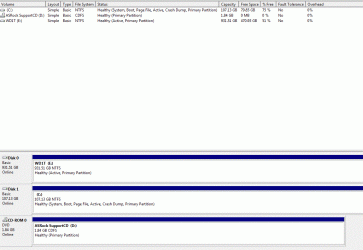
Capture3.GIF

So that looks fine now.

and:

Microsoft Windows [Version 6.1.7600]
Copyright (c) 2009 Microsoft Corporation. All rights reserved.
C:\Windows\system32>bcdedit/enum all
Windows Boot Manager
--------------------
identifier {bootmgr}
device boot
description Windows Boot Manager
locale en-US
inherit {globalsettings}
default {current}
resumeobject {214fcf45-51fd-11e1-984e-fd8647f7836a}
displayorder {current}
toolsdisplayorder {memdiag}
timeout 30
Windows Boot Loader
-------------------
identifier {current}
device partition=C:
path \Windows\system32\winload.exe
description Windows 7
locale en-US
inherit {bootloadersettings}
recoverysequence {214fcf47-51fd-11e1-984e-fd8647f7836a}
recoveryenabled Yes
osdevice partition=C:
systemroot \Windows
resumeobject {214fcf45-51fd-11e1-984e-fd8647f7836a}
nx OptIn
Windows Boot Loader
-------------------
identifier {214fcf47-51fd-11e1-984e-fd8647f7836a}
device ramdisk=[C:]\Recovery\214fcf47-51fd-11e1-984e-fd8647f783
6a\Winre.wim,{214fcf48-51fd-11e1-984e-fd8647f7836a}
path \windows\system32\winload.exe
description Windows Recovery Environment
inherit {bootloadersettings}
osdevice ramdisk=[C:]\Recovery\214fcf47-51fd-11e1-984e-fd8647f783
6a\Winre.wim,{214fcf48-51fd-11e1-984e-fd8647f7836a}
systemroot \windows
nx OptIn
winpe Yes
Resume from Hibernate
---------------------
identifier {214fcf45-51fd-11e1-984e-fd8647f7836a}
device partition=C:
path \Windows\system32\winresume.exe
description Windows Resume Application
locale en-US
inherit {resumeloadersettings}
filedevice partition=C:
filepath \hiberfil.sys
debugoptionenabled No
Windows Memory Tester
---------------------
identifier {memdiag}
device boot
path \Boot\memtest.exe
description Windows Memory Diagnostic
locale en-US
inherit {globalsettings}
badmemoryaccess Yes
EMS Settings
------------
identifier {emssettings}
bootems Yes
Debugger Settings
-----------------
identifier {dbgsettings}
debugtype Serial
debugport 1
baudrate 115200
RAM Defects
-----------
identifier {badmemory}
Global Settings
---------------
identifier {globalsettings}
inherit {dbgsettings}
{emssettings}
{badmemory}
Boot Loader Settings
--------------------
identifier {bootloadersettings}
inherit {globalsettings}
{hypervisorsettings}
Hypervisor Settings
-------------------
identifier {hypervisorsettings}
hypervisordebugtype Serial
hypervisordebugport 1
hypervisorbaudrate 115200
Resume Loader Settings
----------------------
identifier {resumeloadersettings}
inherit {globalsettings}
Device options
--------------
identifier {214fcf48-51fd-11e1-984e-fd8647f7836a}
description Ramdisk Options
ramdisksdidevice partition=C:
ramdisksdipath \Recovery\214fcf47-51fd-11e1-984e-fd8647f7836a\boot.sdi
C:\Windows\system32>
 

My Computer My Computer

At a glance

Windows 7 Professional 64-bitIntel i5 2500k 3.30gHz8gb G.Skill Ripjaw dual-channel 1600AMD Radeon HD 6870
OS
Windows 7 Professional 64-bit
CPU
Intel i5 2500k 3.30gHz
Motherboard
Asus AsRock P67 Extreme4 Gen3
Memory
8gb G.Skill Ripjaw dual-channel 1600
Graphics Card(s)
AMD Radeon HD 6870
Sound Card
On-Board
Hard Drives
OCZ Vertex Sata II 120gb
WD Caviar Black 1tb
WD Scorpio Blue 320gb
PSU
Corsair 650
This is a good example of what happens when all other HD's are not unplugged during install. Your boot files were derailed to the HD since the installer or repairs writes them to the first Active partition.

So in the current config if you run Repairs it will again derail them to the HDD unless you correctly mark it Inactive: Partition - Mark as Inactive - Windows 7 Forums

Only an OS partition should be marked Active to avoid these problems.

The easiest way to move the boot files is to mark the partition Active, make sure it's SSD/HD is set first to boot in BIOS setup, unplug all other HD's then run Startup Repair - Run 3 Separate Times.

In your case I would also swap the cables between Disks 0 and 1 so that if HDD becomes marked Active again it cannot interfere. Make sure SSD remains set to boot first in BIOS setup.
 
Thanks gregrocker for the info. Good to know next time. I like the SSD/HDD setup for speed but it can still be a little advanced for us laymen.

And much thanks to Kaktussoft for helping me with this issue! I would've been spinning my wheels or losing my data if you didn't take the time to assist me.

So as a wrap I just want to summerize that there is only one boot option for Windows 7 now, and if I leave my HDD unplug it boots correctly into my SSD. My problems have been solved. Cheers guys, this site is awesome.
 

My Computer My Computer

At a glance

Windows 7 Professional 64-bitIntel i5 2500k 3.30gHz8gb G.Skill Ripjaw dual-channel 1600AMD Radeon HD 6870
OS
Windows 7 Professional 64-bit
CPU
Intel i5 2500k 3.30gHz
Motherboard
Asus AsRock P67 Extreme4 Gen3
Memory
8gb G.Skill Ripjaw dual-channel 1600
Graphics Card(s)
AMD Radeon HD 6870
Sound Card
On-Board
Hard Drives
OCZ Vertex Sata II 120gb
WD Caviar Black 1tb
WD Scorpio Blue 320gb
PSU
Corsair 650
bootmgr is ok!! although {memdiag} and {bootmgr} are pointing to:
device boot
instead of
device partition=c:

But C is same as boot partition anyway.
Don't forget to mark hdd partition inactive (E)
-------------
If you wish you can delete all boot related stuff on E. Delete E:\boot folder and E:\bootmgr file. Both are hidden system folder/file.
 

My Computer My Computer

At a glance

Microsoft Windows 7 Home Premium 64-bits 7601...Intel(R) Core(TM) i3 CPU M 370 @ 2.40GHz4,00 GBATI Mobility Radeon HD 5400 Series
Computer type
Laptop
Computer Manufacturer/Model Number
ACER ASPIRE 5742G
OS
Microsoft Windows 7 Home Premium 64-bits 7601 Multiprocessor Free Service Pack 1
CPU
Intel(R) Core(TM) i3 CPU M 370 @ 2.40GHz
Motherboard
Acer Aspire 5742G
Memory
4,00 GB
Graphics Card(s)
ATI Mobility Radeon HD 5400 Series
Sound Card
(1) AMD High Definition Audio Device (2) Realtek High Defi
Screen Resolution
1366 x 768 x 32 bits (4294967296 colors) @ 60 Hz
Hard Drives
WDC WD5000BEVT-22ZAT0
Back
Top