Firefox - Enable Aero Glass Transparency

How to Have Firefox with Glass Transparency in Windows 7

   Information
In this tutorial I will show you how to make your Firefox have the Aero Glass Transparency look.
   Note
I do not take credit for any of the scripts uploaded within this tutorial, apparently I don't even have any knowledge about CSS scripts before but learning it bit by bit was fun. I am not that good with CSS so I borrowed the scripts used in this tutorial. The scripts were made by YupYup and 12eason from this thread, you can view the thread for reference and questions. What I did in this tutorial is I merged their methods to achieve a much more flexible solution in glassing Mozilla Firefox. Slight modifications were made by me from their script for my own personal liking but you can tweak the style to your own liking as well :).

• Okay then, let's begin.... :)
   Warning
Remember to always backup your files before proceeding
•This method only works for the latest version of Firefox (Mozilla Firefox 3.5.1)

•This method only works with Glasser and NOT with All-Glass


Here's How:

Step 1: Install Nightly Tester Tools to get Glasser Extension to work (in case you don't have it yet), if you already have Nightly Tester Tools then proceed to Step 2.

Step 2: Download Glasser 1.1.1 here - Glasser 1.1.1 and use force install to make it work with Firefox.

Step 3: On your windows explorer type %appdata%\Mozilla and browse inside your Firefox Profile then go through the following folders: extensions > [email protected] > chrome > content

Replace the 'dwm-overlay.js' in your Firefox Profile with this one -View attachment dwm-overlay.js.txt

   Tip
» Copy the content of the text document and save it as "dwm-overlay.js" without quotations.
   Information

You could add more websites onto the whitelist if you would like to apply your own 'Glass Style' on that certain website..


Step 4: On your windows explorer type %appdata%\Mozilla and browse inside your Firefox Profile then go through the following folders: extensions > [email protected] > chrome > skin > classic

Replace the 'overlay.css' in your Firefox Profile with this one - View attachment overlay.css.txt

   Tip
» Copy the content of the text document and save it as "overlay.css" without quotations.


Step 5: Install Stylish (in case you don't have it yet- then restart firefox if needed), if you already have Stylish then proceed to Step 6.

Step 6: Choose and download the appropriate updated style for you from the files I attached below:

View attachment Aero Fox 7 - Glassed for Default Sidebar.txt

View attachment Aero Fox 7 - Glassed for All-in-One Sidebar.txt

   Information
I managed to somehow make the styles work with other themes but I'm not sure if it works on all themes


Step 7:

  • Open the style you just downloaded with notepad or word pad or whichever you prefer, and copy the entire contents.
  • Now in Firefox click on Tools > Add-ons > User styles and click the write new style button at the top right corner.
  • At the top of new style window give it a name and paste what you just copied in step into the main area and click save. The style will automatically be enabled.
Step 8: Restart Firefox.


   Information
There are still bugs and some fixes that needs to be done.. like the scroll bars appearing black on websites and some tooltips
   Tip
Just switch tabs to gain normal view when the page seems illegible, this usually happens after switching from a Glassed tab to a non-Glassed tab


   Information
Here's the glass theme for "Windows 7 v2 b" for sevenforums made by 12eason
-View attachment Seven Forums - Aero Effect Win v2 b theme.css.txt


For the Google and about:blank page you could use YupYup's code here in this thread.

The Google and about:blank page on the screenshots below are what I'm currently using, if you like them I'll upload them for you :)

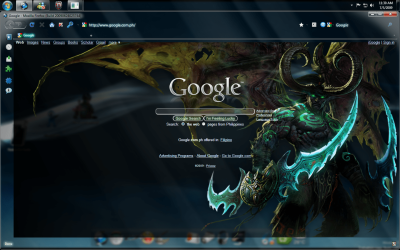
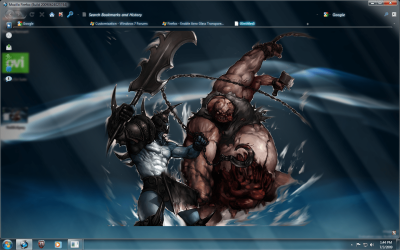
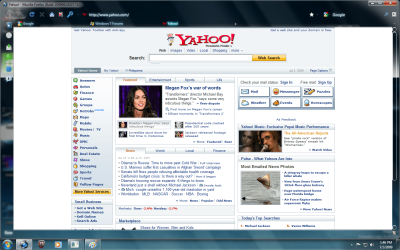
Screenshots:
Untitle2d.pngUntitled.pngUntitled3.pngUntitled4.png

   Information
The Screenshots above show that "google.com" and "sevenforums.com" are glassed. Those webpages were glassed because i have a Stylish code for those websites to make them look glass, but in order to achieve the full glass effect, you would still have to put the domain of those websites on your whitelist. On the other hand "yahoo.com" is not glassed since i don't have a Stylish code for that website and it looks normal because I did not put its domain on my white list. Even though the webpage looks normal as it should, I still have the transparency on my browser.


Last edited by a moderator:
Ok I did everything but the glassser@sixxx folder isn't there

Can you upload the folders from step 3 and 4 for me?
Hello Psych0t1c,

Please make sure that Glasser was installed :)
It should be there if it was installed properly ;)

Hope this helps

-EdRiK
 

My Computer My Computer

OS
Windows 7 Home Premium SP1 64-bit
CPU
Intel™ Core™ i7 920 2.66 ghz
Motherboard
Asus P6T Deluxe V2
Memory
OCZ 6gb (triple 2gb) ddr3-1333 (Gold Edition)
Graphics Card(s)
Nvidia 9800 GT 1GB - x2 SLI
Sound Card
On board
Monitor(s) Displays
19" LCD Wide Screen / Built-in TV Tuner
Screen Resolution
1440x900
Hard Drives
250 GB Maxtor
+
1 TB Seagate
PSU
Corsair GX 800 (800watts)
Case
Thermaltake Level 10 GT
Cooling
Antec Kuhler 920
Mouse
CM Storm Sentinel Advanced
Internet Speed
1MBps
Ok I did everything but the glassser@sixxx folder isn't there

Can you upload the folders from step 3 and 4 for me?

I had the same problem, the path is c:\users\user name\appdata\roaming\mozilla\firefox\profile\3gbqi5fbdefault\extension.

Make sure your "unhide hidden folders"

Hope this helps
xxrazor
 

My Computer My Computer

OS
Dual Boot 7600 RTM x64
Motherboard
Asus P5B
Memory
6GB
Graphics Card(s)
NVIDIA GeForce 9600GT
Monitor(s) Displays
Benq 24" x 2
Screen Resolution
1600 x 1024
Hard Drives
Seagate 160 GB Sata
Western Digital 1.5 TB Sata
Seagate 400 GB External
Case
Antec
I had the same problem, the path is c:\users\user name\appdata\roaming\mozilla\firefox\profile\3gbqi5fbdefault\extension.

Make sure your "unhide hidden folders"

Hope this helps
xxrazor


The path is c:\users\user name\appdata\roaming\mozilla\firefox\profile\default Firefox Profile folder\extension


It seems that the default Firefox Profile folder name differs from every user :)

For example:


3gbqi5fbdefault
3jkjci8jasdefault
adef3ks.default

etc......
 

My Computer My Computer

OS
Windows 7 Home Premium SP1 64-bit
CPU
Intel™ Core™ i7 920 2.66 ghz
Motherboard
Asus P6T Deluxe V2
Memory
OCZ 6gb (triple 2gb) ddr3-1333 (Gold Edition)
Graphics Card(s)
Nvidia 9800 GT 1GB - x2 SLI
Sound Card
On board
Monitor(s) Displays
19" LCD Wide Screen / Built-in TV Tuner
Screen Resolution
1440x900
Hard Drives
250 GB Maxtor
+
1 TB Seagate
PSU
Corsair GX 800 (800watts)
Case
Thermaltake Level 10 GT
Cooling
Antec Kuhler 920
Mouse
CM Storm Sentinel Advanced
Internet Speed
1MBps
how can i modify the background of the google myself...any tutorial?
 

My Computer My Computer

Computer Manufacturer/Model Number
Asus F83VF Noteook
OS
Windows 7 Home Premium x64
CPU
Intel Core 2 Duo P8800
Motherboard
Intel PM45 Chipset
Memory
4 GB DDR3
Graphics Card(s)
NVIDIA GeForce GT 220M, 1 GB GDDR3 SDRAM
Sound Card
Realtek
Screen Resolution
1366x768
Hard Drives
Seagate 500 GB
PSU
-
Case
-
Cooling
-
Keyboard
-
Mouse
Razer Lachesis
Internet Speed
10 Mb/s
how can i modify the background of the google myself...any tutorial?

Hello G2gCya,

You could try modifying an existing google userstyle.css or create your own :)
However it is advisable that you use an existing style and mod it to your liking, using a style with comments would be much better. :)
Look for this inside the userstyle to change the background:

Code:
background:{

<insert color or image URI here>

}!important;


Hope this helps

-EdRiK.
 

My Computer My Computer

OS
Windows 7 Home Premium SP1 64-bit
CPU
Intel™ Core™ i7 920 2.66 ghz
Motherboard
Asus P6T Deluxe V2
Memory
OCZ 6gb (triple 2gb) ddr3-1333 (Gold Edition)
Graphics Card(s)
Nvidia 9800 GT 1GB - x2 SLI
Sound Card
On board
Monitor(s) Displays
19" LCD Wide Screen / Built-in TV Tuner
Screen Resolution
1440x900
Hard Drives
250 GB Maxtor
+
1 TB Seagate
PSU
Corsair GX 800 (800watts)
Case
Thermaltake Level 10 GT
Cooling
Antec Kuhler 920
Mouse
CM Storm Sentinel Advanced
Internet Speed
1MBps
Hey guys I got it. How do I make blank tabs glass?
 

My Computer My Computer

Computer Manufacturer/Model Number
HP dv7t 1000 CTO
OS
Windows 7 Ultimate 7600 RTM - Windows Server 2008 R2 7600 RTM Dual Boot
CPU
Intel Core Duo
Memory
4 gigs
Graphics Card(s)
NVIDIA 9600 GT
Sound Card
IDT HD Audio
Monitor(s) Displays
Generic 1680x1050
Screen Resolution
1680x1050
Hard Drives
TOSHIBA MK2552GSX ATA Device 320 gigs
Mouse
Synaptics Port Device PS/2
I made a style that is for the rest of the firefox pages here. If you want something different let us know.

Yupyup, unless you have a dark background behind firefox some pages are hard to see, your thoughts on this.

xxrazor
 

My Computer My Computer

OS
Dual Boot 7600 RTM x64
Motherboard
Asus P5B
Memory
6GB
Graphics Card(s)
NVIDIA GeForce 9600GT
Monitor(s) Displays
Benq 24" x 2
Screen Resolution
1600 x 1024
Hard Drives
Seagate 160 GB Sata
Western Digital 1.5 TB Sata
Seagate 400 GB External
Case
Antec
Yupyup, unless you have a dark background behind firefox some pages are hard to see, your thoughts on this.

xxrazor
I think i know what your talking about but just to be sure toss up some screenshots and i will check them out tomorrow.
 

My Computer My Computer

OS
Win 7
I think i know what your talking about but just to be sure toss up some screenshots and i will check them out tomorrow.

I am not sure what i changed, but the problem has gone, i was getting the same issue i have with gmail, email list.

googleerror.jpg


I did remove some url from the white list, maybe that was it, not sure.

xxrazor
 

My Computer My Computer

OS
Dual Boot 7600 RTM x64
Motherboard
Asus P5B
Memory
6GB
Graphics Card(s)
NVIDIA GeForce 9600GT
Monitor(s) Displays
Benq 24" x 2
Screen Resolution
1600 x 1024
Hard Drives
Seagate 160 GB Sata
Western Digital 1.5 TB Sata
Seagate 400 GB External
Case
Antec
I am not sure what i changed, but the problem has gone, i was getting the same issue i have with gmail, email list.

googleerror.jpg


I did remove some url from the white list, maybe that was it, not sure.

xxrazor

You could try adjusting the opacity settings for the text to 0.99 and remove the background images or change it to black.
 

My Computer My Computer

OS
Windows 7 Home Premium SP1 64-bit
CPU
Intel™ Core™ i7 920 2.66 ghz
Motherboard
Asus P6T Deluxe V2
Memory
OCZ 6gb (triple 2gb) ddr3-1333 (Gold Edition)
Graphics Card(s)
Nvidia 9800 GT 1GB - x2 SLI
Sound Card
On board
Monitor(s) Displays
19" LCD Wide Screen / Built-in TV Tuner
Screen Resolution
1440x900
Hard Drives
250 GB Maxtor
+
1 TB Seagate
PSU
Corsair GX 800 (800watts)
Case
Thermaltake Level 10 GT
Cooling
Antec Kuhler 920
Mouse
CM Storm Sentinel Advanced
Internet Speed
1MBps
You could try adjusting the opacity settings for the text to 0.99 and remove the background images or change it to black.

Just checking, but that would be in the overlay.ccs, correct?

xxrazor:D
 

My Computer My Computer

OS
Dual Boot 7600 RTM x64
Motherboard
Asus P5B
Memory
6GB
Graphics Card(s)
NVIDIA GeForce 9600GT
Monitor(s) Displays
Benq 24" x 2
Screen Resolution
1600 x 1024
Hard Drives
Seagate 160 GB Sata
Western Digital 1.5 TB Sata
Seagate 400 GB External
Case
Antec
Just checking, but that would be in the overlay.ccs, correct?

xxrazor:D

You could also change it in your Stylish userstyle.css if you're using one ;)
 

My Computer My Computer

OS
Windows 7 Home Premium SP1 64-bit
CPU
Intel™ Core™ i7 920 2.66 ghz
Motherboard
Asus P6T Deluxe V2
Memory
OCZ 6gb (triple 2gb) ddr3-1333 (Gold Edition)
Graphics Card(s)
Nvidia 9800 GT 1GB - x2 SLI
Sound Card
On board
Monitor(s) Displays
19" LCD Wide Screen / Built-in TV Tuner
Screen Resolution
1440x900
Hard Drives
250 GB Maxtor
+
1 TB Seagate
PSU
Corsair GX 800 (800watts)
Case
Thermaltake Level 10 GT
Cooling
Antec Kuhler 920
Mouse
CM Storm Sentinel Advanced
Internet Speed
1MBps
I made a style that is for the rest of the firefox pages here. If you want something different let us know.


For some reason the blank tabs are black. Any reason why?
 

My Computer My Computer

Computer Manufacturer/Model Number
HP dv7t 1000 CTO
OS
Windows 7 Ultimate 7600 RTM - Windows Server 2008 R2 7600 RTM Dual Boot
CPU
Intel Core Duo
Memory
4 gigs
Graphics Card(s)
NVIDIA 9600 GT
Sound Card
IDT HD Audio
Monitor(s) Displays
Generic 1680x1050
Screen Resolution
1680x1050
Hard Drives
TOSHIBA MK2552GSX ATA Device 320 gigs
Mouse
Synaptics Port Device PS/2
For some reason the blank tabs are black. Any reason why?

That may be a bug depending on which method are you using...
If you're using glasser try switching from a glassed tab to the blank tab.. ;)
 

My Computer My Computer

OS
Windows 7 Home Premium SP1 64-bit
CPU
Intel™ Core™ i7 920 2.66 ghz
Motherboard
Asus P6T Deluxe V2
Memory
OCZ 6gb (triple 2gb) ddr3-1333 (Gold Edition)
Graphics Card(s)
Nvidia 9800 GT 1GB - x2 SLI
Sound Card
On board
Monitor(s) Displays
19" LCD Wide Screen / Built-in TV Tuner
Screen Resolution
1440x900
Hard Drives
250 GB Maxtor
+
1 TB Seagate
PSU
Corsair GX 800 (800watts)
Case
Thermaltake Level 10 GT
Cooling
Antec Kuhler 920
Mouse
CM Storm Sentinel Advanced
Internet Speed
1MBps
That may be a bug depending on which method are you using...
If you're using glasser try switching from a glassed tab to the blank tab.. ;)

Lol wow that actually works. Thanks. I used your method btw.
 

My Computer My Computer

Computer Manufacturer/Model Number
HP dv7t 1000 CTO
OS
Windows 7 Ultimate 7600 RTM - Windows Server 2008 R2 7600 RTM Dual Boot
CPU
Intel Core Duo
Memory
4 gigs
Graphics Card(s)
NVIDIA 9600 GT
Sound Card
IDT HD Audio
Monitor(s) Displays
Generic 1680x1050
Screen Resolution
1680x1050
Hard Drives
TOSHIBA MK2552GSX ATA Device 320 gigs
Mouse
Synaptics Port Device PS/2

My Computer My Computer

OS
Dual Boot 7600 RTM x64
Motherboard
Asus P5B
Memory
6GB
Graphics Card(s)
NVIDIA GeForce 9600GT
Monitor(s) Displays
Benq 24" x 2
Screen Resolution
1600 x 1024
Hard Drives
Seagate 160 GB Sata
Western Digital 1.5 TB Sata
Seagate 400 GB External
Case
Antec
Well guys , i thought i would show you where i got too, it is complete.

Firefox 3.5 and Google glassed, Firefox 3.5 Longhorn theme with W7 longhorn Theme.

Special thanks the edrik and YupYup,


longhorn.jpg


xxrazor
dancesteps.gif

Looks GREAT ! but i think you should fix the small magnifying glass icon on your windows explorer, and also the back and forward buttons ;)
 

My Computer My Computer

OS
Windows 7 Home Premium SP1 64-bit
CPU
Intel™ Core™ i7 920 2.66 ghz
Motherboard
Asus P6T Deluxe V2
Memory
OCZ 6gb (triple 2gb) ddr3-1333 (Gold Edition)
Graphics Card(s)
Nvidia 9800 GT 1GB - x2 SLI
Sound Card
On board
Monitor(s) Displays
19" LCD Wide Screen / Built-in TV Tuner
Screen Resolution
1440x900
Hard Drives
250 GB Maxtor
+
1 TB Seagate
PSU
Corsair GX 800 (800watts)
Case
Thermaltake Level 10 GT
Cooling
Antec Kuhler 920
Mouse
CM Storm Sentinel Advanced
Internet Speed
1MBps
packed full of errors, since i don't use the default skin
 

My Computer My Computer

Computer Manufacturer/Model Number
ME
OS
Windows 7 Ultimate 32-bit
CPU
P4 Northwood 3.0 Ghz @ 3.4 Ghz (512kb Cache :( )
Motherboard
Abit IC7-G
Memory
PC-3200 (3.0) 2x512 Kingston 2x1024 Corsair
Graphics Card(s)
Sapphire HD 3850 512mb DDR3 !AGP! Catalyst 9.9 HOTFIX
Sound Card
Onbored
Monitor(s) Displays
Viewsonic G220fb
Screen Resolution
1600x1200
Hard Drives
(2) 3.5 Seagate 74 GB Raid-0 , 1 WD Raptor 10k 150 GB, (2) Seagate 300 GB
PSU
650w Antec
Case
Mid tower
Cooling
Air.
Keyboard
PS2 Generic
Mouse
MX 518
Internet Speed
ComCrap
Other Info
This computer will become a good second computer until the time comes to buy a new computer.

My Computer My Computer

OS
Dual Boot 7600 RTM x64
Motherboard
Asus P5B
Memory
6GB
Graphics Card(s)
NVIDIA GeForce 9600GT
Monitor(s) Displays
Benq 24" x 2
Screen Resolution
1600 x 1024
Hard Drives
Seagate 160 GB Sata
Western Digital 1.5 TB Sata
Seagate 400 GB External
Case
Antec
Back
Top