For those that are still not sure about Windows 8

whs

New member
Guru
Gold Member
VIP
Local time
3:18 AM
Messages
26,200
Location
Florida in winter, Black Forest/Germany
If you are not sure whether you should try Windows8 CP, make a test installation in Virtual Box. This gives you ultimate flexibility because

1. You do not commit a lot of resources
2. You can run Windows7 and Windows8 seamlessly side by side
3. You can try out all Windows8 tips without a reboot
4. If you want to get rid of it, just delete the vBox files.

And best of all - it is damn fast. Have a look at my boot video I posted on the Windows8 forum: Starting Windows8 in my virtual box - amazing - Windows 8 Forums
 

My Computer My Computer

At a glance

Vista, Windows7, Mint Mate, Zorin, Windows 8from 1.6GHz Duo to i7
Computer Manufacturer/Model Number
HP, Dell, Gateway, Toshiba - 4 laptops and 2 desktops
OS
Vista, Windows7, Mint Mate, Zorin, Windows 8
CPU
from 1.6GHz Duo to i7
Monitor(s) Displays
2x HP w2207
Hard Drives
5x HDD, 7x SSD, 12x Externals
Keyboard
with trackball - no mices
Mouse
Trackball mice
Internet Speed
DSL 6000
Nice. I may do it if I have another issue requiring me to bail to 7. Today it was Firefox scripts hanging like crazy refusing to render Google Maps Directions, requiring Stop Scripts button.
 
Nice video Wolfgang. It nowhere near as fast for me, I guess, because my VM is on a USB2 attached disk but it is still faster than my native Win 7.
 

My Computer My Computer

At a glance

Microsoft Windows 7 Home Premium 64-bit Servi...Intel(R) Core(TM) i3 CPU M 330 @ 2.13GHz8 GB DDR3Intel(R) HD Graphics
Computer type
Laptop
Computer Manufacturer/Model Number
Hewlett-Packard/G62-107SA Notebook
OS
Microsoft Windows 7 Home Premium 64-bit Service Pack 1
CPU
Intel(R) Core(TM) i3 CPU M 330 @ 2.13GHz
Motherboard
Hewlett-Packard 1425
Memory
8 GB DDR3
Graphics Card(s)
Intel(R) HD Graphics
Sound Card
Realtek High Definition Audio
Monitor(s) Displays
Builtin
Screen Resolution
1366 x 768 x 32 bits (4294967296 colors) @ 60 Hz
Hard Drives
250 GB SATA Hard Disk Drive 7200 rpm
2TB Seagate GoFlex USB 2 Drive
1TB Iomega Prestige USB 2 Drive
1.5TB Iomega Prestige USB 2 Drive (Samsung)
2TB WD MyBook Live NAS.
Mouse
Logitech Anywhere MX
Internet Speed
152 Mbs download 10 Mbs upload
Antivirus
Norton 360
Browser
Chrome
I gonna hold on to Windows 7 for 10 ... long ... years ... :)
 

My Computer My Computer

At a glance

Windows 10 x64Intel i5-3570KCrucial 16GBnVidia Geforce 660 GTX
Computer type
PC/Desktop
OS
Windows 10 x64
CPU
Intel i5-3570K
Motherboard
Asus Maximus V Gene
Memory
Crucial 16GB
Graphics Card(s)
nVidia Geforce 660 GTX
Sound Card
onboard
Monitor(s) Displays
NEC 2490WUXi2
Screen Resolution
1920x1200
Hard Drives
Crucial M4 256GB
PSU
Corsair 650TX
Case
Fractal Design - Define Mini
Keyboard
Filco Majestouch Tenkeyless Black MX
Mouse
Logitech MBJ58
That's cool enough I may have to install VirtualBox again just to try it out.

I'm very disappointed with XP Mode, it takes forever to boot, so maybe XP and Win 8 under VirtualBox is the way to go.
 

My Computer My Computer

At a glance

Windows 10 Pro X64Intel Quad Core i7-4770 @ 3.4Ghz16.0GB PC3-12800 DDR3 SDRAM 1600 MHzIntel Integrated HD Graphics
Computer type
PC/Desktop
Computer Manufacturer/Model Number
Lenovo IdeaCenter 450
OS
Windows 10 Pro X64
CPU
Intel Quad Core i7-4770 @ 3.4Ghz
Memory
16.0GB PC3-12800 DDR3 SDRAM 1600 MHz
Graphics Card(s)
Intel Integrated HD Graphics
Sound Card
Realtek HD Audio
Monitor(s) Displays
HP 22" LCD
Screen Resolution
1680 x 1050
Hard Drives
250GB Samsung EVO SATA-3 SSD
2TB Seagate ST2000DM001 SATA-2
1.5TB Seagate ST3150041AS SATA
Keyboard
Dell USB
Mouse
Lenovo USB
Internet Speed
Cable via Road Runner 3MB Upload, 30MB Download
Antivirus
Windows Defender, MBAM Pro, MBAE
Browser
Seamonkey
Other Info
UEFI/GPT
PLDS DVD-RW DH16AERSH
I just made a "Get started" video and posted it on the Win8 forum: Windows 8 Forums
 

My Computer My Computer

At a glance

Vista, Windows7, Mint Mate, Zorin, Windows 8from 1.6GHz Duo to i7
Computer Manufacturer/Model Number
HP, Dell, Gateway, Toshiba - 4 laptops and 2 desktops
OS
Vista, Windows7, Mint Mate, Zorin, Windows 8
CPU
from 1.6GHz Duo to i7
Monitor(s) Displays
2x HP w2207
Hard Drives
5x HDD, 7x SSD, 12x Externals
Keyboard
with trackball - no mices
Mouse
Trackball mice
Internet Speed
DSL 6000
Not having any success installing Win 8 X86 (no virtualization support in my processor) under VirtualBox. Keeps throwing errors and saying I have to power off.

I've had Win 7 X86 installed with no problems, along with Ubuntu, Win 98 SE and XP Pro.
 

My Computer My Computer

At a glance

Windows 10 Pro X64Intel Quad Core i7-4770 @ 3.4Ghz16.0GB PC3-12800 DDR3 SDRAM 1600 MHzIntel Integrated HD Graphics
Computer type
PC/Desktop
Computer Manufacturer/Model Number
Lenovo IdeaCenter 450
OS
Windows 10 Pro X64
CPU
Intel Quad Core i7-4770 @ 3.4Ghz
Memory
16.0GB PC3-12800 DDR3 SDRAM 1600 MHz
Graphics Card(s)
Intel Integrated HD Graphics
Sound Card
Realtek HD Audio
Monitor(s) Displays
HP 22" LCD
Screen Resolution
1680 x 1050
Hard Drives
250GB Samsung EVO SATA-3 SSD
2TB Seagate ST2000DM001 SATA-2
1.5TB Seagate ST3150041AS SATA
Keyboard
Dell USB
Mouse
Lenovo USB
Internet Speed
Cable via Road Runner 3MB Upload, 30MB Download
Antivirus
Windows Defender, MBAM Pro, MBAE
Browser
Seamonkey
Other Info
UEFI/GPT
PLDS DVD-RW DH16AERSH
Dual Boot working fine for me with 7, using 5 second Menu timeout.

In ten days I've only gone back to 7 once, when Firefox hung running scripts to render Google Maps directions. Only out was to Stop Scripts and print my directions via 7. MS sees this in telemetry.

It occurs to me that none of these threads are hearing from touchscreen users who Metro is obviously meant for. Anyone?
 
A freind of mine just bought a new Lenovo 23" All-In-one Touch system. I helped him carve out a 100GB E: partition and he's going to install Win 8 there (via the .iso). I'm very curious what he will think of it. I suspect a lot more than I do using a mouse and keyboard.

I'm going to give up on trying to get Win8 installed under VirtualBox and if I really want to play with it more, go back and set it up for Dual boot. Right now that doesn't interest me much as I really did not like Win 8.
 

My Computer My Computer

At a glance

Windows 10 Pro X64Intel Quad Core i7-4770 @ 3.4Ghz16.0GB PC3-12800 DDR3 SDRAM 1600 MHzIntel Integrated HD Graphics
Computer type
PC/Desktop
Computer Manufacturer/Model Number
Lenovo IdeaCenter 450
OS
Windows 10 Pro X64
CPU
Intel Quad Core i7-4770 @ 3.4Ghz
Memory
16.0GB PC3-12800 DDR3 SDRAM 1600 MHz
Graphics Card(s)
Intel Integrated HD Graphics
Sound Card
Realtek HD Audio
Monitor(s) Displays
HP 22" LCD
Screen Resolution
1680 x 1050
Hard Drives
250GB Samsung EVO SATA-3 SSD
2TB Seagate ST2000DM001 SATA-2
1.5TB Seagate ST3150041AS SATA
Keyboard
Dell USB
Mouse
Lenovo USB
Internet Speed
Cable via Road Runner 3MB Upload, 30MB Download
Antivirus
Windows Defender, MBAM Pro, MBAE
Browser
Seamonkey
Other Info
UEFI/GPT
PLDS DVD-RW DH16AERSH
A freind of mine just bought a new Lenovo 23" All-In-one Touch system. I helped him carve out a 100GB E: partition and he's going to install Win 8 there (via the .iso). I'm very curious what he will think of it. I suspect a lot more than I do using a mouse and keyboard.

I'm going to give up on trying to get Win8 installed under VirtualBox and if I really want to play with it more, go back and set it up for Dual boot. Right now that doesn't interest me much as I really did not like Win 8.
I would try again with Virtual Box. It works great. Beats double boot any time.On my laptop I will dismantle the double boot because it is a pain in the neck - especially if you want to boot into Win7.

I had no problem with the vBox installation. Downloaded the latest vBox and the extensions for it. Installed directly from the Win8 .iso, got the Guest Additions installed and off it went.

The only little restriction is that I currently run on a 16" screen with a 22" monitor. But that is still OK.
 

My Computer My Computer

At a glance

Vista, Windows7, Mint Mate, Zorin, Windows 8from 1.6GHz Duo to i7
Computer Manufacturer/Model Number
HP, Dell, Gateway, Toshiba - 4 laptops and 2 desktops
OS
Vista, Windows7, Mint Mate, Zorin, Windows 8
CPU
from 1.6GHz Duo to i7
Monitor(s) Displays
2x HP w2207
Hard Drives
5x HDD, 7x SSD, 12x Externals
Keyboard
with trackball - no mices
Mouse
Trackball mice
Internet Speed
DSL 6000
Works great for me, takes mine like 25 seconds to boot probably due to the fact I have no SSD.
 

My Computer My Computer

At a glance

Windows 7 Ultimate SP1 - 64 BitIntel Core i5 2500k2x4GB DDR3 1333HzAti Radeon 6770
Computer type
PC/Desktop
Computer Manufacturer/Model Number
Novatech iRush Pro
OS
Windows 7 Ultimate SP1 - 64 Bit
CPU
Intel Core i5 2500k
Motherboard
Foxconn H67M-S/H67M-V/H67
Memory
2x4GB DDR3 1333Hz
Graphics Card(s)
Ati Radeon 6770
Sound Card
None
Monitor(s) Displays
Samsung S22B150
Screen Resolution
1920x1080
Hard Drives
2x500GB
PSU
500W
Cooling
Fan
Keyboard
HP KU0316
Mouse
Wireless Logitech M185
Internet Speed
20MB/s
Antivirus
Avast Free
Browser
Google Chrome
Other Info
Logitech M185 Mouse
KU-M316 Keyboard
I really hate the new start menu that it has
 

My Computer My Computer

At a glance

Windows 7 Ultimate x64, Windows 7 Pro x64, Wi...Intel i7-4790K , Intel i7-3770K, Intel i7-451...12GB Corsair VengeanceEVGA GeForce GTX 660 2GB, 2X GIGABYTE 6890, N...
Computer type
PC/Desktop
Computer Manufacturer/Model Number
Custom (desktop), Custom (desktop), Lenovo U530 Touch
OS
Windows 7 Ultimate x64, Windows 7 Pro x64, Windows 10 Home x64
CPU
Intel i7-4790K , Intel i7-3770K, Intel i7-4510ULT
Motherboard
Asus Z87-PRO (main), Asus P8P67 Rev 3.1(secondary)
Memory
12GB Corsair Vengeance
Graphics Card(s)
EVGA GeForce GTX 660 2GB, 2X GIGABYTE 6890, Nvidia GT730M
Sound Card
Realtek Integrated, IDT (both laptops)
Monitor(s) Displays
Samsung S22C300H 21.5"
Screen Resolution
1920x1080 (Both machines)
Hard Drives
Main:
Muskin SSD 240GB
Seagate 320GB
Western Digital 1TB
Seagate 2TB

Seconday:
Toshiba 1TB
WD 1TB

Lenovo Laptop:
SAMSUNG SM843 SSD 480GB
PSU
Corsair GS700, COOLMAX CUL-850B (secondary)
Case
Thermaltake Chaser
Cooling
Corsair H60 Dual Fans, Stock Cooler
Keyboard
Logitech K360
Mouse
Logitech M310
Internet Speed
16Mbps
Antivirus
Comodo Internet Security Premium, MWB
Browser
Chrome, Firefox
Other Info
I have three systems listed in the specs area. My main desktop and my secondary desktop that was my previous build. The last one (in all the sections) is my Lenovo laptop.

Thanks for your interest in my machines! :)

My Computer My Computer

At a glance

Vista, Windows7, Mint Mate, Zorin, Windows 8from 1.6GHz Duo to i7
Computer Manufacturer/Model Number
HP, Dell, Gateway, Toshiba - 4 laptops and 2 desktops
OS
Vista, Windows7, Mint Mate, Zorin, Windows 8
CPU
from 1.6GHz Duo to i7
Monitor(s) Displays
2x HP w2207
Hard Drives
5x HDD, 7x SSD, 12x Externals
Keyboard
with trackball - no mices
Mouse
Trackball mice
Internet Speed
DSL 6000
I had problems with a VirtualBox installation and it took a lot of digging to get it up and running. VMPlayer on the other hand installed it with no problems at all.
 

My Computer My Computer

At a glance

Microsoft Windows 7 Home Premium 64-bit Servi...Intel(R) Core(TM) i3 CPU M 330 @ 2.13GHz8 GB DDR3Intel(R) HD Graphics
Computer type
Laptop
Computer Manufacturer/Model Number
Hewlett-Packard/G62-107SA Notebook
OS
Microsoft Windows 7 Home Premium 64-bit Service Pack 1
CPU
Intel(R) Core(TM) i3 CPU M 330 @ 2.13GHz
Motherboard
Hewlett-Packard 1425
Memory
8 GB DDR3
Graphics Card(s)
Intel(R) HD Graphics
Sound Card
Realtek High Definition Audio
Monitor(s) Displays
Builtin
Screen Resolution
1366 x 768 x 32 bits (4294967296 colors) @ 60 Hz
Hard Drives
250 GB SATA Hard Disk Drive 7200 rpm
2TB Seagate GoFlex USB 2 Drive
1TB Iomega Prestige USB 2 Drive
1.5TB Iomega Prestige USB 2 Drive (Samsung)
2TB WD MyBook Live NAS.
Mouse
Logitech Anywhere MX
Internet Speed
152 Mbs download 10 Mbs upload
Antivirus
Norton 360
Browser
Chrome
whs I've tried it 4 or 5 times now, always the same problem. I am trying to install from the downloaded .iso. I will burn a DVD next and try it again, but I'm beginning to suspect that Win 8 required hardware (CPU) virtualization which my 3.4Ghz P4 does not have.

I can install anything else, Win 98SE, XP, Vista and Win 7, just Win 8 that has this problem. The divfference is all other installs are via CD/DVD so I'll try it that way next.
 

My Computer My Computer

At a glance

Windows 10 Pro X64Intel Quad Core i7-4770 @ 3.4Ghz16.0GB PC3-12800 DDR3 SDRAM 1600 MHzIntel Integrated HD Graphics
Computer type
PC/Desktop
Computer Manufacturer/Model Number
Lenovo IdeaCenter 450
OS
Windows 10 Pro X64
CPU
Intel Quad Core i7-4770 @ 3.4Ghz
Memory
16.0GB PC3-12800 DDR3 SDRAM 1600 MHz
Graphics Card(s)
Intel Integrated HD Graphics
Sound Card
Realtek HD Audio
Monitor(s) Displays
HP 22" LCD
Screen Resolution
1680 x 1050
Hard Drives
250GB Samsung EVO SATA-3 SSD
2TB Seagate ST2000DM001 SATA-2
1.5TB Seagate ST3150041AS SATA
Keyboard
Dell USB
Mouse
Lenovo USB
Internet Speed
Cable via Road Runner 3MB Upload, 30MB Download
Antivirus
Windows Defender, MBAM Pro, MBAE
Browser
Seamonkey
Other Info
UEFI/GPT
PLDS DVD-RW DH16AERSH
Good luck. I hope it will work.
 

My Computer My Computer

At a glance

Vista, Windows7, Mint Mate, Zorin, Windows 8from 1.6GHz Duo to i7
Computer Manufacturer/Model Number
HP, Dell, Gateway, Toshiba - 4 laptops and 2 desktops
OS
Vista, Windows7, Mint Mate, Zorin, Windows 8
CPU
from 1.6GHz Duo to i7
Monitor(s) Displays
2x HP w2207
Hard Drives
5x HDD, 7x SSD, 12x Externals
Keyboard
with trackball - no mices
Mouse
Trackball mice
Internet Speed
DSL 6000

My Computer My Computer

At a glance

Windows 10 Pro x64 ; Xubuntu x64Intel i7 860 @ 2.80 GHz O/C'ed to 4.0GHz16GB Corsair Vengance DDR3 @ 661 MHz Dual Cha...EVGA NVidia GTX 560 1024MB
Computer type
PC/Desktop
Computer Manufacturer/Model Number
Golden Mk. I.4
OS
Windows 10 Pro x64 ; Xubuntu x64
CPU
Intel i7 860 @ 2.80 GHz O/C'ed to 4.0GHz
Motherboard
Gigabyte P55A-UD3R Rev.1. Award BIOS F13
Memory
16GB Corsair Vengance DDR3 @ 661 MHz Dual Channel (9-9-9-24)
Graphics Card(s)
EVGA NVidia GTX 560 1024MB
Sound Card
Realtek Integrated
Monitor(s) Displays
Dual Samsung SyncMaster 2494HS
Screen Resolution
1920*1080 and 1920*1080
Hard Drives
1*Samsung 840 EVO 120GB SSD;
1*OCZ Vertex 2 60GB SSD;
2*Samsung F3 SpinPoint 1TB in RAID0;
1*Samsung F1 SpinPoint 1TB;
2*Western Digital 1TB External USB 3.0
1*Western Digital 500GB External USB 3.0
1*Seagate 500GB External USB 2.0
PSU
Thermaltake ToughPower QFan 750W
Case
Thermaltake Element S VK60001W2Z
Cooling
Corsair H60 Water Cooling, 2*230mm and 2*80mm case fans
Keyboard
Logitech G110
Mouse
Logitech MX518
Nope, will not work. Has to be CPU virtualization not available. Oh well, I can always install to free partition to play some more if I get the urge.
 

My Computer My Computer

At a glance

Windows 10 Pro X64Intel Quad Core i7-4770 @ 3.4Ghz16.0GB PC3-12800 DDR3 SDRAM 1600 MHzIntel Integrated HD Graphics
Computer type
PC/Desktop
Computer Manufacturer/Model Number
Lenovo IdeaCenter 450
OS
Windows 10 Pro X64
CPU
Intel Quad Core i7-4770 @ 3.4Ghz
Memory
16.0GB PC3-12800 DDR3 SDRAM 1600 MHz
Graphics Card(s)
Intel Integrated HD Graphics
Sound Card
Realtek HD Audio
Monitor(s) Displays
HP 22" LCD
Screen Resolution
1680 x 1050
Hard Drives
250GB Samsung EVO SATA-3 SSD
2TB Seagate ST2000DM001 SATA-2
1.5TB Seagate ST3150041AS SATA
Keyboard
Dell USB
Mouse
Lenovo USB
Internet Speed
Cable via Road Runner 3MB Upload, 30MB Download
Antivirus
Windows Defender, MBAM Pro, MBAE
Browser
Seamonkey
Other Info
UEFI/GPT
PLDS DVD-RW DH16AERSH
Nope, will not work. Has to be CPU virtualization not available. Oh well, I can always install to free partition to play some more if I get the urge.
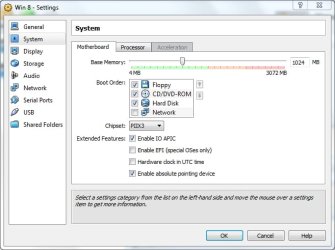
And Virtual Box does not work either? Because there is an option with or without virtualization. In my picture it is greyed out because Win8 is running in vBox right now.
 

Attachments

  • 2012-03-17_2244.png
    2012-03-17_2244.png
    15.1 KB · Views: 10

My Computer My Computer

At a glance

Vista, Windows7, Mint Mate, Zorin, Windows 8from 1.6GHz Duo to i7
Computer Manufacturer/Model Number
HP, Dell, Gateway, Toshiba - 4 laptops and 2 desktops
OS
Vista, Windows7, Mint Mate, Zorin, Windows 8
CPU
from 1.6GHz Duo to i7
Monitor(s) Displays
2x HP w2207
Hard Drives
5x HDD, 7x SSD, 12x Externals
Keyboard
with trackball - no mices
Mouse
Trackball mice
Internet Speed
DSL 6000
My screen doesn't look like that at all.

VBScreen.jpg
 

My Computer My Computer

At a glance

Windows 10 Pro X64Intel Quad Core i7-4770 @ 3.4Ghz16.0GB PC3-12800 DDR3 SDRAM 1600 MHzIntel Integrated HD Graphics
Computer type
PC/Desktop
Computer Manufacturer/Model Number
Lenovo IdeaCenter 450
OS
Windows 10 Pro X64
CPU
Intel Quad Core i7-4770 @ 3.4Ghz
Memory
16.0GB PC3-12800 DDR3 SDRAM 1600 MHz
Graphics Card(s)
Intel Integrated HD Graphics
Sound Card
Realtek HD Audio
Monitor(s) Displays
HP 22" LCD
Screen Resolution
1680 x 1050
Hard Drives
250GB Samsung EVO SATA-3 SSD
2TB Seagate ST2000DM001 SATA-2
1.5TB Seagate ST3150041AS SATA
Keyboard
Dell USB
Mouse
Lenovo USB
Internet Speed
Cable via Road Runner 3MB Upload, 30MB Download
Antivirus
Windows Defender, MBAM Pro, MBAE
Browser
Seamonkey
Other Info
UEFI/GPT
PLDS DVD-RW DH16AERSH
Back
Top