cubs249
New member
This is my first post and hopefully I do it right cause I'm a noob...
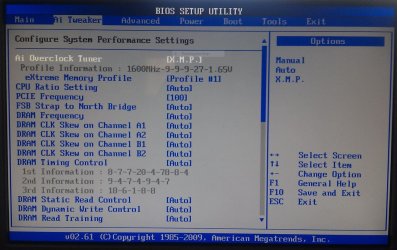
Recently made a few purchases to upgrade my computer. I purchased a OCZ-Vertex 3 120GB SSD and installed Windows 7 on it for faster performance of the OS. At the same time I purchased 8GB of Kingston Hyper X memory (KHX1600C9D3K2/8x) to see if I could get more performance from my PC. How do I check / fix this?
Please forgive my Noobiness!
Recently made a few purchases to upgrade my computer. I purchased a OCZ-Vertex 3 120GB SSD and installed Windows 7 on it for faster performance of the OS. At the same time I purchased 8GB of Kingston Hyper X memory (KHX1600C9D3K2/8x) to see if I could get more performance from my PC. How do I check / fix this?
Please forgive my Noobiness!
My Computer
At a glance
Windows 7 Ultimate x64Core 2 Quad Q6600 @2.40GHz8gb Kingston Hyper X ddr3 (khx1600c9d3k2/8gx)Radeon HD 5770 (xfx)
- OS
- Windows 7 Ultimate x64
- CPU
- Core 2 Quad Q6600 @2.40GHz
- Motherboard
- ASUS P5Q3 Deluxe
- Memory
- 8gb Kingston Hyper X ddr3 (khx1600c9d3k2/8gx)
- Graphics Card(s)
- Radeon HD 5770 (xfx)
- Monitor(s) Displays
- Dell SP2008WFP(Digital)
- Screen Resolution
- 1680 x 1050
- Hard Drives
- OCZ-VERTEX3 SSD 120Gb
Hitachi_HDT725032VLA360
- PSU
- 750w
- Case
- Dell XPS 630i Case
- Cooling
- Dell N764D CPU Heatsink, 120mm fans
- Keyboard
- Dell USB Keyboard
- Mouse
- Logitech G9x
- Internet Speed
- 36 mbps
- Other Info
- Had purchased Dell XPS 630i directly from Dell. Power surge took out my mobo and SoundBlaster card that was stock on the machine. Replaced with ASUS P5Q3 mobo. Also still have Nvdia Phys-X plugged into a PCI slot.