
How do I make sure my Hyper X memory runs at 1600 in my ASUS P5Q3

cubs249

New member
Local time
10:59 AM
Messages
6
Location
Oswego, IL
This is my first post and hopefully I do it right cause I'm a noob...

Recently made a few purchases to upgrade my computer. I purchased a OCZ-Vertex 3 120GB SSD and installed Windows 7 on it for faster performance of the OS. At the same time I purchased 8GB of Kingston Hyper X memory (KHX1600C9D3K2/8x) to see if I could get more performance from my PC. How do I check / fix this?

Please forgive my Noobiness!
 

My Computer My Computer

At a glance

Windows 7 Ultimate x64Core 2 Quad Q6600 @2.40GHz8gb Kingston Hyper X ddr3 (khx1600c9d3k2/8gx)Radeon HD 5770 (xfx)
OS
Windows 7 Ultimate x64
CPU
Core 2 Quad Q6600 @2.40GHz
Motherboard
ASUS P5Q3 Deluxe
Memory
8gb Kingston Hyper X ddr3 (khx1600c9d3k2/8gx)
Graphics Card(s)
Radeon HD 5770 (xfx)
Monitor(s) Displays
Dell SP2008WFP(Digital)
Screen Resolution
1680 x 1050
Hard Drives
OCZ-VERTEX3 SSD 120Gb
Hitachi_HDT725032VLA360
PSU
750w
Case
Dell XPS 630i Case
Cooling
Dell N764D CPU Heatsink, 120mm fans
Keyboard
Dell USB Keyboard
Mouse
Logitech G9x
Internet Speed
36 mbps
Other Info
Had purchased Dell XPS 630i directly from Dell. Power surge took out my mobo and SoundBlaster card that was stock on the machine. Replaced with ASUS P5Q3 mobo. Also still have Nvdia Phys-X plugged into a PCI slot.
Well that's a p45 motherboard, assuming the cpu is in the same age bracket as the motherboard. The max that system was ever meant to have is 1333mhz, meaning 1600 would be well into overclocking on that system. ...I don't even recall if the p45 supports intel turbo boost. ..If it does you'll get automatic use of the additional ram speed when the system is under load without you needing to do anything.

...Does the motherboard support XMP ram?
 

My Computer My Computer

At a glance

Windows 7 x64Intel i7 2600kG.skill Ripjaw 16gigs @ 1866Nvidia gtx580 (evga)
Computer Manufacturer/Model Number
Insane hobo technologies. ;-)
OS
Windows 7 x64
CPU
Intel i7 2600k
Motherboard
Asrock z68 extreme 4 gen 3
Memory
G.skill Ripjaw 16gigs @ 1866
Graphics Card(s)
Nvidia gtx580 (evga)
Sound Card
Integrated HD audio + hdmi
Monitor(s) Displays
24" ASUS widescreen + 42" insignia
Screen Resolution
1080p (1920x1080)
Hard Drives
128 Samsung 830
256 Samsung 840
3 x 1tb storage drive (various)
1 western digital 1tb (eSATA)
1 Seagate 1tb (eSATA)
PSU
1 kilowatt SLI/Crossfire rated Silverstone modular
Case
NZXT Phantom + additional 220 fan
Cooling
Zalmann
Keyboard
Microsoft wireless 3000 (v2)
Mouse
MS - wireless 5000 (bluetrack)
Internet Speed
depends on if you ask me or my provider.
Other Info
The above information is provided as is, and the author assumes no responsibility for issues it may cause with your sanity or fanboyism.
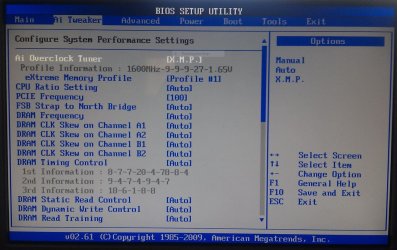
Checked the BIOS and it is set to Auto but there is also Manual and XMP options. Is there a way to capture the BIOS screen for a post?
 

My Computer My Computer

At a glance

Windows 7 Ultimate x64Core 2 Quad Q6600 @2.40GHz8gb Kingston Hyper X ddr3 (khx1600c9d3k2/8gx)Radeon HD 5770 (xfx)
OS
Windows 7 Ultimate x64
CPU
Core 2 Quad Q6600 @2.40GHz
Motherboard
ASUS P5Q3 Deluxe
Memory
8gb Kingston Hyper X ddr3 (khx1600c9d3k2/8gx)
Graphics Card(s)
Radeon HD 5770 (xfx)
Monitor(s) Displays
Dell SP2008WFP(Digital)
Screen Resolution
1680 x 1050
Hard Drives
OCZ-VERTEX3 SSD 120Gb
Hitachi_HDT725032VLA360
PSU
750w
Case
Dell XPS 630i Case
Cooling
Dell N764D CPU Heatsink, 120mm fans
Keyboard
Dell USB Keyboard
Mouse
Logitech G9x
Internet Speed
36 mbps
Other Info
Had purchased Dell XPS 630i directly from Dell. Power surge took out my mobo and SoundBlaster card that was stock on the machine. Replaced with ASUS P5Q3 mobo. Also still have Nvdia Phys-X plugged into a PCI slot.
Pretty sure that board is from before they started using the UEFI bios. So a picture from a camera is the only way to show it here. you can't capture.
Honestly the easiest way to see if your ram supports xmp is to try enabling it.
I would only do this if you know how to reset your bios though, because if it doesn't support it you'll probably have trouble even booting without a reset.


edit: just checked and the bios is a standard AMI type so a camera would be the only way to share a screen from your bios.
 

My Computer My Computer

At a glance

Windows 7 x64Intel i7 2600kG.skill Ripjaw 16gigs @ 1866Nvidia gtx580 (evga)
Computer Manufacturer/Model Number
Insane hobo technologies. ;-)
OS
Windows 7 x64
CPU
Intel i7 2600k
Motherboard
Asrock z68 extreme 4 gen 3
Memory
G.skill Ripjaw 16gigs @ 1866
Graphics Card(s)
Nvidia gtx580 (evga)
Sound Card
Integrated HD audio + hdmi
Monitor(s) Displays
24" ASUS widescreen + 42" insignia
Screen Resolution
1080p (1920x1080)
Hard Drives
128 Samsung 830
256 Samsung 840
3 x 1tb storage drive (various)
1 western digital 1tb (eSATA)
1 Seagate 1tb (eSATA)
PSU
1 kilowatt SLI/Crossfire rated Silverstone modular
Case
NZXT Phantom + additional 220 fan
Cooling
Zalmann
Keyboard
Microsoft wireless 3000 (v2)
Mouse
MS - wireless 5000 (bluetrack)
Internet Speed
depends on if you ask me or my provider.
Other Info
The above information is provided as is, and the author assumes no responsibility for issues it may cause with your sanity or fanboyism.
You can run that memory fine in your system but you need to know how to overlock in order to use it effectively. Do you know how to properly OC your system? It's not just one change in the BIOS and forget about it. Regardless, if you do OC effectively, you're going to have a much more noticeable difference in adding the amount of RAM as compared to running it at a slightly higher frequency.
 

My Computer My Computer

At a glance

XP / Win7 x64 ProIntel Quad-Core Q9450 @ 3.2GHz2x2GB GSkill DDR2NVIDIA GeForce 8600 GTS (EVGA)
OS
XP / Win7 x64 Pro
CPU
Intel Quad-Core Q9450 @ 3.2GHz
Motherboard
Asus P5-E
Memory
2x2GB GSkill DDR2
Graphics Card(s)
NVIDIA GeForce 8600 GTS (EVGA)
Monitor(s) Displays
Dell 2408WFP
Screen Resolution
1920x1200
Pretty sure that board is from before they started using the UEFI bios. So a picture from a camera is the only way to show it here. you can't capture.
Honestly the easiest way to see if your ram supports xmp is to try enabling it.
I would only do this if you know how to reset your bios though, because if it doesn't support it you'll probably have trouble even booting without a reset.


edit: just checked and the bios is a standard AMI type so a camera would be the only way to share a screen from your bios.


Here is a picture I took of my BIOS screen. I selected XMP, saved changes and my computer restarted but never came back on. Only thing was the fan was running at an increasing rate. Waited about 30 seconds but nothing happened so I powered off my machine and reset my BIOS to the AUTO setting.

Capture1.JPG
 

My Computer My Computer

At a glance

Windows 7 Ultimate x64Core 2 Quad Q6600 @2.40GHz8gb Kingston Hyper X ddr3 (khx1600c9d3k2/8gx)Radeon HD 5770 (xfx)
OS
Windows 7 Ultimate x64
CPU
Core 2 Quad Q6600 @2.40GHz
Motherboard
ASUS P5Q3 Deluxe
Memory
8gb Kingston Hyper X ddr3 (khx1600c9d3k2/8gx)
Graphics Card(s)
Radeon HD 5770 (xfx)
Monitor(s) Displays
Dell SP2008WFP(Digital)
Screen Resolution
1680 x 1050
Hard Drives
OCZ-VERTEX3 SSD 120Gb
Hitachi_HDT725032VLA360
PSU
750w
Case
Dell XPS 630i Case
Cooling
Dell N764D CPU Heatsink, 120mm fans
Keyboard
Dell USB Keyboard
Mouse
Logitech G9x
Internet Speed
36 mbps
Other Info
Had purchased Dell XPS 630i directly from Dell. Power surge took out my mobo and SoundBlaster card that was stock on the machine. Replaced with ASUS P5Q3 mobo. Also still have Nvdia Phys-X plugged into a PCI slot.
Only two thoughts left at this point.
1 - it is possible you need to update your bios. I would only do so if there is a fix in there related to memory issues.
2 - the ram doesn't support xmp, (which is kind of odd for ram @1600+)
 

My Computer My Computer

At a glance

Windows 7 x64Intel i7 2600kG.skill Ripjaw 16gigs @ 1866Nvidia gtx580 (evga)
Computer Manufacturer/Model Number
Insane hobo technologies. ;-)
OS
Windows 7 x64
CPU
Intel i7 2600k
Motherboard
Asrock z68 extreme 4 gen 3
Memory
G.skill Ripjaw 16gigs @ 1866
Graphics Card(s)
Nvidia gtx580 (evga)
Sound Card
Integrated HD audio + hdmi
Monitor(s) Displays
24" ASUS widescreen + 42" insignia
Screen Resolution
1080p (1920x1080)
Hard Drives
128 Samsung 830
256 Samsung 840
3 x 1tb storage drive (various)
1 western digital 1tb (eSATA)
1 Seagate 1tb (eSATA)
PSU
1 kilowatt SLI/Crossfire rated Silverstone modular
Case
NZXT Phantom + additional 220 fan
Cooling
Zalmann
Keyboard
Microsoft wireless 3000 (v2)
Mouse
MS - wireless 5000 (bluetrack)
Internet Speed
depends on if you ask me or my provider.
Other Info
The above information is provided as is, and the author assumes no responsibility for issues it may cause with your sanity or fanboyism.
You can run that memory fine in your system but you need to know how to overlock in order to use it effectively. Do you know how to properly OC your system? It's not just one change in the BIOS and forget about it. Regardless, if you do OC effectively, you're going to have a much more noticeable difference in adding the amount of RAM as compared to running it at a slightly higher frequency.


Unfortunately I have no clue what to do when it comes to overclocking and that is why I joined this forum. I have read many threads but know that each computer is different and I don't want to make a serious error. Where could I go to learn basic OC 101 if you will? What do you recommend?
 

My Computer My Computer

At a glance

Windows 7 Ultimate x64Core 2 Quad Q6600 @2.40GHz8gb Kingston Hyper X ddr3 (khx1600c9d3k2/8gx)Radeon HD 5770 (xfx)
OS
Windows 7 Ultimate x64
CPU
Core 2 Quad Q6600 @2.40GHz
Motherboard
ASUS P5Q3 Deluxe
Memory
8gb Kingston Hyper X ddr3 (khx1600c9d3k2/8gx)
Graphics Card(s)
Radeon HD 5770 (xfx)
Monitor(s) Displays
Dell SP2008WFP(Digital)
Screen Resolution
1680 x 1050
Hard Drives
OCZ-VERTEX3 SSD 120Gb
Hitachi_HDT725032VLA360
PSU
750w
Case
Dell XPS 630i Case
Cooling
Dell N764D CPU Heatsink, 120mm fans
Keyboard
Dell USB Keyboard
Mouse
Logitech G9x
Internet Speed
36 mbps
Other Info
Had purchased Dell XPS 630i directly from Dell. Power surge took out my mobo and SoundBlaster card that was stock on the machine. Replaced with ASUS P5Q3 mobo. Also still have Nvdia Phys-X plugged into a PCI slot.
Only two thoughts left at this point.
1 - it is possible you need to update your bios. I would only do so if there is a fix in there related to memory issues.
2 - the ram doesn't support xmp, (which is kind of odd for ram @1600+)

I updated the BIOS yesterday I now have the newest one (BIOS 2105) directly from the ASUS site. Also I checked Kingston's website and found this PDF regarding my memory. It doesn't specifically mention XMP but I'm not really sure what I'm looking for...

View attachment KHX1600C9D3K2_8G.pdf
 

My Computer My Computer

At a glance

Windows 7 Ultimate x64Core 2 Quad Q6600 @2.40GHz8gb Kingston Hyper X ddr3 (khx1600c9d3k2/8gx)Radeon HD 5770 (xfx)
OS
Windows 7 Ultimate x64
CPU
Core 2 Quad Q6600 @2.40GHz
Motherboard
ASUS P5Q3 Deluxe
Memory
8gb Kingston Hyper X ddr3 (khx1600c9d3k2/8gx)
Graphics Card(s)
Radeon HD 5770 (xfx)
Monitor(s) Displays
Dell SP2008WFP(Digital)
Screen Resolution
1680 x 1050
Hard Drives
OCZ-VERTEX3 SSD 120Gb
Hitachi_HDT725032VLA360
PSU
750w
Case
Dell XPS 630i Case
Cooling
Dell N764D CPU Heatsink, 120mm fans
Keyboard
Dell USB Keyboard
Mouse
Logitech G9x
Internet Speed
36 mbps
Other Info
Had purchased Dell XPS 630i directly from Dell. Power surge took out my mobo and SoundBlaster card that was stock on the machine. Replaced with ASUS P5Q3 mobo. Also still have Nvdia Phys-X plugged into a PCI slot.
From the manual/specs,

4 x DIMM, Max. 16 GB, DDR3 1800(O.C.)/1600/1333/1066 Non-ECC,Un-buffered Memory
Dual Channel memory architecture
*DDR3 1600MHz or above DIMMs work only on the Orange slots for one DIMM per channel.
Based on that if you have the two sticks in the orange slots, it should just be a matter of setting the DRAM frequency to DDR3-800 if the XMP setting won't work. You should also make sure that it is set to 1.65V, as that is what it needs to run at 1600.
 

My Computer My Computer

At a glance

Win 7 Ultimate x64FX-8350 @ 4.6 GHz so farADATA XPG V1 Series Black 8GB DDR3 1600Sapphire R9 270x Dual-X
Computer type
PC/Desktop
Computer Manufacturer/Model Number
Me
OS
Win 7 Ultimate x64
CPU
FX-8350 @ 4.6 GHz so far
Motherboard
Asus M5A97 EVO
Memory
ADATA XPG V1 Series Black 8GB DDR3 1600
Graphics Card(s)
Sapphire R9 270x Dual-X
Sound Card
Xonar DGX w/ Corsair Vengence 1300
Monitor(s) Displays
Acer S232HL Abid
Screen Resolution
1920x1080
Hard Drives
120 GB OCZ Vertex 3
500 GB Seagate 7200.12
PSU
Antec Earthwatts 650W Green
Case
Antec Three Hundred
Cooling
Cooler Master 212 EVO
Keyboard
Logitech G510
Mouse
Logitech G500s
Internet Speed
35000/3000
Sorry this is where I get off, I don't do overclocking support. I actually generally recommend against it.

Best of luck to you, there are plenty of people here who can help. I just am not one of them I consider the possibility of hardware damage too high.

If you are going to do it, please work in small steps and find a good application to monitor your temperatures with.
 

My Computer My Computer

At a glance

Windows 7 x64Intel i7 2600kG.skill Ripjaw 16gigs @ 1866Nvidia gtx580 (evga)
Computer Manufacturer/Model Number
Insane hobo technologies. ;-)
OS
Windows 7 x64
CPU
Intel i7 2600k
Motherboard
Asrock z68 extreme 4 gen 3
Memory
G.skill Ripjaw 16gigs @ 1866
Graphics Card(s)
Nvidia gtx580 (evga)
Sound Card
Integrated HD audio + hdmi
Monitor(s) Displays
24" ASUS widescreen + 42" insignia
Screen Resolution
1080p (1920x1080)
Hard Drives
128 Samsung 830
256 Samsung 840
3 x 1tb storage drive (various)
1 western digital 1tb (eSATA)
1 Seagate 1tb (eSATA)
PSU
1 kilowatt SLI/Crossfire rated Silverstone modular
Case
NZXT Phantom + additional 220 fan
Cooling
Zalmann
Keyboard
Microsoft wireless 3000 (v2)
Mouse
MS - wireless 5000 (bluetrack)
Internet Speed
depends on if you ask me or my provider.
Other Info
The above information is provided as is, and the author assumes no responsibility for issues it may cause with your sanity or fanboyism.
Maybe rather than trying to OC the RAM we should just consider leaving it at its base settings because OC'ing just RAM will be rather useless for the vast majority of users. You buy OC RAM so you have more headroom in overclocking your CPU, not just because you want faster memory to improve performance on your machine. The only way you're going to be able to measure the difference between base settings and OC'ed to 1600 is with bench testing applications. It's really not worth your while, IMO.

Now, if you want to OC your CPU, that is a separate issue, and yes I would recommend you doing a ton of reading on the matter in a more appropriate forum. Overclockers.com is one of them. Don't even think about changing settings on your system until you can comprehend and understand everything that's being talked about in threads like these:

Best BIOS settings for Asus P5Q3 Deluxe & DDR3

What RAM works better for my P5Q3 Deluxe? - Overclockers Forums
 

My Computer My Computer

At a glance

XP / Win7 x64 ProIntel Quad-Core Q9450 @ 3.2GHz2x2GB GSkill DDR2NVIDIA GeForce 8600 GTS (EVGA)
OS
XP / Win7 x64 Pro
CPU
Intel Quad-Core Q9450 @ 3.2GHz
Motherboard
Asus P5-E
Memory
2x2GB GSkill DDR2
Graphics Card(s)
NVIDIA GeForce 8600 GTS (EVGA)
Monitor(s) Displays
Dell 2408WFP
Screen Resolution
1920x1200
Ok great advice from everyone. I will read up on some of these threads before I decide to do anything further. Thanks.
 

My Computer My Computer

At a glance

Windows 7 Ultimate x64Core 2 Quad Q6600 @2.40GHz8gb Kingston Hyper X ddr3 (khx1600c9d3k2/8gx)Radeon HD 5770 (xfx)
OS
Windows 7 Ultimate x64
CPU
Core 2 Quad Q6600 @2.40GHz
Motherboard
ASUS P5Q3 Deluxe
Memory
8gb Kingston Hyper X ddr3 (khx1600c9d3k2/8gx)
Graphics Card(s)
Radeon HD 5770 (xfx)
Monitor(s) Displays
Dell SP2008WFP(Digital)
Screen Resolution
1680 x 1050
Hard Drives
OCZ-VERTEX3 SSD 120Gb
Hitachi_HDT725032VLA360
PSU
750w
Case
Dell XPS 630i Case
Cooling
Dell N764D CPU Heatsink, 120mm fans
Keyboard
Dell USB Keyboard
Mouse
Logitech G9x
Internet Speed
36 mbps
Other Info
Had purchased Dell XPS 630i directly from Dell. Power surge took out my mobo and SoundBlaster card that was stock on the machine. Replaced with ASUS P5Q3 mobo. Also still have Nvdia Phys-X plugged into a PCI slot.
Back
Top