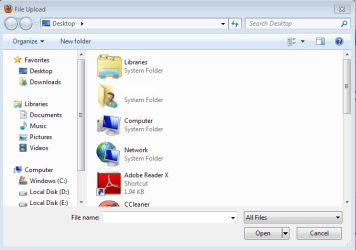
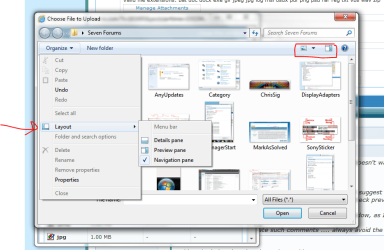
How do I set the dialog window to open full

eaglepi

New member
Member
VIP
Local time
8:59 AM
Messages
193
Since I did a fresh install of Windows 7 64 bit I can't find how to change the dialog windows that come up when looking for a image to post somewhere from this

dialog.jpg


To this window

dialog2.jpg
 

My Computer My Computer

At a glance

Windows 7 ultimate SP1Intel Core i7-870 Lynnfield 4.00GHzCorsair Vengeance 16GB (2x8GB) DDR3 1600 MHz ...MSI NX8600GTS T2D256EZ
Computer type
PC/Desktop
Computer Manufacturer/Model Number
Home made :)
OS
Windows 7 ultimate SP1
CPU
Intel Core i7-870 Lynnfield 4.00GHz
Motherboard
ASUS Z97-A ATX DDR3 2600 LGA 1150 Motherboards Z97-A
Memory
Corsair Vengeance 16GB (2x8GB) DDR3 1600 MHz (PC3 12800) Des
Graphics Card(s)
MSI NX8600GTS T2D256EZ
Sound Card
intergraded on MB
Monitor(s) Displays
Two 24" Samsung
Screen Resolution
1920 X1200
Hard Drives
3 of: Seagate 2TB Desktop HDD SATA 6Gb/s 64MB Cache 3.5-Inch Internal Bare Drive
1 of: Seagate 1TB Desktop HDD SATA 6Gb/s 64MB Cache 3.5-Inch Internal Bare Drive
PSU
OCZ GameXStream OCZ700GXSSLI 700W ATX12V
Case
Antec Performance TX640B ATX Mini Tower Case
Cooling
Thermalright Ultima 90
Keyboard
Logitech
Mouse
Logitec
Internet Speed
10 Mbps cable
click on this and it should come back to normal. (second picture)
 

Attachments

  • Capture.PNG
    Capture.PNG
    21 KB · Views: 11
  • Capture1.PNG
    Capture1.PNG
    20.2 KB · Views: 7

My Computer My Computer

At a glance

Windows 10 Home 64BitIntel Core i5 10400 @ 2.90GHz8.00GB Single-Channel Unknown @ 1329MHz (16-2...
Computer type
PC/Desktop
Computer Manufacturer/Model Number
Self assembled
OS
Windows 10 Home 64Bit
CPU
Intel Core i5 10400 @ 2.90GHz
Motherboard
Intel Corporation DG41WV (PROCESSOR)
Memory
8.00GB Single-Channel Unknown @ 1329MHz (16-20-20-38)
Sound Card
Realtek High Definition Audio
Monitor(s) Displays
DELL E170S
Screen Resolution
1280x1024 pixels
Hard Drives
931GB TOSHIBA DT01ACA100 (SATA)
238GB TEAM TM8PS7256G (SATA SSD)
Case
Nothing Fancy
Cooling
Fans
Keyboard
A4 Tech Co LTD
Mouse
A4 Tech Co Ltd/Logitech
Internet Speed
25 Mbps
All that does is allow me to select how I want the window to display the contents but it only works for that one window, next time I open the same dialog window I have the same issue. There has to be a place where you can set the default configuration for all dialog windows.
 

My Computer My Computer

At a glance

Windows 7 ultimate SP1Intel Core i7-870 Lynnfield 4.00GHzCorsair Vengeance 16GB (2x8GB) DDR3 1600 MHz ...MSI NX8600GTS T2D256EZ
Computer type
PC/Desktop
Computer Manufacturer/Model Number
Home made :)
OS
Windows 7 ultimate SP1
CPU
Intel Core i7-870 Lynnfield 4.00GHz
Motherboard
ASUS Z97-A ATX DDR3 2600 LGA 1150 Motherboards Z97-A
Memory
Corsair Vengeance 16GB (2x8GB) DDR3 1600 MHz (PC3 12800) Des
Graphics Card(s)
MSI NX8600GTS T2D256EZ
Sound Card
intergraded on MB
Monitor(s) Displays
Two 24" Samsung
Screen Resolution
1920 X1200
Hard Drives
3 of: Seagate 2TB Desktop HDD SATA 6Gb/s 64MB Cache 3.5-Inch Internal Bare Drive
1 of: Seagate 1TB Desktop HDD SATA 6Gb/s 64MB Cache 3.5-Inch Internal Bare Drive
PSU
OCZ GameXStream OCZ700GXSSLI 700W ATX12V
Case
Antec Performance TX640B ATX Mini Tower Case
Cooling
Thermalright Ultima 90
Keyboard
Logitech
Mouse
Logitec
Internet Speed
10 Mbps cable

My Computer My Computer

At a glance

Windows 10 Home 64BitIntel Core i5 10400 @ 2.90GHz8.00GB Single-Channel Unknown @ 1329MHz (16-2...
Computer type
PC/Desktop
Computer Manufacturer/Model Number
Self assembled
OS
Windows 10 Home 64Bit
CPU
Intel Core i5 10400 @ 2.90GHz
Motherboard
Intel Corporation DG41WV (PROCESSOR)
Memory
8.00GB Single-Channel Unknown @ 1329MHz (16-20-20-38)
Sound Card
Realtek High Definition Audio
Monitor(s) Displays
DELL E170S
Screen Resolution
1280x1024 pixels
Hard Drives
931GB TOSHIBA DT01ACA100 (SATA)
238GB TEAM TM8PS7256G (SATA SSD)
Case
Nothing Fancy
Cooling
Fans
Keyboard
A4 Tech Co LTD
Mouse
A4 Tech Co Ltd/Logitech
Internet Speed
25 Mbps
Still doesn't work.... it works in explorer but when I open a dialog to select a image the preview is still there..
 

My Computer My Computer

At a glance

Windows 7 ultimate SP1Intel Core i7-870 Lynnfield 4.00GHzCorsair Vengeance 16GB (2x8GB) DDR3 1600 MHz ...MSI NX8600GTS T2D256EZ
Computer type
PC/Desktop
Computer Manufacturer/Model Number
Home made :)
OS
Windows 7 ultimate SP1
CPU
Intel Core i7-870 Lynnfield 4.00GHz
Motherboard
ASUS Z97-A ATX DDR3 2600 LGA 1150 Motherboards Z97-A
Memory
Corsair Vengeance 16GB (2x8GB) DDR3 1600 MHz (PC3 12800) Des
Graphics Card(s)
MSI NX8600GTS T2D256EZ
Sound Card
intergraded on MB
Monitor(s) Displays
Two 24" Samsung
Screen Resolution
1920 X1200
Hard Drives
3 of: Seagate 2TB Desktop HDD SATA 6Gb/s 64MB Cache 3.5-Inch Internal Bare Drive
1 of: Seagate 1TB Desktop HDD SATA 6Gb/s 64MB Cache 3.5-Inch Internal Bare Drive
PSU
OCZ GameXStream OCZ700GXSSLI 700W ATX12V
Case
Antec Performance TX640B ATX Mini Tower Case
Cooling
Thermalright Ultima 90
Keyboard
Logitech
Mouse
Logitec
Internet Speed
10 Mbps cable
ok then try this while the dialogue box for uploading image pops, click on organize > layout & see if preview pane is tick marked, if yes, un tick it and see if the same thing still happens.
 

Attachments

  • Untitled.png
    Untitled.png
    33.9 KB · Views: 10

My Computer My Computer

At a glance

Windows 10 Home 64BitIntel Core i5 10400 @ 2.90GHz8.00GB Single-Channel Unknown @ 1329MHz (16-2...
Computer type
PC/Desktop
Computer Manufacturer/Model Number
Self assembled
OS
Windows 10 Home 64Bit
CPU
Intel Core i5 10400 @ 2.90GHz
Motherboard
Intel Corporation DG41WV (PROCESSOR)
Memory
8.00GB Single-Channel Unknown @ 1329MHz (16-20-20-38)
Sound Card
Realtek High Definition Audio
Monitor(s) Displays
DELL E170S
Screen Resolution
1280x1024 pixels
Hard Drives
931GB TOSHIBA DT01ACA100 (SATA)
238GB TEAM TM8PS7256G (SATA SSD)
Case
Nothing Fancy
Cooling
Fans
Keyboard
A4 Tech Co LTD
Mouse
A4 Tech Co Ltd/Logitech
Internet Speed
25 Mbps
It isn't..... thanks for trying to help but seems you are just guessing so I will find the answer myself
Thanks
 

My Computer My Computer

At a glance

Windows 7 ultimate SP1Intel Core i7-870 Lynnfield 4.00GHzCorsair Vengeance 16GB (2x8GB) DDR3 1600 MHz ...MSI NX8600GTS T2D256EZ
Computer type
PC/Desktop
Computer Manufacturer/Model Number
Home made :)
OS
Windows 7 ultimate SP1
CPU
Intel Core i7-870 Lynnfield 4.00GHz
Motherboard
ASUS Z97-A ATX DDR3 2600 LGA 1150 Motherboards Z97-A
Memory
Corsair Vengeance 16GB (2x8GB) DDR3 1600 MHz (PC3 12800) Des
Graphics Card(s)
MSI NX8600GTS T2D256EZ
Sound Card
intergraded on MB
Monitor(s) Displays
Two 24" Samsung
Screen Resolution
1920 X1200
Hard Drives
3 of: Seagate 2TB Desktop HDD SATA 6Gb/s 64MB Cache 3.5-Inch Internal Bare Drive
1 of: Seagate 1TB Desktop HDD SATA 6Gb/s 64MB Cache 3.5-Inch Internal Bare Drive
PSU
OCZ GameXStream OCZ700GXSSLI 700W ATX12V
Case
Antec Performance TX640B ATX Mini Tower Case
Cooling
Thermalright Ultima 90
Keyboard
Logitech
Mouse
Logitec
Internet Speed
10 Mbps cable
Open it as big as you can get it manually by dragging the corner of the Window - but do not use the Maximize icon. Then close it with the red X icon. The next time you open it it should be full screen. Sometimes you have to do that a couple of times, at which point Windows will remember the size.

Alternatively, Maximize the new screen and close the main screen behind it. I know that won't immediately serve your actual purpose for opening the sub-Window to begin with, but the next time you do it it should open Maximized. (With the same deal about sometimes having to do it a time or two for it to be "remembered".)
 

My Computer My Computer

At a glance

Main - Windows 7 Pro SP1 64-Bit; 2nd - Window...Main - Core i7 2600K; 2nd - Core i7 920Main - 16GB Corsair Vengeance; 2nd - 12GB Cor...Main - XFX Radeon 6870 1GB; 2nd - XFX Radeon ...
Computer Manufacturer/Model Number
Self
OS
Main - Windows 7 Pro SP1 64-Bit; 2nd - Windows Server 2008 R2
CPU
Main - Core i7 2600K; 2nd - Core i7 920
Motherboard
Main - Asus P8Z68-V Pro/Gen3; 2nd - Gigabyte GA-EX58-UDR3
Memory
Main - 16GB Corsair Vengeance; 2nd - 12GB Corsair Vengeance
Graphics Card(s)
Main - XFX Radeon 6870 1GB; 2nd - XFX Radeon 4870 1GB
Sound Card
Both: Onboard Realtek Azalia
Monitor(s) Displays
Main - Hann 25" + I-INC 25" + Acer 23"; 2nd - Upgrading Soon
Screen Resolution
Main - 1920x1080 (All Three Monitors); 2nd - Upgrading Soon
Hard Drives
Main - (1) Crucial M4 128GB (Boot)
Main - (1) Seagate 2TB 64MB Cache (Data)
Main - (1) Seagate 2TB 64MB Cache (Data Backup)
2nd - (1) Intel X25-M SSD 80GB (Boot)
2nd - (3) Seagate 1TB 32MB Cache (Data Backup)
2nd - (1) Seagate 320GB (Because)
PSU
Main - OCZ 600W Modular; 2nd - OCZ 600W
Case
Main - Thermaltake Element G; 2nd - NZXT something or other
Cooling
Main - Corsair H80; 2nd - Prolimatech Megahalems
Keyboard
Main - Razer Reclusa; 2nd - Old MS Keyboard
Mouse
Main - Logitech MX Revolution; 2nd - Old MS Mouse
Internet Speed
20Mbps Time-Warner Cable
The size isn't the issue, it is the split window, it has a preview pane that I can't get rid of and in the layout options there is "NO" preview to check or uncheck.
 

My Computer My Computer

At a glance

Windows 7 ultimate SP1Intel Core i7-870 Lynnfield 4.00GHzCorsair Vengeance 16GB (2x8GB) DDR3 1600 MHz ...MSI NX8600GTS T2D256EZ
Computer type
PC/Desktop
Computer Manufacturer/Model Number
Home made :)
OS
Windows 7 ultimate SP1
CPU
Intel Core i7-870 Lynnfield 4.00GHz
Motherboard
ASUS Z97-A ATX DDR3 2600 LGA 1150 Motherboards Z97-A
Memory
Corsair Vengeance 16GB (2x8GB) DDR3 1600 MHz (PC3 12800) Des
Graphics Card(s)
MSI NX8600GTS T2D256EZ
Sound Card
intergraded on MB
Monitor(s) Displays
Two 24" Samsung
Screen Resolution
1920 X1200
Hard Drives
3 of: Seagate 2TB Desktop HDD SATA 6Gb/s 64MB Cache 3.5-Inch Internal Bare Drive
1 of: Seagate 1TB Desktop HDD SATA 6Gb/s 64MB Cache 3.5-Inch Internal Bare Drive
PSU
OCZ GameXStream OCZ700GXSSLI 700W ATX12V
Case
Antec Performance TX640B ATX Mini Tower Case
Cooling
Thermalright Ultima 90
Keyboard
Logitech
Mouse
Logitec
Internet Speed
10 Mbps cable

Koolkat77,
Thanks for trying to help me but as you can see in the images I posted at the begining, I do not have the icon you want me to click on so I can't follow the tutorial you suggested and I would rather not do any red edits or hacks.

The size isn't the problem with my dialog windows ( not explorer windows ) only dialog when I need to open a image for a program, there is always a side that says select file for preview and it takes up space I want for all my files to appear.

I appreciate your help but what I have and what you are telling me to do is different....

Thanks
 

My Computer My Computer

At a glance

Windows 7 ultimate SP1Intel Core i7-870 Lynnfield 4.00GHzCorsair Vengeance 16GB (2x8GB) DDR3 1600 MHz ...MSI NX8600GTS T2D256EZ
Computer type
PC/Desktop
Computer Manufacturer/Model Number
Home made :)
OS
Windows 7 ultimate SP1
CPU
Intel Core i7-870 Lynnfield 4.00GHz
Motherboard
ASUS Z97-A ATX DDR3 2600 LGA 1150 Motherboards Z97-A
Memory
Corsair Vengeance 16GB (2x8GB) DDR3 1600 MHz (PC3 12800) Des
Graphics Card(s)
MSI NX8600GTS T2D256EZ
Sound Card
intergraded on MB
Monitor(s) Displays
Two 24" Samsung
Screen Resolution
1920 X1200
Hard Drives
3 of: Seagate 2TB Desktop HDD SATA 6Gb/s 64MB Cache 3.5-Inch Internal Bare Drive
1 of: Seagate 1TB Desktop HDD SATA 6Gb/s 64MB Cache 3.5-Inch Internal Bare Drive
PSU
OCZ GameXStream OCZ700GXSSLI 700W ATX12V
Case
Antec Performance TX640B ATX Mini Tower Case
Cooling
Thermalright Ultima 90
Keyboard
Logitech
Mouse
Logitec
Internet Speed
10 Mbps cable

My Computer My Computer

At a glance

Main - Windows 7 Pro SP1 64-Bit; 2nd - Window...Main - Core i7 2600K; 2nd - Core i7 920Main - 16GB Corsair Vengeance; 2nd - 12GB Cor...Main - XFX Radeon 6870 1GB; 2nd - XFX Radeon ...
Computer Manufacturer/Model Number
Self
OS
Main - Windows 7 Pro SP1 64-Bit; 2nd - Windows Server 2008 R2
CPU
Main - Core i7 2600K; 2nd - Core i7 920
Motherboard
Main - Asus P8Z68-V Pro/Gen3; 2nd - Gigabyte GA-EX58-UDR3
Memory
Main - 16GB Corsair Vengeance; 2nd - 12GB Corsair Vengeance
Graphics Card(s)
Main - XFX Radeon 6870 1GB; 2nd - XFX Radeon 4870 1GB
Sound Card
Both: Onboard Realtek Azalia
Monitor(s) Displays
Main - Hann 25" + I-INC 25" + Acer 23"; 2nd - Upgrading Soon
Screen Resolution
Main - 1920x1080 (All Three Monitors); 2nd - Upgrading Soon
Hard Drives
Main - (1) Crucial M4 128GB (Boot)
Main - (1) Seagate 2TB 64MB Cache (Data)
Main - (1) Seagate 2TB 64MB Cache (Data Backup)
2nd - (1) Intel X25-M SSD 80GB (Boot)
2nd - (3) Seagate 1TB 32MB Cache (Data Backup)
2nd - (1) Seagate 320GB (Because)
PSU
Main - OCZ 600W Modular; 2nd - OCZ 600W
Case
Main - Thermaltake Element G; 2nd - NZXT something or other
Cooling
Main - Corsair H80; 2nd - Prolimatech Megahalems
Keyboard
Main - Razer Reclusa; 2nd - Old MS Keyboard
Mouse
Main - Logitech MX Revolution; 2nd - Old MS Mouse
Internet Speed
20Mbps Time-Warner Cable
may i know if the pictures you posted in your first post are from google? or are they your own snips?
 

My Computer My Computer

At a glance

Windows 10 Home 64BitIntel Core i5 10400 @ 2.90GHz8.00GB Single-Channel Unknown @ 1329MHz (16-2...
Computer type
PC/Desktop
Computer Manufacturer/Model Number
Self assembled
OS
Windows 10 Home 64Bit
CPU
Intel Core i5 10400 @ 2.90GHz
Motherboard
Intel Corporation DG41WV (PROCESSOR)
Memory
8.00GB Single-Channel Unknown @ 1329MHz (16-20-20-38)
Sound Card
Realtek High Definition Audio
Monitor(s) Displays
DELL E170S
Screen Resolution
1280x1024 pixels
Hard Drives
931GB TOSHIBA DT01ACA100 (SATA)
238GB TEAM TM8PS7256G (SATA SSD)
Case
Nothing Fancy
Cooling
Fans
Keyboard
A4 Tech Co LTD
Mouse
A4 Tech Co Ltd/Logitech
Internet Speed
25 Mbps
ok then try this while the dialogue box for uploading image pops, click on organize > layout & see if preview pane is tick marked, if yes, un tick it and see if the same thing still happens.


My system is up to date so maybe I have some new features, notice how on my open dialog window I don't have anything for preview in the dropdown for organize. I also have things on the button like "embed" and other things that I have never seen before and I can drag the edge to the right to make more room but I can't get rid of the section that says "select file to preview"

Here are a few more screen shots, I know how frustrated it can be when something is suppose to be like you say it is and then it isn't.

here are 2 screenshots

dialog3.jpg


NEXT

dialog4.jpg
 

My Computer My Computer

At a glance

Windows 7 ultimate SP1Intel Core i7-870 Lynnfield 4.00GHzCorsair Vengeance 16GB (2x8GB) DDR3 1600 MHz ...MSI NX8600GTS T2D256EZ
Computer type
PC/Desktop
Computer Manufacturer/Model Number
Home made :)
OS
Windows 7 ultimate SP1
CPU
Intel Core i7-870 Lynnfield 4.00GHz
Motherboard
ASUS Z97-A ATX DDR3 2600 LGA 1150 Motherboards Z97-A
Memory
Corsair Vengeance 16GB (2x8GB) DDR3 1600 MHz (PC3 12800) Des
Graphics Card(s)
MSI NX8600GTS T2D256EZ
Sound Card
intergraded on MB
Monitor(s) Displays
Two 24" Samsung
Screen Resolution
1920 X1200
Hard Drives
3 of: Seagate 2TB Desktop HDD SATA 6Gb/s 64MB Cache 3.5-Inch Internal Bare Drive
1 of: Seagate 1TB Desktop HDD SATA 6Gb/s 64MB Cache 3.5-Inch Internal Bare Drive
PSU
OCZ GameXStream OCZ700GXSSLI 700W ATX12V
Case
Antec Performance TX640B ATX Mini Tower Case
Cooling
Thermalright Ultima 90
Keyboard
Logitech
Mouse
Logitec
Internet Speed
10 Mbps cable
What about dragging the vertical bar on the left side of the preview pane all the way to the right?
 

My Computer My Computer

At a glance

Main - Windows 7 Pro SP1 64-Bit; 2nd - Window...Main - Core i7 2600K; 2nd - Core i7 920Main - 16GB Corsair Vengeance; 2nd - 12GB Cor...Main - XFX Radeon 6870 1GB; 2nd - XFX Radeon ...
Computer Manufacturer/Model Number
Self
OS
Main - Windows 7 Pro SP1 64-Bit; 2nd - Windows Server 2008 R2
CPU
Main - Core i7 2600K; 2nd - Core i7 920
Motherboard
Main - Asus P8Z68-V Pro/Gen3; 2nd - Gigabyte GA-EX58-UDR3
Memory
Main - 16GB Corsair Vengeance; 2nd - 12GB Corsair Vengeance
Graphics Card(s)
Main - XFX Radeon 6870 1GB; 2nd - XFX Radeon 4870 1GB
Sound Card
Both: Onboard Realtek Azalia
Monitor(s) Displays
Main - Hann 25" + I-INC 25" + Acer 23"; 2nd - Upgrading Soon
Screen Resolution
Main - 1920x1080 (All Three Monitors); 2nd - Upgrading Soon
Hard Drives
Main - (1) Crucial M4 128GB (Boot)
Main - (1) Seagate 2TB 64MB Cache (Data)
Main - (1) Seagate 2TB 64MB Cache (Data Backup)
2nd - (1) Intel X25-M SSD 80GB (Boot)
2nd - (3) Seagate 1TB 32MB Cache (Data Backup)
2nd - (1) Seagate 320GB (Because)
PSU
Main - OCZ 600W Modular; 2nd - OCZ 600W
Case
Main - Thermaltake Element G; 2nd - NZXT something or other
Cooling
Main - Corsair H80; 2nd - Prolimatech Megahalems
Keyboard
Main - Razer Reclusa; 2nd - Old MS Keyboard
Mouse
Main - Logitech MX Revolution; 2nd - Old MS Mouse
Internet Speed
20Mbps Time-Warner Cable
Is this a recent thing or has it always been like this. If its a recent thing and it wasnt like this before. I would suggest system restore.


I can disable and enable and have the buttons which you are missing for some reason, in IE.

I know my post doesn't have the solution but it does rule out some possiblities.
 

Attachments

  • IssueNotIE.PNG
    IssueNotIE.PNG
    56.9 KB · Views: 6

My Computer My Computer

At a glance

Windows 8 64 bit PROAMD Phenom X4 9100e2GB X2 DDR2Sapphire HD 6850
Computer type
PC/Desktop
Computer Manufacturer/Model Number
Gateway / Slight Modifications
OS
Windows 8 64 bit PRO
CPU
AMD Phenom X4 9100e
Motherboard
Gateway RS780
Memory
2GB X2 DDR2
Graphics Card(s)
Sapphire HD 6850
Sound Card
Integrated
Monitor(s) Displays
Gateway 19" + Dell 19"
Screen Resolution
1440X900 sometimes 2880 by 900
Hard Drives
WD 80GB
WD 640GB
WD 1,000GB
PSU
Antec BP 550watts
Case
Antec 300
Cooling
Stock Cooling
Keyboard
Saitek Eclipse II
Mouse
Gigabyte GM-M6800
Internet Speed
D: 30Mbps U:4Mbps
Antivirus
Avast version 8
Browser
Internet Explorer ver 10 64 bit
Other Info
This is my work computer.
I have another laptop running Windows 7 64 bit.
Another PC running Windows 8 64 bit pro.
Total of 3
Back
Top